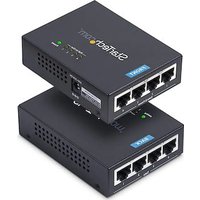
POEINJ4G-US - Carte réseau StarTech.com - Notice d'utilisation et mode d'emploi gratuit
Retrouvez gratuitement la notice de l'appareil POEINJ4G-US StarTech.com au format PDF.


| Type de produit | Injecteur PoE (Power over Ethernet) |
| Marque | StarTech.com |
| Modèle | POEINJ4G-US |
| Nombre de ports | 4 ports Gigabit Ethernet (10/100/1000 Mbps) |
| Standard PoE | IEEE 802.3at (PoE+) |
| Puissance par port | 30 W maximum |
| Puissance totale | 120 W |
| Tension d'entrée | 100-240 V AC, 50/60 Hz |
| Tension de sortie | 48 V CC |
| Connecteur d'alimentation | Câble d'alimentation C13 avec prise |
| Matériau du boîtier | Métal |
| Dimensions (L x P x H) | 200 x 120 x 44 mm |
| Poids | 0,8 kg |
| Température de fonctionnement | 0°C à 40°C |
| Humidité relative | 5% à 95% (sans condensation) |
| Indicateurs LED | Alimentation, PoE par port, activité réseau |
| Protection contre les surintensités | Oui, par port |
| Montage | Bureau ou mural (kit inclus) |
| Certifications | CE, FCC, RoHS |
| Garantie | 2 ans |
| Contenu du carton | Injecteur, câble d'alimentation, manuel d'utilisation |
| Entretien | Nettoyer avec un chiffon sec et doux. Ne pas utiliser de produits abrasifs. |
| Sécurité | Utiliser uniquement avec une alimentation appropriée. Ne pas exposer à l'humidité. |
| Réparabilité | Pièces détachées disponibles via le service après-vente. Ne pas ouvrir le boîtier. |
FOIRE AUX QUESTIONS - POEINJ4G-US StarTech.com
Questions des utilisateurs sur POEINJ4G-US StarTech.com
0 question sur cet appareil. Repondez a celles que vous connaissez ou posez la votre.
Poser une nouvelle question sur cet appareil
Téléchargez la notice de votre Carte réseau au format PDF gratuitement ! Retrouvez votre notice POEINJ4G-US - StarTech.com et reprennez votre appareil électronique en main. Sur cette page sont publiés tous les documents nécessaires à l'utilisation de votre appareil POEINJ4G-US de la marque StarTech.com.
MODE D'EMPLOI POEINJ4G-US StarTech.com
4-Port Gigabit PoE+ Injector, Midspan Hub, 54V/30W - 802.3at/802.3af
Product ID
POEINJ4G-US
Top View

*Product may vary from image
Rear View

| Feature Function | ||
| 1 | Power Input Port • Connect the included Power Adapter | |
| 2 | LEDs • Refer to LED Chart | |
| 3 | Data Ports | • Connect an Ethernet Cable to a Network Device• Supports 1Gbps, 100Mbps, and 10Mbps |
| 4 | PoE+ Ports (Data + PoE) | • Connect an Ethernet Cable to a PD (Powered Device)• • Supports 1Gbps, 100Mbps, and 10Mbps• • Supports 802.3af and 802.3at |
Package Contents
- PoE Injector x 1
- Power Adapter x 1
- Power Cord x 1
- Quick-Start Guide x 1
Requirements
For the latest manuals, product information, technical specifications, and declarations of conformance, please visit: www.StarTech.com/POEINJ4G-US
- RJ45 terminated Cat5 or higher Ethernet cabling
• 10/100/1000Mbps compatible Ethernet network
• Available AC electrical outlet
LED Chart
| LED Indication | ||
| 1 | Power | Solid Green: Indicates that the POEINJ4G-US is receiving power |
| 2 | PoE In-Use* | Solid Green: Indicates that the corresponding port (1 ~ 4) has a PoE or PoE+ device connected |
*Note: If the input Data line contains any PoE power, the PoE In-Use LED for that port may not light up
Installation
The POEINJ4G-US can be installed between a regular Ethernet Switch and PoE Powered Devices, and will provide power to the connected PoE Powered Devices without impacting regular data transmission performance.
- Ensure there are no devices connected to the PoE+ Ports (Data + PoE) prior to connecting the Power Adapter to the POEINJ4G-US.
- Connect the provided Power Cord to the provided Power Adapter, then to an AC Electrical Outlet. Then connect the Power Adapter to the Power Input Port on the POEINJ4G-US. Ensure that the Power LED is lit.
- Using RJ45 Ethernet Cable, connect up to four source Network Devices (i.e. router, switch, computer, etc.) to the Data Ports on the POEINJ4G-US.
- Using RJ45 Ethernet Cable, connect up to four PoE (802.3af 15W) or PoE+ (802.3at 30W) complaint device(s) to the PoE+ Ports (Data + PoE) on the POEINJ4G-US.
Notes
- The maximum RJ45 Ethernet Cable length used cannot exceed 100m / 330ft.
- If not connected to a IEEE 802.3af or IEEE 802.3at compliant device the POEINJ4G-US will not inject power into the connected Ethernet cable(s) or device(s).
- The POEINJ4G-US does not offer a “standby” operation mode. For energy savings, disconnect the Power Adapter from the POEINJ4G-US. Without removing the Power Adapter, the POEINJ4G-US can still consume power from your power source. It is strongly recommended you disconnect the Power Adapter if the POEINJ4G-US is not in use.
Wall-Mounting
The POEINJ4G-US features two mounting holes, located on the bottom side of the PoE Injector, see Figure 1. The mounting holes provide the option to wall-mount the POEINJ4G-US as desired.

Figure 1 (Not to scale)


StarTech.com Ltd.
45 Artisans Crescent
London, Ontario
N5V 5E9
Canada
StarTech.com LLP
4490 South Hamilton
Road
Groveport, Ohio
43125
U.S.A.
StarTech.com Ltd.
Unit B, Pinnacle 15
Gowerton Road
Brackmills,
Northampton
NN4 7BW
United Kingdom
StarTech.com Ltd.
Siriusdreef 17-27
2132 WT Hoofddorp
The Netherlands
FR: startech.com/fr
DE: startech.com/de
ES: startech.com/es
NL: startech.com/nl
IT: startech.com/it
JP: startech.com/jp
Marque : StarTech.com
Modèle : POEINJ4G-US
Catégorie : Carte réseau