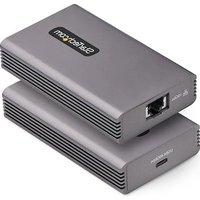
USB4-10GBE-ETHERNET - Carte réseau StarTech.com - Notice d'utilisation et mode d'emploi gratuit
Retrouvez gratuitement la notice de l'appareil USB4-10GBE-ETHERNET StarTech.com au format PDF.


| Type de produit | Carte réseau externe |
| Marque | StarTech.com |
| Modèle | USB4-10GBE-ETHERNET |
| Interface | USB4 / Thunderbolt 4 (USB-C) |
| Débit maximal | 10 Gbit/s (10GBASE-T) |
| Connecteurs | 1 port RJ45 10GBASE-T, 1 port USB-C (hôte) |
| Standards réseau | IEEE 802.3an (10GBASE-T), 802.3ab (1000BASE-T), 802.3u (100BASE-TX) |
| Dimensions | Environ 10,2 x 5,8 x 2,0 cm |
| Poids | Environ 120 g |
| Alimentation | Alimenté par bus USB (pas d'alimentation externe requise) |
| Consommation électrique | Max 15 W (selon norme USB4) |
| Systèmes d'exploitation supportés | Windows, macOS, Linux |
| Température de fonctionnement | 0 °C à 45 °C |
| Température de stockage | -20 °C à 70 °C |
| Humidité relative | 5 % à 90 % (sans condensation) |
| Indicateurs LED | Lien (vert), activité (orange) |
| Matériau du boîtier | Aluminium anodisé |
| Entretien et nettoyage | Débrancher avant nettoyage. Utiliser un chiffon sec et doux. Ne pas utiliser de liquides ou aérosols. |
| Sécurité | Ne pas exposer à l'eau, à l'humidité ou à des températures extrêmes. Manipuler avec soin pour éviter les décharges électrostatiques. |
| Pièces détachées et réparabilité | Ne contient pas de pièces réparables par l'utilisateur. Contacter le support technique pour toute réparation. |
| Garantie | 3 ans (selon politique StarTech.com) |
FOIRE AUX QUESTIONS - USB4-10GBE-ETHERNET StarTech.com
Assurez-vous que le câble et le port du switch sont adaptés.
Questions des utilisateurs sur USB4-10GBE-ETHERNET StarTech.com
0 question sur cet appareil. Repondez a celles que vous connaissez ou posez la votre.
Poser une nouvelle question sur cet appareil
Téléchargez la notice de votre Carte réseau au format PDF gratuitement ! Retrouvez votre notice USB4-10GBE-ETHERNET - StarTech.com et reprennez votre appareil électronique en main. Sur cette page sont publiés tous les documents nécessaires à l'utilisation de votre appareil USB4-10GBE-ETHERNET de la marque StarTech.com.
MODE D'EMPLOI USB4-10GBE-ETHERNET StarTech.com
USB Type-C to 10G Ethernet Adapter - USB4 and Thunderbolt 3 Compatible
Product ID
USB4-10GBE-ETHERNET
Front View

Rear View
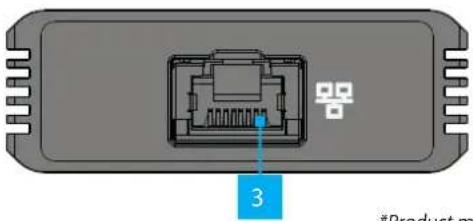
*Product may vary from image
| Feature Function | |
| 1 | Host ConnectionConnect to a USB4 or Thunderbolt compatible Host Computer |
| 2 | LED IndicatorSolid Green = Indicates that the USB4 Network Adapter is connected to the Host Computer |
| 3 | Ethernet Port & LED IndicatorsConnect an Ethernet CableUse Cat6 or better cabling for 10 Gbps speedsLeft LED Indicator is Link SpeedSolid Green = 10 GbpsSolid Orange = 5 Gbps/2.5 Gbps/1 Gbps/100 MbpsRight LED Indicator is Link StatusSolid Green = Active linkFlashing Green = Activity |
Package Contents
• USB4 Network Adapter x 1
• 20 in (50 cm) USB4 Cable x 1
- Quick-Start Guide x 1
Requirements
For the latest manuals, product information, technical specifications, and declarations of conformance, please visit: www.StarTech.com/USB4-10GBE-ETHERNET
• USB4 or Thunderbolt compatible host computer
- Ethernet Cable (Cat6 or better)
Installation
USB4 Host
- Connect the included USB4 Cable from a USB4 port on the Host Computer to the Host Connection on the front of the USB4 Network Adapter.
- Connect an Ethernet Cable from the Ethernet Port on the back of the USB4 Network Adapter to a Network Port or Device.
Install the Driver
Note: For the latest list of supported operating systems, please visit: www.StarTech.com/USB4-10GBE-ETHERNET
- Navigate to www.StarTech.com/USB4-10GBE-ETHERNET
- Click the Drivers & Downloads tab.
- Under Driver(s), download the Driver for your operating system.
For Windows Systems
a. Extract the contents of the Driver Package by Right Clicking the Driver Folder that was downloaded from the website and select Extract All. Follow the on-screen instructions to finish the Extraction.
b. Follow the instructions on the accompanying PDF file for further Installation Instructions.
For Linux Systems
a. Extract the contents of the Driver Package.
b. Follow the instructions on the accompanying README.txt file.

HQ Contact:
StarTech.com Ltd. 45 Artisans Crescent, London, ON N5V 5E9, Canada
US Contact:
StarTech.com USA LLP 4490 South Hamilton Rd, Groveport, OH 43125, United States
UK Contact:
StarTech.com Ltd. 15 Gowerton Rd, Northampton, NN4 7BW, United Kingdom
EU Contact:
StarTech.com Ltd. Siriusdreef 17-27 2132 WT Hoofddorp The Netherlands
JP Contact:
StarTech.com K.K. Atelier Yours Ogawamachi 7F 1-10-2 Kanda Ogawamachi Chiyoda-ku, Tokyo 101-0052 Japan
FR: startech.com/fr
DE: startech.com/de ES: startech.com/es NL: startech.com/nl IT: startech.com/it JP: startech.com/jp
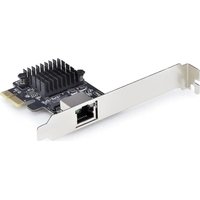
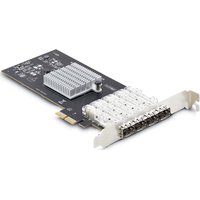
Marque : StarTech.com
Modèle : USB4-10GBE-ETHERNET
Catégorie : Carte réseau