
ITAC10110 - Commutateur ABUS - Notice d'utilisation et mode d'emploi gratuit
Retrouvez gratuitement la notice de l'appareil ITAC10110 ABUS au format PDF.


| Type de produit | Commutateur réseau |
| Marque | ABUS |
| Modèle | ITAC10110 |
| Nombre de ports | 8 ports RJ45 |
| Débit des ports | 10/100/1000 Mbps (Gigabit) |
| Fonctions de commutation | Qualité de service (QoS), VLAN, IGMP snooping |
| Dimensions (L x P x H) | 150 x 100 x 30 mm |
| Poids | 300 g |
| Alimentation | Adaptateur secteur externe, 5 V CC / 1 A |
| Consommation électrique | 5 W maximum |
| Température de fonctionnement | 0 à 40 °C |
| Humidité relative | 10 % à 90 %, sans condensation |
| Certifications | CE, RoHS |
| Entretien et nettoyage | Débrancher l’appareil, nettoyer avec un chiffon sec et doux. Ne pas utiliser de produits chimiques. |
| Sécurité | Utiliser dans un endroit sec, aéré et à l’abri des liquides. Ne pas ouvrir le boîtier. |
| Pièces détachées et réparabilité | Aucune pièce réparable par l’utilisateur. Contacter le service après-vente ABUS pour toute réparation. |
FOIRE AUX QUESTIONS - ITAC10110 ABUS
Questions des utilisateurs sur ITAC10110 ABUS
0 question sur cet appareil. Repondez a celles que vous connaissez ou posez la votre.
Poser une nouvelle question sur cet appareil
Téléchargez la notice de votre Commutateur au format PDF gratuitement ! Retrouvez votre notice ITAC10110 - ABUS et reprennez votre appareil électronique en main. Sur cette page sont publiés tous les documents nécessaires à l'utilisation de votre appareil ITAC10110 de la marque ABUS.
MODE D'EMPLOI ITAC10110 ABUS
ITAC10110

natural_image
Black network switch device with multiple Ethernet ports and power indicator (no text or symbols on the device body)D Bedienungsanleitung
GB User manual
Originalbedienungsanleitung in deutscher Sprache. Für künftige Verwendung aufbewahren.
This user manual contains important information for installation and operation. This should be also noted when this product is passed on to a third party. Therefore look after these operating instructions for future reference!
D
Merkmale:
- Anschlüsse: 8 x PoE Gigabit (Downstream), 1 x Gigabit (Uplink) RJ45, 1 x Gigabit (Uplink) SFP
- Unterstützt PoE and PoE+
• PoE-Ausgangsleistung von 120 Watt - Plug and Play, keine Konfiguration nötig
- Robuste Verarbeitung, einfach und universal zu installieren
Installationsübersicht:
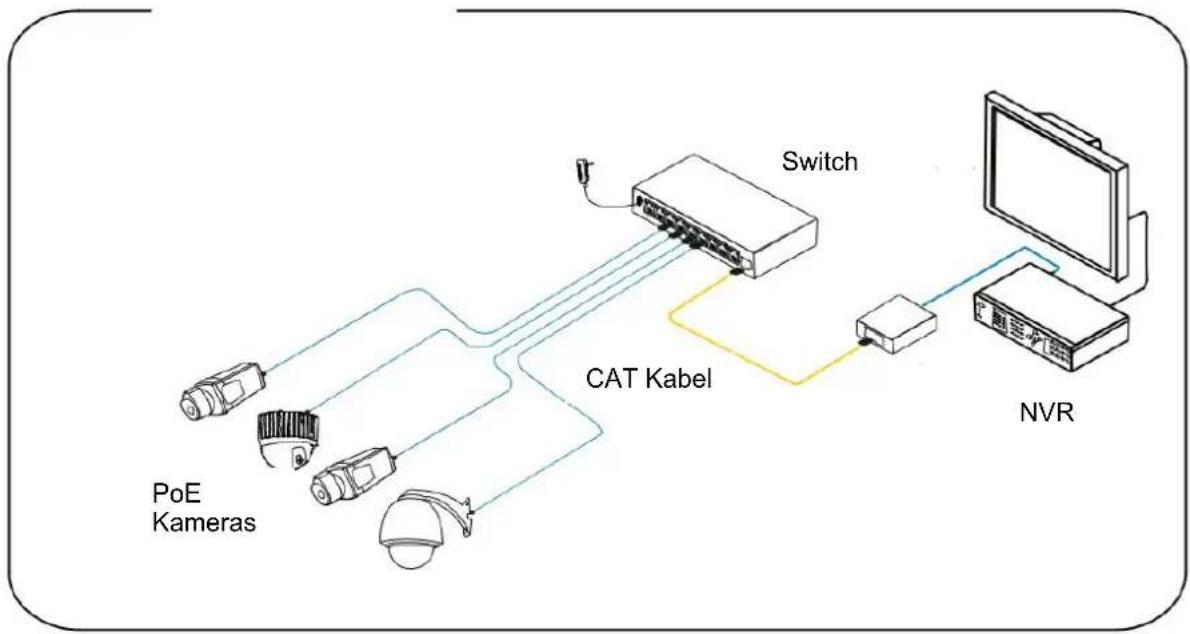
flowchart
graph TD
    A["PoE Kameras"] --> B["Switch"]
    C["Coherent Camera"] --> B
    D["Camera"] --> B
    E["Satellite"] --> B
    F["NVR"] --> G["Computer"]
Achtung:
Die Übertragungsdistanz hängt von der Signalquelle und der Kabelqualität ab. Es wird dringend empfohlen, ein Standard Cat5e / 6 Ethernet-Kabel zu verwenden, um die maximale Übertragungsdistanz zu erreichen.

CCTV Mode:
Um einen Broadcast Storm (starke Anhäufung von Broadcast- und Multicast-Verkehr in einem Rechnernetz) zu verhindern, kann der CCTV Mode aktiviert werden. Ist dieser aktiviert, wird für Port 1-8 ein separates VLAN erzeugt und die Ports können nur noch mit dem Uplink Port kommunizieren. Eine Kommunikation der Ports untereinander ist nicht mehr möglich.
Wir empfehlen dieses Modus nur zu aktivieren, falls Sie Probleme innerhalb des Netzwetzwerkes feststellen.
Nach dem Wechseln des Modus ist ein Neustart erforderlich.

Technische Daten:
| Artikelnummer ITAC101010 | |
| Abmessungen (LxBxH) 200 x 102 x 27 mm | |
| Leistungsaufnahme 5 W | |
| Max. Betriebstemperatur 45 °C | |
| Max. Luftfeuchtigkeit 95 % | |
| Max. PoE Leistung pro Port 30 Watt | |
| Min. Betriebstemperatur -10 °C | |
| Nettogewicht 0,5 k | g |
| Netzwerk Standards IEEE802.3, IEEE802.3u,IEEE802.3ab, IEEE802.3Z,EEE802.3 X | |
| Netzwerkanschluss | 1~8 Downlink Ports:10/100/1000Mbps PoE Ethernet Ports1 Uplink Port:10/100/1000Mbps Ethernet Ports1 Uplink Port:1000Base-X SFP |
| Pin Zuordnung Stromversorgung | 1/2(+), 3/6(-) |
| PoE Leistung gesamt 120 Watt | |
| PoE Standard 802.3af/at | (PSE) |
| Spannungsversorgung DC 48~57 V | |
Features:
- Connections: 8 x PoE gigabit (downstream), 1 x gigabit (uplink) RJ45, 1 x gigabit (uplink) SFP
• Supports PoE and PoE+ - PoE output power of 120 watt
- Plug & Play, no configuration required
- Robust design, easy to install anywhere
Installation overview
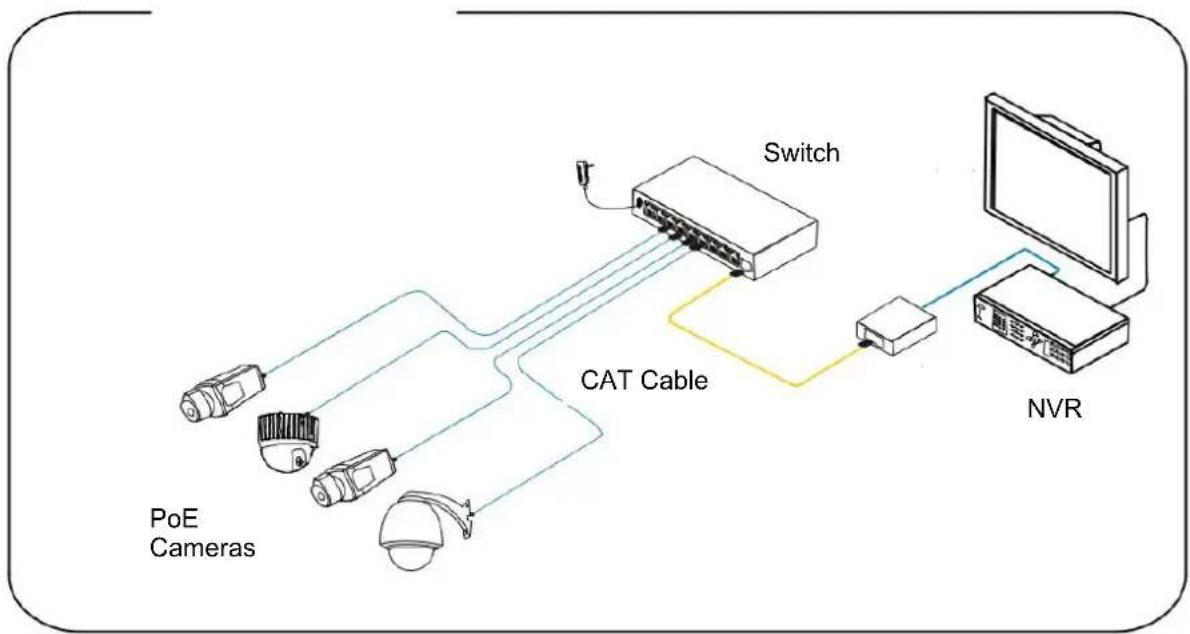
flowchart
graph TD
    A["PoE Cameras"] --> B["Switch"]
    C["Camera"] --> B
    D["CAT Cable"] --> B
    B --> E["NVR"]
Attention:
The transmission distance depends on the signal source and the cable quality. It is strongly recommended to use a standard Cat5e / 6 Ethernet cable to achieve the maximum transmission distance.

CCTV Mode:
In order to prevent a broadcast storm (strong accumulation of broadcast and multicast traffic in a network), the CCTV mode can be activated.
Once activated, a separate VLAN is created for port 1-8 and the ports can only communicate with the uplink port. Communication between the ports is no longer possible.
We recommend activating this mode only if you experience problems within the network.
After changing the mode, a restart is required.

Specification:
| Item # ITAC10110 | |
| DC voltage supply 48~57 V | |
| Dimensions 200 x 102 x 27 mm | |
| Max. PoE power per port 30 Watt | |
| Max. operating temperature 45 °C | |
| Max. humidity 95 % | |
| Min. operating temperature -10 °C | |
| Net weight 0,5 k | g |
| Network standards IEEE802.3, IEEE802.3u,IEEE802.3ab, IEEE802.3Z,EEE802.3 X | |
| Network ports | 1~8 Downlink Ports:10/100/1000Mbps PoE Ethernet Ports1x Uplink Port:10/100/1000Mbps Ethernet Ports1x Uplink Port:1000Base-X SFP |
| PoE Standard 802.3af/at | (PSE) |
| Power Pin Assignment 1/2 | (+), 3/6(-) |
| Power consumption 5 W | |
| Total PoE power 120 Watt | |
(D) Impressum
Diese Bedienungsanleitung ist eine Publikation der ABUS Security-Center GmbH & Co. KG, Linker Kreuthweg 5, 86444 Affing. Alle Rechte einschließlich Übersetzung vorbehalten. Reproduktionen jeder Art, z.B. Fotokopie, Mikroverfilmung, oder die Erfassung in elektronischen Datenverarbeitungsanlagen, bedürfen der schriftlichen Genehmigung des Herausgebers.
Nachdruck, auch auszugsweise, verboten. Diese Bedienungsanleitung entspricht dem technischen Stand bei Drucklegung. Änderung in Technik und Ausstattung vorbehalten.
GB Im print
These operating instructions are published by ABUS Security-Center GmbH & Co.KG, Linker Kreuthweg 5, 86444 Affing, Germany. No reproduction (including translation) is permitted in whole or part e.g. photocopy, microfilming or storage in electronic data processing equipment, without the express written consent of the publisher.
The operating instructions reflect the current technical specifications at the time of print. We reserve the right to change the technical or physical specifications.

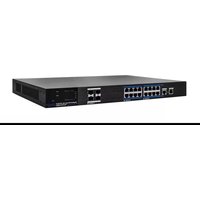

Marque : ABUS
Modèle : ITAC10110
Catégorie : Commutateur