
ITAC10130 - Commutateur ABUS - Notice d'utilisation et mode d'emploi gratuit
Retrouvez gratuitement la notice de l'appareil ITAC10130 ABUS au format PDF.


| Marque | ABUS |
| Modèle | ITAC10130 |
| Type de produit | Commutateur réseau PoE |
| Dimensions (L x P x H) | 200 x 130 x 44 mm |
| Poids | 0,5 kg |
| Alimentation | 48 V CC (PoE) |
| Nombre de ports | 8 ports RJ-45 10/100/1000 Mbps |
| Alimentation par Ethernet (PoE) | Oui, IEEE 802.3af/at, jusqu'à 30 W par port |
| Détection automatique | MDI/MDIX automatique sur tous les ports |
| Fonctions principales | Commutation store-and-forward, contrôle de flux, QoS |
| Entretien et nettoyage | Nettoyer avec un chiffon doux et sec ; ne pas utiliser de solvants |
| Sécurité | Protection contre les surtensions, boîtier métallique |
| Pièces détachées et réparabilité | Adaptateur secteur, kit de montage ; réparation par un professionnel |
| Informations générales | Commutateur non administrable, plug-and-play |
FOIRE AUX QUESTIONS - ITAC10130 ABUS
Questions des utilisateurs sur ITAC10130 ABUS
0 question sur cet appareil. Repondez a celles que vous connaissez ou posez la votre.
Poser une nouvelle question sur cet appareil
Téléchargez la notice de votre Commutateur au format PDF gratuitement ! Retrouvez votre notice ITAC10130 - ABUS et reprennez votre appareil électronique en main. Sur cette page sont publiés tous les documents nécessaires à l'utilisation de votre appareil ITAC10130 de la marque ABUS.
MODE D'EMPLOI ITAC10130 ABUS
ITAC10120 ITAC10130
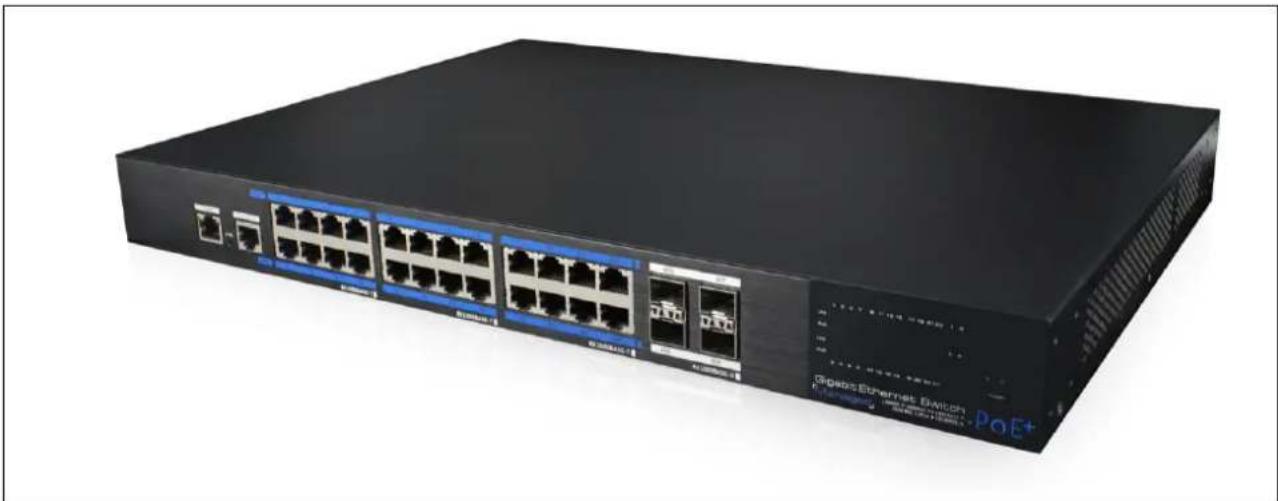
natural_image
Exterior view of a black network switch device with multiple Ethernet ports and network switches (no visible text or symbols on the device body)D Bedienungsanleitung User manual
Originalbedienungsanleitung in deutscher Sprache. Für künftige Verwendung aufbewahren.
This user manual contains important information for installation and operation. This should be also noted when this product is passed on to a third party. Therefore look after these operating instructions for future reference!
Version 05/2019
CE
D
Merkmale:
- Anschlüsse: ITAC10120: 16 x PoE Gigabit (Downstream), 4 x Gigabit (Uplink) SFP ITAC10130: 24 x PoE Gigabit (Downstream), 4 x Gigabit (Uplink) SFP
- Unterstützt PoE and PoE+
• Temperaturgesteuerter Lüfter - Unterstützt webbasiertes Layer 2 Netzwerkmanagement und simples PoE-Management
- Unterstützt High-Speed Data-Forwarding, besonders geeignet für große Datenmengen bei professioneller Videoüberwachung
• Geeignet für professionelle Installation im 19" Rack
Installationsübersicht:

flowchart
graph TD
    A["PoE Kameras"] --> B["Switch"]
    C["Car via CAT Kabel"] --> B
    D["NVR"] --> E["Computer"]
Achtung:
Die Übertragungsdistanz hängt von der Signalquelle und der Kabelqualität ab. Es wird dringend empfohlen, ein Standard Cat5e / 6 Ethernet-Kabel zu verwenden, um die maximale Übertragungsdistanz zu erreichen.

Zugriff auf Web Management via Downlink Port
Um sich auf die Web Management Oberfläche zu verbinden, schließen Sie ein Netzwerkkabel an einem der 1-16/1-24 Downlink Ports an und geben im Browser folgende Daten ein.
Die Werkseinstellungen lauten:
IP-Adresse: 192.168.1.200
Benutzer: admin
Passwort: admin
Zugriff auf Web Management via CLS Port
Um sich auf die Web Management Oberfläche zu verbinden, schließen Sie ein Konsolenkabel (RJ45 -> R232 serial port 115200,8,N,1) am CLS Port, am PC am seriellen Port (DB9) an und geben Browser folgende Daten ein.
Die Werkseinstellungen lauten:
IP-Adresse: 192.168.1.200
Benutzer: admin
Passwort: admin
Reset
Neustart: Drücken Sie kurz die Reset-Taste um den Switch neu zu starten.
Rücksetzten auf Werkseinstellungen: Drücken Sie die Reset-Taste für mehr als 10 Sekunden, um den Switch auf Werkseinstellungen zurück zu setzen.
Technische Daten:
| Artikelnummer | ITAC101020 | ITAC10130 |
| Abmessungen (LxBxH) | 442 x 320 x 45 mm | |
| Leistungsaufnahme | 320 W | 450 W |
| Max. Betriebstemperatur | 50 °C | |
| Max. Luftfeuchtigkeit | 95 % | |
| Max. PoE Leistung pro Port | 30 Watt | |
| Min. Betriebstemperatur | -10 °C | |
| Nettogewicht | 4,35 kg | |
| Netzwerk Standards | IEEE802.3 , IEEE802.3u,IEEE802.3ab, IEEE802.3Z,IEEE802.3X,IEEE 802.1Q, IEEE802.1p, IEEE 802.3ad,IEEE 802.1D, IEEE802.1X | |
| Netzwerkanschluss | Downstream: 16x10/100/1000Base-TPoE RJ45(Auto-MDI/MDI-X), Uplink: 4*1000Base-X SFP(Mini-GBIC), Konsole: 1xRJ45-R232 serial port(115200,8,N,1), OOB:1x 10/100Base-TX RJ45(Web Management) | Downstream: 24x10/100/1000Base-TPoE RJ45(Auto-MDI/MDI-X), Uplink: 4x1000 Base-X SFP(Mini-GBIC), Konsole: 1xRJ45-R232 serial port(115200,8,N,1), OOB:1x 10/100Base-TX RJ45(Web Management) |
| Pin Zuordnung Stromversorgung | 1/2(+), 3/6(-) | |
| PoE Leistung gesamt | 270 Watt | 390 Watt |
| PoE Standard | 802.3af/at (PSE) | |
| Spannungsversorgung AC | 100~240 V | |
Features:
- Connections:
ITAC10120: 16 x PoE gigabit (downstream), 4 x gigabit (uplink) SFP
ITAC10130: 24 x PoE gigabit (downstream), 4 x gigabit (uplink) SFP
• Supports PoE and PoE+
• Temperature-controlled fan
• Supports web-based Layer 2 network management and simple PoE management - Supports high-speed data-forwarding, particularly suitable for large volumes of data in professional video surveillance
- Suitable for professional installation in a 19" rack
Installation overview

flowchart
graph TD
    A["PoE Cameras"] --> B["Switch"]
    C["Camera"] --> B
    D["Camera"] --> B
    E["Camera"] --> B
    B --> F["CAT Cable"]
    F --> G["NVR"]
Attention:
The transmission distance depends on the signal source and the cable quality. It is strongly recommended to use a standard Cat5e / 6 Ethernet cable to achieve the maximum transmission distance.

Access to Web Management via Downlink Port
To connect to the web management interface, connect a network cable to any of 1-16/1-24 Downlink port and enter the following data into browser.
The default factory settings are:
IP-Address: 192.168.1.200
User: admin
Password: admin
Access to Web Management via CLS Port
To connect to the web management interface, connect a console cable (RJ45 -> R232 serial port 115200,8, N, 1) to the CLS port, to the PC at the serial port (DB9) and enter the following data into the browser.
The default factory settings are:
IP-Address: 192.168.1.200
User: admin
Password: admin
Reset
Restart: Press the reset button to restart the switch.
Reset to default factory settings: Press the reset button for more than 10 seconds to reset the switch to default factory settings.
Specification:
| Item # | ITAC10120 | ITAC10130 |
| AC voltage supply | 100~240 V | |
| Dimensions | 442 x 320 x 45 mm | |
| Max. PoE power per port | 30 Watt | |
| Max. operating temperature | 50 °C | |
| Max. humidity | 95 % | |
| Min. operating temperature | -10 °C | |
| Net weight | 4,35 kg | |
| Network standards | IEEE802.3, IEEE802.3u, IEEE802.3ab, IEEE802.3Z, IEEE802.3X, IEEE 802.1Q, IEEE802.1p, IEEE 802.3ad, IEEE 802.1D, IEEE802.1X | |
| Network ports | Downstream: 16x 10/100/1000Base-T PoE RJ45(Auto-MDI/ MDI-X), Uplink: 4*1000 Base-X SFP(Mini- GBIC), Konsole: 1x RJ45-R232 serial port( 115200,8,N,1), OOB: 1x 10/100Base-TX RJ45 (Web Management) | Downstream: 24x 10/100/1000Base-T PoE RJ45(Auto-MDI/ MDI-X), Uplink: 4x 1000 Base-X SFP(Mini- GBIC), Konsole: 1x RJ45-R232 serial port( 115200,8,N,1), OOB: 1x 10/100Base-TX RJ45 (Web Management) |
| PoE Standard | 802.3af/at (PSE) | |
| Power Pin Assignment | 1/2(+), 3/6(-) | |
| Power consumption | 320 W | 450 W |
| Total PoE power | 270 W | 390 W |
(D) Impressum
Diese Bedienungsanleitung ist eine Publikation der ABUS Security-Center GmbH & Co. KG, Linker Kreuthweg 5, 86444 Affing. Alle Rechte einschließlich Übersetzung vorbehalten.
Reproduktionen jeder Art, z.B. Fotokopie, Mikroverfilmung, oder die Erfassung in elektronischen Datenverarbeitungsanlagen, bedürfen der schriftlichen Genehmigung des Herausgebers.
Nachdruck, auch auszugsweise, verboten.
Diese Bedienungsanleitung entspricht dem technischen Stand bei Drucklegung.
Anderung in Technik und Ausstattung vorbehalten.
GB Imprint
These operating instructions are published by ABUS Security-Center GmbH & Co.KG, Linker Kreuthweg 5, 86444 Affing, Germany. No reproduction (including translation) is permitted in whole or part e.g. photocopy, microfilming or storage in electronic data processing equipment, without the express written consent of the publisher.
The operating instructions reflect the current technical specifications at the time of print.
We reserve the right to change the technical or physical specifications.


- ITAC10120 ITAC10130
- D Bedienungsanleitung User manual
- D
- Merkmale:
- Installationsübersicht:
- Achtung:
- Zugriff auf Web Management via Downlink Port
- Zugriff auf Web Management via CLS Port
- Reset
- Features:
- Installation overview
- Attention:
- Access to Web Management via Downlink Port
- Access to Web Management via CLS Port
- Impressum
- GB Imprint
Marque : ABUS
Modèle : ITAC10130
Catégorie : Commutateur