TD-110 - Caméra de surveillance Jablotron - Notice d'utilisation et mode d'emploi gratuit
Retrouvez gratuitement la notice de l'appareil TD-110 Jablotron au format PDF.


| Type de produit | Caméra de surveillance |
| Marque | Joblotron |
| Modèle | TD-110 |
| Dimensions (L x l x H) | 10 x 6 x 6 cm |
| Poids | 250 g |
| Alimentation | 12 V DC via adaptateur secteur (inclus) |
| Résolution | 1080p Full HD |
| Vision nocturne | Infrarouge jusqu'à 10 m |
| Angle de vue | 90° |
| Détection de mouvement | Oui, avec notification sur smartphone |
| Connectivité | Filaire (câble BNC/RCA) |
| Audio bidirectionnel | Oui, microphone et haut-parleur intégrés |
| Fonctions principales | Enregistrement continu ou sur détection, audio bidirectionnel, vision nocturne |
| Entretien et nettoyage | Nettoyer l'objectif avec un chiffon doux et sec. Débrancher avant nettoyage. |
| Sécurité | Fixation murale sécurisée, câble d'alimentation dissimulable |
| Pièces détachées et réparabilité | Câble d'alimentation, support de montage disponibles sur le site Joblotron |
| Informations générales | Garantie 2 ans, fabriqué en Chine |
FOIRE AUX QUESTIONS - TD-110 Jablotron
Questions des utilisateurs sur TD-110 Jablotron
0 question sur cet appareil. Repondez a celles que vous connaissez ou posez la votre.
Poser une nouvelle question sur cet appareil
Téléchargez la notice de votre Caméra de surveillance au format PDF gratuitement ! Retrouvez votre notice TD-110 - Jablotron et reprennez votre appareil électronique en main. Sur cette page sont publiés tous les documents nécessaires à l'utilisation de votre appareil TD-110 de la marque Jablotron.
MODE D'EMPLOI TD-110 Jablotron
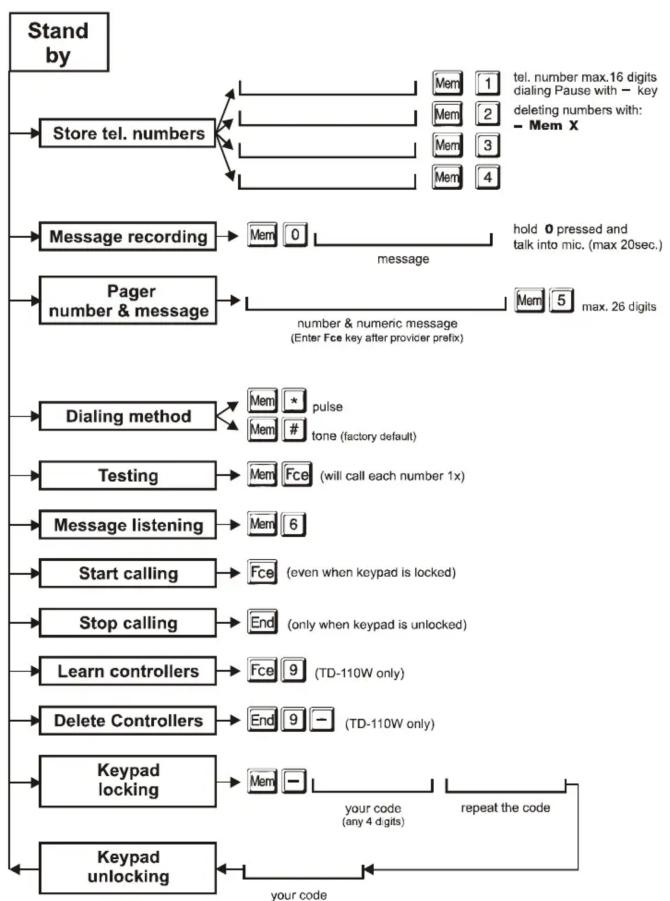
flowchart
graph TD
    A["Stand by"] --> B["Store tel. numbers"]
    B --> C["Message recording"]
    C --> D["Pager number & message"]
    D --> E["Dialing method"]
    E --> F["Testing"]
    F --> G["Message listening"]
    G --> H["Start calling"]
    H --> I["Stop calling"]
    I --> J["Learn controllers"]
    J --> K["Delete Controllers"]
    K --> L["Keypad locking"]
    L --> M["Keypad unlocking"]

    B --> N["Mem 1 tel. number max.16 digits dialing Pause with - key deleting numbers with: - Mem X"]
    C --> O["Mem 0 hold 0 pressed and talk into mic. (max 20sec.)"]
    D --> P["Mem 5 max. 26 digits number & numeric message (Enter Fce key after provider prefix)"]
    E --> Q["Mem * pulse"]
    E --> R["Mem # tone (factory default)"]
    F --> S["Mem Fce (will call each number 1x)"]
    G --> T["Mem 6 (even when keypad is locked)"]
    H --> U["End (only when keypad is unlocked)"]
    I --> V["Fce (TD-110W only)"]
    J --> W["Fce 9 (TD-110W only)"]
    K --> X["End 9 (TD-110W only)"]
    L --> Y["Mem - repeat the code"]
    M --> Z["your code (any 4 digits)"]
Note: Although this product does not contain any harmful materials we suggest you to return the product to the dealer or directly to the producer after usage.

Pod Skalkou 33
466 01 Jablonec nad Nisou
Czech Republic
Tel.: +420 483 559 999
fax: +420 483 559 993
Internet: www.jablotron.cz
Telephone Dialer
TD-110 / TD-110W

The TD-110 is an automatic dialing device that transmits a prerecorded voice message to 4 telephone numbers to an ordinary or mobile telephone system. It can also send a numeric message to your Pager.
The dialer can be triggered manually or by another device connected to the TD-110 input. The optional model TD-110W can also be triggered with a wireless remote control.
The dialer can automatically call for help or to report different events. Its installation and programming is extremely easy relative to traditional dialers.
Installation
Fix the dialer with two screws (spacing 100mm). Partly screw in the top screw and slide its head through the hole located in upper part of the dialer's rear housing. After opening the terminal cover, screw in the second screw. Do not try to open the upper part of TD-110 housing during installation.

Terminals
IN - telephone line connection (to outside line)
OUT - other devices (phone, fax...), in standby the phone line is running through the dialer GND +12V - external power supply (12VDC, max. 100mA)
IN1 - trigger input - connecting or disconnecting with the GND will start dialing. Can be operated by Normally Closed or Normally Opened contact.
TAMPER - switch - normally closed contact (24hr. loop, when used with an alarm system)
After switching the power supply ON the dialer will run a self testing program and will then enter standby mode (a green LED will light). Enter Mem 6 to listen to the initial voice message from the factory.
Setting
Store tel. numbers and your own message into the dialer. Setting is possible when the green LED is lit (stand by mode). Data being entering from the keypad is indicated by a red flashing LED. Started programming can be terminated with the End key at any time.
- tel. numbers: enter the number and store it with Mem key followed by the memory number from 1 to 4. A tel. number can have max. of 16 digits, the area code can be separated with the — key (Pause). A Pause can not be used as a first digit. We recommend to store a pause after the last digit when you store a GSM phone number, this will make dialing faster for some providers.
If # is stored after the last digit, the dialer will call this number 4 times whenever triggered. - message recording: press shortly the Mem button then press the 0 key and hold it pressed while talking into the mic. (max. 20sec.), recording is indicated by a lit yellow LED. After releasing the 0 key, the message will play back (playback can be terminated with the End key).
- Pager message: enter exactly the same sequence of numbers as if you were to dial a pager from an ordinary phone. Then store this sequence with the Mem 5 (max. 26 digits).
- After the Provider Prefix, press the Fce key and then enter the numeric message you want sent to the pager. Some Paging systems request other specific codes or pauses inside the dialed number (language selectors etc.), consult your Paging provider for details if you have trouble sending a message to the Pager.
- deleting numbers: enter — Mem x (x = corresponding memory number from 1 to 5)
- dialing methods: enter Mem * for pulse dialing, Mem # for tone dialing = factory default
Telephone Dialer TD-110 / TD-110W
-2 -
MEN51206
- testing: enter Mem Fce and the dialer will call all programmed numbers once (you will hear the tel. line signals from the built in mini speaker during the test)
- listening to the message: enter Mem 6 to check the recorded voice message
- keypad locking: enter Mem — and your own customized four digit code (PIN). Repeat the code a second time for confirmation. The yellow LED will turn on and the keypad is blocked against unauthorized use.
- keypad unlocking: enter your code (PIN), the green LED will light. If you use the dialer with an alarm system, lock the keypad after each programming.
- Learning of remote controls (TD-110W only) – after entering Mem 9 the dialer is in the remote control learning mode. Activate remote controls (max. 3) one by one (pressing any button of the remote control). Close the learning mode by pressing the End key. Both remote control buttons will have identical trigger function.
Note: when the first remote control is taught in the learning mode, all previous remote controls are forgotten.
- remote controls erasing (TD-110W only) - enter Mem 9 — to erase all remote controls.
How the dialer works
The TD-110 will activate under three conditions: when its input IN1 is triggered, when the Fce key is pressed or when the remote control of a TD-110W is pressed.
When activated, the TD-110 will immediately disengage all other devices hooked up to the phone line (telephone, fax..). It will then, one by one, call and play the user recorded message, for all programmed numbers. If the dialer makes a successful connection to a programmed number, it will not call that number again. If the number is busy, the TD-110 will make 3 more attempts to call it.
Empty tel. number memories are skipped. The red LED indicates transmitting.
If the keypad is unlocked, the calling sequence can be stopped by pressing the End key.
If it does not work as you expected?
- check that you selected the correct dialing method (Pulse or Tone)
- check that there is a signal on the tel. line and that the dialer is powered
- enter your tel. numbers once again and confirm your voice message
Forgot your access code?
If you forgot the code you used to lock the keypad, disconnect power supply for 20 sec. After you reconnect the power enter code 1234 immediately (when the red LED lights). The green LED will light indicating that the keypad is unlocked.
Specifications
| operating voltage | 10 -14 VDC (adapter DE-01-12) |
| consumption | stand by max. 15 mA, dialing max. 100 mA |
| triggering | connecting or disconnecting of IN1 with GND, or pressing Fce key |
| remote controls | max. 3 of RC-11 (for model TD-110W only) |
| telephone line | electrically separated, built in over voltage protection |
| dialing method | pulse or tone (factory default = tone) |
| number of cycles | the dialer recognizes signals in the line and it calls the same number more times (max. 3x)only if ringing tone is not detected |
tel. num. memories 4× 16 digits (Mem 1 to Mem 4) for voice message sending
1× 26 digits (Mem 5) for Pager numeric message sending
voice mess. duration max. 20sec., record is repeated for 40sec. during sending
for indoor use only, working temperature from -10 to +40°C
can be connected to analogue interfaces TBR 21/1998, EG 201 121 V1.13/2000, AS/ACIF S002/2001 (Australia) Hereby, Jablotron Ltd., declares that this TD-110(W) is in compliance with the essential requirements and other relevant provisions of Directive 1999/5/EC. Original of the conformity assessment can be found at the web page www.jablotron.cz, section Technical support.
Telephone Dialer TD-110 / TD-110W
-3-
MEN51206
Marque : Jablotron
Modèle : TD-110
Catégorie : Caméra de surveillance