UC-230 - Caméra de surveillance Jablotron - Notice d'utilisation et mode d'emploi gratuit
Retrouvez gratuitement la notice de l'appareil UC-230 Jablotron au format PDF.


| Type de produit | Caméra de surveillance |
| Marque | Joblotron |
| Modèle | UC-230 |
| Résolution | 1920 x 1080 pixels (Full HD) |
| Angle de vue | 90° diagonale |
| Vision nocturne | Oui, jusqu'à 10 mètres avec LED IR |
| Alimentation | Adaptateur secteur 12V DC (inclus) |
| Consommation électrique | 5W maximum |
| Dimensions (L x H x P) | 80 x 80 x 120 mm |
| Poids | 250 g |
| Indice de protection | IP65 (résistant aux intempéries) |
| Connectivité | Wi-Fi 2.4 GHz, câble Ethernet RJ45 |
| Fonctionnalités principales | Détection de mouvement, notification push, enregistrement sur carte SD (jusqu'à 128 Go), vision nocturne, audio bidirectionnel |
| Stockage | Carte microSD (non incluse) ou cloud (abonnement requis) |
| Entretien et nettoyage | Nettoyer la lentille avec un chiffon doux et sec. Éviter les produits chimiques. |
| Sécurité | Cryptage TLS/SSL, authentification à deux facteurs, mise à jour firmware automatique |
| Pièces détachées et réparabilité | Adaptateur secteur et câbles disponibles sur demande. Réparation par centre agréé. |
| Température de fonctionnement | -10°C à 50°C |
| Appareils compatibles | iOS 10+, Android 5+, Windows, macOS |
| Garantie | 2 ans |
FOIRE AUX QUESTIONS - UC-230 Jablotron
Questions des utilisateurs sur UC-230 Jablotron
0 question sur cet appareil. Repondez a celles que vous connaissez ou posez la votre.
Poser une nouvelle question sur cet appareil
Téléchargez la notice de votre Caméra de surveillance au format PDF gratuitement ! Retrouvez votre notice UC-230 - Jablotron et reprennez votre appareil électronique en main. Sur cette page sont publiés tous les documents nécessaires à l'utilisation de votre appareil UC-230 de la marque Jablotron.
MODE D'EMPLOI UC-230 Jablotron
UC-230 Remote Control Switch
Description
The UC-230 electronic switch can replace a standard mechanical wall switch. It is directly powered from the mains (230 V AC). By pressing the switch up or down it works as a standard mechanical switch. At the same time a built-in receiver in the UC-230 enables reception of control signals transmitted from RC-xx remote controls or JA-60 wireless detectors. Thus the mains electric circuit can be switched on or off using a remote control or automatically when a wireless detector is triggered. Different operating modes can be used (2 minutes pulse, over switching, on/off).

flowchart
graph TD
    A["Power Source"] --> B["L N"]
    B --> C["Switch"]
    C --> D["FUSE F 1.6A"]
    D --> E["ELECTRONIC SWITCH UC-230"]
    E --> F["detector JA-60P"]
    E --> G["detector JA-60N"]
    F --> H["Wireless detectors"]
    G --> H
    H --> I["Remote control"]
    I --> J["button RC-22"]
    I --> K["controller RC-11"]
    I --> L_pressures["button RC-28"]
Specification:
Power supply mains 230 V, 50 Hz
Switch output 25 W - 300 W
Built-in fuse F1.6 A
Coverage class IP 40
Operating temperature indoor, -10°C to +40°C
Working frequency 433.92 MHz
Working range (open area) RC-11 - max. 30 m
RC-22, RC-28, JA-60P, N - max. 100 m
Number of RC remotes or JA-60 detectors max.8
Note: If a momentary consumption is 2 A (for maximum 10 seconds) and the permanent load doesn't exceed 300 W, then a 2 A fuse can be used (fluorescent lamps).
Complies with EN 60950, EN 300220, ETS 300683.

Hereby, Jablotron Ltd., declares that this UC-230 is in compliance with the essential requirements and other relevant provisions of Directive 1999/5/EC.
Original of the conformity assessment can be found at the web page www.jablotron.cz, section Technical support.
Installation
The UC-230 switch should be mounted as a usual wall switch. Follow these steps:
- Switch off the power and remove the
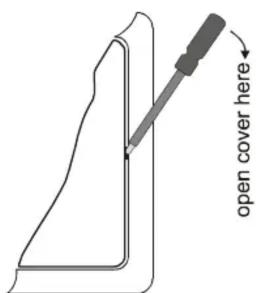
- Open the cover using a small screw driver (see picture)
- Connect the wires to the terminals
- Attach the housing to the junction box with screws (button A up)
- Close the cover (LED indicator must be in the upper right corner)
- Switch on the power supply
- Test the switch manually (press upper part to switch it on, lower part to switch it off)
In order to use the UC-230 for controlling fluorescent lamps with consumption bellow 25W, connect the KF-01 compensation filter in parallel to the lamp. This filter eliminates lamp flickering when it is switched off.
Enrolling wireless remote controls and/or detectors
To enroll remote controls and/or wireless detectors to the UC-230, proceed with the following steps:
- Press and hold the upper side of the UC-230 (next to the LED indicator) for 10 seconds.
- The red LED will flash to confirm entering the learning mode.
- Press a button of a remote control or insert batteries to a wireless detector. The LED will turn off confirming that the accessory has been enrolled.
- You can repeat steps 1 - 4 and enroll more accessories (up to 8).
Note: The enrolling mode will automatically close in 20 seconds if no accessory has been enrolled.
Operating modes
Enrolled JA-60 wireless detectors trigger the UC-230 for 2 minutes. If you enroll RC-11 or RC-22 remote controls they will switch on with one button and off with the other one.
However, you can select other functions for the remote controls. In the enrolling mode (LED flashes red) press down the lower (B) UC-230 button. The LED color will change every time you press the button. This allows you to select other operating modes:
Green flash
overswitching mode (the enrolled button will change the switch status every time it is pressed – on- off-on -...) – suitable for RC-11, RC-22 and RC-28 remotes.
Yellow flash
2 minutes pulse – the button enrolled in this mode will trigger the UC-230 switch for 2 minutes
Red flash
switch mode (one button on, the other off) – suitable for RC-11 and RC-22 remotes
Notes:
- The function of the JA-60 wireless detectors remains the same despite the color of the LED during enrollment (2 min. pulse)
- Permanent switch off - If you don't want the UC-230 to be triggered byenrolled JA-60 detectors, switch off the UC-230 manually once again. It means, that if red LED flashes on the UC-230, enrolled JA-60 detectors are bypassed unitll the receiver is switched on again (manually or by enrolled RC-xx remote control)
- Permanent switching – If you want to have the UC-230 permanently on, switch it on once again manually. This will obstruct reception of radio instructions until it is switched off manually by pressing the lower button.
LED indicator
The LED indicates the following status:
Red light = off
Flashing of red LED - off (enrolled detectors are bypassed)
Green light = on (enrolled detectors are bypassed)
Yellow light = on for 2 minutes
Optional function of the UC-230
The factory default setting (upper button – on, lower button – off) can be changed if necessary.
After opening the cover (Caution – dangerous voltage inside!) press and hold the B button and then scroll with the A button through the following modes:
- Green light = overswitching mode (operated by both the upper and the lower button)
- Yellow light = 2 minute pulse mode (operated by both the upper and the lower button)
• Red light = switch mode (factory setting)
Deleting the accessories
Switch the UC-230 to the enrolling mode. Then press and hold the lower button on the UC-230 switch for 10 seconds. All enrolled items will be deleted from the memory. LED will confirm this with short green and red flashes.
Pod Skalkou 33
466 01 Jablonec nad Nisou
Czech Republic
Tel.: +420 483 559 999
fax: +420 483 559 993
Internet: www.jablotron.cz
Some practical applications of the UC-230
1. Forgotten corridor switch
If it is required to control light from different places (e.g. in a corridor or passage) and this was "forgotten" when the electric installation was designed, the solution is simple. The existing light switch will be replaced with the UC-230 and up to 8 RC-22 remote controls can be used to control it from a distance.
2. Bathroom light switch
If you want to control light in a bathroom from a place where ordinary switch cannot be used for safety reasons (close to the bath tub or wash basin), you can replace the ordinary switch with a UC-230. An RC-22 remote control can safely switch it on or off.
3. Outdoor lighting control
When you arrive at your house you can use the RC-11 remote control (usually used to control a Jablotron car alarm or automobile's central locking) to switch on an outdoor light. In order to do this you should enroll the simultaneous pressing of both RC-11 buttons to the UC-230 in the overswitching mode or in the 2 minutes pulse mode.
4. Automatic corridor light
If you replace the ordinary light switch with the UC-230 one, you can enroll the JA-60 wireless detectors to it. Usually the JA-60N door contact is used (triggering the switch if a door is opened) or JA-60P motion detector (triggering the switch if human monition is detected). At the same time the detectors can be part of the security system. When the JA-60P is used with the UC-230, the battery saving feature must be set to the Energy saving level. You have to press and keep pressed the tamper switch when inserting batteries in the detector. This way the sleeping mode will be set to 1 minute.
5. Switching the lights permanently off
You can switch off the UC-230 manually and override the triggering signals from enrolled JA-60 detectors (e.g. during the daylight). This status is indicted by the flashing red LED.
6. Wireless doorbell with automatic light switch
The RC-28 doorbell button is usually used with the UC-260 acoustic indicator creating a wireless doorbell. You can also enroll the RC-28 to the UC-230 in a pulse mode. When the RC-28 is pressed both the UC-260 will sound and a light can be switched on. This way you can light up the entrance hall or indicate a visitor to people with poor hearing. The triggered light may also prevent intruders entering your house during your absence.
7. Child switch
If a small child is in the house, sometimes it is difficult for him to switch on the lights. You can help him if your replace the ordinary switch with the UC-230 and place RC-22 remote switches on the wall at a desired height.
Note: Although this product does not contain any harmful materials we suggest you to return the product to the dealer or directly to the producer after usage.
- UC-230 Remote Control Switch
- Description
- Specification:
- Installation
- Enrolling wireless remote controls and/or detectors
- Operating modes
- Notes:
- LED indicator
- Optional function of the UC-230
- Deleting the accessories
- Some practical applications of the UC-230
- Forgotten corridor switch
- Bathroom light switch
- Outdoor lighting control
- Automatic corridor light
- Switching the lights permanently off
- Wireless doorbell with automatic light switch
- Child switch
Marque : Jablotron
Modèle : UC-230
Catégorie : Caméra de surveillance