JA-63F - Caméra de surveillance Jablotron - Notice d'utilisation et mode d'emploi gratuit
Retrouvez gratuitement la notice de l'appareil JA-63F Jablotron au format PDF.


| Type de produit | Caméra de surveillance intérieure/extérieure |
| Marque | Joblotron |
| Modèle | JA-63F |
| Résolution maximale | 1920 x 1080 pixels (Full HD) |
| Angle de vision | 90° |
| Vision nocturne | Oui, LED infrarouges jusqu'à 10 mètres |
| Détection de mouvement | Oui, avec notification push |
| Connectivité | Wi-Fi 2,4 GHz, Ethernet RJ45 |
| Stockage | Carte microSD jusqu'à 128 Go, cloud (abonnement) |
| Alimentation | Adaptateur secteur 5V/1A (fourni) |
| Dimensions (L x H x P) | 6,5 x 6,5 x 11 cm |
| Poids | 150 g |
| Indice de protection | IP65 (résistant aux intempéries) |
| Température de fonctionnement | -10°C à 50°C |
| Fonctions audio | Microphone et haut-parleur intégrés (audio bidirectionnel) |
| Compatibilité | iOS, Android, Assistant Google, Amazon Alexa |
| Entretien et nettoyage | Nettoyer l'objectif avec un chiffon doux et sec. Ne pas utiliser de produits chimiques. |
| Consignes de sécurité | Ne pas exposer à des températures extrêmes. Débrancher avant nettoyage. Tenir hors de portée des enfants. |
| Pièces détachées et réparabilité | Adaptateur secteur, câble Ethernet, support de fixation disponibles. Réparation par centre agréé. |
| Contenu de la boîte | Caméra, adaptateur secteur, câble Ethernet, support de fixation, kit de vis, guide de démarrage rapide |
FOIRE AUX QUESTIONS - JA-63F Jablotron
Questions des utilisateurs sur JA-63F Jablotron
0 question sur cet appareil. Repondez a celles que vous connaissez ou posez la votre.
Poser une nouvelle question sur cet appareil
Téléchargez la notice de votre Caméra de surveillance au format PDF gratuitement ! Retrouvez votre notice JA-63F - Jablotron et reprennez votre appareil électronique en main. Sur cette page sont publiés tous les documents nécessaires à l'utilisation de votre appareil JA-63F de la marque Jablotron.
MODE D'EMPLOI JA-63F Jablotron
The JA-63F wireless keypad
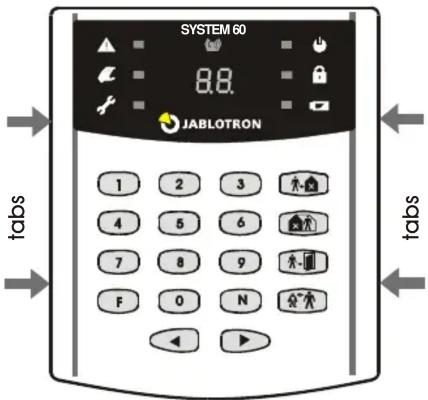
The JA-63F keypad is designed to control and program alarm systems of Jablotron's JA-60 series. The keypad is equipped with backlit keys, built-in LED signalling, acoustic signalling, and a display. It conveys information about the system status in a convenient way. The keypad communicates wirelessly.
The keypad has a single input which is designed for door contact connections. Any undesirable mishandling of the keypad (like opening its housing or tearing the keypad off its position) will trigger tamper signalling. In addition, the number of attempts to enter an access code is checked not to exceed a given limit. The keypad performs regular auto-testing and reports its condition (including loss of communication) regularly to the system for full supervision.
Installation
Select the desired keypad location close to the building's entrance. Under optimum conditions in an open area, the keypad's communication range is about 80 meters. Indoors the distance of the keypad from the control panel should not exceed 20 meters. Before fixing to the desired location check the keypad's radio communication with the control panel. The need for a good quality radio connection must be taken into account during installation. The keypad communicates bi-directionally and any radio communication obstructions or interference can reduce the operating distance.
- Open the keypad's rear housing (by pressing the two tabs on the left or right side).
- Enter enrollment mode on the control panel (see the control panel installation manual) and insert the battery into the keypad.
- Battery insertion will trigger enrollment to the control panel.
- Exit enrollment mode by pressing the N key and test the keypad functions from the desired location.
- When using with an external door detector, wire up the detector to the INP and GND terminals.
- Mount the rear housing onto the desired location.
- Close the keypad's housing (attach the front housing on one side and push it on the other side).
Operation
The keypad can operate and program the system to the full extent as it is described in the control panel manual.
The following table describes the meaning of symbols on the keypad LED indicators:
| Alarm | Power supply | ||
| Tamper | Set (Armed) | ||
| Fault | Battery | ||
| Wireless communication indication | |||
Functions F1 through F0 can be used as described in the control panel manual. Besides this, there are 4 extra keys with the following functions:
| Setting (Arming)(equal to F1 entry) | Door opening(equal to F3 entry) | ||
 | Partial setting(equal to F2 entry) | Panic (access under duress)(equal to F7, before access code entry) |
Keypad sleep mode
When battery-powered, the keypad saves energy by turning itself off after 10 seconds of inactivity. After then, the keypad will not indicate system status, neither will it be able to indicate acoustically that an entrance
delay has begun. The keypad is woken up by pressing any key or triggering a connected wired door detector.
If the keypad unit is powered by an AC adaptor there is no sleep mode. The system status is indicated permanently and the keypad is also capable of acoustic indication.
External door detector
If a door detector is wired up then its triggering (by the detector's loop disconnection) has the same effect as pressing a key. This will exit keypad sleep mode and the keypad will display the current system status. If the system is set (armed) then the entrance delay will start – this means that the keypad will simultaneously behave as a door detector.
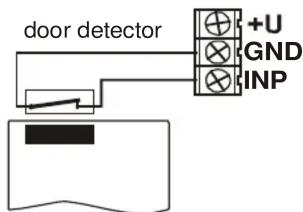
Short circuit terminals INP and GND if the input is not used.
Note: The lifetime of the battery is reduced proportionally to how frequently the door detector is triggered and how often and how long the keypad is battery-powered.
Optional power adapter
If you want the JA-63F keypad to indicate the system status permanently, it should be powered by an external power adapter with an output voltage of 12 VDC (stabilized). We recommend use of the Jablotron DE01-12 power supply.
To install the keypad with an adapter, follow the installation instructions as above but connect the adapter outlet to the keypad terminals with the adaptor unpowered (make sure the polarity is correct) before inserting the battery. After enrollment, plug the adapter into the power socket. Even when using an adapter a battery should still be present in the keypad so that backup power supply can be ensured. Do not use rechargeable batteries!
Optional external antenna
External antenna AN-01A can be used in order to increase the operating radio range.. The external antenna should be connected to the corresponding antenna connector on the JA-63F board (on the right side). Follow the antenna's manual instructions when installing the antenna.
Using the keypad for system testing
If the keypad's housing is released (so that the tamper switch is open) then the LED indicators and display indicate system status permanently (sleep mode is suppressed). This way you can pass through the premises with the keypad in your hands and test all the installed components, seeing an exact copy of the control panel's reactions. The keypad should not remain in this test mode after you have finished the testing. We recommend using extra (low cost) batteries for testing. The battery supplied in the package should not be used until the time of system handover.
Battery testing and replacement
The keypad checks the condition of its batteries automatically. If it is necessary to replace the batteries, the keypad will indicate this situation. The keypad will continue to function as before. If a low battery is indicated, it should be replaced as soon as possible (within a week).
Before the batteries are replaced, the control panel must be put into User mode. Only use high quality alkaline AAA batteries for replacement. Correct installation of a battery will be indicated acoustically by a beep.
Specifications
Power supply 6 V – 4x AAA alkaline battery cells
or 12 V DC / 100 mA power adaptor
Battery life time typically 1 year
Number of keypads in a system max. 8 control devices
Communication band 433.92 MHz
Communication range max. 80 m (open area, no interference)
Access codes identical to control panel (1 +14)
Door detector input IN = Normally closed
Enclosure IP40
Dimensions 125 x 145 x 30 mm
Degree of protection 2 EN 50131-1
Complies with EN 50131-1 grade 2
Environmental class II indoor general, -10 to +40 °C
Can be operated according to ERC REC 70-03
The package contains: JA-63F keypad, 4 dowels&screws, 4 cells AAA


Jablotron Ltd. hereby declares that the JA-63F is in compliance with the essential requirements and other relevant provisions of Directive 1999/5/EC. The original of the conformity assessment can be found at www.jablotron.com. Technical Support section.
Note: Although this product does not contain any harmful materials we suggest you return the product to the dealer or directly to the producer after use. See www.jablotron.com for details.
Marque : Jablotron
Modèle : JA-63F
Catégorie : Caméra de surveillance