
LK-42 - Clavier électronique CASIO - Notice d'utilisation et mode d'emploi gratuit
Retrouvez gratuitement la notice de l'appareil LK-42 CASIO au format PDF.


| Type de produit | Clavier électronique |
| Marque | CASIO |
| Modèle | LK-42 |
| Nombre de touches | 61 touches de taille standard, 5 octaves |
| Polynomie | 12 notes maximum |
| Timbres | 100 préréglages |
| Accompagnement automatique | 100 motifs rythmiques, 2 systèmes d'accord (CASIO CHORD et FINGERED), variation, synchro start |
| Morceaux intégrés | 100 morceaux Song Bank (00-84 avec accompagnement, 85-99 pour deux mains) |
| Système d'apprentissage en 3 étapes | Étapes 1, 2 et 3 avec guidage lumineux des touches |
| Éclairage des touches | Jusqu'à 4 touches simultanément, activable/désactivable |
| Connectique | MIDI IN/OUT, prise casque/sortie (jack stéréo standard), prise DC 9V |
| Haut-parleurs | 2 haut-parleurs de 10 cm, sortie 2W+2W |
| Alimentation | 6 piles AA (environ 1h avec piles R6P, 4h avec LR6) ou adaptateur secteur AD-5 (9V) |
| Dimensions | 944 x 363 x 118 mm |
| Poids | Environ 4,5 kg (sans piles) |
| Fonctions supplémentaires | Transposition (F# à F), accordage (±50 cents), démonstration, volume numérique 0-9 |
| MIDI | Réception multi-timbres 5 canaux, GM mappable, Local ON/OFF |
| Extinction automatique | Après environ 6 minutes d'inactivité (uniquement sur piles) |
| Entretien et nettoyage | Chiffon doux légèrement humide avec solution savonneuse neutre, ne pas utiliser de solvants |
| Sécurité | Utiliser uniquement l'adaptateur spécifié, ne pas démonter, éviter l'humidité et la chaleur |
| Accessoires inclus | Pupitre à partitions |
FOIRE AUX QUESTIONS - LK-42 CASIO
Questions des utilisateurs sur LK-42 CASIO
0 question sur cet appareil. Repondez a celles que vous connaissez ou posez la votre.
Poser une nouvelle question sur cet appareil
Téléchargez la notice de votre Clavier électronique au format PDF gratuitement ! Retrouvez votre notice LK-42 - CASIO et reprennez votre appareil électronique en main. Sur cette page sont publiés tous les documents nécessaires à l'utilisation de votre appareil LK-42 de la marque CASIO.
MODE D'EMPLOI LK-42 CASIO
LK-40
LK-42
USER'S GUIDE
GUIA DEL USUARIO
P
英西
LK40/42-ES-1
CASIO
GUIDELINES LAID DOWN BY FCC RULES FOR USE OF THE UNIT IN THE U.S.A. (not applicable to other areas).
NOTICE
This equipment has been tested and found to comply with the limits for a Class B digital device, pursuant to Part 15 of the FCC Rules. These limits are designed to provide reasonable protection against harmful interference in a residential installation. This equipment generates, uses and can radiate radio frequency energy and, if not installed and used in accordance with the instructions, may cause harmful interference to radio communications. However, there is no guarantee that interference will not occur in a particular installation. If this equipment does cause harmful interference to radio or television reception, which can be determined by turning the equipment off and on, the user is encouraged to try to correct the interference by one or more of the following measures:
- Reorient or relocate the receiving antenna.
- Increase the separation between the equipment and receiver.
- Connect the equipment into an outlet on a circuit different from that to which the receiver is connected.
- Consult the dealer or an experienced radio/TV technician for help.
FCC WARNING
Changes or modifications not expressly approved by the party responsible for compliance could void the user's authority to operate the equipment.

CASIO ELECTRONICS CO., LTD.
Unit 6, 1000
North Circular Road
London NW2 7JD, U.K.
This mark is valid in the EU countries only.
Please keep all information for future reference.
Welcome...
To the happy family of satisfied CASIO electronic musical instrument owners! To get the most out of the many features and functions of the keyboard, be sure to carefully read this manual and keep it on hand for future reference.
Important!
When using batteries, be sure to replace them or shift to one of the alternate power sources whenever you notice any of the following symptoms.
- Dim power supply indicator
- Instrument does not turn on
- Dim, difficult to read display
- Abnormally low speaker/headphone volume
Distortion of sound output - Occasional interruption of sound when playing at high volumes
- Sudden power failure when playing at high volumes
- Dimming of the display when playing at high volume
- Abnormal rhythm pattern and demo tune play
- Dimming of keyboard lights when notes sound
- Loss of power, sound distortion, or low volume when playing from a connected computer or MIDI device
Main Features
100 amazingly realistic tones
Enhanced auto-accompaniment function for greater versatility
- 100 built in auto-accompanyment patterns.
100 Built-in Song Bank tunes - A total of 100 built-in Song Bank tunes comes built in for playback enjoyment or play-along practice.
A three-step lesson function lets you develop your musical skills by following the keys as they light (Three Step Lesson System). - First you become familiar with the timing of the notes by watching the keys light as you playback one of the 100 built-in Song Bank tunes. Next, practice playing along at a pace that's comfortable for you. Finally, try playing along at the normal tempo for the Song Bank tune.
Auto Accompaniment - Simply specify a chord and the keyboard automatically produces the matching rhythm, bass, and chord patterns. One-touch fill-ins make accompaniments sound interesting and natural.
Transpose Function - An easy operation instantly changes the key of the keyboard.
MIDI compatibility - Connecting to another MIDI device lets you sound notes on both this keyboard and the connected device by playing on this keyboard. You can even playback commercially available pre-recorded MIDI data.
Safety Precautions
Symbols
Various symbols are used in this operating manual and on the product itself to ensure that the product is used safely and correctly, and to prevent injury to the user and other persons as well as damage to property. Those symbols along with their meanings are shown below.

WARNING
This indication stipulates matters that have the risk of causing death or serious injury if the product is operated incorrectly while ignoring this indication.

CAUTION
This indication stipulates matters that have the risk of causing injury as well as matters for which there is the likelihood of occurrence of physical damage only if the product is operated incorrectly while ignoring this indication.
Symbol Examples

This triangle symbol () means that the user should be careful. (The example at left indicates electrical shock caution.)

This circle with a line through it (⊗) means that the indicated action must not be performed. Indications within or nearby this symbol are specifically prohibited. (The example at left indicates that disassembly is prohibited.)

The black dot () means that the indicated action must be performed. Indications within this symbol are actions that are specifically instructed to be performed. (The example at left indicates that the power plug must be unplugged from the electrical socket.)

WARNING
Please use caution regarding the handling of the AC adaptor.
- Do not use a voltage other than the indicated power supply voltage. Use of a voltage other than that indicated may cause fire or electrical shock.
- If the power cord should become damaged (exposed wires, disconnection, etc.), purchase a new AC adaptor. Use of a damaged power cord may cause fire or electrical shock.
- Do not cut or damage the power cord. Also do not place heavy objects on top of it or subject it to excessive heat. Damage to the power cord may cause fire or electrical shock.
- Do not attempt to shape the power cord or subject it to excessive bending, twisting or pulling. This may cause fire or electrical shock.
- Please use the adaptor specified for this instrument. Use of another adaptor may cause fire, electrical shock, or malfunction.
Do not locate the instrument or its stand on an uneven or unstable surface.
- Locating the instrument or its stand on an uneven or unstable surface can cause it to fall, creating the danger of personal injury.

Do not place containers containing water or other liquids on the instrument.
- Do not place the following objects on the instrument. Placing such objects on the instrument may cause fire or electrical shock if they spill and get inside the instrument.
- Containers filled with water or other liquids (including vases, potted plants, cups, cosmetics and medicines)
- Small metal objects (including hairpins, sewing needles and coins)
- Flammable objects
In the event a foreign object should happen to get inside the instrument, please take the following actions:
- Turn power off.
- Unplug the AC adaptor from the wall outlet.
- If there are any batteries loaded in the keyboard, remove them.
- Do not touch the batteries directly with your hands when removing them. They may be hot or battery fluid may be leaking from them.
- Consult with the dealer where you purchased the keyboard or with an authorized CASIO service provider.
Do not disassemble or modify the instrument.
- Never attempt of take apart or modify the instrument, its accessories, or separately sold options. Doing so may cause fire, electrical shock or malfunction. Consult your dealer concerning all inspection, adjustment or repair of internal components.
Do not use if there is an abnormality or malfunction.
-
Do not use the instrument if there appear to be abnormalities such as the presence of smoke or abnormal odor. Also do not use the instrument if there appear to be malfunctions such as the power not coming on or sound not being produced. Use under such conditions may cause fire or electrical shock. In such cases, take the following actions immediately. Never attempt to repair the instrument yourself.
-
Turn power off.
- Unplug the AC adaptor from the wall outlet.
- If there are any batteries loaded in the keyboard, remove them.
- Do not touch the batteries directly with your hands when removing them. They may be hot or battery fluid may be leaking from them.
- Consult with the dealer where you purchased the keyboard or with an authorized CASIO service provider.
When the instrument has been dropped:
- In the case the instrument has been dropped or damaged, take the following actions. Continued use may cause fire or electrical shock.
- Turn power off.
- Unplug the AC adaptor from the wall outlet.
- If there are any batteries loaded in the keyboard, remove them.
- Do not touch the batteries directly with your hands when removing them. They may be hot or battery fluid may be leaking from them.
- Consult with the dealer where you purchased the keyboard or with an authorized CASIO service provider.
Be careful of the bags around children.
- Never allow anyone to place the plastic bags of the instrument, its accessories, and its separately sold options over their heads. Doing so may cause suffocation. Particular caution is required in homes with small children.


CAUTION
AC Adaptor
- Do not locate the power cord in close proximity to heaters or other heating appliances. This may cause the cord to melt leading to possible fire or electrical shock.
- When unplugging the AC adaptor from an electrical outlet, always make sure to pull on the adaptor itself and not the cord. Pulling excessively on the cord may cause it to be damaged or break leading to possible fire or electrical shock.
- Do not touch the AC adaptor with wet hands when it is plugged in. This may cause electrical shock.
- When not using the instrument for an extended period such as when traveling, always make sure to unplug the AC adaptor from the electrical outlet for safety reasons.
- After use turn off the power switch of the instrument and unplug the AC adaptor from the electrical outlet.
- At least once a year, unplug the AC adaptor from the power outlet and clean the area around the prongs of the plug. Dust build up around the prongs can create the danger of fire.
Batteries
-
Improper battery use may cause batteries to rupture and leak. This may cause injury, malfunction of the instrument or discoloration of furniture and other articles that come into contact with battery fluid. Take care to observe the following.
-
Install batteries so their polarity (+/-) matches that indicated on the instrument.
- For safety and to prevent possible leakage of battery fluid, always make sure to remove batteries from the instrument when you do not plan to use it for a long time.
- Always make sure that the batteries making up a set are all of the same type.
- Never combine new batteries with old ones.
- Never dispose of batteries by incinerating them. Never short or disassemble batteries, and do not expose them to excessive heat.
- Replace dead batteries as soon as possible.
- Never attempt to recharge batteries.
Transport
- When transporting the instrument, always make sure to unplug the AC adaptor from the electrical outlet and confirm that all other external connections have been disconnected. Only then should the instrument be transported. If the above is not done, the cord may be damaged leading to possible fire or electrical shock.
Care
- Whenever caring, make sure to first unplug the AC adaptor from the electrical outlet. Also remove the instrument's batteries if battery power is being used.
Location
- Never locate the instrument in areas subject to high humidity or heavy accumulation of dust. Doing so may cause fire or electrical shock.
- Never locate the instrument in areas subject to grease splatters or steam, such as in a kitchen or near a humidifier. Doing so may cause fire or electrical shock.
Do not place keyboard on lacquered furniture.
- The instrument's silicone rubber feet may eventually blacken or scar lacquered surfaces. Use felt cloth pads to insulate the feet or preferably use a CASIO musical instrument stand designed for your keyboard.
E-4


478B-E-006A
Do not place heavy objects on the instrument.
- Do not place heavy objects on the instrument. This may cause the instrument to tip over or break resulting in injury.
Volume
- Very high volume levels can damage hearing. Avoid using the instrument at very high volume settings for long periods. Consult with a physician immediately if you experience impaired hearing or ringing in the ears.
Do not get onto the instrument or stand.
- Do not crawl on top of the instrument or its optional stand. Particular caution is required in homes having small children. This may cause the instrument or stand to tip over and break resulting in injury.
Optional Stand (sold separately)
- Carefully assemble the stand following the assembly instructions that come with it. Securely tighten all bolts, nuts, and fasteners, and make sure that you mount the instrument correctly onto the stand. Incorrectly or insufficiently tightening screws, or incorrectly mounting the instrument onto the stand can cause the stand to tip over or the instrument to fall off the stand, possibly leading to injury.
Accessories and options
-
Use only accessories that come with the instrument or authorized CASIO options (sold separately). Use of non-specified accessories or options may cause fire, electrical shock, or malfunction.
-
You may not be able to see the keyboard keys light under direct sunlight or in other brightly lit areas.
Care of Your Keyboard
Avoid heat, humidity or direct sunlight.
Do not overexpose the instrument to direct sunlight, or place it near an air conditioner, or in any extremely hot place.
Do not use near a TV or radio.
This instrument can cause video or audio interference with TV and radio reception. If this happens, move the instrument away from the TV or radio.
Do not use lacquer, thinner or similar chemicals for cleaning.
Clean the keyboard with a soft cloth dampened in a weak solution of water and a neutral detergent. Soak the cloth in the solution and squeeze until it is almost dry.
Note
- You may notice lines in the finish of the case of this keyboard. These lines are a result of the molding process used to shape the plastic of the case. They are not cracks or breaks in the plastic, and are no cause for concern.
Contents
Welcome. E-1
Main Features E-1
Safety Precautions E-2
Care of Your Keyboard E-5
Contents E-6
Control Locations E-8
Quick Reference E-10
Connections E-12
Phones/Output Jack E-12
Accessories and Options E-13
Power Supply E-14
Using batteries E-14
To load batteries E-14
Important Battery Information E-14
Using the AC Adaptor E-15
Auto Power Off. E-16
Power On Alert E-16
To disable Auto Power Off and power on alert E-16
Basic Operations E-17
To switch power on and off E-17
To change tones E-17
Keyboard split tones E-18
Digital Sampling E-19
Polyphony E-19
Other Useful Functions E-19
To change the key of the keyboard E-19
To tune the keyboard E-20
Playing the demo tunes E-21
To start demo tune play. E-21
To stop demo tune play. E-21
Playing rhythms E-22
To select and play a rhythm. E-22
Using auto-accompanyment E-23
About the accompaniment keyboard E-23
Using the CASIO CHORD system. E-24
To play a CASIO CHORD auto-accompanyment E-24
Using standard fingerings E-25
To play a FINGERED auto-accompanyment E-26
Improvising with the preset patterns. E-27
Using fill-in rhythm E-27
Using Synchro start E-27
Three Step Lesson System E-28
Using Three Step Lesson System E-28
Three Step Lesson System Tempo Setting E-29
To play a built-in Song Bank tune E-29
Using the Three Step Lesson System with Song Bank Tunes E-30
How the Three Step Lesson System operates in Steps 1 through 3 E-31
Turning Off Key Lighting E-32
Number of Simultaneously Lit Keys E-32
To change the tone used for the melody of a Song Bank tune E-32
Step 1: Easy Play E-33
Step 2: Slow Play E-33
Step 3: Normal Play. E-34
To practice the left hand part E-35
To check if the right hand or left hand part is currently selected
(two-hand tunes only) E-35
MIDI E-36
What is MIDI? E-36
MIDI Connections E-36
MIDI Channels E-37
General MIDI E-37
Messages E-37
Technical Reference E-41
Troubleshooting E-41
Specifications E-43
Appendix A-1
GM Tone Map List A-1
Rhythm List A-3
Fingered Chord Charts A-4
MIDI Implementation Chart
Control Locations

① POWER/MODE selector
② Power indicator
③ VOLUME buttons
④ SYNCHRO/FILL-IN button
⑤ START/STOP button
⑥ TEMPO buttons
⑦ KEY LIGHT button
STEP1icon
STEP2icon
STEP3icon
SONG BANK icon
⑫ Display
13 RHYTHM icon
14 TONE icon
PART SELECT button
16 TONE button
⑰ RHYTHM button
ONE KEY PLAY buttons
19 SONG BANK button
20 Number buttons
DEMO button
2 3-STEP LESSON buttons
TRANSPOSE/TUNE operation guide
24 100 RHYTHMS list
See "Rhythm List" on page A-3 for details.
25 100 TONES list
100 SONG BANK list
2 Speakers
CHORD ROOT NAMES
29 Percussion instrument list
DC 9V jack
③ PHONES/OUTPUT jack
For connection of commercially available headphones. Output from the speakers is automatically cut when headphones are connected.
MIDI OUT terminal
33 MIDI IN terminal
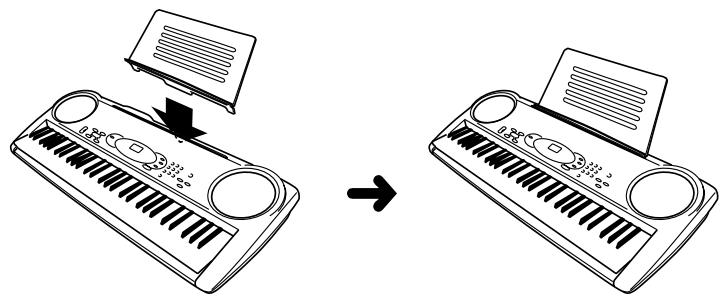
- Attachment of Score Stand
Insert the score stand into the slot at the top of the keyboard as shown in the illustration.
Quick Reference
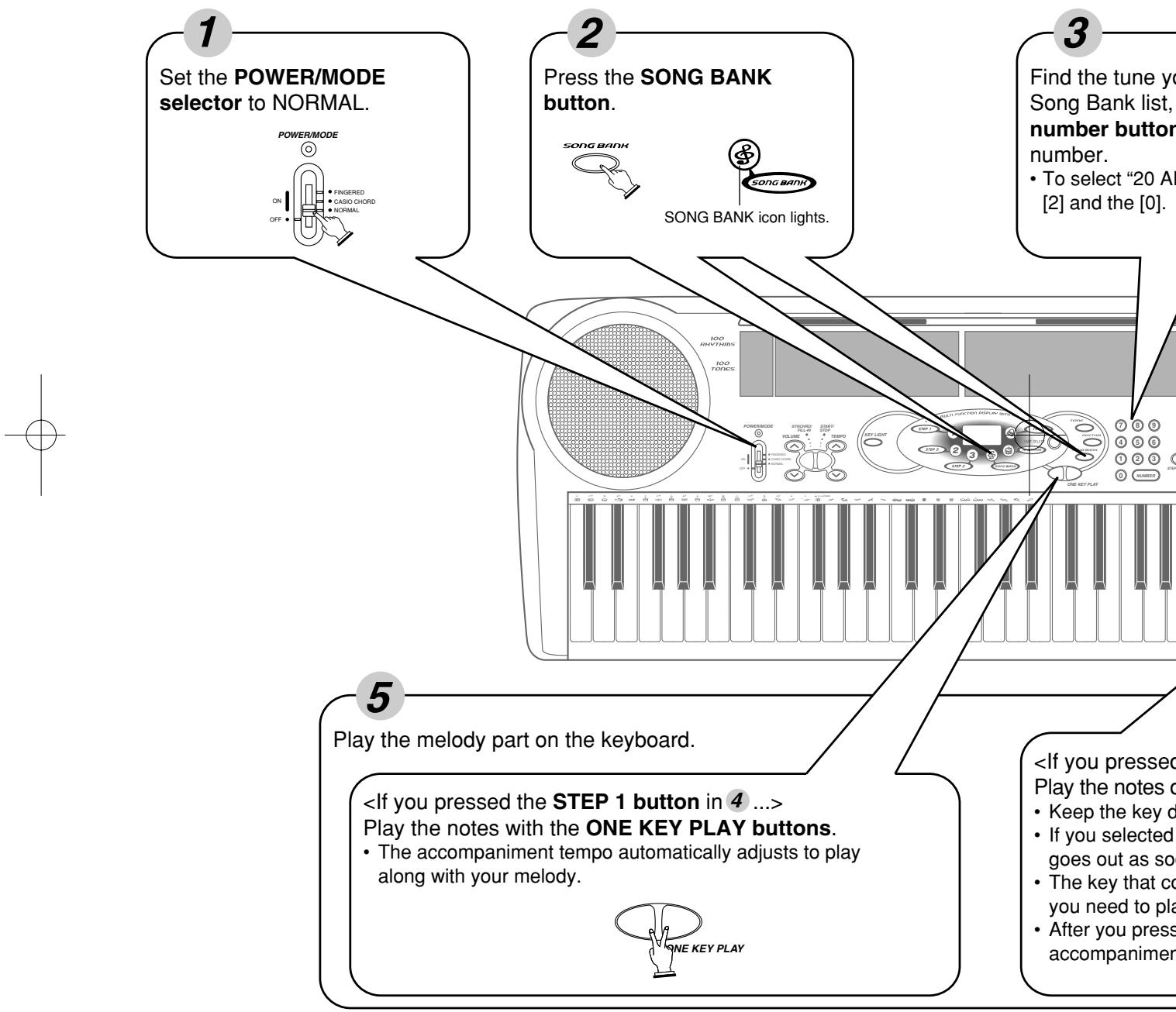
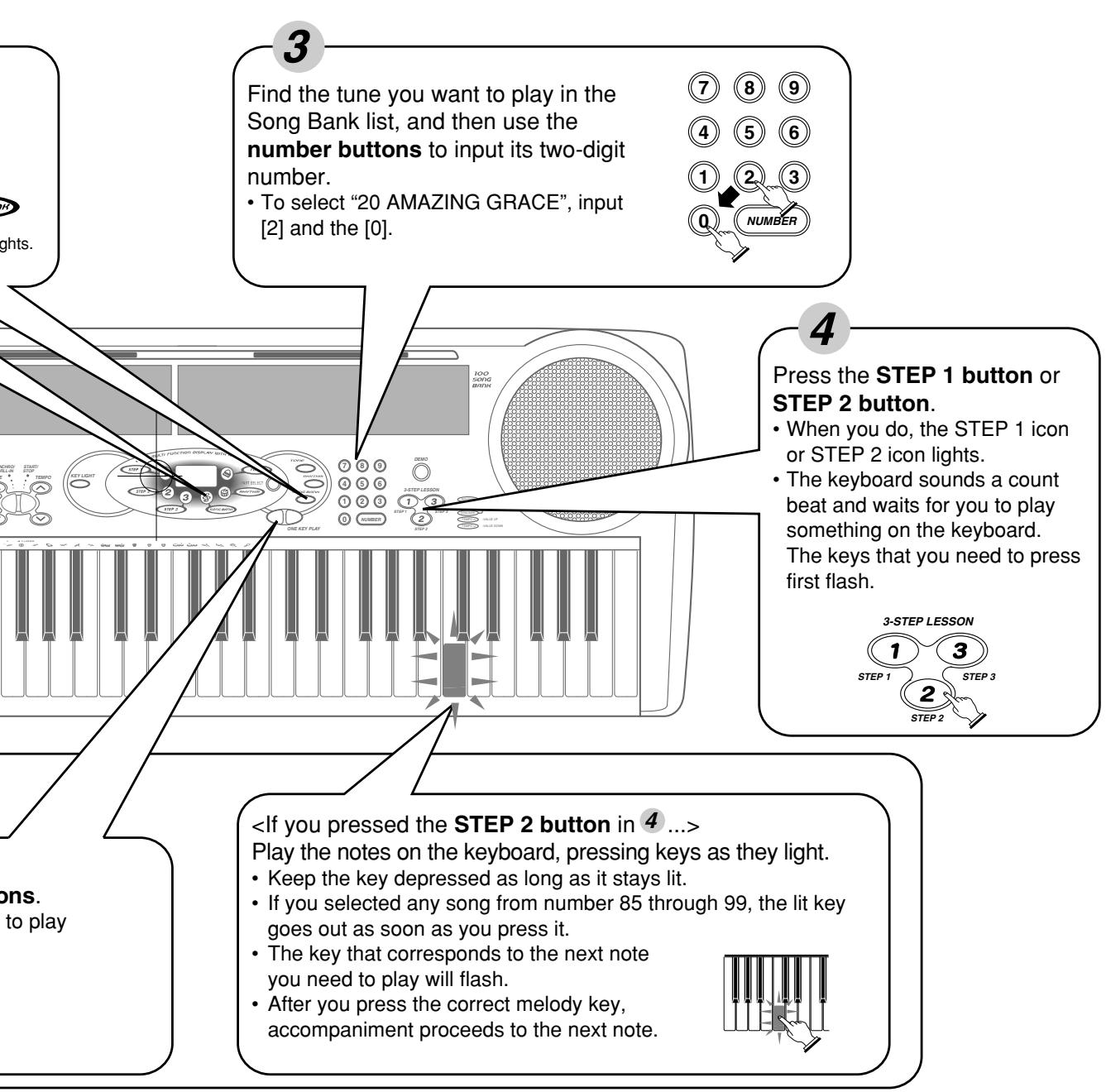
This section provides a quick overview of keyboard operation using steps one and two of the 3-step lesson feature. See page E-28 for detailed explanations of these steps.
Connections
■ Phones/Output Jack
Before connecting headphones or other external equipment, be sure to first turn down the volume settings of the keyboard and the connected equipment. You can then adjust volume to the desired level after connections are complete.
[Rear Panel]
![CASIO LK-42 - [Rear Panel] - 1](/content/2025/01/129468/images/d67fff1b8ad87c6bea8e0888351c3d9bf73feb7fec55964643b4b707103bbc42.jpg)
Connecting Headphones (Figure 1)
Connecting headphones cuts off output from the keyboard's built-in speakers, so you can play even late at night without disturbing anyone.
Audio Equipment (Figure 2)
Connect the keyboard to an audio equipment using a commercially available connecting cord with a standard plug on one end and two PIN plugs on the other end. In this configuration, you normally set the input selector of the audio equipment to the terminal (usually marked AUX IN or something similar) where the cord from the keyboard is connected. See the user documentation that comes with your audio equipment for full details.
Musical Instrument Amplifier (Figure 3)
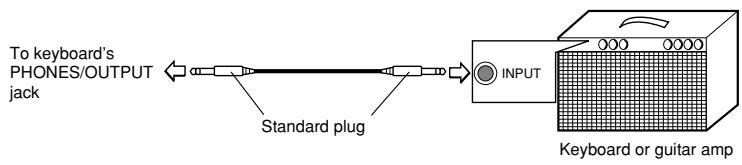
Use a commercially available connecting cord to connect the keyboard to a musical instrument amplifier.
Note
- Be sure to use a connecting cord that has standard plugs on the ends you connect to the keyboard and amplifier.
Connection Example
Accessories and Options
Use only the accessories and options specified for this keyboard. Use of non-author-ized items creates the danger of fire, electrical shock, and personal injury.
Power Supply
This keyboard can be powered by current from a standard household wall outlet (using the specified AC adaptor) or by batteries. Always make sure you turn the keyboard off whenever you are not using it.
Using batteries
Always make sure you turn off the keyboard before loading or replacing batteries.
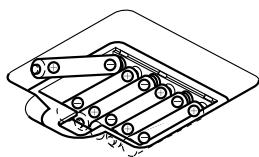
To load batteries
- Remove the battery compartment cover.
-
Load 6 AA-size batteries into the battery compartment.
-
Make sure that the positive (+) and negative (-) ends are facing correctly.
-
Insert the tabs on the battery compartment cover into the holes provided and close the cover.
The keyboard may not function correctly if you load or replace batteries with power turned on. If this happens, turning the keyboard off and then back on again should return functions back to normal.
Important Battery Information
The following shows the approximate battery life provided by different battery types.
- Standard battery life: Approximately 1 hour (SUM3/R6P)
Approximately 4 hours (AM3/LR6)
Both of the above values are standard battery life at normal temperature, with the keyboard volume at a medium setting. Temperature extremes or playing at very loud volume settings can shorten battery life.
■ Any of the following symptoms indicate low battery power. Replace batteries as soon as possible whenever any of the following occurs.
- Dim power supply indicator
- Instrument does not turn on
- Dim, difficult to read display
- Abnormally low speaker/headphone volume
Distortion of sound output - Occasional interruption of sound when playing at high volumes
- Sudden power failure when playing at high volumes
- Dimming of the display when playing at high volume
- Abnormal rhythm pattern and demo tune play
- Dimming of keyboard lights when notes sound
- Loss of power, sound distortion, or low volume when playing from a connected computer or MIDI device
Important!
Improper handling of batteries can cause them to burst and leak, which creates the danger of personal injury or damage due to contact with battery acid. Be sure to note the following important precautions.
- Always make sure that the positive (+) and negative (-) poles are facing correctly as indicated inside the battery compartment.
- To avoid damage caused by leaking batteries, be sure to remove batteries from the keyboard whenever you leave it unattended for long periods (such as when leaving on a trip).
- Never mix batteries of different types.
- Never mix old batteries with new ones.
- Never discard batteries by incinerating them, do not allow their poles to be shorted (connected to each other), never take batteries apart, and do not expose batteries to direct heat.
- Replace batteries as soon as possible after any sign they are getting weak.
- Never attempt to recharge batteries.
Using the AC Adaptor
Make sure that you use only the AC adaptor specified for this keyboard.
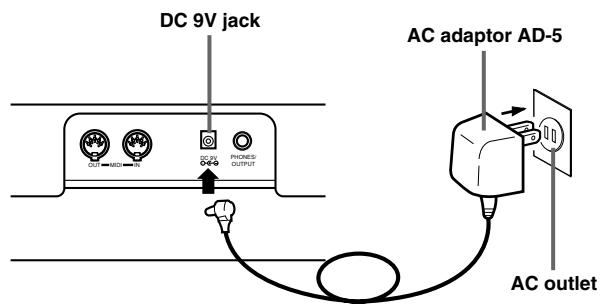
Specified AC Adaptor: AD-5
Also note the following important warnings and precautions when using the AC adaptor.
Warning!
- Take care to avoid any damage to or breakage of the power cord. Never place any heavy objects on the power cord or expose it to direct heat. Doing so creates the danger of power cord damage, fire, and electrical shock.
- Use only the specified AC adaptor. Use of another type of adaptor creates the danger of fire and electrical shock.
Caution!
- For safety sake, be sure to unplug the AC adaptor from the wall outlet whenever leaving the keyboard unattended for a long time (such as when leaving on a trip).
- Always turn off the keyboard and unplug the AC adaptor from the wall outlet when you are not using the keyboard.
Important!
- Make sure that the keyboard is turned off before connecting or disconnecting the AC adaptor.
- Using the AC adaptor for a long time can cause it to become warm to the touch. This is normal and does not indicate malfunction.
Auto Power Off
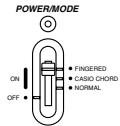
When you are using battery power, keyboard power turns off automatically whenever you leave it on without performing any operation for about 6 minutes. When this happens, move the POWER/MODE selector to the OFF position and then back to NORMAL, CASIO CHORD, or FINGERED to turn power back on.
Note
- Auto Power Off is disabled (it does not function) when you are using the AC adaptor to power the keyboard.
Power On Alert
Keyboard keys light to alert you if you leave power on and do not perform any operation for about 6 minutes. Note that keys light only, and no sound is produced. When this happens, press any button or keyboard key to clear the power on alert.
Note
- Power on alert operates only when you are powering the keyboard using the AC adaptor. It does not operate when you are using batteries.
■ To disable Auto Power Off and power on alert
Hold down the TONE button while turning on the keyboard to disable Auto Power Off and power on alert.
- When these functions are turned off, the keyboard does not turn off automatically and no alert is performed no matter how long it is left with no operation being performed.
- Auto Power Off and power on alert are enabled again when you manually turn off power and then turn it back on again.
Basic Operations
This part of the manual provides you with the basic information you need to use your keyboard.
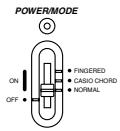
To switch power on and off
- Set the POWER/MODE selector to NORMAL.
-
Press the keyboard keys.
-
The VOLUME up and down arrow buttons are used to adjust main volume.
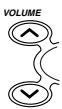
- Pressing or displays the currently set volume setting. Press or again to change the volume setting.
- Volume can be adjusted over a range of 0 (minimum) to 9 (maximum).
Volume is set to 7 when the power is turned on. - A setting of 0 turns down the volume completely.
- The volume can be changed continuously by continuously pressing down the or buttons.
- Pressing the and buttons simultaneously sets the volume to level 7.
- Numeric values can be entered directly with the number buttons after the VOLUME button has been pressed in step 3.
-
The amount that the volume settings raises or lowers the volume level differs according to the tone, auto accompaniment, or song you are using.
-
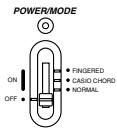
To switch power off, set the POWER/MODE selector to OFF position.
To change tones
-
Look at the tone list printed on the keyboard's console and find the one you want.
-
A total of 100 tones are available.
-
Press the TONE button.

- When you do, the TONE icon lights.
- The number for the tone that is currently selected is shown on the display.

TONE icon

- Use the number buttons to input the 2-digit number that identifies the tone you want to select.
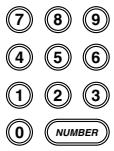
- Always enter two digits for the tone number. If you enter only one digit, the display will automatically return to the previous tone number setting after a few seconds.
- If you change the tone setting while a keyboard key is depressed, the tone does not change until you release the key and press a keyboard key again.
- With certain tones (such as percussion sounds and sound effects), there may be very little or no change at all in the pitch, no matter which keyboard key you press.
- If you input the wrong first digit for a tone number, you can return to the previous setting by pressing the TONE button.
Keyboard split tones
Some of the preset tones split the keyboard and assign two or more sounds. With such a preset tone, the sound produced depends on what position of the keyboard you play. For example, BASS/PIANO (tone 90) puts BASS on the left and PIANO on the right of the keyboard.
BASS/PIANO (No.90)
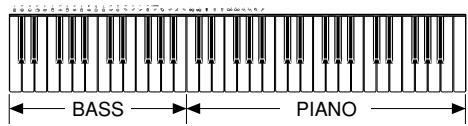
PERCUSSION (No.99)
- PERCUSSION (tone 99) assigns 35 percussion sound to the keyboard as illustrated below. The sound assigned to each key are indicated above the keyboard.

BASS DRUM
SIDE STICK
ACOUSTIC SNARE
HANDCLAP
ELECTRIC SNARE
LOW FLOOR TOM
CLOSED HI-HAT
HIGH FLOOR TOM
PEDAL HI-HAT
LOW TOM
OPEN HI-HAT
LOW MID TOM
HIG HIG MID TOM
CRASH CYMBAL 1
HIGHTOM
RIDE CYMBOL 1
CHINESE CYMBOL
RIDE BELL
TAMBOURINE
SPLASH CYMBOL
COWBELL
CRASH CYMBOL 2
CLAVES
RIDE CYMBAL 2
HIGHBONGO
LOW BONGO
MUTE HIGH CONGA
OPEN HIGH CONGA
LOW CONGA
HIGHTIMBALES
LOWTIMBALES
HIGH AGOGO
LOW AGOGO
CABASA
MARACAS
- There are no sounds assigned to any keyboard keys from B4 onward when the "99 PERCUSSION" tone is selected.
Digital Sampling
A number of the tones that are available with this keyboard have been recorded and processed using a technique called digital sampling. To ensure a high level of total quality, samples are taken in the low, mid, and high ranges and then combined to provide you with sounds that are amazingly close to the originals. You may notice very slight differences in volume or sound quality for some tones when you play them at different positions on the keyboard. This is an unavoidable result of multiple sampling, and it is not a sign of malfunction.
Polyphony
The term polyphony refers to the maximum number of notes you can play at the same time. This keyboard has 12-note polyphony, which includes the notes you play as well as the rhythms and auto-accompanyment patterns that are played by the keyboard. This means that when a rhythm or auto-accompanyment pattern is being played by the keyboard, the number of notes (polyphony) available for keyboard play is reduced. Also note that some of the tones offer only 6-note polyphony.
- When rhythm or auto accompaniment is playing, the number of sounds simultaneously played is reduced.
- Though you can sound up to 12 notes at one time, only the last four keyboard keys pressed light up.
Other Useful Functions
To change the key of the keyboard
The transpose feature of this keyboard lets you raise or lower its key in semitone increments. This means you can easily match to suit someone's voice, and you can eliminate sharps and flats from music making it easier to play.
- While in any mode besides the Song Bank Mode (indicated when the SONG BANK icon is lit), hold down the TONE button and press the RHYTHM button.
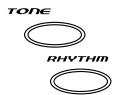
- Perform step 2 within five seconds after performing step 1.
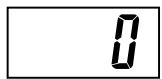
- Use the TEMPO buttons to change the key of the keyboard.
- Example: To change the tuning to B (indicated by -1 since it is one tone below C, which is the normal tuning of the keyboard).
- See page E-20 for the indicator that appears for each key.
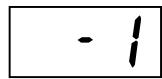
Indicator remains on the display for a few seconds.
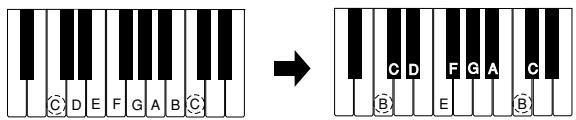
Normal tuning
E-19
478B-E-021A

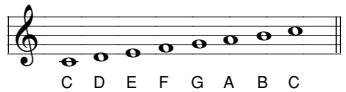
Notes
- You cannot change the transpose setting while the keyboard is in the Song Bank Mode.
- In step 2 of the above operation, you could also use the number buttons [0] to [5] to specify C through F.
- Pressing both of the TEMPO buttons ( / ) at the same time returns the transpose setting to C(0).
- The transpose setting is automatically set to C(0) whenever you turn keyboard power on.
- The transpose setting is automatically set to C(0) whenever you press the SONG BANK button.
- The pitch of a transposed note depends on the tone you are using. If the transpose operation causes a note to exceed its upper range, the same note from the lowest octave available is substituted.
- The transpose operation does not affect tone number 99 (PERCUSSION) or auto-accompanyment rhythms.
- Transposing tones 75 through 79 and 90 through 96 changes the range of keys to which each of the tones is assigned.
- The transpose setting is automatically set to C(0) whenever you press the DEMO button.
To tune the keyboard
A simple operation lets you tune the keyboard to another musical instrument.
- While in any mode besides the Song Bank Mode (indicated when the SONG BANK icon is lit), hold down the TONE button and press the SONG BANK button.

- Perform step 2 within five seconds after performing step 1.
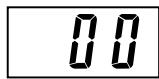
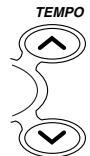
- Use the TEMPO buttons to change the tuning of the keyboard.
Indicator remains on the display for a few seconds.
E-20
478B-E-022A
Notes
- In step 2 of the above procedure, you could also use the number buttons to input a value from 00 to 50.
- Pressing both of the TEMPO buttons ( / ) at the same time returns the tuning setting to 00.
- Pressing the SONG BANK button changes the tuning setting to 00.
- The tuning setting does not affect any of Song Bank tunes.
- You can tune the keyboard within a range of approximately ± 50 cents (100 cents = 1 semitone).
- The tuning setting is automatically set to 00 whenever you turn the keyboard on.
- Pressing the DEMO button changes the tuning setting to 00.
- The tuning operation does not affect rhythm (percussion).
■ Playing the demo tunes
You can set up the keyboard to continually play its 100 built-in Song Bank tunes. Keyboard keys light to indicate the melody notes of the demo tune as it plays.
To start demo tune play
- Switch power on and adjust the volume level.
- Press the DEMO button.

- Demo tune play continues in a sequential endless loop until you switch it off.
- The number of the demo tune currently playing is shown on the display.
-
You can play along on the keyboard while a demo tune is playing back.
-
You can change the demo tune play being played by pressing the number buttons.
⑦ ⑧ ⑨
④ ⑤ ⑥
① ② ③
NUMBER
- The Song Bank tunes play back in tune number sequence, starting from the one you select.
To stop demo tune play
Press the DEMO button again to stop demo tune play.

Notes
- Only the following buttons are enabled while a Song Bank tune is being played.
VOLUME buttons
Number buttons - START/STOP button
- POWER/MODE selector (OFF)
- DEMO button
- KEY LIGHT button
- You cannot change the tone being used for the melody of a Song Bank tune.
■ Playing rhythms
This keyboard features a collection of 100 exciting built-in rhythm patterns. Each pattern provides percussion back up for all your performances.
To select and play a rhythm
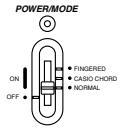
- Set the POWER/MODE selector to NORMAL.
-
Find the rhythm you want to use in the "Rhythm List" (page A-3) and note its rhythm number.
-
Press the RHYTHM button.

- When you do, the RHYTHM icon lights.
- The number that appears on the display indicates the currently selected rhythm.

RHYTHM icon
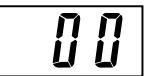
- Use the number buttons to input the 2-digit rhythm number for the rhythm you want to use.
⑦ ⑧ ⑨
Example: To select "71 SAMBA", input 7 and 1.
- Be sure to always specify a 2-digit number.
- If you discover a mistake before you input the second digit, press the RHYTHM button to return to the previously set rhythm number.
- You can change to another rhythm even while the current rhythm is sounding.

- Press the START/STOP button to start play of the rhythm.
SYNCHRO/ START/ When you do, the selected rhythm starts to sound. FILL-IN STOP

- Use the TEMPO buttons to adjust the tempo of the rhythm.
- Pressing or displays the current tempo setting. Press or again to change the tempo setting.
Each time you press one of the TEMPO buttons while the tempo value is displayed, the tempo setting changes one step, within the range of 040 to 255. - The initial default tempo setting when you turn on power is 120.
- After displaying the current tempo setting by pressing a TEMPO button in step 6, you can also input the tempo setting you want by inputting a three-digit value with the number buttons.
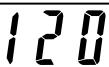
- Holding down either of the TEMPO buttons changes the tempo setting at high speed.
-
To reset the tempo to the standard value of each rhythm, press both TEMPO buttons.
-
To stop rhythm play, press the START/STOP button again.

Using auto-accompanyment
This keyboard features 100 accompaniment patterns that let you add full accompaniments to your performances automatically. With auto-accompanyment, part of the keyboard is reserved as an accompaniment keyboard. As you play your chords on the accompaniment keyboard, the accompaniment patterns adjusts automatically to follow the progression you play.
You get a choice between two different methods for chord play. FINGERED lets you play chords as you normally do, while CASIO CHORD makes it possible to play fully formed chords with one finger.
About the accompaniment keyboard
The lower (left) 1.5 octaves are reserved for use as an accompaniment keyboard whenever you select CASIO CHORD or FINGERED with the POWER/MODE selector. The panel above the accompaniment keyboard keys is marked with the names of the notes they play. The remainder of the keyboard (the part that is not included in the accompaniment keyboard) is called the melody keyboard. Please be sure to remember these terms, because they will be used throughout the rest of this manual.
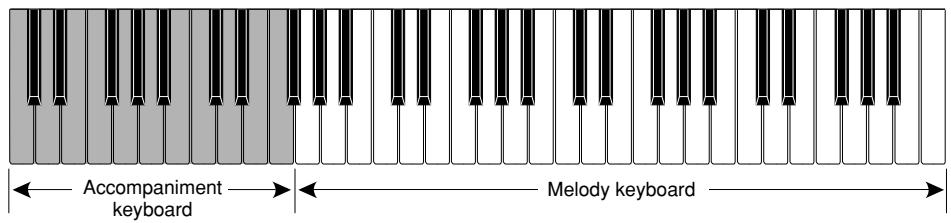
The entire keyboard can be used for melody play while the POWER/MODE selector is set to NORMAL.
Using the CASIO CHORD system
The CASIO CHORD system lets you easily play the four main types of chords. Play of chords is simplified as shown in the chart below.
| Keys | Chord Type | Example |
| Pressing one accompaniment key | Major chord | C (C Major Chord) |
| Pressing two accompaniment keys | Minor chord | Cm (C Minor Chord) |
| Pressing three accompaniment keys | Seventh chord | C7 (C Seventh Chord) |
| Pressing four accompaniment keys | Minor seventh chord | Cm7 (C Minor Seventh Chord) |
Notes
- The bottom (leftmost) note that you play determines the name of the chord. If the bottom note is a C for example, the keyboard produces a C chord.
- When pressing more than one accompaniment key, it makes no difference whether the keys to the right of the bottom note are white or black.
To play a CASIO CHORD auto-accompanyment
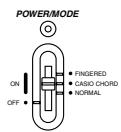
- Use the POWER/MODE selector to select CASIO CHORD.
-
Select an auto-rhythm as described under "To select and play a rhythm" on page E-22.
-
Start play of the rhythm.
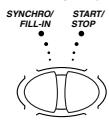
- If you want start play of the normal rhythm pattern, press START/ STOP.
-
You can also use synchro start (page E-27) to start rhythm play.
-
Press either one or up to four keys on the accompaniment keyboard, and the corresponding accompaniment starts to play automatically.
- Continue pressing different keys on the accompaniment keyboard to play your chord progression.
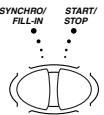
- To stop auto-accompaniment play, press the START/STOP button again.
Using standard fingerings
The FINGERED mode lets you play a wider variety of chords. In this mode, you can start play of an accompaniment pattern by pressing three or four of the accompani-ment keyboard keys.
This keyboard is capable of recognizing 15 different chords. The following shows the fingerings of these chords with a root of C. Note that you can omit the fifth notes (which are shown inside parentheses in the illustrations below) to produce 7, m7, maj7, add9 and mM7 chords.
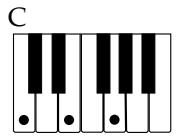
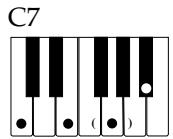
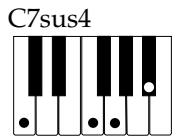
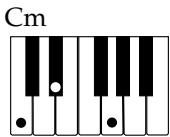
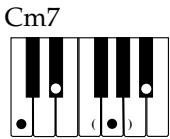
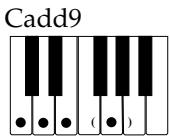
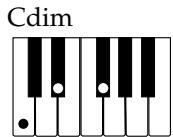
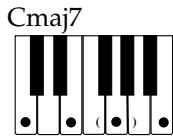
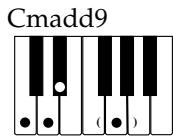
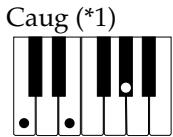
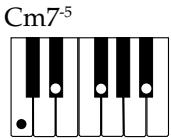
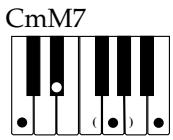
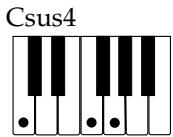
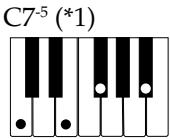

*1 With this chords, the lowest note in your fingering is always used as the root. Make sure that your fingering correctly identifies the root you want to use.
Important!
- If you play one or two notes only in the left hand, or three notes that do not make up a recognizable chord formation, no sound will be produced. FINGERED mode requires a conventional three or four-note chord formation to produce an auto-accompaniment. Also, note that auto-chords only work in conjunction with rhythm patterns, and not independently of them.
Notes
- The above examples show only one of the possible fingerings for each chord. Note that you can play the notes that form a chord in any combination. Each of the following fingerings for example, produces the same C chord.

- See the "Fingered Chord Charts" on page A-4 for information on the fingerings of chords for all roots.
To play a FINGERED auto-accompanyment
- Use the POWER/MODE selector to select FINGERED.
- Select an auto-rhythm as described under "To select and play a rhythm" on page E-22.
- Start play of the rhythm.
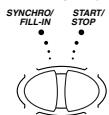
- If you want start play of the normal rhythm pattern, press START/ STOP.
-
You can also use synchro start (page E-27) to start rhythm play.
-
Play a chord on the accompaniment keyboard to start play of the auto-accompaniment.
- Continue pressing keys on the accompaniment keyboard to play your chord progression.
- To stop auto-accompaniment play, press the START/STOP button again.
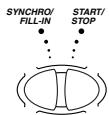
E-26
478B-E-028A
Improvising with the preset patterns
Pressing the START/STOP button to start rhythm play causes the normal version of the pattern to be played. You can also play a variation of the rhythm using the operation described below.
Using fill-in rhythm
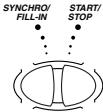
You can insert a fill-in rhythm by pressing the SYNCHRO/FILL-IN button while an auto-rhythm plays.
Using Synchro start
You can start the rhythm and accompaniment pattern at the same time, with your play of the accompaniment keyboard. To do this, follow the steps below.
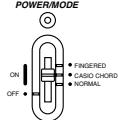
- Set the POWER/MODE selector to the CASIO CHORD or FINGERED position.
- Select an auto-rhythm.
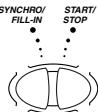
- Press the SYNCHRO/FILL-IN button.
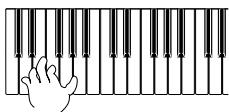
- Press the accompaniment keys to play the first chord. As soon as you do, the auto-accompaniment pattern begins to play.
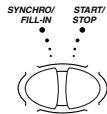
- To stop the auto-accompanyment pattern play, press the START/STOP button.
Note
- If you set the POWER/MODE selector to NORMAL in step 1 on page E-22, the operation in step 4 starts play of the rhythm (percussion instruments) only.
Three Step Lesson System
Using Three Step Lesson System
Even individuals who cannot play the keyboard at all can follow along with the 100 built-in Song Bank tunes with the ONE KEY PLAY buttons. You can also use the Three Step Lesson System to learn at your own pace. Play slowly at first until you are able to play along at normal speed.
Of the 100 built-in tunes, numbers 00 through 84 feature auto-accompanyment (auto-accompanyment tunes), while 85 through 99 are played using both hands (two-hand tunes).
The Three Step Lesson System can be used with the following three-step lesson plan to master keyboard play.
Step 1: Easy Play
Pressing the ONE KEY PLAY buttons plays the melody for an auto-accompanyment tune or the right hand part for two-hand tunes. In both cases, the auto-accompanyment (the right hand part in the case of two-hand tunes) is played automatically by the keyboard. In place of the ONE KEY PLAY buttons, you can also press any key of the keyboard to play the melody or right hand part. The purpose of this step is to familiarize yourself with the timing required to play melody notes.
Step 2: Slow Play
Press the keys that light as they teach you the correct notes to play. You can play at the pace you want, because the auto-accompanyment or left hand part waits until you press the correct key.
Step 3: Normal Play
At this level, the keyboard's keys still light to indicate which notes to play, but they no longer wait for you to press the correct key. The auto-accompanyment or left hand part is played at normal speed.
Notes
- You may not be able to see the keyboard keys light under direct sunlight or in other brightly lit areas.
- You can press the ONE KEY PLAY, STEP 1, STEP 2, and STEP 3 buttons at any time, except while a demo tune is playing. To return the keyboard to its normal mode, press the SONG BANK button.
Three Step Lesson System Tempo Setting
You can use the procedure in step 6 of the procedure on page E-22 to set the tempo of the left-hand part for Song Bank and Three Step Lesson System play (Step 1 through 3).
This means you can use a slower tempo at the beginning, and then increase it as you learn. Press both of the TEMPO buttons ( and ) at the same time to return the tempo to its initial preset setting.
To play a built-in Song Bank tune
- Look up the number of the tune you want to play in the Song Bank list.
- Press the SONG BANK button until the SONG BANK icon lights.

- The number that appears is the currently selected Song Bank number.

SONG BANK icon
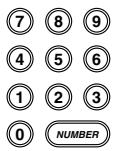
- Input the two digit number for the tune you want to play.
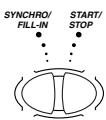
- Press the START/STOP button to start play of the selected tune.
-
The tune you select plays repeatedly, with the keyboard keys lighting to indicate the melody notes.
-
To stop Song Bank tune play, press the START/STOP button again.
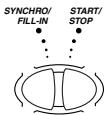
- To exit the SONG Mode, press the SONG BANK button again.

- When you do, the SONG BANK icon goes out.
- At this time the tone number or rhythm number appears on the display.
Notes
- Always enter two digits for the Song Bank number.
- You can input a Song Bank tune number even while another Song Bank tune is playing.
- If you input the wrong first digit for a Song Bank tune number, you can return to the previous setting by pressing the SONG BANK button.
- The RHYTHM button is disabled in the Song Bank Mode. If you want to play a rhythm, press the SONG BANK button to return to the normal mode first.
Using the Three Step Lesson System with Song Bank Tunes
When you use a Song Bank tune with melody guide, the Three Step Lesson System teaches you which melody notes to play.
Auto-accompaniment Song Bank Tune
Chord and melody part keys light.
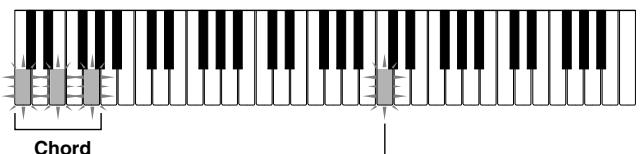
The root (the C-note of a C-chord) and other notes that make up the chord alternately light.
Melody note lights.
Note
- Some Song Bank tunes use chords (such as C6) that cannot be played with the FINGERED setting (page E-25). In the FINGERED Mode, even if you finger the chords according to the keys that are lit by Melody Guide, chords may sound different from the ones produced during Melody Guide play.
Two-hand Song Bank Tune
Left hand and right hand part keys light.
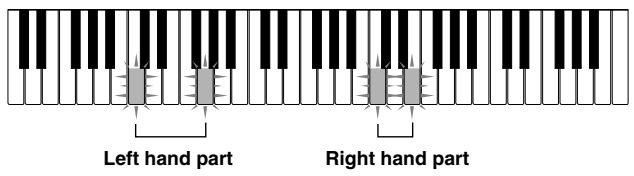
How the Three Step Lesson System operates in Steps 1 through 3
When using an auto-accompanyiment Song Bank tune with the Three Step Lesson System, the lights indicate not only the note you should play, but how long you should play it (how long you should keep the key depressed). The following describes what illumination of keys indicates.
Note Guide: A lit key indicates the note to be played.
- Length Guide: Key remains lit for as long as note should be played.
- Next Note Guide: A flashing key indicates the next note to be played.
- Consecutive Note Guide: When a key lights, goes out momentarily, and then lights again, it indicates that the same note should be played in succession.
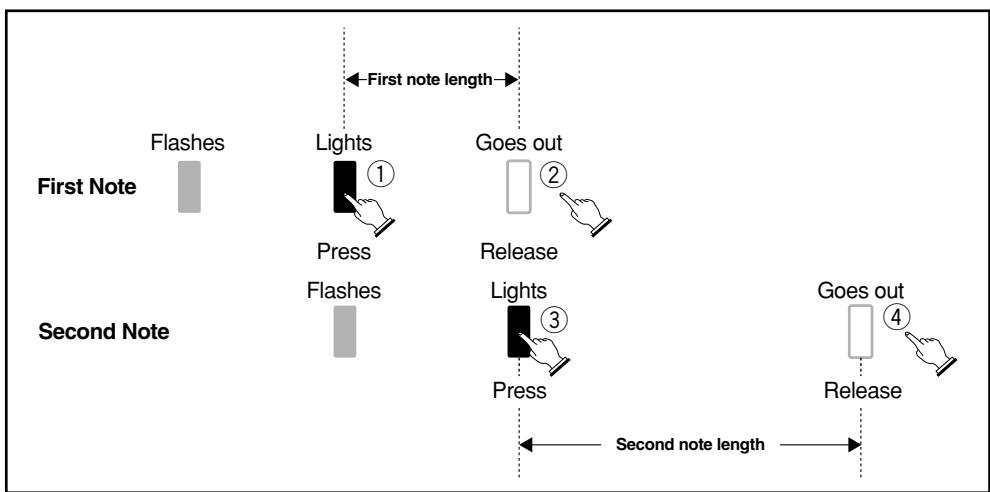
Note lengths are not indicated by the Three Step Lesson System when playing a two-hand tune with Step 1 and Step 2. The lit key goes out as soon as you press the correct keyboard key and the next note's key flashes.
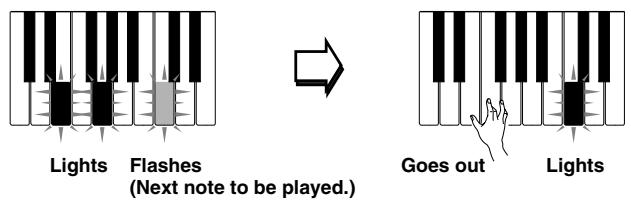
When playing a two-hand tune with Step 3, the applicable keyboard key remains lit as long as its note plays. In this case, however, the key for the next note to be played does not flash. Keys light when their notes start to play.
Turning Off Key Lighting
- Press the KEY LIGHT button.
KEYLIGHT

- Press the KEY LIGHT button again to turn key lighting back on.
Note
Key lighting turns on automatically in any of the following cases:
- When keyboard power is turned on.
- When demo tune play is started.
- When the SONG BANK button is pressed in the normal mode (page E-29 to steps 1 to 3).
- When the power on alert function operates (page E-16).
Number of Simultaneously Lit Keys
Up to four keyboard keys can be lit at the same time.
To change the tone used for the melody of a Song Bank tune
- Following step 3 of the procedure on page E-29, press the TONE button.

- Both the SONG BANK icon and TONE icon light, along with the tone number of the tone that is currently assigned to the keyboard.

- Input a value to select the tone you want to use.
⑦ ⑧ ⑨
④ ⑤ ⑥
① ② ③

Notes
- You cannot change the tone of the two-hand Song Bank tunes (number 85 through 99).
- Selecting another Song Bank tune switches the tone setting to the newly selected tune's preset melody tone.
- The tone assigned to the keyboard is the same one specified for the melody of the Song Bank tune.
- The above procedure can be used to change the Song Bank melody tone before starting play or while play is already in progress.
■ Step 1: Easy Play
You can press the ONE KEY PLAY buttons or any of the keyboard keys to play along with the melody (right hand part) of the Song Bank tune. You do not have to worry about pressing the right key, so you can concentrate on getting the timing right.
1. Press the STEP 1 button.
- When you do, the STEP 1 icon lights.
- After a count sounds, the keyboard stands by and waits for you to play the first note of the tune. If the tune includes intro measures, the keyboard enters standby after the intro measures are complete.

STEP1icon
2. Press the ONE KEY PLAY buttons to play each note of the tune.
- The accompaniment (left hand) part of the tune follows along as you play the melody (right hand) part.
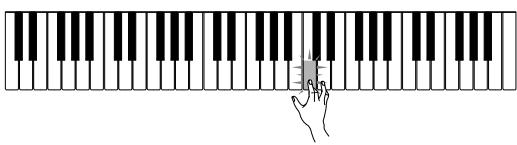
- The keyboard key that corresponds to the next note to be played flashes, and lights when you play the note.
- The rhythm (percussion) part does not sound.
3. Try pressing any one of the keyboard keys in place of the ONE KEY PLAY buttons.
- Pressing any keyboard key plays the correct melody (right hand part) note.
- Pressing more than one (up to four) keyboard keys plays the corresponding number of melody notes.
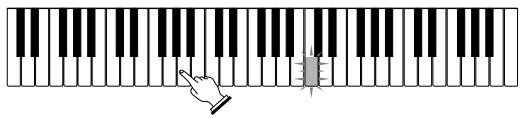
The correct note is played even if you do not press the key that is lit.
4. To interrupt an Easy Play session, press the START/STOP button.
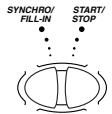
- When you do, the STEP 1 icon goes out.
■ Step 2: Slow Play
With Slow Play, you have to play the note that the Three Step Lesson System indicates. But don't worry - the accompaniment (left hand part) waits until you can play the correct note before continuing. This means you can take your time and play at your own pace.
1. Press the STEP 2 button.
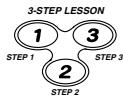
- When you do, the STEP 2 icon lights.
- After a count sounds, the keyboard stands by and waits for you to play the first note of the tune. If the tune includes intro measures, the keyboard enters standby after the intro measures are complete.

STEP2icon
-
Play the notes indicated by the Three Step Lesson System.
-
The accompaniment (left hand) part of the tune follows along as you play the melody (right hand) part.
- The keyboard key that corresponds to the next note to be played flashes, and lights when you play the note.
- The rhythm (percussion) part does not sound.
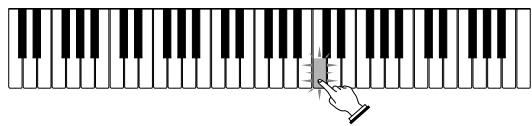
Press keyboard keys as they light. More than one key may light when you are playing a two-hand tune. Press all keys that light.
- To interrupt an Slow Play session, press the START/STOP button.
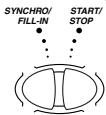
- When you do, the STEP 2 icon goes out.
■ Step 3: Normal Play
Normal Play also shows you which notes to play, but unlike Slow Play, it does not wait for you to press the key. The accompaniment part is played at normal speed, no matter what you play (or don't play) on the keyboard.
1. Press the STEP 3 button.
- When you do, the STEP 3 icon lights.
- Play starts after a count sounds.

STEP3icon
-
Play along on the keyboard, following the keys as they light.
-
The accompaniment (left hand) part of the tune plays at normal speed, regardless of what you play on the keyboard.
- With a auto-accompanyment tune, the keyboard key that corresponds to the next note to be played flashes, and lights when the note should be played.
- With a two-hand tune, the applicable keyboard key remains lit as long as its note plays. In this case, however, the key for the next note to be played does not flash. Keys light when their notes start to play.
- To interrupt a Normal Play session, press the START/STOP button.
SYNCHRO/ START/
FILL-IN STOP
- When you do, the STEP 3 icon goes out.


E-34
478B-E-036A
To practice the left hand part
Once you master right hand part play, you can use the two-hand tunes (numbers 85 through 99) to practice left hand part.
- Press the STEP 1, STEP 2, or STEP 3 button.
-
When you do, the STEP 1, STEP 2, or STEP 3 icon lights.
-
Press the PART SELECT button to switch the left hand play.
PART SELECT

-
After a count beat sounds, the right-hand part starts to play and the keys for the left-hand part notes flash.
-
Press the PART SELECT button to return the part selection to its previous setting.
PART SELECT

- To interrupt play of the melody, press the START/STOP button.
- When you do, the STEP 1, STEP 2, or STEP 3 icon goes out.
Note
- The PART SELECT button is operational only while STEP 1, STEP 2, or STEP 3 is playing or paused (by the START/STOP button).
To check if the right hand or left hand part is currently selected (two-hand tunes only)
The Three Step Lesson System tells you what part is selected whenever you press the STEP 3 button. Pressing the STEP 3 button causes the leftmost three keys to light when the left hand part is selected, and the rightmost three keys to light when the right hand part is selected.
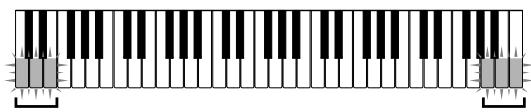
Left hand part selected
Right hand part selected
MIDI
What is MIDI?
The letters MIDI stand for Musical Instrument Digital Interface, which is the name of a worldwide standard for digital signals and connectors that makes it possible to exchange musical data between musical instruments and computers (machines) produced by different manufacturers. MIDI compatible equipment can exchange keyboard key press, key release, tone change, and other data as messages.
Though you do not need any special knowledge about MIDI to use this keyboard as a stand-alone unit, MIDI operations require a bit of specialized knowledge. This section provides you with an overview of MIDI that will help to get you going.
MIDI Connections
MIDI messages are send out through the MIDI OUT terminal of one machine to the MIDI IN terminal of another machine over a MIDI cable. To send a message from this keyboard to another machine, for example, you must use a MIDI cable to connect the MIDI OUT terminal of this keyboard to the MIDI IN terminal of the other machine. To send MIDI messages back to this keyboard, you need to use a MIDI cable to connect the other machine's MIDI OUT terminal to the MIDI IN terminal of this keyboard.
To use a computer or other MIDI device to record and playback the MIDI data produced by this keyboard, you must connect the MIDI IN and MIDI OUT terminals of both machines in order send and receive data.
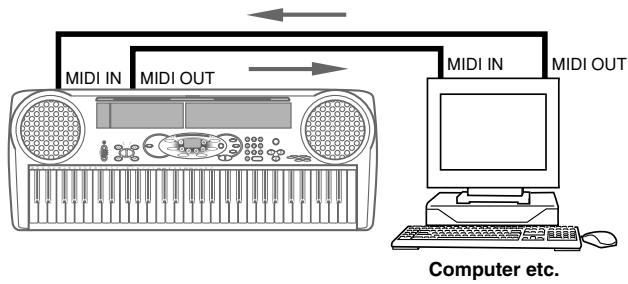
MIDI Channels
MIDI allows you to send the data for multiple parts at the same time, with each part being sent over a separate MIDI channel. There are 16 MIDI channels, numbered 1 through 16, and MIDI channel data is always included whenever you exchange data (key press etc.)
Both the sending machine and the receiving machine must be set to the same channel for the receiving unit to correctly receive and play data. If the receiving machine is set to Channel 2, for example, it receives only MIDI Channel 2 data, and all other channels are ignored.
With this keyboard, messages received over MIDI Channels 1, 2, 3, 4, and 10 can be used for multi-timbre play of up to five different instrument parts. The tone and volume settings for these five channels must be controlled by messages sent from an external device.
Conversely, keyboard operations are sent to external devices over MIDI Channel 1.
General MIDI
General MIDI standardizes MIDI data for all sound source types, regardless of manufacturer. General MIDI specifies such factors as tone numbering, drum sounds, and available MIDI channels for all sound sources. This standard makes it possible for all MIDI equipment to reproduce the same nuances when playing General MIDI data, regardless of the manufacturer of the sound source.
Though the sound source of this keyboard is not General MIDI compatible, you can still connect the keyboard to a computer or other MIDI equipment to playback. General MIDI data that is widely available in stores, over computer networks, and from other sources.
Notes
- General MIDI data made up of a large number of parts may not play correctly on this keyboard.
- You will have most success playing back General MIDI data that has few parts and is made up of data on channels 1, 2, 3, 4, and 10.
Messages
There is a wide variety of messages defined under the MIDI standard, and this section details the particular messages that can be sent and received by this keyboard.
NOTE ON/OFF
This message sends data when a key is pressed (NOTE ON) or released (NOTE OFF). A NOTE ON/OFF message include a note number (to indicate note whose key is being pressed or released) and velocity (keyboard pressure as a value from 1 to 127). NOTE ON velocity is always used to determine the relative volume of the note. This keyboard does not receive NOTE OFF velocity data.
Whenever you press or release a key on this keyboard, the corresponding NOTE ON or NOTE OFF message is sent by constant velocity from the MIDI OUT terminal.
PROGRAM CHANGE
This is the tone selection message. PROGRAM CHANGE can contain tone data within the range of 0 to 127.
A PROGRAM CHANGE message (0 to 99) is sent out through this keyboard's MIDI OUT terminal whenever you manually change its tone number. Receipt of a PROGRAM CHANGE message from an external machine changes the tone setting of this keyboard.
This keyboard can send tone data within the range of 00 to 99 and receive tone data within the range of 0 to 127^* .
- When GM mapping is turned on. When turned off, tone data is received in the range of 0 to 99.
Note
- Channel 10 is for the drum part only, and it does not receive Program Change messages. When receiving MIDI data, it sounds percussion sounds produced by this keyboard.
PITCH BEND
This message carries pitch bend information for smoothly sliding the pitch upwards or downwards during keyboard play. This keyboard does not send pitch bend data, but is can receive such data.
CONTROL CHANGE
This message adds effects such as vibrato and volume changes applied during keyboard play. CONTROL CHANGE data includes a control number (to identify the effect type) and a control value (to specify the on/off status and depth of the effect). The following is a list of data that can be received using CONTROL CHANGE.
| Effect | Control Number |
| VOLUME | 7 |
| HOLD1 | 64 |
| MODULATION | 1 |
LOCAL CONTROL (Default: on) /GM mapping (Default: off)
This setting determines whether or not the keyboard and sound source of this keyboard are connected internally. When recording to a computer or other external device connected to this keyboard's MIDI IN/OUT terminal, it helps if you turn LOCAL CONTROL off.
on: Anything played on the keyboard is sounded by the internal sound source and simultaneously output as a MIDI message from the MIDI OUT terminal.
oFF: Anything played on the keyboard is output as a MIDI message from the MIDI OUT terminal, without being sounded by the internal sound source. Turn LOCAL CONTROL off whenever you are using the MIDI THRU function of a computer or other external device. Also note that no sound is produced by the keyboard if LOCAL CONTROL is turned off and no external device is connected.
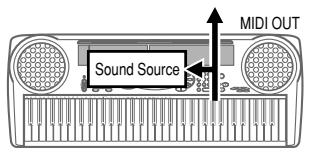
LOCAL CONTROL On
Notes played on the keyboard are sounded by the internal sound source and output as MIDI messages from the MIDI OUT terminal.
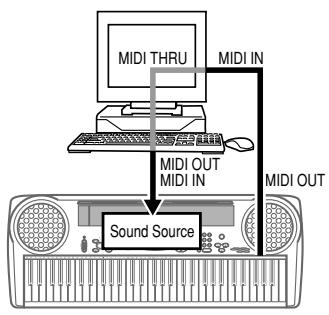
LOCAL CONTROL Off
Notes played on the keyboard are output as MIDI messages from the MIDI OUT terminal, but not sounded directly by the internal sound source. The MIDI THRU terminal of the connected device can be used to return the MIDI message and sound it on this keyboard's sound source.
To turn off LOCAL CONTROL
While holding down the RHYTHM button, press the SONG BANK button.
This also turns on GM mapping.
To turn on LOCAL CONTROL
While holding down the RHYTHM button, press the PART SELECT button.
This turns off GM mapping.
Note that LOCAL CONTROL is also turned on automatically when any of the following buttons are pressed.
POWER (to turn on power), START/STOP (to start rhythm or Song Bank tune play), ONE-KEY PLAY, STEP 1, STEP 2, STEP 3, DEMO (to start demo tune play).
Note
- See the GM Tone Map List at the back of this manual for information about tone assignments while GM mapping is turned on.
Technical Reference
Troubleshooting
Be sure to check the following table whenever you experience problems with keyboard operation.
| Symptom | Cause | Action |
| • No sound when keyboard keys are pressed. | 1. Power supply problem. | 1. Correctly attach the AC adaptor, make sure that batteries poles (+/-) are facing correctly, and check to make sure that batteries are not dead. |
| 2. Volume is set to 0. | 2. Press the VOLUME ⊙ button. | |
| 3. Headphones are plugged into the keyboard. | 3. Unplug the headphones from the PHONES/OUT-PUT jack. | |
| 4. The POWER/MODE selector is in the CASIO CHORD or FINGERED position. | 4. Normal play is not possible on the accompaniment key-board while the POWER/MODE selector is set to CASIO CHORD or FIN-GERED. Change the POWER/MODE selector setting to NORMAL. | |
| 5. Tone "99 PERCUSSION" is selected and you are pressing keys that are not assigned tones. | 5. While "99 PERCUSSION" is selected, you can use only keys to the left of B4. These keys are marked on the console with illustrations of percussion instruments. | |
| • Any of the following symptoms while using battery power. • Dim power supply indicator • Instrument does not turn on • Dim, difficult to read display • Abnormally low speaker/headphone volume • Distortion of sound output • Occasional interruption of sound when playing at high volumes • Sudden power failure when playing at high volumes • Dimming of the display when playing at high volume • Abnormal rhythm pattern and demo tune play • Dimming of keyboard lights when notes sound • Loss of power, sound distortion, or low volume when playing from a connected computer or MIDI device | • Low battery power | • Replace the batteries with a set of new ones or use the AC adaptor. |
| • Keyboard keys remain lit. | • Keyboard is standing by for keyboard play in Step 2. | • Press the lit keys and continue with Step 2 play. • Press the START/STOP button to stop Step 2. |
| • Keyboard keys light but no sound is produced. | • Power on alert is telling you that power is left on. | • Press any button or key-board key to resume normal operation with the key-board in its initial power on setting. |
| • RHYTHM button does not work. | • Keyboard is in the Song Bank Mode. | • Press the SONG BANK button to return to the Normal Mode. |
| • Song Bank tone does not change. | • A two-hand Song Bank tune (number 85 through 99) is selected. | • Change to an auto accompaniment Song Bank tune (number 00 to 84). You cannot change the tone setting of a two-hand Song Bank tune (number 85 through 99). |
| • Cannot change TRAN-POSE/TUNE settings. | • Keyboard is in the Song Bank Mode. • Demo tune play is in progress. | • Press the SONG BANK button to return to the Normal Mode. • Stop demo tune play. |
| • Cannot play correctly even when the lit keyboard keys are pressed with Step 1. | • More than one key is being pressed at the same time, which causes accompaniment to advance the corresponding number of notes (up to four). | • When using Step 1, press keyboard keys one by one. |
| • No sound is produced when playing MIDI data from a computer. | • MIDI cables are not connected properly. | • Connect MIDI cables properly. |
| • Playing on the keyboard produces an unnatural sound when connected to a computer. | • The computer's MIDI THRU function is turned on. | • Turn off the MIDI THRU function on the computer or turn off LOCAL CONTROL on the keyboard. |
■ Specifications
| Model: | LK-40/LK-42 |
| Keyboard: | 61 standard-size keys; 5 octaves |
| Key Light System: | Can be turned on and off (up to 4 keys can be lit at the same time) |
| Tones: | 100 presets |
| Polyphony: | 12 notes maximum |
| Three Step Lesson System: | Number of simultaneously lit keys; 4 Three steps Playback: 1 tune repeat playback |
| Auto-accompaniment: | Rhythm patterns 100 presets Tempo Adjustable, (216 steps, ↓ = 40 to 255), initial value: 120 Chords Two systems: CASIO CHORD, FINGERED Other Fill-in pattern, Synchro start |
| Song Bank tunes: | 100 tunes |
| Other Functions: | Transpose (F# to C to F: half-note) Tuning Adjustable A4 = Approx. 440 Hz, ±50 cents, Initial value: A4 = Approx. 440 Hz |
| MIDI: | 5 multi-timbre receive |
| Speakers: | 10 cm diameter x 2 (Output: 2W+2W) |
| Digital Volume Control: | Main volume; 10 steps (0 to 9), initial value: 7 |
| I/O Terminals: | MIDI Terminals IN, OUT Power Supply DC 9V jack Headphones/Output Stereo standard jack (Output is monaural.) |
| [output impedance: 78Ω, output voltage: 4V (RMS) MAX], | |
| Power Supply: | 2-way AC/DC power sources; Batteries 6 AA-size Battery life approximately 1 hour on R6P (SUM3) manganese batteries/ 4 hours on LR6 (AM3) alkaline batteries AC adaptor AD-5 |
| Auto Power Off: | Approximately 6 minutes after the last operation (Operates during battery use only) |
| Power Consumption: | 9 V --- 7.7 W |
| Dimensions: | 94.4 x 36.3 x 11.8 cm (37 3/16" x 14 5/16" x 4 5/8") |
| Weight: | Approximately 4.5 kg (9.9 lbs) (without batteries) |
| * Designs and specifications are subject to change without notice. | |
Appendix/Apéndice
GM Tone Map List
■ lista de asignaciones de sonido GM
| Tone No./Tone Name N° de sonido/Nombre de sonido | GM No. N° GM |
| 00 GRAND PIANO | 0 |
| 01 BRIGHT PIANO | 1 |
| 02 HONKY-TONK | 3 |
| 03 E GRAND PIANO | 2 |
| 04 ELEC PIANO 1 | 4 |
| 05 ELEC PIANO 2 | 5 |
| 06 ELEC PIANO 3 | 8 |
| 07 ELEC PIANO 4 | 9 |
| 08 HARPSICHORD | 6 |
| 09 CLAVI | 7 |
| 10 ELEC ORGAN 1 | 16 |
| 11 ELEC ORGAN 2 | 17 |
| 12 ELEC ORGAN 3 | 18 |
| 13 ELEC ORGAN 4 | 15 |
| 14 CHURCH ORGAN | 19 |
| 15 PIPE ORGAN | 104 |
| 16 REED ORGAN | 20 |
| 17 ACCORDION | 21 |
| 18 BANDONEON | 23 |
| 19 HARMONICA | 22 |
| 20 NYLON STR GT | 24 |
| 21 STEEL STR GT | 25 |
| 22 JAZZ GUITAR | 26 |
| 23 CLEAN GUITAR | 27 |
| 24 MUTE GUITAR | 28 |
| 25 DIST GUITAR | 29 30 31 84 |
| 26 ACOUSTIC BASS | 32 |
| 27 ELEC BASS | 33 34 35 |
| 28 SLAP BASS | 36 37 |
| 29 BANJO | 105 |
| 30 VIOLIN | 40 41 |
| 31 CELLO | 42 43 |
| 32 HARP | 45 46 47 |
| 33 STRING 1 | 48 55 |
| 34 STRING 2 | 49 |
| 35 STRING 3 | 44 |
| 36 SYNTH-STR 1 | 50 |
| 37 SYNTH-STR 2 | 51 |
| 38 CHOIR AAHS | 52 91 |
| 39 SYNTH-VOICE | 53 85 |
| 40 TRUMPET | 56 |
| 41 TUBA | 58 |
| 42 BRASS SECTION | 57 |
| 43 FRENCH HORN 1 | 60 |
| 44 FRENCH HORN 2 | 59 |
| 45 BRASS 1 | 61 |
| 46 BRASS 2 | 69 |
| 47 SYNTH-BRASS 1 | 62 |
| 48 SYNTH-BRASS 2 | 63 83 |
| 49 SYNTH-BRASS 3 | 70 |
| 50 SOPRANO SAX | 64 |
| 51 ALTO SAX | 65 |
| 52 TENOR SAX | 66 67 |
| 53 OBOE | 68 |
| 54 CLARINET | 71 |
| 55 PICCOLO | 72 |
| 56 FLUTE | 73 |
| 57 REORDER | 74 79 |
| 58 FLUTE ENSEMBLE | 75 76 77 |
| 59 WHISTLE | 78 |
| 60 SYNTH-LEAD 1 | 87 |
| 61 SYNTH-LEAD 2 | 81 86 |
| 62 SYNTH-LEAD 3 | 80 |
| 63 CALLIOPE | 82 |
| 64 SYNTH-PAD 1 | 89 |
| 65 SYNTH-PAD 2 | 90 |
| 66 SYNTH-PAD 3 | 95 |
| 67 BOWED GLASS | 92 93 98 |
| 68 HALO PAD | 54 94 |
| 69 SYNTH-BASS | 38 39 |
| 70 RAIN DROP | 96 |
| 71 SF | 103 |
| 72 SOUNDTRACK | 97 |
| 73 SPACE PAD | 101 |
| 74 SYNTH-SFX | 102 |
| 75 VEHICLE | 125 |
| 76 TELEPHONE | 124 |
| 77 SPACE | 126 |
| 78 INVADER | 127 |
| 79 FUNNY | 123 |
| 80 STRINGS PIANO | 106 |
| 81 STRINGS EP | 88 107 |
| 82 CHOIR EP | 108 |
| 83 CHOIR ORGAN | 109 |
| 84 STRINGS GUITAR | 99 110 |
| 85 STRINGS HARP | 111 |
| 86 BRASS STRINGS | 112 |
| 87 VIB PAD | 113 |
| 88 12STR GUITAR | 114 |
| 89 CHOIR STRINGS | 115 |
| 90 BASS/PIANO | 100 116 |
| 91 BASS/E PIANO | 117 |
| 92 BASS/VIB | 118 |
| 93 BASS/NYLON STR GT | 119 |
| 94 BASS/DIST GUITAR | 120 |
| 95 STRINGS/PIANO | 121 |
| 96 STRINGS/TRUMPET | 122 |
| 97 VIBRAPHONE | 10 11 14 |
| 98 MARIMBA | 12 13 |
| 99 PERCUSSION |
Rhythm List
■ Listaderitmos
| POPS I | 32 | HEAVY ROCK | 66 | FRENCH WALTZ | |
| 00 | CLUB POP | 33 | 8 BEAT ROCK | 67 | SLOW WALTZ |
| 01 | FUNKY POP 1 | 34 | STRAIGHT ROCK | 68 | SERENADE |
| 02 | RAP POP | 35 | HEAVY METAL | 69 | TANGO 1 |
| 03 | FUNKY POP 2 | 36 | TWIST | ||
| 04 | SOUL BALLAD | 37 | NEW ORLNS R&R | ||
| 05 | POP BALLAD | 38 | CHICAGO BLUES | ||
| 06 | FUNKY POP 3 | 39 | R & B | ||
| 07 | EPIC BALLAD | ||||
| 08 | LITE POP | ||||
| 09 | |||||
| JAZZ/FUSION | 70 | BOSSA NOVA | |||
| 40 | BIG BAND | 71 | SAMBA | ||
| 41 | SLOW SWING | 72 | MAMBO | ||
| 42 | SWING | 73 | RHUMBA | ||
| 43 | FOX TROT | 74 | CHA-CHA-CHA | ||
| 44 | JAZZ WALTZ | 75 | MERENGUE | ||
| 45 | MODERN JAZZ | 76 | REGGAE | ||
| 46 | COOL | 77 | BOLERO | ||
| 47 | HARD BOP | 78 | TANGO 2 | ||
| 48 | ACID JAZZ | 79 | LAMBADA | ||
| 49 | LATIN FUSION | ||||
| POPS II | |||||
| 10 | 16 BEAT SHUFFLE | ||||
| 11 | 16 BEAT POP | ||||
| 12 | 16 BEAT FUNK | ||||
| 13 | 8 BEAT POP | ||||
| 14 | 8 BEAT SOUL | ||||
| 15 | 8 BEAT SHUFFLE | ||||
| 16 | DANCE POP 1 | ||||
| 17 | DANCE POP 2 | ||||
| 18 | POP FUSION | ||||
| 19 | FOLKIE POP | ||||
| DANCE/FUNK | 80 | PUNTA | |||
| 50 | TECHNO POP | 81 | CUMBIA | ||
| 51 | RAVE | 82 | SKA | ||
| 52 | CLUB GROOVE | 83 | TEX-MEX | ||
| 53 | TECHNO | 84 | SALSA | ||
| 54 | TRANCE | 85 | FOLKLORE | ||
| 55 | HOUSE | 86 | PASODOBL | ||
| 56 | GROOVE SOUL | 87 | RUMBA CATALANA | ||
| 57 | DISCO | 88 | SEVILLANA | ||
| 58 | RAP | 89 | FOLK | ||
| ROCK I | |||||
| 20 | ROCK WALTZ | ||||
| 21 | SLOW ROCK 1 | ||||
| 22 | SLOW ROCK 2 | ||||
| 23 | SOFT ROCK 1 | ||||
| 24 | SOFT ROCK 2 | ||||
| 25 | SOFT ROCK 3 | ||||
| 26 | POP ROCK 1 | ||||
| 27 | POP ROCK 2 | ||||
| 28 | 50'S ROCK | ||||
| 29 | 60'S SOUL | ||||
| EUROPEAN | 90 | COUNTRY | |||
| 60 | POLKA 1 | 91 | BLUEGRASS | ||
| 61 | POLKA 2 | 92 | TOWNSHIP | ||
| 62 | MARCH 1 | 93 | FAST GOSPEL | ||
| 63 | MARCH 2 | 94 | SLOW GOSPEL | ||
| 64 | WALTZ | 95 | ADANI | ||
| ROCK II | |||||
| 30 | 4 BEAT ROCK | ||||
| 31 | ROCK | ||||
Fingered Chord Charts
Cuadros de acordes digitados
A-4
| Ackord-typeRot | M7 | m7-5 | dim | aug | sus4 |
| C | |||||
| C#/ (D#) | |||||
| D | |||||
| (D#)/E# | |||||
| E | |||||
| F | |||||
| F#/ (G#) | |||||
| G | |||||
| (G#)/A# | |||||
| A | |||||
| (A#)/B# | ※ | ||||
| B | ※ |
| Ackord-typeRot | M | m | 7 | m7 | dim7 |
| C | |||||
| C#/ (D#) | |||||
| D | |||||
| (D#)/E# | |||||
| E | |||||
| F | |||||
| F#/ (G#) | |||||
| G | |||||
| (G#)/A# | |||||
| A | |||||
| (A#)/B# | ※ | ||||
| B | ※ |
478B-E-094A
Cannot be specified in FINGERED setting because of accom- paniment keyboard limitations, but augmented chords made up of the same component notes (with different base note) can be used instead.
Chords with same component notes as B aug....D aug, F aug
Chords with same component notes as B aug.....E aug, G aug
No puede especificarse en el ajuste FINGERED bajo a las limitaciones del teclado de compañero, pero en su lugar pueda usarse los acordes augmentados compuestos por las mismas notas componentes (con diferentenota baja).
Acordes con las mismas notas componentes como Bb augmentada ... D augmentada, Fa augmentada.
Acordes con las mismas notas componentes como B augmentada ... Eb augmentada, G augmentada.



478B-E-096A
478B-E-098A
478B-E-100A
Model LK-40 MIDI Implementation Chart Version: 1.0
| Function ... | Transmitted | Recognized | Remarks | |
| Basic Channel | Default Changed | 1 | 1-4, 10 | |
| 1 | 1-4, 10 | |||
| Mode | Default Messages Altered | Mode 3 X *** **** | Mode 3 X *** **** | |
| ********** | ********** | |||
| Note Number: | True voice | 36-96 **** **** | 0-127 36-96 *1 | *1: Depends on tone |
| Velocity | Note ON Note OFF | ○ 9nH v = 75, 100 *2 X 9nH v = 0 | ○ 9nH v = 1-127 X 9nH v = 0,8nH v = *3 | *3 = no relation |
| After Touch | Key's Ch's | X X | X X | |
| Pitch Bender | X | O | ||
| Control Change | 1 6,38 7 10 11 64 100,101 120 121 | X X X X X X | ○ X O X X | Modulation Data entry Volume Pan Expression Hold1 RPN LSB, MSB All sound off Reset all controller |
| X X X X X | ||||
| X | ||||
| X | ||||
| X | ||||
| X | ||||
| X | ||||
| X | ||||
| X | ||||
| X | ||||
| X | ||||
| X | ||||
| X | ||||
| X | ||||
| X | ||||
| Control Change | 16,3871011 | XXXX | OXOX | Modulation Data entry Volume Pan Expression |
| 64100,101120121 | XXXXX | XOXX | Hold1 RPN LSB, MSB All sound off Reset all controller | |
| Program Change: | True # | O 0-99********** | O 0-127, 0-99 *4********** | *4: Depends on GM Map setting |
| System Exclusive | X | X | ||
| System : Song Pos Common : Song Sel : Tune | XX | XX | ||
| X | X | |||
| System : Clock Real Time : Commands | XX | XX | ||
| Aux : Local ON/OFF Messages : Active Sense : Reset | XX | XX | ||
| XX | XX | |||
| X | X | |||
| Remarks | *2: V(Velocity)=100 when note on data when the main volume value of this unit is 9 to 2, and V=75 when the main volume value is 1 or 0. | |||
O:Yes
Mode 2:OMNI ON, MONO
Mode 1: OMNI ON, POLY

This recycle mark indicates that the packaging conforms to the environmental protection legislation in Germany.
Estamarca de reciclaje indica que el embalaje se ajusta a la legislacion de proteccion ambiental en Alemania.
CASIO
- LK-40
- LK-42
- NOTICE
- FCC WARNING
- Welcome...
- Important!
- Main Features
- Safety Precautions
- Symbols
- WARNING
- CAUTION
- Symbol Examples
- Do not place containers containing water or other liquids on the instrument.
- Do not disassemble or modify the instrument.
- Do not use if there is an abnormality or malfunction.
- When the instrument has been dropped:
- Be careful of the bags around children.
- AC Adaptor
- Batteries
- Transport
- Care
- Location
- Do not place keyboard on lacquered furniture.
- Volume
- Do not get onto the instrument or stand.
- Optional Stand (sold separately)
- Accessories and options
- Care of Your Keyboard
- Avoid heat, humidity or direct sunlight.
- Do not use near a TV or radio.
- Do not use lacquer, thinner or similar chemicals for cleaning.
- Note
- Contents
- Three Step Lesson System E-28
- MIDI E-36
- Technical Reference E-41
- Appendix A-1
- MIDI Implementation Chart
- Control Locations
- Quick Reference
- Connections
- ■ Phones/Output Jack
- [Rear Panel]
- Connecting Headphones (Figure 1)
- Audio Equipment (Figure 2)
- Musical Instrument Amplifier (Figure 3)
- Connection Example
- Power Supply
- Using batteries
- To load batteries
- Important Battery Information
- Using the AC Adaptor
- Warning!
- Caution!
- Auto Power Off
- Power On Alert
- ■ To disable Auto Power Off and power on alert
- Basic Operations
- To switch power on and off
- To change tones
- Keyboard split tones
- Digital Sampling
- Polyphony
- Other Useful Functions
- To change the key of the keyboard
- Notes
- To tune the keyboard
- ■ Playing the demo tunes
- To start demo tune play
- To stop demo tune play
- ■ Playing rhythms
- To select and play a rhythm
- Using auto-accompanyment
- About the accompaniment keyboard
- Using the CASIO CHORD system
- To play a CASIO CHORD auto-accompanyment
- Using standard fingerings
- To play a FINGERED auto-accompanyment
- Improvising with the preset patterns
- Using fill-in rhythm
- Using Synchro start
- Three Step Lesson System
- Using Three Step Lesson System
- Step 1: Easy Play
- Step 2: Slow Play
- Step 3: Normal Play
- Three Step Lesson System Tempo Setting
- To play a built-in Song Bank tune
- Using the Three Step Lesson System with Song Bank Tunes
- Auto-accompaniment Song Bank Tune
- Two-hand Song Bank Tune
- How the Three Step Lesson System operates in Steps 1 through 3
- Turning Off Key Lighting
- Number of Simultaneously Lit Keys
- To change the tone used for the melody of a Song Bank tune
- ■ Step 1: Easy Play
- Press the STEP 1 button.
- Press the ONE KEY PLAY buttons to play each note of the tune.
- Try pressing any one of the keyboard keys in place of the ONE KEY PLAY buttons.
- To interrupt an Easy Play session, press the START/STOP button.
- ■ Step 2: Slow Play
- Press the STEP 2 button.
- ■ Step 3: Normal Play
- Press the STEP 3 button.
- To practice the left hand part
- To check if the right hand or left hand part is currently selected (two-hand tunes only)
- MIDI
- What is MIDI?
- MIDI Connections
- MIDI Channels
- General MIDI
- Messages
- NOTE ON/OFF
- PROGRAM CHANGE
- PITCH BEND
- CONTROL CHANGE
- LOCAL CONTROL (Default: on) /GM mapping (Default: off)
- LOCAL CONTROL On
- LOCAL CONTROL Off
- To turn off LOCAL CONTROL
- To turn on LOCAL CONTROL
- Technical Reference
- Troubleshooting
- ■ Specifications
- Appendix/Apéndice
- GM Tone Map List
- ■ lista de asignaciones de sonido GM
- Rhythm List
- ■ Listaderitmos
- Fingered Chord Charts
- Cuadros de acordes digitados
- CASIO
Marque : CASIO
Modèle : LK-42
Catégorie : Clavier électronique