
CDP-100 - Piano numérique CASIO - Notice d'utilisation et mode d'emploi gratuit
Retrouvez gratuitement la notice de l'appareil CDP-100 CASIO au format PDF.


| Type de produit | Piano numérique |
| Marque | CASIO |
| Modèle | CDP-100 |
| Clavier | 88 touches (réponse au toucher) |
| Polyphonie maximale | 32 notes |
| Sons (timbres) | 5 (GRAND PIANO 1, GRAND PIANO 2, ELEC PIANO, HARPSICHORD, STRINGS) avec superposition |
| Effets numériques | Réverbération (4 types), Chorus (4 types) |
| Morceaux démo intégrés | 5 |
| Pédale | Damper (sustain) – prise jack standard |
| Connectique | Sortie casque (mini-jack stéréo), MIDI IN/OUT, prise pédale, entrée DC 12V |
| Haut-parleurs | 2 × (12 cm × 6 cm), puissance 8,0 W + 8,0 W |
| Alimentation | Adaptateur secteur AD-12 (12V DC, 18W) |
| Dimensions | 132,3 × 27,8 × 13,2 cm |
| Poids | Environ 11,2 kg |
| Fonctions principales | Transposition (1 octave), Réglage de hauteur (A4=440Hz ±50 cents), Sensibilité du toucher (3 types + désactivé), MIDI 16 canaux, Réglage volume, Superposition de timbres |
| Entretien et nettoyage | Nettoyer avec un chiffon doux légèrement humide (détergent neutre), ne pas utiliser de solvants |
| Sécurité | Utiliser uniquement l'adaptateur AD-12, débrancher avant nettoyage, ne pas exposer à l'eau ou à la chaleur |
| Accessoires fournis | Notice d'utilisation, adaptateur secteur, pied de pupitre |
| Reparabilité / Pièces détachées | Contacter un service agréé CASIO pour toute réparation |
| Informations générales | Conforme à la classe B (FCC), marquage CE, recyclage selon législation allemande |
FOIRE AUX QUESTIONS - CDP-100 CASIO
Questions des utilisateurs sur CDP-100 CASIO
0 question sur cet appareil. Repondez a celles que vous connaissez ou posez la votre.
Poser une nouvelle question sur cet appareil
Téléchargez la notice de votre Piano numérique au format PDF gratuitement ! Retrouvez votre notice CDP-100 - CASIO et reprennez votre appareil électronique en main. Sur cette page sont publiés tous les documents nécessaires à l'utilisation de votre appareil CDP-100 de la marque CASIO.
MODE D'EMPLOI CDP-100 CASIO
CDP-100
USER'S GUIDE GUIA DEL USUARIO
Please keep all information for future reference.
Guarde toda información para tener como referencia futura.
Safety Precautions
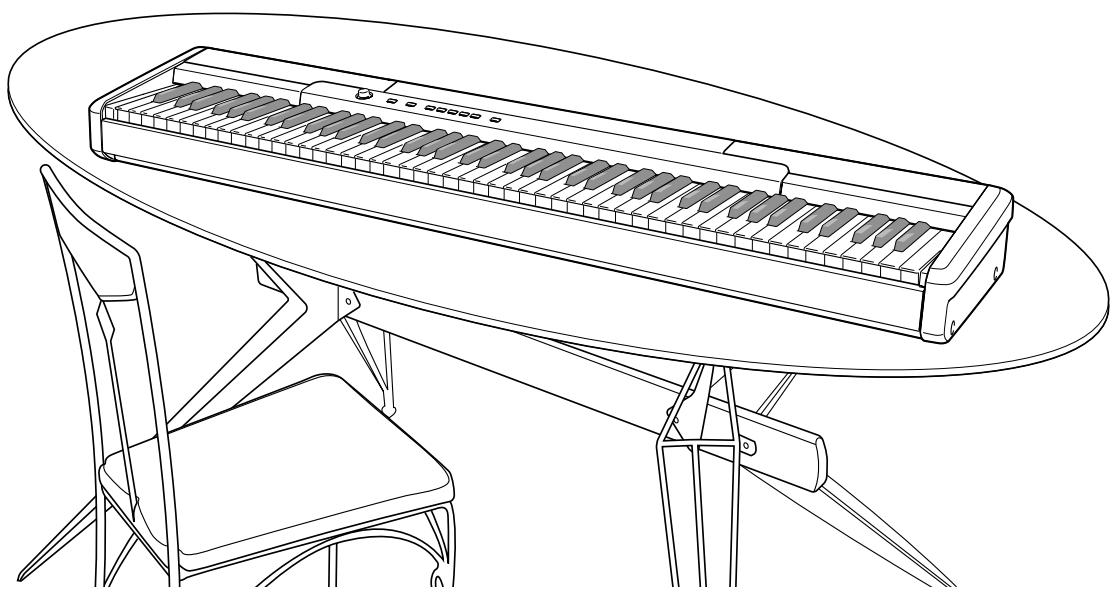
Before trying to use the piano, be sure to read the separate "Safety Precautions".
Precauciones de seguridad
Antes de intentar usar el piano, asegúrese de leer las "Precauciones de seguridad" separadas.
IMPORTANT SAFETY INSTRUCTIONS
- Read these instructions.
- Keep these instructions.
- Heed all warnings.
- Follow all instructions.
- Do not use this apparatus near water.
- Clean only with dry cloth.
- Do not block any ventilation openings. Install in accordance with the manufacturer's instructions.
- Do not install near any heat sources such as radiators, heat registers, stoves, or other apparatus (including amplifiers) that produce heat.
- Do not defeat the safety purpose of the polarized or grounding-type plug. A polarized plug has two blades with one wider than the other. A grounding type plug has two blades and a third grounding prong. The wide blade or the third prong are provided for your safety. If the provided plug does not fit into your outlet, consult an electrician for replacement of the obsolete outlet.
- Protect the power cord from being walked on or pinched particularly at plugs, convenience receptacles, and the point where they exit from the apparatus.
- Only use attachments/accessories specified by the manufacturer.
- Use only with the cart, stand, tripod, bracket, or table specified by the manufacturer, or sold with the apparatus. When a cart is used, use caution when moving the cart/apparatus combination to avoid injury from tip-over.

- Unplug this apparatus during lightning storms or when unused for long periods of time.
- Refer all servicing to qualified service personnel. Servicing is required when the apparatus has been damaged in any way, such as power-supply cord or plug is damaged, liquid has been spilled or objects have fallen into the apparatus, the apparatus has been exposed to rain or moisture, does not operate normally, or has been dropped.
The apparatus shall not be exposed to dripping or splashing and that no objects filled with liquids, such as vases, shall be placed on the apparatus.
The power indicator being unlit does not mean the apparatus is completely disconnected from the MAINS. When you need to have the apparatus completely disconnected from the MAINS, you must unplug the power cord. For that purpose, locate the apparatus in a way that secures easy access to the power cord.
NOTICE
This equipment has been tested and found to comply with the limits for a Class B digital device, pursuant to Part 15 of the FCC Rules. These limits are designed to provide reasonable protection against harmful interference in a residential installation. This equipment generates, uses and can radiate radio frequency energy and, if not installed and used in accordance with the instructions, may cause harmful interference to radio communications. However, there is no guarantee that interference will not occur in a particular installation. If this equipment does cause harmful interference to radio or television reception, which can be determined by turning the equipment off and on, the user is encouraged to try to correct the interference by one or more of the following measures:
- Reorient or relocate the receiving antenna.
- Increase the separation between the equipment and receiver.
- Connect the equipment into an outlet on a circuit different from that to which the receiver is connected.
- Consult the dealer or an experienced radio/TV technician for help.
FCC WARNING
Changes or modifications not expressly approved by the party responsible for compliance could void the user's authority to operate the equipment.
Important!
Please note the following important information before using this product.
- Before using the AD-12 Adaptor to power the unit, be sure to check the AC Adaptor for any damage first. Carefully check the power cord for breakage, cuts, exposed wire and other serious damage. Never let children use an AC adaptor that is seriously damaged.
- The product is not intended for children under 3 years.
- Use only CASIO AD-12 adaptor.
The AC adaptor is not a toy. - Be sure to disconnect the AC adaptor before cleaning the product.

This mark applies in EU countries only.

CASIO Europe GmbH
Bornbarch 10, 22848 Norderstedt, Germany
General Guide E-2
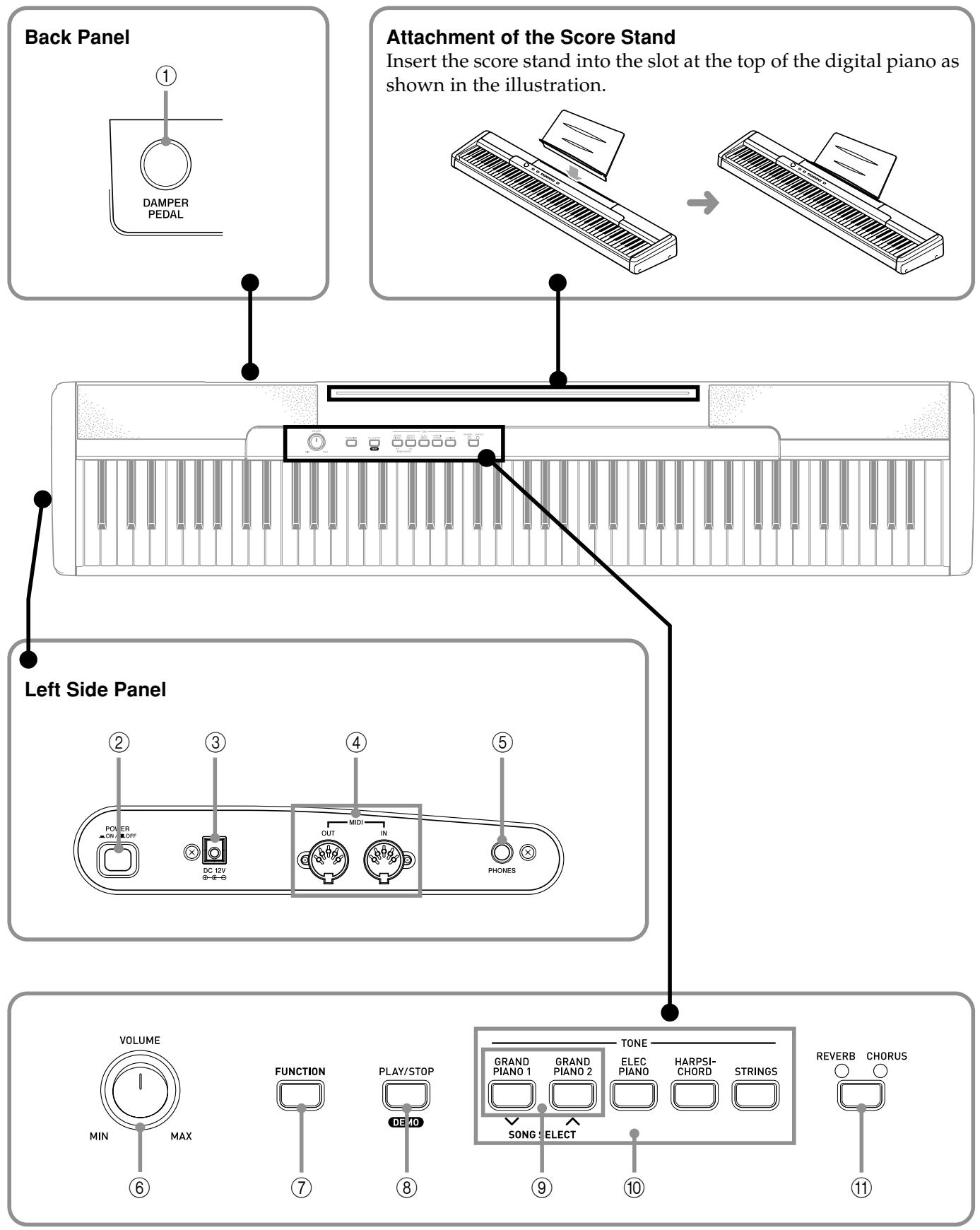
Attachment of the Score Stand E-2
Playing Back the Built-in Demo Tunes .... E-3
Power Supply E-4
Using the AC Adaptor E-4
Connections E-5
Connecting Headphones E-5
Connecting to a DAMPER PEDAL Jack.....E-5
Playing with Different Tones... E-6
Selecting and Playing a Tone E-6
Using Tone Effects E-6
Layering Two Tones E-7
Other Settings E-8
Changing the Keyboard Touch E-8
Changing the Pitch of the Piano to Match
Another Instrument E-8
Changing the Piano Key E-8
UsingMIDI E-9
Troubleshooting......E-10
Specifications. E-11
Operational Precautions ......E-12
Locating the Unit E-12
Care of the Unit. E-12
MIDI Implementation Chart
Company and product names used in this manual may be registered trademarks of others.
NOTE
Each chapter of this manual starts with an illustration of the piano's console, which shows the buttons and other controllers you need to operate.
① DAMPER PEDAL jack
② POWER button
③ DC 12V jack
④ MIDI OUT/IN terminals
(5) PHONES jack
⑥ VOLUME knob
(7) FUNCTION button
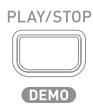
⑧ PLAY/STOP, DEMO button
⑨ SONG SELECT buttons
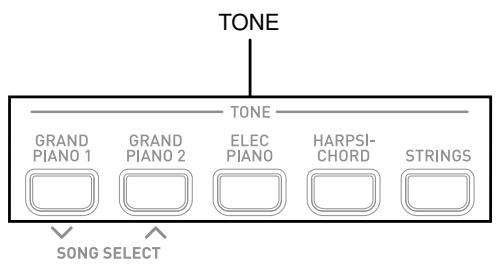
10 TONE buttons
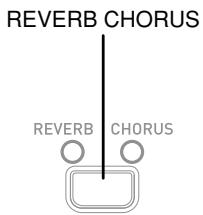
11 REVERB CHORUS button
NOTE
- Key, button, and other names are indicated in the text of this manual using bold type.
Playing Back the Built-in Demo Tunes
This digital piano comes with 5 built-in demo tunes, each of which features one of the built-in tones.
To play the built-in tunes in sequence
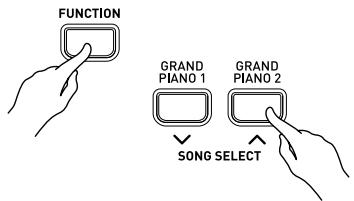
While holding down the FUNCTION button, press the PLAY/STOP button.
- This starts sequential playback of the built-in tunes.
- You can play along with the built-in tunes on the keyboard, if you want. Tone assigned to the keyboard is the one that is preset for the built-in tune that is playing.
- You can also cycle through the available tunes by holding down the FUNCTION button and pressing the SONG SELECT [√] or [▲] button.
Press the PLAY/STOP button again to stop the tune play.
| Tone | Title | Composer | Play Time |
| GRAND PIANO 1 | Étude Op.25-9 | F.F.Chopin | 0:56 |
| GRAND PIANO 2 | Norwegische Tänze 2 | E.Grieg | 1:45 |
| ELEC PIANO | Original | - | 1:49 |
| HARPSICHORD | Gavotte [Französsische Suite 5] | J.S.Bach | 0:43 |
| STRINGS | Intermezzo Sinfonico [Cavalleria Rusticana] | P.Mascagni | 1:49 |
To play a specific built-in tune
While holding down the FUNCTION button, press the SONG SELECT [√] or [▲] button to cycle through the available tunes.
Press the PLAY/STOP button.
- This starts the playback of the tune in an endless loop.
3 Press the PLAY/STOP button again to stop tune play.
Power Supply
You can power this digital piano by plugging it into a standard household power outlet.
Be sure you turn off power and unplug the power cord from the electrical outlet whenever the digital piano is not in use.
Using the AC Adaptor
Make sure that you use only the AC adaptor specified for this digital piano.
Specified AC Adaptor: AD-12
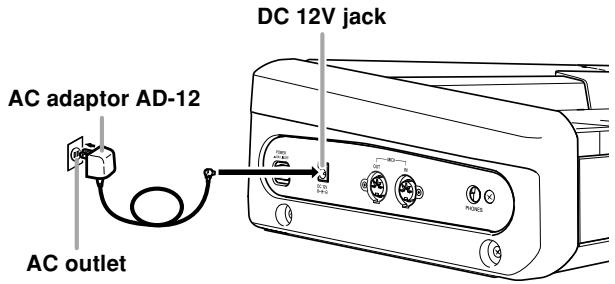
[Left Side Panel]
Note the following important precautions to avoid damage to the power cord.
- During Use
- Never pull on the cord with excessive force.
- Never repeatedly pull on the cord.
- Never twist the cord at the base of the plug or connector.
- The power cord should not be stretched tight while it is in use.
During Movement
- Before moving the keyboard, be sure to unplug the AC adaptor from the power outlet.
During Storage
- Loop and bundle the power cord, but never wind it around the AC adaptor.
IMPORTANT!
- Make sure that the product is turned off before connecting or disconnecting the AC adaptor.
- Using the AC adaptor for a long time can cause it to become warm to touch. This is normal and does not indicate malfunction.
IMPORTANT!
- Whenever connecting external equipment, first set the VOLUME knob of the digital piano and the volume controller of the external equipment to relatively low volume settings. You can later adjust volume to the level you want after connections are complete.
- Be sure also to refer to the documentation that comes with the external equipment for its proper connection procedures.
Connecting Headphones
Connect commercially available headphones to the digital piano's PHONES jack. This cuts off the built-in speakers, which means you can practice even late at night without disturbing others. To protect your hearing, make sure that you do not set the volume level too high when using headphones.
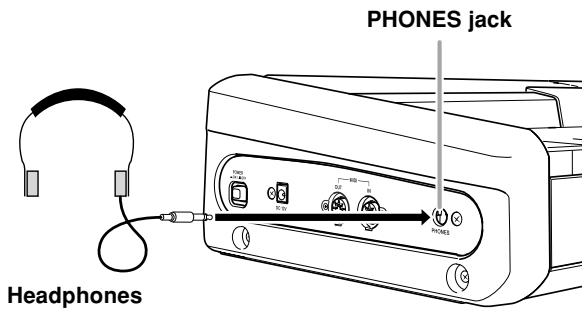
[Left Side Panel]
Connecting to a DAMPER PEDAL Jack
Connect the pedal's cable to the digital piano's DAMPER PEDAL jack.
Pressing this pedal causes notes to reverberate and to sustain longer.
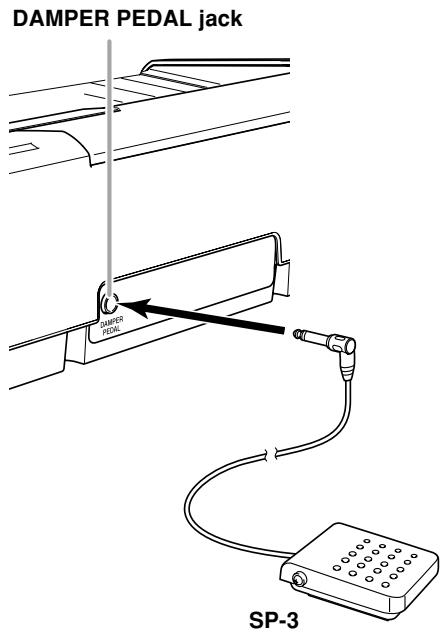
[Back Panel]
Accessories and Options
Use only the accessories and options specified for this digital piano. Use of non-authorized items creates the danger of fire, electric shock, and personal injury.
Selecting and Playing a Tone
The piano comes with 5 built-in tones.
Press the POWER button.
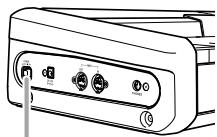
POWER button
Use the VOLUME knob to adjust the volume level.
- Before playing, it is a good idea to set the volume to a relatively low level.
Press the TONE button of the tone you want to select.
4 Now try playing something on the keyboard.
| Tone Name | Maximum Polyphony |
| GRAND PIANO 1 | 16 |
| GRAND PIANO 2 | 32 |
| ELEC PIANO | 32 |
| HARPSICHORD | 16 |
| STRINGS | 32 |
Using Tone Effects
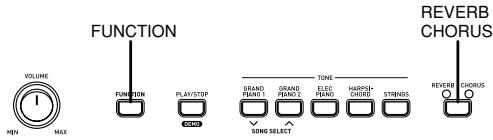
Reverb: Makes your notes resonate
Chorus: Adds more breadth to your notes
Press the REVERB CHORUS button to cycle through the effect settings as shown below.
- You can find out the current reverb/chorus configuration by looking at the REVERB and CHORUS indicator lamps.
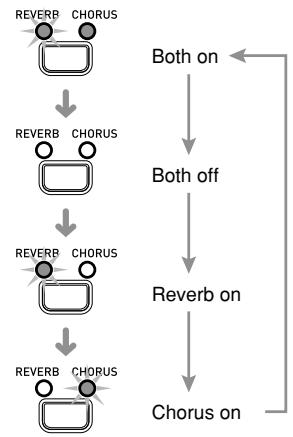
Selecting an Effect
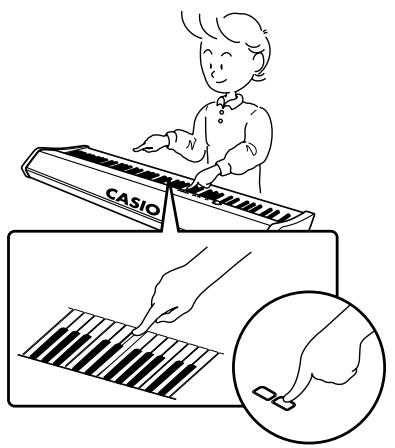
You can select from among four reverb effects and four chorus effects by pressing the keyboard keys shown below.
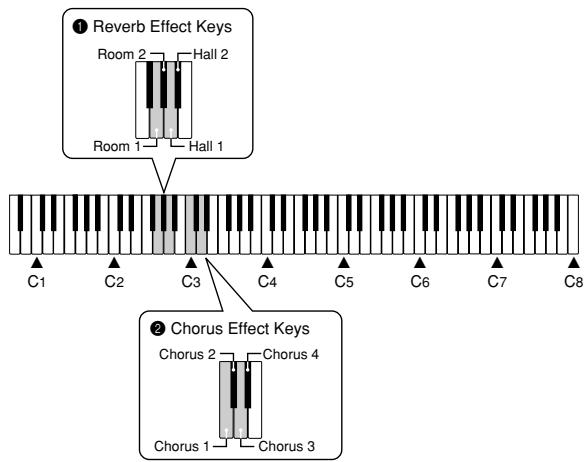
While holding down the FUNCTION button, press one of the keyboard keys shown above.
Layering Two Tones
Use the following procedure to layer to two tones, so they sound at the same time.
Simultaneously press the TONE buttons of the two tones that you want to layer.
Example: Press GRAND PIANO 2 button and STRINGs button at the same time.
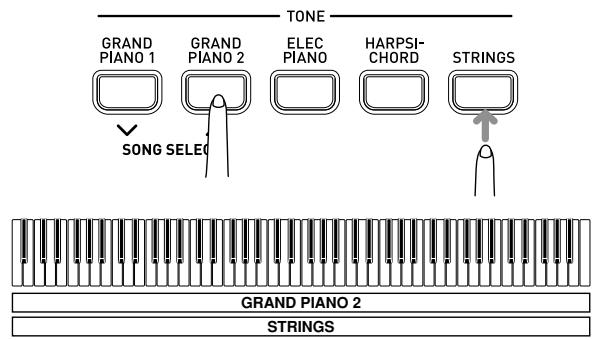
- The tones are now layered.
After you are finished using the layered tones, press the one of the TONE buttons again to unlayer them.
Adjusting the Volume of Layered Tones
While holding down the FUNCTION button, use the keyboard keys shown below to adjust the volume of the layered tones.
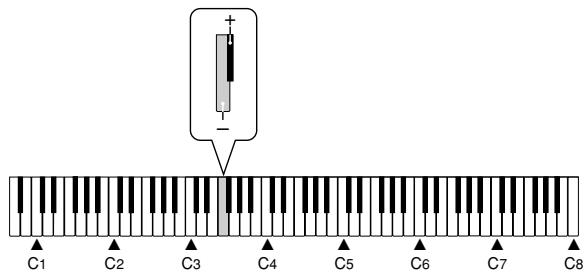
+: Raises the volume
- : Lowers the volume
Changing the Keyboard Touch
This setting changes the relative touch of the keyboard keys.
Changing the Pitch of the Piano to Match Another Instrument
Use this setting to raise or lower the overall pitch of the piano. The setting range is plus or minus 50 cents (100 cents = 1 semitone) from the standard pitch of A4 = 440.0Hz.
Changing the Piano Key
Use this setting to raise or lower the overall key of the keyboard in semitone steps.

While holding down the FUNCTION button, use the keyboard keys shown below to select the keyboard setting you want.
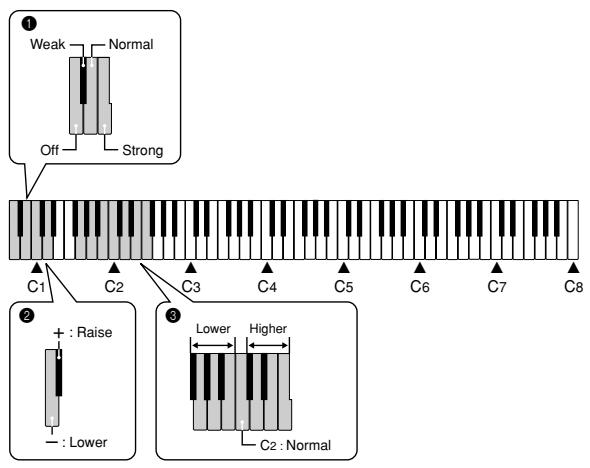
1 Changing the Keyboard Touch
Off
Weak (Strong sound is produced even when relatively light pressure is applied.)
Normal
Strong (Normal sound is produced even when relatively strong pressure is applied.)
Changing the Pitch of the Piano to Match Another Instrument
+: Raise
:Lower
- Each press of a key changes the current setting by approximately 1 cents (1/100 semitone).
NOTE
- Holding down the FUNCTION button and pressing keyboard keys “-” and “+” at the same time returns tuning to the standard A4 = 440.0Hz.
Changing the Piano Key
Higher (C# to F)
Normal (C)
Lower (F# to B)
Using MIDI
What is MIDI?
The letters MIDI stand for Musical Instrument Digital Interface, which is the name of a worldwide standard for digital signals and connectors that makes it possible to exchange musical data between musical instruments and computers (machines) produced by different manufacturers.
MIDI Connections
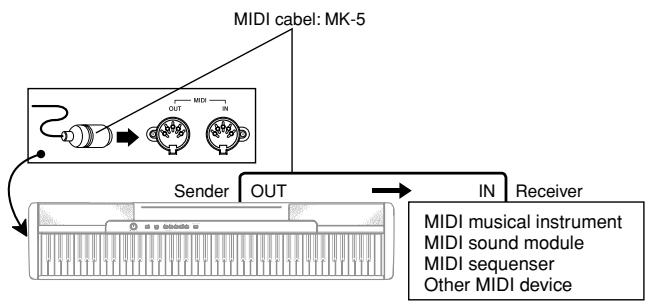
Send
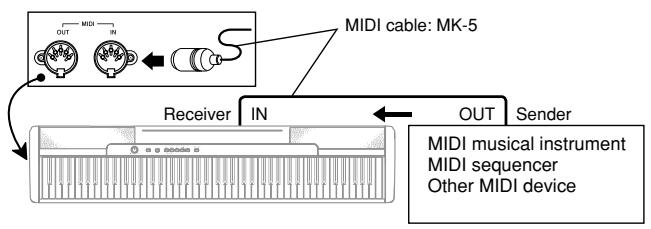
Receive
MIDI Settings
1 Send Channel
Use this setting to specify one of the MIDI channels (1 through 16) as the Send Channel for sending MIDI messages to an external device.
Local Control
This setting controls whether or not power is cut off internally from the piano's keyboard and sound source. Turning off Local Control cuts off power to the keyboard and source, which means that the piano does not produce any sound when played. This comes in handy when you want to turn off the piano's keyboard and use its auto accompaniment feature to accompany an external sequencer or other device.
While holding down the FUNCTION button, press one the keyboard keys shown below to configure the setting you want.
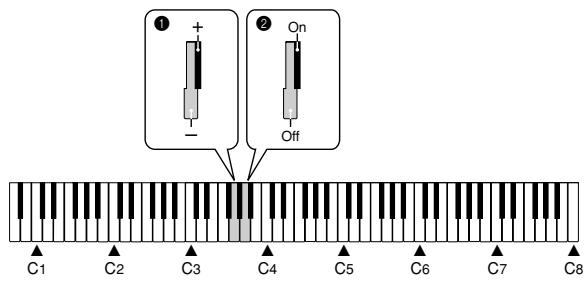
1 Send Channel
- : Decreases value
+: Increases value
Local Control
Off
On
Program Change
| Tone Name | Program Change | Bank Select MSB |
| GRAND PIANO 1 | 0 | 0 |
| GRAND PIANO 2 | 1 | 0 |
| ELEC PIANO | 2 | 0 |
| HARPSICHORD | 3 | 0 |
| STRINGS | 4 | 0 |
| Symptom | Possible Cause | Action | Reference |
| No sound produced when keyboard keys are pressed. | 1. VOLUME knob set to MIN. 2. Headphones connected to the digital piano. 3. Local Control turned off. | 1. Move the VOLUME knob more towards MAX. 2. Disconnect the headphones from the digital piano. 3. Turn on Local control. | Page E-6 Page E-5 Page E-9 |
| Keyboard out of tune. | 1. The piano key is set to a value other than C. 2. Incorrect pitch setting of the piano. | 1. Change the piano key setting to C, or turn the digital piano power off and then back on again. 2. Correct the pitch setting, or turn the digital piano power off and then back on again. | Page E-8 Page E-8 |
| No sound produced by demo tune play. | 1. VOLUME knob set to MIN. 2. Headphones connected to the digital piano. | 1. Move the VOLUME knob more towards MAX. 2. Disconnect the headphones from the digital piano. | Page E-6 Page E-5 |
| No sound produced by connected external MIDI sound source when the digital piano keys are pressed. | 1. The digital piano Send Channel does not match the Send Channel of the MIDI sound source. 2. Volume or expression setting of the external sound source is set to 0. | 1. Change the Send Channel settings so they are identical. 2. Change the volume or expression setting of the external sound source to an appropriate value. | Page E-9 See the documentation that comes with the external sound source. |
| Models: | CDP-100 |
| Keyboard: | 88 piano keys (with touch response) |
| Polyphony: | 32 notes, maximum |
| Tones: | 5; with layer |
| Digital Effects: | Reverb (4 types), Chorus (4 types) |
| Built-in Tunes: | 5 |
| Pedal: | Damper |
| Other Functions: | • Touch: 3 types, off • Transpose: 1 octave (F# to C to F) • Tuning: A4 = 440.0Hz ±50 cents (adjustable) |
| MIDI: | 16 multi-timbre receive |
| Input/Output: | • Headphones: Stereo mini jack Output Impedance: 170Ω Output Voltage: 4.8V (RMS) MAX • Pedal: Standard jack • Power: 12V DC • MIDI (OUT) (IN) |
| Speakers: | (12cm × 6cm) × 2 (Output: 8.0W + 8.0W) |
| Power Supply: | AC Adaptor: AD-12 |
| Power Consumption: | 12V --- 18W |
| Dimensions: | 132.3 × 27.8 × 13.2 cm (52²/₁₆ × 10¹⁵/₁₆ × 5³/₁₆ inch) |
| Weight: | Approximately 11.2 kg (24.7 lbs) |
- Design and specifications are subject to change without notice.
Locating the Unit
Avoid the following locations.
- Areas exposed to direct sunlight and high humidity
- Areas subjected to very low temperatures
- Near a radio, TV, video deck, or tuner (unit can cause interference with audio or video signals)
You may notice lines in the finish of the case of this product. These lines are the result of the molding process used to shape the plastic of the case. They are not cracks or breaks in the plastic, and are no cause for concern.
Care of the Unit
- Never use benzene, alcohol, thinner or other such chemicals to clean the exterior of the unit.
- To clean the keyboard, use a soft cloth dampened with a weak solution of a mild neutral detergent and water. Wring out all excess moisture from the cloth before wiping.
NOTE
- Unauthorized reproduction of this manual in its entirety or in part is expressly forbidden. All rights reserved.
- CASIO COMPUTER CO., LTD. shall not be held liable for any damages or losses or any claims by third parties arising from use of this product or this manual.
- The contents of this manual are subject to change without notice.
| Function ... | Transmitted | Recognized | Remarks | |
| Basic Channel | Default Changed | 1 | 1-16 | |
| 1-16 | 1-16 | |||
| Mode | Default Messages Altered | Mode 3 X | Mode 3 X | |
| ********** | ********** | |||
| Note Number | True voice | 21-108********** | 0-127 0-127 | |
| Velocity | Note ON Note OFF | O 9nH V = 1-127 X 8nH V = 64 | O 9nH V = 1-127 X 9nH V = 0,8nH V = ** | **: no relation **: sin relacion |
| After Touch | Key's Ch's | X X | X X | |
| Pitch Bender | X | O | ||
| Control Change | 0, 32 1 6, 38 7 10 11 64 66 67 91 93 100, 101 120 121 | O X O*1 O O O O X X X O O O O O O X X X O O O O O X X O O O O O O O O O O O O O O O O O O O O O O O O O O O O O O O O O O O O O O O O O O O O O O O O O O O O O O O O O O O O O O O O O O O O O O O O O O O O O O O O O O O O O O O O O O O O O O O O O O O O | O O O O*1 O O O O O O O O O O O O O O O O O O O O O O O O O O O O O O O O O O O O O O O O O O O O O O O O O O O O O O O O O O O O O O O O O O O O O O O O O O O O O O O O O O O O O O O O O O O O O O O O O O O Ds. | Bank select Modulation Data entry Volume Pan Expression Hold1 Sostenuto Soft pedal Reverb send Chorus send RPN LSB, MSB All sound off Reset all controller |
| Program Change | :True # | O 0-4********** | O 0-4********** | |
| System Exclusive | O*2 | O*2 | ||
| System Common | :Song Pos :Song Sel : Tune | X X X X | X X X | |
| System Real Time | :Clock : Commands | X X | X X | |
| Aux Messages | : Local ON/OFF : All notes OFF Active Sense : Reset | X X X | X O | |
| X X | O | |||
| X X | O | |||
| Remarks | *1 Fine tune and coarse tune send/receive, RPN Null, and pitch bend sense receives *1 Affinaciónónica y envío/recepción de afinación gruesa, RPN nulo y recepción de captação de inflexión de alta tonal. *2 - Reverb type [F0][7F][7F][04][05][01][01][01][01][01][01][01][01][01][01][01][01][01][01][01][01][01][01][01][01][01][01][01][01][01][01][01][01][01][01][01][01][01][01] | *2 - Tipo de reverberación [F0][7F][7F][04][05][01][01][01][01][01][01][01][01][01][01][01][01][01][01][01][01][01][01][01][01][01][01][01][01][01][01][01][01] | ||
Mode 1: OMNI ON, POLY
Mode 3: OMNI OFF, POLY
Mode 2: OMNI ON, MONO
Mode 4: OMNI OFF, MONO
O:Yes
X:No

This recycle mark indicates that the packaging conforms to the environmental protection legislation in Germany.
Estamarca de reciclaje indica que el empaquetado se ajusta a la legislacion de proteccion ambiental en Alemania.
CASIO
- CDP-100
- USER'S GUIDE GUIA DEL USUARIO
- IMPORTANT SAFETY INSTRUCTIONS
- NOTICE
- FCC WARNING
- Important!
- General Guide E-2
- Power Supply E-4
- Connections E-5
- Playing with Different Tones... E-6
- Other Settings E-8
- Troubleshooting......E-10
- Specifications. E-11
- Operational Precautions ......E-12
- MIDI Implementation Chart
- NOTE
- Playing Back the Built-in Demo Tunes
- To play the built-in tunes in sequence
- To play a specific built-in tune
- Power Supply
- Using the AC Adaptor
- - During Use
- During Movement
- During Storage
- Connecting Headphones
- Connecting to a DAMPER PEDAL Jack
- Accessories and Options
- Selecting and Playing a Tone
- Using Tone Effects
- Selecting an Effect
- Layering Two Tones
- Adjusting the Volume of Layered Tones
- Changing the Keyboard Touch
- Changing the Pitch of the Piano to Match Another Instrument
- Changing the Piano Key
- Using MIDI
- What is MIDI?
- MIDI Connections
- MIDI Settings
- Send Channel
- Local Control
- Locating the Unit
- Care of the Unit
Marque : CASIO
Modèle : CDP-100
Catégorie : Piano numérique