MODE D'EMPLOI AP-38 CASIO
CELVIANO AP-38
MODE D'EMPLOI

CASIO®
CONSIGNES DE SÉCURITÉ IMPORTANTES
AVERTISSEMENT - Lors de l'utilisation de produits électriques, des précautions de base doivent toujours être suivies, notamment les suivantes :
- Lisez ces instructions.
- Conservez ces instructions.
- Tenez compte de tous les avertissements.
- Suivez toutes les instructions.
- N'utilisez pas cet appareil près de l'eau.
- Nettoyez uniquement avec un chiffon sec.
- Ne l'installez pas à proximité de sources de chaleur telles que radiateurs, bouches de chaleur, poêles ou autres appareils (y compris les amplificateurs) qui produisent de la chaleur.
- Ne neutralisez pas la fonction de sécurité de la fiche polarisée ou de mise à la terre. Une fiche polarisée a deux lames, l'une plus large que l'autre. Une fiche de mise à la terre a deux lames et une troisième broche de mise à la terre. La lame large ou la troisième broche sont fournies pour votre sécurité. Si la fiche fournie ne correspond pas à votre prise, consultez un électricien pour remplacer la prise obsolète.
- Protégez le cordon d'alimentation afin qu'il ne soit pas piétiné ou pincé, en particulier au niveau des prises, des prises de courant et de l'endroit où il sort de l'appareil.
- Utilisez uniquement les accessoires spécifiés par le fabricant.
- Utilisez uniquement avec le support spécifié par le fabricant ou vendu avec l'appareil.
- Débranchez cet appareil pendant les orages ou lorsqu'il reste inutilisé pendant de longues périodes.
- Confiez toute réparation à un personnel qualifié. Une réparation est nécessaire lorsque l'appareil a été endommagé de quelque manière que ce soit, par exemple si le cordon d'alimentation ou la prise est endommagé, si du liquide a été renversé ou si des objets sont tombés dans l'appareil, si l'appareil a été exposé à la pluie ou à l'humidité, s'il ne fonctionne pas normalement ou s'il est tombé.
- 8 : s'applique uniquement à l'AP-38.
428A-E-002A
AVIS
Cet équipement a été testé et déclaré conforme aux limites applicables aux appareils numériques de classe B, conformément à la partie 15 des règles de la FCC. Ces limites sont conçues pour fournir une protection raisonnable contre les interférences nuisibles dans une installation résidentielle. Cet équipement génère, utilise et peut émettre de l'énergie radiofréquence et, s'il n'est pas installé et utilisé conformément aux instructions, peut provoquer des interférences nuisibles aux communications radio. Cependant, rien ne garantit que des interférences ne se produiront pas dans une installation particulière. Si cet équipement provoque des interférences nuisibles à la réception radio ou télévisée, ce qui peut être déterminé en éteignant et en allumant l'équipement, l'utilisateur est encouragé à essayer de corriger les interférences par une ou plusieurs des mesures suivantes :
- Réorienter ou déplacer l'antenne de réception.
- Augmenter la distance entre l'équipement et le récepteur.
- Brancher l'équipement sur une prise située sur un circuit différent de celui auquel le récepteur est connecté.
- Consulter le revendeur ou un technicien radio/TV expérimenté pour obtenir de l'aide.
Avertissement FCC
Tout changement ou modification non expressément approuvé par la partie responsable de la conformité pourrait annuler le droit de l'utilisateur à utiliser l'équipement.
POUR RÉDUIRE LE RISQUE D'INCENDIE OU DE CHOC ÉLECTRIQUE, CONFIEZ TOUTE RÉPARATION À UN PERSONNEL QUALIFIÉ.
ATTENTION
RISQUE DE CHOC ÉLECTRIQUE - NE PAS OUVRIR

ATTENTION : POUR RÉDUIRE LE RISQUE DE CHOC
ÉLECTRIQUE, NE RETIREZ PAS LE CAPOT (OU LE PANNEAU ARRIÈRE). AUCUNE PIÈCE
- RÉPARABLE PAR L'UTILISATEUR À L'INTÉRIEUR. CONFIEZ TOUTE RÉPARATION À UN
PERSONNEL QUALIFIÉ.

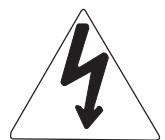
Le symbole de l'éclair avec une flèche, dans un triangle équilatéral, est destiné à alerter l'utilisateur de la présence d'une "tension dangereuse" non isolée à l'intérieur du boîtier du produit, qui peut être d'une ampleur suffisante pour constituer un risque de choc électrique pour les personnes.

Le point d'exclamation dans un triangle équilatéral est destiné à alerter l'utilisateur de la présence d'instructions importantes d'utilisation et de maintenance (réparation) dans la documentation accompagnant le produit.
C E
CASIO ELECTRONICS CO., LTD.
Unité 6, 1000
North Circular Road
Londres NW2 7JD, Royaume-Uni
Cette marque s'applique uniquement au modèle AP-38V.
Veuillez conserver toutes les informations pour référence future.
428A-E-004A
Consignes de sécurité
Félicitations pour votre choix du piano numérique CASIO. Ce piano numérique est un instrument de musique sophistiqué qui allie le meilleur du toucher et de la sonorité d'un piano traditionnel aux dernières avancées de la technologie électronique moderne.
- Avant d'utiliser l'instrument, assurez-vous de lire attentivement les instructions contenues dans ce manuel.
- Veuillez conserver toutes les informations pour référence future.
Symboles
Divers symboles sont utilisés dans ce guide de l'utilisateur et sur le produit lui-même pour garantir une utilisation sûre et correcte du produit, et pour prévenir les blessures de l'utilisateur et d'autres personnes ainsi que les dommages matériels. Ces symboles et leur signification sont présentés ci-dessous.

AVERTISSEMENT
Cette indication précise les points qui présentent un risque de mort ou de blessure grave si le produit est utilisé de manière incorrecte en ignorant cette indication.

ATTENTION
Cette indication précise les points qui présentent un risque de blessure ainsi que les points pour lesquels il y a une probabilité de dommages matériels uniquement si le produit est utilisé de manière incorrecte en ignorant cette indication.
Exemples de symboles

Ce symbole triangulaire () signifie que l'utilisateur doit être prudent. (L'exemple à gauche indique un avertissement de choc électrique.)

Ce cercle barré () signifie que l'action indiquée ne doit pas être effectuée. Les indications à l'intérieur ou à proximité de ce symbole sont spécifiquement interdites. (L'exemple à gauche indique que le démontage est interdit.)

Le point noir () signifie que l'action indiquée doit être effectuée. Les indications à l'intérieur de ce symbole sont des actions spécifiquement recommandées. (L'exemple à gauche indique que la fiche d'alimentation doit être débranchée de la prise électrique.)

AVERTISSEMENT
Cordon d'alimentation
Une utilisation incorrecte du cordon d'alimentation peut créer un risque d'incendie et de choc électrique. Veillez toujours à respecter les précautions suivantes.
- Utilisez uniquement le cordon d'alimentation spécifié pour ce piano numérique.
- Assurez-vous que la source d'alimentation que vous utilisez correspond à la tension nominale indiquée sur l'instrument lui-même.
- N'utilisez pas de rallonge pour brancher plusieurs appareils sur la même prise de courant.
Cordon d'alimentation
Une utilisation incorrecte du cordon d'alimentation peut créer un risque de blessure, de dommage matériel, d'incendie et de choc électrique. Veillez toujours à respecter les précautions suivantes.
- Ne placez pas d'objets lourds sur le cordon d'alimentation et ne l'exposez pas à la chaleur.
- Ne tentez jamais de modifier le cordon d'alimentation ou de le plier excessivement.
- Ne tordez jamais le cordon d'alimentation et ne tirez jamais dessus.
- Si le cordon d'alimentation ou la fiche est endommagé, contactez votre revendeur d'origine ou un prestataire de services agréé CASIO.
Cordon d'alimentation
Ne touchez pas la fiche avec des mains mouillées lorsqu'elle est branchée. Cela peut provoquer un choc électrique.
Ne placez pas le piano numérique sur une surface instable.
Ne placez jamais le piano numérique sur une surface bancale, inclinée ou autrement instable*. Une surface instable peut faire tomber le piano numérique, créant un risque de blessure.

- Évitez les zones où il y a plusieurs couches de moquette et où des câbles passent sous le piano numérique.
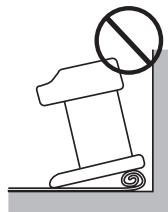
Assurez-vous toujours de fixer le piano numérique au support avec les vis fournies. Un piano numérique non fixé peut tomber du support, créant un risque de blessure.
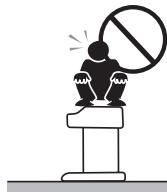
Ne montez jamais sur le piano numérique ou le support.
Ne montez jamais sur le piano numérique et ne vous suspendez pas à ses bords. Cela peut faire tomber le piano numérique, créant un risque de blessure. Une attention particulière est requise dans les foyers avec de jeunes enfants.
Ne jetez jamais le piano numérique au feu.
Ne jetez jamais le piano numérique au feu. Cela crée un risque d'incendie et de blessure due à une explosion.

Ne placez pas de récipients contenant de l'eau ou d'autres liquides sur l'instrument.
Ne placez pas les objets suivants sur l'instrument. Placer de tels objets sur l'instrument peut provoquer un incendie ou un choc électrique s'ils se renversent et pénètrent à l'intérieur de l'instrument.

- Récipients remplis d'eau ou d'autres liquides (y compris vases, plantes en pot, tasses, cosmétiques et médicaments)

- Petits objets métalliques (y compris épingles à cheveux, aiguilles à coudre et pièces de monnaie)
- Objets inflammables
- Sources de flammes nues, telles que des bougies allumées
Si un objet étranger venait à pénétrer dans l'instrument, veuillez prendre les mesures suivantes :
- Mettez l'appareil hors tension.
- Débranchez le cordon d'alimentation de la prise murale.
- Consultez le revendeur auprès duquel vous avez acheté l'instrument ou un prestataire de services CASIO agréé.
N'exposez pas ce piano numérique à la pluie ou à l'humidité.
Pour réduire le risque d'incendie ou de choc électrique, n'exposez pas ce piano numérique à la pluie ou à l'humidité.
Ne tentez jamais de démonter ou de modifier le piano numérique.
Ne tentez jamais de démonter ou de modifier le piano numérique de quelque manière que ce soit. Cela créerait un risque de choc électrique, de brûlure ou d'autres blessures. Confiez toute inspection, tout réglage et toute réparation internes à votre revendeur d'origine ou à un prestataire de services CASIO agréé.

Précautions concernant la fumée, les odeurs anormales et autres anomalies
L'utilisation continue du piano numérique alors qu'il émet de la fumée ou une odeur anormale, ou qu'il présente d'autres anomalies, crée un risque d'incendie et de choc électrique. Dès que vous remarquez une anomalie, effectuez immédiatement les étapes suivantes.
- Mettez le piano numérique hors tension.
- Débranchez le piano numérique de sa prise de courant.
- Contactez votre revendeur d'origine ou un réparateur agréé CASIO.

Évitez de faire tomber le piano numérique et de lui faire subir des chocs violents.
L'utilisation continue du piano numérique après qu'il a été endommagé par une chute ou un autre choc externe présente un risque d'incendie et de choc électrique. Dès que le piano numérique est endommagé par un choc, effectuez immédiatement les étapes suivantes : 1. Éteignez le piano numérique. 2. Débranchez le piano numérique de sa prise de courant. 3. Contactez votre revendeur d'origine ou un réparateur agréé CASIO.
Ne placez pas de sacs en plastique sur votre tête ou dans votre bouche.
Ne laissez jamais les sacs en plastique dans lesquels le piano numérique et ses accessoires sont livrés être placés sur la tête ou avalés. Cela présente un risque d'étouffement. Une attention particulière est requise dans les foyers avec de jeunes enfants.

Ouverture et fermeture du couvercle du clavier
Assurez-vous que le couvercle du clavier est complètement ouvert. Lors de la fermeture du couvercle, tenez le devant du couvercle et fermez-le lentement. Se coincer les doigts entre le piano numérique et le couvercle du clavier présente un risque de blessure.
ATTENTION
Cordon d'alimentation
Une utilisation inappropriée du cordon d'alimentation peut présenter un risque d'incendie et de choc électrique. Veuillez toujours respecter les précautions suivantes.
- Ne placez jamais le cordon d'alimentation près d'une cuisinière ou d'une autre source de chaleur.
- Lorsque vous débranchez l'appareil d'une prise, ne tirez jamais sur le cordon. (Saisissez toujours la fiche pour tirer.) Après utilisation, éteignez l'interrupteur d'alimentation de l'instrument et débranchez le cordon d'alimentation de la prise électrique.
Fiche d'alimentation
Une utilisation inappropriée de la fiche d'alimentation peut présenter un risque d'incendie et de choc électrique. Veuillez toujours respecter les précautions suivantes.
- Enfoncez complètement la fiche dans la prise de courant.
- Débranchez de la prise de courant pendant les orages, et lorsque vous ne prévoyez pas d'utiliser le piano numérique pendant une longue période (comme avant un long voyage).
- Débranchez de la prise de courant au moins une fois par an et nettoyez toute accumulation de poussière entre les broches de la fiche.
Déplacement du piano numérique
Assurez-vous d'effectuer les étapes suivantes avant de déplacer le piano numérique. Le non-respect de ces consignes peut endommager le cordon d'alimentation, créant un risque d'incendie et de choc électrique.
- Débranchez le piano numérique de sa prise de courant.
- Débranchez le câble de connexion de la pédale, ainsi que tous les câbles et autres éléments connectés à l'arrière du piano numérique.


Nettoyage
Avant de nettoyer le piano numérique, débranchez-le de la prise de courant. Le non-respect de ces consignes peut endommager le cordon d'alimentation, créant un risque d'incendie et de choc électrique. Cela peut également faire tomber le piano numérique, créant un risque de blessure.


Ne montez jamais sur le piano numérique ou le support.
Cela peut faire tomber le piano numérique, créant un risque de blessure. Une attention particulière est requise dans les foyers avec de jeunes enfants.

Connecteur
Connectez uniquement les appareils spécifiés aux connecteurs du piano numérique. La connexion d'éléments non spécifiés crée un risque d'incendie et de choc électrique.

Emplacement
Évitez de placer le piano numérique dans les zones suivantes. Exposer le piano numérique aux conditions décrites ci-dessous crée un risque d'incendie et de choc électrique.
- Zones exposées à une humidité élevée ou à de grandes quantités de poussière, près des zones de préparation des aliments et autres zones exposées à la fumée d'huile.
- Près d'un radiateur, sur un tapis chauffant, en plein soleil, à l'intérieur d'une voiture fermée garée au soleil, et dans tout autre endroit soumis à une température très élevée
Ne placez jamais le piano numérique directement sur un meuble ou tout autre objet ayant une surface finie. Les pieds en caoutchouc sous le piano numérique peuvent réagir avec la peinture ou d'autres revêtements, ce qui peut tacher ou endommager la surface finie. Assurez-vous de poser du feutre ou un autre matériau sur la surface finie avant d'y placer le piano numérique.
Ne posez pas d'objets lourds sur le piano numérique.
Ne posez jamais d'objets lourds sur le piano numérique. Cela pourrait faire basculer le support et faire tomber l'objet, créant un risque de blessure.

Réglage du volume
Ne jouez pas à des volumes très élevés pendant une longue période. Cette précaution est particulièrement importante lors de l'utilisation d'un casque. Une exposition prolongée à un son très fort peut endommager votre audition.

Assemblez correctement le support.
Si vous ne le faites pas, le support peut basculer et le piano numérique peut tomber du support, créant un risque de blessure.
Assurez-vous d'assembler le support conformément aux instructions fournies avec celui-ci, et vérifiez que toutes les connexions sont bien fixées. Assurez-vous également de choisir un emplacement approprié pour le support.
- Lorsque vous placez le piano numérique sur le support, veillez à ne pas vous pincer les doigts entre le piano numérique et le support.

- Au moins deux personnes doivent soulever le piano numérique lors de sa mise en place sur le support ou de son déplacement. Essayer de déplacer le piano numérique seul peut faire basculer le support, créant un risque de blessure.
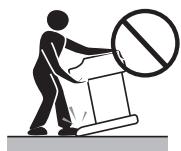
- Ne faites pas glisser le support et ne l'inclinez pas vers l'avant ou l'arrière lors de la mise en place du piano numérique sur le support ou de son déplacement. Cela pourrait faire basculer le piano numérique, créant un risque de blessure.
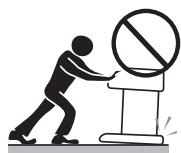
Vérifiez périodiquement que les vis qui fixent le piano numérique au support ne sont pas desserrées. Si une vis est desserrée, resserrez-la. Des vis desserrées peuvent faire basculer le support et faire tomber le piano numérique, créant un risque de blessure.
Caractéristiques principales
16 sonorités polyvalentes
16 sonorités d'instruments, dont le piano et l'orgue à tuyaux, offrent une grande polyvalence d'interprétation.
Un réglage facile vous permet de contrôler la brillance de chaque sonorité, et une fonction de superposition vous permet d'assigner deux sonorités pour qu'elles sonnent simultanément. D'autres fonctions incluent des effets numériques qui contrôlent les caractéristiques acoustiques des sonorités, ainsi que trois effets de pédale pour toutes les nuances d'un piano acoustique.
■ Métronome
Une opération simple vous permet de régler le tempo et la mesure du métronome en fonction du morceau que vous voulez jouer. C'est l'outil de pratique idéal pour les musiciens de tous niveaux.
16 morceaux de démonstration
16 morceaux de démonstration montrent comment utiliser chacune des sonorités intégrées.
■ Mémoire de morceaux
Deux zones de mémoire indépendantes vous permettent d'enregistrer et de lire séparément des morceaux. Vous pouvez enregistrer dans une mémoire puis enregistrer dans l'autre tout en lisant votre enregistrement original, ou même lire les deux mémoires en même temps.
■ Bibliothèque musicale
Lecture avec l'un des 50 morceaux intégrés de la bibliothèque musicale. Les parties de main droite et de main gauche sont séparées, vous pouvez donc désactiver la lecture d'une main et vous entraîner au clavier (Leçon par partie).
Tempérament variable, diapason baroque
Choisissez parmi une variété de réglages de tempérament et le diapason baroque pour une interprétation réaliste des pièces classiques.
■ Fonctions de réglage puissantes du clavier
Une sélection de fonctions de réglage puissantes du clavier vous aide à créer exactement l'ambiance musicale que vous souhaitez.
La transposition ajuste la tonalité du clavier par demi-tons.
L'accordage permet d'accorder l'instrument avec un autre instrument de musique.
Touch Select ajuste l'intensité du son émis en fonction de la pression exercée sur le clavier.
■ Borne MIDI
La connexion à un autre instrument de musique MIDI permet de jouer sur deux instruments à partir du clavier de ce piano numérique. Vous pouvez également connecter un séquenceur MIDI disponible dans le commerce pour augmenter le nombre de parties que vous pouvez jouer.
Sommaire
Précautions de sécurité. E-1
Caractéristiques principales. E-6
Sommaire. E-7
Guide général. E-8
Fixation du pupitre. E-8
Connexion à une prise de courant...E-10
Connexions. E-11
Accessoires et options. E-11
Fonctionnement de base. E-12
Utilisation des sons. E-12
Utilisation des effets numériques. E-16
Utilisation des pédales E-18
Utilisation du métronome. E-18
Utilisation de la mémoire de chansons .... E-20
À propos de la mémoire de chansons .E-20
Enregistrement. E-20
Lecture E-21
Suppression du contenu de la mémoire de chansons .E-22
Utilisation des morceaux de démonstration. E-23
Lecture des morceaux de démonstration en séquence ....E-23
Lecture d'un morceau de démonstration spécifique .E-23
Arrêt de la lecture des morceaux de démonstration .E-23
Utilisation de la bibliothèque musicale. E-24
Lecture des morceaux de la bibliothèque musicale .E-24
Pratique de parties individuelles (leçon par partie) ... E-25
Paramètres du clavier E-26
Utilisation de Touch Select E-26
Utilisation de Transpose E-26
Réglage de l'accordage du piano numérique ... E-27
Tempérament E-27
Utilisation du diapason baroque E-29
MIDI E-30
Qu'est-ce que le MIDI ? E-30
Ce que vous pouvez faire avec le MIDI E-30
Connexions MIDI E-30
Canaux MIDI E-30
Réception simultanée sur plusieurs canaux (multi-timbral) E-31
Spécification du canal clavier E-31
Envoi des données de lecture de la mémoire de morceaux E-31
Envoi des données de mémoire de chanson en cours de lecture ....E-31
Activation et désactivation du contrôle local .........E-32
Notes sur les données MIDI E-32
Dépannage E-34
Instructions d'assemblage......E-35
Spécifications E-38
Précautions d'utilisation......E-39
Annexe A-1
Réglages initiaux à la mise sous tension. A-1
Morceaux de la bibliothèque musicale A-3
Messages de canal A-4
Messages système. A-8
Tableau d'implémentation MIDI
Guide général
Panneau arrière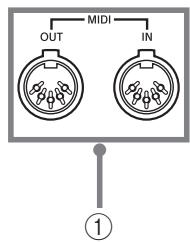
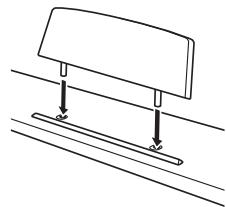
Fixation du pupitre
Fixez le pupitre en insérant ses ergots dans les trous situés sur le dessus du piano numérique.
Avant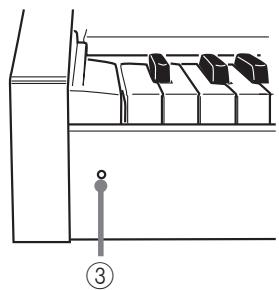
Bas 1
Bas
(6)


CASIO 8
9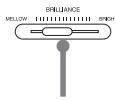
11 12
13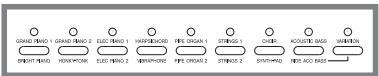
15
17

19 21
E-8
428A-E-012A

ATTENTION
Assurez-vous que le couvercle du piano numérique est complètement ouvert lorsque vous jouez sur le clavier. Un couvercle partiellement ouvert peut se fermer soudainement et vous pincer les doigts.
*Sur l'AP-38, le cordon d'alimentation est câblé en dur sous l'instrument.
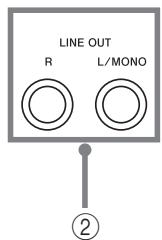
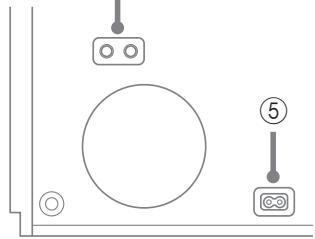
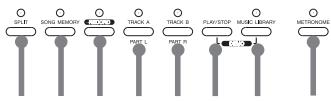
① Borne MIDI IN, borne MIDI OUT ② Prises LINE OUT (R, L/MONO) ③ Voyant d'alimentation ④ Prises casque ⑤ Prise d'alimentation secteur ⑥ Connecteur de pédale ⑦ Bouton POWER ⑧ Curseur VOLUME ⑨ Curseur BRILLIANCE ⑩ Bouton CONTROL ⑪ Bouton REVERB ⑫ Bouton CHORUS ⑬ Boutons de tonalité ⑭ Bouton SPLIT ⑮ Bouton SONG MEMORY ⑯ Bouton RECORD ⑰ Bouton TRACK A/PART L ⑱ Bouton TRACK B/PART R ⑲ Bouton PLAY/STOP ⑳ Bouton MUSIC LIBRARY ㉑ Bouton METRONOME
REMARQUE
Noms des notes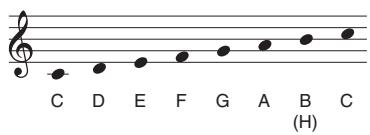
Une valeur à côté d'un nom de note indique la position relative de la note sur le clavier, comme indiqué ci-dessous.
Connexion à une prise de courant
Vous pouvez alimenter ce piano numérique en le branchant sur une prise de courant domestique standard.
Assurez-vous d'éteindre l'appareil et de débrancher le cordon d'alimentation de la prise électrique lorsque le piano numérique n'est pas utilisé.
Pour connecter à une prise de courant
- Vérifiez que le bouton POWER du piano numérique est en position OFF.
- S'il est sur ON, appuyez sur le bouton POWER pour l'éteindre.
Bouton POWER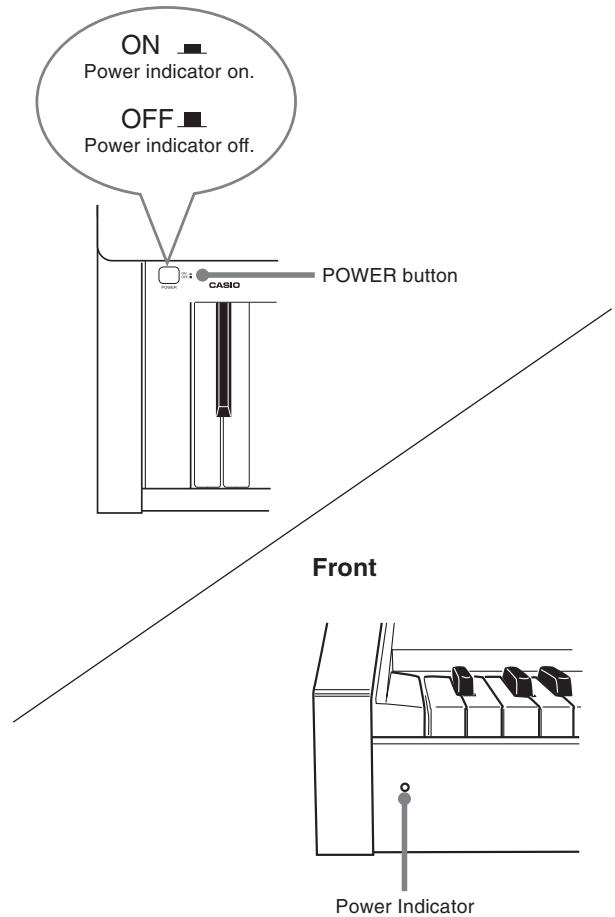
- Branchez le cordon d'alimentation fourni avec le piano numérique sur le dessous du piano numérique.*
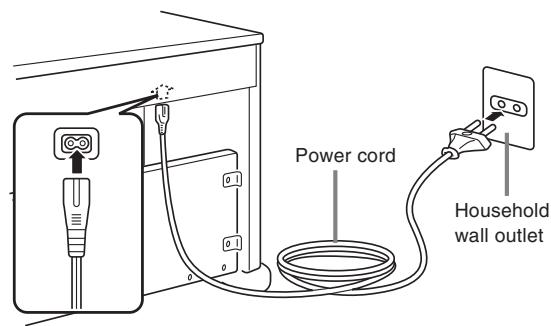
- Branchez le cordon d'alimentation du piano numérique dans une prise murale.
- Appuyez sur le bouton POWER pour mettre l'appareil sous tension.
- S'applique au modèle AP-38V.
IMPORTANT !
- L'alimentation doit également être coupée avant de débrancher le piano numérique de la prise murale.
- La forme du cordon d'alimentation du piano numérique et de la prise murale peut varier selon le pays ou la région. Les illustrations sont des exemples.
- Sur le modèle AP-38, le cordon d'alimentation est câblé en dur sous l'instrument.
E-10
428A-E-014A
Connexions
La connexion à un amplificateur audio ou d'instrument de musique permet d'obtenir un son encore plus clair et plus puissant via des enceintes externes.
Bas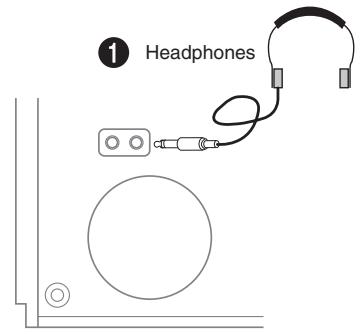
Arrière
Amplificateur audio AUX IN, etc.
IMPORTANT !
- Lors de la connexion d'un équipement externe, réglez d'abord le curseur VOLUME du piano numérique et le contrôle de volume de l'équipement externe sur des niveaux relativement bas. Vous pourrez ensuite ajuster le volume au niveau souhaité une fois les connexions terminées.
- Consultez également la documentation fournie avec l'équipement externe pour connaître les procédures de connexion appropriées.
Connexion d'un casque 1
Connectez un casque disponible dans le commerce à la prise casque du piano numérique. Cela coupe les haut-parleurs intégrés, ce qui vous permet de vous entraîner même tard le soir sans déranger les autres. Pour protéger votre audition, assurez-vous de ne pas régler le volume trop haut lors de l'utilisation du casque.
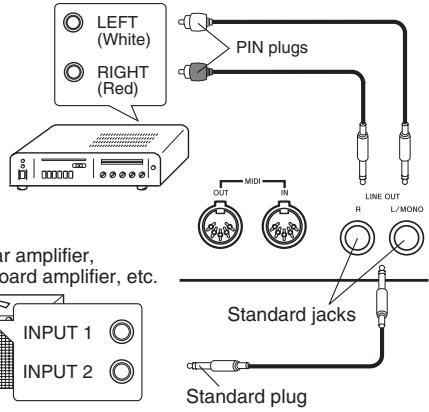
Connexion à un équipement audio 2
Utilisez des câbles disponibles dans le commerce pour connecter l'équipement audio externe aux prises LINE OUT du piano numérique comme indiqué sur la figure 2. La sortie de la prise R correspond au canal droit, tandis que la sortie de la prise L/MONO correspond au canal gauche. Il vous appartient d'acheter les câbles de connexion comme ceux illustrés pour la connexion de l'équipement audio. Normalement, dans cette configuration, vous devez régler le sélecteur d'entrée de l'équipement audio sur le réglage qui spécifie la borne (telle que AUX IN) à laquelle le piano numérique est connecté. Utilisez le curseur VOLUME du piano numérique pour régler le niveau de volume.
Connexion à un amplificateur d'instrument de musique ③
Utilisez des câbles disponibles dans le commerce pour connecter l'amplificateur aux prises LINE OUT du piano numérique comme indiqué sur la figure ③. La sortie de la prise R correspond au canal droit, tandis que la sortie de la prise L/MONO correspond au canal gauche. La connexion à la prise L/MONO uniquement produit un mélange des deux canaux. Il vous appartient d'acheter un câble de connexion comme celui illustré pour la connexion de l'amplificateur. Utilisez le curseur VOLUME du piano numérique pour régler le niveau de volume.
Accessoires et options
Utilisez uniquement les accessoires et options spécifiés pour ce piano numérique. L'utilisation d'articles non autorisés présente un risque d'incendie, de choc électrique et de blessure.
Fonctionnement de base
Utilisation des sonorités
Les procédures suivantes décrivent tout ce que vous devez savoir sur la sélection et l'utilisation des sonorités.
Sélection d'une sonorité
Ce piano numérique dispose d'une sélection de 16 sonorités intégrées.
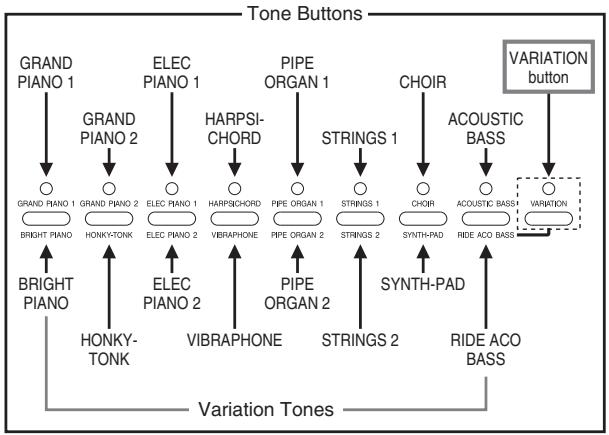
Chaque bouton de sonorité est associé à deux sonorités : une "sonorité normale" (dont le nom est au-dessus du bouton) et une "sonorité de variation" (dont le nom est en dessous du bouton). La sonorité sélectionnée lorsque vous appuyez sur un bouton de sonorité dépend de l'état actuel du témoin lumineux au-dessus du bouton VARIATION, comme indiqué ci-dessous.
| To select this type of tone: | The VARIATION button lamp should be: |
| Normal tone | Off |
| Variation tone | On |
- Appuyez sur le bouton VARIATION pour activer ou désactiver son témoin lumineux.
- Appuyer sur le bouton de sonorité de la sonorité actuellement sélectionnée bascule entre la sonorité normale et la sonorité de variation.
REMARQUE
- Les boutons de sonorité vous offrent une sélection de 16 sonorités que vous pouvez assigner et jouer sur le clavier.
- La sonorité GRAND PIANO 1 a été enregistrée avec un échantillonnage stéréo.
- Voir "Sélection d'une sonorité de variation" pour des informations sur la sélection des sonorités dont les noms sont marqués sous chaque bouton de sonorité.
Pour sélectionner une sonorité
- Appuyez sur le bouton POWER pour mettre sous tension le piano numérique.
- Appuyez sur l'un des boutons de sonorité pour sélectionner la sonorité souhaitée.
- Utilisez le curseur VOLUME pour régler le volume.
- Il est conseillé de régler le volume à un niveau relativement bas au début.
- Déplacer le curseur vers MIN diminue le volume, tandis que le déplacer vers MAX l'augmente.
- Jouez quelque chose au clavier.
- Réglez le volume au niveau souhaité pendant que vous jouez.
- Après avoir fini de jouer, appuyez sur le bouton POWER pour couper l'alimentation.
REMARQUE
- La tonalité GRAND PIANO 1 est sélectionnée automatiquement à chaque mise sous tension du piano numérique.
Sélection d'une tonalité de variation
Les boutons de tonalité marqués comme indiqué ci-dessous servent à sélectionner les tonalités de variation.
- Appuyez sur le bouton de tonalité correspondant à la tonalité que vous souhaitez sélectionner.
- Appuyez sur le bouton VARIATION.
- Cela allume le voyant au-dessus du bouton, indiquant que le son de variation est sélectionné.
- Pour revenir du son de variation au son normal, appuyez à nouveau sur le bouton VARIATION jusqu'à ce que le voyant s'éteigne.
Utilisation du calque
Avec le calque, vous pouvez assigner deux sons différents (un son principal et un son superposé) au clavier, qui jouent tous deux lorsque vous appuyez sur une touche.
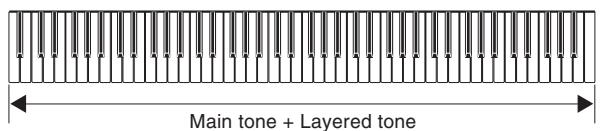
Pour superposer deux sons
REMARQUE
- Pour utiliser le son de variation pour le son principal et/ou le son superposé, effectuez l'opération requise pour activer le(s) son(s) de variation avant de commencer la procédure ci-dessous.
- Tout en maintenant enfoncé le bouton de son du son principal, appuyez sur le bouton de son pour le son superposé.
- Cela allume le voyant du bouton de son principal et fait clignoter le voyant du bouton de son superposé.
- Le choix entre la tonalité normale et la tonalité de variation pour la tonalité principale et la tonalité de couche dépend du réglage normal/variation du bouton de tonalité que vous enfoncez. Le voyant au-dessus du bouton VARIATION est allumé lorsque la tonalité de variation est sélectionnée pour la tonalité principale.
- Essayez maintenant de jouer quelque chose sur le clavier.
La note doit retentir en utilisant les deux tonalités que vous avez sélectionnées. 3. Pour annuler la superposition, appuyez sur n'importe quel bouton de tonalité.
REMARQUE
- Si vous modifiez ou désactivez un effet numérique alors que la superposition est activée, le réglage que vous effectuez n'est enregistré que pour les réglages de la tonalité principale.
- Vous ne pouvez pas superposer deux tonalités assignées au même bouton de tonalité (par exemple : ELEC PIANO 1 + ELEC PIANO 2, ou HARPSICHORD + VIBRAPHONE).
Comment les effets numériques sont appliqués lorsque la superposition est activée
Voici les règles qui déterminent le type d'effets numériques appliqués à deux tonalités superposées.
| These conditions: | Cause these digital effects to be applied to both the main tone and layered tone: |
| ·Digital effects turned on for the main tone
·Digital effects turned on or off for the layered tone | Main tone digital effects |
| ·Digital effects turned off for the main tone
·Digital effects turned on for the layered tone | Layered tone digital effects |
| ·Digital effects turned off for the main tone
·Digital effects turned off for the layered tone | None |
Pour régler le volume de la tonalité principale
- Maintenez enfoncé le bouton CONTROL, et gardez-le enfoncé jusqu'à ce que vous atteigniez l'étape 4 de cette procédure.
- Appuyez sur le bouton GRAND PIANO 1.
- Cela fait clignoter le voyant au-dessus du bouton.
- Utilisez l'une des procédures ci-dessous pour régler le volume du son principal sur une valeur comprise entre 40 et 127.
- Pour faire défiler la valeur du réglage du volume : tout en maintenant enfoncé le bouton CONTROL, utilisez les touches + (augmenter) et - (diminuer) pour faire défiler la valeur du réglage du volume. Maintenir l'une des touches enfoncée modifie le réglage à grande vitesse. Appuyer simultanément sur + et - sélectionne automatiquement une valeur de volume de 127.
- Pour saisir la valeur du réglage du volume : tout en maintenant enfoncé le bouton CONTROL, utilisez les touches de saisie numérique pour entrer une valeur de volume à deux ou trois chiffres comprise entre 40 et 127. Vous pouvez saisir une valeur à deux ou trois chiffres. Le niveau saisi est appliqué à la valeur du réglage du volume lorsque vous relâchez le bouton CONTROL. Le réglage du volume ne change pas si vous saisissez une valeur à un chiffre ou une valeur hors de la plage autorisée.

- Aucune note ne retentit lorsque vous appuyez sur une touche du clavier à ce moment-là.
- Relâchez le bouton CONTROL pour terminer la procédure.
REMARQUE
- Le réglage que vous effectuez pour le volume du son principal reste en vigueur même si vous changez de sonorité.
Pour régler le volume du son de la couche
- Maintenez enfoncé le bouton CONTROL et ne le relâchez pas jusqu'à l'étape 4 de cette procédure.
- Appuyez sur le bouton GRAND PIANO 2.
- Cela fait clignoter le voyant au-dessus du bouton.
- Utilisez l'une des procédures ci-dessous pour régler le volume du son de couche sur une valeur comprise entre 40 et 127.
- Pour faire défiler la valeur du volume : Tout en maintenant enfoncé le bouton CONTROL, utilisez les touches + (augmenter) et - (diminuer) pour faire défiler la valeur du volume. Maintenir une touche enfoncée modifie le réglage à grande vitesse. Appuyer simultanément sur + et - sélectionne automatiquement une valeur de volume de 72.
- Pour saisir la valeur du volume : Tout en maintenant enfoncé le bouton CONTROL, utilisez les touches de saisie numérique pour saisir une valeur de volume à deux ou trois chiffres comprise entre 40 et 127. Vous pouvez saisir une valeur à deux ou trois chiffres. Le niveau saisi est appliqué à la valeur du volume lorsque vous relâchez le bouton CONTROL. Le réglage du volume ne change pas si vous saisissez une valeur à un chiffre ou une valeur hors de la plage autorisée.
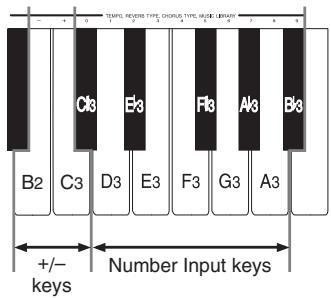
- Aucun son n'est émis lorsque vous appuyez sur une touche du clavier à ce moment-là.
- Relâchez le bouton CONTROL pour terminer la procédure.
REMARQUE
- Le réglage que vous effectuez pour le volume du son de couche reste en vigueur même si vous changez de sonorité.
Utilisation de la fonction Split
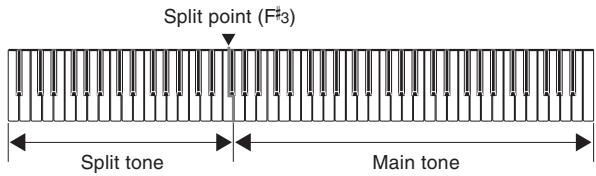
Avec la fonction de partage du clavier (split), vous pouvez assigner deux sonorités différentes (une sonorité principale et une sonorité de partage) à chaque extrémité du clavier, ce qui vous permet de jouer une sonorité avec la main gauche et une autre avec la main droite.
Pour partager le clavier
- Sélectionnez la sonorité principale.
- Appuyez sur le bouton SPLIT.
- Cela allume le voyant au-dessus du bouton.
- Tout en maintenant enfoncé le bouton SPLIT, appuyez sur le bouton de sonorité de la sonorité que vous voulez utiliser comme sonorité de partage.
- Tout en maintenant enfoncé le bouton SPLIT, vous pouvez également appuyer sur le bouton VARIATION pour passer à la variation de la sonorité de partage.
- Le voyant du bouton de sonorité de la sonorité de partage que vous spécifiez clignote. Le voyant au-dessus du bouton VARIATION clignote également lorsque la sonorité de variation est sélectionnée pour la sonorité de partage.
- Essayez maintenant de jouer quelque chose sur le clavier.
- La partie inférieure (côté gauche) du clavier est assignée au son de partage, tandis que la partie supérieure (côté droit) est assignée au son principal.
- L'endroit du clavier où se produit le changement entre les deux sons est appelé le point de partage. Voir « Pour changer l'emplacement du point de partage » sur cette page pour plus de détails sur la modification de l'emplacement du point de partage.
- Appuyez à nouveau sur le bouton SPLIT pour annuler le partage du clavier et revenir à la normale.
- Cela éteint le voyant au-dessus du bouton.
REMARQUE
- Si vous modifiez ou désactivez un effet numérique alors que le partage est activé, le réglage que vous effectuez est enregistré uniquement dans les réglages du son principal.
Comment les effets numériques sont appliqués lorsque le partage est activé
Voici les règles qui déterminent quels types d'effets numériques sont appliqués aux sons assignés à un clavier partagé.
| These conditions: | Cause these digital effects to be applied to both the main tone and split tone: |
| ·Digital effects turned on for the main tone
·Digital effects turned on or off for the split tone | Main tone digital effects |
| ·Digital effects turned off for the main tone
·Layering turned on (page E-13)
·Digital effects turned on for the layered tone | Layered tone digital effects |
| ·Digital effects turned off for the main tone
·Layering turned on (page E-13), but digital effects turned off for the layered tone
·Layering turned off
·Digital effects turned on for the split tone | Split tone digital effects |
Pour changer l'emplacement du point de partage
Le « point de partage » est le point du clavier qui sépare la plage grave (son de partage) de la plage aiguë (son principal).
- Tout en maintenant enfoncé le bouton SPLIT, appuyez sur la touche du clavier où vous voulez que se trouve la note la plus haute (la touche la plus à droite) de la plage inférieure (plage du côté gauche).
- Aucun son n'est produit lorsque les touches sont enfoncées.
Pour régler le volume du son de partage
- Maintenez enfoncé le bouton CONTROL, et gardez-le enfoncé jusqu'à ce que vous atteigniez l'étape 4 de cette procédure.
- Appuyez sur le bouton ELEC PIANO 1.
- Cela fait clignoter le voyant au-dessus du bouton.
- Utilisez l'une des procédures ci-dessous pour régler le volume du son de partage sur une valeur comprise entre 40 et 127.
- Pour faire défiler la valeur du réglage du volume : Tout en maintenant enfoncé le bouton CONTROL, utilisez les touches + (augmenter) et - (diminuer) pour faire défiler la valeur du réglage du volume. Maintenir enfoncée l'une des touches modifie le réglage à grande vitesse.
Appuyer simultanément sur + et - sélectionne automatiquement une valeur de réglage du volume de 127.
- Pour saisir la valeur du réglage du volume : Tout en maintenant enfoncé le bouton CONTROL, utilisez les touches de saisie numérique pour saisir une valeur de réglage du volume à deux ou trois chiffres comprise entre 40 et 127. Vous pouvez saisir une valeur à deux ou trois chiffres. Le niveau que vous saisissez est appliqué à la valeur du réglage du volume lorsque vous relâchez le bouton CONTROL. Le réglage du volume ne change pas si vous saisissez une valeur à un chiffre ou une valeur hors de la plage autorisée.
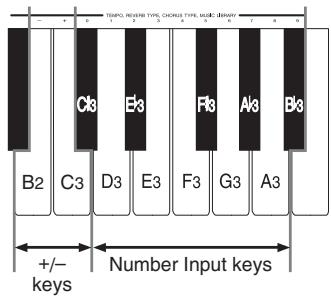
- Aucun son n'est émis lorsque vous appuyez sur une touche du clavier à ce moment.
- Relâchez le bouton CONTROL pour terminer la procédure.
REMARQUE
- Le réglage du volume du son de partage reste effectif même si vous changez de sonorité.
En savoir plus sur les sonorités
Polyphonie
Ce piano numérique peut jouer jusqu'à 64 notes en même temps. Notez cependant que les sonorités énumérées ci-dessous ne disposent que d'une polyphonie de 32 notes. GRAND PIANO 1, BRIGHT PIANO, HONKY-TONK, ELEC PIANO 1, HARPSICHORD, STRINGS 1, CHOIR, SYNTH-PAD, RIDE ACO BASS
Réponse au toucher
La fonction de réponse au toucher provoque des variations de volume et de sonorité en fonction de la pression exercée sur le clavier, comme sur un piano acoustique.
La réponse au toucher n'affecte que légèrement la sonorité HARPSICHORD, car l'instrument d'origine produit normalement le même son, quelle que soit la pression appliquée.
Sonorités échantillonnées numériquement
Les sonorités de ce piano numérique sont produites à partir d'échantillons numériques d'instruments réels. Cependant, tous les instruments ne peuvent pas produire des sons sur toute la gamme jouable de ce piano numérique (A0 à C8). Dans ce cas, des enregistrements numériques sont utilisés pour la plage réellement produite par l'instrument d'origine, et des sons synthétisés sont utilisés pour les notes qui ne peuvent pas être produites naturellement. De ce fait, vous pouvez remarquer de très légères différences entre les notes naturelles et les notes synthétisées, tant en termes de qualité sonore que de résultats obtenus avec les effets. Ces différences sont normales et n'indiquent pas un dysfonctionnement.
Réglage de la brillance d'une sonorité
Vous pouvez utiliser le curseur BRILLIANCE pour ajuster la clarté et la netteté d'un son afin de l'adapter à votre musique et à vos préférences personnelles.
- Faites glisser le curseur BRILLIANCE vers la gauche ou la droite pour régler la brillance d'un son au niveau souhaité.
- En déplaçant le curseur vers MELLOW, vous obtenez un son plus doux, tandis qu'en le déplaçant vers BRIGHT, vous obtenez un son plus brillant.
Utilisation des effets numériques
Ce piano numérique vous propose une sélection d'effets numériques que vous pouvez appliquer aux sons. Voici une description générale de chaque effet, mais la meilleure façon de découvrir leur effet sur les sons est d'expérimenter par vous-même.
Types d'effets numériques
RÉVERBÉRATION
L'effet RÉVERBÉRATION vous propose un choix de huit variations énumérées ci-dessous. Chacune simule l'acoustique de différents environnements.
Le tableau suivant indique le nom de chaque effet et les touches du clavier à presser pour le sélectionner.
| Type | Keyboard Key Number* |
| Room 1 | 1 |
| Room 2 | 2 |
| Room 3 | 3 |
| Stage | 4 |
| Hall 1 | 5 |
| Hall 2 | 6 |
| Delay | 7 |
| Pan Delay | 8 |
- Numéro indiqué au-dessus de la touche du clavier
CHŒUR
L'effet CHŒUR ajoute de la profondeur et du vibrato aux notes.
Voici les huit effets de chœur de ce piano numérique et les touches du clavier à presser pour les sélectionner.
| Type | Keyboard Key Number* |
| Chorus 1 | 1 |
| Chorus 2 | 2 |
| Chorus 3 | 3 |
| Chorus 4 | 4 |
| F-back Chorus | 5 |
| Flanger | 6 |
| ShortDelay | 7 |
| ShortDelayFB | 8 |
- Numéro indiqué au-dessus de la touche du clavier
Touches utilisées pour configurer les réglages des effets numériques
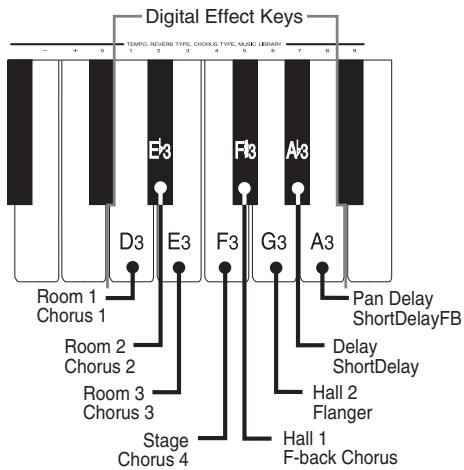
Activation et désactivation des effets numériques
| To turn this digital effect on or off: | Press this button: |
| Reverb | REVERB |
| Chorus | CHORUS |
- La lampe au-dessus du bouton correspondant est allumée lorsque l'effet numérique est activé, et éteinte lorsqu'il est désactivé.
Sélection d'un effet numérique
Pour sélectionner un effet de réverbération
- Tout en maintenant enfoncé le bouton REVERB, appuyez sur la touche du clavier qui correspond au numéro de l'effet de réverbération que vous souhaitez sélectionner.
- Aucune note ne sonne lorsque vous appuyez sur une touche du clavier à ce moment-là.
Pour sélectionner un effet de chorus
- Tout en maintenant enfoncé le bouton CHORUS, appuyez sur la touche du clavier qui correspond au numéro de l'effet de chorus que vous souhaitez sélectionner.
- Aucune note ne sonne lorsque vous appuyez sur une touche du clavier à ce moment-là.
Réglages d'effets par défaut à la mise sous tension
Le tableau ci-dessous indique les réglages d'effets attribués à chaque son lorsque vous mettez le piano numérique sous tension.
| Tone Name | Digital Effect Setting |
| REVERB | CHORUS |
| GRAND PIANO 1 | Hall 1 | Off (Chorus 3)* |
| BRIGHT PIANO | Hall 1 | Off (Chorus 3)* |
| GRAND PIANO 2 | Hall 1 | Off (Chorus 3)* |
| HONKY-TONK | Hall 1 | Off (Chorus 3)* |
| ELEC PIANO 1 | Hall 1 | Chorus 3 |
| ELEC PIANO 2 | Hall 1 | Chorus 3 |
| HARPSICHORD | Hall 1 | Off (Chorus 3)* |
| VIBRAPHONE | Hall 1 | Chorus 3 |
| PIPE ORGAN 1 | Hall 1 | Chorus 3 |
| PIPE ORGAN 2 | Hall 1 | Off (Chorus 3)* |
| STRINGS 1 | Hall 1 | Chorus 3 |
| STRINGS 2 | Hall 1 | Chorus 3 |
| CHOIR | Hall 1 | Chorus 3 |
| SYNTH-PAD | Hall 1 | Chorus 3 |
| ACOUSTIC BASS | Hall 1 | Off (Chorus 3)* |
| RIDE ACO BASS | Hall 1 | Off (Chorus 3)* |
- ( ) : réglage initial du type de chorus lorsque l'effet de chorus est activé.
- Vous pouvez modifier les réglages d'effets numériques ci-dessus après la mise sous tension.
REMARQUE
- La sélection d'un son sélectionne automatiquement les effets numériques qui lui sont actuellement attribués.
- Les modifications que vous apportez aux réglages d'effets numériques ne sont attribuées qu'au son actuellement sélectionné.
- Les réglages d'effets numériques restent en vigueur jusqu'à ce que vous coupiez l'alimentation du piano numérique.
- Les morceaux de démonstration ont leurs propres réglages d'effets numériques, qui sont automatiquement sélectionnés lorsque vous choisissez un morceau de démonstration.
Utilisation des pédales
Ce piano numérique est équipé des trois pédales illustrées ci-dessous.
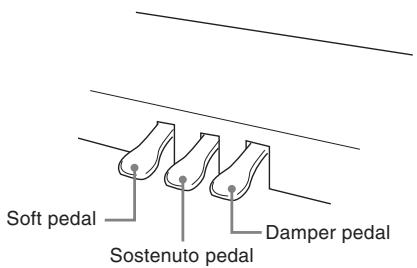
Fonctions des pédales
- Pédale de sustain
- L'enfoncement de cette pédale fait résonner les notes et prolonge leur durée. Dans le cas des sons ORGUE À TUYAUX et CORDES, l'enfoncement de cette pédale maintient les notes jouées jusqu'à ce que vous relâchiez la pédale.
- Pédale douce
En appuyant sur cette pédale, les notes sont étouffées et leur volume est légèrement réduit. Seules les notes jouées après avoir enfoncé la pédale sont affectées, et toutes les notes jouées avant d'appuyer sur la pédale sonnent à leur volume normal. - Pédale sostenuto
Comme la pédale forte, cette pédale fait résonner les notes et les prolonge plus longtemps. La différence entre les deux pédales réside dans le moment où elles sont enfoncées. Avec la pédale sostenuto, vous appuyez sur la pédale après avoir enfoncé les notes que vous voulez soutenir. Seules les notes dont les touches du clavier sont enfoncées lorsque la pédale sostenuto est pressée sont affectées.
REMARQUE
- Ce qui suit montre comment les effets de pédale sont appliqués lors de différents types d'opérations.
| While you are performing this type of operation: | Pedal effects are applied to: |
| Song memory recording | Notes played on the keyboard only |
| Song memory playback |
| Demo tune play |
| Music Library play |
- Dans le réglage par défaut à la mise sous tension, les effets de pédale ne sont pas appliqués à un son partagé (page F-14). Effectuez la procédure ci-dessous pour appliquer les effets de pédale à un son partagé.
Pour appliquer les effets de pédale à un son partagé
- Tout en maintenant enfoncé le bouton CONTROL, activez ou désactivez les effets de pédale en appuyant sur l'une des touches du clavier illustrées ci-dessous.
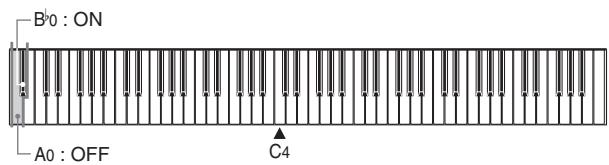
A0 : Effets de pédale désactivés
Bb0 : Effets de pédale activés
- Aucune note ne sonne lorsque vous appuyez sur une touche du clavier pendant que le bouton CONTROL est enfoncé.
Utilisation du métronome
Le métronome fournit un battement de référence que vous pouvez utiliser pendant vos performances ou vos séances de pratique. Vous pouvez changer le battement et le tempo du métronome.
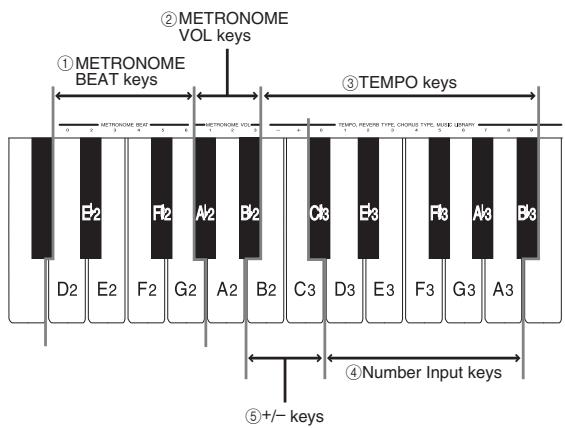
- L'illustration ci-dessous montre les touches du clavier que vous utilisez pour configurer les réglages du métronome. Les noms des réglages sont également indiqués au-dessus des touches du clavier auxquelles ils sont assignés.
REMARQUE
- Aucune note ne sonne lorsque vous appuyez sur l'une des touches du clavier ci-dessus tout en maintenant enfoncé le bouton CONTROL.
Utilisation du métronome
PRÉPARATION
- Vérifiez que le témoin au-dessus du bouton RECORD est éteint. S'il est allumé, appuyez sur le bouton RECORD pour l'éteindre.
- Reportez-vous à la section de ce guide de l'utilisateur concernant la mémoire de chanson pour plus de détails sur l'utilisation du métronome en combinaison avec cette fonction.
Pour utiliser le métronome
- Appuyez sur METRONOME pour démarrer le métronome.
- Réglez le rythme du métronome.
- Tout en maintenant enfoncé le bouton CONTROL, appuyez sur la touche METRONOME BEAT ① pour sélectionner un réglage de rythme.
- Aucune note ne retentit lorsque vous appuyez sur une touche du clavier tout en maintenant CONTROL enfoncé.
- La première valeur du rythme peut être réglée sur une valeur de 2 à 6. La cloche qui indique normalement le premier temps d'une mesure ne sonne pas lorsque la valeur 0 est spécifiée. Tous les temps sont indiqués par un clic. Ce réglage vous permet de vous entraîner avec un rythme régulier, sans vous soucier du nombre de temps dans chaque mesure.
- Utilisez l'une des procédures ci-dessous pour régler le tempo sur une valeur comprise entre 30 et 255 battements par minute.
- Pour faire défiler la valeur du tempo : tout en maintenant enfoncé le bouton CONTROL, utilisez les touches TEMPO + (augmentation) et - (diminution) ⑤ pour faire défiler la valeur du tempo. Maintenir enfoncée l'une ou l'autre touche modifie le réglage à grande vitesse. Appuyer simultanément sur + et - sélectionne automatiquement une valeur de tempo de 120.
- Pour saisir la valeur du tempo : tout en maintenant enfoncé le bouton CONTROL, utilisez les touches de saisie numérique ④ pour saisir une valeur de tempo à deux ou trois chiffres comprise entre 30 et 255. Vous pouvez saisir une valeur à deux ou trois chiffres. La valeur saisie est appliquée au tempo lorsque vous relâchez le bouton CONTROL. Le réglage du tempo ne change pas si vous saisissez une valeur à un chiffre ou une valeur hors de la plage autorisée.
- Lorsque vous souhaitez arrêter le métronome, appuyez à nouveau sur METRONOME.
- Appuyer à nouveau sur METRONOME redémarre le son du métronome en utilisant le réglage actuel de la mesure et du tempo.
- Si vous souhaitez modifier à la fois le tempo et la mesure avant de redémarrer le métronome, effectuez la procédure ci-dessus ici.
REMARQUE
- Vous pouvez modifier les réglages de mesure et de tempo du métronome à tout moment, même pendant que le métronome sonne.
- Vous pouvez également utiliser le métronome en combinaison avec la lecture de la mémoire de chansons. Voir la section de ce guide de l'utilisateur couvrant cette fonction pour plus de détails.
Réglage du volume du métronome
Utilisez la procédure suivante pour augmenter et diminuer le volume du battement du métronome.
Pour régler le volume du métronome
- Tout en maintenant enfoncé le bouton CONTROL, utilisez les touches METRONOME VOL ② pour saisir 1, 2 ou 3.
REMARQUE
- Le volume du métronome est automatiquement réglé sur 2 à chaque mise sous tension du piano numérique.
Utilisation de la mémoire de morceaux
Cette section décrit comment enregistrer le jeu au clavier en mémoire et lire les données depuis la mémoire de morceaux.
À propos de la mémoire de morceaux
Capacité de la mémoire de morceaux
- Il y a deux pistes de mémoire de morceaux nommées Piste A et Piste B. Les deux pistes peuvent stocker un total combiné d'environ 8 000 notes.
- L'enregistrement s'arrête automatiquement et le témoin au-dessus du bouton RECORD s'éteint lorsque la mémoire est pleine.
Données enregistrées
Voici une liste des données qui peuvent être enregistrées dans la mémoire de morceaux une fois l'enregistrement commencé.
- Tout ce que vous avez joué au clavier (les données MIDI reçues ne sont pas enregistrées)
- Réglages de sonorité (y compris les sonorités en couche, le volume des sonorités en couche, les sonorités de division, le volume des sonorités de division, le point de partage) et tout changement de réglage de sonorité
- Réglages de tempo et de mesure utilisés pendant l'enregistrement
- Opérations de pédale
- Réglages de réverbération
- Réglages de chœur
Stockage des données enregistrées
Ce piano numérique est équipé d'une pile au lithium pour alimenter la mémoire et conserver son contenu même lorsque l'appareil est éteint.* La durée de vie de la pile au lithium est de cinq ans à compter de la date de fabrication du piano numérique. Veillez à contacter votre prestataire de services CASIO pour faire remplacer la pile au lithium tous les cinq ans.
- Ne coupez jamais l'alimentation du piano pendant une opération d'enregistrement.
IMPORTANT !
- Si les données enregistrées sur une piste utilisent toute la capacité de la mémoire de chansons, vous ne pourrez pas enregistrer quoi que ce soit sur l'autre piste.
- L'enregistrement de nouvelles données sur une piste supprime automatiquement toutes les données précédemment stockées sur cette piste. Un indicateur de piste allumé signifie que la piste contient déjà des données.
- Couper l'alimentation pendant une opération d'enregistrement supprime tout ce qui a été enregistré jusqu'à ce point.
- CASIO ne saurait être tenu responsable des pertes subies par vous ou par un tiers en raison de la perte de données causée par un dysfonctionnement ou une réparation de ce piano numérique, ou par le remplacement de la pile.
E-20
Enregistrement
En plus d'enregistrer les notes telles qu'elles sont jouées au clavier, vous pouvez également enregistrer sur une piste tout en lisant l'autre piste. Les procédures suivantes couvrent chacune de ces opérations.
Pour enregistrer des notes depuis le clavier
PRÉPARATION
- Sélectionnez le son et les effets numériques avec lesquels vous souhaitez commencer.
- Assurez-vous que le témoin au-dessus du bouton MUSIC LIBRARY n'est pas allumé. S'il l'est, appuyez sur MUSIC LIBRARY pour l'éteindre.
- Utilisez la procédure décrite dans "Utilisation du métronome" à la page E-18 pour configurer le tempo et les battements que vous souhaitez utiliser pendant l'enregistrement.
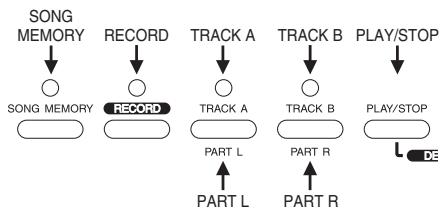
- Appuyez sur le bouton SONG MEMORY.
- Cela allume le témoin au-dessus du bouton.
- Si une piste est déjà enregistrée, le témoin au-dessus de son bouton de piste s'allume à ce moment.
- Si vous souhaitez utiliser le métronome pendant l'enregistrement, appuyez sur le bouton METRONOME pour le démarrer.
- Appuyez sur RECORD pour mettre le piano numérique en attente d'enregistrement.
- Le témoin au-dessus de RECORD clignote.
- Si les deux pistes sont vides (non enregistrées), la piste A est sélectionnée en premier pour l'enregistrement, ce qui est indiqué par le voyant au-dessus de son bouton qui clignote. Si une seule des pistes est vide, cette piste est sélectionnée en premier pour l'enregistrement.
- Si les deux pistes sont déjà sélectionnées, la piste enregistrée en dernier est sélectionnée en premier. Si les deux pistes sont enregistrées et que vous avez coupé l'alimentation depuis l'enregistrement, la piste A est sélectionnée en premier.
- Vous pouvez également modifier le réglage du rythme du métronome à ce moment.
- Appuyez sur l'un des boutons TRACK pour sélectionner la piste A ou la piste B.
- Le voyant au-dessus du bouton sur lequel vous appuyez clignote pour indiquer que la piste est sélectionnée pour l'enregistrement.
- Si les données enregistrées sur une seule piste utilisent toute la capacité de mémoire de chanson disponible, vous ne pourrez rien enregistrer sur l'autre piste.
- Jouez quelque chose au clavier pour démarrer l'enregistrement.
- Ce que vous jouez est émis par les haut-parleurs et est enregistré en mémoire.
- Vous pouvez également démarrer l'enregistrement en appuyant sur PLAY/STOP. Dans ce cas, un espace vide est inséré en mémoire à partir du point où vous appuyez sur PLAY/STOP jusqu'au point où vous commencez à jouer au clavier.
- Le voyant au-dessus du bouton RECORD passe de clignotant à allumé lorsque l'enregistrement démarre.
- Après avoir terminé l'enregistrement, appuyez sur PLAY/STOP pour arrêter l'opération d'enregistrement.
- À ce moment, le voyant au-dessus de RECORD s'éteint, tandis que le voyant au-dessus de la piste enregistrée reste allumé. Vous pouvez alors appuyer sur PLAY/STOP pour écouter les données que vous venez d'enregistrer.
- Pour quitter le mode mémoire de morceau, appuyez sur SONG MEMORY afin que son voyant s'éteigne.
Pour enregistrer sur une piste tout en lisant l'autre piste
Cette procédure est essentiellement la même que celle décrite dans "Pour enregistrer des notes depuis le clavier" à la page E-20. Les différences sont décrites ci-dessous.
Exemple : Pour lire la piste A tout en enregistrant sur la piste B
- Avant de commencer l'étape 2 de la procédure à la page E-20, appuyez sur le bouton TRACK A pour que le voyant au-dessus soit allumé.
- Lorsque vous entrez en mode d'attente d'enregistrement, le voyant au-dessus du bouton TRACK A reste allumé, tandis que le voyant au-dessus du bouton TRACK B clignote. Si le voyant au-dessus du bouton TRACK A clignote à ce moment, appuyez sur le bouton TRACK B pour que le voyant au-dessus clignote.
- L'exécution de l'étape 4 de la procédure démarre simultanément la lecture de la piste A et l'enregistrement sur la piste B. Jouez sur le clavier en même temps que la lecture de la piste A.
- Une fois que vous êtes en mode d'attente d'enregistrement, vous pouvez également modifier les réglages de tempo et de mesure. Il est à noter, cependant, que la lecture est effectuée selon les derniers réglages de tempo et de mesure utilisés pour l'enregistrement sur l'une ou l'autre des pistes.
Lecture
Utilisez la procédure suivante pour lire la mémoire de morceau.
Pour lire depuis la mémoire de morceau
- Appuyez sur le bouton SONG MEMORY.
- Cela allume le témoin au-dessus du bouton.
- Appuyez sur le bouton TRACK de la piste que vous voulez lire (A ou B).
- Cela allume le témoin au-dessus du bouton de la piste sélectionnée.
- Appuyez sur PLAY/STOP pour démarrer la lecture.
- Vous pouvez activer ou désactiver le son du métronome de lecture en appuyant sur le bouton METRONOME.
- Pour arrêter le métronome, appuyez sur le bouton METRONOME.
- La lecture s'arrête automatiquement lorsque la fin du morceau est atteinte.
- Pour arrêter en cours de lecture, appuyez sur LECTURE/ARRÊT.
REMARQUE
- Si vous souhaitez écouter le contenu de la mémoire de morceau que vous venez d'enregistrer, appuyez simplement sur LECTURE/ARRÊT.
- Vous ne pouvez pas changer le son lors de la lecture depuis la mémoire de morceau.
- Vous pouvez modifier le tempo de lecture pendant la lecture depuis la mémoire de morceau.
Suppression du contenu de la mémoire de morceau
IMPORTANT !
L'opération de suppression ne peut pas être annulée. Assurez-vous d'avoir écouté le contenu de la mémoire de morceau et confirmé que vous n'en avez plus besoin avant d'effectuer la procédure suivante.
Pour supprimer le contenu de la mémoire de morceau
- Appuyez sur le bouton MÉMOIRE DE MORCEAU.
- Cela allume le voyant au-dessus du bouton.
- Tout en maintenant enfoncé le bouton MÉMOIRE DE MORCEAU, appuyez sur le bouton de la piste (A ou B) que vous souhaitez supprimer.
- Cela supprime le contenu de la piste.
- Pour quitter le mode mémoire de morceau, appuyez sur le bouton MÉMOIRE DE MORCEAU.
Utilisation des morceaux de démonstration
Ce piano numérique est équipé de 16 morceaux de démonstration intégrés, chacun mettant en valeur l'un des sons intégrés.
Lecture des morceaux de démonstration en séquence
Pour lire les morceaux de démonstration en séquence
- Appuyez sur le bouton MUSIC LIBRARY pour démarrer la lecture des morceaux de démonstration.
- Tous les morceaux de démonstration sont lus en séquence, en commençant par le morceau 1.
Lecture d'un morceau de démonstration spécifique
Pour lire un morceau de démonstration spécifique
- Après le début de la lecture, appuyez sur le bouton de son correspondant au morceau que vous souhaitez écouter.
- Les morceaux sont lus en séquence, en boucle continue, en commençant par le morceau actuellement sélectionné.
- Appuyer sur le bouton VARIATION ou sur le bouton de son du son actuel pendant la lecture du morceau de démonstration permet de basculer entre le morceau du son normal et celui du son de variation.
Arrêt de la lecture de la démonstration
Pour arrêter la lecture de la démonstration
- Appuyez sur le bouton PLAY/STOP pour arrêter la lecture de la démonstration.
REMARQUE
- Vous ne pouvez pas changer le tempo ou la tonalité, ni activer le métronome pendant la lecture d'une démonstration.
- Jouer sur le clavier pendant la lecture d'une démonstration produit des notes utilisant la tonalité de la démonstration.
- Vous pouvez ajuster le volume pendant la lecture de la démonstration.
- Les réglages ci-dessous sont modifiés automatiquement lors de la lecture d'une démonstration. Ces modifications sont temporaires et ne restent en vigueur que pendant la lecture de la démonstration.
- Tonalité
Effet numérique - Transposition - Accordage - Tempérament : tempérament égal - Hauteur baroque : désactivée
- Les opérations de pédale effectuées pendant la lecture de la démonstration ne s'appliquent qu'aux notes jouées sur le clavier. Elles ne s'appliquent pas à la lecture de la démonstration.
- Les notes de la démonstration ne peuvent pas être envoyées comme données MIDI.
Liste des démonstrations
| No. | Title | Composer | Tone | Time |
| 1 | Etude Op.10 No.12 “Revolutionary” | F.F.Chopin | GRAND PIANO 1 | 2’35" |
| 2 | Jesus Bleibet Meine Freude | J.S.Bach | PIPE ORGAN 2 | 1’18" |
| 3 | Original | — | ELEC PIANO 1 | 1’33" |
| 4 | Original | — | STRINGS 2 | 1’11" |
| 5 | Original | — | ACOUSTIC BASS | 48" |
| 6 | Hungarian Dances No.5 (Duets) | J.Brahms | GRAND PIANO 2 | 2’24" |
| 7 | Original | — | VIBRAPHONE | 1’10" |
| 8 | Mein junges Leben hat ein End | J.P.Sweelinck | CHOIR | 1’18" |
| 9 | Original | — | BRIGHT PIANO | 1’10" |
| 10 | Original | — | SYNTH-PAD | 1’18" |
| 11 | HARMONIUS BLACKSMITH | G.F.HÄNDEL | HARPSICHORD | 2’12" |
| 12 | Original | — | STRINGS 1 | 2’00" |
| 13 | Original | — | ELEC PIANO 2 | 1’55" |
| 14 | Original | — | RIDE ACO BASS | 54" |
| 15 | Fantasia (Praeludium) und Fuga in G-Moll BWV542 | J.S.Bach | PIPE ORGAN 1 | 1’48" |
| 16 | Scott Joplin's New Rag | S.Joplin | HONKY-TONK | 1’04" |
Utilisation de la bibliothèque musicale
Une fois que vous avez sélectionné l'un des 50 airs intégrés de la bibliothèque musicale, vous pouvez couper soit la partie de la main gauche, soit celle de la main droite (parties primo et secondo pour les airs en duo) et jouer l'autre partie au clavier. Vous pouvez ajuster le tempo pour jouer à l'allure qui vous convient, et vous pouvez utiliser le métronome pour vous aider à garder le rythme.
Voir « Airs de la bibliothèque musicale » à la page A-3 pour la liste complète des airs disponibles. Les airs en duo sont marqués « (Duos) ».
Lecture des airs de la bibliothèque musicale
Utilisez la procédure suivante lorsque vous voulez simplement lire un air de la bibliothèque musicale sans jouer avec.
Pour lire un air de la bibliothèque musicale
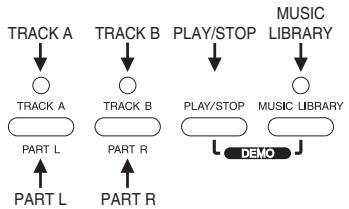
- Appuyez sur le bouton MUSIC LIBRARY pour que le voyant au-dessus s'allume.
- Activez ou désactivez le métronome.
Pour désactiver le métronome :
Appuyez sur le bouton METRONOME pour que le voyant au-dessus ne soit pas allumé. Avec ce réglage, le précompte avant la lecture ne sonne pas et le métronome ne sonne pas non plus. Le voyant au-dessus du bouton METRONOME clignote toutefois en mesure avec le tempo de l'air joué.
Pour activer le métronome :
Appuyez sur le bouton METRONOME pour que le voyant au-dessus soit allumé. Avec ce réglage, un précompte sonne avant le début de la lecture de l'air de la bibliothèque musicale, et le métronome sonne pendant la lecture. Le voyant au-dessus du bouton METRONOME clignote en mesure avec le tempo de l'air joué.
Vous pouvez également configurer le métronome pour qu'un seul précompte sonne avant la lecture, sans que le métronome sonne pendant la lecture proprement dite. Voir « Pour activer ou désactiver le métronome pendant la lecture » pour plus d'informations.
- Sélectionnez le numéro de l'air que vous voulez jouer.
- Voir « Musique de la bibliothèque » à la page A-3 pour la liste complète des morceaux disponibles.
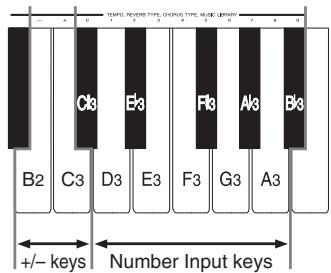
- Tout en maintenant enfoncé le bouton MUSIC LIBRARY, utilisez les touches du clavier C3 à B3 (touches de saisie numérique) pour saisir le numéro du morceau que vous voulez jouer. Aucune note ne retentit lorsque vous appuyez sur une touche du clavier à ce moment-là. Saisissez un nombre à un ou deux chiffres. Le numéro saisi est enregistré lorsque vous relâchez le bouton MUSIC LIBRARY.
- La sélection d'un morceau de la bibliothèque musicale allume les voyants au-dessus des deux boutons de partie (L et R).
- Pour spécifier la lecture de tous les morceaux de la bibliothèque musicale, saisissez 99 comme numéro de morceau. Le voyant au-dessus du bouton MUSIC LIBRARY clignote pendant la lecture de tous les morceaux de la bibliothèque musicale.
- Appuyez sur PLAY/STOP pour démarrer la lecture.
- Si vous avez activé le métronome avant de commencer cette procédure, un compte à rebours retentit avant le début de la lecture proprement dite.
- Le tempo change automatiquement pour adopter le tempo prédéfini du morceau en cours de lecture.
- Les notes jouées au clavier pendant la lecture d'un morceau de la bibliothèque musicale sont émises avec le réglage de tonalité du morceau sélectionné.
- Pour arrêter la lecture, appuyez à nouveau sur PLAY/STOP.
- Si vous avez sélectionné un seul morceau, la lecture s'arrête automatiquement à la fin du morceau.
- Si vous avez sélectionné le « morceau numéro 99 », la lecture du morceau continue jusqu'à ce que vous appuyiez sur PLAY/STOP.
- Pour quitter le mode Music Library, appuyez sur MUSIC LIBRARY jusqu'à ce que son voyant s'éteigne.
REMARQUE
- Lorsque vous appuyez sur le bouton MUSIC LIBRARY, le numéro du morceau sélectionné la dernière fois que vous avez utilisé la Music Library apparaît en premier.
- Vous pouvez modifier le tempo de la lecture après avoir sélectionné un morceau. Vous pouvez revenir au tempo préréglé d'un morceau en sélectionnant à nouveau le même morceau (étape 2 de la procédure ci-dessus).
- Les opérations et réglages suivants peuvent être effectués pendant la lecture d'un morceau de la Music Library :
Volume - Brilliance - Tempo - Sélection du toucher - Sonorité - Activation/désactivation de la partie main gauche/main droite - Métronome - Jeu au clavier - Opérations de pédale
- La réception de données MIDI IN est activée pendant la lecture de la leçon de morceau.
- Appuyer sur le bouton PLAY/STOP dans un mode autre que le mode Music Library ou le mode Song Memory permet d'entrer dans le mode Music Library et de démarrer la lecture.
Pour activer ou désactiver le métronome pendant la lecture
- Tout en maintenant enfoncé le bouton CONTROL, activez ou désactivez le métronome en appuyant sur l'une des touches du clavier illustrées ci-dessous.
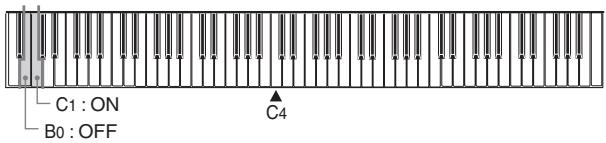
B0 : Désactivé (le précompte retentit uniquement avant la lecture, pas de métronome pendant la lecture) C1 : Activé (le précompte retentit avant la lecture, et le métronome retentit pendant la lecture)
- Aucune note ne retentit lorsque vous appuyez sur une touche du clavier pendant que le bouton CONTROL est enfoncé.
NOTE
- Par défaut, le réglage ci-dessus est métronome activé, ce qui signifie qu'un précompte retentit avant la lecture et que le métronome sonne pendant la lecture.
Travail des parties individuelles (leçon de partie)
La partie de la main gauche (ou partie secondo) et la partie de la main droite (ou partie primo) sont enregistrées séparément pour les morceaux de la bibliothèque musicale. Ainsi, vous pouvez désactiver l'une des parties et jouer l'autre au clavier. Les termes "primo" et "secondo" désignent les parties des morceaux en duo.
PRÉPARATION
- Effectuez les étapes 1 et 2 de la procédure "Pour lire un morceau de la bibliothèque musicale" à la page E-24 pour sélectionner le morceau que vous souhaitez travailler.
- Réglez le tempo souhaité pour la leçon de partie. Utilisez la même procédure que pour régler le tempo du métronome (page E-18).
Pour utiliser la leçon de partie
- Appuyez sur le bouton PART L ou PART R pour sélectionner la partie que vous voulez jouer au clavier.
- Appuyer sur l'un des boutons éteint le témoin au-dessus de l'autre bouton. Pour travailler la partie de la main droite (ou primo), appuyez sur le bouton PART R.
Témoin du bouton PART R : éteint
Témoin du bouton PART L : allumé
Pour travailler la partie de la main gauche (ou secondo), appuyez sur le bouton PART L.
Indicateur du bouton PART R : allumé
Indicateur du bouton PART L : éteint
- Activez le métronome si vous le souhaitez.
- Appuyez sur METRONOME pour que l'indicateur au-dessus s'allume.
- Laissez l'indicateur au-dessus de METRONOME éteint si vous ne souhaitez pas utiliser le métronome pendant votre séance de pratique.
- Appuyez sur PLAY/STOP pour lancer la lecture du morceau de la bibliothèque musicale et jouez en même temps sur le clavier.
- Si vous avez activé le métronome, un compte à rebours retentit pendant une mesure avant le début réel de la lecture.
- Pour arrêter la lecture, appuyez à nouveau sur PLAY/STOP.
- La lecture s'arrête également automatiquement lorsque la fin du morceau est atteinte.
REMARQUE
- Le rythme de chaque morceau de la bibliothèque musicale est fixe et ne peut pas être modifié.
- L'enregistrement dans la mémoire de morceaux (page E-20) ne peut pas être démarré pendant la lecture d'un morceau de la bibliothèque musicale.
- Les opérations sur les pédales n'affectent que le jeu au clavier.
- Voir les notes sous "Lecture de morceaux de la bibliothèque musicale" à la page E-24 pour plus de détails sur les autres opérations.
Réglages du clavier
Utilisation de la sélection du toucher
Ce réglage vous permet d'ajuster le toucher du clavier à votre style de jeu. Vous pouvez ainsi choisir un toucher plus fort pour les personnes ayant des mains puissantes, et un toucher plus léger pour les débutants et toute personne ayant moins de force.
Utilisez les touches indiquées ci-dessous pour modifier le réglage de la sélection du toucher.
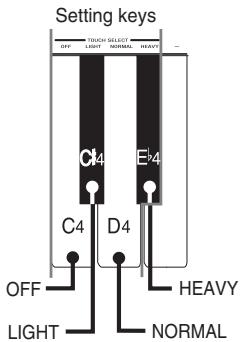
Réglages de la sélection du toucher
OFF . Désactivé
LIGHT Léger
Ce réglage produit une sortie forte, même lorsqu'une pression légère est appliquée sur le clavier.
NORMAL ....... Normal
C'est le réglage standard.
HEAVY ........ Lourd
Ce réglage nécessite une pression relativement forte sur le clavier pour produire une sortie normale.
Pour modifier le réglage de la sélection du toucher
- Tout en maintenant enfoncé le bouton CONTROL, sélectionnez le toucher du clavier en appuyant sur l'une des touches du clavier.
- Aucune note ne sonne lorsque vous appuyez sur une touche du clavier tout en maintenant CONTROL enfoncé.
REMARQUE
- La sélection du toucher est automatiquement réglée sur NORMAL chaque fois que vous allumez le piano numérique.
Utilisation de la transposition
La transposition vous permet de régler la hauteur tonale de ce piano numérique par pas de demi-ton.
Cela signifie que vous pouvez changer la tonalité du piano numérique pour l'adapter à la voix d'un chanteur ou à la tonalité d'un autre instrument de musique, sans avoir à apprendre à jouer un morceau dans une autre tonalité.
Utilisez les touches illustrées ci-dessous pour modifier le réglage de transposition.
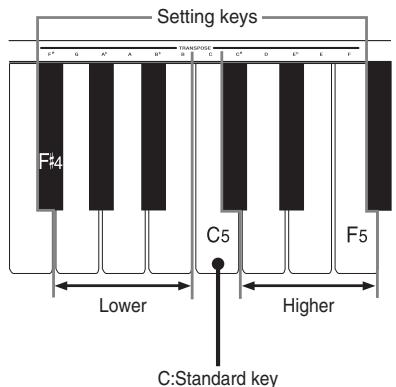
Pour modifier le réglage de transposition
- Tout en maintenant enfoncé le bouton CONTROL, sélectionnez une touche en appuyant sur l'une des touches du clavier illustré ci-dessus.
- Le piano numérique peut être transposé dans une plage allant de Fa# à Do à Fa.
- Aucune note ne sonne lorsque vous appuyez sur une touche du clavier tout en maintenant la touche CONTROL enfoncée.
REMARQUE
- La valeur de transposition est automatiquement réglée sur 0 (Do) chaque fois que vous allumez le piano numérique.
Réglage de l'accord du piano numérique
Vous pouvez ajuster l'accord global du piano numérique pour jouer avec un autre instrument. Vous pouvez ajuster l'accord dans une plage de ±50 cents* à partir de A4 = 440,0 Hz.
Utilisez les touches du clavier indiquées ci-dessous pour ajuster l'accord du piano numérique.
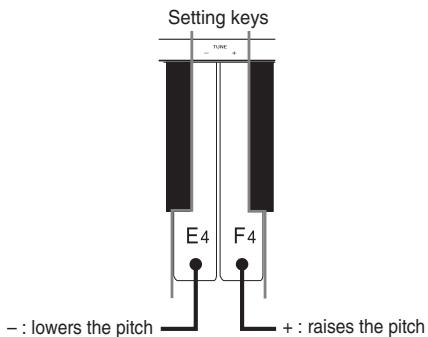
Pour ajuster l'accord du piano numérique
- Tout en maintenant la touche CONTROL enfoncée, appuyez sur la touche E4 (-) pour baisser l'accord ou sur la touche F4 (+) pour le monter. Chaque pression sur une touche modifie l'accord d'environ 0,8 cent* (1/128 de demi-ton).
- Maintenir l'une ou l'autre touche enfoncée modifie le réglage à grande vitesse.
- Aucune note ne sonne lorsque vous appuyez sur une touche du clavier tout en maintenant la touche CONTROL enfoncée.
REMARQUE
- Maintenir la touche CONTROL enfoncée et appuyer simultanément sur les touches E4 (-) et F4 (+) du clavier ramène l'accord au standard A4 = 440,0 Hz.
- 100 cents équivalent à un demi-ton.
Tempérament
Les pianos modernes utilisent un système d'accordage appelé « tempérament égal », également utilisé par votre piano numérique. Le tempérament égal est cependant un système d'accordage relativement récent, et différents tempéraments étaient en usage à l'époque de Bach, Beethoven et Chopin.
Votre piano numérique est doté des sept réglages de tempérament listés ci-dessous, qui ajustent l'accordage du clavier pour convenir à divers morceaux classiques.
Utilisez les touches indiquées ci-dessous pour changer le réglage de tempérament.
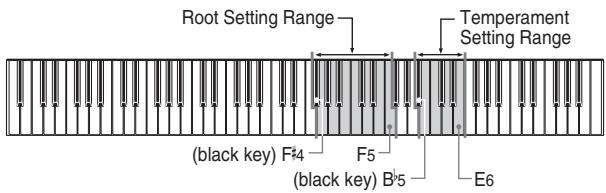
- B5... Tempérament égal
B5.... Kirnberger III
C6... Werckmeister
C#6... Tempérament mésotonique
D6... Système pythagoricien
E6... Juste intonation majeure
E6... Juste intonation mineure
REMARQUE
- Le tempérament égal et une fondamentale de C sont attribués par défaut à chaque mise sous tension du piano numérique.
- Voir « À propos des tempéraments » à la page E-28 pour plus de détails.
Pour changer le tempérament
- Maintenez enfoncé le bouton CONTROL. Notez que vous devez garder le bouton CONTROL enfoncé jusqu'à l'étape 4 ci-dessous.
- Tout en maintenant le bouton CONTROL enfoncé, sélectionnez le tempérament en appuyant sur l'une des touches du clavier illustrées ci-dessous.
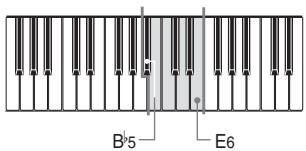
- Aucun son n'est produit lorsque les touches sont enfoncées.
- Sélectionnez une fondamentale en appuyant sur l'une des touches de la plage indiquée dans l'illustration ci-dessous. N'oubliez pas de maintenir le bouton CONTROL enfoncé.
- La note correspondant à la touche du clavier que vous enfoncez est appliquée comme fondamentale. Par exemple, si vous enfoncez la touche F5, la fondamentale devient F.
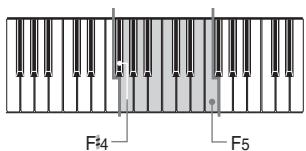
- Aucun son n'est produit lorsque les touches sont enfoncées.
- Lorsque le diapason baroque (page E-29) est activé, la fondamentale est un demi-ton plus haut que la touche enfoncée. Cela signifie que pour régler une fondamentale de C, vous devez enfoncer B4.
- Relâchez le bouton CONTROL pour quitter le réglage du tempérament.
REMARQUE
- Si vous sélectionnez uniquement le tempérament sans spécifier la fondamentale dans la procédure ci-dessus, la fondamentale devient automatiquement C.
- Les réglages de fondamentale du tempérament ne sont pas affectés lorsque vous modifiez le réglage de transposition.
- Les touches à enfoncer pour régler la fondamentale à l'étape 3 de la procédure ci-dessus sont fixes. Elles ne sont pas affectées par les réglages de transposition, etc.
À propos des tempéraments
Tempérament égal
Ce système d'accord est le plus largement utilisé pour les instruments à clavier dans le monde aujourd'hui. L'octave est divisée en 12 demi-tons égaux en rapport de fréquence. Avec ce système, vous pouvez jouer dans toutes les tonalités majeures et mineures sans aucun ajustement. Bien que nous tenions ce système pour acquis de nos jours, il a été un développement révolutionnaire dans l'histoire de la musique. Le tempérament égal est le système le plus courant utilisé dans le monde depuis le milieu du XVIIIe siècle.
Kirnberger III
C'est aussi l'un des précurseurs du tempérament égal. C'est une évolution de la justesse et du système de tempérament mésotonique, et toutes les tonalités (de do majeur à fa dièse majeur) peuvent être utilisées pour le jeu au clavier.
- Werckmeister
Werckmeister est un théoricien célèbre qui a également fait des recherches sur le tempérament égal. Ce système particulier est considéré comme un précurseur du tempérament égal, et toutes les tonalités (de do majeur à fa dièse majeur) peuvent être utilisées pour le jeu au clavier.
- Système mésotonique
Ce système a été le premier réellement utilisé pour l'accord des instruments à clavier. Il a été largement utilisé depuis la Renaissance jusqu'à la seconde moitié du XVIIIe siècle. À l'époque de Haendel et de Bach, il était employé pour les clavecins, les orgues et les pianos.
Système pythagoricien
Ce système a été développé par le philosophe Pythagore vers le Ve siècle avant J.-C. La plupart des quintes de ce système ne s'écartent pas des intervalles « purs » (acoustiquement corrects). Le système pythagoricien est parfait dans une petite gamme de tons et dans les tonalités simples, mais il devient inadéquat dans d'autres. Malgré cela, ce système a été utilisé pour la musique religieuse du Moyen Âge, qui était exécutée (chantée) en utilisant uniquement les tonalités simples.
- Justesse
Ce système est l'un des systèmes « purs » dans lesquels beaucoup de quintes et de tierces sont acoustiquement correctes. Essayez de régler la fondamentale sur do et de jouer do, mi, sol.
Utilisation du diapason baroque
Pendant l'ère baroque, le diapason standard (A4) était plus bas que le standard moderne. Le réglage du diapason baroque de votre piano numérique vous permet de jouer la musique de l'ère baroque au diapason pour lequel elle a été écrite.
Utilisez les touches indiquées ci-dessous pour changer le réglage du diapason baroque.
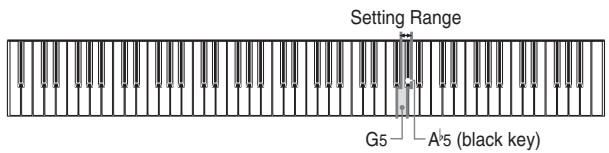
A5...ON : diapason baroque (A4 = 415,3 Hz)
G5...OFF : standard moderne (A4 = 440,0 Hz)
Pour activer ou désactiver le diapason baroque
- Maintenez enfoncé le bouton CONTROL. Notez que vous devez garder le bouton CONTROL enfoncé jusqu'à l'étape 3 ci-dessous.
- Tout en maintenant le bouton CONTROL enfoncé, activez ou désactivez le diapason baroque en appuyant sur l'une des touches du clavier illustrées ci-dessous.
A5 (touche noire) : ON G5 : OFF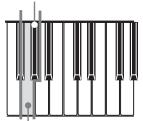
- Aucun son n'est produit lorsque les touches sont enfoncées.
- Relâchez le bouton CONTROL.
REMARQUE
- Le réglage du diapason baroque que vous effectuez est conservé jusqu'à ce que vous le modifiiez ou jusqu'à ce que vous éteigniez l'appareil. Chaque fois que vous allumez l'appareil, le réglage par défaut est désactivé (A4 = 440,0 Hz).
428A-E-033A
MIDI
Qu'est-ce que le MIDI ?
Les lettres MIDI signifient Musical Instrument Digital Interface, qui est le nom d'une norme mondiale pour les signaux numériques et les connecteurs qui permet d'échanger des données musicales entre des instruments de musique et des ordinateurs (machines) produits par différents fabricants. Les équipements compatibles MIDI peuvent échanger des messages tels que l'enfoncement de touches, le relâchement de touches, les changements de timbre et d'autres données. Bien que vous n'ayez pas besoin de connaissances particulières sur le MIDI pour utiliser ce piano numérique en tant qu'instrument autonome, les opérations MIDI nécessitent un peu de connaissances spécialisées. Cette section vous donne un aperçu du MIDI qui vous aidera à démarrer.
Ce que vous pouvez faire avec le MIDI
Envoyer
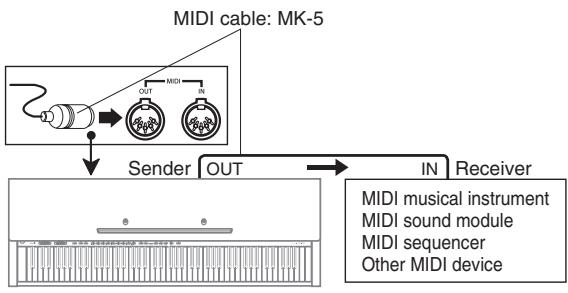
- Ce que vous jouez sur le piano numérique peut être envoyé à l'appareil connecté sous forme de messages MIDI *1 . L'appareil connecté émet des notes conformément aux messages qu'il reçoit.
- Les messages MIDI 1 peuvent être envoyés depuis le piano numérique vers un séquenceur MIDI 2 disponible dans le commerce pour être enregistrés.
Recevoir
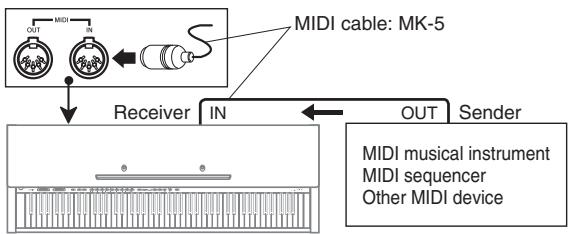
- Le piano numérique peut être utilisé pour émettre des notes envoyées sous forme de messages MIDI depuis un appareil connecté.
- Les données de piano MIDI disponibles dans le commerce peuvent être envoyées depuis un séquenceur MIDI*2 ou un ordinateur personnel compatible MIDI pour être lues sur le piano numérique. Le piano numérique peut jouer jusqu'à 16 parties simultanément.
1 Les données de jeu au clavier et de lecture en mémoire peuvent être envoyées comme données MIDI. Les morceaux de démonstration ne peuvent pas être envoyés comme données MIDI. 2 Un appareil qui contient une mémoire de stockage pour les données MIDI. Certains séquenceurs MIDI disposent de capacités de stockage externes, ce qui permet d'enregistrer un nombre pratiquement illimité de morceaux.
Connexions MIDI
Deux câbles MIDI, un pour l'envoi et un pour la réception, sont nécessaires pour des capacités d'enregistrement et de lecture bidirectionnelles avec un séquenceur MIDI ou un autre appareil connecté.
Canaux MIDI
Le MIDI permet d'envoyer les données de plusieurs parties en même temps, chaque partie étant envoyée sur un canal MIDI séparé. Il y a 16 canaux MIDI, numérotés de 1 à 16, et les données de canal MIDI sont toujours incluses lorsque vous échangez des données (pression de touche, pédale, etc.).
La machine émettrice et la machine réceptrice doivent être réglées sur le même canal pour que l'unité réceptrice reçoive et joue correctement les données. Si la machine réceptrice est réglée sur le canal 2, par exemple, elle ne reçoit que les données du canal MIDI 2, et tous les autres canaux sont ignorés.
Ce piano numérique est équipé de capacités multi-timbrales, ce qui signifie qu'il peut recevoir des messages sur les 16 canaux MIDI et jouer jusqu'à 16 parties en même temps.
Les opérations du clavier et de la pédale effectuées sur ce piano numérique sont envoyées en sélectionnant un canal MIDI (1 à 16) puis en envoyant le message approprié.
Réception simultanée sur plusieurs canaux (Multi-timbral)
Le mode Multi-Timbre permet d'assigner les sonorités intégrées du piano numérique aux canaux MIDI 1 à 16. Vous pouvez ainsi faire sonner plusieurs canaux simultanément pour jouer à partir d'un séquenceur multipiste disponible dans le commerce.
REMARQUE
- Voir « Assignation de sonorités à des canaux individuels » sur cette page pour plus de détails sur l'assignation de sonorités à chaque canal.
- Jusqu'à 16 canaux peuvent être reçus simultanément (canaux 1 à 16).
- Le nombre de canaux à recevoir simultanément ne peut pas être prédéterminé. S'il devient nécessaire d'annuler un canal, l'opération d'annulation doit être effectuée côté émetteur.
Spécification du canal clavier
Le canal clavier est le canal utilisé lors de l'envoi de messages MIDI à un autre périphérique MIDI. Vous pouvez spécifier n'importe quel canal de 1 à 16 comme canal clavier.
Pour spécifier le canal clavier
- Tout en maintenant enfoncé le bouton CONTROL, spécifiez le canal clavier en appuyant sur l'une des touches du clavier illustrées ci-dessous.
Exemple : Canal 8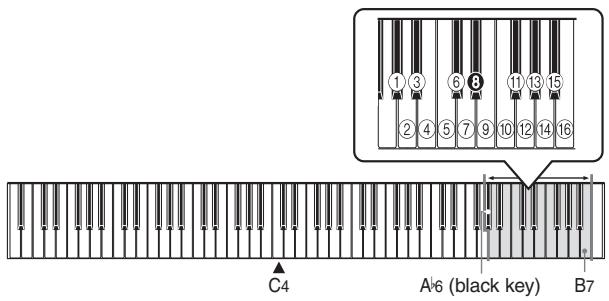
- Aucune note ne sonne lorsque vous appuyez sur une touche du clavier tout en maintenant CONTROL enfoncé.
REMARQUE
- Le canal clavier est automatiquement réglé sur 1 à chaque mise sous tension du piano numérique.
Assignation de sonorités à des canaux individuels
Vous pouvez assigner des sonorités aux canaux à l'aide d'un message de changement de programme envoyé depuis un périphérique MIDI connecté. Vous ne pouvez pas modifier la sonorité assignée à chaque canal depuis le piano numérique.
NOTE
- Le timbre GRAND PIANO 1 est automatiquement assigné à tous les canaux lorsque vous allumez le piano numérique.
Envoi des données de lecture de la mémoire de morceaux
Vous pouvez envoyer la lecture de la mémoire de morceaux comme données MIDI. Le canal d'envoi utilisé dépend du réglage du canal clavier, comme indiqué dans le tableau ci-dessous.
| Keyboard Play | Keyboard Channel |
| Keyboard main tone data | Keyboard Channel |
| Keyboard layer tone data | Keyboard Channel + 1* |
| Keyboard split tone data | Keyboard Channel + 2* |
| Main tone data inside of Track A playback data | Keyboard Channel + 3* |
| Layer tone data inside of Track A playback data | Keyboard Channel + 4* |
| Split tone data inside of Track A playback data | Keyboard Channel + 5* |
| Main tone data inside of Track B playback data | Keyboard Channel + 6* |
| Layer tone data inside of Track B playback data | Keyboard Channel + 7* |
| Split tone data inside of Track B playback data | Keyboard Channel + 8* |
- Chaque fois que l'ajout du numéro de canal clavier à une valeur de 1 à 8 produit un résultat supérieur à 16, le canal d'envoi utilisé est celui dont le numéro est égal au résultat moins 16.
NOTE
- Les données d'effet de pédale enregistrées en mémoire sont appliquées à la lecture depuis la mémoire de morceaux et n'affectent pas votre jeu au clavier. De même, les opérations de pédale sur le piano numérique ne s'appliquent qu'au clavier et non à la lecture depuis la mémoire de morceaux.
Activation et désactivation du contrôle local
Ce réglage détermine si le clavier et les pédales du piano numérique sont connectés à la source sonore interne, comme illustré ci-dessous.
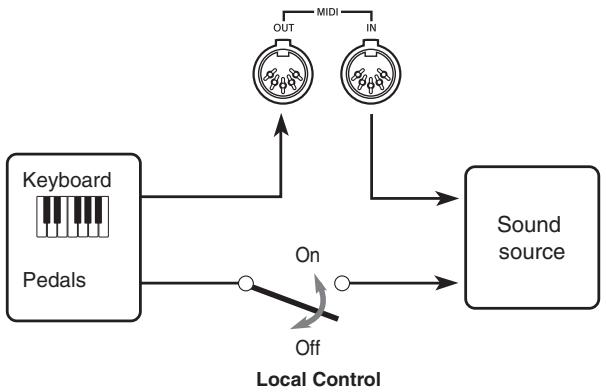
Lorsque le contrôle local est activé (réglage normal), tout ce qui est joué au clavier est sonorisé par la source sonore interne et simultanément émis par la borne MIDI OUT. Lorsqu'il est désactivé, tout ce qui est joué au clavier est émis uniquement par la borne MIDI OUT, sans être sonorisé par la source sonore.
Le contrôle local peut être désactivé lorsque vous utilisez le piano numérique comme source sonore d'un séquenceur ou d'un autre appareil connecté, et que vous souhaitez éviter qu'un son soit produit si le clavier du piano numérique est enfoncé accidentellement.
Pour activer et désactiver le contrôle local
- Tout en maintenant enfoncé le bouton CONTROL, activez ou désactivez le contrôle local en appuyant sur l'une des touches du clavier illustrées ci-dessous.
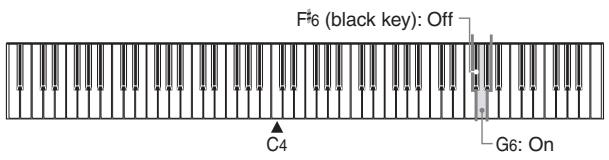
- Aucune note ne sonne lorsque vous appuyez sur une touche du clavier tout en maintenant CONTROL enfoncé.
NOTE
- Notez qu'aucun son ne sera produit par les haut-parleurs du piano numérique si vous appuyez sur le clavier alors que le contrôle local est désactivé.
- Le contrôle local est activé automatiquement chaque fois que vous allumez le piano numérique.
Notes sur les données MIDI
Cette section fournit des détails sur les données MIDI que ce piano numérique envoie et reçoit. Vous pouvez également trouver des informations techniques supplémentaires dans le "Format des données MIDI" à la page A-4 et dans le "Tableau d'implémentation MIDI"* à la fin de ce guide de l'utilisateur.
- Le tableau d'implémentation MIDI est un résumé au format standard de la manière dont les données sont transférées entre ce piano numérique et un périphérique MIDI connecté.
Données du clavier (Note On, Note Off, Numéro de note, Vélocité)
Les quatre types de données de clavier suivants peuvent être envoyés et reçus.
| Data | Meaning |
| Note On | Keyboard key is pressed. |
| Note Off | Keyboard key is released. |
| Note Number | Which key is pressed. |
| Velocity | Pressure applied |
Données de changement de sonorité (Program Change)
Un numéro de programme est une donnée utilisée pour la sélection de la sonorité. Les numéros de programme sont pratiques lorsque vous utilisez les sonorités de ce piano numérique pour jouer des données MIDI reçues d'un séquenceur externe ou d'un autre périphérique MIDI. Cependant, lorsque le numéro de programme reçu d'un autre périphérique ne correspond pas à l'une des sonorités intégrées de ce piano numérique, le changement de sonorité est ignoré et la lecture continue sans changement de sonorité.
Voici les numéros de programme pris en charge par ce piano numérique.
| ToneName | Send | Receive |
| Bank Select | Program numbers | Bank Select | Program numbers |
| MSB | LSB | MSB | LSB |
| GRAND PIANO 1 | 2 | 0 | 0 | 2 | 0 | 0 |
| BRIGHT PIANO | 2 | 0 | 1 | 2 | 0 | 1 |
| GRAND PIANO 2 | 0 | 0 | 0 | 0 | 0 | 0 |
| HONKY-TONK | 0 | 0 | 3 | 0 | 0 | 3 |
| ELEC PIANO 1 | 16 | 0 | 4 | 16 | 0 | 4 |
| ELEC PIANO 2 | 0 | 0 | 4 | 0 | 0 | 4 |
| HARPSICHORD | 0 | 0 | 6 | 0 | 0 | 6 |
| VIBRAPHONE | 0 | 0 | 11 | 0 | 0 | 11 |
| PIPE ORGAN 1 | 0 | 0 | 19 | 0 | 0 | 19 |
| PIPE ORGAN 2 | 24 | 0 | 19 | 24 | 0 | 19 |
| STRINGS 1 | 2 | 0 | 49 | 2 | 0 | 49 |
| STRINGS 2 | 0 | 0 | 48 | 0 | 0 | 48 |
| CHOIR | 0 | 0 | 52 | 0 | 0 | 52 |
| SYNTH-PAD | 0 | 0 | 88 | 0 | 0 | 88 |
| ACOUSTIC BASS | 0 | 0 | 32 | 0 | 0 | 32 |
| RIDE ACO BASS | 32 | 0 | 32 | 32 | 0 | 32 |
Données de fonctionnement de la pédale et des effets (Control Change et message exclusif système universel)
Control Change est utilisé pour envoyer et recevoir des données sur les opérations d'enfoncement et de relâchement des pédales de sustain, douce et sostenuto, ainsi que des données sur les effets numériques.
Dépannage
| Symptom | Possible Cause | Action | Reference |
| No sound produced when keyboard keys are pressed. | 1. VOLUME slider set to MIN.
2. Headphones connected to the digital piano.
3. Local Control turned off. | 1. Move VOLUME slider more towards the MAX side.
2. Disconnect the headphones from the digital piano.
3. Turn on Local control. | Page E-12
Page E-11
Page E-32 |
| Keyboard out of tune. | 1. Transpose is set to a value other than 0.
2. Incorrect tuning setting
3. Baroque pitch is turned on. | 1. Change the transpose setting to 0, or turn the digital piano power off and then back on again.
2. Correct the tuning setting, or turn the digital piano power off and then back on again.
3. Turn off baroque pitch or turn power off and then back on again. | Page E-26
Page E-27
Page E-29 |
| Pedal effect continues to be applied even though pedals are not pressed. | Problem with the connection between the pedals and the digital piano. | Turn off the digital piano power and then check to make sure that the pedal plug is securely connected to the digital piano's pedal connector. | Page E-37 |
| No sound produced by demo tune play. | 1. VOLUME slider set to MIN.
2. Headphones connected to the digital piano. | 1. Move VOLUME slider more towards the MAX side.
2. Disconnect the headphones from the digital piano. | Page E-12
Page E-11 |
| Song Memory contents deleted. | Lithium battery is dead. | Contact your CASIO Service Provider for replacement of the lithium battery. | Page E-39 |
| Song Memory track cannot be selected. | Data recorded in the other track uses up all available Song Memory capacity. | Delete the data recorded in the other track. | Page E-22 |
| Chords or scales sound strange. | Wrong temperament | Return the temperament setting to equal temperament, or turn power off and then back on again. | Page E-27 |
| No sound produced by connected external MIDI sound source when the digital piano keys are pressed. | 1. The digital piano Basic Channel does not match the Basic Channel of the MIDI sound source.
2. Volume or expression setting of the external sound source is set to 0. | 1. Change the Basic Channel settings so they are identical.
2. Change the volume or expression setting of the external sound source to an appropriate value. | Page E-30
See the documentation that comes with the external sound source. |
E-34
428A-E-038A
Instructions de montage

Attention
- Faites particulièrement attention à éviter les blessures lors de l'installation des pieds et des pédales, ainsi que lors du montage du clavier sur le support.
- Lors de l'assemblage, assurez-vous que le couvercle coulissant du clavier du piano numérique est complètement fermé. Si le couvercle est laissé ouvert pendant l'assemblage, il peut se fermer soudainement, ce qui pourrait coincer les doigts entre le corps du piano numérique et le couvercle.
IMPORTANT !
- Assurez-vous d'assembler le support sur une surface plane.
- Ce support ne comprend pas les outils nécessaires à son assemblage. Vous devez disposer d'un grand tournevis cruciforme (+) pour l'assemblage.
Figure 1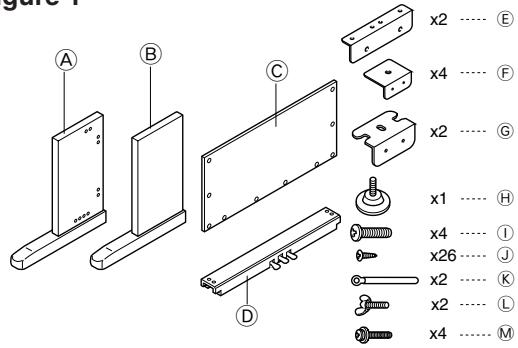
- Vérifiez les articles fournis avec l'unité pour vous assurer que tout ce qui est montré dans la Figure 1 (A) à (M) est inclus. Toutes les vis sont dans un sac en plastique à l'intérieur du carton d'emballage.
Figure 2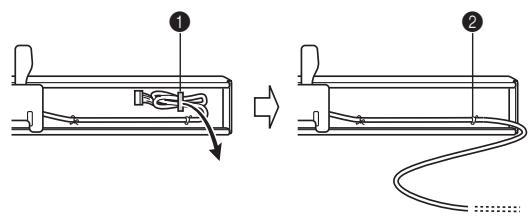
- Avant de commencer l'assemblage du support, déclipsez l'attache à l'emplacement ① (Figure 2) où le câble de la pédale sort à l'arrière de la traverse ①.

Assemblage du support
Reportez-vous aux Figures 3, 4 et 5 pour assembler le support selon la procédure suivante.
Figure 3
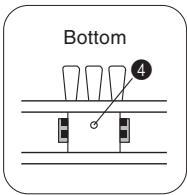
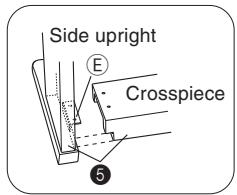
- Fixez les supports E et F aux montants latéraux A et B à l'aide des vis ① (Figure 3).
- Lors de la fixation du support en F au montant latéral B, glissez un clip K sur la vis J avant de visser la vis J dans le montant au point S.
- Fixez les équerres ⑥ aux montants latéraux A et B à l'aide des quatre vis J (Figure 3). 3. Installez la vis de réglage de hauteur H dans le trou 4 situé au centre de l'arrière de la traverse (Figure 3).
- Fixez les montants latéraux A et B à la traverse D à l'aide des quatre vis ① (Figure 3).
- Lors de l'assemblage des deux pièces marquées ⑤, les pièces métalliques ⑥ situées à l'intérieur des montants latéraux ⑧ et ⑧ doivent s'insérer dans les fentes aux extrémités de la traverse ①. Assurez-vous que les pièces métalliques pénètrent complètement dans les fentes. Si les pièces ne sont pas positionnées correctement, les écrous intégrés dans la traverse ⑨ ne s'aligneront pas correctement avec les vis ①. Cela peut entraîner un filetage abîmé et un desserrage des écrous.
Figure 4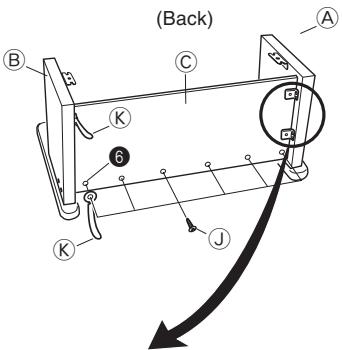
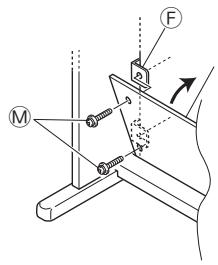
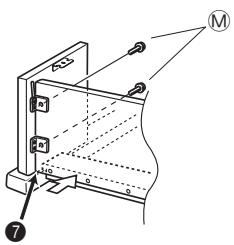
- Fixez le panneau arrière C aux supports en F et à la traverse D. Notez que le panneau arrière C doit être installé de manière à se trouver devant les supports en F (Figure 4). Utilisez les quatre vis M et six vis J pour fixer le panneau arrière en place (Figures 3 et 4). Notez que vous devez également installer le deuxième clip K à ce moment, comme indiqué sur l'illustration.
- Tout d'abord, installez les vis M les plus hautes sur les côtés gauche et droit du panneau arrière C. Notez que vous devez glisser l'autre clip K sur la vis J au point 6 avant de visser la vis J.
- Le panneau arrière C doit reposer sur les pieds des montants latéraux A et B, comme indiqué par Φ dans l'illustration. Appuyez le panneau arrière C contre la traverse D tout en installant les vis M.
Figure 5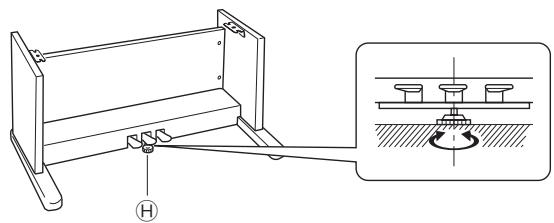
- Tournez la vis de réglage de hauteur H jusqu'à ce qu'elle soutienne la traverse, empêchant ainsi la traverse de se plier lorsque vous appuyez sur les pédales (Figure 5).
IMPORTANT !
- Assurez-vous d'installer la vis de réglage H et d'effectuer la procédure de réglage décrite ci-dessus avant d'enfoncer les pédales. Le non-respect de cette consigne peut entraîner des dommages à la traverse O.
2 Installation du clavier sur le support

Veillez à ne pas vous pincer les doigts entre le clavier et le support !
Figure 6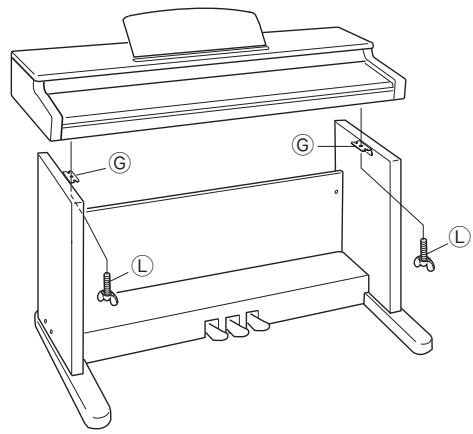
Assurez-vous de fixer solidement le clavier au support à l'aide des boulons à oreilles ① (Figure 6).
- Faites glisser les vis situées sous le clavier dans les fentes des deux équerres ⑥ . Ensuite, fixez le clavier au support avec deux boulons à oreilles ① (Figure 7).
Figure 7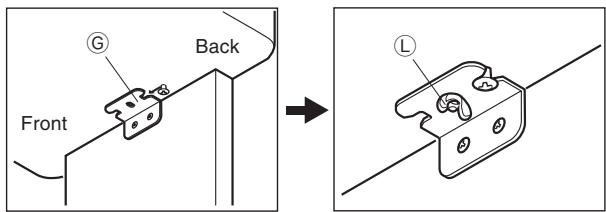
- Les boulons à oreilles empêchent le clavier de tomber du support. Assurez-vous de toujours fixer le clavier avec les boulons à oreilles.
3 Connexion de la pédale
Figure 8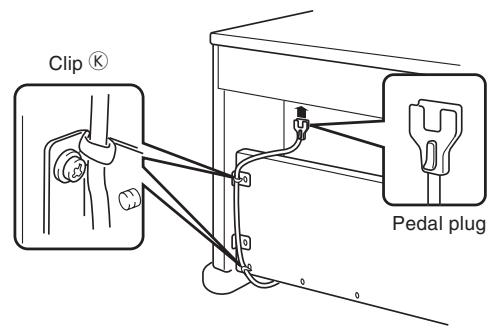
Positionnez la fiche de la pédale comme indiqué sur la Figure 8 et insérez-la dans le connecteur de pédale situé sous le piano numérique. Fixez le câble de la pédale au montant du support à l'aide des clips que vous avez installés lors de l'assemblage du support (Figure 8).
4 Connexion à une source d'alimentation
Figure 9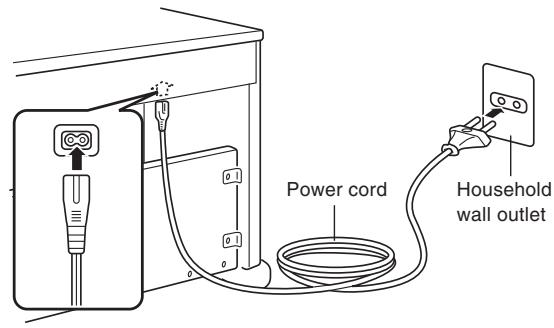
- Vérifiez que le bouton POWER du piano numérique est en position OFF. S'il est sur ON, appuyez sur le bouton pour le mettre sur OFF.
- Fixez le cordon d'alimentation fourni avec le piano numérique au bas du piano numérique.*
- Branchez le cordon d'alimentation du piano numérique dans une prise murale (Figure 9).
- s'applique à l'AP-38V.
IMPORTANT !
- La forme du cordon d'alimentation du piano numérique et de la prise murale peut varier selon les pays ou les régions. Les illustrations sont des exemples.
- Sur l'AP-38, le cordon d'alimentation est câblé en dur sous l'instrument.
428A-E-041A

Attention
Les vis utilisées pour assembler le support peuvent se desserrer après une longue période en raison des changements de température et d'humidité, ou des vibrations causées par une utilisation normale, etc. Vérifiez périodiquement les vis de fixation du support et les boulons papillon qui fixent le support et le piano numérique, et resserrez-les si nécessaire.
Spécifications
Tous les éléments de ces spécifications s'appliquent à l'AP-38 et à l'AP-38V, sauf indication contraire.
| Models: | AP-38/AP-38V |
| Keyboard: | 88 piano keys (with touch response) |
| Polyphony: | 64 notes, maximum |
| Tones: | 16
Layer: Adjustable volume
Split: Split point, adjustable volume |
| Digital Effects: | Reverb (8 types), Chorus (8 types), Brilliance |
| Demo Tunes: | Number of Tunes: 16
Playback: Repeat (all tunes, one tune) |
| Song Memory: | Operations: Real-time recording, playback
Number of Tracks: 2 (Track A, Track B)
Capacity: Approximately 8,000 notes (total of 2 tracks)
Memory Backup: Built-in lithium battery (Battery Life: Approximately 5 years) |
| Music Library: | Number of Tunes: 50
Playback: All song repeat, specific song
Part Off: L, R |
| Pedals: | Damper, Soft, Sostenuto |
| Other Functions: | Metronome: Beat (6 types), Tempo (↓ = 30 to 255)
Touch Select: 3 types, off
Transpose: 1 octave (F# to C to F)
Tuning: A4 = 440.0Hz ±50 cents (adjustable)
Temperament: 7 types
Baroque pitch |
| MIDI: | 16 multi-timbre receive |
| Input/Output: | Headphones: Stereo standard jacks × 2
LINE OUT (R, L / MONO): Standard jacks × 2
Output Impedance; 1.1KΩ
Output Voltage; 1.3V (RMS) MAX
MIDI (OUT) (IN) |
| Speakers: | ∅ 16cm × 2, ∅ 5cm × 2 (Output: 20 W + 20 W) |
| Power Supply: | AP-38: 120V
AP-38V: 220-240V |
| Power Consumption: | AP-38: 60W
AP-38V: 60W |
| Dimensions: | CELVIANO (without stand): 138.0 × 47.2 × 22.2 cm (54 3/8 × 18 5/8 × 8 3/4 inch)
CELVIANO: 138.0 × 47.2 × 83.9 cm (54 3/8 × 18 5/8 × 33 1/16 inch) |
| Weight: | CELVIANO (without stand): approximately 39.0 kg (86.0 lbs)
CELVIANO: approximately 51.0 kg (112.4 lbs) |
- La conception et les spécifications sont sujettes à modification sans préavis.
- L'AP-38 a des cordons d'alimentation câblés en dur.
- L'AP-38V a des cordons d'alimentation amovibles.
E-38
428A-E-042A
Précautions d'utilisation
Emplacement de l'appareil
Évitez les emplacements suivants.
- Les zones exposées à la lumière directe du soleil et à une humidité élevée
- Les zones soumises à des températures très basses
- Près d'une radio, d'un téléviseur, d'un magnétoscope ou d'un tuner (l'appareil peut provoquer des interférences avec les signaux audio ou vidéo)
Entretien de l'appareil
- N'utilisez jamais de benzène, d'alcool, de diluant ou d'autres produits chimiques de ce type pour nettoyer l'extérieur de l'appareil.
- Pour nettoyer le clavier, utilisez un chiffon doux imbibé d'une solution faible d'un détergent neutre doux et d'eau. Essorez tout excès d'humidité du chiffon avant d'essuyer.
Pile au lithium
Cet appareil est équipé d'une pile au lithium pour fournir l'énergie nécessaire à la conservation du contenu de la mémoire lorsque l'appareil est éteint. Si la pile au lithium est déchargée, tout le contenu de la mémoire sera perdu à chaque fois que vous éteignez l'appareil. La durée de vie normale de la pile au lithium est d'environ cinq ans à compter de son installation. Veillez à contacter périodiquement votre revendeur ou un prestataire de services agréé pour faire remplacer la pile au lithium. Notez que le remplacement de la pile au lithium vous sera facturé séparément.
- Notez que CASIO COMPUTER CO., LTD. ne pourra être tenu responsable de tout dommage ou perte, ou de toute réclamation de tiers découlant de la corruption ou de la perte de données causée par un dysfonctionnement ou une réparation de l'appareil, ou par le remplacement de la pile.
Vous remarquerez peut-être des lignes sur la finition du boîtier de ce produit. Ces lignes résultent du processus de moulage utilisé pour façonner le plastique du boîtier. Ce ne sont pas des fissures ou des cassures dans le plastique, et elles ne sont pas une source d'inquiétude.
REMARQUE
- La reproduction non autorisée de ce manuel, en tout ou en partie, est expressément interdite. Tous droits réservés.
- CASIO COMPUTER CO., LTD. ne pourra être tenu responsable de tout dommage ou perte, ou de toute réclamation de tiers découlant de l'utilisation de ce produit ou de ce manuel.
- Le contenu de ce manuel est susceptible d'être modifié sans préavis.
Annexe
Réglages initiaux à la mise sous tension
Le tableau ci-dessous indique les réglages initiaux du piano numérique à chaque mise sous tension.
| Item | Setting |
| Tone | GRAND PIANO 1 |
| Digital Effect | Reverb | Hall 1 (GRAND PIANO 1) |
| Chorus | Off (GRAND PIANO 1) |
| Layer | Off (Layer Volume: 72) |
| Split | Off (Split Volume: 127), Split point: F#3 |
| Metronome | Volume | 2 |
| Tempo | 120 |
| Beat | 4 |
| Playback Track | Recorded track |
| Touch Select | Normal |
| Transpose | C |
| Tuning | A4 = 440.0Hz |
| Temperament | Equal Temperament, Root C |
| Baroque Pitch | Off |
| Music Library | Off |
| Song Number | 1 |
| Part L | On |
| Part R | On |
| MIDI | Keyboard Channel | Channel 1 |
| Local Control | On |
| Tone Assigned to Each Channel | GRAND PIANO 1 |
428A-E-085A
Réglages initiaux à la mise sous tension
Le tableau ci-dessous indique les réglages initiaux du piano numérique à chaque mise sous tension.
| Item | Ajuste |
| Sonido | GRAND PIANO 1 |
| Efektodigital | Reverberación | Hall 1 (GRAND PIANO 1) |
| Chorus | Off (GRAND PIANO 1) |
| Estratificador | Desactivado (Volumen del estratificador: 72) |
| División | Desactivado (volumen de división: 127),Punto de división: F#3 |
| Metrólomo | Volumen | 2 |
| Tempo | 120 |
| Tiempo | 4 |
| Pista de reproducción | Pista grabada |
| Selección de toque | Normal |
| Transmisión | C |
| Afinación | A4 = 440,0Hz |
| Temperamento | Temperamento uniforme,nota fundamental C |
| Altura tonal barroca | Desactivado |
| Biblioteca musical | Desactivado |
| Número de canción | 1 |
| Parte L (izquierda) | Activado |
| Parte R (derecha) | Activado |
| MIDI | Canal de teclado | Canal 1 |
| Control local | Activado |
| Sonido asignado a cada canal | GRAND PIANO 1 |
Morceaux de la bibliothèque musicale
| Tune Number/ Número de melodia | Tune Name/Nombre de melodia | Composer/ Compositor | Tune Number/ Número de melodia | Tune Name/Nombre de melodia | Composer/ Compositor |
| 1 | Klavierbüchlein für Anna Magdalena Bach "Menuet" | J.S.Bach | 26 | Etude Op.10 No.12
"Revolutionary" | F.F.Chopin |
| 2 | Invention No.1 | J.S.Bach | 27 | Prelude Op.28 No.7 | F.F.Chopin |
| 3 | Invention No.8 | J.S.Bach | 28 | Valse Op.64 No.1 "Petit Chien" | F.F.Chopin |
| 4 | Invention No.13 | J.S.Bach | 29 | Valse Op.64 No.2 | F.F.Chopin |
| 5 | Wohltemperierte Klavier I Praelodium 1 | J.S.Bach | 30 | Fröhlicher Landmann | R.Schumann |
| 31 | Von fremden Ländern und Menschen | R.Schumann |
| 6 | Goldberg-Variationen Aria | J.S.Bach |
| 7 | Goldberg-Variationen Var.30 | J.S.Bach | 32 | Träumerei | R.Schumann |
| 8 | Sonata K.545 1st Mov. | W.A.Mozart | 33 | Arabesque | F.Burgmüller |
| 9 | Sonata K.331 1st Mov. Theme | W.A.Mozart | 34 | La Chevaleresque | F.Burgmüller |
| 10 | Sonata K.331 3rd Mov. "Turkish March" | W.A.Mozart | 35 | La Prière d'une Vierge | T.Badarzewska |
| 36 | Liebesträume No.3 | F.Liszt |
| 11 | Variations on "Ah, Vous DiRai-je, Maman" K.265 | W.A.Mozart | 37 | Blumenlied | G.Lange |
| 38 | Hungarian Dances No.5 (Duets) | J.Brahms |
| 12 | Sonatina Op.36 No.1 1st Mov. | M.Clementi | 39 | Rhapsodie No.2 | J.Brahms |
| 13 | Sonata Op.13 "Pathétique" 1st Mov. | L.v.Beethoven | 40 | Waltz Op.39 No.15 (Duets) | J.Brahms |
| 41 | Promenade From "Tableaux d'une Exposition" | M.Mussorgsky |
| 14 | Sonata Op.13 "Pathétique" 2nd Mov. | L.v.Beethoven |
| 42 | Berceuse (Duets) | G.Fauré |
| 15 | Sonata Op.13 "Pathétique" 3rd Mov. | L.v.Beethoven | 43 | Passepied | C.A.Debussy |
| 44 | La Fille aux Cheveux de Lin | C.A.Debussy |
| 16 | Sonata Op.27 No.2 "Moonlight" 1st Mov. | L.v.Beethoven | 45 | Arabesque No.1 | C.A.Debussy |
| 46 | The Entertainer | S.Joplin |
| 17 | Sonata Op.31 No.2 "Tempest" 3rd Mov. | L.v.Beethoven | 47 | Maple Leaf Rag | S.Joplin |
| 48 | Gymnopédies No.1 | E.Satie |
| 18 | Für Elise | L.v.Beethoven | 49 | Gnossiennes No.1 | E.Satie |
| 19 | Moments Musicaux Op.94 No.3 | F.P.Schubert | 50 | Je Te Veux | E.Satie |
| 20 | Impromptu Op.142 No.3 "Thema" | F.P.Schubert | |
| 21 | Marche Militaire No.1 (Duets) | F.P.Schubert |
| 22 | Nocturne Op.9 No.2 | F.F.Chopin |
| 23 | Fantaisie-Impromptu Op.66 | F.F.Chopin |
| 24 | Etude Op.10 No.3 "Chanson de l'adieu" | F.F.Chopin |
| 25 | Etude Op.10 No.5 "Black Keys" | F.F.Chopin |
Les éléments marqués « ★ » sont en réception uniquement.
Messages de canal
Messages de note
Note off
Reconnaissance
Format
Octet 1
Par
Octet 1
Volume du canal ★
| Byte 1 | Byte 2 | Byte 3 |
| BnH | 07H | vvH |
n .... Numéro de canal de voix = 0H à FH (Ch1 à Ch16) vv..... Volume = 00H à 7FH
Panoramique
1.1.1. Numéro de banque ESB = 001 ∴ m - 1 ≠ 0 ;
Un message Bank Select est envoyé en même temps que la sélection d'un timbre sur l'instrument.
Molette de modulation ★
Octet 1
2,3-1 2,3-1 BnH 01H vvH
n..... Numéro de canal de voix = 0H à F vv..... Profondeur de modulation = 00H à 7FH
Temps de Forte ★
Temps de Forte
n : Voice Channel Number = 0H à FH (Ch1 à Ch16).
kk : Note Number = 15H à 6CH
vv : Note Off Velocity = 40H
Note On
Reconnaissance
Données
#
Octet 1 Octet 2 Octet 3 9nH kkH vvH
n : Voice Channel Number = 0H à FH (Ch1 à Ch16)
kk : Note Number = 00H à 7FH vv : Note On Velocity = 00H à 7FH
Octet 1 Octet 2 Octet 3 9nH kkH vvH
#
Octet 1 Octet 2 Octet 3 9nH kkH vvH
Sostenuto

n.....Voice Channel Number = 0H to FH (Ch1 to Ch16) vv .... Sostenuto = 00H to 7FH (00H to 3FH: OFF, 40H to 7FH: ON)
n.....Voice Channel Number = 0H to FH (Ch1 to Ch16) vv .... Sostenuto = 00H, 7FH (00H: OFF, 7FH: ON)

Reconnaissance
n.....Voice Channel Number = 0H to FH (Ch1 to Ch16) vv.....Soft = 00H to 7FH (00H to 3FH: OFF, 40H to 7FH: ON)
Envoi
n.....Voice Channel Number = 0H to FH (Ch1 to Ch16) vv.....Soft = 00H, 7FH (00H: OFF, 7FH: ON)
Résonance

n .Voice Channel Number = 0H to FH (Ch1 to Ch16)
Temps de relâchement ★
#

n . Voice Channel Number = 0H to FH (Ch1 to Ch16) vv. AMP Release Time = 00H to 7FH
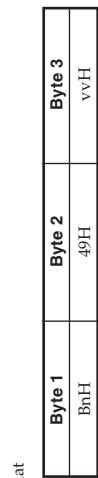
n.....Voice Channel Number = 0H to FH (Ch1 to Ch16) vv.....AMP Attack Time = 00H to 7FH
Reconnaissance
- Les messages NRPN non définis par l'instrument peuvent également être reçus, mais les valeurs d'entrée de données ultérieures après des messages NRPN non définis sont ignorées.
Les messages NRPN non définis sont ignorés.
- Après réception du MSB et du LSB du NRPN et application du protocole applicable, les données sont envoyées au patient.
Une fois les réglages des paramètres de contrôle effectués, la valeur est définie par la réception du MCR du système et des paramètres de contrôle. Les paramètres de données ICRP sont
du MSB de l'entrée de données suivante. Le LSB de l'entrée de données est ignoré.
*Taux de vibrato
NRPN MSB = 01H
NRPN LSB = 08H
Entrée de données MSB = mmH
mm .... Taux de vibrato = 00H à 40H à 7FH (-64 à 0 à +63)
Ignition
Lorsque l'instrument reçoit ce message, la valeur préréglée du taux de vibrato pour le système est mise à jour selon le rapport de Hillston comme suit :
la valeur pour la tonalité est changée en la valeur du taux de vibrato qui correspond au MSB de l'entrée de données du message reçu. Il n'y a aucun changement lorsque la valeur du MSB de l'entrée de données est 40H(0)
Profondeur du vibrato
NRPN MSB = 01H
NRPN LSB = 09H
NRPN LSB = 09H
Data Entry MSB = mmH
mm .... Vibrato Depth = 00H à 40H à 7FH (-64 à 0 à +63)
mm .... Vibrato Delay = 00H à 40H à 7FH (-64 à 0 à +63)
Reconnaissance
Lorsque l'instrument reçoit ce message, la valeur de Vibrato Delay
préréglée pour le timbre est modifiée en fonction de la valeur
correspondant au MSB de Data Entry du message reçu. Il n'y a pas de changement dans la taille du MSB de Data Entry qui est 40H (0)
lorsque la valeur du MSB de Data Entry est 40H (0)
Brightness ★

n.....Numéro de canal de voix = 0H à FH (Ch1 à Ch16) vv.....Fréquence de coupure du filtre = 00H à 7FH
Portamento Control ★

n. Voice Channel Number = 0H to FH (Ch1 to Ch16) kk. Source Note Number = 00H to 7FH
Effect 1 Depth (Reverb)
Effect 1 Depth (Reverb Send Level)

n. Voice Channel Number = 0H to FH (Ch1 to Ch16) yy. Reverb Send Level = 00H to 7FH
Effect 3 Depth (Chorus Send Level)
When the instrument receives this message, the preset Vibrato Depth value for the tone is changed to the value that corresponds to the data entry MSB of the received message. There is no change when the value of the data entry MSB is 40H (0).
NRPN MSB = 01H, NRPN LSB = 0AH, Data Entry MSB = mmH. When the instrument receives this message, the preset Vibrato Depth value for the tone is changed to the value that corresponds to the data entry MSB of the received message. There is no change when the value of the data entry MSB is 40H (0). Vibrato Delay: NRPN MSB = 01H, NRPN LSB = 0AH, Data Entry MSB = mmH. n. Voice Channel Number = 0H to FH (Ch1 to Ch16) vv. Chorus Send Level = 00H to 7FH
NRPN (Non-
Num

NRPN (Non-Registered Parameter
Num

n. Voice Channel Number = 0H to FH (Ch1 to Ch16) pm. MSB of NRPN p1. LSB of NRPN
Filter Cut Off Frequency
NRPN MSB = 01H
NRPN LSB = 20H
Data Entry MSB = mmH
mm.
+63)
Filter/AMP Envelope Release Time
NRPN MSB = 01H
NRPN LSB = 66H
Data Entry MSB = mmH
mm Filter/AMP Env
(-64 à 0 à +63)
Lorsque l'instrument reçoit ce message
Enveloppe
qui correspond au Data Entry MSB du message reçu. Il n'y a pas de changement lorsque la valeur du Data Entry MSB est 40H (0)
Data Entry MSB = mmH
N (Registered Parameter Numbers)
Format
NRPN LSB = 21H
Data Entry MSB = 1
mm .... Résonance = 00
n.....Numéro de canal de voix = 0H à FH (Ch1 à Ch16)
qm.....MSB du RPN
qI ....LSB du RPN
Reconnaissance
Temps d'attaque de l'enveloppe du filtre/ampli
NRPNMSB = 01H NRPNLSB = 63H Data Entry MSB = mmH (1) mm .... Env. filtre/AMF (-64 à 0 à +63)
- Les messages RPN non définis par l'instrument peuvent également être reçus, mais les valeurs de data entry suivantes après un RPN non défini
sont ignorées.
- Après la réception du MSB et du LSB d'un RPN et l'application des règles applicables, le système est prêt à démarrer.
Les paramètres de contrôle sont réglés ; la valeur est définie par la réception du MSB du data entry suivant. Le LSB du data entry est
du M. ignoré.
8.10
Envoi
Un RPN est envoyé chaque fois qu'une opération modifiant le paramètre assigné au RPN est effectuée.
qui correspond au
Il n'y a pas de changement lorsque la valeur de l'octet de poids fort de la saisie de données est 40H(0)
Temps de décroissance de l'enveloppe du filtre/amplificateur
NRPN MSB = 01H
NRPN LSB = 64H
Data Entry MSB = mmH
mm .... Enveloppe du filtre/amplificateur
Le cas
L'octet de poids faible de la saisie de données est toujours ignoré.
p. Numéro de canal voix = 0H à EH (Ch1 à Ch16). 1. Pitch Bend Change LSB = 00H à 7FH mm .... Pitch Bend Change MSB = 00H à 7FH
| Byte 1 | Byte 2 | Byte 3 |
| EnH | 11H | mmH |
| Byte 1 | Byte 2 | Byte 3 |
| BnH | 65H | qmH (MSB) |
| BnH | 64H | qI H (LSB) |
| Filter Cut Off Frequency
NRPN MSB = 01H
NRPN LSB = 20H
Data Entry MSB = mmH |
| mm .... Filter Cut Off Frequency = 00H to 40H to 7FH (-64 to 0 to +63) |
| Recognition
When the instrument receives this message, the preset Filter Cut off Frequency value for the tone is changed to the value that corresponds to the data entry MSB of the received message. There is no change when the value of the data entry MSB is 40H(0). |
| Filter Resonance
NRPN MSB = 01H
NRPN LSB = 21H
Data Entry MSB = mmH |
| mm .... Resonance= 00H to 40H to 7FH (-64 to 0 to +63) |
| Recognition
When the instrument receives this message, the preset Filter Resonance value for the tone is changed to the value that corresponds to the data entry MSB of the received message. There is no change when the value of the data entry MSB is 40H(0). |
| Filter/AMP Envelope Attack Time
NRPN MSB = 01H
NRPN LSB = 63H
Data Entry MSB = mmH |
| mm .... Filter/AMP Envelope Attack Time = 00H to 40H to 7FH (-64 to 0 to +63) |
| Recognition
When the instrument receives this message, the preset Filter/AMP Envelope Attack Time value for the tone is changed to the value that corresponds to the data entry MSB of the received message. There is no change when the value of the data entry MSB is 40H(0). |
| Filter/AMP Envelope Decay Time
NRPN MSB = 01H
NRPN LSB = 64H
Data Entry MSB = mmH |
| mm .... Filter/AMP Envelope Decay Time = 00H to 40H to 7FH (-64 to 0 to +63) |
| Recognition
When the instrument receives this message, the preset Filter/AMP Envelope Decay Time value for the tone is changed to the value that corresponds to the data entry MSB of the received message. There is no change when the value of the data entry MSB is 40H(0). |
Mode Mono activé ★
| Byte 1 | Byte 2 | Byte 3 |
| BnH | 7BH | 00H |
n..... Voice Channel Number = 0H à FH (Ch1 à Ch16)
Ignition
La réception du message All Note Off coupe toutes les notes jouées par les données reçues sur les canaux MIDI (note off). Si Hold 1 ou Sostenuto est activé lors de la réception du message All Note Off, les notes sont maintenues conformément à l'opération de la pédale correspondante.
Ce message est envoyé lorsque le CONTROL
lorsque la lecture de la mémoire de chanson est arrêtée.
Omni Mode Off ★
| Byte 1 | Byte 2 | Byte 3 |
| BnH | 7CH | 00H |
n ...... Voice Channel Number = 0H à FH (Ch1 à Ch16).
Ignition 1
La réception d'un message Omni Mode On n'active pas le mode Omni de l'instrument. La réception d'un message Omni Mode On est
Mode Instrument Off. La réception est traitée comme un message All Note Off.
Omni Mode On*
| Byte 1 | Byte 2 | Byte 3 |
| BnH | 7DH | 00H |
Reconnaissance
n..... Voice Channel Number = 0H to FH (Ch1 to Ch16). Receipt of an Omni Mode On message does not turn on the instrument's Omni Mode. Receipt of [this message] is treated as an All Note Off message.
All Note Off
You have to set both the LSB and MSB together to form a 14-bit value and make a Pitch Bend Change message recognized by the instrument. You have to set both the LSB and MSB together to form a 14-bit value, and make the Pitch Bend Changes process reprocessed by the instrument.
Channel Mode Message
All Sound Off ★
Format
Reset All Controller ★
Format
| Byte 1 | Byte 2 | Byte 3 |
| BnH | 79H | 00H |
n ......... Voice Channel Number = 0H to FH (Ch1 to Ch16)
Receipt of the Reset All Controller message causes the following:
Receipt of the [message] causes the reserve controllers to be reset.
| Controller Name | Reset Value |
| Modulation Wheel | vvH = 00H |
| Expression Controller | vvH = 7FH |
| Hold 1 | vvH = 00H |
| Portamento | vvH = 00H |
| Sostenuto | vvH = 00H |
| Soft | vvH = 00H |
| NRPN | msb = 7FH, lsb = 7FH |
| RPN | msb = 7FH, lsb = 7FH |
| Pitch Bend Change | lH mmH = 00H 40H |
Recognition
The value IIHmmH is 00H00H at the lowest pitch, 00H40H at mid pitch, and 7FH7FH at the highest pitch.
mid-pitch, and 7FH/FF at the highest pitch.
428A-E-091A
A
Messages système
Message exclusif système universel
Message
GM System On ★
Format
F0H 7EH 7FH
Envoi
Type de réverbération
F0 7F 7F 04 05 01
F0 7F 7F 04 05 01
F0 7F 7F 04 05 01
Type de réverbération
PP = 0
vv = 0 :Ko0m1 = 1 :Koom2
= 1 : Room2 = 2 : Room3
= 3 : Hall1
= 4 : Hall2
= 6 :Delay
= 7 : Pan Del
= 8 : Stage
Send
This message is sent when a reverb switch operation or other reverb
vE Receipt of this message sets the reverb type.
Chorus Type
F0 7F
Type de chorus
PP = 0
vv = 0 : Chorus 1
= 1 : Chorus 2
= 2 : Chorus 3
= 3 : Chorus 4
= 4 : Feedback
= 5 : Flanger
= 6 : Short Delay
Envoi
Ce message est envoyé lors d'une opération de commutation de chorus ou de réglage du type de chorus. La réception de ce message règle le type de chorus.
F0H 7EH 7FH 09H 01H F7H
Envoi
Ce message ne peut pas être envoyé.
Type de réverbération
Format
Type de réverbération
PP = 0 . 0,P = P - 1
vv = 0 :Ko0m11 1: Rcm2
2:Reclims =3:Hall1
= 4: Hall2
= 6 :Delay
= 7 :PanDelay
= 8 :Stage
Modèle AP-38 Tableau d'implémentation MIDI Version : 1.0
| Function ... | Transmitted | Recognized | Remarks |
| Basic Channel | Default Changed | 1 | 1-16 | |
| 1-16 | 1-16 |
| Mode | Default Messages Altered | Mode 3 X | Mode 3 X | |
| ********** | X |
| Note Number: | True voice | 21-108 | 0-127 | |
| ********** | 0-127 |
| Velocity | Note ON Note OFF | ○ 9nH V = 1-127 | ○ 9nH V = 1-127 | ** = no relation |
| × 8nH V = 64 | × 9nH V = 0, 8nH V = ** |
| After Touch | Key's Ch's | × | × | |
| × | × |
| Pitch Bend | × | ○ | |
| Control Change | 0, 32 | ○ | ○ | Bank select Modulation Portamento Time Data entry Volume Pan Expression Damper Portamento Sostenuto Soft Resonance Release Time Attack Time Brightness |
| 1 | × | ○ |
| 5 | × | ○ |
| 6, 38 | ○*1 | ○*1 |
| 7 | × | ○ |
| 10 | × | ○ |
| 11 | × | ○ |
| 64 | ○ | ○ |
| 65 | × | ○ |
| 66 | ○ | ○ |
| 67 | ○ | ○ |
| 71 | × | ○ |
| 72 | × | ○ |
| 73 | × | ○ |
| 74 | × | ○ |
| 84 | × | ○ | Portamento Control Reverb send |
| 91 | ○ | ○ |
428A-E-102A
| 72 | X | O | Release Time |
| 73 | X | O | Attack Time |
| 74 | X | O | Brightness |
| 84 | X | O | Portamento Control |
| 91 | O | O | Reverb send |
| 93 | O | O | Chorus send |
| 98, 99 | X | O | NRPN LSB, MSB |
| 100, 101 | O | O | RPN LSB, MSB |
| 120 | X | O | All sound off |
| 121 | X | O | Reset all controller |
| Program Change : True # | O********** | O*2 | |
| System Exclusive | O | O | |
| System : Song Pos Common : Song Sel : Tune | X | X | |
| X | X | |
| X | X | |
| System : Clock Real Time : Commands | X | X | |
| X | X | |
| Aux : Local ON/OFF : All notes OFF Messages : Active Sense : System Reset | X | X | |
| O | O | |
| X | O | |
| X | X | |
| Remarks | *1 : Fine tune and coarse tune send/receive, and RPN Null, pitch bend sense, vibrato rate, vibrato depth, vibrato delay, Filter cut off frequency, Filter resonance, Filter/AMP envelope attack time, Filter/AMP envelope decay time and Filter/AMP envelope release time receives *2 : See the program numbers' table on page E-33, S-33. |
| Mode 1 : OMNI ON, POLY Mode 2 : OMNI ON, MONO O: Yes Mode 3 : OMNI OFF, POLY Mode 4 : OMNI OFF, MONO X: No |
428A-E-103A

Ce symbole de recyclage indique que l'emballage est conforme à la législation sur la protection de l'environnement en Allemagne.
La marque de recyclage indique que l'emballage est conforme à la législation sur la protection de l'environnement en Allemagne.