
60KP5BB - Four électrique VEDETTE - Notice d'utilisation et mode d'emploi gratuit
Retrouvez gratuitement la notice de l'appareil 60KP5BB VEDETTE au format PDF.


| Type de produit | Four électrique |
| Marque | VEDETTE |
| Modèle | 60KP5BB |
| Dimensions (H x L x P) | 596 x 596 x 562 mm |
| Dimensions du logement requis (H x L x P) | Encaster : 585 x 560 x 550 mm ; Sous plan : 595 x 560 x 550 mm |
| Alimentation électrique | 230 V monophasé |
| Puissance totale absorbée | 2,580 kW |
| Puissance du four chaleur tournante | 2,050 kW |
| Puissance du grill (avec ventilateur) | 2,550 kW |
| Fonctions | Chaleur tournante, grill pleine largeur, grill demi-largeur, décongélation, minuteur, programmateur électronique 24h |
| Type de programmateur | Électronique 24h (affichage digital) |
| Éclairage intérieur | Ampoule 15 W (remplaçable par l'utilisateur) |
| Accessoires fournis | 2 grilles, 2 cadres latéraux, lèchefrite, poignée, notice |
| Matériau de la cavité | Émail (nettoyage facile) |
| Système de refroidissement | Ventilateur de refroidissement (maintient la porte froide) |
| Nettoyage recommandé | Chiffon humide et nettoyant doux ; éviter produits abrasifs |
| Sécurité | Porte froide, avertissement de surchauffe, ne pas laisser les enfants sans surveillance |
| Garantie | 12 mois (pièces et main-d'œuvre) ; extension possible via Caremark |
| Service après-vente | Caremark : 01942 815311 (Royaume-Uni) |
| Pays de fabrication | Autriche (pour Bernstein Group PLC) |
FOIRE AUX QUESTIONS - 60KP5BB VEDETTE
Questions des utilisateurs sur 60KP5BB VEDETTE
0 question sur cet appareil. Repondez a celles que vous connaissez ou posez la votre.
Poser une nouvelle question sur cet appareil
Téléchargez la notice de votre Four électrique au format PDF gratuitement ! Retrouvez votre notice 60KP5BB - VEDETTE et reprennez votre appareil électronique en main. Sur cette page sont publiés tous les documents nécessaires à l'utilisation de votre appareil 60KP5BB de la marque VEDETTE.
MODE D'EMPLOI 60KP5BB VEDETTE
HOMARK
KALEIDOSCOPE
FAN OVEN
O— Blue 08-801201 Yellow 13-801201
Ivory 09-801201 Turquoise 14-801201
Red 10-801201 MintGreen 15-801201
Claret 11-801201 Purple 16-801201
Green 12-801201 Terracotta 17-801201
OWNERS GUIDE
WARNING - THIS APPLIANCE MUST BE EARTHED
This appliance must be connected by a competent person, using fixed wiring via a DOUBLE POLE SWITCHED FUSED SPUR OUTLET.
We recommend that the appliance is connected by a qualified electrician, who is a member of the N.I.C.E.I.C. and who will comply with the I.E.E. and local regulations.
The wires in the mains lead are coloured in accordance with the following code:
Green & Yellow = Earth, Blue = Neutral, Brown = Live.
As the colours of the wires in the mains lead for the appliance, may not correspond with the coloured markings identifying the terminals in
your spur box, proceed as follows:
1) The wire which is coloured green and yellow must be connected to the terminal marked E (Earth) or coloured Green.
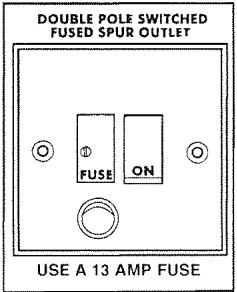
Fig. 1
2) The wire which is coloured blue must be connected to the terminal marked N (Neutral), or coloured Black.
3) The wire which is coloured brown must be connected to the terminal marked L (Live), or coloured Red.
HOW TO INSTALL YOUR OVEN
You will need the following housing area to fit your oven correctly.
| Dimensions (mm) | Oven | Housing |
| Height | 596 | 585 Built in 595 Built under |
| Width | 596 | 560 |
| Depth | 562 | 550 (min) |
The oven is designed to fit into a cabinet of 600mm width. The oven can be built in or built under the kitchen units, but you must ensure that it is properly ventilated.
In the diagram the built-in oven is ventilated by means of a space at the top of the kitchen cabinet. There are many other methods of ventilating your oven. Consult a qualified engineer for advice.
IMPORTANT:
If the oven is being installed into a built-under oven housing unit ensure that the front rail at the top of the unit is not installed as it could restrict ventilation.
Ensure that air can flow freely around the housing area. If the oven is being installed into a fully enclosed built-under oven housing unit it may be necessary to cut a small slot in the top of the plinth fitted under the unit. Cut a section 400mm wide and a minimum of 15mm high to allow air to pass under the unit.
Failure to allow adequate ventilation to the appliance may result in over heating or damage to adjacent units and may invalidate the warranty.
This appliance is type X installation.
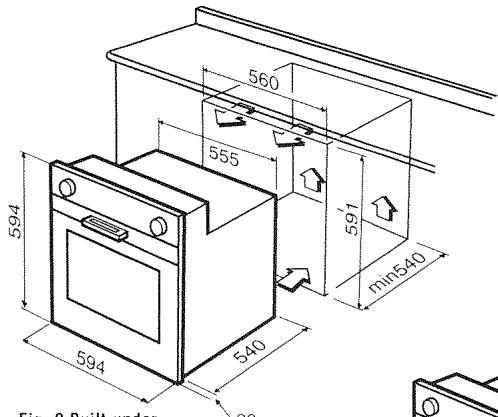
Fig. 2 Built-under
Lift the oven carefully into position on the shelf, taking care NOT to lift it by the door handle. If you lower the oven door, you will see 4 screw holes, 2 on each side of the oven. The oven should then be secured to the housing by fitting screws into these holes. Remember the housing should not be free standing but be secured to the wall and/or adjacent fittings.
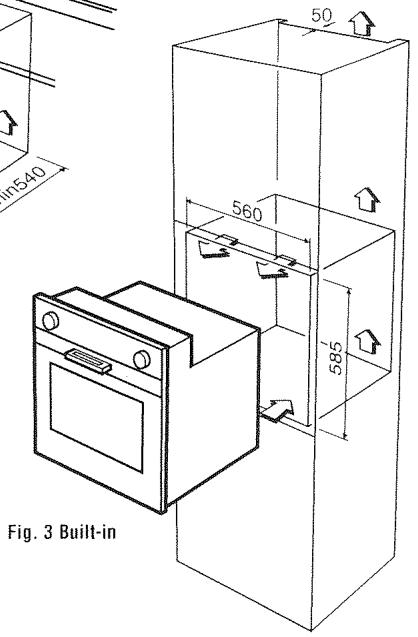
HOW TO USE YOUR OVEN
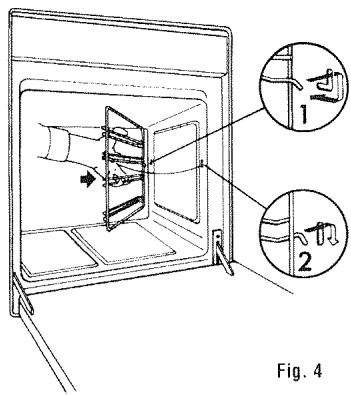
Fig. 4
You will find the following items delivered with your oven; grill pan and handle, 2 wire side frames, 2 shelves, instruction booklet and guarantee card.
The rating plate can be found on the bottom right hand side of the inner door.
Before using the oven for the first time we recommend that you clean it with soapy water, rinse carefully and heat for 30 minutes at maximum temperature. A slightly unpleasant smell may be produced, caused by grease remaining on the oven elements from the production process.
DO NOT CLEAN THE OVEN WHEN IT IS SWITCHED ON.
Attach the side frames as indicated in fig. 4.
The fan is situated on the back wall of the oven. The heating element encircles the fan and the fan forces this heat into the oven, through the sidewalls, creating a more even temperature than a conventional oven. The moving hot air surrounds the food and penetrates it more quickly than in a conventional oven. The oven can be filled with foods all requiring the same cooking temperature. Subtract 10 minutes per hour for every dish requiring a conventional cooking time of more than 1 hour, and reduce the heat by 10 - 20^ ; the hotter the oven, the more the heat can be reduced.
Generally, it is not essential to pre-heat a fan
oven. However, pre-heating for 5 minutes ensures the best results.
When the fan is turned on and the temperature control is set at 0^ , the oven can be used for defrosting food. This is ideal for gelatin based dishes and softening ice-cream - a microwave oven is much too strong for these dishes. If the oven door has been opened, the fan oven quickly regains its temperature once the door is closed.
RECOMMENDED COOKING TEMPERATURES
| Food | °C | °F | Gas Mark | Shelf Position* | Cooking Time (approx) |
| CAKES | |||||
| Victoria sandwich | 190 | 375 | 5 | 2 or 3 | 20-25 mins |
| Small cakes/buns | 190 | 375 | 5 | 1 and 2 | 15-20 mins |
| Madeira cake | 180 | 350 | 4 | 2 or 3 | 20 mins |
| Fruit cake | 170 | 325 | 3 | 3 | 13/4 hours |
| Rich fruit cake | 150 | 300 | 2 | 3 or 4 | 21/2 hours |
| Scones | 224-240 | 425-475 | 8-9 | 2 | 8-10 mins |
| PASTRY | |||||
| Puff | 225-240 | 425-475 | 8-9 | 2 | 10-20 mins |
| Short crust | 200 | 400 | 6 | 2 | 20-30 mins |
| Plate tarts | 200-210 | 400-410 | 6 | 1 or 2 | 30-35 mins |
| Quiche and flans | 200-210 | 400-410 | 6 | 1 or 2 | 40-45 mins |
| YEAST | |||||
| Bread loaf | 220-230 | 425-450 | 7-8 | 2 | 35-55 mins |
| Bread rolls | 220 | 425 | 7 | 1 or 2 | 15-20 mins |
| Pizza dough | 230 | 450 | 8 | 2 | 20 mins |
| ROAST MEAT | |||||
| Beef - Medium | 190 | 375 | 5 | 2 or 3 | 20 mins/lb + 20 mins |
| Lamb | 190 | 375 | 5 | 2 or 3 | 25-30 mins/lb +25 mins |
| Pork | 190-200 | 375-400 | 5-6 | 2 or 3 | 30 mins/lb + 30 mins |
| Veal | 190 | 375 | 5 | 2 or 3 | 30 mins/lb + 30 mins |
| Chicken | 190 | 375 | 5 | 2 or 3 | 16-20 mins/lb + 20 mins |
| Turkey up to 10lb | 180 | 350 | 4 | 2 or 3 | 18-20 mins/lb + 20 mins |
| Stews/casseroles | 150-170 | 300-325 | 2-3 | 2 or 3 | 11/2 - 2 hours |
N.B. For fan ovens reduce the temperature by 10 - 20^ .For any dish taking one hour or over to cook, reduce the cooking time by 10 minutes per hour.
- Shelf positions have been counted from the top of the oven to the base. A fan oven creates more even temperature throughout, therefore the shelf positions are not as critical.
This oven is fitted with a cooling system to prevent the glass from becoming too hot, thus helping to ensure kitchen safety. The cool door system is operated by a fan at the rear of the oven which constantly draws cool air between the liner and outer door glasses.
The fan will continue to operate even after the oven has been switched off until the oven temperature has cooled down sufficiently.
Note: in the unlikely event of cooling fan failure the control panel and doors will become hot.
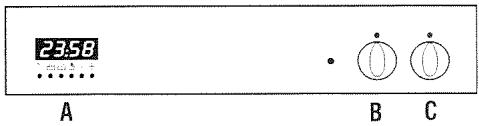
A. Electronic Timer
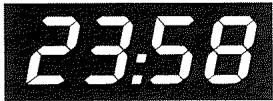
The programmer operates in the 24 hour mode, ie..1pm is set at 13.00.
Procedure
To set the Clock
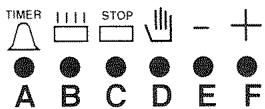
Switch on the electricity supply. Press buttons B and C together and adjust the time using buttons E and F. Release all buttons when the correct time is displayed.
Press button D.
Semi Automatic Cooking Using Length of Cooking Time
Turn the oven to the required temperature.
Press button C and using buttons E and F adjust the time at which you require the food to finish cooking.
Turn control knobs to the Off position and press button D.
To Cancel the Programme
Press button B and adjust the time displayed using button E to read 00.00.
Button A - Minute Minder
Button B - Length of Cooking Time
Button C - End Time
Button D - Manual
Button E - Display Forward
Button F - Display Backward
The adjustment speed of buttons E and F increases depending on the amount of pressure on the buttons.
Result
0.01 flashing.
Correct time is displayed with AUTO flashing.
The time is now set and the MANUAL symbol appears in the centre of the display. The AUTO symbol has disappeared.
The oven will now operate when the function and temperature control knobs are set in the desired position.
The word AUTO will appear, and the MANUAL symbol will stay on.
The oven will be on until the end of the duration time whereupon the bleeper will sound.
The bleeper stops and the programmer is returned to the manual mode.
The programme will be automatically cancelled and returned to the manual mode
Procedure
To Set the Minute Minder
Press button A
Using buttons E and F, adjust the display to the duration of time required.
Press any button to cancel the bleeper. At any time during the countdown, the time remaining can be displayed by pressing button A.
To Set for Fully Automatic Cooking
Set the length of cooking time required, ie. the length of time you wish the food to cook by pressing button B and using buttons E and F to adjust the time.
Press button C.
Keep button C pressed and set the required time you wish the food to finish cooking by using buttons E and F.
Set the function and temperature controls to the required setting.
Turn control knobs to the off position and press button D.
Result
Display reads 00.00
The duration of time required is displayed and the minute MINDER symbol is illuminated. The time of day is displayed again approximately 4 seconds later.
At the end of the time period set, the bleeper will sound and the BELL symbol will disappear. The bleeper will sound for approximately 15 minutes unless it is cancelled manually.
The bleeper is cancelled.
The AUTO and MANUAL symbols are displayed.
The earliest time possible that the programme
can end is displayed.
The MANUAL symbol will go out.
The oven will automatically switch on, cook, and switch off at the required time. The bleeper will sound at the end of the cooking time.
The bleeper stops and the programmer is returned to the manual mode.
B. Temperature Selector
The light above this dial illuminates when the oven is on and turns off when the oven reaches the correct temperature. The light goes on and off during cooking, in line with the oven temperature.
C. Function Selector
Cook or grill by turning the control knob F to the function required.

The oven light is switched on.
Fan Oven

Use in conjunction with the temperature selector B. It is advisable to pre-heat the for at least 5 minutes.

Full width fan assisted grill.

Half width fan assisted grill.
Grill with the door closed. Set the function selector to the grill position (either full or half width grill depending on the amount of food to be cooked) and the temperature selector B to the desired temperature. The temperature can be varied depending on the food being cooked. Before using the grill, pre-heat for about five minutes. Position the grill pan on the highest shelf position and check continually as it could easily burn.
NOTE: It is recommended that you do not grill for longer than 30 minutes at any one time.
CLANING YOUR OVEN
The inside of the oven can be easily cleaned with a wet cloth and oven cleaner (follow the manufacturer's instructions). As a safety measure, before you start cleaning the oven, make sure the electrical supply is switched off.
You should clean the oven when it is cold. Do not leave acid or alkaline residues (lemon juice, vinegar, salt, tomato, etc) on the enamelled surface. Avoid abrasive cleaning products on the painted parts.
CHANGING THE OVEN GAMTY LIGHT BULB
If the oven light fails:
- Turn off the oven by switching the oven selector to 0, switch off at the cooker point.
- When the oven is cool, reach back and upwards inside the oven, the bulb is in the top left hand corner.
- Unscrew the light glass cover, replace the bulb with a new one of the same specification and screw the cover back until it is hand tight.
NOTE: Oven bulb replacement is not covered by your guarantee.
Other bulbs cannot be changed by yourself and should be replaced by a qualified electrical engineer. Bulbs other than the oven bulb are covered by the guarantee.
IMPORTANT!
WARNING - OVENS GET HOT. KEEP
CHILDREN AWAY FROM THIS APPLIANCE.
IF YOUR OVEN IS NOT WORKING
Check the following points:
- Check that the fuse is still working.
- Check that the autotimer is set to manual.
- If your appliance is still not working call Caremark 01942 815311.
TECHNICAL INFORMATION
Light 15 watt
Voltage 230V, single phase
Total absorbed power
Fan Oven 2.580 kW
Fan Oven
Fan + Fan element 2.050 kW
Grill + Fan 2.550 kW
Proof of Purchase - Caremark require you to produce your receipt when they call to service a guarantee item. Attach your receipt to this page and keep the guide in a safe place.
Caremark provide a quality and effective aftercare programme to cover all your servicing needs:-
- Our direct telephone number - 01942 815311, covers all queries and servicing needs nationwide.
- Fully trained telephone operators take your calls and specifically trained engineers repair your appliance.
- A Caremark Engineer will respond to your call within three working days and will have the
spare parts required to complete most jobs on the first visit.
When ringing for service, our staff will require the following information:
- Your name, address, postcode and telephone number.
- The model number and colour of your appliance - see the front of the guide.
- Date and place of Purchase.
- Clear and concise details of the fault.
DIRECT LINE SERVICE NUMBER 01942 815311
GUARANTEED
You will find a reply paid guarantee card with this guide. Please complete and return this card immediately. Proof of purchase is required for service under the guarantee.
Caremark are authorised to repair or replace free of charge any defect attributable to faulty material or workmanship used in manufacture, provided that such defect appears within 12 months from the date of sale to the original purchaser, provided that:
- The domestic purchaser notifies Caremark promptly of any defect.
- The appliance is installed and used only in accordance with the manufacturer's instructions enclosed with the appliance and used for normal domestic purposes only on mainland Britain, Jersey, Guernsey, Isle of Man, Isle of Wight, Northern and Southern Ireland.
- The guarantee does not apply:
i) If the appliance is repaired or modified by any person other than an authorised Caremark Engineer
ii) To second hand appliances, or those used commercially or in communal establishments iii) To accidental damage or misuse.
iv) To fair wear and tear of cosmetic parts.
v) To loss of use whilst replacement parts are being supplied or fitted.
The rights and benefits under this guarantee are additional to the statutory rights of the domestic purchaser whose rights are not affected by this guarantee.
Manufactured in Austria on behalf of:
BERNSTEIN GROUP PLC.
GREAT BANK ROAD, WINGATES INDUSTRIAL
ESTATE.WESTHOUGHTON,BL53XU
The manufacturer reserves the right to alter specifications without notice.
- HOMARK
- KALEIDOSCOPE
- FAN OVEN
- OWNERS GUIDE
- WARNING - THIS APPLIANCE MUST BE EARTHED
- HOW TO INSTALL YOUR OVEN
- IMPORTANT:
- HOW TO USE YOUR OVEN
- DO NOT CLEAN THE OVEN WHEN IT IS SWITCHED ON.
- Electronic Timer
- To set the Clock
- Semi Automatic Cooking Using Length of Cooking Time
- To Cancel the Programme
- Result
- Procedure
- To Set the Minute Minder
- To Set for Fully Automatic Cooking
- Temperature Selector
- Function Selector
- CLANING YOUR OVEN
- CHANGING THE OVEN GAMTY LIGHT BULB
- If the oven light fails:
- IF YOUR OVEN IS NOT WORKING
- Check the following points:
- TECHNICAL INFORMATION
- GUARANTEED
Marque : VEDETTE
Modèle : 60KP5BB
Catégorie : Four électrique