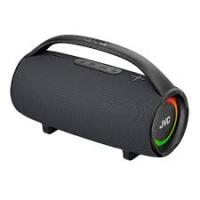
RC-EX10S - Enceinte bluetooth JVC - Notice d'utilisation et mode d'emploi gratuit
Retrouvez gratuitement la notice de l'appareil RC-EX10S JVC au format PDF.

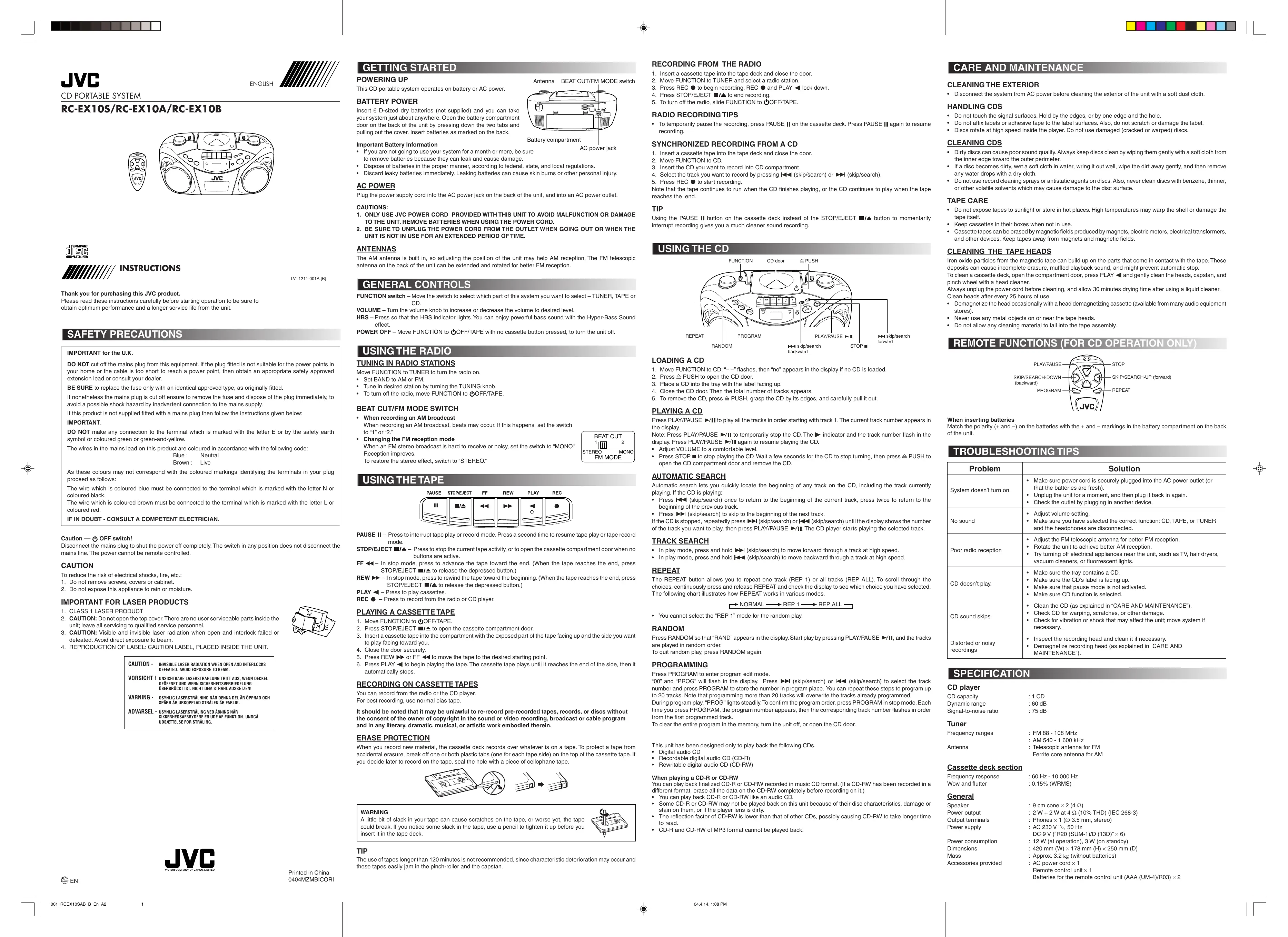

| Type de produit | Système audio portable CD/Radio/Cassette |
| Marque | JVC |
| Modèle | RC-EX10S (également RC-EX10A, RC-EX10B) |
| Dimensions (L × H × P) | 420 mm × 178 mm × 250 mm |
| Poids (sans piles) | Environ 3.2 kg |
| Alimentation | CA 230 V ~ 50 Hz (cordon secteur fourni) ou DC 9 V (6 piles R20/SUM-1/D, non fournies) |
| Consommation électrique | 12 W en fonctionnement, 3 W en veille |
| Type de lecteur CD | Lecteur CD audio simple, compatible CD-R/CD-RW (finalisés), ne lit pas MP3 |
| Récepteur radio | FM (88-108 MHz) avec antenne télescopique, AM (540-1600 kHz) avec antenne ferrite intégrée |
| Platine cassette | Lecture et enregistrement (depuis radio ou CD), arrêt automatique |
| Haut-parleurs | 2 × cône 9 cm (4 Ω) |
| Puissance de sortie | 2 × 2 W sous 4 Ω (10% THD, selon IEC 268-3) |
| Sorties | Prise casque stéréo Ø 3,5 mm |
| Effet sonore | Hyper Bass Sound (HBS) activable |
| Télécommande | Télécommande infrarouge (fonctions CD uniquement), piles AAA (fournies) |
| Accessoires fournis | Cordon secteur, télécommande, 2 piles AAA pour télécommande |
| Nettoyage | Débrancher avant nettoyage extérieur ; pour tête de cassette, utiliser un nettoyant tête après 25 h d'utilisation |
| Consignes de sécurité | Ne pas exposer à la pluie ou à l'humidité ; débrancher en cas d'absence prolongée ; respecter polarité des piles |
FOIRE AUX QUESTIONS - RC-EX10S JVC
Questions des utilisateurs sur RC-EX10S JVC
0 question sur cet appareil. Repondez a celles que vous connaissez ou posez la votre.
Poser une nouvelle question sur cet appareil
Téléchargez la notice de votre Enceinte bluetooth au format PDF gratuitement ! Retrouvez votre notice RC-EX10S - JVC et reprennez votre appareil électronique en main. Sur cette page sont publiés tous les documents nécessaires à l'utilisation de votre appareil RC-EX10S de la marque JVC.
MODE D'EMPLOI RC-EX10S JVC
RC-EX10S/RC-EX10A/RC-EX10B


INSTRUCTIONS
LVT1211-001A [B]
Thank you for purchasing this JVC product.
Please read these instructions carefully before starting operation to be sure to obtain optimum performance and a longer service life from the unit.
SAFETY PRECAUTIONS
IMPORTANT for the U.K.
DO NOT cut off the mains plug from this equipment. If the plug fitted is not suitable for the power points in your home or the cable is too short to reach a power point, then obtain an appropriate safety approved extension lead or consult your dealer.
BE SURE to replace the fuse only with an identical approved type, as originally fitted.
If nonetheless the mains plug is cut off ensure to remove the fuse and dispose of the plug immediately, to avoid a possible shock hazard by inadvertent connection to the mains supply.
If this product is not supplied fitted with a mains plug then follow the instructions given below:
IMPORTANT.
DO NOT make any connection to the terminal which is marked with the letter E or by the safety earth symbol or coloured green or green-and-yellow.
The wires in the mains lead on this product are coloured in accordance with the following code:
Blue : Neutral
Brown : Live
As these colours may not correspond with the coloured markings identifying the terminals in your plug proceed as follows:
The wire which is coloured blue must be connected to the terminal which is marked with the letter N or coloured black.
The wire which is coloured brown must be connected to the terminal which is marked with the letter L or coloured red.
IF IN DOUBT - CONSULT A COMPETENT ELECTRICIAN.
Caution — ⏻ OFF switch!
Disconnect the mains plug to shut the power off completely. The switch in any position does not disconnect the mains line. The power cannot be remote controlled.
CAUTION
To reduce the risk of electrical shocks, fire, etc.:
-
Do not remove screws, covers or cabinet.
-
Do not expose this appliance to rain or moisture.
IMPORTANT FOR LASER PRODUCTS
- CLASS 1 LASER PRODUCT
- CAUTION: Do not open the top cover. There are no user serviceable parts inside the unit; leave all servicing to qualified service personnel.
- CAUTION: Visible and invisible laser radiation when open and interlock failed or defeated. Avoid direct exposure to beam.
- REPRODUCTION OF LABEL: CAUTION LABEL, PLACED INSIDE THE UNIT.
CAUTION - INVISIBLE LASER RADIATION WHEN OPEN AND INTERLOCKS DEFEATED. AVOID EXPOSURE TO BEAM.
VORSICHT ! UNSICHTBARE LASERSTRAHLUNG TRITT AUS, WENN DECKEL GEÖFFNET UND WENN SICHERHEITSVERRIEGELUNG ÜBERBRÜCKT IST. NICHT DEM STRAHL AUSSETZEN!
VARNING - OSYNLIG LASERSTRÅLNING NÄR DENNA DEL ÄR ÖPPNAD OCH SPÄRR ÄR URKOPPLAD STRÅLEN ÄR FARLIG.
ADVARSEL - USYNLIG LASERSTRÅLING VED ÅBNING NÅR SIKKERHEDSAFBRYDERE ER UDE AF FUNKTION. UNDGÅ UDSÆTTELSE FOR STRÅLING.

Printed in China 0404MZMBICORI
GETTING STARTED
POWERING UP
This CD portable system operates on battery or AC power.
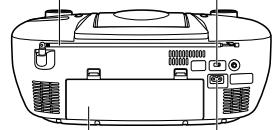
Antenna BEAT CUT/FM MODE switch

BATTERY POWER
Insert 6 D-sized dry batteries (not supplied) and you can take your system just about anywhere. Open the battery compartment door on the back of the unit by pressing down the two tabs and pulling out the cover. Insert batteries as marked on the back.
Important Battery Information
- If you are not going to use your system for a month or more, be sure to remove batteries because they can leak and cause damage.
- Dispose of batteries in the proper manner, according to federal, state, and local regulations.
- Discard leaky batteries immediately. Leaking batteries can cause skin burns or other personal injury.
AC POWER
Plug the power supply cord into the AC power jack on the back of the unit, and into an AC power outlet.
CAUTIONS:
- ONLY USE JVC POWER CORD PROVIDED WITH THIS UNIT TO AVOID MALFUNCTION OR DAMAGE TO THE UNIT. REMOVE BATTERIES WHEN USING THE POWER CORD.
- BE SURE TO UNPLUG THE POWER CORD FROM THE OUTLET WHEN GOING OUT OR WHEN THE UNIT IS NOT IN USE FOR AN EXTENDED PERIOD OF TIME.
ANTENNAS
The AM antenna is built in, so adjusting the position of the unit may help AM reception. The FM telescopic antenna on the back of the unit can be extended and rotated for better FM reception.
GENERAL CONTROLS
FUNCTION switch – Move the switch to select which part of this system you want to select – TUNER, TAPE or CD.
VOLUME – Turn the volume knob to increase or decrease the volume to desired level.
HBS – Press so that the HBS indicator lights. You can enjoy powerful bass sound with the Hyper-Bass Sound effect.
POWER OFF – Move FUNCTION to ⏻OFF/TAPE with no cassette button pressed, to turn the unit off.
USING THE RADIO
TUNING IN RADIO STATIONS
Move FUNCTION to TUNER to turn the radio on.
- Set BAND to AM or FM.
- Tune in desired station by turning the TUNING knob.
• To turn off the radio, move FUNCTION to ⏻OFF/TAPE.
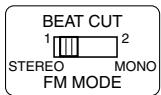
BEAT CUT/FM MODE SWITCH
- When recording an AM broadcast
When recording an AM broadcast, beats may occur. If this happens, set the switch to "1" or "2."
• Changing the FM reception mode
When an FM stereo broadcast is hard to receive or noisy, set the switch to "MONO." Reception improves.
To restore the stereo effect, switch to "STEREO."
USING THE TAPE
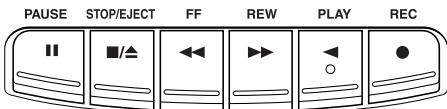
PAUSE II – Press to interrupt tape play or record mode. Press a second time to resume tape play or tape record mode.
STOP/EJECT ■/▲ – Press to stop the current tape activity, or to open the cassette compartment door when no buttons are active.
FF ◀◀ – In stop mode, press to advance the tape toward the end. (When the tape reaches the end, press STOP/EJECT ▪/▲ to release the depressed button.)
REW ▶▶ – In stop mode, press to rewind the tape toward the beginning. (When the tape reaches the end, press STOP/EJECT ■/▲ to release the depressed button.)
PLAY ◀ – Press to play cassettes.
REC ● – Press to record from the radio or CD player.
PLAYING A CASSETTE TAPE
- Move FUNCTION to OFF/TAPE.
- Press STOP/EJECT ■/▲ to open the cassette compartment door.
- Insert a cassette tape into the compartment with the exposed part of the tape facing up and the side you want to play facing toward you.
- Close the door securely.
- Press REW ▶▶ or FF ◀◀ to move the tape to the desired starting point.
- Press PLAY ◀ to begin playing the tape. The cassette tape plays until it reaches the end of the side, then it automatically stops.
RECORDING ON CASSETTE TAPES
You can record from the radio or the CD player.
For best recording, use normal bias tape.
It should be noted that it may be unlawful to re-record pre-recorded tapes, records, or discs without the consent of the owner of copyright in the sound or video recording, broadcast or cable program and in any literary, dramatic, musical, or artistic work embodied therein.
ERASE PROTECTION
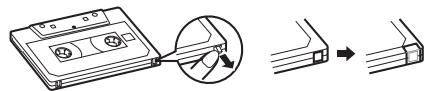
When you record new material, the cassette deck records over whatever is on a tape. To protect a tape from accidental erasure, break off one or both plastic tabs (one for each tape side) on the top of the cassette tape. If you decide later to record on the tape, seal the hole with a piece of cellophane tape.
WARNING
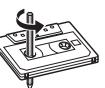
A little bit of slack in your tape can cause scratches on the tape, or worse yet, the tape could break. If you notice some slack in the tape, use a pencil to tighten it up before you insert it in the tape deck.
TIP
The use of tapes longer than 120 minutes is not recommended, since characteristic deterioration may occur and these tapes easily jam in the pinch-roller and the capstan.
RECORDING FROM THE RADIO
- Insert a cassette tape into the tape deck and close the door.
- Move FUNCTION to TUNER and select a radio station.
- Press REC ● to begin recording. REC ● and PLAY ◀ lock down.
- Press STOP/EJECT ■/▲ to end recording.
- To turn off the radio, slide FUNCTION to OFF/TAPE.
RADIO RECORDING TIPS
- To temporarily pause the recording, press PAUSE II on the cassette deck. Press PAUSE II again to resume recording.
SYNCHRONIZED RECORDING FROM A CD
- Insert a cassette tape into the tape deck and close the door.
- Move FUNCTION to CD.
- Insert the CD you want to record into CD compartment.
- Select the track you want to record by pressing ◀◀◀ (skip/search) or ▶▶◀ (skip/search).
- Press REC ● to start recording.
Note that the tape continues to run when the CD finishes playing, or the CD continues to play when the tape reaches the end.
TIP
Using the PAUSE II button on the cassette deck instead of the STOP/EJECT ■/▲ button to momentarily interrupt recording gives you a much cleaner sound recording.
USING THE CD

LOADING A CD
- Move FUNCTION to CD; “—” flashes, then “no” appears in the display if no CD is loaded.
- Press ≅ PUSH to open the CD door.
- Place a CD into the tray with the label facing up.
- Close the CD door. Then the total number of tracks appears.
- To remove the CD, press PUSH, grasp the CD by its edges, and carefully pull it out.
PLAYING A CD
Press PLAY/PAUSE ▶/Ⅱ to play all the tracks in order starting with track 1. The current track number appears in the display.
Note: Press PLAY/PAUSE ▶/Ⅱ to temporarily stop the CD. The ▶ indicator and the track number flash in the display. Press PLAY/PAUSE ▶/Ⅱ again to resume playing the CD.
- Adjust VOLUME to a comfortable level.
- Press STOP ■ to stop playing the CD. Wait a few seconds for the CD to stop turning, then press ≜ PUSH to open the CD compartment door and remove the CD.
AUTOMATIC SEARCH
Automatic search lets you quickly locate the beginning of any track on the CD, including the track currently playing. If the CD is playing:
- Press I◀◀ (skip/search) once to return to the beginning of the current track, press twice to return to the beginning of the previous track.
- Press ▶▶▶ (skip/search) to skip to the beginning of the next track.
If the CD is stopped, repeatedly press ▶▶▶ (skip/search) or ◀◀◀ (skip/search) until the display shows the number of the track you want to play, then press PLAY/PAUSE ▶/□. The CD player starts playing the selected track.
TRACK SEARCH
- In play mode, press and hold ▶▶▶ (skip/search) to move forward through a track at high speed.
- In play mode, press and hold ◀◀◀ (skip/search) to move backward through a track at high speed.
REPEAT
The REPEAT button allows you to repeat one track (REP 1) or all tracks (REP ALL). To scroll through the choices, continuously press and release REPEAT and check the display to see which choice you have selected. The following chart illustrates how REPEAT works in various modes.
$$ \rightarrow \text { NORMAL } \longrightarrow \text { REP 1 } \longrightarrow \text { REP ALL } $$
- You cannot select the "REP 1" mode for the random play.
RANDOM
Press RANDOM so that "RAND" appears in the display. Start play by pressing PLAY/PAUSE ▶/II, and the tracks are played in random order.
To quit random play, press RANDOM again.
PROGRAMMING
Press PROGRAM to enter program edit mode.
“00” and “PROG” will flash in the display. Press ▶▶▶ (skip/search) or ◀◀◀ (skip/search) to select the track number and press PROGRAM to store the number in program place. You can repeat these steps to program up to 20 tracks. Note that programming more than 20 tracks will overwrite the tracks already programmed.
During program play, “PROG” lights steadily. To confirm the program order, press PROGRAM in stop mode. Each time you press PROGRAM, the program number appears, then the corresponding track number flashes in order from the first programmed track.
To clear the entire program in the memory, turn the unit off, or open the CD door.
This unit has been designed only to play back the following CDs.
- Digital audio CD
• Recordable digital audio CD (CD-R) - Rewritable digital audio CD (CD-RW)
When playing a CD-R or CD-RW
You can play back finalized CD-R or CD-RW recorded in music CD format. (If a CD-RW has been recorded in a different format, erase all the data on the CD-RW completely before recording on it.)
- You can play back CD-R or CD-RW like an audio CD.
- Some CD-R or CD-RW may not be played back on this unit because of their disc characteristics, damage or stain on them, or if the player lens is dirty.
- The reflection factor of CD-RW is lower than that of other CDs, possibly causing CD-RW to take longer time to read.
- CD-R and CD-RW of MP3 format cannot be played back.
CARE AND MAINTENANCE
CLEANING THE EXTERIOR
- Disconnect the system from AC power before cleaning the exterior of the unit with a soft dust cloth.
HANDLING CDS
- Do not touch the signal surfaces. Hold by the edges, or by one edge and the hole.
- Do not affix labels or adhesive tape to the label surfaces. Also, do not scratch or damage the label.
• Discs rotate at high speed inside the player. Do not use damaged (cracked or warped) discs
CLEANING CDS
- Dirty discs can cause poor sound quality. Always keep discs clean by wiping them gently with a soft cloth from the inner edge toward the outer perimeter.
- If a disc becomes dirty, wet a soft cloth in water, wring it out well, wipe the dirt away gently, and then remove any water drops with a dry cloth.
- Do not use record cleaning sprays or antistatic agents on discs. Also, never clean discs with benzene, thinner, or other volatile solvents which may cause damage to the disc surface.
TAPE CARE
- Do not expose tapes to sunlight or store in hot places. High temperatures may warp the shell or damage the tape itself.
- Keep cassettes in their boxes when not in use.
- Cassette tapes can be erased by magnetic fields produced by magnets, electric motors, electrical transformers, and other devices. Keep tapes away from magnets and magnetic fields.
CLEANING THE TAPE HEADS
Iron oxide particles from the magnetic tape can build up on the parts that come in contact with the tape. These deposits can cause incomplete erasure, muffled playback sound, and might prevent automatic stop.
To clean a cassette deck, open the compartment door, press PLAY ◀ and gently clean the heads, capstan, and pinch wheel with a head cleaner.
Always unplug the power cord before cleaning, and allow 30 minutes drying time after using a liquid cleaner.
Clean heads after every 25 hours of use.
- Demagnetize the head occasionally with a head demagnetizing cassette (available from many audio equipment stores).
- Never use any metal objects on or near the tape heads.
- Do not allow any cleaning material to fall into the tape assembly.
REMOTE FUNCTIONS (FOR CD OPERATION ONLY)
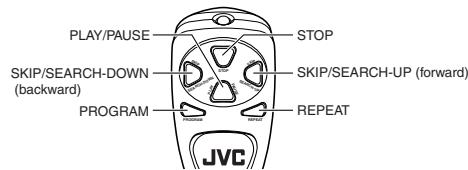
When inserting batteries
Match the polarity (+ and −) on the batteries with the + and − markings in the battery compartment on the back of the unit.
TROUBLESHOOTING TIPS
| Problem | Solution |
| System doesn’t turn on. | Make sure power cord is securely plugged into the AC power outlet (or that the batteries are fresh).Unplug the unit for a moment, and then plug it back in again.Check the outlet by plugging in another device. |
| No sound | Adjust volume setting.Make sure you have selected the correct function: CD, TAPE, or TUNER and the headphones are disconnected. |
| Poor radio reception | Adjust the FM telescopic antenna for better FM reception.Rotate the unit to achieve better AM reception.Try turning off electrical appliances near the unit, such as TV, hair dryers, vacuum cleaners, or fluorescent lights. |
| CD doesn’t play. | Make sure the tray contains a CD.Make sure the CD’s label is facing up.Make sure that pause mode is not activated.Make sure CD function is selected. |
| CD sound skips. | Clean the CD (as explained in “CARE AND MAINTENANCE”).Check CD for warping, scratches, or other damage.Check for vibration or shock that may affect the unit; move system if necessary. |
| Distorted or noisy recordings | Inspect the recording head and clean it if necessary.Demagnetize recording head (as explained in “CARE AND MAINTENANCE”). |
SPECIFICATION
CD player
CD capacity : 1 CD Dynamic range : 60 dB Signal-to-noise ratio : 75 dB
Tuner
Frequency ranges : FM 88 - 108 MHz : AM 540 - 1 600 kHz Antenna : Telescopic antenna for FM Ferrite core antenna for AM
Cassette deck section
Frequency response : 60 Hz - 10 000 Hz Wow and flutter : 0.15% (WRMS)
General
Speaker : 9 cm cone × 2 (4 Ω)
Power output : 2 W + 2 W at 4 Ω (10% THD) (IEC 268-3)
Output terminals : Phones × 1 (∅ 3.5 mm, stereo)
Power supply : AC 230 V ∼, 50 Hz
DC 9 V ("R20 (SUM-1)/D (13D)" × 6)
Power consumption : 12 W (at operation), 3 W (on standby)
Dimensions : 420 mm (W) × 178 mm (H) × 250 mm (D)
Mass : Approx. 3.2 kg (without batteries)
Accessories provided : AC power cord × 1
Remote control unit × 1
Batteries for the remote control unit (AAA (UM-4)/R03) × 2
RC-EX10S/RC-EX10A/RC-EX10B


INSTRUCTIONS
LVT1211-002A [E]
Thank you for purchasing this JVC product.
Please read these instructions carefully before starting operation to be sure to obtain optimum performance and a longer service life from the unit.
SAFETY PRECAUTIONS
Caution — ⏻ OFF switch!
Disconnect the mains plug to shut the power off completely. The switch in any position does not disconnect the mains line. The power cannot be remote controlled.
CAUTION
To reduce the risk of electrical shocks, fire, etc.:
-
Do not remove screws, covers or cabinet.
-
Do not expose this appliance to rain or moisture.
IMPORTANT FOR LASER PRODUCTS
- CLASS 1 LASER PRODUCT
- CAUTION: Do not open the top cover. There are no user serviceable parts inside the unit; leave all servicing to qualified service personnel.
- CAUTION: Visible and invisible laser radiation when open and interlock failed or defeated. Avoid direct exposure to beam.
- REPRODUCTION OF LABEL: CAUTION LABEL, PLACED INSIDE THE UNIT.
CAUTION - INVISIBLE LASER RADIATION WHEN OPEN AND INTERLOCKS DEFEATED. AVOID EXPOSURE TO BEAM.
VORSICHT ! UNSICHTBARE LASERSTRAHLUNG TRITT AUS, WENN DECKEL GEÖFFNET UND WENN SICHERHEITSVERRIEGELUNG ÜBERBRÜCKT IST. NICHT DEM STRAHL AUSSETZEN!
VARNING - OSYNLIG LASERSTRÄLNING NÄR DENNA DEL ÄR ÖPPNAD OCH SPÄRR ÄR URKOPPLAD STRÅLEN ÄR FARLIG.
ADVARSEL - USYNLIG LASERSTRÅLING VED ÅBNING NÅR SIKKERHEDSAFBRYDERE ER UDE AF FUNKTION. UNDGÅ UDSÆTTELSE FOR STRÅLING.

Printed in China 0404MZMBICORI
GETTING STARTED
POWERING UP
This CD portable system operates on battery or AC power.
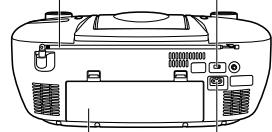
Antenna BEAT CUT/FM MODE switch
BATTERY POWER
Insert 6 D-sized dry batteries (not supplied) and you can take your system just about anywhere. Open the battery compartment door on the back of the unit by pressing down the two tabs and pulling out the cover. Insert batteries as marked on the back.

Important Battery Information
If you are not going to use your system for a month or more, be sure to remove batteries because they can leak and cause damage.
- Dispose of batteries in the proper manner, according to federal, state, and local regulations.
Discard leaky batteries immediately. Leaking batteries can cause skin burns or other personal injury.
AC POWER
Plug the power supply cord into the AC power jack on the back of the unit, and into an AC power outlet.
CAUTIONS:
- ONLY USE JVC POWER CORD PROVIDED WITH THIS UNIT TO AVOID MALFUNCTION OR DAMAGE TO THE UNIT. REMOVE BATTERIES WHEN USING THE POWER CORD.
- BE SURE TO UNPLUG THE POWER CORD FROM THE OUTLET WHEN GOING OUT OR WHEN THE UNIT IS NOT IN USE FOR AN EXTENDED PERIOD OF TIME.
ANTENNAS
The AM antenna is built in, so adjusting the position of the unit may help AM reception. The FM telescopic antenna on the back of the unit can be extended and rotated for better FM reception.
GENERAL CONTROLS
FUNCTION switch – Move the switch to select which part of this system you want to select – TUNER, TAPE or CD.
VOLUME – Turn the volume knob to increase or decrease the volume to desired level.
HBS – Press so that the HBS indicator lights. You can enjoy powerful bass sound with the Hyper-Bass Sound effect.
POWER OFF – Move FUNCTION to ⏻OFF/TAPE with no cassette button pressed, to turn the unit off.
USING THE RADIO
TUNING IN RADIO STATIONS
Move FUNCTION to TUNER to turn the radio on.
- Set BAND to AM or FM.
- Tune in desired station by turning the TUNING knob.
• To turn off the radio, move FUNCTION to ⏻OFF/TAPE.
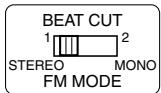
BEAT CUT/FM MODE SWITCH
- When recording an AM broadcast
When recording an AM broadcast, beats may occur. If this happens, set the switch to "1" or "2."
• Changing the FM reception mode
When an FM stereo broadcast is hard to receive or noisy, set the switch to "MONO." Reception improves.
To restore the stereo effect, switch to "STEREO."
USING THE TAPE
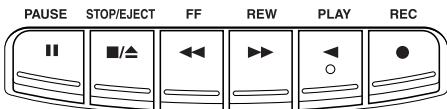
PAUSE II – Press to interrupt tape play or record mode. Press a second time to resume tape play or tape record mode.
STOP/EJECT ■/▲ – Press to stop the current tape activity, or to open the cassette compartment door when no buttons are active.
FF ◀◀ – In stop mode, press to advance the tape toward the end. (When the tape reaches the end, press STOP/EJECT ▪/▲ to release the depressed button.)
REW ▶▶ – In stop mode, press to rewind the tape toward the beginning. (When the tape reaches the end, press STOP/EJECT ■/▲ to release the depressed button.)
PLAY ◀ – Press to play cassettes.
REC ● – Press to record from the radio or CD player.
PLAYING A CASSETTE TAPE
- Move FUNCTION to OFF/TAPE.
- Press STOP/EJECT ■/▲ to open the cassette compartment door.
- Insert a cassette tape into the compartment with the exposed part of the tape facing up and the side you want to play facing toward you.
- Close the door securely.
- Press REW ▶▶ or FF ◀◀ to move the tape to the desired starting point.
- Press PLAY ◀ to begin playing the tape. The cassette tape plays until it reaches the end of the side, then it automatically stops.
RECORDING ON CASSETTE TAPES
You can record from the radio or the CD player.
For best recording, use normal bias tape.
It should be noted that it may be unlawful to re-record pre-recorded tapes, records, or discs without the consent of the owner of copyright in the sound or video recording, broadcast or cable program and in any literary, dramatic, musical, or artistic work embodied therein.
ERASE PROTECTION
When you record new material, the cassette deck records over whatever is on a tape. To protect a tape from accidental erasure, break off one or both plastic tabs (one for each tape side) on the top of the cassette tape. If you decide later to record on the tape, seal the hole with a piece of cellophane tape.
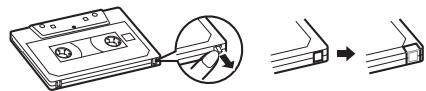
WARNING
A little bit of slack in your tape can cause scratches on the tape, or worse yet, the tape could break. If you notice some slack in the tape, use a pencil to tighten it up before you insert it in the tape deck.
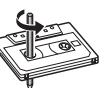
TIP
The use of tapes longer than 120 minutes is not recommended, since characteristic deterioration may occur and these tapes easily jam in the pinch-roller and the capstan.
RECORDING FROM THE RADIO
- Insert a cassette tape into the tape deck and close the door.
- Move FUNCTION to TUNER and select a radio station.
- Press REC ● to begin recording. REC ● and PLAY ◀ lock down.
- Press STOP/EJECT ■/▲ to end recording.
- To turn off the radio, slide FUNCTION to OFF/TAPE.
RADIO RECORDING TIPS
- To temporarily pause the recording, press PAUSE II on the cassette deck. Press PAUSE II again to resume recording.
SYNCHRONIZED RECORDING FROM A CD
- Insert a cassette tape into the tape deck and close the door.
- Move FUNCTION to CD.
- Insert the CD you want to record into CD compartment.
- Select the track you want to record by pressing ◀◀◀ (skip/search) or ▶▶▶ (skip/search).
- Press REC ● to start recording.
Note that the tape continues to run when the CD finishes playing, or the CD continues to play when the tape reaches the end.
TIP
Using the PAUSE ▪ button on the cassette deck instead of the STOP/EJECT ■/▲ button to momentarily interrupt recording gives you a much cleaner sound recording.
USING THE CD

LOADING A CD
- Move FUNCTION to CD; “—” flashes, then “no” appears in the display if no CD is loaded.
- Press ≅ PUSH to open the CD door.
- Place a CD into the tray with the label facing up.
- Close the CD door. Then the total number of tracks appears.
- To remove the CD, press PUSH, grasp the CD by its edges, and carefully pull it out.
PLAYING A CD
Press PLAY/PAUSE ▶/Ⅱ to play all the tracks in order starting with track 1. The current track number appears in the display.
Note: Press PLAY/PAUSE ▶/Ⅱ to temporarily stop the CD. The ▶ indicator and the track number flash in the display. Press PLAY/PAUSE ▶/Ⅱ again to resume playing the CD.
- Adjust VOLUME to a comfortable level.
- Press STOP ■ to stop playing the CD. Wait a few seconds for the CD to stop turning, then press ≜ PUSH to open the CD compartment door and remove the CD.
AUTOMATIC SEARCH
Automatic search lets you quickly locate the beginning of any track on the CD, including the track currently playing. If the CD is playing:
- Press I◀◀ (skip/search) once to return to the beginning of the current track, press twice to return to the beginning of the previous track.
- Press ▶▶▶ (skip/search) to skip to the beginning of the next track.
If the CD is stopped, repeatedly press ▶▶▶ (skip/search) or ◀◀◀ (skip/search) until the display shows the number of the track you want to play, then press PLAY/PAUSE ▶/□. The CD player starts playing the selected track.
TRACK SEARCH
- In play mode, press and hold ▶▶▶ (skip/search) to move forward through a track at high speed.
- In play mode, press and hold ◀◀◀ (skip/search) to move backward through a track at high speed.
REPEAT
The REPEAT button allows you to repeat one track (REP 1) or all tracks (REP ALL). To scroll through the choices, continuously press and release REPEAT and check the display to see which choice you have selected. The following chart illustrates how REPEAT works in various modes.
$$ \rightarrow \text { NORMAL } \longrightarrow \text { REP 1 } \longrightarrow \text { REP ALL } $$
- You cannot select the "REP 1" mode for the random play.
RANDOM
Press RANDOM so that "RAND" appears in the display. Start play by pressing PLAY/PAUSE ▶/II, and the tracks are played in random order.
To quit random play, press RANDOM again.
PROGRAMMING
Press PROGRAM to enter program edit mode.
“00” and “PROG” will flash in the display. Press ▶▶▶ (skip/search) or ◀◀◀ (skip/search) to select the track number and press PROGRAM to store the number in program place. You can repeat these steps to program up to 20 tracks. Note that programming more than 20 tracks will overwrite the tracks already programmed.
During program play, "PROG" lights steadily. To confirm the program order, press PROGRAM in stop mode. Each time you press PROGRAM, the program number appears, then the corresponding track number flashes in order from the first programmed track.
To clear the entire program in the memory, turn the unit off, or open the CD door.
This unit has been designed only to play back the following CDs.
- Digital audio CD
• Recordable digital audio CD (CD-R) - Rewritable digital audio CD (CD-RW)
When playing a CD-R or CD-RW
You can play back finalized CD-R or CD-RW recorded in music CD format. (If a CD-RW has been recorded in a different format, erase all the data on the CD-RW completely before recording on it.)
- You can play back CD-R or CD-RW like an audio CD.
- Some CD-R or CD-RW may not be played back on this unit because of their disc characteristics, damage or stain on them, or if the player lens is dirty.
- The reflection factor of CD-RW is lower than that of other CDs, possibly causing CD-RW to take longer time to read.
- CD-R and CD-RW of MP3 format cannot be played back.
CARE AND MAINTENANCE
CLEANING THE EXTERIOR
- Disconnect the system from AC power before cleaning the exterior of the unit with a soft dust cloth.
HANDLING CDS
- Do not touch the signal surfaces. Hold by the edges, or by one edge and the hole.
- Do not affix labels or adhesive tape to the label surfaces. Also, do not scratch or damage the label.
• Discs rotate at high speed inside the player. Do not use damaged (cracked or warped) discs.
CLEANING CDS
- Dirty discs can cause poor sound quality. Always keep discs clean by wiping them gently with a soft cloth from the inner edge toward the outer perimeter.
- If a disc becomes dirty, wet a soft cloth in water, wring it out well, wipe the dirt away gently, and then remove any water drops with a dry cloth.
- Do not use record cleaning sprays or antistatic agents on discs. Also, never clean discs with benzene, thinner, or other volatile solvents which may cause damage to the disc surface.
TAPE CARE
- Do not expose tapes to sunlight or store in hot places. High temperatures may warp the shell or damage the tape itself.
- Keep cassettes in their boxes when not in use.
- Cassette tapes can be erased by magnetic fields produced by magnets, electric motors, electrical transformers, and other devices. Keep tapes away from magnets and magnetic fields.
CLEANING THE TAPE HEADS
Iron oxide particles from the magnetic tape can build up on the parts that come in contact with the tape. These deposits can cause incomplete erasure, muffled playback sound, and might prevent automatic stop.
To clean a cassette deck, open the compartment door, press PLAY ◀ and gently clean the heads, capstan, and pinch wheel with a head cleaner.
Always unplug the power cord before cleaning, and allow 30 minutes drying time after using a liquid cleaner. Clean heads after every 25 hours of use.
- Demagnetize the head occasionally with a head demagnetizing cassette (available from many audio equipment stores).
- Never use any metal objects on or near the tape heads.
- Do not allow any cleaning material to fall into the tape assembly.
REMOTE FUNCTIONS (FOR CD OPERATION ONLY)
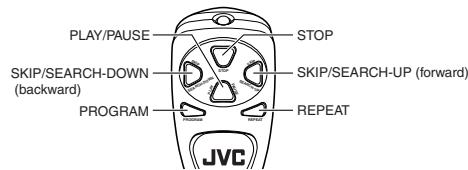
When inserting batteries
Match the polarity (+ and −) on the batteries with the + and − markings in the battery compartment on the back of the unit.
TROUBLESHOOTING TIPS
| Problem | Solution |
| System doesn’t turn on. | Make sure power cord is securely plugged into the AC power outlet (or that the batteries are fresh).Unplug the unit for a moment, and then plug it back in again.Check the outlet by plugging in another device. |
| No sound | Adjust volume setting.Make sure you have selected the correct function: CD, TAPE, or TUNER and the headphones are disconnected. |
| Poor radio reception | Adjust the FM telescopic antenna for better FM reception.Rotate the unit to achieve better AM reception.Try turning off electrical appliances near the unit, such as TV, hair dryers, vacuum cleaners, or fluorescent lights. |
| CD doesn’t play. | Make sure the tray contains a CD.Make sure the CD’s label is facing up.Make sure that pause mode is not activated.Make sure CD function is selected. |
| CD sound skips. | Clean the CD (as explained in “CARE AND MAINTENANCE”).Check CD for warping, scratches, or other damage.Check for vibration or shock that may affect the unit; move system if necessary. |
| Distorted or noisy recordings | Inspect the recording head and clean it if necessary.Demagnetize recording head (as explained in “CARE AND MAINTENANCE”). |
SPECIFICATION
CD player
CD capacity : 1 CD Dynamic range : 60 dB Signal-to-noise ratio : 75 dB
Tuner
Frequency ranges : FM 88 - 108 MHz : AM 540 - 1 600 kHz Antenna : Telescopic antenna for FM Ferrite core antenna for AM
Cassette deck section
Frequency response : 60 Hz - 10 000 Hz Wow and flutter : 0.15% (WRMS)
General
Speaker : 9 cm cone × 2 (4 Ω) Power output : 2 W + 2 W at 4 Ω (10% THD) (IEC 268-3) Output terminals : Phones × 1 (∅ 3.5 mm, stereo) Power supply : AC 230 V ∼, 50 Hz DC 9 V (“R20 (SUM-1)/D (13D)” × 6) Power consumption : 12 W (at operation), 3 W (on standby) Dimensions : 420 mm (W) × 178 mm (H) × 250 mm (D) Mass : Approx. 3.2 kg (without batteries) Accessories provided : AC power cord × 1
Remote control unit × 1
Batteries for the remote control unit (AAA (UM-4)/R03) × 2
RC-EX10S/RC-EX10A/RC-EX10B
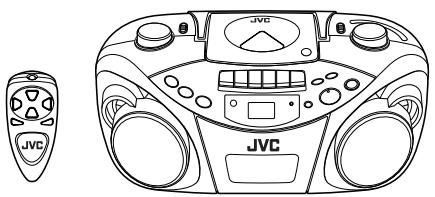


INSTRUCTIONS
LVT1211-005A [EN]
Thank you for purchasing this JVC product.
Please read these instructions carefully before starting operation to be sure to obtain optimum performance and a longer service life from the unit.
SAFETY PRECAUTIONS
Caution — ⏻ OFF switch!
Disconnect the mains plug to shut the power off completely. The switch in any position does not disconnect the mains line. The power cannot be remote controlled.
CAUTION
To reduce the risk of electrical shocks, fire, etc.:
-
Do not remove screws, covers or cabinet.
-
Do not expose this appliance to rain or moisture.
IMPORTANT FOR LASER PRODUCTS
- CLASS 1 LASER PRODUCT
- CAUTION: Do not open the top cover. There are no user serviceable parts inside the unit; leave all servicing to qualified service personnel.
- CAUTION: Visible and invisible laser radiation when open and interlock failed or defeated. Avoid direct exposure to beam.
- REPRODUCTION OF LABEL: CAUTION LABEL, PLACED INSIDE THE UNIT.
CAUTION - INVISIBLE LASER RADIATION WHEN OPEN AND INTERLOCKS DEFEATED. AVOID EXPOSURE TO BEAM.
VORSICHT ! UNSICHTBARE LASERSTRAHLUNG TRITT AUS, WENN DECKEL GEÖFFNET UND WENN SICHERHEITSVERRIEGELUNG ÜBERBRÜCKT IST. NICHT DEM STRAHL AUSSETZEN!
VARNING - OSYNLIG LASERSTRÄLNING NÄR DENNA DEL ÄR ÖPPNAD OCH SPÄRR ÄR URKOPPLAD STRÅLEN ÄR FARLIG.
ADVARSEL - USYNLIG LASERSTRÅLING VED ÅBNING NÅR SIKKERHEDSAFBRYDERE ER UDE AF FUNKTION. UNDGÅ UDSÆTTELSE FOR STRÅLING.

Printed in China 0404MZMBICORI
GETTING STARTED
POWERING UP
This CD portable system operates on battery or AC power.
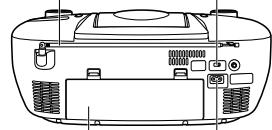
Antenna BEAT CUT/FM MODE switch
BATTERY POWER
Insert 6 D-sized dry batteries (not supplied) and you can take your system just about anywhere. Open the battery compartment door on the back of the unit by pressing down the two tabs and pulling out the cover. Insert batteries as marked on the back.

Important Battery Information
If you are not going to use your system for a month or more, be sure to remove batteries because they can leak and cause damage.
- Dispose of batteries in the proper manner, according to federal, state, and local regulations.
Discard leaky batteries immediately. Leaking batteries can cause skin burns or other personal injury.
AC POWER
Plug the power supply cord into the AC power jack on the back of the unit, and into an AC power outlet.
CAUTIONS:
- ONLY USE JVC POWER CORD PROVIDED WITH THIS UNIT TO AVOID MALFUNCTION OR DAMAGE TO THE UNIT. REMOVE BATTERIES WHEN USING THE POWER CORD.
- BE SURE TO UNPLUG THE POWER CORD FROM THE OUTLET WHEN GOING OUT OR WHEN THE UNIT IS NOT IN USE FOR AN EXTENDED PERIOD OF TIME.
ANTENNAS
The AM antenna is built in, so adjusting the position of the unit may help AM reception. The FM telescopic antenna on the back of the unit can be extended and rotated for better FM reception.
GENERAL CONTROLS
FUNCTION switch – Move the switch to select which part of this system you want to select – TUNER, TAPE or CD.
VOLUME – Turn the volume knob to increase or decrease the volume to desired level.
HBS – Press so that the HBS indicator lights. You can enjoy powerful bass sound with the Hyper-Bass Sound effect.
POWER OFF – Move FUNCTION to ⏻OFF/TAPE with no cassette button pressed, to turn the unit off.
USING THE RADIO
TUNING IN RADIO STATIONS
Move FUNCTION to TUNER to turn the radio on.
- Set BAND to AM or FM.
- Tune in desired station by turning the TUNING knob.
• To turn off the radio, move FUNCTION to ⏻OFF/TAPE.
BEAT CUT/FM MODE SWITCH
- When recording an AM broadcast
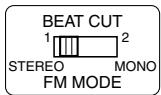
When recording an AM broadcast, beats may occur. If this happens, set the switch to "1" or "2."
• Changing the FM reception mode
When an FM stereo broadcast is hard to receive or noisy, set the switch to "MONO." Reception improves.
To restore the stereo effect, switch to "STEREO."
USING THE TAPE
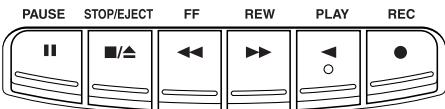
PAUSE II – Press to interrupt tape play or record mode. Press a second time to resume tape play or tape record mode.
STOP/EJECT ■/▲ – Press to stop the current tape activity, or to open the cassette compartment door when no buttons are active.
FF ◀◀ – In stop mode, press to advance the tape toward the end. (When the tape reaches the end, press STOP/EJECT ■/▲ to release the depressed button.)
REW ▶▶ – In stop mode, press to rewind the tape toward the beginning. (When the tape reaches the end, press STOP/EJECT ■/▲ to release the depressed button.)
PLAY ◀ – Press to play cassettes.
REC ● – Press to record from the radio or CD player.
PLAYING A CASSETTE TAPE
- Move FUNCTION to OFF/TAPE.
- Press STOP/EJECT ■/▲ to open the cassette compartment door.
- Insert a cassette tape into the compartment with the exposed part of the tape facing up and the side you want to play facing toward you.
- Close the door securely.
- Press REW ▶▶ or FF ◀◀ to move the tape to the desired starting point.
- Press PLAY ◀ to begin playing the tape. The cassette tape plays until it reaches the end of the side, then it automatically stops.
RECORDING ON CASSETTE TAPES
You can record from the radio or the CD player.
For best recording, use normal bias tape.
It should be noted that it may be unlawful to re-record pre-recorded tapes, records, or discs without the consent of the owner of copyright in the sound or video recording, broadcast or cable program and in any literary, dramatic, musical, or artistic work embodied therein.
ERASE PROTECTION
When you record new material, the cassette deck records over whatever is on a tape. To protect a tape from accidental erasure, break off one or both plastic tabs (one for each tape side) on the top of the cassette tape. If you decide later to record on the tape, seal the hole with a piece of cellophane tape.
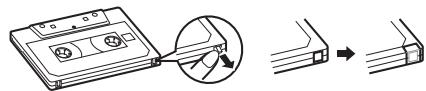
WARNING
A little bit of slack in your tape can cause scratches on the tape, or worse yet, the tape could break. If you notice some slack in the tape, use a pencil to tighten it up before you insert it in the tape deck.
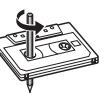
TIP
The use of tapes longer than 120 minutes is not recommended, since characteristic deterioration may occur and these tapes easily jam in the pinch-roller and the capstan.
RECORDING FROM THE RADIO
- Insert a cassette tape into the tape deck and close the door.
- Move FUNCTION to TUNER and select a radio station.
- Press REC ● to begin recording. REC ● and PLAY ◀ lock down.
- Press STOP/EJECT ■/▲ to end recording.
- To turn off the radio, slide FUNCTION to OFF/TAPE.
RADIO RECORDING TIPS
- To temporarily pause the recording, press PAUSE II on the cassette deck. Press PAUSE II again to resume recording.
SYNCHRONIZED RECORDING FROM A CD
- Insert a cassette tape into the tape deck and close the door.
- Move FUNCTION to CD.
- Insert the CD you want to record into CD compartment.
- Select the track you want to record by pressing ◀◀◀ (skip/search) or ▶▶▶ (skip/search).
- Press REC ● to start recording.
Note that the tape continues to run when the CD finishes playing, or the CD continues to play when the tape reaches the end.
TIP
Using the PAUSE ▪ button on the cassette deck instead of the STOP/EJECT ■/▲ button to momentarily interrupt recording gives you a much cleaner sound recording.
USING THE CD
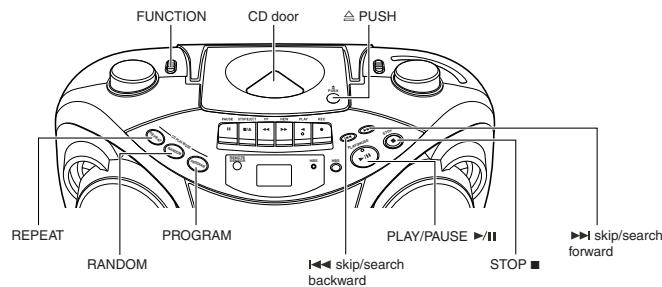
LOADING A CD
- Move FUNCTION to CD; “—” flashes, then “no” appears in the display if no CD is loaded.
- Press ≅ PUSH to open the CD door.
- Place a CD into the tray with the label facing up.
- Close the CD door. Then the total number of tracks appears.
- To remove the CD, press PUSH, grasp the CD by its edges, and carefully pull it out.
PLAYING A CD
Press PLAY/PAUSE ▶/Ⅱ to play all the tracks in order starting with track 1. The current track number appears in the display.
Note: Press PLAY/PAUSE ▶/Ⅱ to temporarily stop the CD. The ▶ indicator and the track number flash in the display. Press PLAY/PAUSE ▶/Ⅱ again to resume playing the CD.
- Adjust VOLUME to a comfortable level.
- Press STOP ■ to stop playing the CD. Wait a few seconds for the CD to stop turning, then press ≜ PUSH to open the CD compartment door and remove the CD.
AUTOMATIC SEARCH
Automatic search lets you quickly locate the beginning of any track on the CD, including the track currently playing. If the CD is playing:
- Press I◀◀ (skip/search) once to return to the beginning of the current track, press twice to return to the beginning of the previous track.
- Press ▶▶▶ (skip/search) to skip to the beginning of the next track.
If the CD is stopped, repeatedly press ▶▶▶ (skip/search) or ◀◀◀ (skip/search) until the display shows the number of the track you want to play, then press PLAY/PAUSE ▶/□. The CD player starts playing the selected track.
TRACK SEARCH
- In play mode, press and hold ▶▶▶ (skip/search) to move forward through a track at high speed.
- In play mode, press and hold ◀◀◀ (skip/search) to move backward through a track at high speed.
REPEAT
The REPEAT button allows you to repeat one track (REP 1) or all tracks (REP ALL). To scroll through the choices, continuously press and release REPEAT and check the display to see which choice you have selected. The following chart illustrates how REPEAT works in various modes.
$$ \rightarrow \text { NORMAL } \longrightarrow \text { REP 1 } \longrightarrow \text { REP ALL } $$
- You cannot select the "REP 1" mode for the random play.
RANDOM
Press RANDOM so that "RAND" appears in the display. Start play by pressing PLAY/PAUSE ▶/Ⅱ, and the tracks are played in random order.
To quit random play, press RANDOM again.
PROGRAMMING
Press PROGRAM to enter program edit mode.
“00” and “PROG” will flash in the display. Press ▶▶▶ (skip/search) or ◀◀◀ (skip/search) to select the track number and press PROGRAM to store the number in program place. You can repeat these steps to program up to 20 tracks. Note that programming more than 20 tracks will overwrite the tracks already programmed.
During program play, "PROG" lights steadily. To confirm the program order, press PROGRAM in stop mode. Each time you press PROGRAM, the program number appears, then the corresponding track number flashes in order from the first programmed track.
To clear the entire program in the memory, turn the unit off, or open the CD door.
This unit has been designed only to play back the following CDs.
- Digital audio CD
• Recordable digital audio CD (CD-R) - Rewritable digital audio CD (CD-RW)
When playing a CD-R or CD-RW
You can play back finalized CD-R or CD-RW recorded in music CD format. (If a CD-RW has been recorded in a different format, erase all the data on the CD-RW completely before recording on it.)
- You can play back CD-R or CD-RW like an audio CD.
- Some CD-R or CD-RW may not be played back on this unit because of their disc characteristics, damage or stain on them, or if the player lens is dirty.
- The reflection factor of CD-RW is lower than that of other CDs, possibly causing CD-RW to take longer time to read.
- CD-R and CD-RW of MP3 format cannot be played back.
CARE AND MAINTENANCE
CLEANING THE EXTERIOR
- Disconnect the system from AC power before cleaning the exterior of the unit with a soft dust cloth.
HANDLING CDS
- Do not touch the signal surfaces. Hold by the edges, or by one edge and the hole.
- Do not affix labels or adhesive tape to the label surfaces. Also, do not scratch or damage the label.
• Discs rotate at high speed inside the player. Do not use damaged (cracked or warped) discs.
CLEANING CDS
- Dirty discs can cause poor sound quality. Always keep discs clean by wiping them gently with a soft cloth from the inner edge toward the outer perimeter.
- If a disc becomes dirty, wet a soft cloth in water, wring it out well, wipe the dirt away gently, and then remove any water drops with a dry cloth.
- Do not use record cleaning sprays or antistatic agents on discs. Also, never clean discs with benzene, thinner, or other volatile solvents which may cause damage to the disc surface.
TAPE CARE
- Do not expose tapes to sunlight or store in hot places. High temperatures may warp the shell or damage the tape itself.
- Keep cassettes in their boxes when not in use.
- Cassette tapes can be erased by magnetic fields produced by magnets, electric motors, electrical transformers, and other devices. Keep tapes away from magnets and magnetic fields.
CLEANING THE TAPE HEADS
Iron oxide particles from the magnetic tape can build up on the parts that come in contact with the tape. These deposits can cause incomplete erasure, muffled playback sound, and might prevent automatic stop.
To clean a cassette deck, open the compartment door, press PLAY ◀ and gently clean the heads, capstan, and pinch wheel with a head cleaner.
Always unplug the power cord before cleaning, and allow 30 minutes drying time after using a liquid cleaner. Clean heads after every 25 hours of use.
- Demagnetize the head occasionally with a head demagnetizing cassette (available from many audio equipment stores).
- Never use any metal objects on or near the tape heads.
- Do not allow any cleaning material to fall into the tape assembly.
REMOTE FUNCTIONS (FOR CD OPERATION ONLY)
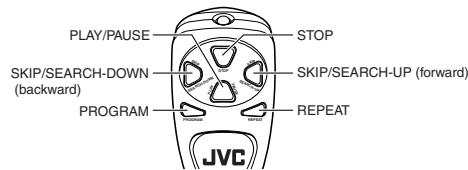
When inserting batteries
Match the polarity (+ and −) on the batteries with the + and − markings in the battery compartment on the back of the unit.
TROUBLESHOOTING TIPS
| Problem | Solution |
| System doesn’t turn on. | Make sure power cord is securely plugged into the AC power outlet (or that the batteries are fresh).Unplug the unit for a moment, and then plug it back in again.Check the outlet by plugging in another device. |
| No sound | Adjust volume setting.Make sure you have selected the correct function: CD, TAPE, or TUNER and the headphones are disconnected. |
| Poor radio reception | Adjust the FM telescopic antenna for better FM reception.Rotate the unit to achieve better AM reception.Try turning off electrical appliances near the unit, such as TV, hair dryers, vacuum cleaners, or fluorescent lights. |
| CD doesn’t play. | Make sure the tray contains a CD.Make sure the CD’s label is facing up.Make sure that pause mode is not activated.Make sure CD function is selected. |
| CD sound skips. | Clean the CD (as explained in “CARE AND MAINTENANCE”).Check CD for warping, scratches, or other damage.Check for vibration or shock that may affect the unit; move system if necessary. |
| Distorted or noisy recordings | Inspect the recording head and clean it if necessary.Demagnetize recording head (as explained in “CARE AND MAINTENANCE”). |
SPECIFICATION
CD player
CD capacity : 1 CD Dynamic range : 60 dB Signal-to-noise ratio : 75 dB
Tuner
Frequency ranges : FM 88 - 108 MHz : AM 540 - 1 600 kHz Antenna : Telescopic antenna for FM Ferrite core antenna for AM
Cassette deck section
Frequency response : 60 Hz - 10 000 Hz Wow and flutter : 0.15% (WRMS)
General
Speaker : 9 cm cone × 2 (4 Ω) Power output : 2 W + 2 W at 4 Ω (10% THD) (IEC 268-3) Output terminals : Phones × 1 (∅ 3.5 mm, stereo) Power supply : AC 230 V ∼, 50 Hz
DC 9 V ("R20 (SUM-1)/D (13D)" × 6)
Power consumption : 12 W (at operation), 3 W (on standby)
Dimensions : 420 mm (W) × 178 mm (H) × 250 mm
Mass : Approx. 3.2 kg (without batteries)
Accessories provided : AC power cord × 1 Remote control unit × 1 Batteries for the remote control unit (AAA (UM-4)/R03) × 2