
XL-PM400SE - Lecteur CD JVC - Notice d'utilisation et mode d'emploi gratuit
Retrouvez gratuitement la notice de l'appareil XL-PM400SE JVC au format PDF.


| Type de produit | Lecteur CD portable |
| Marque | JVC |
| Modèle | XL-PM400SE |
| Dimensions (L × H × P) | 133,2 mm × 30,8 mm × 146,8 mm |
| Poids (avec dragonne, sans piles) | 250 g |
| Alimentation | DC 3 V (2 piles R6/LR6) ou adaptateur secteur DC 4,5 V (non fourni) |
| Autonomie des piles (Anti-Shock désactivé) | Environ 30 heures avec des piles alcalines LR6 |
| Formats lus | CD audio, MP3 (compatible ISO 9660) |
| Réponse en fréquence | 20 Hz - 20 kHz |
| Sortie casque | Prise stéréo 3,5 mm, 9 mW/canal (10 % DHT, 16 Ω) |
| Protection anti-choc | Jusqu'à 175 s (CD audio) / 426 s (MP3 128 kbps) |
| Fonctions de lecture | Lecture normale, aléatoire, programmée, répétition, intro, saut de groupe MP3 |
| Effet sonore | Hyper-Bass (graves renforcés) |
| Verrouillage des touches | Oui (commutateur HOLD) |
| Indicateur de batterie faible | Oui |
| Accessoires fournis | Casque stéréo, dragonne |
| Entretien | Nettoyer avec un chiffon doux ; lentille : soufflette pour objectif d'appareil photo |
| Sécurité laser | Produit laser de classe 1 – Ne pas ouvrir le boîtier |
| Consommation en veille | Faible consommation même éteint si adaptateur branché |
FOIRE AUX QUESTIONS - XL-PM400SE JVC
Questions des utilisateurs sur XL-PM400SE JVC
0 question sur cet appareil. Repondez a celles que vous connaissez ou posez la votre.
Poser une nouvelle question sur cet appareil
Téléchargez la notice de votre Lecteur CD au format PDF gratuitement ! Retrouvez votre notice XL-PM400SE - JVC et reprennez votre appareil électronique en main. Sur cette page sont publiés tous les documents nécessaires à l'utilisation de votre appareil XL-PM400SE de la marque JVC.
MODE D'EMPLOI XL-PM400SE JVC
JVC
PORTABLE CD PLAYER
LECTOR PORTÁTIL DE DISCOS COMPACTOS
PORTABLE DRAAGBARE CD-SPELER
XL-PM400S
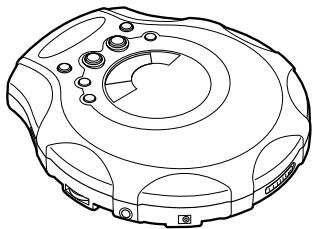
natural_image
Technical line drawing of a mechanical device with circular components and mounting holes (no text or symbols)

INSTRUCTIONS INSTRUCCIONES GEBRUIKSAANWIJZING
LVT1179-005A [E]
Warnings, Cautions and Others
Avios, precauciones y otras notas
Waarschuwingen, voorzorgen en andere mededelingen
CAUTION!
THIS PRODUCT UTILIZES A LASER.
USE OF CONTROLS OR ADJUSTMENTS OR PERFORMANCE OF PROCEDURES OTHER THAN THOSE SPECIFIED HEREIN MAY RESULT IN HAZARDOUS RADIATION EXPOSURE. DO NOT OPEN COVERS AND DO NOT REPAIR YOURSELF. REFER SERVICING TO QUALIFIED PERSONNEL.
WARNING:
TO REDUCE THE RISK OF FIRE OR ELECTRIC SHOCK, DO NOT EXPOSE THIS APPLIANCE TO RAIN OR MOISTURE.
¡ADVERTENCIA!
ESTE APARATO UTILIZA UN LÁSER.
EL USAR LOS CONTROLES, HACER LOS REGLAJES O LOS PASOS REQUERIDOS EN FORMA DIVERSA DE LA AQUI EXPUESTA PUEDE REDUNDAR EN EXPOSICIÓN PELIGROSA A LA RADIACIÓN.
NO ABRA LAS TAPAS NI HAGA REPARACIONES USTED MISMO. EN CASO DE PRODUCIRSE ANOMALÍAS SOLICITE AYUDA DE PERSONAL CUALIFICADO.
AVISO:
PARA REDUCIR EL RIESGO DE INCENDIOS O SACUDIDAS ELÉCTRICAS, NO LO EXPONGA A LA LLUVIA O HUMEDAD.
WAARSCHUWING!
IN DIT APPARAAT WORDT EEN LASER GE-BRUIKT. HET GEBRUIK VAN REGELAARS EN HET MAKEN VAN AFSTELLINGEN OF BEDIENINGEN DIE NIET IN DEZE GEBRUIKSAANWIJZING STAAN BESCHREVEN, KAN LEIDENTOT BLOOT-STELLING AAN GEVAARLIJKE STRALING. MAAK HET APPARAAT NIET OPEN EN GA NIET ZELF REPAREREN. LAAT HET ONDERHOUD AAN ERKENDE VAKMENSEN OVER.
WAARSCHUWING:
TENEINDE HET GEVAAR VOOR BRAND OF ELEKTRISCHE SCHOKKEN TE VERKLEINEN, MAG DIT APPARAAT NIET WORDEN BLOOTGESTELD AAN REGEN OF VOCHT.
CAUTION:
- Do not block the ventilation opening or holes. (If the ventilation openings of holes are blocked by a newspaper or cloth, etc., the heat may not be able to get out.)
- Do not place any naked flame sources, such as lighted candles, on the apparatus.
- When discarding batteries, environmental problems must be considered and local rules or laws governing the disposal of these batteries must be followed strictly.
- Do not expose this apparatus to rain, moisture, dripping or splashing and that no objects filled with liquids, such as vases, shall be placed on the apparatus.
PRECAUCIÓN:
- No obstruya las rendijas o los orificios de ventilación. (Si las rendijas o los orificios de ventilación quedan tapados con un periódico, un trozo de tela, etc., no se podrá disipar el calor).
- No ponga sobre el aparato ninguna llama al descubierto, como velas encendidas.
- Cuando tenga que descartar las pilas, tenga en cuenta los problemas ambientales y observe estrictamente los reglamentos o las leyes locales sobre disposición de las pilas.
- No exponga este aparato a la lluvia, humedad, goteos o salpicaduras. Tampoco ponga recipientes conteniendo líquidos, como floreros, encima del aparato.
VOORZICHTIG:
- Zorg dat u de ventilatieopeningen en -gaten niet afsluit. (Als de ventilatieopeningen en -gaten worden afgesloten door bijvoorbeeld papier of een doek, kan er hitte in het apparaat worden opgebouwd.)
- Zet geen bronnen met open vuur, zoals brandende kaarsen, op het apparaat.
- Wees milieubewust en gooi lege batterijen niet bij het huishoudelijk afval. Lege batterijen dient u in te leveren met het KCA of bij een innamepunt voor batterijen.
- Stel dit apparaat niet bloot aan regen, vocht, drupwater of spatwater en plaats geen enkel voorwerp waarin zich een vloeistof bevindt, zoals een vaas, op het apparaat.
IMPORTANT FOR LASER PRODUCTS
- CLASS 1 LASER PRODUCT
- CAUTION: Do not open the top cover. There are no user serviceable parts inside the unit; leave all servicing to qualified service personnel.
- CAUTION: Visible and invisible laser radiation when open and interlock failed or defeated. Avoid direct exposure to beam.
- REPRODUCTION OF LABEL: CAUTION LABEL, PLACED OUTSIDE THE UNIT.
BELANGRIJK VOOR LASERPRODUKTEN
- KLASSE 1 LASERPRODUKT
- VOORZICHTIG: Open de bovenste afdekking niet. Er zijn geen door de gebruiker te repareren onderdelen in het toestel; laat onderhoud en reparatie over aan erkend onderhoudspersoneel.
- VOORZICHTIG: Zichtbare en onzichtbare laserstraling indien open en interlock defect of buiten werking gesteld. Voorkom directe blootstelling aan de straal.
- REPRODUCTIE VAN LABEL: WAARSCHUWING-SLABEL IN TOESTEL AANGEBRACHT.
IMPORTANTE PARA PRODUCTOS LÁSER
- PRODUCTO LÁSER CLASE 1
- PRECAUCIÓN: No abra la tapa superior. En el interior de la unidad no hay piezas que pueda reparar el usuario; encargue el servicio a personal técnico cualificado.
- PRECAUCIÓN: Radiación láser visible e invisible en caso de apertura o con interbloqueo averiado o defectuoso. Evite la exposición directa a los haces.
- REPRODUCCIÓN DE LA ETIQUETA: ETIQUETA DE PRECAUCIÓN, COLOCADA EN EL INTERIOR DE LA UNIDAD.
CAUTION: Visible and invisible laser radiation when open and interlock failed or defeated. AVOID DIRECT EXPOSURE TO BEAM. (e)
ADVARSEL: Synlig og usynlig laserstråling når maskinen er åben eller interlocken fejle. Undgå direkte eksponering til stråling. (d)
WARNING: Synlig Och osynlig laserstrålning när den öppnas och spärren är urkopplad. Betrakta ej strålen. (s)
VARO: Avattaessa ja Suojalukitus ohitettunatai viallisena olet alttiina näkyvälle ja näkymättömälle lasersäteilylle. Vältä säteen kohdistumista suoraan itseesi. (f)
Thank you for purchasing this JVC product. Please read these instructions carefully before starting operation to be sure to obtain optimum performance and a longer service life from the unit.
Table of Contents
Put the grip band on your hand ....1
Power Supply Preparations 2
About MP3 files 4
Basic Play 5
Other Play Methods 8
Concerning Compact Discs 12
Cautions 13
Troubleshooting 15
Specifications 16
Maintenance 16
Put the grip band on your hand
Adjust the grip band to your hand size.
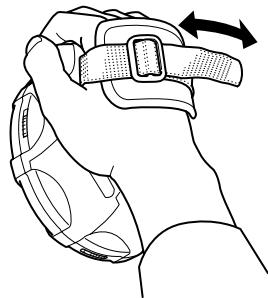
natural_image
Line drawing of a hand holding a belt buckle with an arrow indicating rotation (no text or symbols)Supplied Accessories
Stereo headphone 1 pc.
Power Supply Preparations
The illustration of the grip band is omitted.
Using dry-cell batteries (not supplied)
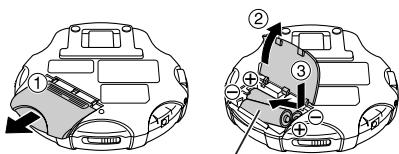
Two "R6" (LR6) alkaline batteries.
Caution:
Do not forcibly open the battery lid too wide.
Battery indicator
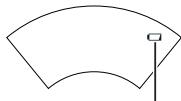
natural_image
Simple curved line drawing with a small square marker at the top-right corner (no text or symbols)Battery indicator
This indicator appears when the batteries are almost out of power. Power will be cut off a short while later.
Note:
Turning off the Anti-Shock Protection EX will save the battery power more or less. For details, see “Anti-shock Protection EX” on page 11. (Available for an Audio CD only)
Using the AC adaptor (not supplied)
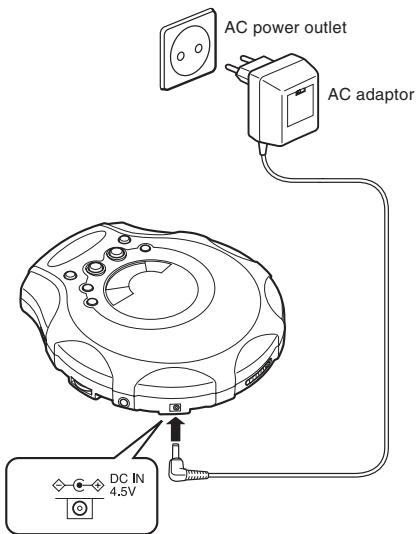
Notes:
- Even if the unit is turned off, small power is consumed as long as the AC adaptor is connected to the AC power outlet.
- When you want to purchase the AC adaptor, see page 14.
Preventing Accidental Operation (Hold mode)
This function causes the unit to ignore, accidental button presses.
Hold mode prevents the following:
- Powering on the unit accidentally (which can cause the batteries to go dead).
- Play being cut off unexpectedly.
To use the Hold mode
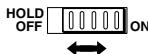
- To prevent the unit from powering on accidentally, set the HOLD switch to the ON position while the unit is turned off.
- To prevent the unit from unexpected operation during play, set the HOLD switch to the ON position after you starts playing the disc.
- When the unit is in Hold mode, "HOLd" and "☐" lights as follows.
Power on : “ 🔒 ” stays lit.
Power off : "HOLd" and "●-■" lights up for a few seconds when ▶/Ⅱ is pressed.
Note:
If the HOLD switch is set to the ON position, you cannot turn on the unit.
About MP3 files
MP3 File Compatibility
- This player can read MP3 files that are recorded in the format that is compliant with ISO 9660.
- The player can read or play an MP3 file with the extension code —“.mp3”.
Playing order of MP3 files
The illustration below shows the normal playing order of the MP3 files. You will see that the MP3 files are played back in the order from the higher hierarchy to the lower one.
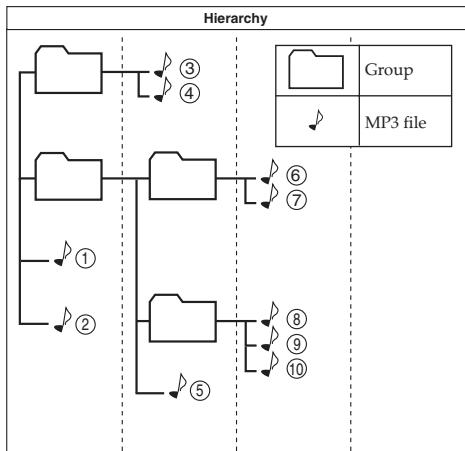
flowchart
graph TD
    A[" "] --> B["③"]
    A --> C["④"]
    D[" "] --> E["⑥"]
    D --> F["⑦"]
    G["①"] --> H["②"]
    I["⑤"] --> J["⑧"]
    I --> K["⑨"]
    I --> L["⑩"]
    M["Group"] --> N["MP3 file"]
    O["MP3 file"] --> P["MP3 file"]
Basic Play
The illustration of the grip band is omitted.
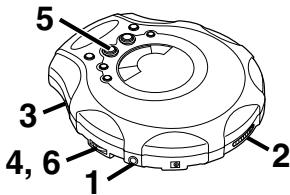
1
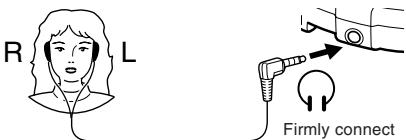
2
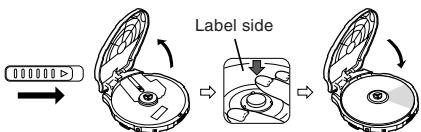
3
4
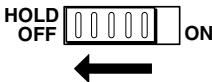
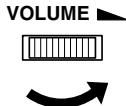
(To be continued on the next page)
5
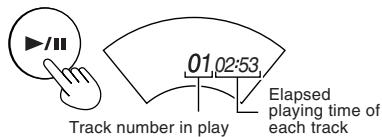
For Audio CD
For MP3
Elapsed playing time of each track
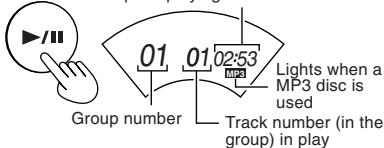
Play stops automatically when all the track have been played.
6
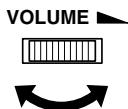
For your reference:
"dISC"
This indication appears if ▶/Ⅲ is pressed when no disc is loaded or if the disc is not properly seated.

Preparation period before playing the track
Flashes for several seconds after pressing ▶/Ⅱ to play.
"OPEN"
This indication appears when the lid is open.
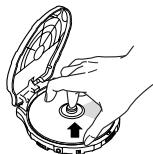
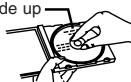
Removing discs
Turn off the unit and, after the disc has stopped rotating, remove the disc as shown below:
natural_image
Illustration of hands operating a mechanical device with a knob and pointer (no text or symbols)Auto power off
If the unit is left in stop mode for 30 seconds, the unit turns itself off automatically to prevent the batteries from running down.
Disc rotation noise
The portable CD player uses a power-saving operation method so that disc rotation noise will intermittently be emitted. But, it is not a failure.
To pause
During play,
For Audio CD

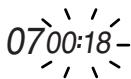
For MP3

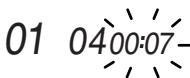
Press again to restart play.
To stop
During play,
For Audio CD

Total number of tracks
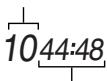
Total playing time
For MP3

Total number of groups
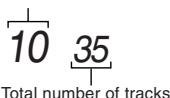
To turn off the unit
While stopped,

No indication
Fast forward/reverse
Skip function
During play,
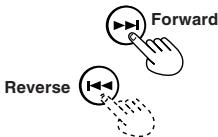
Search function
Keep depressed during play.
- To skip back to the previous track, quickly press ◀◀ twice.
- During Program play, the button is used to fast forward or back through the programmed sequence of tracks.
- During Random play, the skip button cannot be used to skip back to tracks that were played previously in the random sequence.
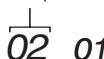
Group skip (MP3 only)
During play or while stopped,
Group number

Other Play Methods
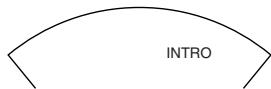
Intro play
You can successively play the first 10 seconds of every track.
1 While stopped,

(Repeatedly)
2

To cancel
Press MODE repeatedly until "INTRO" goes out.
Notes:
- You can also select Intro play during playback.
In this case, Intro play will start from the next track after the current track has finished. - You can also select Intro play during Program play mode.
Random play
During playback,
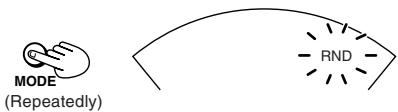
After playing all tracks, the unit stops.
To cancel
Press MODE until "RND" goes out, or press ■ to stop the disc.
Notes:
- You can also select Random play in stop mode.
- During Program play, you can not select Random play.
Program play
You can program up to 64 tracks in any desired order including the same tracks.
For Audio CD, go to step 3.
Though the display differs a little, operation is the same.
1 (MP3 only) While stopped,
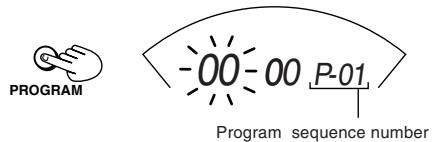
2 (MP3 only) Select the desired group number. (e.g.02)
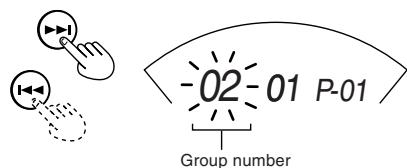
3
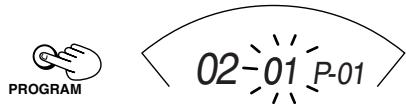
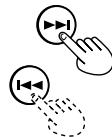
4 Select the desired track.
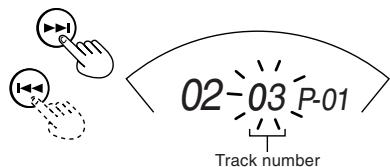
5
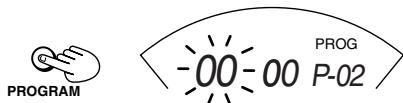
The track is registered.
(To be continued on the next page)
6 For MP3, repeat steps 2-5 to select other tracks. For Audio CD, repeat steps 4 and 5.
When you program exceeding 64 tracks, the program sequence number returns to "01" and will overwrite the previous setting.
7

• To confirm the program
While stopped, press PROGRAM repeatedly. At this time, you can add and change the program, if required.
• To delete the entire program
While stopped, press STOP. Or turn off the unit.
Repeat play
During playback,
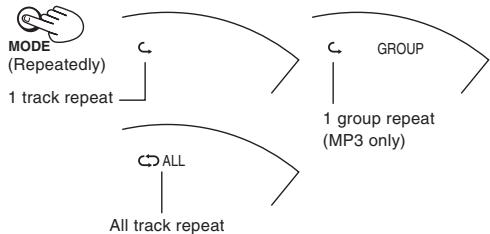
flowchart
graph TD
    A["MODE (Repeatedly)"] --> B["1 track repeat"]
    C["GROUP"] --> D["1 group repeat (MP3 only)"]
    E["ALL"] --> F["All track repeat"]
To cancel
Press MODE repeatedly until the repeat indicator goes out.
Notes:
- You can also select Repeat play during Program play.
- You can also select Repeat play while stopped.
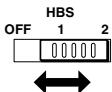
Hyper-Bass Sound effect
You can enjoy powerful bass sound.
Anti-Shock Protection EX
This function achieves excellent performance against sound interruption caused by vibrations. You will be able to enjoy listening to music during (not vigorous) jogging. By utilizing the high-performance servo circuit, audio data will be stored in the memory ahead of time.
For Audio CD: Up to 175 seconds worth (Anti-Shock Protection on/off selectable)
For MP3: Up to 426 seconds worth at 128 kbps (Anti-Shock Protection is fixed to on.)
Normally, this function is in effect.
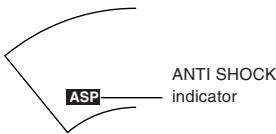
As the audio data is gradually stored, the indicator changes as follows:
![-ASP- → ASP [Fully stored]](/content/2024/12/123495/images/0dec75bab25bb89b1e4d983466aa459212d47ceef19e6b6ee5b54d2d760b5486.jpg)
(Audio CD only) To cancel

The "ANTI SHOCK" indicator goes out.
(Audio CD only) To activate again
Press A.S.P./GROUP UP.
Notes:
- During this operation, the disc rotates at a higher rate than usual in order to collect extra audio data. This may cause the batteries to run out faster and could result in a slight increase in disc rotation noise.
- This function can be switched ON and OFF during playback. However, this may cause a slight interruption in the sound because the disc's rotational speed changes.
Concerning Compact Discs

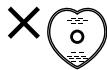
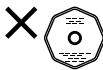
Only compact discs bearing this mark can be used with this unit. However, continued use of irregular shape CDs (heart-shape, octagonal, etc.) can damage the unit.
CD-R and CD-RW discs recorded with the audio CD format can be played back, though some may not be played back because of the disc characteristics or recording condition.
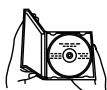
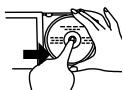
How to remove a disc from its case
natural_image
Illustration of hands operating a circular device with a pointer (no text or symbols visible)How to store the disc in its case
Label side up
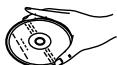
How to hold a disc


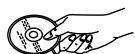
If the disc surface is dirty
Wipe it with a damp cloth and then wipe dry.
Wipe from the center toward the outer edge.
Play surface (shiny surface)

If moisture has formed on a disc
When moisture has formed because the disc was brought suddenly into a warm room from a cold environment, wipe off the moisture using a soft dry cloth.
When storing discs
Avoid locations which are
- Exposed to direct sunlight.
- Susceptible to high levels of humidity or dust.
- Directly exposed to heat from a heating appliance.
- On top of a car dashboard or near the rear window.
Handling precautions
- On the label side (the side with writing)
Do not write anything using a pencil, ball-point pen, etc. Do not use adhesive paper or labels. - On the disc (shiny) side
Handle this side carefully to keep it free from fingerprints or scratches. Do not use record cleaners, solvents, etc. - Do not attach labels or stickers to CDs.
Do not use CDs with exposed adhesive from tape or left over peeled off stickers. - Do not use scratch-proof protectors or covers other than those specified for use with this unit.
Cautions
Listening Precautions
- Do not play your headphones at a high volume. Hearing experts advise against continuous extended play.
- If you experience a ringing in your ears, reduce volume or discontinue use.
- Do not use while operating a motorized vehicle. It may create a traffic hazard and is illegal in many areas.
- You should use extreme caution or temporarily discontinue use in potentially hazardous situations.
- Even if your headphones is an open-air type designed to let you hear outside sounds, don't turn up the volume so high that you can't hear what's around you.
Rechargeable batteries
- Rechargeable batteries (not supplied) can be used.
- To use the rechargeable batteries, follow the instruction manual attached to the rechargeable batteries and charger (not supplied).
Dry cell batteries
To prevent damage to the batteries and electrolyte leakage, heed the following points.
- Align the and polarities properly when inserting the batteries.
- Do not mix different types or makers of batteries or old and new batteries.
- Remove the batteries if you do not plan to use the unit for a long period of time.
- Do not throw batteries into a fire, and do not short-circuit, disassemble or subject them to excessive heat.
- Do not attempt to recharge dry cell batteries.
Carrying dry cell batteries around
When putting dry cell batteries in a pocket or bag, ensure that no other metal objects such as a necklace are placed together with them. Contact with metal may cause short-circuiting which, in turn, may cause a fire.
AC adaptor
- Handle the AC adaptor carefully. Improper handling is dangerous.
- Do not touch it with wet hands.
- Do not place heavy objects on top of it.
- Do not forcibly bend it.
- Be sure to connect only the specified AC adaptor with the unit.
- Disconnect the AC adaptor from the power outlet if the unit is not going to be used for a long time.
Unit
No altering or remodeling
This can cause malfunctioning.
No dropping or strong impacts
This may damage the unit.
Locations to be avoided
Avoid using the unit in the following locations since they can cause malfunctioning.
- Bathrooms and other moisture-prone places.
- Warehouses and other dusty places
- Very hot places near heating appliances, etc.
Do not leave the unit exposed to direct sunlight for long periods of time
This may deform or discolor the cabinet and may also cause malfunctioning.
When purchasing AC adaptor
Be absolutely sure to purchase the AC adaptor designed especially for this unit.
AC adaptor: AA-R4514
For details, check with your dealer.
Troubleshooting
| Problem | Check this |
| Does not turn on. | Is the AC adaptor securely connected?Is the HOLD switch set to OFF position? |
| Cannot close the lid. | Is the disc properly secured in place? |
| Cannot play discs. | Is the disc properly secured in place?Is there moisture condensation on the lens?(Wait for about an hour and then try again.)Are MP3 files recorded on the disc?Do MP3 files have the extension code—.mp3?Are MP3 files recorded in the format compliant with ISO 9660? |
| Cannot hear music—too noisy. | Is the headphone plug inserted all the way?Is the plug dirty? (Wipe away dirt on the plug.)Are you playing a compatible disc? While playing a non-MP3 file, you will hear a noise. (Note it may not be an MP3 file although it has the extension code—.mp3.) |
| TV picture is distorted.Radio reception is noisy. | Are you using the unit too near a TV or tuner? (If the TV or tuner is connected to a simple indoor antenna, connect it to an outdoor antenna.) |
| “dISC” or “Er” is displayed when a disc is in the player. | Is the disc damaged?Is the disc playable on this player?Has the disc been inserted upside down? |
If the remedies indicated in the chart do not solve the problem, refer to the directory of Authorized Service Centers (enclosed with this unit) to locate a convenient service center, or consult your dealer for instructions.
Specifications
Portable CD player
| Type | : Compact disc player |
| Signal detection system | : Non-contact optical pickup (semiconductor laser) |
| Pickup system | : 3 beam laser |
| Number of channels | : 2 channels (stereo) |
| Frequency response | : 20 Hz to 20 kHz |
| Wow & flutter | : Unmeasurable |
| Output | : Headphones (3.5 mm dia. stereo × 1)9 mW/ch at 10 % THD/16 Ω matching impedance (16 Ω to 1 kΩ) |
| Duration of battery(with Anti-Shock Protection EX OFF) | : Approx. 30 hours when using two alkaline batteries (LR6) |
| Power requirements | : DC 3 V (“R6” size battery × 2)DC 2.4V (rechargeable battery × 2)DC IN 4.5 V |
| Dimensions (W×H×D) | : 133.2 mm × 30.8 mm × 146.8 mm(Excluding buttons and controls) |
| Mass | : 250 g(with grip band, without batteries) |
AC adaptor (not supplied)
| Input power source | : AC 230 V, 50 Hz |
| Output voltage | : DC 4.5 V, 600 mA |
* Design and specifications are subject to change without notice.
Maintenance
Unit
Wipe the unit with a soft cloth. Remove stubborn dirt using a cloth which has been dipped in water or soapy water and wrung out, and then wipe dry.
- If you intend to use a chemically treated cleaning cloth, read its directions first.
- Do not use alcohol or paint thinners.
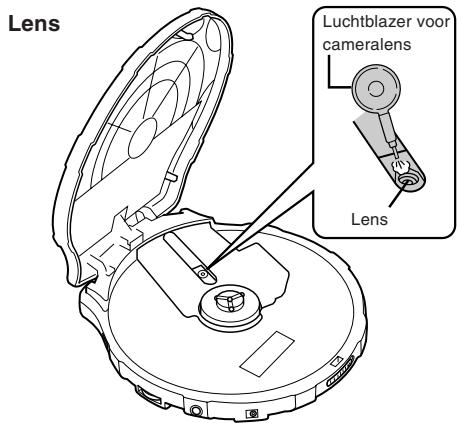
Lens
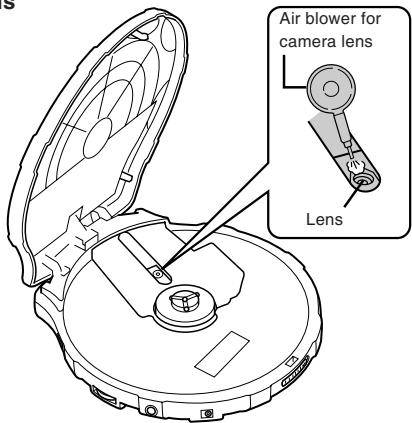
Enhorabuena por la adquisición de este producto de JVC. Lea detenidamente estas instrucciones antes poner en funcionamiento este aparato a fin de obtener un óptimo rendimiento y una mayor vida útil.
Índice
Colóquese en la mano la banda de agarre ... 1
Preparativos para el suministro de alimentación 2
Acerca de los archivos MP3 4
Reproducción básica 5
Otros métodos de reproducción 8
Acerca de los discos compactos 12
Precauciones 13
Solución de problemas.... 15
Especificaciones 16
Mantenimiento 16
Colóquese en la mano la banda de agarre
Ajuste la banda de agarre al tamaño de su mano.
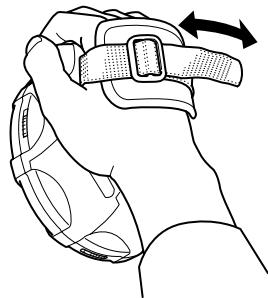
natural_image
Line drawing of a hand holding a belt buckle with an arrow indicating rotation (no text or symbols)Accesorios suministrados
Auriculares estéreo .... 1 paq.
Preparativos para el suministro de alimentación
No se proporciona ilustración de la banda de agarre.
Uso de pilas secas (no suministradas)
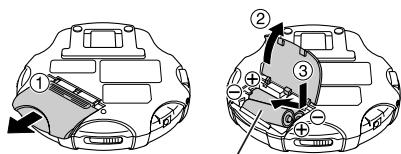
Dos pilas alcalinas "R6" (LR6).
Precaución:
No abra demasiado la tapa del compartimiento de las pilas.
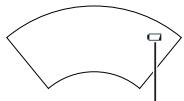
Indicador de pilas
natural_image
Simple curved line drawing with a small square marker at the top center (no text or symbols)Indicador de pilas
Este indicador es encenderá cuando las pilas estén casi agotadas. La alimentación se desconectará completamente un poco después.
Nota:
Si se desactiva la protección antichoques EX se ahorrará energía de la pila en cierto modo. Para conocer más detalles, consulte “Protección antichoques EX” en la página 11. (Disponible sólo para un CD de audio)
Utilización del adaptador de CA (no suministrado)
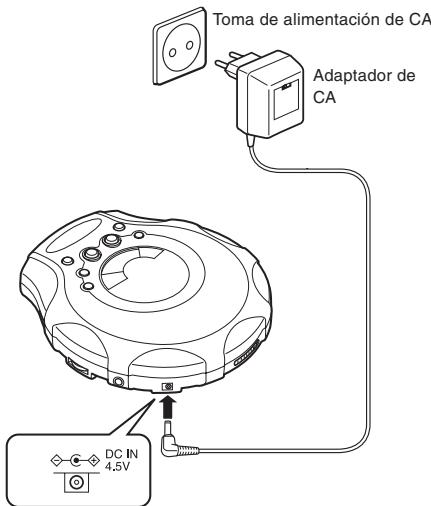
Notas:
- Aunque la unidad esté apagada, se consume una pequeña de energía mientras el adaptador de CA esté conectado a la toma de alimentación de CA.
- Cuando desee adquirir el adaptador de CA, consulte la página 14.
Prevención de funcionamiento accidental (modo Hold)
Esta función hace que la unidad ignore la pulsación accidental de un botón.
La función de bloqueo evita lo siguiente:
- Encendido accidental de la unidad (que puede ocasionar una descarga de las pilas).
- Interrupción inesperada de la reproducción.
Utilización de la función de bloqueo
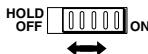
- Para evitar que la unidad se encienda accidentalmente, coloque el interruptor HOLD en la posición ON mientras la unidad esté apagada
- Para evitar que la unidad funcione de forma inesperada durante la reproducción, coloque el interruptor HOLD en la posición ON después de que comience la reproducción.
- Cuando la unidad esté en el modo de bloqueo (Hold), "HOLd" y "☐W" se iluminan de la forma siguiente.
Conexión : “☐” se enciende.
Desconexión : “HOLd” y “☐” se enciende durante unos segundos cuando se pulsa ▶/II.
Nota:
Si se pone el interruptor HOLD en la posición ON, no podrá encender la unidad.
Acerca de los archivos MP3
Compatibilidad con archivos MP3
- Este reproductor puede leer archivos MP3 que estén grabados en el formato que cumple la normal ISO 9660.
- El reproductor puede leer o reproducir un archivo MP3 con el código de extensión — “.mp3”
Orden de reproducción de los archivos MP3
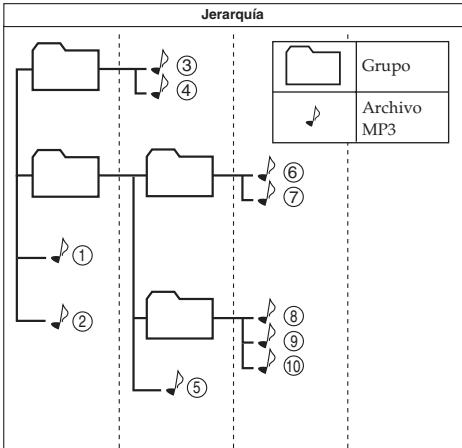
La ilustración inferior muestra el orden de reproducción normal de archivos MP3. Verá que los archivos MP3 se reproducen en el orden que va desde la jerarquía superior a la inferior.
flowchart
graph TD
    A["Jerarquía"] --> B["Folder ③"]
    A --> C["Folder ④"]
    A --> D["Folder ①"]
    A --> E["Folder ②"]
    A --> F["Folder ⑤"]
    G["Grupo"] --> H["Archivo MP3"]
    I["⑥"] --> J["⑦"]
    K["⑧"] --> L["⑨"]
    M["⑩"] --> N["⑪"]
Reproducción básica
No se proporciona ilustración de la banda de agarre.
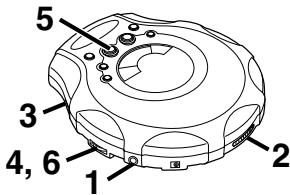
1
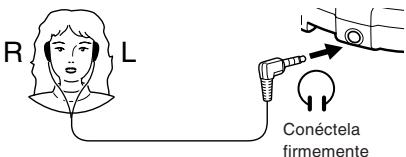
2
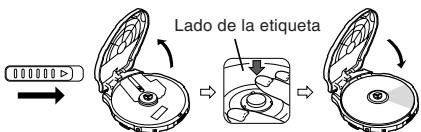
3
4
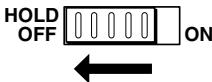
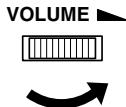
(Continúa en la página siguiente)
5
Para un CD de audio
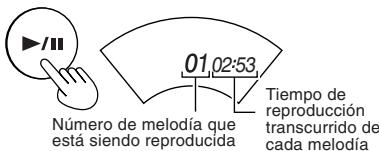
Para MP3
Tiempo de reproducción transcurrido de cada melodía
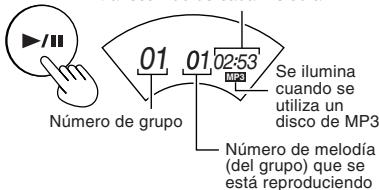
La reproducción se parará automáticamente después de haberse reproducido todas las melodías.
6
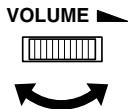
Para su referencia:
"dISC"
Esta indicación aparece si se pulsa ▶/II y no hay ningún disco introducido en la unidad o si el disco no se ha colocado correctamente.

Periodo de preparación antes de reproducir la melodía Parpadea durante unos segundos después de pulsar ▶/Ⅱ para comenzar la reproducción.
"OPEN"
Esta indicación aparece cuando la tapa está abierta.
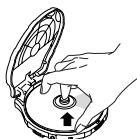
Extracción de discos
Desconecte la unidad y, después de que el disco haya dejado de girar, extraiga el disco:
natural_image
Illustration of hands operating a mechanical device with a knob and arrow indicator (no text or symbols)Desconexión automática de la alimentación
Si se deja el aparato en modo de parada durante más de 30 segundos, la alimentación se desconectará automáticamente para evitar que las pilas se agoten.
Ruido de rotación del disco
El lector portátil de discos compactos utiliza un método de ahorro de energía durante su funcionamiento para que el ruido de rotación del disco se emita de forma intermitente. No se trata de una avería.
Para hacer una pausa
Durante la reproducción,
Para un CD de audio

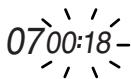
Para MP3

01
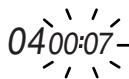
Presione otra vez para reanudar la reproducción.
Para detener
Durante la reproducción,
Para un CD de audio
Número total de melodías


Tiempo de reproducción total
Para MP3
Número total de un grupo

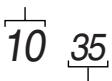
Número total de melodías
Para apagar el aparato
En el modo de parada,

Sin indicación
Salto hacia delante/hacia atrás
Función de salto
Durante la reproducción,
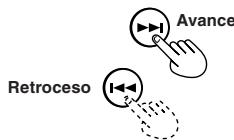
Función de búsqueda
Manténgalo sin pulsar durante la reproducción.
- Para volver a la melodía anterior, pulse rápidamente ◀◀◀ dos veces.
- Si está reproduciendo un programa, el botón permite avanzar o retroceder por la secuencia programada.
- Durante la reproducción aleatoria, el botón de salto no podrá utilizarse para saltar melodías que se hayan reproducido previamente en el orden aleatorio.
Salto de grupo (sólo MP3)
Durante la reproducción o al detenerse.

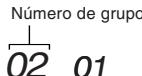
Otros métodos de reproducción
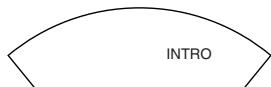
Reproducción de las introducciones
Puede reproducir sucesivamente los primeros 10 segundos de cada pista.
1 En el modo de parada,

(Repetidamente)
2

Para cancelar
Apriete MODE repetidamente hasta que "INTRO" desaparezca.
Notas:
- También podrá seleccionar la reproducción de introducciones durante la reproducción.
En este caso, reproduzca las introducciones después de haberse reproducido la melodía actual. - También puede seleccionar la reproducción de las introducciones durante la reproducción del programa.
Reproducción aleatoria
Durante la reproducción,

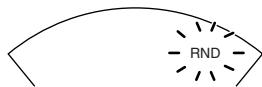
(Repetidamente)
Tras reproducir todas las pistas, la unidad se detiene.
Para cancelar
Pulse MODE hasta que "RND" desaparezca, o pulse para detener el disco.
Notas:
- También puede seleccionar la reproducción aleatoria en el modo de parada.
- Durante la reproducción del programa, no puede seleccionar la reproducción aleatoria.
Reproducción programada
Se pueden programar hasta 64 melodías en el orden deseado, incluyendo las mismas melodías.
Para un CD de audio, vaya al paso 3.
Aunque la pantalla varía un poco, el funcionamiento es el mismo.
1 (Sólo MP3) En el modo de parada,

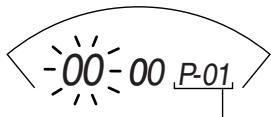
Número de secuencia del programa
2 (Sólo MP3) Seleccione el número de grupo deseado. (ejemplo, 02)
natural_image
Two hand icons interacting with circular buttons, one pointing at a play button and the other with a question mark (no text or symbols)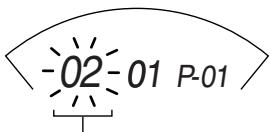
Número de grupo
3

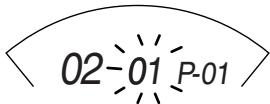
4 Seleccione la melodía deseada.
natural_image
Two circular icons with triangular play button symbols connected by a finger, one dotted and one solid (no text or labels)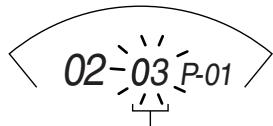
Número de melodía
5

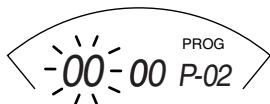
La melodía queda registrada.
(Continúa en la página siguiente)
6 Para MP3, repita los pasos 2-5 para seleccionar otras melodías.
Para un CD de audio, repita los pasos 4 y 5.
Cuando un programa supera las 64 melodías, el número de secuencia del programa vuelve a "01" y se sobrescribe el ajuste anterior.
7

- Para confirmar el programa
En el modo de parada, pulse PROGRAM varias veces. En ese momento, puede añadir y cambiar el programa si fuera necesario.
- Para eliminar el programa completo
En el modo de parada, pulse STOP. O apague la unidad.
Repetición de la reproducción
Durante la reproducción,
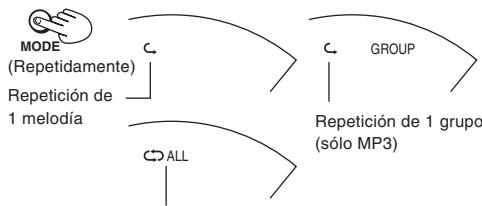
flowchart
graph TD
    A["MODE (Repetidamente)"] --> B["Repetition de 1 melódia"]
    B --> C["GROUP"]
    C --> D["Repetition de 1 grupo (sólo MP3)"]
    D --> E["ALL"]
Repetición de todas las melodías
Para cancelar
Apriete MODE repetidamente hasta que el indicador de repetición desaparezca.
Notas:
- También puede seleccionar la reproducción de repetición durante la reproducción del programa.
- También puede seleccionar la reproducción de repetición en el modo de parada.
Efecto de sonido de graves muy acentuados (Hyper-Bass Sound)
Podrá obtener un sonido con graves muy potentes.
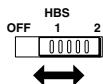
Protección antichoques EX
Esta función obtiene un excelente resultado frente a la interrupción del sonido ocasionada por vibraciones. Podrá disfrutar escuchando música mientras corre (siempre que no lo haga de forma muy brusca).
Con la utilización de un servocircuito de alto rendimiento, los datos de audio se almacenarán en la memoria con un tiempo de adelanto.
Para un CD de audio: Hasta un valor de 175 segundos (la protección antichoques puede activarse o desactivarse)
Para MP3: Hasta un valor de 426 segundos a 128 kbps (la protección antichoques está activada de forma fija).
Normalmente, esta función está activada.
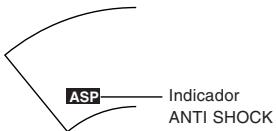
Puesto que los datos de audio se almacenan gradualmente, el indicador cambia de la forma siguiente:
![-ASP- → ASP [Memoria completa]](/content/2024/12/123495/images/6dcb3da007e1f1366ad3b04709af4a26b64db26954e948cc739350f2a5c26458.jpg)
(Sólo CD de audio) Para cancelar

GROUP UP
El indicador "ANTI SHOCK" desaparece.
(Sólo CD de audio) Para activarlo de nuevo
Imprenta A.S.P./GROUP UP.
Notas:
- Durante esta operación, el disco gira a una velocidad superior a la normal para recoger los datos de audio adicionales. Esto puede hacer que las pilas se gasten más deprisa y podría aumentarse el ruido de rotación del disco.
- Esta función puede activarse y desactivarse durante la reproducción. Sin embargo, esto podría ocasionar una ligera interrupción del sonido porque cambia la velocidad de rotación del disco.
Acerca de los discos compactos

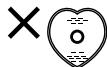
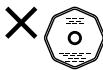
Sólo los discos compactos que tengan esta marca podrán utilizarse en este aparato.
Sin embargo, la utilización continua de discos compactos de formas irregulares (forma de corazón, octagonales, etc.) puede estropear el aparato.
Los discos CD-R y CD-RW grabados con el formato de CD de audio pueden reproducirse, aunque algunos podrán no hacerlo debido a las características del disco o a las condiciones de la grabación.
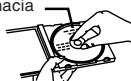
Cómo extraer un disco de su caja
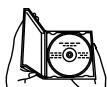
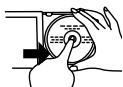
natural_image
Hand operating a circular device with a knob, no visible text or symbolsCómo guardar un disco en su caja
Lado de la etiqueta hacia arriba
natural_image
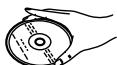
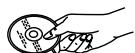
Illustration of hands operating a CD or DVD disc (no text or symbols visible)Cómo sujetar un disco


Si la superficie del disco está sucia
Límpiela con un paño húmedo y luego séquela.
Limpie desde el centro hacia la circunferencia exterior.
Superficie de reproducción (superficie brillante)

Si se ha formado humedad en un disco
Cuando se ha formado humedad debido a que el disco ha sido llevado repentinamente de un lugar frío a otro caliente, quite la humedad con un paño suave y seco.
Cuando guarde discos
Evite los lugares
- Expuestos a la luz directa del sol.
- Susceptibles de tener altos niveles de humedad y polvo.
- Expuestos directamente al calor de un aparato de calefacción.
- Sobre el salpicadero de un automóvil o cerca de una ventana.
Precauciones de manejo
- En el lado de la etiqueta (el lado con escritura)
Tenga cuidado para no manchar este lado con huellas dactilares ni rayarlo. No utilice limpiadores de discos, disolventes, etc. - En el lado del disco (lado brillante)
Tenga cuidado para no manchar este lado con huellas dactilares ni rayarlo. No utilice limpiadores de discos, disolventes, etc. - No ponga etiquetas ni pegatinas en los discos compactos. No utilice discos compactos que tengan adhesivo de cinta adhesiva expuesto o restos de pegatinas despegadas.
- No utilice cubiertas ni protectores a prueba de rayado que no sean aquellos especificados para ser utilizados con este sistema.
Precauciones
Precauciones al escuchar
- No haga funcionar sus auriculares a alto volumen. Los especialistas en audición aconsejan contra una audición prolongada y continua.
- Si experimentase un silbido en los oídos, reduzca el volumen o deje de utilizarlos.
- No los utilice mientras conduce un vehículo. Podría provocar una situación de peligro para el tráfico y es ilegal en muchas zonas.
- Tenga extrema precaución o interrumpa temporalmente su uso en situaciones potencialmente peligrosas.
- Aun cuando sus auriculares sean de un diseño de tipo al aire libre, no suba el volumen tan alto que Vd. no pueda oír lo que pasa a su alrededor.
Pilas recargables
- Se pueden utilizar pilas recargables (no suministradas).
- Para utilizar pilas recargables, siga el manual de instrucciones que se adjunta con las pilas recargables y el cargador (no suministrados).
Pilas secas
Para evitar dañar las pilas/pilas y fugas de electrolito, siga los consejos siguientes.
- Alinee correctamente las polaridades ⊕ en ⊖ cuando inserte las pilas.
- No mezcle diferentes tipos o marcas de pilas, ni tampoco pilas viejas con nuevas.
- Extraiga las pilas si no piensa utilizar el aparato durante un largo periodo de tiempo.
- No tire las pilas al fuego, y no las cortocircuite, desmonte o someta a un calor excesivo.
- No trate de cargas las pilas secas.
Para llevar pilas secas
Cuando ponga las pilas secas en un bolsillo o bolso, asegúrese de no poner otros objetos metálicos como, por ejemplo, un collar con ellas. El contacto con metales podría causar un cortocircuito que, a su vez, podría provocar un incendio.
Adaptador de CA
- Maneje el adaptador de CA con cuidado. Un manejo inapropiado podría ser peligroso.
- No lo toque con las manos mojadas.
- No ponga objetos pesados sobre él.
- No lo doble a la fuerza.
- Asegúrese de conectar solamente el adaptador de CA específico que acompaña al aparato.
- Desconecte el adaptador de CA de la toma de corriente si el aparato no va a ser utilizado durante mucho tiempo.
Aparato
No lo altere ni lo modifique
Esto podría causar averías.
No lo deje caer ni lo golpee
Esto podría estropear el aparato.
Lugares que deberán evitarse
Evite utilizar el aparato en los lugares siguientes porque podrían producirse averías.
- Cuartos de baños y otros lugares propensos a la humedad.
- Almacenes y otros lugares polvorientos
- Lugares muy calurosos cerca de aparatos de calefacción, etc.
No deje el aparato expuesto a luz del sol directa durante mucho tiempo
Esto podría deformar o decolorar la caja y también podría causar averías.
Al adquirir un adaptador de CA
Asegúrese totalmente de adquirir un adaptador de CA diseñado específicamente para esta unidad.
Adaptador de CA : AA-R4514
Para más información, consulte a su distribuidor.
Solución de problemas
| Problema | Compruebe esto |
| No se enciende. | ¿Está firmemente conectado el adaptador de CA?¿Está el interruptor HOLD en la posición OFF? |
| No se puede cerrar la tapa. | ¿Está el disco bien asegurado en su lugar? |
| No se pueden reproducir discos. | ¿Está el disco bien asegurado en su lugar?¿Se ha condensado humedad en la lente?(Espere cerca de una hora e inténtelo de nuevo.)¿Hay grabados archivos MP3 en el disco?¿Tienen los archivos MP3 el código de extensión - .mp3?¿Se han grabado archivos MP3 en el formato que cumple la norma ISO 9660? |
| No se puede oír la música, hay demasiado ruido. | ¿Están los auriculares conectados en toda su extensión?¿Están sucias las clavijas? (Limpie el conector de cualquier suciedad.)¿Está reproduciendo un disco compatible? Al reproducir un archivo MP3, escuchará un ruido. (Tenga en cuenta que puede que no sea un archivo MP3 aunque tenga el código de extensión - .mp3). |
| La imagen de TV está distorsionada.La recepción de la radio tiene ruido. | ¿Está utilizando el aparato demasiado cerca de un televisor o sintonizador? (Si el televisor o sintonizador está conectado a una antena interior sencilla, conéctelo a una antena exterior.) |
| Se visualiza "dISC" o “Er” cuando hay un disco en el reproductor. | ¿Está dañado el disco?¿Es un disco que puede reproducirse en este reproductor?¿Se ha insertado el disco al revés? |
Si las soluciones indicadas en el cuadro no resuelven el problema, consulte el directorio de Centros de servicio autorizados (suministrado con esta unidad) para localizar un centro de servicio apropiado, o consulte con su distribuidor.
Especificaciones
Lector portátil de discos compactos
| Tipo | : Reproductor de discos compactos |
| Sistema de detección de señales | : Fonocaptor óptico sin contacto (semiconductor láser) |
| Sistema fonocaptor | : Rayo láser de 3 haces |
| Número de canales | : 2 canales (estereofónico) |
| Respuesta de frecuencia | : de 20 Hz a 20 kHz |
| Lioro y tremolación | : Inmensurable |
| Salida | : Audifono (3,5 mm de diám. estéreo × 1)9 mW por canal a 10 % THD/16 de impedancia de adaptación (de 16 a 1 k ) |
| Duración de la pila (Protección antichoques EX OFF) | : 30 horas aprox. cuando se utilizan2 pilas alcalinas (LR6) |
| Requisitos de energía | : 3 V CC (pila de tamaño “R6” × 2)2,4 V CC (pila recargable × 2)CC IN 4,5 V |
| Dimensiones (A. × Alt. × P.) | : 133,2 mm × 30,8 mm × 146,8 mm(Excluyendo botones y controles) |
| Peso | : 250 g(con banda de agarre, sin pilas) |
Adaptador de CA (no suministrado)
| Fuente de entrada de energía : CA 230 V, 50 HzVoltaje de salida : CC 4,5 V, 600 mA |
* El diseño y las especificaciones están sujetos a cambios sin previo aviso.
Mantenimiento
Aparato
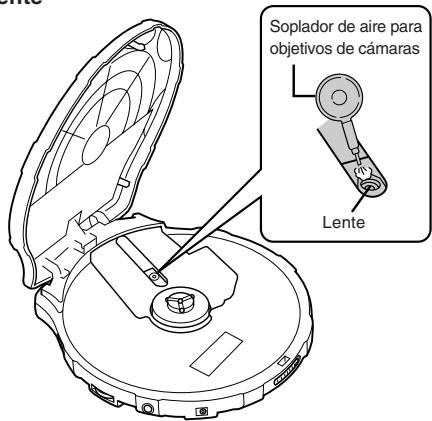
Limpie el aparato con un paño suave. Quite las manchas difíciles con un paño humedecido en agua sola o en agua con jabón y bien escurrido, y luego pase un paño seco para secarlo.
- Si intenta utilizar un paño de limpieza químico, lea primero estas instrucciones.
- No utilice alcohol ni diluyentes de pintura.
Lente
Dank u voor het aanschaffen van dit JVC-toestel. Lees alvorens het toestel te gebruiken deze gebruiksaanwijzing zorgvuldig door teneinde de beste resultaten te verkrijgen en een lange levensduur van het apparaat te waarborgen.
Inhoud
Breng de bevestigingsband aan om uw hand1
Voorbereidingen voor stroomvoorziening .... 2
Over MP3-bestanden 4
Basisafspeelfunctie 5
Andere afspeelfuncties 8
Informatie over compact discs 12
Waarschuwingen 13
Verhelpen van storingen 15
Specifications 16
Onderhoud 16
Bijgeleverde accessoires
Stereo hoofdtelefoon .... 1 st.
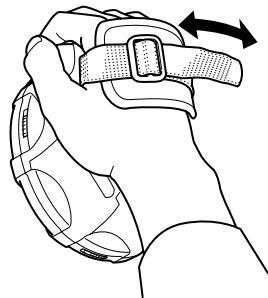
Breng de bevestigings- band aan om uw hand
Stel de bevestigingsband af op de grootte van uw hand.
natural_image
Line drawing of a hand holding a belt buckle with an arrow indicating rotation (no text or symbols)Voorbereidingen voor stroomvoorziening
De afbeelding van de bevestigingsband is weggelaten.
Gebruik van droge batterijen (niet meegeleverd)
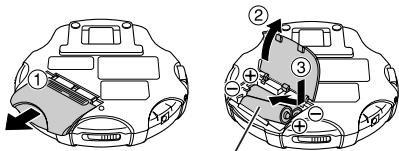
Twee "R6" (LR6) alkalinebatterijen.
Voorzichtig:
Probeer niet met geweld het batterijdeksel te ver te openen.
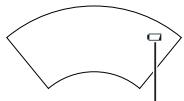
Batterij-indicator
natural_image
Simple curved line drawing with a small square marker at the top center (no text or symbols)Batterij-indicator
Deze indicator verschijnt als de batterijen bijna leeg zijn. De spanning zal na korte tijd worden afgesloten.
Opmerking:
Door uitschakelen van de Anti-schokbeveiliging EX kunt u ervoor zorgen dat de batterijen min of meer langer meegaan. Zie voor nadere bijzonderheden de paragraaf "Anti-schokbeveiliging EX" op pagina 11. (Alleen beschikbaar bij audio-cd's)
Gebruik van de netspanningsadapter (niet meegeleverd)
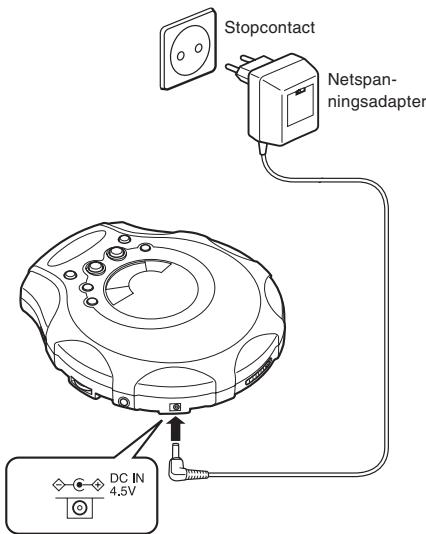
Opmerkingen:
- Zolang de netspanningsadapter in het stopcontact zit, gebruikt het apparaat nog wat stroom, zelfs als u dit hebt uitgezet.
- Zie pagina 14 als u de netspanningsadapter wilt aanschaffen.
Voorkomen van toevallige bediening (HOLD)
Met deze functie voorkomt u dat het apparaat gaat werken wanneer een van de toetsen per ongeluk wordt ingedrukt.
De toetsblokkering voorkomt dat het volgende kan gebeuren:
- Het apparaat wordt per ongeluk ingeschakeld (zodat de batterijen leeg kunnen raken).
- Het afspelen wordt plotseling onderbroken.
Inschakelen van de toetsblokkering
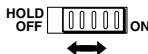
- Om te voorkomen dat het apparaat per ongeluk wordt ingeschakeld, zet u de toetsblokkeerschakelaar (HOLD) bij uitgeschakeld apparaat in de ON-stand.
- Om te voorkomen dat tijdens het afspelen het apparaat onbedoeld wordt bediend, zet u de HOLD-toets in de ON-stand, nadat u met afspelen van de disk bent begonnen.
- Als het apparaat in de toetsblokkeerstand staat, branden "HOLd" en " 🔍 " als volgt.
Power Aan : “☐” blijft verlicht.
Power Uit : "HOLd" en "○-¬" blijven gedurende enkele seconden verlicht als "►/¬" wordt ingedrukt.
Opmerking:
Zolang de HOLD-schakelaar in de ON-stand staat, kunt u het apparaat niet aanzetten.
Over MP3-bestanden
Compatibiliteit van MP3-bestanden
- Deze speler kan MP3-bestanden lezen die zijn opgeslagen in een formaat dat overeenkomt met ISO 9660.
- Deze speler kan MP3-bestanden met de extensie “-.mp3” lezen of afspelen
Afspeelvolgorde van MP3-bestanden
De onderstaande illustratie toont de gebruikelijke afspeelvolgorde bij het afspelen van MP3-bestanden. U ziet dat MP3-bestanden worden afgespeeld van een hogere naar een lagere hiërarchie.
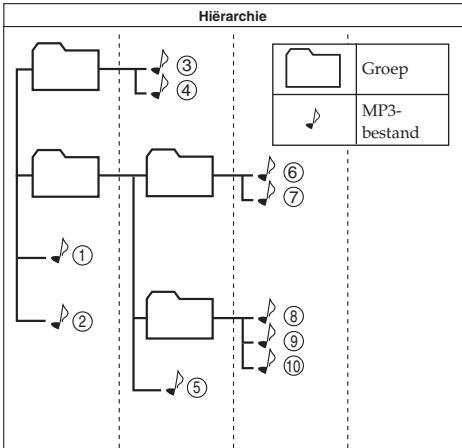
flowchart
graph TD
    A[" "] --> B["③"]
    A --> C["④"]
    D[" "] --> E["⑥"]
    D --> F["⑦"]
    G["①"] --> H["②"]
    I[" "] --> J["⑤"]
    K[" "] --> L["⑧"]
    K --> M["⑨"]
    K --> N["⑩"]
Basisafspeelfunctie
De afbeelding van de bevestigingsband is weggelaten.
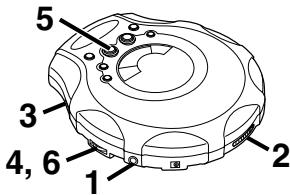
1
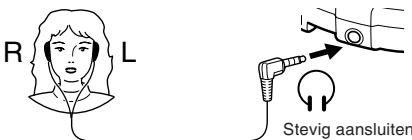
2
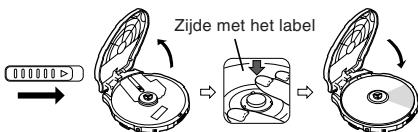
3
4
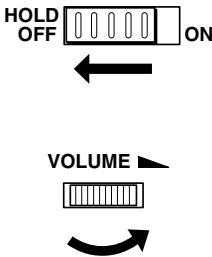
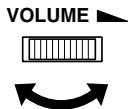
flowchart
graph TD
    A["HOLD OFF"] --> B["ON"]
    B --> C["VOLUME"]
(Wordt vervolgd op de volgende pagina)
5 Voor audio-cd's
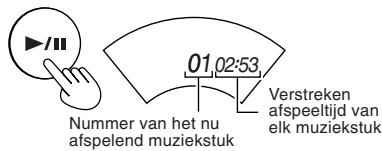
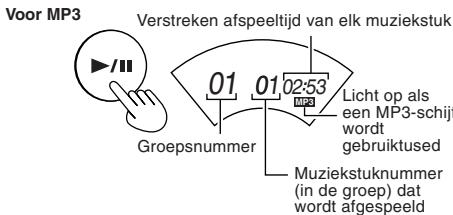
Het afspelen stopt automatisch nadat alle muziekstukken op de cd zijn afgespeeld.
6
Ter informatie:
"dISC"
Deze aanduiding verschijnt als u op ▶/Ⅱ drukt terwijl er geen disk in het apparaat is geplaatst of als de disk niet goed ligt. “_ _”
Voorbereiding voor het afspelen van het muziekstuk Knippert enkele seconden lang na het indrukken van ▶/Ⅱ voordat met het afspelen wordt begonnen.
"OPEN"
Deze indicatie verschijnt als het deksel open staat.
Verwijderen van de disk
Schakel het apparaat uit, wacht tot de disk tot stilstand komt en neem deze uit het apparaat zoals onderstaand wordt weergegeven:
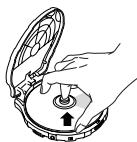
natural_image
Illustration of hands operating a mechanical device with a knob and pointer (no text or symbols)Automatisch uitschakelen
Als het apparaat gedurende 30 seconden in de stopstand blijft, schakelt het zichzelf automatisch uit ter voorkoming van het leeg raken van de batterijen.
Geluid van de draaiende disk
De draagbare cd-speler maakt gebruik van een energiebesparende bedrijfsmethode, waarbij het geluid van de draaiende disk met tussenpozen wegvalt. Dit is dus geen storing.
Pauzeren
Tijdens afspelen,
Voor audio-cd's

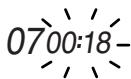
Voor MP3

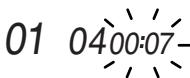
Druk opnieuw om weer met afspelen te beginnen.
Stoppen
Tijdens afspelen,
Voor audio-cd's
Totaal aantal muziekstukken

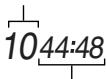
Totale afspeeltijd
Voor MP3

Totaal aantal groepen
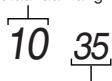
Totaal aantal muziekstukken
Uitschakelen van het apparaat
Indien gestopt,

Geen aanduiding
Snel vooruit/achteruit
SKIP-functie
Tijdens afspelen,
SEARCH-functie
Houd ingedrukt tijdens het afspelen.
- Om terug te gaan naar het vorige muziekstuk drukt u snel tweemaal op ◀◀◀.
- Deze knop wordt bij geprogrammeerd afspelen gebruikt, om snel voorwaarts of achteruit door de geprogrammeerde volgorde van de muziekstukken te gaan.
- Tijdens het afspelen in willekeurige volgorde kan de overslaantoets niet worden gebruikt om terug te gaan naar muziekstukken die reeds in willekeurige volgorde werden afgespeeld.
Van groep veranderen (alleen bij MP3)
Tijdens afspelen of indien gestopt.
Groepsnummer

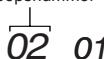
Andere afspeelfuncties
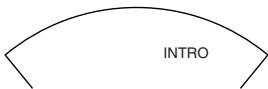
Intro-weergave
Van elk muziekstuk worden de eerste 10 seconden afgespeeld.
1 Indien gestopt,

(Herhalend)
2

Uitschakelen
Druk herhaaldelijk op MODE totdat "INTRO" dooft.
Opmerkingen:
- Tijdens het afspelen kunt u ook de intro's laten afspelen. In dit geval begint de intro-weergave nadat het huidige muziekstuk is afgelopen.
- Bij de programmaweergave kunt u ook instro's laten afspelen.
Afspelen in willekeurige volgorde
Tijdens het afspelen,
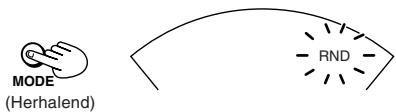
Het apparaat stopt nadat alle muziekstukken zijn afgespeeld.
Uitschakelen
Druk op MODE totdat "RND" dooft, of druk op ■ om de disk te stoppen.
Opmerkingen:
- U kunt de willekeurige afspeelvolgorde ook vanuit de stopstand inschakelen.
- Tijdens de programmaweergave kunnen de muziekstukken niet in willekeurige volgorde worden afgespeeld.
Programma-weergave
U kunt 64 muziekstukken in elke gewenste volgorde afspelen, en daarbij ook hetzelfde muziekstuk meermalen programmeren.
Ga voor audio-cd's naar stap 3.
Hoewel het display er enigszins anders uitziet, is de werking gelijk.
1 (Alleen voor MP3) Indien gestopt,

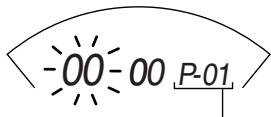
Programmavolgordenummer
2 (Alleen voor MP3) Selecteer het gewenste groepsnummer (bijvoorbeeld 02).
natural_image
Two hand icons interacting with a circular button, one pointing at a triangular button and the other with a question mark and dotted outline (no text or symbols)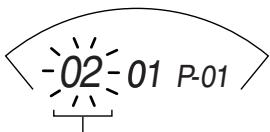
Groepsnummer
3

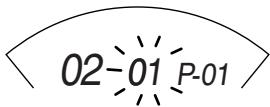
4 Selecteer het gewenste muziekstuk.
natural_image
Two circular icons with triangular play button symbols, one pointing at a finger and the other with a question mark and dotted line (no text or symbols)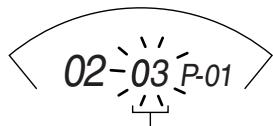
Muziekstuknummer
5

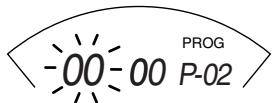
Het muziekstuk wordt vastgelegd.
(Wordt vervolgd op de volgende pagina)
6 Bij MP3 herhaalt u stappen 2-5 als u andere muziekstukken wilt selecteren.
Herhaal bij audio-cd's stappen 4 en 5.
Als u meer dan 64 muziekstukken programmeert, keert het programmavolgordenummer terug naar "01" en zal de vorige instelling worden overschreven.
7

• Het programma bevestigen
Druk in de stopstand herhaaldelijk op PROGRAM. Op dit punt kunt u naar wens programma's toevoegen of wijzigen.
- Het hele programma verwijderen
Druk op STOP indien hij gestopt is. Of zet het apparaat uit.
Herhaalde weergave
Tijdens afspelen,
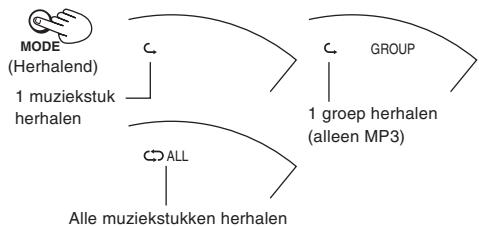
flowchart
graph TD
    A["MODE (Herhalend)"] --> B["1 muziekstuk herhalen"]
    C["GROUP"] --> D["1 groep herhalen (alleen MP3)"]
    E["Alle muziekstukken herhalen"] --> F["ALL"]
Uitschakelen
Druk herhaaldelijk op MODE, totdat de herhaal-aanduiding dooft.
Opmerkingen:
- U kunt de herhaalde afspeelvolgorde ook vanuit de programma-weergave inschakelen.
- U kunt de herhaalde afspeelvolgorde ook selecteren indien het apparaat is gestopt.
Hyper-Bass Sound-effect
Gebruik deze functie voor een krachtige weergave van de bassen.
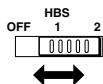
Anti-schok-beveiliging EX
Deze functie zorgt voor een uitstekende geluidsweergave, ondanks geluidsonderbrekingen door trillingen. Hiermee bent u in staat tijdens het joggen (niet al te wild) naar muziek te luisteren.
Met het krachtige servocircuit wordt de audiodata vooruit in de tijd in het geheugen opgeslagen.
Alleen voor audio-cd's: Voor maximaal 175 seconden (anti-schok-beveiliging kan aan of uit worden geschakeld)
Voor MP3: Voor maximaal 426 seconden bij 128 kbps (anti-schok-beveiliging is vastgezet op aan.)
Gewoonlijk is deze functie in gebruik.
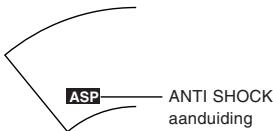
Naarmate de data geleidelijk wordt opgeslagen verandert de aanduiding als volgt:
![-ASP- → ASP [Volledig opgeslagen]](/content/2024/12/123495/images/4bb0b5a550c02f5e4b68e0a403419d19924ab12333ef70d05a7ddde0923acc01.jpg)
(Alleen voor audio-cd's) Uitschakelen

De "ANTI SHOCK" aanduiding dooft.
(Alleen voor audio-cd's) Weer inschakelen
Druk op A.S.P./GROUP UP.
Opmerkingen:
- Bij deze functie draait de disk sneller dan gebruikelijk om de extra audiodata op te kunnen slaan. Hierdoor kunnen de batterijen sneller leeg raken en kan het geluid van de draaiende disk enigszins toenemen.
- Tijdens het afspelen kan deze functie in- of uitgeschakeld worden. Dit kan echter een korte geluidsonderbreking veroorzaken door de wijziging van de disksnelheid.
Informatie over compact discs

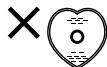
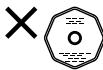
In dit apparaat kunt u alleen compact discs gebruiken die voorzien zijn van dit opschrift.
Continu gebruik van CD's met een onregelmatige vorm (hartvormig, achthoekig, enz.) kan echter het apparaat beschadigen.
CD-R en CD-RW discs die zijn opgenomen in het audio-CD-for-maat kunnen worden afgespeeld. Afhankelijk van de eigenschappen van de disc en de opnamecondities is het echter mogelijk dat sommige discs niet afgespeeld kunnen worden.
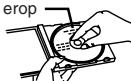
Om een CD uit haar doos te verwijderen
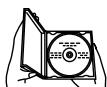
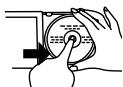
natural_image
Hand operating a circular device with a knob, no visible text or symbolsOm de CD weer in haar doos op te bergen
Kant met label erop
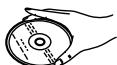
Vastpakken van een CD


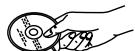
Als er vuil aan een disc kleeft
Veeg de disc schoon met een vochtig doekje en droog de disc daarna af. Veeg altijd vanuit het midden naar de rand toe.
Afspeeloppervlok (glanzend oppervlak)

Als er vocht op een disc is gecondenseerd
Als een disc vanuit de kou plotseling in een warme omgeving wordt gebracht, kan de disc beslaan; veeg dan voor het afspelen het condensvocht weg met een zacht droog doekje.
Wanneer u CD's opbergt
Vermijd dan plaatsen die
- Aan direct zonlicht zijn blootgesteld.
- Onderhevig zijn aan grote vochtigheid of veel stof.
- Direct blootgesteld zijn aan de hitte van een verwarmingstoestel.
- Op het dashboard of dicht bij de achterruit in een auto.
Voorzorgsmaatregelen voor het hanteren van CD's
- Op de labelkant (de bedrukte kant)
Schrijf niet met een potlood, balpen, etc. op de labelkant van CD's en plak er nooit etiketten of stickers op. - Op de afspeelkant (glanzende kant)
Behandel deze kant voorzichtig, zodat er geen vingerafdrukken of krassen op terechtkomen. Gebruik nooit schoonmaakmiddelen bestemd voor grammofoonplaten, oplosmiddelen, etc. - Kleef geen etiketten of stickers op CD's. Gebruik geen CD's met blootgestelde kleefstof van plakband of achtergebleven kleefstof van afgepelde stickers.
- Gebruik geen tegen krassen bestande beschermers of deksels, behalve deze welke voor gebruik met dit systeem zijn voorgeschreven.
Waarschuwingen
Voorzorgen bij het beluisteren
- Zet uw hoofdtelefoon niet te hard. Oorartsen raden voortdurend en langdurig afspelen af.
- Zet het volume lager of stop een tijdje met luisteren, indien u bijgeluiden begint te horen.
- Gebruik het apparaat niet tijdens het besturen van een motorvoertuig. Er kunnen gevaarlijke verkeerssituaties ontstaan en het is op veel plaatsen verboden.
- Neem de grootst mogelijke voorzichtigheid in acht of schakel het apparaat uit in potentieel gevaarlijke situaties.
- Zelfs wanneer uw hoofdtelefoon zo is ontworpen dat u nog geluiden van buitenaf kunt horen, moet u het volume niet zo hoog draaien, dat u niet meer hoort wat er om u heen gebeurt.
Oplaadbare batterijen
- Er kunnen oplaadbare batterijen worden toegepast (niet mee-geleverd).
- Als u oplaadbare batterijen gebruikt, houdt zich u dan aan de gebruiksaanwijzing die bij de oplaadbare batterijen en het oplaadapparaat (niet meegeleverd) hoort.
Droge batterijen
Neem de volgende punten in acht om beschadiging van batterijen en lekkage van elektrolyt te voorkomen.
- Plaats de batterijen met hun en polariteiten in de juiste richting.
- Gebruik nooit batterijen van verschillend type of verschillend fabrikaat door elkaar. Gebruik nooit oude en nieuwe batterijen door elkaar.
- Verwijder de batterijen wanneer u gedurende geruime tijd niet van plan bent het apparaat te gebruiken.
- Gooi batterijen nooit in het vuur. Sluit de batterijen niet kort, neem ze niet uit elkaar en stel ze niet bloot aan hoge temperaturen.
- Probeer droge batterijen niet opnieuw op te laden.
Meenemen van droge batterijen
Wanneer u droge batterijen in een zak of tas plaatst, plaats deze dan niet samen met een halssnoer of andere metalen voorwerpen. Contact met metaal kan kortsluiting en eventueel brand veroorzaken.

Niet weggooien, maar inleveren als KCA.

Netspanningsadapter
- Ga voorzichtig met de netspanningsadapter om. Verkeerde behandeling kan gevaarlijk zijn.
- Raak de netspanningsadapter niet aan met natte handen.
- Plaats er geen zware voorwerpen op.
- Laat de netspanningsadapter niet verbuigen.
- Gebruik alleen het opgegeven type netspanningsadapter bij het apparaat.
- Haal de netspanningsadapter uit het stopcontact als het apparaat gedurende langere tijd niet zal worden gebruikt.
Hoofdapparaat
Niet wijzigen of omvormen
Dit kan foutieve werking veroorzaken.
Niet laten vallen of aan sterke schokken blootstellen
Hierdoor kan het apparaat beschadigd raken.
Te vermijden plaatsen
Gebruik het apparaat niet op de volgende plaatsen, om defecten te voorkomen.
- Badkamers en andere vochtige plaatsen.
- Opslagplaatsen of andere stoffige omgevingen
- Zeer warme plaatsen, zoals dicht bij verwarmingstoestellen, etc.
Stel het apparaat niet voor lange tijd bloot aan direct zonlicht
Hierdoor kunnen de buitenste panelen verkleuren of vervormd raken en kan beschadiging worden veroorzaakt.
Wanneer u een netspanningsadapter koopt
Overtuig u er beslist van, dat de netspanningsadapter speciaal voor dit apparaat geschikt is.
Netspanningsadapter : AA-R4514
Raadpleeg uw dealer voor details.
Verhelpen van storingen
| Symptoom | Controleer het volgende |
| Het apparaat werkt niet. | Is de netspanningsadapter stevig aangesloten?Staat de HOLD-knop in de OFF-stand? |
| Het deksel gaat niet dicht. | Is de cd goed en stevig geplaatst? |
| De cd kan niet worden afgespeeld.Muziek is moeilijk te horen vanwege te veel ruis. | Is de cd goed en stevig geplaatst?Zit er vocht (condens) op de lens?(Wacht ongeveer een uur en probeer dan opnieuw.)Zijn er op deze schijf MP3-bestanden opgeslagen?Hebben de MP3-bestanden de extensie -.mp3?Zijn de MP3-bestanden opgeslagen in een formaat dat overeenkomt met ISO 9660? |
| TV-beeld is vervormd. | Is de stekker van de hoofdtelefoon volledig ingestoken?Is de stekker vuil? (Veeg eventueel vuil van de stekker.)Speelt u een compatibele schijf af? Als u een ander dan een MP3-bestand afspeelt, hoor u geruis. (Opmerking: het kan zijn, dat het bestand geen M3-bestand is, maar toch de extensie -.mp3 heeft.) |
| Ruis op de radio. | Wordt het apparaat te dicht bij een TV of tuner gebruikt? (Als de TV of tuner op een eenvoudige binnenantenne is aangesloten, dient u deze op een buiten-antenne aan te sluiten.) |
| “dlSC” of “Er” wordt in het display getoond wanneer er een cd in het apparaat is. | Is de cd beschadigd?Is de cd geschikt voor dit apparaat?Is de cd ondersteboven in het apparaat geplaatst? |
Als u het probleem niet kunt verhelpen met behulp van de oplossingen in de tabel, dan raadpleegt u de lijst met erkende servicecentra (bij dit apparaat geleverd) of neemt u contact op met de leverancier van dit apparaat.
Specifications
Draagbare cd-speler
| Type | : Compactdiscspeler |
| Signaaldetectiesysteem | : Contactloze optische pick-up (half-geleider-laser) |
| Pick-upsysteem | : 3-stralenlaser |
| Aantal kanalen | : 2 kanalen (stereo) |
| Frequentierespons | : 20 Hz t/m 20 kHz |
| Wow en flutter | : Onmeetbaar |
| Output | : Hoofdtelefoon (3,5 mm diameter stereo × 1)9 mW/ch bij 10 % THD/16 overeenkomende impedantie (16 t/m 1 k ) |
| Levensduur batterij (met anti- schokbeveiliging OFF) | : Ongeveer 30 uur bij gebruik van twee alkalinebatterijen (LR6) |
| Stroomvoorziening | : DC 3 V ("R6"-formaat batterij × 2)DC 2,4V (oplaadbare batterij × 2)DC IN 4,5 V |
| Afmetingen (B × H × D) | : 133,2 mm × 30,8 mm × 146,8 mm (Exclusief toetsen en regelaars) |
| Massa | : 250 g (met bevestigingsband, zonder batterijen) |
Netspanningsadapter (niet meegeleverd)
| Ingangsspanning | : AC 230 V, 50 Hz |
| Uitgangsspanning | : DC 4.5 V, 600 mA |
* Ontwerp en specificaties kunnen zonder nadere berichtgeving worden gewijzigd.
Onderhoud
Apparaat
Veeg het apparaat schoon met een zachte doek. Verwijder hardnekkig vuil met behulp van een doek, die u in water of in een oplossing van water en zeep dompelt en dan goed uitwringt. Veeg daarna droog met een schone doek.
- Als u een chemische schoonmaakdoek wilt gebruiken, lees dan eerst goed de bijbehorende gebruiksinstructies.
- Gebruik geen alcohol of verfverdunners.
JVC
VICTOR COMPANY OF JAPAN, LIMITED
- JVC
- PORTABLE CD PLAYER
- LECTOR PORTÁTIL DE DISCOS COMPACTOS
- PORTABLE DRAAGBARE CD-SPELER
- XL-PM400S
- Warnings, Cautions and Others
- Avios, precauciones y otras notas
- Waarschuwingen, voorzorgen en andere mededelingen
- CAUTION!
- WARNING:
- ¡ADVERTENCIA!
- AVISO:
- WAARSCHUWING!
- WAARSCHUWING:
- CAUTION:
- PRECAUCIÓN:
- VOORZICHTIG:
- IMPORTANT FOR LASER PRODUCTS
- BELANGRIJK VOOR LASERPRODUKTEN
- IMPORTANTE PARA PRODUCTOS LÁSER
- Table of Contents
- Put the grip band on your hand
- Supplied Accessories
- Power Supply Preparations
- Using dry-cell batteries (not supplied)
- Battery indicator
- Note:
- Using the AC adaptor (not supplied)
- Notes:
- Preventing Accidental Operation (Hold mode)
- Hold mode prevents the following:
- To use the Hold mode
- About MP3 files
- MP3 File Compatibility
- Playing order of MP3 files
- Basic Play
- 5
- For Audio CD
- 6
- For your reference:
- "dISC"
- "OPEN"
- Removing discs
- Auto power off
- Disc rotation noise
- To pause
- To stop
- To turn off the unit
- Fast forward/reverse
- Skip function
- Search function
- Group skip (MP3 only)
- Other Play Methods
- Intro play
- While stopped,
- 2
- To cancel
- Random play
- During playback,
- Program play
- Repeat play
- Hyper-Bass Sound effect
- Anti-Shock Protection EX
- (Audio CD only) To cancel
- (Audio CD only) To activate again
- Concerning Compact Discs
- If the disc surface is dirty
- If moisture has formed on a disc
- When storing discs
- Handling precautions
- Cautions
- Listening Precautions
- Rechargeable batteries
- Dry cell batteries
- Carrying dry cell batteries around
- AC adaptor
- Unit
- When purchasing AC adaptor
- Troubleshooting
- Specifications
- Maintenance
- Índice
- Colóquese en la mano la banda de agarre
- Accesorios suministrados
- Preparativos para el suministro de alimentación
- Uso de pilas secas (no suministradas)
- Indicador de pilas
- Nota:
- Utilización del adaptador de CA (no suministrado)
- Notas:
- Prevención de funcionamiento accidental (modo Hold)
- La función de bloqueo evita lo siguiente:
- Utilización de la función de bloqueo
- Acerca de los archivos MP3
- Compatibilidad con archivos MP3
- Orden de reproducción de los archivos MP3
- Reproducción básica
- Para un CD de audio
- Para su referencia:
- Extracción de discos
- Desconexión automática de la alimentación
- Ruido de rotación del disco
- Para hacer una pausa
- Para detener
- Para apagar el aparato
- Salto hacia delante/hacia atrás
- Función de salto
- Función de búsqueda
- Salto de grupo (sólo MP3)
- Otros métodos de reproducción
- Reproducción de las introducciones
- En el modo de parada,
- Para cancelar
- Reproducción aleatoria
- Durante la reproducción,
- Reproducción programada
- Repetición de la reproducción
- Efecto de sonido de graves muy acentuados (Hyper-Bass Sound)
- Protección antichoques EX
- (Sólo CD de audio) Para cancelar
- (Sólo CD de audio) Para activarlo de nuevo
- Acerca de los discos compactos
- Cómo extraer un disco de su caja
- Cómo guardar un disco en su caja
- Cómo sujetar un disco
- Si la superficie del disco está sucia
- Superficie de reproducción (superficie brillante)
- Si se ha formado humedad en un disco
- Cuando guarde discos
- Precauciones de manejo
- Precauciones
- Precauciones al escuchar
- Pilas recargables
- Pilas secas
- Para llevar pilas secas
- Adaptador de CA
- Aparato
- Al adquirir un adaptador de CA
- Solución de problemas
- Especificaciones
- Mantenimiento
- Inhoud
- Bijgeleverde accessoires
- Breng de bevestigings- band aan om uw hand
- Voorbereidingen voor stroomvoorziening
- Gebruik van droge batterijen (niet meegeleverd)
- Batterij-indicator
- Opmerking:
- Gebruik van de netspanningsadapter (niet meegeleverd)
- Opmerkingen:
- Voorkomen van toevallige bediening (HOLD)
- De toetsblokkering voorkomt dat het volgende kan gebeuren:
- Inschakelen van de toetsblokkering
- Over MP3-bestanden
- Compatibiliteit van MP3-bestanden
- Afspeelvolgorde van MP3-bestanden
- Basisafspeelfunctie
- Voor audio-cd's
- Ter informatie:
- Verwijderen van de disk
- Automatisch uitschakelen
- Geluid van de draaiende disk
- Pauzeren
- Stoppen
- Uitschakelen van het apparaat
- Snel vooruit/achteruit
- SKIP-functie
- SEARCH-functie
- Van groep veranderen (alleen bij MP3)
- Andere afspeelfuncties
- Intro-weergave
- Indien gestopt,
- Uitschakelen
- Afspelen in willekeurige volgorde
- Tijdens het afspelen,
- Programma-weergave
- Herhaalde weergave
- Hyper-Bass Sound-effect
- Anti-schok-beveiliging EX
- (Alleen voor audio-cd's) Uitschakelen
- (Alleen voor audio-cd's) Weer inschakelen
- Informatie over compact discs
- Om een CD uit haar doos te verwijderen
- Om de CD weer in haar doos op te bergen
- Vastpakken van een CD
- Als er vuil aan een disc kleeft
- Afspeeloppervlok (glanzend oppervlak)
- Als er vocht op een disc is gecondenseerd
- Wanneer u CD's opbergt
- Voorzorgsmaatregelen voor het hanteren van CD's
- Waarschuwingen
- Voorzorgen bij het beluisteren
- Oplaadbare batterijen
- Droge batterijen
- Meenemen van droge batterijen
- Netspanningsadapter
- Hoofdapparaat
- Wanneer u een netspanningsadapter koopt
- Verhelpen van storingen
- Netspanningsadapter (niet meegeleverd)
- Onderhoud
- Apparaat
Marque : JVC
Modèle : XL-PM400SE
Catégorie : Lecteur CD