D-EJ955 - Lecteur CD portable SONY - Notice d'utilisation et mode d'emploi gratuit
Retrouvez gratuitement la notice de l'appareil D-EJ955 SONY au format PDF.


| Type de produit | Lecteur CD portable |
| Marque | Sony |
| Modèle | D-EJ955 |
| Dimensions (L × l × H) | 135,0 × 135,0 × 15,9 mm |
| Poids | Environ 166 g (sans piles) |
| Alimentation | Adaptateur secteur AC 100-240 V, 2 piles LR6 (AA) ou batterie rechargeable NC-6WM |
| Formats disques compatibles | CD audio, CD-R, CD-RW (finalisés) |
| Fonctions anti-saut | G-PROTECTION (2 modes) |
| Limitation de volume | AVLS (commutateur NORM/LIMIT) |
| Modes de lecture | Normal, 1 (piste unique), SHUF (aléatoire), PGM (programmé), répétition |
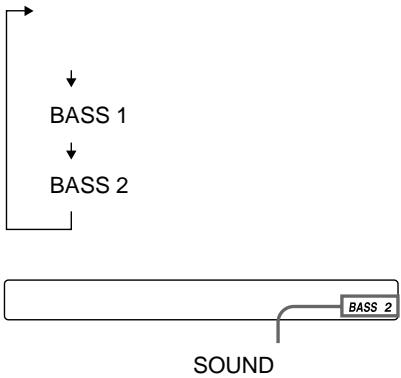
| Fonctions sonores | SOUND : BASS 1, BASS 2 |
| Affichage | Écran LCD (numéro de piste, temps écoulé, temps restant, mode, état batterie, texte CD) |
| Télécommande | Filaire avec molette rotative |
| Sorties | Prise casque (Φ3,5 mm), LINE OUT (OPTICAL) pour enregistrement numérique |
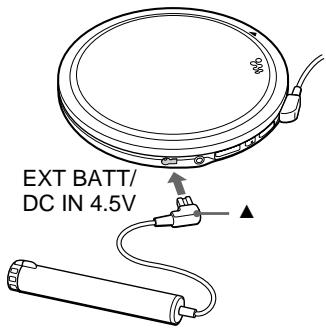
| Entrée d'alimentation externe | EXT BATT/DC IN 4,5 V |
| Protection HOLD | Commutateur HOLD pour verrouiller les touches |
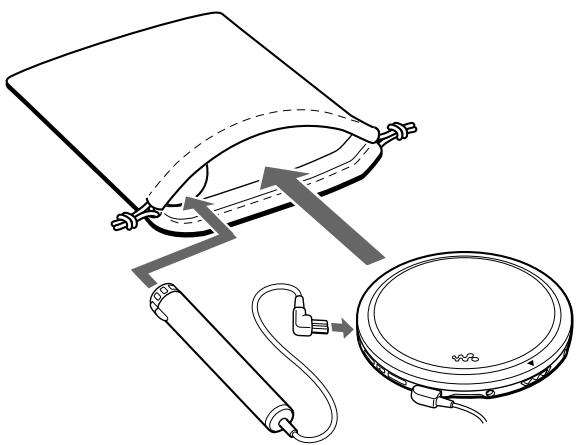
| Accessoires fournis | Adaptateur secteur, chargeur de batterie (NC-6WM), station de charge, écouteurs avec télécommande |
| Entretien | Nettoyer les connecteurs avec un chiffon sec ; éviter l'humidité et les chocs |
| Température de fonctionnement | 5 °C à 35 °C |
| Indice de réparabilité | Non évalué ; pièces détachées disponibles via service après-vente Sony |
FOIRE AUX QUESTIONS - D-EJ955 SONY
Questions des utilisateurs sur D-EJ955 SONY
0 question sur cet appareil. Repondez a celles que vous connaissez ou posez la votre.
Poser une nouvelle question sur cet appareil
Téléchargez la notice de votre Lecteur CD portable au format PDF gratuitement ! Retrouvez votre notice D-EJ955 - SONY et reprennez votre appareil électronique en main. Sur cette page sont publiés tous les documents nécessaires à l'utilisation de votre appareil D-EJ955 de la marque SONY.
MODE D'EMPLOI D-EJ955 SONY
CD
Operating Instructions
使用說明書 沒用電話號

警告
AC100 240V
AC
AC
AC


WALKMAN
D-EJ955

4~8
1
AC
AC
1

2AC
3
危险
警告
注意

火灾

感電

禁止

分解禁止

接触禁止

勿手禁止

指示
A 4
9
CD
- 12
2.CD 12 - 13
16
1 1 16
16
17
G-PROTECTION 18
CD-TEXT 18
CD 19
SOUND 19
AVLS 20
HOLD 20
21
21
22
24
26
27
28
29
30
32
33
34
English
Locating the controls 35
Troubleshooting 36
中文
控制器的位置 38
故障检修 39
中国
KreTlue SwoiIeJue的
好景日?却上 42
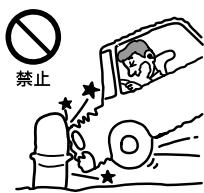
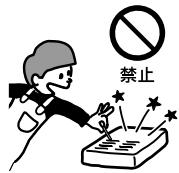
AC

AC
100V
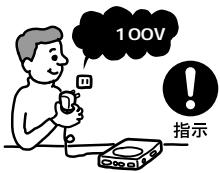
AC
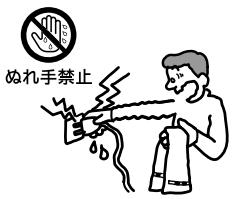
AC

禁止

接触禁止

分解禁止
次の hepatitis
MD CD DAT

禁止
AC

禁止
7 8
危险
.
.
m = 311
.
。
.
m = 311

危险
警告
Ni-Cd
Ni-MH
Li-ion
AC
EXT BATT/DC IN 4.5V
12 25 26
LINE OUT (OPTICAL)
22
3 VOL
13
4
+/-
CHARGE
- CHARGE
13 20 21 25
5 AMS/search
AMS/search
12 13 17
6
12
7 OPEN
12
8
24 29
AVLS
20
G-PROTECTION
18
24

HOLD
20
13
14
/ AMS/search
13 17
:AMS/search 13 17
VOL + / -
+ -
16
19
DISPLAY
18 19
17
18
PLAY MODE
15 17 21
RPT (repeat)
ENT (enter)
15 17

CD
CD
2. CD
1 OPEN
CD
1▶▶
2 VOL+/-
1
2
3
VOL +
1 AMS Automatic Music Sensor
2
3

1
1

CD


2
AVLS
NORM
LIMIT
AVLS
AVLS
.
LINE OUT (OPTICAL)
CD-R/CD-RW
CD-DA
CD-R
CD-RW
CD-DA
Compact Disc Digital Audio
CD
CD
PLAY MODE
RPT/ENT
- RPT(repeat) PLAY MODE
- ENT(enter)
1
RPT/ENT
00:00:01

1 1
1 PLAY MODE
005 01:25

1
SHUF PLAY MODE
005 01:17

SHUF
64
1 PGM PLAY MODE

2
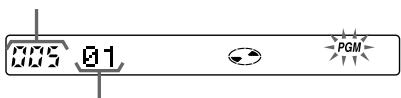
3 RPT/ENT

000
4 23
5 RPT/ENT
5 RPT/ENT
PGM PLAY MODE PGM RPT/ENT
RPT/ENT

364
000
65
G-PROTECTION
G-PROTECTION
G-PROTECTION 2
1
CD
G-PROTECTION 1
G-PROTECTION
1 2
12
G-PROTECTION

一
-
CD
-
CD-R/CD-RW
CD-TEXT
)
CD-TEXT
CD

CD TEXT
READING
DISPLAY
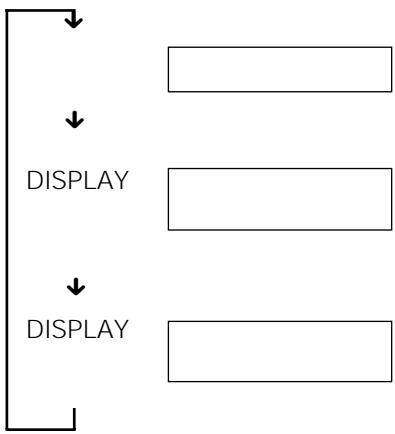
1

CD
CD
DISPLAY
CD
CD-TEXT
CD
SOUND
SOUND
SOUND
DISPLAY
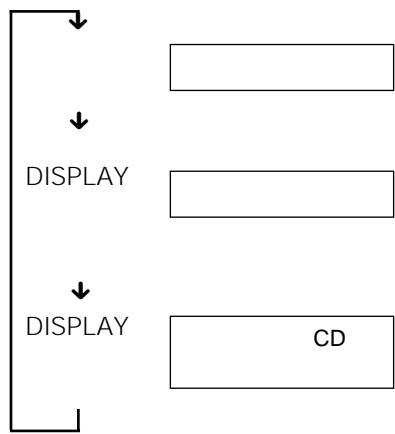
BASS 2
AVLS
HOLD
AVLS
LIMIT
AVLS NORM LIMIT
AVLS
HOLD
HOLD
CHARGE

HOLD
HOLD
HOLD
AVLS
AVLS
NORM
AVLS Automatic Volume Limiter System
HOLD
HOLD
HOLD HOLD
1 AC
2 CHARGE
1
2 PLAY MODE
PLAY MODE
CHARGE
AC
5
CD
CD
.
AC
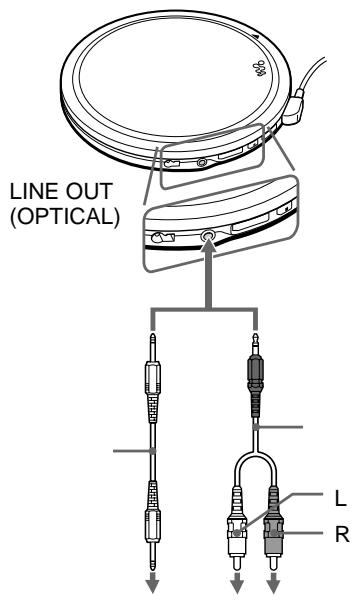
LINE OUT (OPTICAL)
DAT
G-PROTECTION
SOUND
CD
G-PROTECTION 1
- SOUND
LINE OUT
(OPTICAL)
DAT
JOINT TEXT
MD
MZ-R909
CD TEXT
CD MD
POC-5B
CD
RK-TXT1
MD
MD

3 (LR6)
AC
CD
NC-6WM
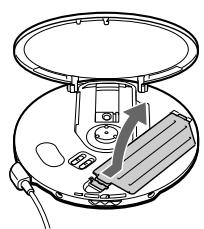
1
2
+
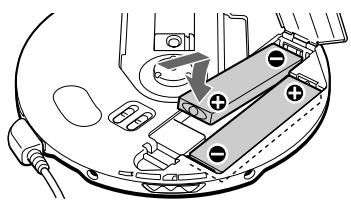
3 AC
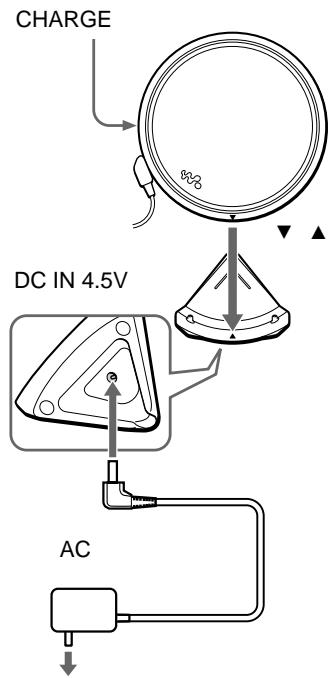
AC
AC
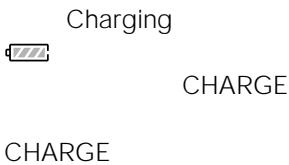
CHARGE
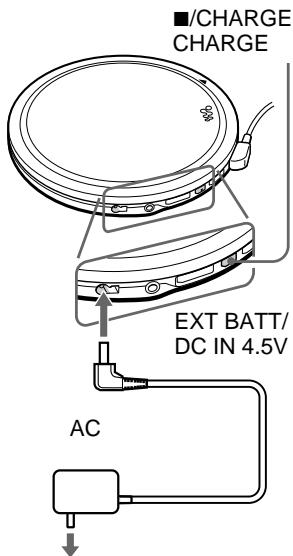




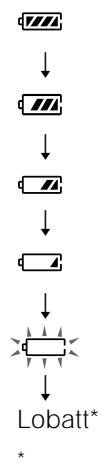
Lobatt*
次の五回にとく
1 4 1
•

AC
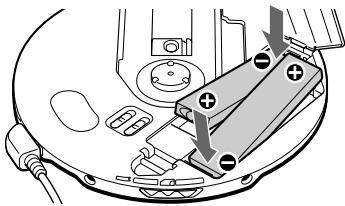
3 (LR6)
1
3 (LR6)
2
+
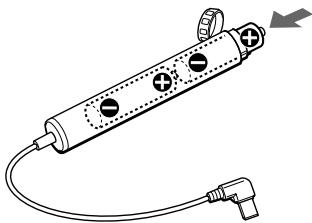
2
NC-6WM


CD
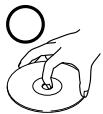
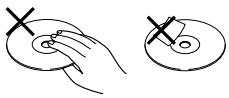
CD
| / | ||||||
| →+ | - | 13 | VOL | |||
| →13 | ▶/▶ | |||||
| VOL | →AVLS20→LINE OUT (OPTICAL)Ω | 12 | NORM | |||
| →LINE OUT (OPTICAL)Ω | 12 | |||||
| → | 12 | |||||
| → | ||||||
| →3 | LR6 | 2626 | ||||
| → | 24 | 26 | ||||
| Lobatt00 | →3 | LR6 | 24 | |||
| → | 26 | |||||
| HiDCin | →AC | 34 | ||||
| → | 12 | 24 | 26 | |||
CD
8
1
D/A
1 bit
20 Hz 20 000 Hz -^+1 dB
4.5 V
1
0.7 Vrms 47 kΩ
10 kΩ
JEITA/16 Ω
1
5 mW+5 mW
16Ω
1
-21 -15 dBm
630 690 nm
JEITA
NC-6WM2
DC 2.4 V
3 (LR6) 2
DC 3.0 V
DC4.5V
AC
AC 100 V
AC 100 240V
| G-PROTECTION | ||
| 1 | 2 | |
| NC-6WM2 | 19 | 19.5 |
| 5 | ||
| 66 | 71 | |
| 2 | ||
| NC-6WM | 88 | 92 |
| 2 + | ||
| 2 | ||
| JEITA | ||
LR6 (SG)
5^ C 35^ C
X X
135.0 × 135.0 × 15.9 ~mm
X X
JEITA
135.4 × 135.5 × 16.4 ~mm
: 166g
214 g
JEITA
JEITA
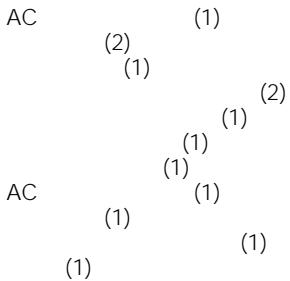
| POC-5B | POC-5B | |
| POC-10B | POC-10B | |
| POC-15B | POC-15B | |
| POC-5AB | POC-5AB | |
| POC-10AB | POC-10AB | |
| POC-15AB | POC-15AB | |
| CD | RK-TXT1 | RK-TXT1 |
| SRS-Z1 | SRS-Z1 | |
| SRS-Z1000 | SRS-Z1000 | |
| MDR-E868SP | MDR-E848LP | |
| MDR-EX70SL | MDR-EX70LP | |
| MDR-A44SP | MDR-A44L | |
| MDR-A105SP | MDR-A110LP | |
| AC | AC-E45L | — |
| AC-E45MA | ||
| AC-E45A | ||
| NC-6WM | NC-6WM | |
| RK-G129 | RK-G129 | |
| RK-G136 | RK-G136 | |
| DCC-E84 | DCC-E345 | |
| CPA-8 | CPA-9C | |
| CPA-84U | DCC-E34CP |
Locating the controls
See the illustrations on pages 9 and 10.
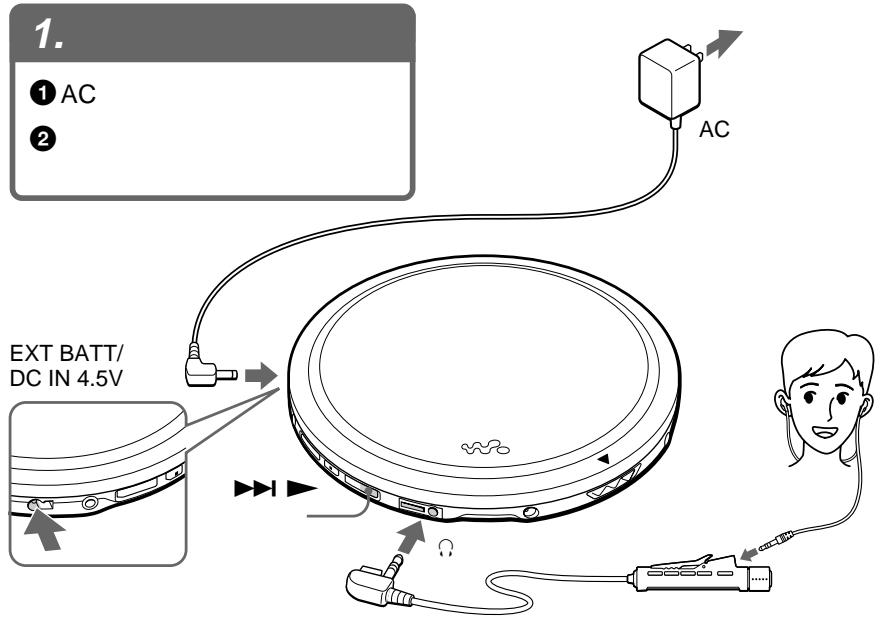
1EXT BATT (external battery)/ DC IN 4.5 V jack (external power input jack)
Connects to the AC power adaptor. Also connects to the external battery case.
2 LINE OUT (OPTICAL) jack
Connects to the stereo system.
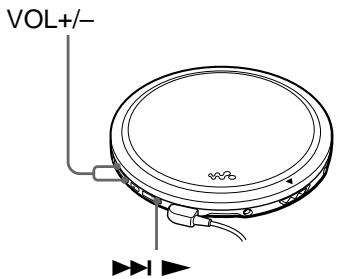
3 VOL +/- buttons
Press to adjust the volume.
4 (stop)/CHARGE button CHARGE lamp
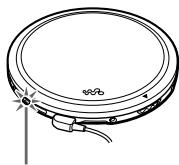
Press to stop play. Also press to start charging. The lamp flashes when the HOLD function is working, and lights up during charge.
5 14 (AMS*1/search)▶(AMS/search/play) button
: Press to start play.
: Press or turn once to find the beginning of the current/next tracks.
Press or turn repeatedly to find the beginning of the previous/succeeding tracks. Hold down to go backward/ forward quickly.
6 (headphones) jack
Connects to the earphones with remote control.
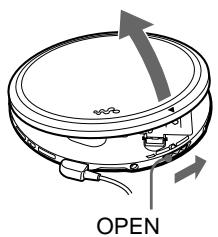
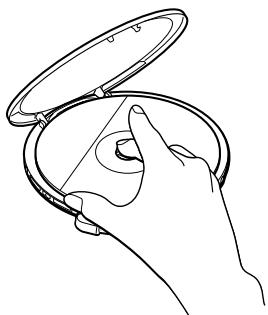
7 OPEN switch
Slide to open the CD player lid.
8 Terminals for the charging stand
Connects to the supplied charging stand.
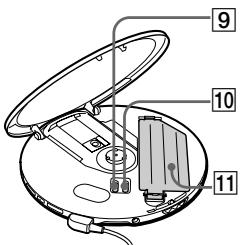
9 AVLS*2 switch
Set to "LIMIT" when you want to keep down the maximum volume to protect your hearing.
10 G-PROTECTION switch
Set to "1" or "2" to prevent sound skipping.
11 Battery compartment
Insert the rechargeable batteries by matching the to the diagram in the battery compartment. To charge the rechargeable batteries, connect the supplied charging stand.
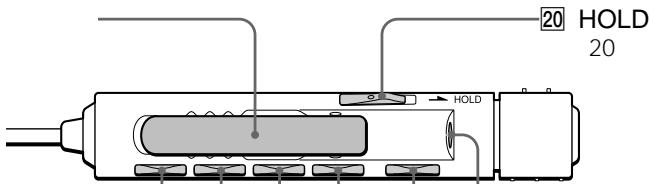
12 20 HOLD switch
Locks the control on your CD player to prevent accidental button presses.
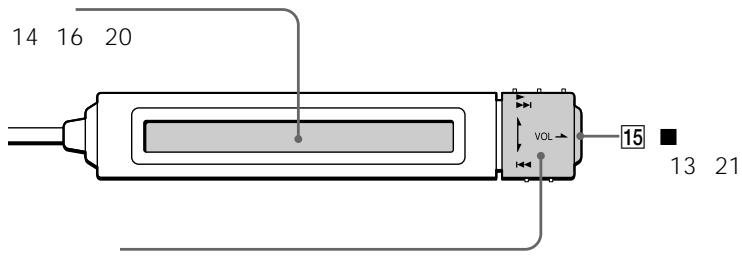
13 Display
Displays the track number, elapsed playing time, remaining time/tracks, battery status, and play mode and functions you selected.
Also displays CD text information (disc name, artist name, track name, etc.) when labeled on the CD.
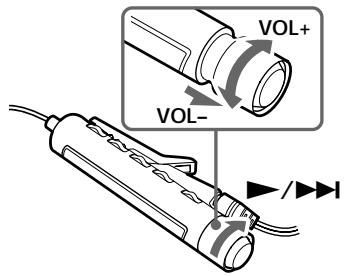
14 Rotary control
/ : play, AMS/search*
:AMS/search*
VOL + / - : pull and turn to adjust the volume
*For AMS/search function, see 5.
15 (stop) button
Press to stop play.
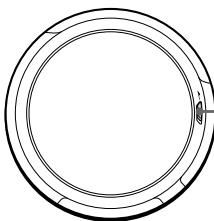
16 Clip
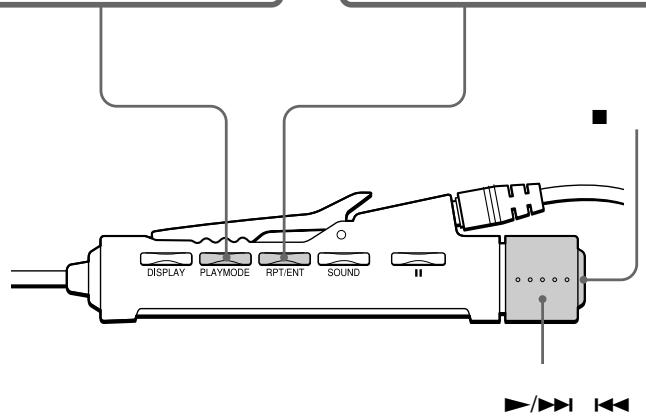
17 DISPLAY button
Press to display the remaining time/ tracks.
18 PLAY MODE button
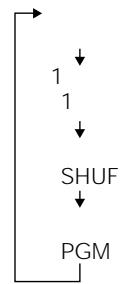
Selects various playback options: 1 (single), SHUF (shuffle) and PGM (program).
19 RPT (repeat)/ENT (enter) button
Turns on the repeat play mode.
Press to select tracks during PGM play. Also press to start PGM play.
21 (headphones) jack
Connects to the earphones.
22 II (pause) button
Press to pause play.
23 SOUND button
Selects sound mode: BASS 1 or BASS 2.
*1 Automatic Music Sensor
*2 Automatic Volume Limiter System
Troubleshooting
Should any problem persist after you have checked these symptoms, consult your nearest Sony dealer.
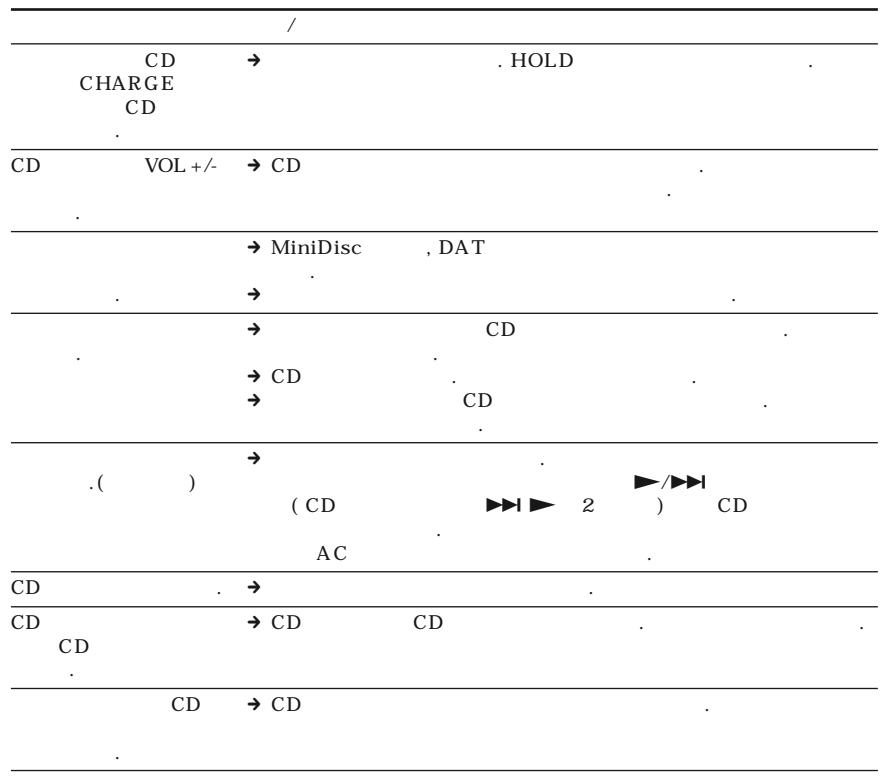
| Symptom | Cause and/or corrective actions |
| Cannot adjust the volume by turning the rotary control on the remote control. | → Pull the rotary control in the direction of the arrow indicated on the control, then turn the control toward VOL + or -. |
| Cannot start play by turning the rotary control on the remote control. | → The rotary control is pulled out. Push the control back, then turn the control toward ▶/□□. |
| The volume does not increase even if you press the VOL + button repeatedly. | → Set the AVLS switch to “NORM.”→ The earphones are connected to the LINE OUT (OPTICAL) jack. Connect them to the ⌿ (headphones) jack. |
| Cannot adjust the volume. | → The earphones are connected to the LINE OUT (OPTICAL) jack. Connect them to the ⌿ (headphones) jack. |
| No sound, or noise is heard. | → Connect the plugs firmly.→ Plugs are dirty. Clean the plugs with a dry soft cloth periodically. |
| The playing time is too short when powered with the dry batteries. | → Check that you are using alkaline batteries and not manganese batteries.→ Replace the batteries with new LR6 (size AA) alkaline batteries. |
| The playing time is too short when powered with the rechargeable batteries. | → Charge and discharge the rechargeable batteries several times. |
| “Lobatti” or “00” appears in the display. The CD does not play. | → The rechargeable batteries are used up completely. Charge the batteries.→ The dry batteries are used up. Replace them with new LR6 (size AA) alkaline batteries. |
| “HiDCin” appears in the display. | → Use only the supplied AC power adaptor or optional AC power adaptor.→ Use only the optional car battery cord.→ Remove all power sources, then insert the batteries or connect the AC power adaptor again. |
| The CD does not play, or “Nodisc” appears in the display when a CD is placed in the CD player. | → The buttons are locked. Slide the HOLD switch back.→ The CD is dirty or defective.→ Check that the CD is inserted with the label side up.→ Moisture condensation has occurred. Leave the CD player aside for several hours until the moisture evaporates.→ Close the lid of the battery compartment firmly.→ Make sure the batteries are inserted correctly.→ Connect the AC power adaptor to an AC outlet securely.→ The CD-R/CD-RW was not finalized. Finalize the CD-R/CD-RW with the recording device.→ There is a problem with the quality of the CD-R/CD-RW, recording device, or application software. |
| CHARGE lamp flashes on the CD player when you press a button, and the CD does not play. | → The buttons are locked. Slide the HOLD switch back. |
| Cannot adjust the volume with the VOL +/- buttons on the CD player. | → The CD player is connected to an audio device. Adjust the volume using the volume control on the connected device. |
| During recording with optical digital connection, the track number cannot be recorded correctly. | → Record the track number again using a MiniDisc recorder, DAT recorder, etc. → See the instruction manual that comes with the recording device. |
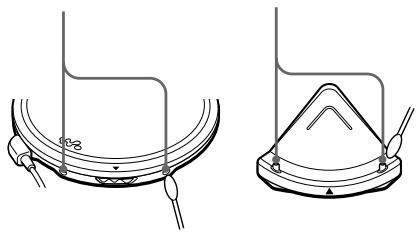
| The rechargeable batteries cannot be charged. | → The terminals on the charging stand or the CD player are dirty. Wipe them with a dry cloth. → The CD is playing. Stop play. → The external battery case is connected to the CD player. Remove it and start charging again. |
| Playback starts from the point you stopped. (resume function) | → The resume function is working. To start playing from the first track, turn the rotary control on the remote control toward ▷/□▶ and hold it until the first track starts playing (press ▷/□▶ for 2 seconds or more for the CD player), or open the lid of the CD player. Or, remove all power sources, then insert the batteries or connect the AC power adaptor again. |
| Rustling noise is heard from the CD. | → Close the lid of the battery compartment firmly. |
| When closing the lid of the CD player, the CD starts to rotate. | → The CD player is reading the information on the CD. It is not malfunctioning. |
| You cannot operate the CD player properly using the remote control. | → The buttons on the CD player are kept pressed by mistake. |
控制器的位置
請參照第9、10頁的圖示。
1EXTBATT(外部電池)/DCIN4.5V插孔(外部電源輸入插孔)
連接AC電源轉接器的插孔。也連接到外部電池盒。
LINE OUT (OPTICAL)(線路輸出(光頻))插孔
連接立體聲音響系統。
3 VOL + / - (音量)按鈕
按以调整音量。
4 (停止)/CHARGE(充電)按鈕· CHARGE燈
按此按鈕以停止播放,或開始充電。當HOLD功能呈保持狀態時,將閃爍著CHARGE燈,充電中則將點亮同指示燈。
14 (AMS*1/尋找)·(AMS/尋找/播放)按鈕
按此按钮以開始播放。
1▶/▶:按或旋轉一次此按鈕以找出現在播放中曲子/下一首曲子的開頭。
反復地按或旋轉此按鈕以找出前一曲/接下曲子的開頭。按住此按鈕以迅速退回/前進。
6(頭戴耳機)插孔
連接帶遙控器的耳機。
7 OPEN(開啓)開關
滑動以打開CD唱機蓋。
8充電架用端子
請連接附帶的充電架。
9 AVLS*2開關
當想限制最大音量以保護聽覺時,可將此開關設定於“LIMIT”(限制)。
10 G-PROTECTION開關
設定於“1”或“2”以防跳音。
11 電池室
裝入充電池,須讓 ① 極對準電池室的圖示。要給充電池充電時,請連接附帶的充電架。
12 20 HOLD(保持)開關
用於鎮定CD唱機的控制按鈕以防意外地按下按鈕而發生誤操作。
13 顯示器
用於顯示曲號,已播放時間,剩餘時間/曲子,電池狀態,以及放音模式和所選擇功能。
當在CD上加標題時,也顯示CD文本資訊(唱碟名,音樂家名,曲名等)。
14 輸轉控制器
▶/▶:放音,AMS/尋找*
:AMS/尋找*
VOL + / - :拉出旋轉以調整音量
- 用於AMS/尋找功能,參看5。
15 (停止)按钮
按此按钮以停止播放。
16 Clip(夹片)
17 DISPLAY(顯示)按鈕
按下此按鈕以顯示剩餘時間/曲子。
18 PLAY MODE(放音模式)按钮
用於選擇各種各樣放音模式選項:1(單曲),SHUF(任意放音)和PGM(程序放音)。
19 RPT(反復)/ENT(輸入)按鈕
打開反復放音模式。
PGM(程序)放音中,按此按鈕以選擇曲子。按此按鈕也用於起動PGM放音。
21(頭戴耳機)插孔
連接耳機。
22Ⅱ(暫停)按鈕
按此按钮以暫停播放。
23 SOUND(聲音)按鈕
用於選擇聲音模式:BASS1或BASS2。
*1 自動音樂探測
*2 自動音量限制系統
檢查過這些徵候而如果仍不能解決問題時,請洽詢附近的Sony代銷店。
故障检修
| 徵候 | 原因和/或矯正措施 |
| 扭轉遙控器上的旋轉控制器也不能調整音量。 | →浴控制器上的箭頭所指方向拉出旋轉控制器,然後向VOL+或-扭轉。 |
| 扭轉遙控器上的旋轉控制器也不能使開始播放。 | →旋轉控制器被拉出了。請按回旋轉控制器,然後向▶/▶I方向扭轉。 |
| 即使反復地按了VOL+按鈕也不能加大音量。 | →把AVLS開關設定於“NORM”。→耳機連接到LINE OUT(OPTICAL)插孔去了。請把它接插到Ω(頭戴耳機)插孔。 |
| 不能調整音量。 | →耳機連接到LINE OUT(OPTICAL)插孔去了。請把它接插到Ω(頭戴耳機)插孔。 |
| 沒聲音,或可聽到噪聲。 | →連接穩固插頭。→插頭髒了。請定期地用乾燥軟布擦拭清潔插頭。 |
| 用乾電池進行供電時播放時間太短。 | →查看確認一下是否用鋰電池而不是錫電池。→請更換以新的LR6(AA,3號)鋰電池。 |
| 用充電池作電源時,能播放的時間太短。 | →反覆數次充電池的充電和放電。 |
| 顯示器中顯示了"Lobatt"或"00"而CD並不播放。 | →充電池完全用完了電。給電池充電。→乾電池用完了電。請更換以新的LR6(AA,3號)鋰電池。 |
| 顯示器中出現"HiDCin"。 | →限使用附帶的AC電源轉接器或推獎使用的AC電源轉接器。→限使用推獎的汽車電池導線。→拆下所有電源,然後再裝入電池或接上AC電源轉接器。 |
| 把CD裝入CD唱機後,CD並不播放,或只在顯示器中出現"Nodisc"顯示。 | →按鈕被鎖定了。請推回去HOLD(保持)開關。→CD軻髒或損壞了。→查看一下CD的貼標籤面是否朝上地安裝了。→發生濕氣冷凝。請擺置CD唱機數小時,讓冷凝水分完全蒸發乾。→關緊電池室蓋。→確認電池是否安裝正確。→把AC電源轉接器確實接穩到AC電源插座。→CD-R/CD-RW未結束。請用同錄音裝置結束CD-R/CD-RW。→CD-R/CD-RW的品質,錄音裝置,或應用的軟體有問題。 |
(接下頁)
故障检修
| 徵候 | 原因和/或矯正措施 |
| 按下按鈕時,CD 唱機只閃爍依 CHARGE 燒而並不播放 CD。 | → 按鈕被鎖定了。請推回去 HOLD(保持)開關。 |
| 不能用 CD 唱機上的VOL+/- 按鈕調節音量。 | → CD唱機被連拉到一個音響裝置。請用所連接音響裝置上的音量控制器調節音量。 |
| 利用光頻數字連接進行錄音時,不能正確地記錄曲號。 | → 使用MD(迷你唱碟)錄音機,DAT錄音機等再錄曲號。 → 請參照錄音裝置附帶的說明書。 |
| 充電池無法充電。 | → 充電架或CD 唱機上的連接端子髒了。請用乾布把它們擦拭乾淨。 → 正在播放著CD。請停止播放。 → 外部電池盒被連接在CD唱機上。請把它卸下來,然後再開始充電。 |
| 從停止放音點開始播放。(復位功能) | → 復位功能正起作用。如要從第1首曲開始播放時,請向▼/▶扭轉遙控器上的旋轉控制器並按住至第一首曲子開始播放(CD唱機,則請按▶□▶2秒或以上),或打開CD 唱機的蓋子,或拔開全所有的電源,然後再裝入電池或接插上AC 電源轉接器。 |
| 可聽到 CD 的沙沙噪聲。 | → 請確實關緊電池室的蓋子。 |
| 當關閉 CD 唱機的機蓋時,CD 開始轉動。 | → CD 唱機正在讀取CD 光盤上的資訊。這並不是機器發生問題。 |
| 不能用遙控器適當地操作 CD 唱機。 | → CD 唱機上的按鈕,因爲操作不當而卡住按下著的狀態。 |
9 10
EXT BATT( )/DC IN 4.5V ( AC
2 LINE OUT(OPTICAL)
3 VOL+/-
4 CHARGE CHARGE
HOLD
5 14 △(AMS*1/ )▶(AMS/ /) ▶: □/▶I:
6Ω(
7 OPEN CD
8
9 AVLS*2
"LIMIT"
10 G-PROTECTION "1" 2
11
12 20 HOLD CD
13
CD CD( , )
14
/ : & , & AMS / * VOL + / - : * AMS/ 5
15 (
16
17 DISPLAY
18 PLAY MODE :1(1), SHUF( ), PGM( ).
19 RPT( )/ENT( )
PGM PGM
21 ( )
22 Ⅱ(
23 SOUND
BASS1( BASS2.
1 Automatic Music Sensor
2 Automatic Volume Limiter System
| ? | Sony | ||
| / | |||
| →VOL + - | . | ||
| →▶/▶ | . | ||
| VOL + | →AVLS “NORM”→LINE OUT(OPTICAL)Ω( ) | . | |
| →LINE OUT(OPTICAL)Ω( ) | . | ||
| →→ | . | ||
| → | . | ||
| →LR6(AA) | . | ||
| → | . | ||
| “Lobatt”00” CD | →AC LR6(AA) | . | |
| →AC | . | ||
| →CD | AC | ||
| “HiDCin” | →HOLD | . | |
| →CD | . | ||
| →CD | . | ||
| CD CD | →AC AC | . | |
| →CD | . | ||
| “Nodisc” | →CD | . | |
| →AC | . | ||
| →CD-R/CD-RW | CD-R/CD-RW | ||
| →CD-R/CD-RW | . | ||
048-794-5194
- 9:00 18:00
二株式会社141-0001東京都品川区北品川6-7-35
二株式会社141-0001東京都品川区北品川6-7-35
你問合怎は客樣相談専一
- ナビダロー

0570-00-3311
受付時間:
月~金
9:00~
20:00
土·日·祝日
(全国乙か市内通话料金为利用的
携帶電話·PH
HSのこ利用は…
03-5448-3311
9:00~
Fax
0466-31-2595
17:00