
D-465 - Lecteur CD portable SONY - Notice d'utilisation et mode d'emploi gratuit
Retrouvez gratuitement la notice de l'appareil D-465 SONY au format PDF.


| Type de produit | Lecteur CD portable (Discman) |
| Marque | Sony |
| Modèle | D-465 |
| Alimentation | Adaptateur secteur AC (4,5 V), batterie rechargeable BP-DM10/BP-DM20, 2 piles alcalines LR6 (AA), batterie de voiture |
| Fonctions de lecture | Lecture normale, répétition (piste unique/tout), lecture aléatoire (Shuffle), programmation (RMS jusqu'à 22 pistes), INTRO PGM (écoute des 15 premières secondes) |
| Fonction ESP | Anti-saut électronique avec mémoire tampon d'environ 20 secondes |
| Amplification des basses | Digital MEGA BASS (deux niveaux : BASS, BASS ++) |
| Limiteur de volume | AVLS (Automatic Volume Limiter System) pour protéger l'audition |
| Reprise de lecture | Fonction RESUME pour reprendre au dernier point d'arrêt |
| Sorties | Prise PHONES/REMOTE (casque/commande à distance), prise OPTICAL (DIGITAL)/LINE OUT (optique numérique/ligne) |
| Commandes à distance | Télécommande filaire fournie avec molettes de volume et verrouillage HOLD |
| Affichage | Écran rétroéclairé (allumé en continu sur adaptateur secteur, temporisé sur batterie) |
| Alimentation de rechange | Batterie rechargeable BP-DM10 (charge 2 h) ou BP-DM20 (charge 3 h), boîtier externe pour 2 piles AA (compatible) |
| Accessoires inclus | Casque avec télécommande, adaptateur secteur, adaptateur de prise secteur |
| Utilisation en voiture | Possible avec kit de montage CPM-450PC/CPM-300PC ou cordon batterie DCC-E245 et pack de connexion |
| Entretien | Nettoyer les CDs avec un chiffon doux, éviter l'exposition au soleil et à la chaleur |
| Sécurité | Fonction AVLS pour limiter le volume, verrouillage HOLD pour éviter les manipulations accidentelles |
| Compatibilité | CD audio standards (8 cm et 12 cm) |
FOIRE AUX QUESTIONS - D-465 SONY
Questions des utilisateurs sur D-465 SONY
0 question sur cet appareil. Repondez a celles que vous connaissez ou posez la votre.
Poser une nouvelle question sur cet appareil
Téléchargez la notice de votre Lecteur CD portable au format PDF gratuitement ! Retrouvez votre notice D-465 - SONY et reprennez votre appareil électronique en main. Sur cette page sont publiés tous les documents nécessaires à l'utilisation de votre appareil D-465 de la marque SONY.
MODE D'EMPLOI D-465 SONY
/Mode d'emploi
Discman

D-465
Sony Corporation © 1996 Imprimé en Malaisie
CD
8
| 141 | 6-7-35 | |
| (03)5448-3311 | (052)232-2611 | (06)539-5111 |
1
2
①OUVRIR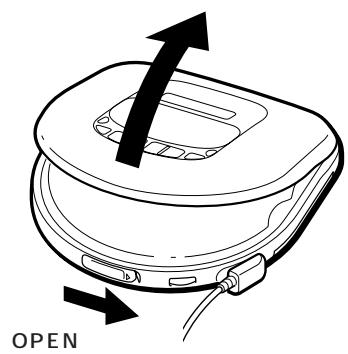
②CD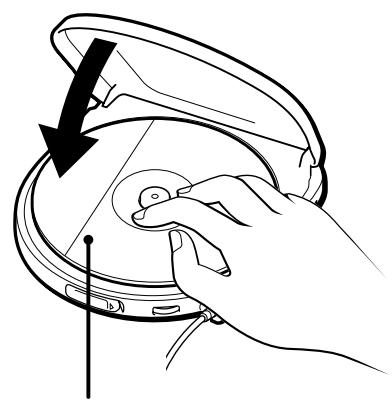
3
(2)
AMS Capteur de musique automatique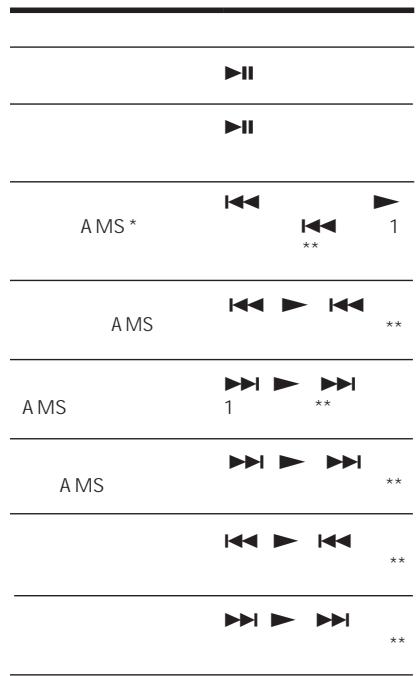
CD VOL (volume) MAX VOLUME MAXX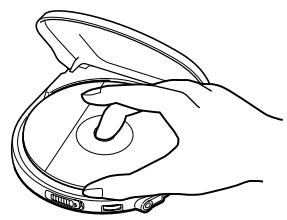
A C CD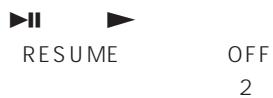
CD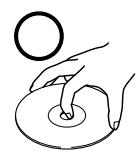
B
REPEAT/ENTER 1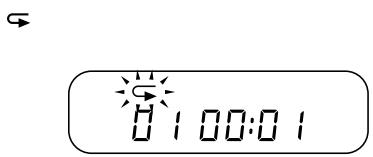
REPEAT/ENTER 2 1 PLAY MODE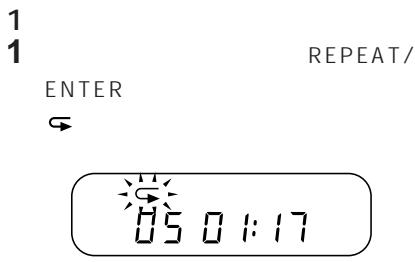
REPEAT/ENTER
C 1 INTRO PGM PLAY MODE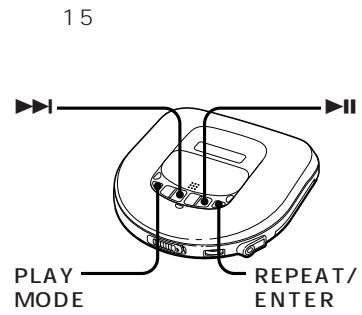
2 15 INTRO PGM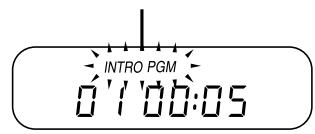
ENTER
INTRO
PGM
MODE PLAY D
PLAYMODE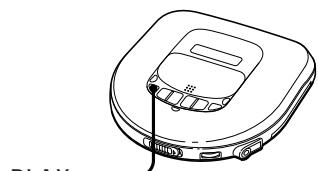
1
PLAY MODE
PLAY MODE
E 22 P L A T MODE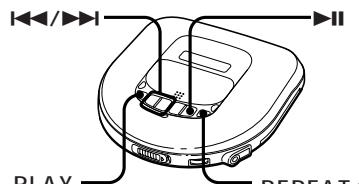
1 RMS PLAY MODE 2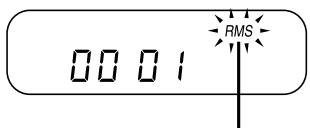

3 REPEAT/ENTER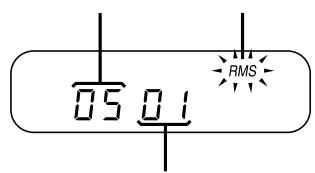
5 RMS 5
REPEAT/ENTER RMS PLAY MODE REPEAT/ENTER REPEAT/ENTER 22
F
BASS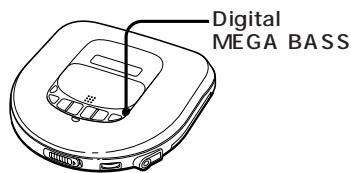
Digital MEGA BASS

BASS
(ESP) G
ESP Electronic Shock Protection) CD 20 ESP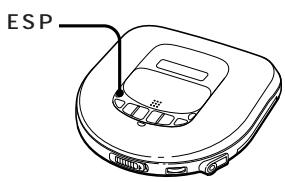
ESP ESP ESP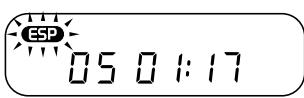
HOLD
(AVLS)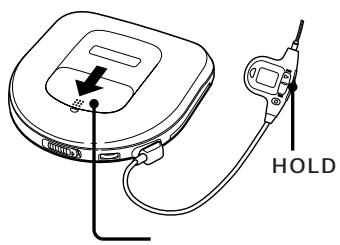
AVLS Automatic Volume Limiter System
LIMIT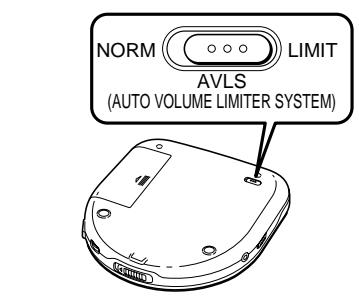
AVLS
AVLS
MEGA BASS numérique AVLS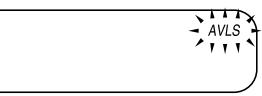

1
REPRISE ACTIVÉE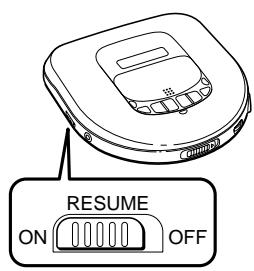
REPRISE DÉSACTIVÉE 1 ± 30

MODE LECTURE CD
RK-G136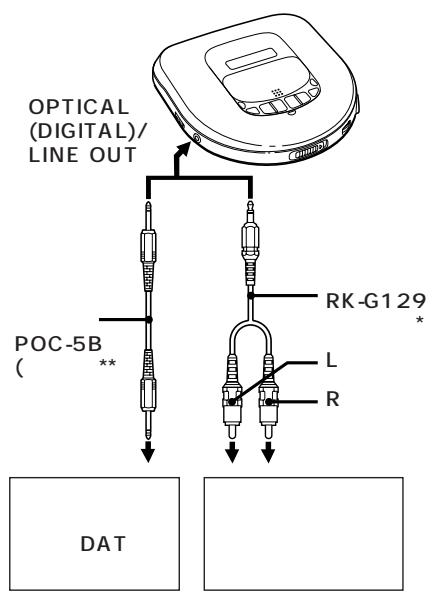
*ENTRÉE LIGNE/ENREG.
MICRO
**
POC-5AB MEGA BASS numérique
CA MEGA BASS numérique TÉLÉCOMMANDE CASQUE/ OPTIQUE (NUMÉRIQUE)/SORTIE LIGNE ESP CD OPTIQUE (NUMÉRIQUE)/ SORTIE LIGNE OPTIQUE (NUMÉRIQUE)/SORTIE LIGNE VOLUME ESP
CPM-450PC/CPM-300PC DCC-E245 CPA-8/CPA-9 CPM-450PC ARRÊT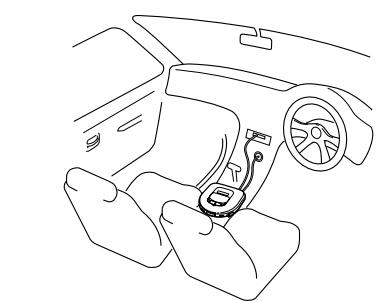
ESP Discman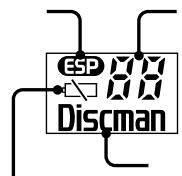
1 I/ I (AMS*/recherche) 2 ESP** 3 AVLS*** 4 RESUME 5 OPTICAL (DIGITAL)/LINE OUT 6 PLAY MODE 7 OPEN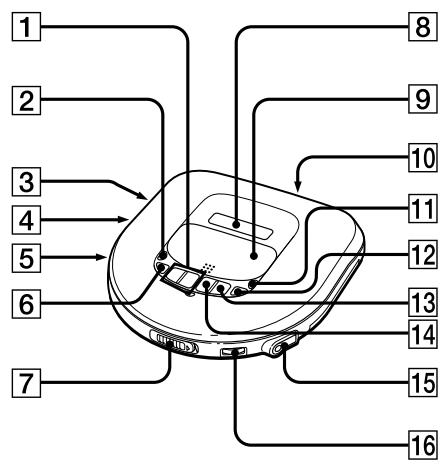
8 9 10 DC IN 4.5V Digital MEGA BASS 12 REPEAT/ENTER 13 14 15 PHONES/REMOTE VOLUME AMS Automatic Music Sensor *ESP Electronic Shock Protection ***AVLS Automatic Volume Limiter System

*Automatic Music Sensor ** HOLD HOLD HOLD ***Electronic Shock Protection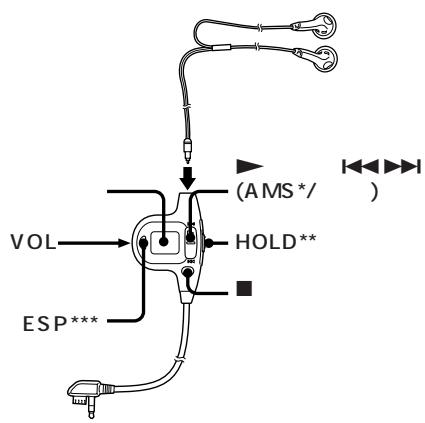
BP-DM10 BP-DM20
1 2 SONY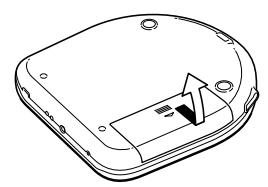
3 AC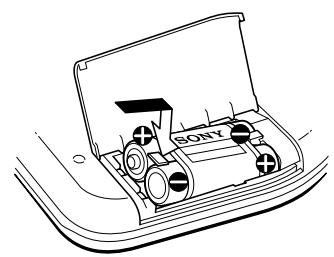
2 (BP-DM10
3 (BP-DM20
CHG
CHG CHG AC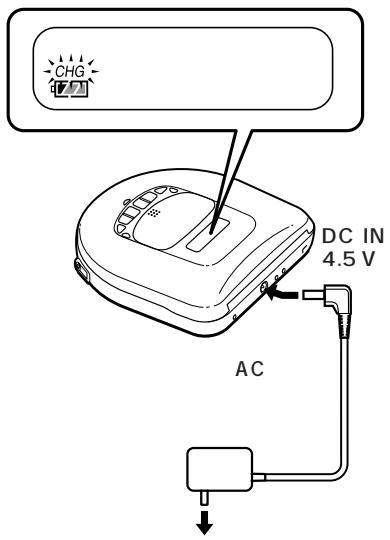
Lo bdd
BP-DM20
BP-DM1O
3
1 2 3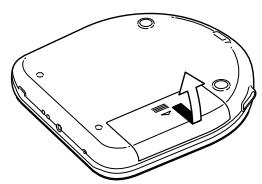
+0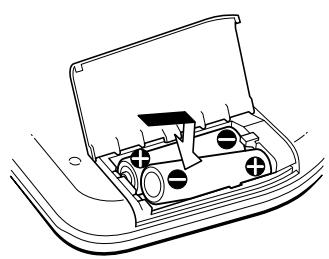
Lo bdd 2

1 2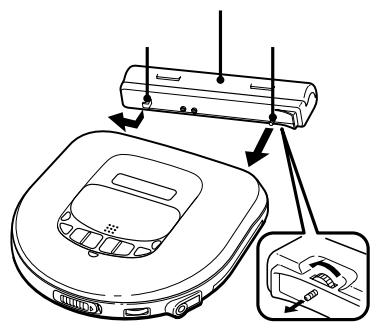
3 3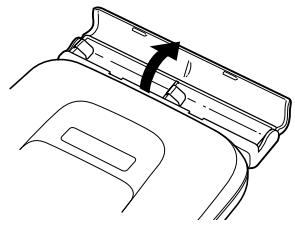
+0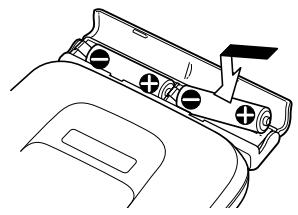
AC AC AC-
| ESP OFF | ESP ON | ||
| BP-DM203 | * | 00 | 00 |
| 2 | 00 | 00 | |
| BP-DM102 | * | 00 | 00 |
| BP-DM20 | 00 | 00 | |
| 2 | |||
| 2 | 00 | 00 | |
| 2 | |||
| BP-DM10 | 00 | 00 | |
| 2 |
DC IN 4.5 V (
E45L/AC-E45MA
AC-E45HG
AC
Ni-Cd
+
Anglais
En lisant, reportez-vous aux illustrations du texte correspondant en japonais (marquées A, B, etc.)
▷ Lecture d'un disque
Lire un CD immédiatement !
Si vous souhaitez lire un CD immédiatement, choisissez d'utiliser votre Discman sur le courant secteur. Les autres options sont les trois suivantes : batterie rechargeable, piles sèches (voir "Sources d'alimentation") et batterie de voiture.
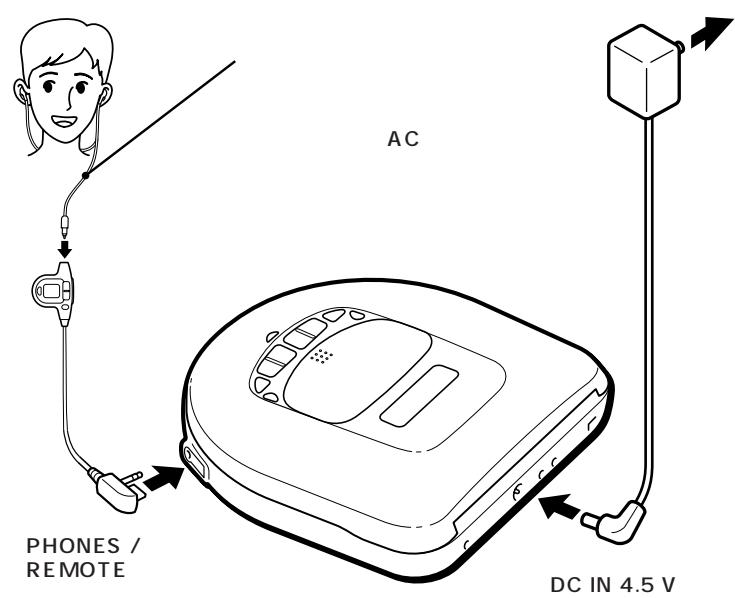
1 Effectuez les connexions.
Branchez fermement le casque fourni avec la télécommande sur la prise PHONES/REMOTE. Branchez également l'adaptateur secteur fourni sur la prise DC IN 4,5 V de votre Discman et sur une prise murale. Si l'adaptateur secteur ne correspond pas à la prise murale, utilisez l'adaptateur de prise secteur.
2 Placez un CD.
① Faites glisser OPEN pour ouvrir le couvercle.
② Placez le CD sur le pivot, étiquette vers le haut.
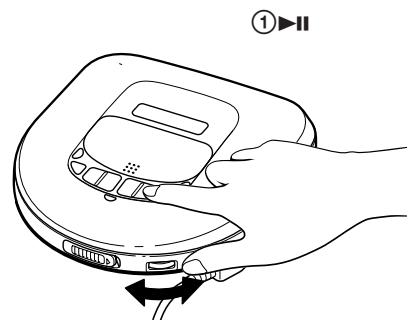
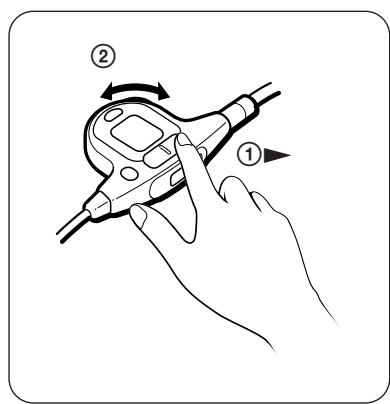
3 Lisez un CD.
① Appuyez sur ▷ sur la télécommande.
② Réglez le volume.
Pour arrêter la lecture, appuyez sur
| To | Press |
| Pause (main unit only) | ▶II |
| Resume play after pause ▷(main unit only) | |
| Find the beginning of ▲□(■□side of ▲ |
| the current track on the remote (AMS*) control) once** |
| Find the beginning of ▲(□side of the previous tracks ▷) repeatedly** (AMS) |
| Find the beginning of ▷■(▷■side of the next track (AMS) ▷) once** |
| Find the beginning of ▷□□(▷□□side of the succeeding tracks ▷)repeatedly** (AMS) |
| Go forward quickly | Hold down▶▶(▶▶side of▶)* |
| Go backwards quickly Hold down ↓(↓side of ▷)* |
*AMS = Capteur de musique automatique
**Ces opérations sont possibles pendant la lecture et la pause.
Pour retirer le CD
Retirez le CD tout en appuyant sur le pivot.
Remarques sur le réglage du volume avec la télécommande
Réglez la commande VOL (volume) de la télécommande sur MAX. Ensuite, réglez le volume sur le Discman au niveau que vous souhaitez comme maximum pour le réglage du volume avec la télécommande.
À l'affichage
- Lorsque vous appuyez sur ou (lorsque RESUME est réglé sur OFF), le nombre total de plages du CD et la durée totale de lecture apparaissent pendant 2 secondes.
- Pendant la lecture, le numéro de plage et le temps de lecture écoulé de la plage en cours apparaissent.
- Entre les plages, le temps restant avant le début de la plage suivante apparaît avec l'indication " - ".
- Pendant la pause, le temps de lecture écoulé du point actuel clignote.
Éclairage de l'affichage (unité principale et télécommande)
Lorsque vous utilisez l'appareil sur l'adaptateur secteur ou la batterie de voiture, l'affichage est toujours éclairé. (La lumière de l'affichage s'éteint lorsque vous appuyez sur et que le CD s'arrête.) Lorsque vous utilisez l'appareil sur la batterie rechargeable ou les piles alcalines, l'affichage est éclairé pendant environ 5 secondes lorsque vous appuyez sur un bouton de commande.
Remarques sur la manipulation des CD
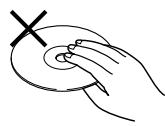
- Pour garder le CD propre, tenez-le par son bord. Ne touchez pas la surface.
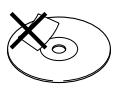
- Ne collez pas de papier ou de ruban adhésif sur le CD.
- N'exposez pas le CD à la lumière directe du soleil ou à des sources de chaleur telles que les conduits d'air chaud. Ne laissez pas le CD dans une voiture garée en plein soleil.
Lecture répétée des plages (Lecture répétée) B
Vous pouvez lire une piste en répétition dans les modes de lecture normale, INTRO PGM, aléatoire ou RMS (Random Music Sensor). Répétez toutes les pistes ou une seule piste.
Pour répéter toutes les pistes
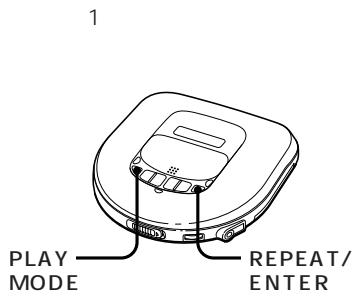
Appuyez sur REPEAT/ENTER pendant la lecture. Le symbole "一 ^ 一" apparaît.
Pour annuler la lecture en répétition, appuyez à nouveau sur REPEAT/ENTER.
Pour répéter une seule piste
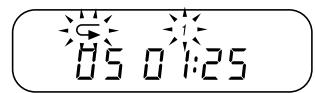
1. Appuyez sur REPEAT/ENTER pendant que la piste que vous voulez répéter est en cours de lecture.
Le symbole "一 ^" apparaît.
2. Appuyez plusieurs fois sur PLAY MODE jusqu'à ce que "1" apparaisse.
Pour répéter une autre piste, appuyez sur ou .
Pour annuler la lecture en répétition, appuyez à nouveau sur REPEAT/ENTER.
Lecture uniquement des pistes souhaitées (lecture INTRO PGM)
Vous pouvez choisir et lire vos pistes préférées en parcourant le début de chaque piste d'un CD.
1. Pendant la lecture, appuyez plusieurs fois sur PLAY MODE
jusqu'à ce que "INTRO PGM" clignote.
2. Appuyez pour commencer le balayage.
Le Discman joue les 15 premières secondes de chaque plage et "INTRO PGM" clignote plus rapidement.
3 Appuyez sur REPEAT/ENTER pendant que la plage souhaitée est en cours de lecture. Pour passer la plage, appuyez sur ou attendez simplement la plage suivante.
Lorsque vous parcourez le CD, "INTRO PGM" cesse de clignoter et les plages choisies sont lues automatiquement.
Pour terminer la programmation avant d'écouter
le CD, appuyez sur II. Les plages sélectionnées sont lues.
Pour annuler la lecture INTRO PGM, appuyez sur PLAY MODE jusqu'à ce qu'aucun mode de lecture ne soit indiqué à l'écran.
Lecture des plages dans un ordre aléatoire (lecture aléatoire) D
Vous pouvez lire les plages d'un CD dans un ordre aléatoire.
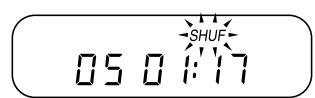
Pendant la lecture, appuyez plusieurs fois sur PLAY MODE jusqu'à ce que "SHUF" apparaisse.
Les plages sont lues dans un ordre aléatoire.
Pour annuler la lecture aléatoire, appuyez plusieurs fois sur PLAY MODE jusqu'à ce qu'aucun mode de lecture ne soit indiqué à l'écran.
Lecture des plages dans l'ordre de votre choix (lecture RMS) E
Vous pouvez programmer jusqu'à 22 plages pour les lire dans l'ordre de votre choix.
1 Pendant la lecture, appuyez plusieurs fois sur PLAY MODE jusqu'à ce que "RMS" clignote. 2 Appuyez sur ou pour choisir une plage. Le numéro de plage et l'ordre de lecture apparaissent. 3 Appuyez sur REPEAT/ENTER pour programmer la plage. 4 Répétez les étapes 2 et 3 pour programmer les plages restantes.
5
Press
"RMS" stops flashing and the tracks you chose play in the order you specified.
To cancel RMS play, press PLAY MODE until "RMS" disappears.
To check the program
During programming:
Press REPEAT/ENTER before step 5.
During RMS play:
Press PLAY MODE repeatedly until "RMS"
flashes, then press REPEAT/ENTER.
Each time you press the button, the track numbers appear in the order you specified.
Using other functions
To enjoy more powerful bass sound
You can enjoy a powerful bass-boosted sound.
Press Digital MEGA BASS to select
BASS or BASS . BASS is more effective.
Pour éviter que le son ne saute
La fonction ESP (Electronic Shock Protection) évite que le son ne saute en utilisant une mémoire tampon qui stocke les données musicales pendant environ 20 secondes. Utilisez cette fonction lorsque vous écoutez en marchant ou en voiture.
Appuyez sur ESP.
L'indication ESP apparaît.
Pour verrouiller les boutons H
Fermez le couvercle de protection pour éviter toute
manipulation accidentelle de l'appareil principal.
Faites glisser l'interrupteur HOLD dans le sens de la flèche pour éviter toute manipulation accidentelle de la télécommande.
Pour protéger votre ouïe (AVLS) 1
La fonction AVLS (Automatic Volume Limiter System) maintient le volume maximum à un niveau bas pour protéger vos oreilles.
Réglez AVLS sur LIMIT.
L'indication AVLS apparaît.
Pour reprendre la lecture à partir du point où vous avez arrêté le CD (Reprise de lecture) J
Normalement, à chaque arrêt et reprise, la lecture commence au début du CD. La fonction de reprise de lecture, cependant, vous permet d'écouter à partir du point où vous avez éteint le Discman pour la dernière fois.
Réglez RESUME sur ON.
Pour annuler la lecture en pause, réglez RESUME sur OFF.
Pour désactiver le bip
Vous pouvez désactiver le bip qui retentit lorsque vous utilisez votre Discman.
Déconnectez la source d'alimentation (adaptateur secteur, batterie rechargeable ou piles alcalines). Tout en maintenant enfoncée la touche sur l'unité principale, reconnectez la source d'alimentation.
Pour éteindre l'éclairage de l'afficheur
Vous pouvez éteindre l'éclairage de l'afficheur sur l'unité principale et la télécommande.
Tout en maintenant enfoncée la touche PLAY MODE, insérez la batterie rechargeable ou les piles alcalines.
Connexion à d'autres équipements stéréo K
Vous pouvez écouter le CD via d'autres équipements stéréo, ou enregistrer un CD sur une cassette ou un MiniDisc. Reportez-vous au manuel d'instructions de l'autre équipement pour plus de détails. Avant de faire les connexions, éteignez chaque appareil.
Utilisation du cordon de connexion
- Lorsque vous utilisez un cordon de connexion, le système Digital MEGA BASS ne fonctionne pas sur les sorties de cet appareil.
Utilisation du cordon de connexion optique numérique
- Lorsque vous utilisez un équipement numérique avec cet appareil, utilisez l'adaptateur secteur. Si vous utilisez une batterie rechargeable ou des piles alcalines, le signal numérique optique ne sera pas émis par l'appareil. (Des phénomènes inattendus peuvent se produire, par exemple, vous ne pourrez pas enregistrer un CD sur l'équipement connecté.)
- Le système Digital MEGA BASS fonctionne sur la sortie de la prise PHONES/REMOTE, mais ne fonctionne pas sur la sortie numérique optique de la prise OPTICAL (DIGITAL)/LINE OUT.
- La fonction ESP ne fonctionne avec aucune sortie de cet appareil.
Lecture d'un CD dans une voiture L
Vous pouvez utiliser votre Discman dans une voiture.
Pour connecter votre Discman à une platine à cassettes de voiture, vous avez besoin des accessoires suivants :
- Kit de montage CPM-450PC/CPM-300PC (plaque de montage + cordon de batterie de voiture + pack de connexion pour voiture) ou
- Cordon de batterie de voiture DCC-E245 et pack de connexion pour voiture CPA-8/CPA-9. Reportez-vous au manuel d'instructions de chaque accessoire pour plus de détails.
Lorsque vous utilisez le kit de montage (CPM-450PC ou équivalent)
Fixez l'adaptateur de montage pour voiture fourni sur la plaque de montage avant d'installer le Discman.
Fonction d'allumage commuté
Grâce à cette fonction, votre Discman s'arrête automatiquement lorsque vous coupez le moteur de la voiture. (Cette fonction n'est pas possible avec certaines voitures selon le modèle.)
Utilisation de la télécommande fournie M
Vous pouvez utiliser la télécommande comme télécommande filaire.
Lorsque vous n'utilisez pas la télécommande, faites glisser HOLD dans le sens de la flèche. Pour déverrouiller, faites glisser HOLD en arrière.
Sources d'alimentation
Utilisation de la batterie rechargeable N
Chargez la batterie rechargeable avant la première utilisation.
Vous pouvez utiliser la batterie rechargeable BP-DM10 ou BP-DM20 pour cet appareil. Elles s'utilisent de la même manière, mais leur temps de charge et leur autonomie diffèrent. Vérifiez le numéro de modèle de votre batterie rechargeable avant utilisation.
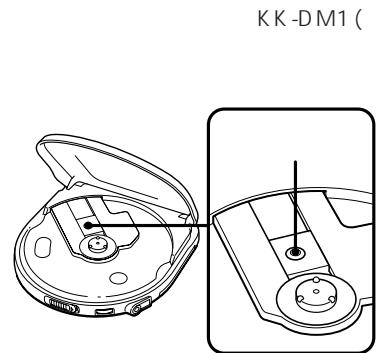
1 Ouvrez le couvercle du compartiment à batterie. 2 Insérez la batterie rechargeable en orientant le mot "SONY" dans le même sens que l'illustration à l'intérieur du couvercle, puis refermez le couvercle. 3 Branchez l'adaptateur secteur. L'indication "CHG" s'allume. Chargez pendant environ 2 heures (pour BP-DM10) ou 3 heures (pour BP-DM20). (Si la batterie est déjà chargée, "CHG" clignote.) 4 Lorsque la charge est terminée, "CHG" s'éteint. Débranchez l'adaptateur secteur.
Quand charger la batterie
Lorsque la batterie est faible, une indication apparaît à l'écran. Lorsque la batterie est épuisée, "Lo bdt" apparaît à l'écran. Rechargez la batterie. Pour préserver la capacité d'origine de la batterie le plus longtemps possible, rechargez-la lorsqu'elle est épuisée (déchargée).
Remarques
- Le temps de charge varie selon l'utilisation de la batterie rechargeable.
- Si la batterie est neuve ou n'a pas été utilisée pendant longtemps, elle peut ne pas se charger complètement avant plusieurs cycles de charge et de décharge.
- Si l'autonomie de la batterie diminue d'environ la moitié, remplacez-la par une batterie rechargeable Sony BP-DM10 ou BP-DM20. N'utilisez pas d'autre batterie rechargeable (type R6, etc.).
Utilisation de piles sèches
1 Ouvrez le couvercle du compartiment à piles. 2 Insérez deux piles alcalines LR6 (format AA) en respectant les polarités et selon le schéma à l'intérieur du compartiment, puis refermez le couvercle.
Quand remplacer les piles sèches
Lorsque les piles sont faibles, une indication apparaît à l'écran. Lorsque les piles sont épuisées, "Lo bdt" apparaît à l'écran. Remplacez toutes les piles par des neuves.
Remarques
- Ne chargez pas les piles sèches.
- Ne mélangez pas des piles neuves avec des piles usagées.
- N'utilisez pas différents types de piles ensemble.
- N'utilisez pas de piles au manganèse pour cet appareil.
Utilisation du boîtier de piles P
Vous pouvez utiliser l'appareil plus longtemps en utilisant le boîtier de piles, en plus de la batterie rechargeable ou des piles dans le compartiment à piles de l'appareil. Les piles du boîtier de piles et la batterie rechargeable ou les piles du compartiment à piles sont consommées ensemble.
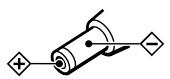
1 Accrochez le boîtier de piles au Discman et serrez la vis. 2 Ouvrez le couvercle du boîtier de piles. 3 Insérez deux piles alcalines LR6 (format AA) en faisant correspondre les symboles ⊕ et ⊖ au schéma à l'intérieur du compartiment à piles, puis fermez le couvercle.
Autonomie des piles (heures approximatives)
| When using | ESP function | |
| off | on | |
| BP-DM20(charged for 3 hours maximum*) | 00 | 00 |
| Two alkaline batteries | 00 | 00 |
| BP-DM10(charged for 2 hours maximum*) | 00 | 00 |
| BP-DM20 + Battery case (two alkaline batteries) | 00 | 00 |
| Two alkaline batteries + Battery case (two alkaline batteries) | 00 | 00 |
| BP-DM10 + Battery case (two alkaline batteries) | 00 | 00 |
(Lorsque l'appareil est utilisé sur une surface plane et stable) *Le temps de charge varie selon l'utilisation de la batterie rechargeable.
- ANGLAIS
- ▷ LECTURE D'UN DISQUE
- LIRE UN CD IMMÉDIATEMENT
- POUR RETIRER LE CD
- REMARQUES SUR LE RÉGLAGE DU VOLUME AVEC LA TÉLÉCOMMANDE
- À L'AFFICHAGE
- ÉCLAIRAGE DE L'AFFICHAGE (UNITÉ PRINCIPALE ET TÉLÉCOMMANDE)
- REMARQUES SUR LA MANIPULATION DES CD
- LECTURE RÉPÉTÉE DES PLAGES (LECTURE RÉPÉTÉE) B
- POUR RÉPÉTER TOUTES LES PISTES
- POUR RÉPÉTER UNE SEULE PISTE
- LECTURE UNIQUEMENT DES PISTES SOUHAITÉES (LECTURE INTRO PGM)
- LECTURE DES PLAGES DANS UN ORDRE ALÉATOIRE (LECTURE ALÉATOIRE) D
- LECTURE DES PLAGES DANS L'ORDRE DE VOTRE CHOIX (LECTURE RMS) E
- TO CHECK THE PROGRAM
- USING OTHER FUNCTIONS
- TO ENJOY MORE POWERFUL BASS SOUND
- POUR ÉVITER QUE LE SON NE SAUTE
- POUR VERROUILLER LES BOUTONS H
- POUR PROTÉGER VOTRE OUÏE (AVLS)
- POUR REPRENDRE LA LECTURE À PARTIR DU POINT OÙ VOUS AVEZ ARRÊTÉ LE CD (REPRISE DE LECTURE) J
- POUR DÉSACTIVER LE BIP
- POUR ÉTEINDRE L'ÉCLAIRAGE DE L'AFFICHEUR
- CONNEXION À D'AUTRES ÉQUIPEMENTS STÉRÉO K
- UTILISATION DU CORDON DE CONNEXION
- UTILISATION DU CORDON DE CONNEXION OPTIQUE NUMÉRIQUE
- LECTURE D'UN CD DANS UNE VOITURE L
- LORSQUE VOUS UTILISEZ LE KIT DE MONTAGE (CPM-450PC OU ÉQUIVALENT)
- FONCTION D'ALLUMAGE COMMUTÉ
- UTILISATION DE LA TÉLÉCOMMANDE FOURNIE M
- SOURCES D'ALIMENTATION
- UTILISATION DE LA BATTERIE RECHARGEABLE N
- QUAND CHARGER LA BATTERIE
- REMARQUES
- UTILISATION DE PILES SÈCHES
- QUAND REMPLACER LES PILES SÈCHES
- UTILISATION DU BOÎTIER DE PILES P
Marque : SONY
Modèle : D-465
Catégorie : Lecteur CD portable