GEBRUIKSAANWIJZING WAX WIKO
Le descriptif de ce guide peut contenir certaines différences avec celui de votre téléphone en fonction de la version du logiciel ou de votre opérateur.
Félicitations!
Vous venez d'acquérir votre mobile WIKO WAX.
Vous trouveras dans ce guide toutes les informations relatives à l'utilisation de ce téléphone portable afin, nous le souhaitons, de vous familiariser rapidement avec l'univers WIKO.
Le transfert, la reproduction et la distribution de l'information contenue dans ce manuel ne peuvent être en aucun cas transmis ou produits sous quelque forme que ce soit, ou sans l'autorisation écrite de WIKO.
Marques commerciales
WIKO est une marque déposée de WIKO.
Avis
WIKO se réserve le droit de modifier à tout moment
les informations continuent dans ce guide.
Ce guide a été réalisé avec la plus grande attention, mais toutes les informations et recommandations qui y sont inscrites ne représentent pas une garantie quelconque.
Limite de responsabilité
L’intégralité des services et contenus accessibles par cet article sont la propriété exclusive de tiers et donc protégée par des droits [Droit d'auteur, brevet, licence, et autre loi sur la propriété intellectuelle]. Ces services sont réservés à votre usage personnel et non pour une utilisation commerciale. Il est impossible d'utiliser ces contenus ou services sans demande écrite au contrôle du contenu. Vous ne pouvez en aucune manière copier, publier, transférer, vendre ou exploiter sur quelconques supports que ce soit des contenus ou des services édités par le biais de cet article ou d’enroüvre des formes dérivées.
LES SERVICES ET CONTENUS DES TIERS SONT DELIVRÉS « EN L'ÊTAT » WIKO NE GARANTIT PAS LES CONTENUS OU SERVICES AINSI DELIVRÉS, QUE CE SOIT DE MANIÈRE EXPRESSÉ OU IMPLICITE, À QUELUQUE FIN QUE CE SOIT AINSI QUE LES GARANTIES QUALITAIRE MARCHANDE ET D'ADÉQUIRATION A UN USAGE PARTICULIER. WIKO N'ASSURE PAS LA GARANTIE DE L'EXACTITUDE, LA VALIDité, LA LEGALITE OU L'EXHAUSTIVITE DES CONTENUS OU SERVICES FOURNIS PAR CET APPAREIL. WIKO N SE SERA PAS RESPONSABLE EN CAS DE NÉSIGENCE, QUE CE SOIT AU Niveau DE LA RESPONSABILÉ CONTRACTUE LÉ UDETIELLE, DES DOMMAGES DIRECTES OU INDIRECTES, ACCESSOIRES SPECIAUXS, DES HONORAIRES D'AVOCAT, DES FRAIS OU DE TODT AUTRE DOMMAGE RÉSULTANT DE L'UTILISATION DES CONTENUS OU SERVICES PAR VOUS-MEUM OU PAR UN TIERS MÉME SI WIKO A ETÉ INFORMÉ DE LA POSSIBILÉT DE TELS DÉSAGRÉMENTS. CERTAINS PAYS N'AUTORISIENT PAS L'EXCLUSION DES GARAN
TIES IMPLICITES OU LA LIMITATION DES DROITS LEGAUX DU CONSUMMATEUR, IL SE PERT QUE CES EXCLUSIONS ET LIMITATIONS NE VOUS SOIENT PAS APPLICABLES.
Les services de tiers peuvent être interrompus ou résiliés à tout moment. Dans le temps, WIKO n'assure aucune représentation ou garantie concernant la disponibilité de tout content ou service. WIKO n'a transmis seldom par des tiers via des réseaux ou des dispositifs de transmission.
WIKO decline expressément toute responsabilité lors d'interruption ou de suspension d'un contenu ou d'un service proposé par ce périmètre, sans restriction des générations de cette limite de responsabilité.
WIKO ne peut être en aucune manière responsable du service client associé aux contenus et services. Toute question ou requête concernant les contenus ou services doit être transmise directement au fournisseur des contenus ou des services concernés.
Contenu du coffret:
- Mobile WIKO WAX
- Adaptateur secteur
- Cable micro-USB
- Batterie
- Kit pieton
- Guide rapide
Découvrir votre téléphone
Les boutons du téléphone
| Boutons | Fonction |
| Marché/Arrêt | Maintenir le bouton enforcé: Allumer / arrêté le téléphone. Appuyer légrement: verrouiller l'écran tactile |
| Accueil | Revenir à l'écran d'accueil, ouvoir la liste des applications récentes (maintenir le bouton enforcé). |
| Menu | Afficher des menus d'options disponibles sur l'application active. |
| Retour | Revenir à l'écran précédent. Fermer le clavier à l'écran. |
| VOLUME +/- | Augmenter ou réduire le volume de l'appel, sonnerie, musique,iaux et d'autres fonctions audio.Lorsque le téléphone sonne,isser la sonnerie en mode silencieux. Activer le mode réunion en appuyant longuement sur Volume- |
Insertion des cartes SIM
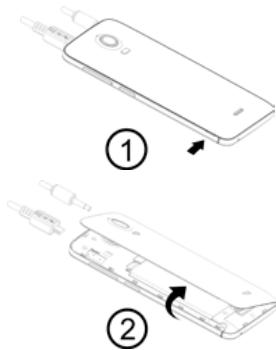
L'utilisation de votre téléphone nécessite l'insertion préalable de votre carte SIM. Une petite encoche sur le côté du téléphone permet d'ouvrir la coque arrière. Insérrez la carte SIM selon le schéma.
Chargement de la batterie
Votre téléphone est alimenté par une batterie rechargeable.
Le rouge clignotant indique que la batterie est très faible, veuillez recharger la batterie, un trop faible niveau de charge risque de réduire sa durée de vie.
Branchez le chargeur à une prise de courant et l'embout micro USB au port USB du téléphone.
Le voyant d'état du téléphone passe au rouge, indiquant qu'il est en charge.
Une fois que le chargement est terminé, le voyant d'état passe au vert, débranchez-le du chargeur.
Démarrage et arrêt
Pour allumer le téléphone, appuyez sur le bouton MARCHE/ARRÉT de manière prolongée jusqu'à ce que le téléphone vibre.
Si votre carte SIM est verrouillée, vous devrez saisir le code PIN correct pour déverrouiller la carte SIM lors de la mise sous tension du téléphone.
Au bout de trois mauvaises saisies du code PIN, le portable se bloque et il faut le débloquer à l'aide de votre code PUK (fourni avec la carte SIM, si ce n'est pas le cas, contactez votre opérateur téléphonique)
Pour permettre le téléphone hors tension, appuyez de manière prolongée sur le bouton MARCHE-ARRET jusqu'à l'ouverture du menu, appuyez sur Eteindre. Appuyez ensuite sur OK pour confirmer.
Le téléphone vibre légèrement quand il est complètement éteint.
~ Connexion réseau
Au premier démarrage du téléphone, ou lorsque vous changez de carte(s) SIM et rallumez le téléphone, le menu Paramètres des points d'accès affiche, appuyez sur Sélectionner. Appuyez sur le nom de la carte SIM afin d'afficher la liste de points d'accès. Choisissez celui qui correspond à votre opérateur en appuyant sur le bouton à droite, appuyez ensuite sur RETOUR → pour revenir au menu précédent.
APN non disponible
Si sur titre opérateur ne figure pas sur la liste ou que la liste est vide, renseignez-vous auprès de cet opérateur pour configurer les APN manuellement.
Pour ce faire, accederé au menu Paramétrés SANS-FIL & RESEAXU + Plus Réseaux mobiles
→ Noms des points d'accès, appuyez sur le bouton + en haut à droite de l'écran, saisissez les informations fournies par l'opérateur. Appuyez ensuite sur le bouton MENU et choisissez Enregistrer. Vous revenez sur le menu précédent, choisissez l'APN que vous venez d'enregistrer.
Activer la connexion de données
Pour vérifier votre configuration de connexion de données:
Renseignez-vous sur les paramètres → SANS-FIL & RESEAUX → Plus... → Réseaux mobiles → Noms des points d'accès, activez le point d'accès suivant cet opérateur/fortait.
- Accedee au Parametres SANS-FIL & RESEAUX Plus... Renseaux mobiles Noms des points d'acces, activé le point d'accès suivant cette opérateur/fortait.
- Revenez au menu précédent Paramètres du réseau mobile, appuyez ensuite sur Données activées. *Vous pouvez également faire glisser le panneau de notification vers le bas afin d'activer une connexion de.
Icônes de notification sur la barre d'état

Puissance du signal
Réseau GPRS connecté
Réseau EDGE connecté
Réseau 3G connecté
HSPA (3G+) connecté
HSPA+ [3G++] connecté

Aucun signal
En itinérance

Wi-Fi dispensables

Wi-Fi connecté

Bluetooth activé

GPS en service

Appel vocal en cours

Appel en attente

Appel manqué

Synchronisation

Nouvel e-mail

Alarme activée

Mode silencieux activé

Nouveau message vocal

Téléchargement

Connecté à l'ordinateur

Niveau de charge de la batterie

Nouveau SMS ou MMS

Mode avion activé
Selon les applications, les notifications peuvent être accomplies d'un signal sonore, d'une vibration ou du clignement de voyants.
Le panneau de notifications
Pour connaître le détail de toutes vos notifications. Faites glisser votre doigt de haut en bas sur n'importe quel endroit de l'écran d'accueil. Les informations concernant l'arrêt de nouveaux messages, d'événements d'agenda à partir, l'état des téléchargements...
seront alors affichées. Le nom de l'opérateur s'affiche en bas du panneau.
Appuyez sur pour effacer toutes les notifications ponctuelles, les applications en cours sont conservées dans la liste. Glissez une notification vers la gauche ou la droite pour l'effacer. Pour fermer le panneau, faites glisser vers le haut ou appuyez sur RETOUR . Pour accéder au panneau des réglages, appuyez sur

Pour y arriver plus rapidement, tirez la barre de notification avec deux doigts vers le bas.
Les menus de votre téléphone sont présentés sous forme de Menu contextuel ou Menu d'options.
Pour faire apparaître un menu contextuel, appuyez de manière prolongée sur un élément de l'écran, le menu contextuel propose des actions associées à cet élément.
Par exemple, appuyez de manière prolongée sur un SMS, les options liées à ce message apparaisent.
Attention: Tous les éléments ne disposent pas de menu contextuel. Lorsque vous effectuez un appui prolongé sur un élément lié à chaque menu, il ne se passe rien.
Pour faire apparaître un menu d'options, appuyez sur le bouton MENU. Le menu d'options propose des actions ou réglages liés à l'application ou l'écran actuel, mais pas à un élément précis comme le menu contextual.
Attention : certains écrans ne disposent pas de menus d'options.
Consignes de sécurité
Afin d'utiliser ce téléphone en toute sécurité. Veuillez lire attentivement les consignes de sécurité:
- Enfants: Soyez très vigilant avec les enfants.
Un téléphone portable contient de nombreuses pièces détachées, il s'agit donc d'être très vigilant quand un enfant est en contact avec un téléphone portable. Le produit contient des petites pièces qui peuvent être ingérées ou entraîner la suffocation en cas d'ingestion. Dans le cas où vous apprêtez il est équipé d'un appareil photo ou d'un dispositif d'éclairage, ne l'utilisez pas trop près des yeux des enfants ou des animaux.
- Audition: A pleine puissance, l'écoute prolongée au moyen d'un casque léger, ou d'écouteurs peut endomager sa audition. Veillez s périodes.
- Au volant: Prudence lorsque vous conduisez. La conduite demande une attention extrême et régulière pour réduire au maximum le risque d'accident. Utiliser un téléphone portable peut distraire son utilisateur et conduire à un accident. Il s'agit de respecter scrupuleusement la législation et les ré t de téléphoner en conduisant et l'utilisation d'un kit main-libre ne peut pas être considérée comme une solution.
Éteignez votre téléphone dans l'avion.
Pensez à éteindre votre téléphone lorsque vous êtes dans un avion (GSM + Bluetooth). Celui-ci peut provoquer des interférences.
- Milieu hospitalier: Éteignez votre telephone à proximité de tout appareil médical.
Il est très dangereux de laisser allumer un téléphone
à proximité d'un appareil Médical. Celui-ci peut créer des interférences avec des appareils Médicaux. Il faut donc respecter toutes les consignes et avertissements dans les hôpitaux ou centres de soin.
Pensez à éteindre votre téléphone dans les stations-service. N'utilisez pas votre appareil dans une station-essence, à proximité de carburants.
Il est dangereux d'utiliser votre téléphone à l'intérieur d'un garage professionnel.
- Implants électroniques et stimulateurs cardiaques: Les personnes équipées d'un implant électronique ou d'un stimulateu eur cardiaque, éteignez immédiatement le téléphone et contactez le fabricant du stimulateur cardiaque pour être informé de la conduite à tenir.
- Risques d'incendie: Ne laissez pas cet appareil à proximité des sources de chaleur comme un radiateur
théateur ou une cuisinière. Ne mettez pas votre téléphone en charge à proximité de matières inflammables (les risques d'incendie sont réels).
- Contact avec des liquéfiés: Ne mettez pas le téléphone en contact avec des liquéfiés, ni avec les mains mouillées, tous les dégâts provoqués par l'eau peuvent être irrémédiables.
- N'utilise que les accessoires homologués par WIKO.
L'utilisation d'accessoires non homologues peut déterminer une téléphone ou provoquer des risques.
- Ne détruisez pas les batteries et les chargeurs.
N'utilisez jamais une batterie ou un chargeur endommagé.
Ne pas mettre en contact des batteries avec des objets magnétiques, risque de court-circuit entre les bornes plus et moins de vos batteries et de détruire la batterie ou le téléphone de manière définitive.
D'une manière générale, il ne faut pas exposer les batteries à des pressions très basses ou très élevées.
[inférieures à 0°C ou supérieures à 45°C]. Ces déficiences de températures peuvent réduire l'autonomie et la durée de vie des batteries.
- Choc ou impacts: Utilisez et manipulez votre téléphone avec le plus grand soin. Protégez votre téléphone, des chocs ou impacts vous pourriez l'endommager. Certaines parties de votre téléphone sont en verre, et pourraient donc se briser en cas de chute ou de gros impacts. Évitez de laisser tomber votre appareil. Ne touchez pas l'écran avec un objet pointu.
- Décharge électrique: Ne cherchez pas à démonter votre téléphone, les risques de décharge électriques sont réels.
- Entretien: Si vous voulez nettoyer votre combiné, utilisez un chiffon sec [pas de solvant, tel que du benzène, ou de l'alcool].
- Rechargez votre téléphone dans une zone bien aérée. Ne pas recharger votre appareil si il est posé sur du tissu.
- Altération des bandes magnétiques : Ne placez pas votre téléphone à côté de cartes de crédit, cela peut endommager les données des bandes magnétiques.
Consignes d'utilisation importantes
Batteries - SIM - Appel d'urgence - DAS - Réparation
- Afin d'augmenter la durée de vie de votre batterie, utilisez uniquement les chargeurs et batteries WIKO. Le remplacement de la batterie par un modèle non-conforme peut entraîner une explosion de cette dernière.
- Ne jetez jamais les batteries au feu et veillez à respecter les consignes en vigueur en matière de recyclage des batteries et des téléphones usagés.
- Veillez à ne pas endommager et écraser la batterie. Cela risquera de provoquer un court-circuit interne et une surchauffe.
- Ne démontez pas la batterie.
- La batterie peut être rechargée des centaines de fois avant de nevoir la remplaquer. Lorsque la batterie présente des signes de faiblesse, vous pouvez proceder à son remplacement.
- Si vous n'utilisez pas votre téléphone portable pendant une durée prolongée, pensez à recharger la batterie afin d'optimiser sa durée d'utilisation.
- Ne vous débarrassez pas des batteries avec les déchets ménagers, pensez au recyclage et suivez les consignes du fabricant. Si la batterie est endommagée, veillez la rapporter au service après-vente ou au revendeur WIKO agréé le plus proche.
- Afin de réduire votre consommation d'énergie, débranchez le chargeur de la prise murale lorsque le chargement de la batterie est terminé.
- Ne pas laissé la batterie se charger pendant plus d'une semaine, cela pourrait créer une surcharge et réduire la durée de vie du produit.
- Manipulez les cartes SIM avec précaution, essuyez les cartes avec un chiffon doux si elles semblent sales.
- Appel d'urgence: Il peut arriver que les numéros d'urgence uprès de votre opérateur.
12. Exposition aux radiofréquences :
Votre téléphone portable a été réalisé et construit de façon à respecter les directives internationales (ICNIRP) en matière d'exposition aux fréquences radiélectriques. Ces directives ont été mises en place par des organismes scientifiques indépendants à partir d'études et de recherches visant à garantir la sécurité de toutes les personnes ayant recours à l'utilisation d'un téléphone portable.
Les consignes de sécurité relatives à l'exposition aux ondes radiélectriques utilisent une unité de mesure appelée DAS [débit d'absorption spécifique]. Les directives internationales ont fixé cette limite à 2W/kg^*. Au cours des tests permettant d'identifier le DAS, on utilise le téléphone dans des positions de fonctionnement.
standard.
1 Commission Internationale de Protection contre les Rayonnements Non Ionisants
Même si le taux d'absorption spécifique est déterminé sous le niveau de puissance le plus élevé, le taux d'absorption spécifique réel du téléphone en fonctionnement peut être largement inférieur à la valeur maximale.
Un téléphone est conçu pour marcher à différents niveaux de puissance de façon à utiliser uniquement la puissance dont il a besoin pour être relié au réseau. De plus, n'importe quel modèle de téléphone, avant sa commercialisation, doit subir des tests visant à garantir sa conformité à la directive européenne R&TTE. Cette directive édite des règles strictes dans le but de garantir la sécurité des utilisateurs et prévenir tout risque sanitaire.
La valeur maximale du DAS testée sur ce modèle pour une utilisation près de l’oreille est de 0.687W/kg et de 0.893W/kg pour une utilisation près du corps, à une distance minimale de 1,5 cm. Il est conforme aux règles en matière d’exposition aux fréquences radioélectriques, lorsqu’il est utilisé dans sa position normale au niveau de l’oreille, ou à une distance minimale de 1,5 cm du corps. Pour transmettre des fichiers, des données, ou des messages, cet appareil utilise une connexion de qualité au réseau. Parfois, la transmission de fichiers ou de messages peut être retardée jusqu’à ce que la connexion soit possible. Dans ce cas, veillez à bien respecter les instructions concernant la distance de séparation pour l’établissement de la transmission. Si vous utilisez un étui, un clip de ceinture, ou un support utilisé à des fins de transport, il ne doit pas contenir de parties métalliques, et doit être à une distance minimale de 1,5 cm entre le produit et le corps.
La limite DAS concernant les équipements mobiles
est de 2 watts/kilogramme (W/kg) en moyenne sur dix grammes de tissu cellulaire. Les valeurs DAS peuvent évoluer selon les normes de présentation des informations en vigueur dans différents pays.
Conseils pour réduire le niveau d'exposition
Afin de diminuer la quantité de rayonnement reçu, nous vous recommandons d'utiliser votre téléphone dans de bonnes conditions de réception. Il est conseillé d'en limiter l'utilisation notamment dans : les parkings souterrains, lors de déplacements en voiture ou en train, etc.
Les conditions de réception sont indiquées par l'intermédiaire de barrettes apparaissant sur votre téléphone. Plus il y a de barrettes de réception indiquées sur votre téléphone, plus la qualité de réception est bonne.
Afin de limiter l'exposition aux rayonnements, nous vous recommandons l'usage du kit mains libre.
Afin de limiter les mauvaises conséquences de l'exposition
sition à un rayonnement prolongé, nous conseillons aux adolescents de tenir le téléphone éloigné de leur bas-ventre, et aux femmes enceintes de tenir le téléphone éloigné du ventre.
- La réparation de votre appareil doit être effectuée par un technicien agréé. Si vous confiez la réparation de cet appareil à des personnes non habilitées, WIKO n’assure pas la garantie du téléphone.
- Le matériel dont est fait le boîtier du téléphone mobile exige une connexion à une interface USB de version 2.0 ou supérieure. La connexion à une alimentation dite USB est interdite.
- L'adaptateur doit être installé à proximité de l'appareil et doit être facile d'accès.
- Le chargeur est unconc pour un usage en intérieur uniquement. Le chargeur est de type UD36A50100, la tension de sortie/courant est de 5Vdc/1A.
Attention
WIKO ne garantit pas l'usage normal du produit (batteries, écans, claviers, objectifs d'appareil photo, etc.).
Accord sur l'utilisation de données
L'enregistrement de votre téléphone WIKO est un service gratuit qui permet aux techniciens de WIKO d'être connectés aux données matérielles de votre téléphone, afin de connaître en temps réel vos spécifications matérielles, votre réseau et, en retour, de vous tenir informé des mises à jour disponibles pour Your système, de vous alerter en cas de défaillance technique reconnue sur un réseau ou une série. Par ailleurs, ce service permet de nous alerter instantanément en cas d'anomalie afin d'y apporter une solution technique dans les délais les plus brefs.
Par l'enregistrement de votre téléphone, vous reconnaîtrez à WIKO ainsi qu'à ses techniciens la possibilité de recueillir, conserver, analyser et utiliser des informations de diagnostic, techniques, d'utilisation et afférentes, incluant, sans limites, des informations concernant votre appareil WIKO, vos logiciels système et vos applications ; nous recueillerons régulièrement ces informations pour faciliter la mise à disposition de mises à jour de logiciels, d'assistance sur les produits et de services divers proposés au client (le cas échéant) relatifs aux logiciels de leur appareil.
WIKO peut utiliser ces informations, sans dévoiler l'identité du client, afin de lui proposer et d'améliorer ses produits ou ses services à l'utilisateur.
Ce service ne nous donne pas accès à vos contenus et fichiers personnels.
L'enregistrement de votre téléphone WIKO nécessite une courte connexion au réseau internet mobile. Cela pourrait vous entraîner des frais de communication, à votre charge, en fonction de l'abonnement souscrit.
auprès de votre opérateur de téléphonie mobile. Nous vous recommandons d'utiliser une connexion Wi-Fi. Avec le Wi-Fi, vous n'avez pas de limitation de data [si votre abonnement téléphonique limite l'échange de Data] et la connexion est plus rapide.
Les informations recueillies font l'objet d'un traitement informatique destiné à accéder aux données matérielles de chaque téléphone. Le destinataire des données est WIKO SAS.
Conformément à la loi « Informatique et libertés » du 6 janvier 1978 modifiée en 2004, vous bénéficiaz d'un droit d'accès et de rectification aux informations personnelles transmises lors de l'enregistrement qui vous concernent, que vous pouvez exercer en vous adressant à WIKO SAS,
1, rue Capitaine Dessemond, 13007 MARSEILLE.
Vous pouvez également, pour des motifs légitimes, vous opposer au traitement des données vous concernant.
Recyclage
sur ce manuel, le symbole de la poubelle barrée d'une croix, indique que le produit est soumis à une directive

directive européenne 2002/96/EC: les produits électriques, électroniques, les batteries, et les accumulateurs, accessoires doivent impérativement faire l'objet d'un tri sélectif. Veillez à déposer le téléphone hors d'usage
Dans une poubelle appropriée, ou le restituer dans un magasin de téléphone portable. Cette conduite aidera à réduire les dangers pour l'environnement et la santé. Les mairies, les revendeurs, et les associations nationales de constructeurs vous donneront les précisions essentielles concernant l'élimination de votre ancien appareil.
Nous, WIKO SAS - 1, rue Capitaine Dessemond, 13007 Marseille, FRANCE, déclarons par la présence que le téléphone mobile WAX est en conformité avec les standards et dispositions des directives.
La procédure de déclaration de conformité, définie dans l'article 10.5 de la directive 1999/5/EC a été conduite sous contrôle de l'organisme suivant:
PHOENIX TESTLAB GmbH, Königswinkel 10
D-32825 Blomberg, Germany
www.phoenix-testlab.de
Phone +49[0]5235 - 9500 - 0 / Fax + 49[0]5235 - 9500 - 10
C€ 0700
Le texte intégral de la déclaration de conformité de l'appareil est disponible sur simple démarche par voie postale à l'ADDRESS suivant: WIKO SAS - 1, rue Capitaine Dessemdon, 13007 Marseille, FRANCE
25/03/2014

Laurent DAHAN / Président
[Date]
[Nom et signature du responsable d'ement habilité]
SHARE YOUR IDENTITY
1, rue Capitaine Dessemond
13007 Marseille
FRANCE
www.wikomobile.com

A pleine puissance, l'écoute prolongée du baladeur peut endomgar l'oreille de l'utilisateur.

SHARE YOUR IDENTITY
The contents of this manual may differ in certain respects from the description of your phone depending on its software version and your telephone operator.
You have just purchased your WIKO WAX mobile phone. This guide contains all the information needed to use the phone so that you can quickly familiarise yourself, we hope, with the world of WIKO.
www.wikomobile.com
The information provided in this manual may not be transmitted, reproduced or distributed in any form whatsoever without the written consent of WIKO.
WIKO is a registered trademark of WIKO.
Notice
WIKO reserves the right to modify the information contained in this guide at any time.
This guide has been produced with the utmost care.
However, the information and advice herein do not represent a guarantee of any kind.
The entire content and services accessible through this device are the exclusive property of third parties and are therefore protected in law (copyright, patents, licences and other intellectual property laws). These services are reserved for your personal use and not for commercial use. This content or these services may not be exploited without submitting a written request to the content owner. You may in no way copy, publish, transfer, sell or operate on any medium the content or services published by means of this device or generate derivative forms thereof.
THIRD PARTY SERVICES AND CONTENT ARE DELIVERED «AS IS». WIKO DOES NOT GUARantee THE CONTENT AND SERVICES SO DELIVERED, EITHER EXPRESSLY OR IMPLICITLY, FOR ANY PURPOSE
WHATSOEVER AS WELL AS WARRANTYES OF MERCHANTABILITY AND FITNESS FOR A PARTICULAR PURPOSE. WIKO DOES NOT GUARantee THE ACCURACY, VALIDITY, LEGALITY OR EXHAUSTIVENESS OF THE CONTENT OR SERVICES PROVIDED BY THIS DEVICE. WIKO SHALL NOT BE LIABLE FOR NEGLIgence, WHETHER IN CONTRACT OR IN TORT, FOR ANY DIRECT, INDIRECT, INCIDENTAL OR SPECIAL DAMAGES, LEGAL FEES, EXPENSES OR ANY OTHER DAMAGE ASRiSING FROM USE OF THE CONTENT OR SERVICES BY YOURSELF OR BY A THIRD PARTY EVEN IF WIKO HAS BEEN ADVISED OF THE POSSIBILITY OF SUCH INCONVENIENCES. AS SOME COUNTRIES DO NOT ALLOW THE EXCLUSION OF IMPLIED WARRANTY OR LIMITATIONS ON THE LEGAL RIGHTS OF CONSUMERS, IT IS POSSIBLE THAT THESE EXCLUSIONS AND LIMITATIONS MAY NOT APPLY TO YOU.
Third party services may be interrupted or terminated at any time. WIKO makes no representations or warranties over time regarding the availability of any content or service. WIKO has no control over the content and services transmitted by third parties via networks or transmission devices.
WIKO expressly disclaims all liability for any interruption or suspension of a service or content provided by this device without restricting the general scope of this limitation of liability.
WIKO may in no circumstances be liable for the customer service associated with the content and services. Any questions or inquiries concerning the content or services should be sent directly to the supplier of the relevant content or services.
1. WIKO WAX mobile phone
2. AC adaptor
3. Micro USB cable
4. Battery
6. Hands-free kit
6. Quick guide

| Button | Function |
| On/Off | Press and hold the button to turn the phone on or off. Press the button lightly to lock the touch screen. |
| Home | Returns to the home screen and opens the list of recent applica-
tions (press and hold the button). |
| Menu | Displays the options menus available on the active application. |
| Return | Returns to the previous screen.Closes the onscreen keyboard. |
| VOLUME+/- | Increases or decreases the call volume, the ringtone, music,
games and other audio functions.
Switch the ringtone to silent mode when the phone rings.
Press and hold on Volume- to enable the meeting profile. |
You will need to insert your SIM card before you can use your phone. There is a small notch on the side of the phone to open the back cover. Insert the SIM card following the diagram.

A flashing red light indicates that the battery level is very low: the battery should be recharged because, if the level is too low, it may shorten the life of the battery.
Connect the charger to a power outlet and the micro USB connector to the phone's USB port.
The phone's status indicator changes to red, indicating that the device is charging.
Once the phone has finished charging, the status indicator changes to green and you should unplug the charger.
To turn the phone on, press on the ON/OFF button and hold it down until the phone begins to vibrate.
If your SIM card is locked, you must enter the correct PIN code to unlock the SIM card when the phone is powered up. Your PIN is supplied by your operator; if you did not receive it or have lost it, please contact them.
When the PIN is entered incorrectly three times, the mobile phone is blocked and has to be unblocked using your PUK [this is supplied with the SIM card; if this is not the case, you should contact your phone operator].
To turn the phone off, press and hold the ON-OFF button until the menu opens, then press on Switch Off. Now press OK to confirm.
The phone vibrates when it is shut down completely.
The first time the phone is turned on, or when you change SIM card[s] and re-start the phone, the Access point settings menu will be brought up. Press on Select.
Press on the name of the SIM card to display the list of access points. Choose the one that matches your operator's by pressing on the button on the right, then press on RETURN to go back to the previous menu.
If your operator does not appear in the list or the list is empty, ask your operator how to configure the APN manually. To do this, access the menu Settings
WIRELESS & NETWORKS More... Mobile networks Access point names, press the + button in the top right of the screen, and enter the information provided by your operator. Then press the MENU button and choose Save. Return to the previous menu, then choose the APN that you have just saved.
To check your data connection settings:
1. Go to Settings WIRELESS & NETWORKS More... Mobile networks Access point names, then enable the access point according to your operator/package.
2. Return to the previous mobile network settings menu, then press on Data enabled.
*You can also drag the notifications panel downwards to enable a data connection.

Signal strength
G
Connected to GPRS
E
Connected to EDGE
3G
Connected to 3G
H
Connected to HSPA (3G+)
H+
Connected to HSPA+ (3G + + )

No signal
R
Roaming

Wi-Fi available

Connected to Wi-Fi

Bluetooth enabled

GPS in use

Voice call in progress

Call waiting

Missed call

Synchronising

New mail

Alarm on

Silent mode on

New voicemail

Downloading

Connected to computer

Battery level

New SMS or MMS

Airplane mode on
Depending on the application, notifications may be accompanied by a beep, vibration or a flashing LED.
Drag the status bar downwards to see details of all your notifications, slide your finger up on any part of the home screen. Information about new messages received, upcoming calendar events, download status, etc. will then be displayed. The name of the operator is
shown at the bottom of the panel.
Press on to clear all temporary notifications (applications that are running are still listed).
Drag a notification to the left or right to clear it.
To close the panel, drag it upwards or press on RETURN
To access the settings panel, press on

Shortcut: pull the notification downwards with two fingers.
The menus on your phone take the form of a contextual menu or an options menu.
To bring up a contextual menu, press and hold on an item on the screen: the contextual menu then suggests various actions associated with the item.
For example, if you press and hold on an SMS, the options for the message are displayed.
Note: not all items have a contextual menu. When you press and hold on an item that does not have a menu, nothing will happen.
To bring up an options menu, press on the MENU
button. The options menu suggests actions or settings for the current screen or application but not for a specific item as is the case for the contextual menu.
Note: some screens do not have options menus.
Please read this safety information carefully so that you can use your phone in complete safety:
1. Children: Be very careful with children and your phone.
A mobile phone contains a number of detachable parts. Exercise great care when children are in close proximity to the phone. The phone contains small parts that could be swallowed or cause choking. If your phone is equipped with a camera or lighting device, do not use it too near children or animals.
2. Hearing: Prolonged listening at full power using a lightweight headset or headphones can damage your hearing. Reduce the volume to the lowest possible level when listening to music or conversations. Avoid high volumes over extended periods.
3. Driving: Exercise care when driving. Driving requires maximum attention at all times in order to
minimise the risk of accidents. Using a mobile phone can distract the user and result in an accident. You must fully comply with the local regulations and laws in force regarding the use of cell phones whilst driving. You are not allowed to use the phone whilst driving. A hands-free kit should not be regarded as an alternative solution.
Flying: Turn your phone off when flying.
Remember to turn your phone off when you are in a plane (GSM + Bluetooth) as it may cause interference.
4. Hospitals: Turn your phone off near any medical devices.
It is extremely dangerous to leave a phone switched on near medical devices as it may cause interference. You must observe any instructions or warnings in hospitals and treatment centres.
Remember to turn your phone off in service stations.
Do not use your device in a petrol station near fuel.
It is dangerous to use your phone inside a professional garage.
5. Electronic implants and pacemakers: Users who wear a pacemaker or who are fitted with an electronic implant must hold the phone on the opposite side to their implant as a precaution when making a call. If you notice that your phone is causing interference with a pacemaker, switch it off immediately and contact the manufacturer of the pacemaker for advice on what action to take.
6. Fire hazard: Do not leave your device near heat sources such as radiators or cookers.
Do not leave your phone charging near flammable materials as there is a real risk of fire.
7. Contact with liquid: Do not expose the phone to liquid or touch it with wet hands: any damage caused by water may be irreparable.
8. Use only WIKO-approved accessories. The use of unauthorised accessories may damage your phone or cause a safety risk.
9. Do not destroy the batteries and chargers.
Never use a battery or charger that has been damaged.
Keep batteries away from magnetic objects as the latter might cause a short-circuit between the positive and negative terminals of your batteries and permanently destroy the battery or phone.
As a general rule, you should not expose the batteries to very high or low temperatures [below 0^ or above 45^ ]. Differences in temperature may reduce battery autonomy and service life.
10. Shocks and impact: Handle and use your phone with the utmost care.
Protect your phone : shocks and impact may damage it. Some parts of your phone are made from glass and might break if the phone is dropped or is subject to severe impact. Avoid dropping your phone. Do not touch the screen with sharp objects.
11. Electric shock: Do not try to dismantle your phone as there is a very real risk of electric shock.
12. Maintenance: If you want to clean your handset, use a dry cloth (do not use a solvent, such as benzene, or alcohol).
13. Recharge your phone in a well ventilated area. Do not recharge your device when it is resting on a soft surface.
14. Damage to magnetic strips: Keep your phone away from credit cards as they may damage the data on the magnetic strips.
Batteries - SIM - Emergency calls - SAR - Repairs
1. To increase the life of your battery, only use WIKO chargers and batteries. Replacing the battery with a non-compliant model may result in the latter exploding.
2. Never throw batteries on a fire and follow the guidelines in force for recycling used batteries and phones.
3. Be careful not to crush or damage the battery, as
this could cause an internal short circuit and overheating.
4. Do not take the battery apart.
5. The battery can be recharged several hundred times before needing to be replaced. When it shows signs of losing its power, it can be replaced.
6. If you do not use your mobile phone for an extended period, remember to recharge the battery to optimise its use time.
7. Do not throw batteries away with household waste: recycle them in accordance with the manufacturer's guidelines. If the battery is damaged, contact the after-sales service or the nearest authorised WIKO dealer.
8. Unplug the charger from the wall socket when the battery is fully charged in order to reduce your energy consumption.
9. Do not leave the battery being charged for more than a week as this might result in an overload and reduce the life of the product.
10. Handle the SIM cards with care: wipe them with a soft cloth if they appear dirty.
11. Emergency calls: the emergency numbers may not be accessible on all mobile telephone networks, in isolated areas or areas where there is no coverage; check first with your operator.
Your mobile phone has been designed and manufactured in accordance with the international guidelines [ICNIRP] on exposure to radio frequencies. These guidelines, which are based on various studies and research, have been developed by independent scientific organisations to ensure the safety of everyone who uses a mobile phone.
The safety information on exposure to radio waves uses a unit of measurement known as SAR (Specific Absorption Rate). The international guidelines have set this limit at 2W / kg^* . The phone is used in standard operating positions when being tested for its SAR.
^1 International Commission on Non-Ionising Radiation
Protection
Although the SAR is determined using the highest power level, the phone's real rate of specific absorption whilst in operation may be well below the maximum value.
A phone is designed to operate at different power levels so that it only uses the power it needs to be connected to the network.
In addition, all models of phone must undergo tests before being marketed to ensure compliance with the European R&TTE directive.
This directive publishes strict rules for guaranteeing the safety of users and for preventing any risks to health.
The maximum SAR value tested on this device when used in its normal position at the ear is 0.687W / kg and 0.955W / kg when used close to the body, at a minimum distance of 1.5cm . It complies with the rules on ex
posure to radio frequencies when used in its normal position at the ear or at a minimum distance of 1.5cm from the body. The device uses a high-quality network connection for transmitting files, data and messages. On occasion, the transmission of files or messages may be delayed until the connection is available. When this is the case, be sure to follow the instructions regarding the separation distance for establishing the transmission. If you use a case, belt-clip or holder for carrying the phone, it must not contain any metal and should be kept at a minimum distance of 1.5cm from your body.
*The SAR limit for mobile devices is 2.0 watts / kilogram [W/kg] averaged over ten grams of body tissue. SAR values may vary according to the standards for reporting information that are in force in different countries.
We recommend that you use your phone in good re
ception conditions in order to reduce the amount of radiation received. It is advisable to limit the amount of time you use the phone in underground car parks and when travelling by car or train, etc.
Reception conditions are indicated by the bars that are displayed on your phone : the more bars there are, the better the reception quality.
We recommend that you use the hands-free kit to reduce exposure to radiation.
To reduce the adverse effects of prolonged radiation exposure, we advise teenagers to hold the phone away from their lower abdomen, and that pregnant women hold the phone at a distance from their stomach.
13. Only qualified service personnel should repair your device. If you give your device to non-qualified personnel for repair, the phone will not be covered by WIKO's warranty.
14. Due to the used enclosure material, the GSM mobile phone shall only be connected to a USB Interface of version 2.0 or higher. The connection to so called
power USB is prohibited.
15. The adapter shall be installed near the equipment and shall be easily accessible.
16. This charger is for indoor use only, the charger type is UD36A50100, output voltage/current is 5Vdc/1A.
WIKO's warranty does not cover normal wear and tear (batteries, screens, keyboards, camera lenses, etc.).
Registering your WIKO phone is a free service offered by WIKO that allows our engineers to connect to your phone's physical data so that they can tell what your model and hardware specifications are in real time. In return, the engineers can keep you informed of updates that are available for your system and warn you in case of a recognised technical failure on a model or series. In addition, this service allows us to alert
you instantly if there is a malfunction so that we can provide a technical solution as soon as possible.
By registering your phone, you acknowledge that WIKO and its engineers are able to collect, store, analyse and use diagnostic, technical and usage data (and related data) including, without limitation, data regarding your WIKO device, your software system and your applications. We will collect this information on a regular basis to facilitate the provision of software updates and product support and miscellaneous services offered to customers (where applicable) relating to the software on your device.
WIKO may use this information without revealing the identity of the customer in order to offer and improve its products or services for the user.
This service will not give us access to your content and personal files.
You need to be connected to the mobile internet net
work for a short time to register your WIKO phone. This may result in connections costs, at your expense, depending on the nature of your contract with your mobile operator. We recommend that you use a Wi-Fi connection, as with this type of connection there is no data limit (if your phone service limits the exchange of data) and the connection is quicker.
The information obtained is processed electronically in order to access the physical data on your phone. The data recipient is WIKO SAS.
In accordance with the French Data Protection Act (the Lloi Informatique et Libertés of January 6, 1978, amended in 2004), you have the right to access and correct personal information submitted during registration. You may exercise this right by writing to WIKO SAS at 1, rue Capitaire Dessemond, 13007 Marseille, FRANCE.
You may also, for legitimate reasons, oppose the processing of your personal data.

The symbol of a crossed-out wheeled-bin, as found in this manual., indicates that the item is subject to European Directive 2002/96/EC, which states that electrical and electronic equipment, batteries, ac
cumulators and accessories must undergo selective waste management.
Make sure that, when your phone is no longer usable, you put it in a suitable waste bin or return it to a mobile phone retailer. In this way you will help to reduce environmental and health hazards.
Local councils, retailers and national manufacturing associations will give you the necessary information on how to dispose of your old device.
«The details and conditions of our manufacturer warranty are available on www.wikomobile.com»
We, WIKO SAS - 1, rue Capitaine Dessemond - 13007 - Marseilles - FRANCE, here by declare that the WAX mobile phone complies with the standards and provisions of the Directives.
The procedure for the Statement of Compliance, set out in Article 10.5 of Directive 1999/5/EC, was conducted under the supervision of the following organisation:
PHOENIX TESTLAB GmbH, Konigswinkel 10
D-32825 Blomberg, Germany
www.phoenix-testlab.de
Phone +49[0]5235 - 9500 - 0 / Fax + 49[0]5235 - 9500 - 10
C€ 0700
The full text of the device's Statement of Compliance is available on written request to the following address: WIKO SAS - 1, rue Capitaine Dessemond - 13007 - Marsileis - FRANCE
25/03/2014

Laurent DAHAN / CEO
[Date]
{Name and signature of the authorised official}
SHARE YOUR IDENTITY
1, rue Capitaine Dessemond
13007 Marseille
FRANCE
www.wikomobile.com

Prolonged listening to the music player at full power may damage the user's hearing.

SHARE YOUR IDENTITY
Guida rapida
Il contento del presente attività pottrebbe differire dal prodotto o dal software formato dal gestore Telefonico.
Hai appena acquistato un dispositivo mobile WIKO WAX.
Nella presente报告显示 sono elencate les informazioni relative all'uso delwhose smartphone allo scopo di aiutarti a familiarizzato con l'Universo WIKO.
Copyright © 2014 WIKO
www.wikomobile.com
Non è consentito trasférire, riproduire e diffunderé en pessim caso le informazioni contente nel presente manuale in qualsiasi forma o sera averàpreventamente ottutto i consenso scritti di WIKO.
Marchi commerciali
WIKO è un marchio depositato di WIKO.
Nota
WIKO si riserva il diritto di modificare in qualsiasi mo
mente le informazioni contente nella presente guida. Il presente manuale è realizzato con la massima attenzione, tutvata tutte le informazioni e le raccommandazioni che vi sono descritte non rappresentano nessuna garanzia.
Tutti i servizi e i contenti accessibilitramitequesto appearecchio sono di proprietaria esclusive di terzi e pertanto protetti dalle leggi in vigire in materia [diritro d'autore, brevetto, licenza e autresse propietà sulla proprietà intellettuale].Questi servizi sono riservati per uso personale e non per un uso commerciale. Non è possible utilizzare questi contentu o serviti sulla richezza scritta al proprietario del contentu. Non è possible copiare, pubbicare,trasferire,vendere o struttura con qualsiasisi supporti o contentu o servizi modificati tramite il presente dispositivo o di createnr opere derivate.
I SERVIZI I CONTENUTI DI TERZI SONO FORNITI « TALI QUALI » WIKO NON GARANTISCE I CONTENTUTI O I SERVIZI COSI FORNITI, ESPLICITAMENTE O IMPLICITAMENTE, PER NESSUNI SCOPO. WIKO RIFIUTA ALTRESI LE GARANZIONE DI COMMERCIABILITA O IDONETIÀ PER UNO SCOPO SPECIFICIO. WIKO NON GARANTISCE L'ACCURATEZZA, LA VALIDITA, LA LEGALITA O LA COMPLETEZZE DEI CONTENUTI O SERVIZI FORNITI DAL PRESENTE DISPOSITIVO. WIKO NON SARÀ RESPONSABLE IN CASE DI NEIGILIGNAZA, IN CONTRATTO O TORTO, PER DANNI DIRETTI, INDIRETTI O FORTUITI, PER GLI ONORARI LEGALI, LE SPSE O QUALSIASI ALTRO DANNO RISULTANTE DALL'UTILIZZO DE CONTENUTI O SERVIZI DA PARTE DEL'TUENTE O DI TERZI ANCHE SE LA SOCIET A WIKO É STATA INFORMATA DELLA POSSIBILITIES DE EVENTUALI PROBLEMI. POICHE ALCINI PAESI NON AUTORIZZANO L'ESCLUSIONE DELLE GARANZIE IMPLICITE O LA LIMITAZIONE DEI DIRITTI LEGALI DEL CONSUMATORE, É POSSIBLE CHE QUESTE ESCLU
SIONI E LIMITAZIONI NON SIANO APPLICABILI.
I servizi forniti da terzi sono essere annulati o interrotti in qualiasi段时间. WIKO non garantisce una rappresentanza o garanzia relative alla disponibilità di qualiasi contesto un servizio nel tempo. WIKO non ha nessun controllo sul contesto e servizi che sono trasmensi da terzi tramite reti o impianti di trasmissione.
WIKO declina esplessamente qualsiasi responsabilità in caso di interrup tion o suspensione di contentu o servizi disponibili tramite i presente dispositivo sansa restrizione delle characteristiche generali della presente limitazione di responsabilità.
WIKO non è responsable e non ha alcun obbligo per il servizio di assistenza clienti relativa ai contenuti e ai servizi. Ogni fornando o richiesta sui contenuti o servizi che essere envia direttazione ai rispettoffornitori dei contenuti o servizi in oggetto.
1. Dispositivo mobile WIKO WAX
2. Adattatore
3. Cavo micro USB
4. Auricolare
5. Batteria
6. Guida rapida

Componenti del dispositivo
Connettore
da 3,5 mm
per auricolare
iettivo
fotocamera
anterioriore
Volume +/-
Accensione
spegnimento/blocco
Tasto indietro
Porta micro USB
LED
Altoparlante
| Tasti | Funzione |
| Accensione/spegnimento | Tenere premuto il tasto : per accendere/spagnere il Telefono.Premere leggermente : per bloccare il touch screen. |
| Home | Consente di ritornare alla schermata iniziale, aprire l'elenco delle applicazioni recenti (tenere premuto il tasto). |
| Menu | Consente di visualizzare i menu delle opzioni disponibili sull'applicazione attiva. |
| Tastodi indietro | Consente di ritornare alla schermata precedente.Consente di chiudere la tastiera della schermata. |
| VOLUME +/- | Consente di regolare il volume di chiamata della suoneria, della musica, dei giorni e delle altre funzioni audio. Quando il Telefono suona, consente di mettere il dispositivo in modalità silenziosa. Per attivare la modalità «riunione» premere a lungo il tasto Volume- |
La scocca posteriori del Telefono è fissata con delle clip, e va staccata parte dai cordi della scocca e seguito il contorno del Telefono. Inserire le schede SIM in baseagli schemi qui sotto.

Il disposivo è alimentato da una batteria ricaricabile. La luce rossa intermittente indica che il livello di carica della batteria è basso e un livello di carica troppo basso potrebere ridurre la durata.
Inserire il caricabatterie in una presa di corrente e colleague l connettore micro USB alla porta USB del dispositivo. La spia di stato del dispositivo diventerà rossa per indicare che la batteria è in carica.
Al terme del caricamento, la spia diventera verde e sare possible scollegare il caricatore alla presa di corrente.
Per accendere il dispositivo, tenere premuto per qualche secondo l tasto di ACCENSIONE/SPEGNIMENTO fin quando il dispositivo vibra.
Se la SIM è protetta, inserire il codice PIN per sblocarla al momento dell'accensione del dispositivo. Il PIN viene forniti dal gestore Telefonico; in caso di smarrimento contattare il gestore per richiederne uno. Se per tre volte consecutive si insertisce il PIN sbagliato, il dispositivo si blocka e per sbloccarlo è necessario inserire il codice PUK [fornito insieme alla SIM; in case contrario richiedere il PUK al gestore Telefonico prescettol].
Per spegnere il disponibile, tenere premuto il tasti da accensione o spegnimento fino all'apertura del menu, premere Spagnere. Premere OK per confirmare.
Il Telefono vibra quando è Completely spento.
Al primo avvio del dispositivo, oppure quando si cambia SIM, e si riaccende il dispositivo, viene visualizzato il menu Parametri dei punti di accesso; premere il tasto SeLECTIONAR.
Toccare i nome della SIM per visualizzare l'elenco dei puniti di accesso. SeLECTIONERE quello corrispondente all'operaatore in uso premendo il tasto a destra; preme quando il tasto INDIETRO per ritornare al menu precedente.
Se l'operaore di servizi internet desiderato non è presente nell'élencò oppure se l'élencò è vuoto, chiedere informazioni al proprio operatore per configurare manually gli APN.
Per eseguire esta operationa, acceder al menu Parametri WIRELESS E RETI Piu... Reti mobili Nomi dei puniti de accesso, premere sul tasto + in alto a destra dello scherno, immettere le informazioni fornite dal proprio operatore. Premiere poi sul tasto MENU e scegliare Salva. Rittornare al menu precedente e selezione quandi l'APN salvato.
Per vericare la configurazione della connessione dati:
1. Acceder ai Parametri WIFIE RETI Avanti Reti mobili Punti di accesso, attivare il punto di accesso in base al proprio operatore/contratto.
2. Ritorarne al menu precedente Parametri della rete mobile, premeere successivamente sui Dati arrivati.
*E potibile anche trascinarne i pannello di notificata versuso il basso per attuare una connessione dati.

Potenza del segnale
G
Rete GPRS connessa
E
Rete EDGE connessa
3G
Rete 3G connessa
H
HSPA (3G+) connessa
H+
HSPA (3G + + ) connessa

Nessun segnale
R
In roaming

Reti Wi-Fi disponibili

Wi-Fi connesso

Bluetooth attivato

GPS in servizio

Chiamata vocale in corso

Chiamata in attesa

Chiamata persa

Sincronizzazione

Nuova e-mail

Allarme attenuato

Modalità silenziosa attivata

Nuovo messaggio vocale

Download

Connesso al computerr

Livello di carica della batteria

Nuovo SMS o MMS

Modalità aeroaattivata
In base alle applicazioni, le notifiche possono essere occupapagna da un segnale acustico, da una vibrazione oppore da un lampeggiamiento delle spie.
Per conoscere il dettagio di tutte le notifiche,fare sciclavorile il dito dall'alto al basso sopra un punto qualsiasi della schermata di avvio. Saranno pericol visualizzate le notifiche relative all arrivio di nuovi的消息i, eventi futuri in agenda, lo stato dei downloads. Il nome dell'ope
ratore è visualizzato nel pannello in basso.
Premiere 2 per cancellare tutte le notifiche, le applicazioni in corso vengono mantenate nell'elenco. Trascinare una notifica versuso sinistra o destra per eliminarla. Per chiudere il pannello, trascinarto versuso l'altlo oppoe presere��l tasto Indietro
Per acceder e pannello delle impostazioni, preme
Per acceder al menu più velocamente, con due dita trascinarare la barra delle notifiche verso il basso.
1 menu del dispositivo sono presentati sotto forma di Menu contestuali e Menu di opzioni.
Per visualizzato un menu contestuale, premere per alcuni初次 su uno elemento dello schermo, il menu contestuale propone delle operazioni associate a quello elemento.
Per esempio, premere per alcuni secondi su un SMS e saranno visualizzate le opzioni collegate a questo messaggio.
Attenzione: non tutti gli elementi hanno un menu contestuale, perché non succederà nella se si preme per alcuni secondi su un dato non collegato a un dato.
Per visualizzazione un menu delle opzioni, premere il tasto MenuIl menu delle opzioni propone operazioni o impostazioni collegate all'applicazione o alla schermata aperta, ma non a un dato specifico come il menu contestuale.
Attenzione: alcune schermate non dispongono di menu delle opzioni.
Leggere attentamente le informazioni sulla sicurezza prima di utilizzare il presente dispositivo:
1. Bambini: Prestare molta attenzione con i bambini. Un dispositivo mobile contiene numerosi pezioni assemblati, e quindi significabile fare molta attenzione se un bambino entra in contagio con un dispositivo mobile. Il prodotto è composto da piccole parti che se ingerite, sono possaCAFIO.
Nel caso in cui il disposativo sia dotato di fotocamera o di un flash, non utilizzato vicinoagli ecchi dei bambini o degli animali.
2. Udito: L'ecessiva espesizione a un livello di volume troppo elevato, in particolare quando si utilizzato le cuffe o 'auricolare, cui causare danni al'udito. Si raccomanda di abbassare il volume al minimo necessario quando si ascolta la musica o durante una conversazione. Evitare l'esposizione a un livello di volume
troppo elevato per lunghi periodi di tempo.
3. Alla guida: Essere prudenti quando si è alla guida. L'uso di un dispositivo mobile durante la guida può causare distrazione con il rischio di provocare incidenti. Ristettare scrupolosamente le dispositionsi di legge in vigore in materia di restrizioni di utilizzo di dispositivi mobili quando si è alla guida di autoveicoli. É perciò viietato Telefonare durante la guida e l'utilizzo di un dispositivo «hands free» (viva você) PODESSERE una valida soluzione.
In aeroe: Si raccomanda di spegnere il disposito durante la permanenza in un aeroe (GSM e Bluetooth), poichè potrebree causare interferenze.
4. Ambiente ospedaliero: Spegnere il dispossessiono in presenza di qualiasi sistrumentazione medica, poiché potrebbe interferire con quest'ultima. Bisogna perché rispetto tutte la precauzioni e le avervazioni presenti negli ospedali o nei centri di cura.
Spegnere il dispositivo quando si è fermi in una stazione di servizio. Non utilizzare il dispositivo in un distributore di benzina, in vicinanza di carburanti.
É pericoloso'utilizzo il dispositivo all'interno di un'officina mecatica.
5. Impianti elettronici e pace-maker: I portatori di impianti elettronici o pace-maker devono, in via precazone, positonare il dispositivo sul dato opposto a quello dell'impianto durante una conversazione Telefonica. Nel caso in cui il dispositivo provoco interferenze con il pace-maker, spegnere immediamente il dispositivo e contattare le produttore del pace-maker per averare informazioni sulle precazioni da osservare.
6. Rischio di incidento: Non lasciare il disposativo vicino a fonti di calorie, per esempio un radiatore o una stufa. Non mettere il tefonero in ricerica vicino a materiali inflammabili (risci di incidento sono real).
7. Contattato con i liquidi: Non lasciare il disposito aicontatto con i liquidi e non utilizzato con le mani bagnate: qualiasi danno provocato dall'acqua è ir-
reversible.
8. Utilizzare unicamente accessori omologati da WIKO.
L'utilizzo di accessori non omologati potere deteriorare il disposito o provocare dei rischi.
9. Non distruggere le batterie e il caricabatterie.
Non utilizzare mai una batteria o un caricabatteria danneggiato.
Non mettere in contatto le batterie con oggetti magneti per evitare i rischio di corto circuito fra i poli positivo e negativo delle batterie e di distruggere definitivement la batteria o il dispositivo.
In linea generale, evitare di esporre le batterie a temperature molto basse o molto elevate [inferiori a 0^ o superiori a 45^ ]. Queste differenze di temperature sono ridurre l'autonomia e la durata della vita delle batterie.
10. Urti o impatti: Utilizare e maneggiare i disposito con grande attenzione e cura.
Proteggere il dispositivo da urti o impatti che potreb
bero dannegiarlo. Alcune parti del dispositivo sono di vetro e potrebbero quindi rompersi in casa di caduta o di impatti violenti. Non lasciare cadere il dispositivo. Non toccare lo scherno con oggetti appuntiti.
11. Scariche elettriche: Non tentare di smontare il dispositivo, i rischi di scariche elettriche sono reali.
12. Manutenzione: Per pulire il dispositivo, utilizzare un panno asciutto (senza solventi quali benzene o alcool).
13. Ricaricare il dispositivo in un ambiente ben aerato. Non ricaricare il dispositivo se è appoggiato su tessuto.
14. Alterazione delle bande magnetiche: Non posizioneare il dispositivo vicino a carte di credito per evitare di danneggiare i dati delle bande magnetiche.
Batterie - SIM - Chiamata d'emergenza - SAR - Riparazione
1. Per augmentare la durata di vita della batteria, utilizzare unicamente i carcabatteria e le batterie WIKO. Sostituire la batteria con un modello non conforme cui provocare un esplonio di queste ultima.
2. Non gettare mai le batterie nel fuoco e rispettore les disposizioni in vigore in materia di smaltimento delle batterie e dei dispositivi obsoleti.
3. Non danneggiare o distruggere la batteria. Ciò rischierebbe di provocare un certo-circuito interno e surriscaldaire la batteria.
4. Non smontare la batteria.
5. La batteria peut essere ricariciata multissime volte prima di essere sostuita. Procedure alla sostituzione della batteria quando"Thisà segni dicedimento.
6. Se il disposativo non è utilizzato per un lungo pezzo, si consiglia di ricarcicare la batteria al fine di
ottimizzarne la durata di utilizzo.
7. Non gettare le batterie nei rifiuti domestici, ma seguire lesindicazioni del produttore in materia di smaltimento.Nel caso in cui la batterie fosse dannegnita, reportlar alla assistenza post vendita oppure al rivenditore autorizzato WIKO più vicino.
8. Per ridurre il consumo di energia, scollegare il caricatore alla presa di alimentazione dopo aver caricato completeness la batteria.
9. Non lasciare la batteria sotto carica per altre una settimana esta operatione potrebbe provocare un sovraccarico e ridurre la durata della vita del prodotto.
10. Maneggiare la SIM con attenzione; pulire le schede con un panno morbido se dovessero sporcarsi.
11. Chiamate d'émergence: é possible che i nombre di emergenza non siano accessibili su tutte le reti di telecomia mobile, nelle aree isolate o scoperte dal servizio; si consiglia di verificare la copertura presso il proprio operatore.
12. Esposizione alle radiofrequenze :
Il presente dispositivo portale è realizzato e costruito nel rispetto delle dirette internazionali [ICINI RIP] in materia di esposizione alle onde radio ed elettriche. Le direttive menzionate sono state adottate da enti scientifici independenti a partire da studi e ricerca che hanno lo scopo di garantire la sicurezza di tutte le personne che utilizeano un dispositivo mobile.
Le precauzioni di sicurezza relative all'esposizione an onda radio utilizzano un'unità di risura chiamata SAR (tasso di assorbimento specifico).Le direttive internazionali hanno fissato lo dato limite a 2W / kg^* .Nel corso di teste che consentono di identificare il SAR, il dispositivo eutilizzato in modalità di funzionamento standard. Commissione internazionale di protezione contro le radiazioni non ionizzanti.
Anche se il tasso di assorbimento specifico determinato è inferiori al livello di potenza più elevato, il tasso di assorbimento specifico reale del disposivo in funzione più essere di molto inferiori rispetto al
valore massimo.
Un dispositivo è concepito per funzioni a diversi livelli di potenza in modo da utilizzare unicamente la potenza necessaria per essere Collegato alla rete. Inoltre, qualsiasi modello di disposizione mobile, prima di essere commerciazato, deve essere sottoposto a test per garantirne la conformità alla diretiva europea R&TTE.
La direttiva citata prescire norme rigide nell'ottica di garantire la sicurezza degli utenti e prevenir qualiasi rischio per la salute.
Il valore massimo del SAR testato sul presente appearecchio quando è utilizzato in modalità normale alla'le altezza dell'reccchio è di 0.687W/ke di 0.893W/kg quando è usizzato vicino al corpo, a una distanza minima di 1,5 cm. É conformate alle dispositions in materia di esposizione alle onde radio ed elettriche quando è usizzato in modalità normale alla'lezza dell'reccchio oppure a una distanza di 1,5 cm dal corpo. Per tra
smetterile file, dati o messaggi il presente dispositivo utilizes una connessione di qualità alla rete. La trasmissione dei file o dei messaggi talvolta può essere retardata when laConnessione è possible. In quello:, rispettoWhile lestruzioni relative alla distance di separazione per la realizzazione della trasmissione. Ogni eventuale custordia, porta Telefona da cintura o quaisi supporto per il trasporto del dispositivo non delle contentere parti metaliche e dessire alla una distance minima di 1,5cm dal corso.
*It limite SAR per i dispositivi mobili è in media di 2,0 watt/chilogramma [W/kg] su dieci grammi di tessuto cellulare. I valori di SAR sono variate seconde lo norme di presentazione delle informazioni in vigore nei diversi paesi.
Al fine di diminuire la quantità di irraggiamento ricevuto, si consiglia di utilizzare il disposito in buone condizioni di riseczione. Si consiglia di limitarne l'uso
in particolare : nei parcheggii sotterranei , durante gli spostamenti in automobile o in treco , ecc.
Le condizioni di ricerzione sono indicate dalla barre visualizzate sul disposativo. Piè il numero di barre della ricerizione è elevato e più la qualità del riservimento è Buona.
Al fine di limitare l'esposizione a a radio frequenza, si consiglia di utilizzare un kit viva voce.
Per limitare le consequence negative dell'esposizione prolongata alle once radio, gli adolescenti e le donne in gravidanza dovrebbero tenere il disposivo lontano alla pancia.
13. L'eventuale riparazione del dispositivo deve essere eseguita da un technician autorizzato. Nel caso in cui il dispositivo fosse riparato da tecnici non autorizzati, WIKO non riconoscerebbe la garanzia del dispositivo.
14. Per via dei materiali impiegati, il Telefono portabile deve essere collegato solo a un interfacciacc USB versione 2.0 o successive. E' Vietato l'uso della cosiddetta alimentazione USB.
15. Laddattatore delve essere installato vicino al tefecono portabile e di facile accesso
16. Il caracabateria peut essere utilizzato escludulously al chiuso, il tipo di caracabateria è UD36A50100, la tensione di uscita/corrente è 5Vdc/1A.
WIKO non è responsabile dell'usura del prodotto (batterie, schermo, tasiera, obiettivo fotografico, ecc.).
La registracion del tuo disposativo WIKO e un service gratuite que文化创意 ai nostri tecnici di connetteri ai dati hardware del tuo smartphone. E'un modulo per gestire in tempo reale tutte les informazioni riguardanti il modulo da te acquistato, le specifiche, gi aggiornariamenti disponibili.
Sarai informato in caso di anomalie individuate in un modello o unaserie per offrirta una soluzione tecnica efficacnel minor tempo possibile.
Per la registration del tuo disposativo, & necessario autorizzato Wiko e i loro专业技术i a raccogliere, conservare, analizarze e utilizzare informazioni di diagnostica, tecniche, d'uso e afferenti, compensoenza minima limitazione, informazioni riguardanti il tuo disposativo WIKO, i software di systeme e le applicazioni; raccogliereismo regolarmente le informazioni sulla indicate per rendere più facilemente disponibili gli aggiornamenti di software, l'assistenza sui prodotti e i diversi servizi proposti alla clientela relativi ai software delzosistro disposativo.
WHOcouldutilizzarequesteinformazioni,senazrivallere l'identitateldel cliente,perproprereegmicrillariseiulosodotti oisui servizi perl'ultente.
Questo servizio non ci consente di averere accesso ai loro contentuti e file personali.
Per registrar il suo dispositivo WIKO avrai bisogno di con
nettetti alla rete Internet mobile. Per esta operazione potrebbero essere addebitati dei dati di connaissance in funzione dell'abbonamento che hai sottoscritto con il dato gestore di telecomia mobile. Ti consiglio si utilizzare una connessione Wi-Fi per non avere limitazioni di dati scarici (Ise lo sua abbonamento Telefonico limito lo scavario di dati e usfuriere da una connessione più veloc).
Le informazioni raccolte saranno elaborate da un sistema informatico utilizzato per accederate ai dati hardware del其所 disposizione. Il destinatario dei dati è WIKO SAS.
Ai sensedelles disposizioni della legge francaise su informatica e libertà del 6 gennaio 1978 modificata nel 2004, hai il diritto di accederere e modificare le tue informazioni personali trasmesse durante la registratione. Puo esercitarare tali diritti rivolgenti a WIKO SAS, 1, rue Capitaine Dessemond, 13007 MARSIGLIA.
Pouin inolte, per motivi legitimiti, opposti al tratamento dei dati che ti riguardano.

Nella presente guidia, il significo del cassetoneatto barrato con una cruce indica che i prodotto è soggetto alla diretiva europea 2002/96/EC: : prodotti elettrici, elettronico, la batterie e gli accumulatorati e gli accessori
devono essere accuratamente separati.
I disponiti che non sono piùutilizzabili devono essere depositati nel carrassotto appropriato oppre restituito in un negozio di telecomnia. Questo accorgimento contribuira a ridurre i rischi per l'ambiente e per la salute. I comuni, i rivenditori e le associazioni nazionali di costruttori sono fornire leindicazioni necessarie per un corretto smaltimento del vecchio disposivo.
«Dettagli e condizioni sulla nostra garanzia del costruttore disponibili sul sito Internet www.wikimobile.com»
La società WIKO SAS - 1, rue Capitaine Dessemond - 13007 MarSIGIA - FRANCICA, dichiara qui di seguito che il dispositivo mobile WAX e conforme ai requisiti e alla dispositions della direttive.
La Procedure di dichiarazione di conformità di cui si fa riferimento nell'articolo 10.5 della direttiva 1999/5/EC è stata eseguita con il contributo dei segunti Ehti:
PHOENIX TESTLAB GmbH, Konigswinkel 10
D-32825 Blomberg, Germania
www.phoenix-testlab.de
Telefon +49[0]5235 - 9500 - 0 / Fax +49[0]5235 - 9500 - 10
C€ 0700
Il testo integrale della dichiarazione di conformità del dispositivo è disponibile su mercapile domanda inviata per posta all'indirizzo segmente: WIKO SAS - 1, rue Capitaine Dessemond - 13007 Marsiglia - FRANICA
25/03/2014

Laurent Dahan / Presidente
(Data)
[Nome e firma del responsabile autorizzato]
SHARE YOUR IDENTITY
1, rue Capitaine Dessemond
13007 Marsiglia
FRANCIA
www.wikomobile.com

A piena potenza, l'ascolto prolongato dell'auricolare puo danneggiare Iorechio dell'utente.

SHARE YOUR IDENTITY
Guía rápida
El contenido de este Manual podra diferir del de tu Telefono en función de la version del software o de tu operador Telefonico
Acabas de adquirir tu téléphone móvil WIKO WAX.
En esta guía encontrarás toda la información relativa a la'utilisation de este téléphone móvil para que, según desaquamos, te famíricas rápidamente con el universo WIKO.
es.wikomobile.com
La información que contiene esta guía no podrá en ningún caso Transmitirse, reproducirse o difundirse de formaalguna sinla autorización por Escritode WIKO.
WIKO es una marca registrada de WIKO.
Notice
WIKO se Reserve el derecho de modifier en cadaquiermomento la informacion de esta guia, la cuales haelaborado con el mayor cuidado, si bien toda la in-
formación y recomendaciones queaquiconstano no constituyen garantía一经。
La integridad de los servicios y contentidos accesibles a工程技术 de este aparato son propidad exclusiva de terceros, por lo que está protegada por la legislacion [derecho de autor, patente, licencia, u otheras leyes en materia de propidad intelectual]. Estos servicios se reservan al uso personal para parte del comprador y no para una utilizacion commercial. No se autoriza la realizacion de dichos contentsados o servicios sin la autorizacion previa por escrito del proprieterio del contentido. El comprador de;ninguna forma podra copiar,publicar,transferir,vender ni explotar en uno u othero soporte los contentidos o servicios editados por medio de este aparato, asi como producir derivados de estos.
LOS SERVICIOS Y CONTENIDOS DE TERCEROS SE SUMINISTRAN "TAL CUAL". WIKO NO GARANTIZA LOS CONTENIDOS NI SERVICIOS ASI PRESTADOS, DE FORMA EXPRESSA N IMPLICITA, CUALQUIERA QUE SEA EL FIN DESEADO, ASI COMO LAS GARANTIAS DE COMERCIABILIDAD Y ADECUACION A UN USO PARTICULAR. WIKO NO GARANTIA LA GARANTEJA DE EXACTITUD, VALIDEZ, LEGALDO I EXHAUSTIVIDAD DE LOS CONTENIDOS O SERVICIOS PRESTADOS POR THIS APARATO. WIKO DECLINA TODA RESPONSABILIDAD EN CASE DE NEGLIGENCIA, TANTO A NIVEL DE RESPONSABILIDAD CONTRACTUAL O DELICITIVA, DE DANOS DIRECTOS O INDIRECTROS, FORTUITOs O ESPECIALES, DE HONORARIOS DE ABOGADOS, DE GASTOS O DE CUALQUIER OTRO PERJUCIO RESULTANTE DE LA UTILIZATION DE LOS CONTENIDOS O SERVICIOS PAR PARTE DEL COMPRADOR O POR TERCEROS INCLUZO SI SE HA INFORMADO A WIKO DE LA POSIBILIDAD DE DICHAS CONTRARIEDADES. DETERMINados PASES NO AUTORIZANZA AL EXCLU
SION DE GARANTIAS IMPLICITAS O LA LIMITACION DE LOS DERECHOS LEGALES DEL CONSUMIDOR, EXCLUSIONES Y LIMITACIONES QUE PUEDO N NO APLICARSE AL COMPRADOR.
Los servicios de terceros podran interruptirse o rescindir en todo tiempo. Con el paso del tiempo, WIKO no asegura;ninguna representation ni garantía que concierna a la disponibili de cualquier contenido o service. WIKO no ejerce controlalguno sobre los contentidos o servicios que son transmitidos por terceros a工程技术 de redes ordispositivos de transmisión.
WIKO declina expresamente toda responsabilidad en caso de interrupción o suspENSION de un contentido o servicios propuestos por este disposito periférico, sin restricción de las generalidades de este limite de responsabilidad.
WIKO no podrá ser en forma una responsable del serviceo al cliente asociado a los contenditos y servicios. Toda pregunta o Solicitud acerca de los contenditos o servicios debár ser transmitida directamente al proveedor de los contenditos o servicios afectados.
1. Movil WIKO WAX
2. Adaptador de corriente
3. Cable micro USB
4. Auriculares
5. Bateria
6. Guía rápida

| Teclas | Función |
| On / Off / Bloqueo | Almantener presionada esta tecla se enciende o apaga el teléfono. Al pulsarla ligeramente se bloquea la pantalla táctil. |
| Inicio | Al pulsar está tecla ligeramente seMEA la pantalla de inicios y se abre el lista de aplicaciones recientes. |
| Menú | Al pulsar está tecla se muestran los menús de OPTIONES disponibles en la aplicación activa. |
| Volver | Pulsa esta tecla para volver a la pantalla anterior o para que desaparezca el teclado. |
| VOLUMEN +/- | Pulsa paraacular o disminuiir el volumen de la llamada, el tono, la música, juegos y de otheras configuraciones de audio. Al sonar el teléfono, permitear pasarlo a modo silencio. Paraactivar el modo "reunion",mantén pulsada la tecla Volumen- |
La carcasa trasera del movil está fijiada con clips, desencájaloseparando la tapa por la parte superior y sique el contorno del telófono.Inserta la tarjeta SIM sugindo los esquemas siguerentes.

Este Telefono usesuna bateria recargable.
Elindicador parpadear en rojo si el nivel de la bateria es muy bajo.Procede entones a su recarga,ya quen un nivel demasiado bajo podria reducir la vida de functi-namento.Conecta el cargador a una toma de corriente y el extremo micro USB al puerto USB del telófo. Elindicador pagar a illuminarse en rojo, lo que indica que el telófo está cargandose.
Una vez terminada la carga, elindicador se iluminar en verde:desconectaentrieselcargador deltelefono.
Para encender el telófo, mantén pulsada la tecla ON/OFF hasta que el telófo vibre.
Si tu tarjeta SIM estábloqueada,introduce el)cógo PIN correspondiente para desbloquearla alponer enfuncimiento eteltelefon.Elcógo PIN essumi-nistrado portu operadortelefónica,si no dispones delmesimo o lohasextraviado,ponte encontacto conel operador.
Tras tresintentosfallidos to introduccelengood PIN, elmovil se bloquearayhabrasedesbloquearoro.haciendouso delcsgood PUK(suministrado con la tarjeta SIM,Si y no es aspose nontacto con tu operadortelefonico).
Para apagar el Telefono, mantén pulsado el botón ON-OFF hasta que se muestre el筷. A continuación, pulsa Apagar. Despues, pulsa OK para confirmar.
Antes de apagarse Completely, el téléphone vibrará.
Al encender el Telefono por primera vez, o cuando cambies de tarjeta SIM y发展模式 a encender el Telefono, aparecerá el menu Configurar APN [punto a internet]. Después pulsa Modificar.
Pulsa el nombre de la tarjeta SIM para que se meuda el lista de+puntos de acces. Elige el correspondiente t a operador Telefonico pulsando el boton de laaina anterior.
- APN [Nombre del Punto de Acceso] no disponible
Si tu operador Telefonico no figura en la lista o si la lista está vacia, ponte en contacto con tu operador para configurar los APNmanualmente. Para ella, pulsa el botón Menu, desde Nuevos APN y completela la información proportionada por tu operador.
Vuelle a pulsar para acceder al menu Parametros INALAMBRICO & REDES MAs... Redes mo- viles
Numbres de los+puestos de acces,pulse el boton ^+ que se encontrar en la parte superior derecha de lapellalata, seleccion las informaciones faciliadas por su operador. Luego pulse el boton MENU y eljita Guardar.Al pagar al menu anterior,elleg e APN que acabas de guardar.
Para comprobar tu configuración de connexion de datos:
1. Accede a Ajustes CONEXIONES INALAMBRICAS Y REDES Masi... Redes movíres APN y activa el punto de accesoSEOtu operador/contrato.
2. Vuelte al menu anterior Ajuste de la red movil y pulsar desde espues Habilitar datos.
*Puedes también desizlar hacer algo en el panel de notifications paraactivar una connexion de datos.

Potencia de la senal
G
Red GPRS conectada
E
Red EDGE conectada
3G
Red 3G conectada
H
HSPA (3G+) conectada
H+
HSPA+ [3G + + ] conectada

Sin senal
R
En itinerancia

Red Wi-Fi disposable

Red Wi-fi conectada

Bluetooth aktivado

GPS en service

Llamada bajo la lawa.

Llamada en espera

Llamada perdida

Sincronización

Nuevo e-mail

Alarma activada
Modo silencio activado

Nuevo mensaje de voz

Descarga en bajo el encuentado.

Conectado al ordinador

Nivel de energia de la bateria

Nuevo SMS o MMS

Modo avion activado
Dependiendo de aplicaciones, las Notificationesollenveniracompanadasdeunasenalsonora,deuna vibracion o del parpadoe deindicadores.
Para poderoon deldleles de tous sus��aciones, desicte su dedo a irraba al abajo en qualque parte de la pantalla de inieco. La informacion relativa a lalegada de新形势下cqases, de futuros acontecimentos de la agenda, el estado de las descargas...se mestraran
de estaforma.El nombre del operador se我院a en la parte de abajo del panel.
Pulsa para borrar todas las notificationsesiones punitales. Las aplicaciones en bajo se mantendran en la lista. Para borrar una Notification, deslizala hacia la izquiera o la的那一cha. Para cerrar el panel, desliza hacía irriba o pulse VOLVER
Para acceder al panel de ajustes, pulsa

Para encontrar lo con mayor rapidez,DSLa.Hacia abajo con dos dedos la barra de Notification.
Los nombres de tu téléphone se presentan en forma de Menu contextual o de Menu de OPCiones.
Para hacer aparecer un menu contextual, Maintain pulso el elemento de la pantalla y el menu contextual propondráaxonicasassociadasaestelemento.
Por exemple, si mantienes pulsado un elemento SMS, apareceran las-option propias de este mensaje.
Atencion: Todos los componentos no disponible en menu contextual. Si mantienes pulsado un dato que no está vinculado a ningún dato, no sucedera nada.
Para que aparezca un menu de options, pulsa la
tecla MENU. El menu de options propone陂actions o ajustes vinculados a la aplicacion o a la pantalla actual, pero no a un elemento preciso como el menu contextual.
Atencion:algunas pantallas no disponen de menus deoptiones.
Para usar este téléphone en planas conditiones de seguridad, lee atentamente las siguientes consignas :
1. Niños: Presta especial atencion a los niños.
Lostelefonosmobilescontienennumerosaspiezas sueltas,por lo quedeferasprestarespecialatanciocuandouniñoestendecontractoan untelefonomovil. Este producto contienepequeñaspiezasquepden seringeridas oprovacarlasfixiaen casode ingestion accidental.
Si tu Telefonoonga con camera fotografica o un dispositivo de iluminacion, no los usicios demiasojaoca de los ojos de niños o de animales.
2. Audicion: La escucha prolongada a fuerte potencia a工程技术 de cascos o auricularesquepuprovocardoños en la audicion.Trata del regular el volumen al minimumosecuario cuando estes eschucando de musica o
durante una lllamada. Evita la escucha prolongada a volumen elevado.
3. Al volante: Se cauto cuando conducts. La conduccion exigone a una意識 extrema e ininterrupnda, reduciendose asi y riego de accidentes. Utilizar un téléphone móvil可以使 distrar la意識 del usuario y conducirle a un accidente. Es esencial respetar esculpulosamente la legislacion y las normativas locales en vigor en materia de utilizacion de Telefonos inalambricos al volante. Por consiguiente, esta prohibido hacer uso del téléphone conductorico, y la utilizacion de uno auriculares nouedeconsiderarse una solution.
En un avion: Apaga tu téléphone en el avion.
No olvides apagar tu téléphone cuando te rencontres en un avion [GSM + Bluetooth], ya que podrian producirse interferencias.
4. En hospitates: Apaga tu Telefono cuando hayaproximo综合素质dispositivo medico.
Es muy peligioso poner enecha un téléphone en las proximas de un dispositivo medico. Esto peut provocar interferencias con dichos dispositivos. PorARRY, han de repesarse todas las consignas y avisos en hospitalas o centroids de salute.
No olvides apagar tu téléphone en las estaciones de servicios. No Utilities muovil en una gasolinera ni en la proximidad de combustibles.
Es peligioso usar tu téléphone en el interior de un taller de reparacion.
5. Implantes electrónicos y marcapasos: Las personas que tengan un implante electrónico o un marcapasos deben adoptar la precaución de colocar el Telefono en el costado opuesto al implante durante una llamada. Si percibes que tu Telefono provoca interfecencias con un marcapasos, apagá instantamente el Telefono y ponte en contacto con el fabricante del marcapasos o con tu medico con el fin de informarme sobre qué conductsa adoptar.
6. Riesgos de incidio: No dejes tu téléphone proximo a
fuentes de calor como un radiador o cucina de gas. No recargues tu teléfono cerca de materias inflamables [el ríegio de incenso es inccustable].
7. Contacto con liquidos: Evita todo contacto del teléfono con liquidos o con manos mojadas. El agua puede provocar daños irreparables.
8. Utiliza exclusivamente accesosom homologados por WIKO. Lautilizacionde accesos no homologadosgue podetetrioral t eltoo o provocar risgios.
9. No manipules las baterias ni los cargadores.
Nunca utilities a bateria o cargador dañados.
No pongas en contacto con las baterias objetivos magnetizados, ya que existiría rísgo de cortocircuito entre los bornes + y - de las baterías asi como denardar la bateria a el Telefono de forma irrem ediable.
En关键时刻 generales, no expongas las baterias a temperatasas muy bajas o muy elevadas [inferiores a 0^ o superiores a 45^ ]. Esas diferencias de temperatura都可以 reducir la autonomia y vida de funciona de las baterias.
10. Caidos impactos Utilizar y maneja tu téléphone con el mayor cuidado.
Protege tu Telefono de caidas o impactos que pudieran darnilo. Algunos elementos de tu Telefono son de vidrio, por lo que PODIAN romperse en casa de caida o de fuertes impactos. Evita que你可以 poder tu Telefono. Nunca totes la pantalla con objetivos puntiaguados.
11. Descarga electricia: No intents desmostar tu Telephone, podria darte una descarga electricia.
12. Mantenimiento Si deasas limpiar tu téléphone, utilizing un trapo seco [(nunca disolventes, como el benceno, ni alcohol).
13. Recarga tu Telefono en una zona bien ventilada. No lo recargues si está apoyo sobre unaTELa.
14. Alteración de las bandas magnéticas: No coloques tu Telefono al lado de tarjetas de credito, ya que las bandas magnéticas de estas podran resultar dñañadas y por tanto, sus datos.
1. Con objeto de会上er la vida de configuracione de tu bateria,utiliza unicamente cargadores y baterias WIKO.Susituir la bateria original por una bateria no conformeuedeprovocarquestaexploite.
2. Nunca arrojes las bacterias al fuego. Respita las normas en vigor en materia de reciclaje de bacterias y de Telefonos usados.
3. Presta atencion a no dañar ni aplastar la bateria. Ello provocacion el riego de cortocircuito interno y de sobrecalentamento.
4. No desmontes la bateria.
5. La bateria admié ser cargada centenas de vezes antes de proceder a su sustitución. Cuando el rendimiento de la bateria disminuya, contacta con el serviceístico para su sustitución.
6. Si no vas a utiliser tu téléphone móvil durante un长大o periodo, no olvides recargar la bateria y asi optimizar sua vida de configuracion.
7. No te deshagos de las baterias indiscriminadasmente junto con desechos domesticos. Considera su reciclaje y sugie las pautas del fabricante.
Si la bateria está dañana, lévala al serviceo postventa o al distribuidir WIKO más proximo.
8. ConCKETO de reducir el consumo de energia, desconecta el cargador de la toma de corriente una vez haya terminado la recarga de la bateria.
9. No dejes enarga la bateria durante días ya que podra generate una sobrecarga y reducir la vida de funciona del producto.
10. Maneja con precauación la tarjeta SIM, cuando señasitas limpiarlas pássales a un peño seco suavamente.
11. Llamadas de emergencia: Puede occurrir que los nombres de emergencia no estén accesibles en todas las redes de Telefonía móvil, como en zonas aislasas o sin cobertura, consulttalo previamente a tu operador de Telefonía.
12. Exposión a radiofrecuencias:
Tu Telefono móvil ha sido设计理念 y Construido de
forma que respeta las directivas internaciones (ICINIRP) en materia de exposión a Frequencias radioélectricas, directivas que vienen siendo implementadas por organismoscientificos independentes a partir destudios e investigaciones destinados a garantizar laseguidadde todaslaspersonasque recurren alutilização detelefonosmoviles.
Las consignas de seguidad relativas a la exposacion o ondas de radio utilizean una unidad de meda denominada SAR [coeficiente de absorcion espesifica]. Las directivas internaciones han fijado este limite a 2W / kg^* .En la realizacion de los tests que permiten identicular el coeficiente SAR se utilize un Telefono en positionses deccionamento estandar.
Comisión Internacional de Protección contra las Radiaciones no lonizantes
Incluso si el coefficie de absorccion espacifica se determina con el nivel de potencia mayor升值, el coefficie real del téléphone en función bajo que
ser ampliamente inferior al valor maximalo.
Lostelefonosestánconcebidosparafuncionala diferentes nivelesde potencia y asiutilizarunicamente la potencia queprecianparaconectarayalred.
Además, todo发展模式 de téléphone antes de su commercialización es sometido a tests destinados a garantizar su conformidad con la directiva europea R&TTE, la在哪 establishe reglas estrictas al的对象 de garantizar la的最后一jaridad de los usuario y de prevenir todo risco para la salute.
El valor máximo de la DASAGO希望大家 enriquece para unautilizacioncerdaorejaes 0.687W / kq de 0.893W / kg paraunautilizacioncerdaelcuerpo, a una distancia minima de 1,5cm valor conoara a las normas en materia de exposiciona frecuencias radioelectricas, cuando se utilizen su posicion normal ala ultura de la oreja, o a una distancia minima de 1,5cm respecto alcuerpo. Para transmitir:ficheros, datos o mensajes, este aparato utilizesuna conexion
de calidad a la red. En occasiones la transmisión de ficheros o de mensajes你能 retrasarse hasta que es possible la connexion. En este caso, no olvides respetar las instrucciones sobre cui ha de ser la distancia de separacion para el establecimiento de la transmisión. Si realizas unaunda,una pinza para she cintura,ou soporte destinado a transporte el Telefono, no ha de contener piezas metáricas y el dispositivo ha de estar al menos a 1,5cm del cierto.
*El limite SAR para dispositivoselines es de 2,0 ratios/kilogramo [W/kg] como valor medio para diez gramos de tejido cellular: Los values SARonian y defierir segn las normas de presentacion de informacion en vigor en differentes paises.
Para disminuir la calidad de radiación recibida, te recomendamos que Utilities tuTELfoneno en buenas conditiones de recepcion. Se aconseja limitar suutilization principalmente en: parks subterraneos, o
al desplazarse en coche, tren, etc.
Las conditiones de receptions se visualizan en eltelefonía mediante un Conjunto de barras verticales. Cuantas más barras se mustran, mejor es la calidad de la Reception.
Para limitar la exposacion a la radiacion, te recomendamos lautilizacion de un kit de manoslibres.
13. La reparacion de tu téléphone ha de efectuarla un techniciano autorizzato.Si se confia la reparacion deltelephoneauna persona no habilita,WIKO no asumirala garantialedelignefonero.
14. Debido al material realizado para la fabricacion de la carcasa del Telefono móvil, es besoino utilizear una connexion a una interfaz USB de version 2.0 o superior. Una connexion a una alimentacion como la denominada USB esta prohibida.
15. El adaptorado deEARestinstalado ceral eldispositivoydebeserdefaclacceo.
16. Este cargador ha sido concedido para una realizacion al interiorunicamente. El cargador es de tipo
UD36A50100, la tension de salute/corriere es de 5vdc/1A.
El desgaste por uso normal del producto [baterias, pantallas, teclados, objetivos de CAMERA deotos] no está cubierto para la garantia WIKO.
WIKO registrar tu Telefono de forma Gratisuta. Este serviceo le permitse a los��ecnicos de WIKO estar connectados con los datos del Telefono para poderconcer en tiempo real tus espécografies, tu modelo y, almasimo tiempo,mantener informado sobre lasactualizaciones disponibles para tu sistemas yavisante en caso de fallo技术服务 reconocido en tu modelo o en
su série. Además,这是我vilico noidavierte al instante en caso de anomalía para poder asi, aportarte una solución技术水平a antes possible.
Al mesmo tiempo que registras tu téléphone, reconoce que WIKO, asi como sus��écnicos,puede recoger,guardar,analizar yutilizar la informacion de diagnosisico,informacion tecticale,deutilizacion y relacionadas; incluyendo,sin limites,informacion sobre tu aparato WIKO,el software de sistemas y tus aplicaciones.Recogemos con fecrecuencia estas informaciones para que sea mayorfacenpon a tu disposicion lasactualizaciones de software,la asistencia de los productos y differentes servicios propuestos al cliente (siesto fuea necessario) relacionados con el software de tu aparato. WIKO peut utilizesta.thision, sin revelar la identidad del cliente,para proponerojerosas de sus products o de seservicios por el usuario.
Estevionosnosdaaccessa tustuscontentoidyarchivospersonales.
Para registrar tu téléphone WIKO se necesita una co
nexión a la red de datos móvil. Esteouldaearcarre gastos de communicator que queden tu cargo seguna suscripción que tengas con tu operador de téléphone móvil. Te recomendamos utilizing una交代 Wi-Fi para este proceso.
Con Wi-Fi, no tienes limitación de datos (si tu suscripción Telefonica limita el intercambio de datos) y la connexion es más=rápida.
A la información vertida por tu terminal se le hace un tratamiento informativo para acceder a los datos de tuTELofono. El destinatario de這些 datos es WIKO SAS. Conforce a la ley "informática y libertades" del 6 de enero de 1978 modificada en 2004, Tienedeocho aceder y rectificar la informacion personal que haya transmitido al registrarse;deocho que pueda ejercer dirigendose a WIKO SAS, 1 rue Capitaine Dessemond, 13007, MARSEILLE.
Tembloidea,por motivos legitimos,oponerte al tratamento de tus datos.
internet es.wikomobile.com»

En el presentemanual,elsimpoldecontenderotachadoindicaqueleprodutoestasometidoauna directivaeura,la 2002/96/EC:los productoselectricos oréctrónicos,lasbaterias,ylosacumula
dores y除外 accesorios necessamente han de ser objeto de una recogida selectiva.
Al final de la vida util del téléphone, haz uso de los contenedores de reciclaje, o llévalo a una tienda de Telefonos moviles. Este=gosto ayudará a reducir los ríegros para la salute y a preservar el medioambiente. Los ayuntamientos,los distribuidores y las associa- naciones nucleadas de constructores te aportaran las precisiones esenciales en materia de eliminación de su antiguo aparato.
«Los detalles y las conditiones de是我的a garantia del fabricante se encontrarán disponibles en el situ
El abajo firmante, WIKO SAS con se ede social en 1, rue Capitaine Dessemond - 13007 Marsella - FRANCIA,declarera por la presente que el Telephone movable WAX cumple las normas y dispositions de las directivas.
El procedimiento de declaración de conformidad, definido en el articulo 10.5 de la directiva 1999/5/EC, se ha lllerado a cabo con la supervisión deleligible organismo:
PHOENIX TESTLAB GmbH, Konigswinkel 10
D-32825 Blomberg, Alemania
www.phoenix-testlab.de
Phone +49[0]5235 - 9500 - 0 / Fax + 49[0]5235 - 9500 - 10
C€ 0700
El texto integralo de la Declaracion de Conformidad del aparato queable obtenerse previa solicitud por correto postal remitido a: WIKO SAS - 1, rue Capitaine Dessemond - 13007 Marsella - FRANCIA
25/03/2014

Laurent Dahan / Présidente
[Fecha]
[Nombre yfirmade la persona responsable debidamenteabilitada]
SHARE YOUR IDENTITY
1, rue Capitaine Dessemond
13007 Marsella
FRANCIA
www.wikomobile.com

La esucha prolongada a fuerte potencia a工程技术 de casos o auricularsizable provocar dani en la audicion

SHARE YOUR IDENTITY
A descrição destemanualpodeconteralgumas diferencias em relaçao ao seu smartphone enfuncao da versao dosoftware oudo seu operadortelefonico
Acabou de adquirir o seu téléphone movable WIKO WAX. Vai encontrar este guía todas as informações relacionais à'utilisation deste téléphone movable para se familiarizarrapidamente, como desejosamos, com um universo WIKO.
www.wikomobile.com
A transérência, a reprodução e a distribuição das informações contidas这是我nal não poderm ser em caso algo Transmitidas ou reproduzidas sobre quaker forma, ou sem a autorização escrita da WIKO.
WIKO é uma marca registada de WIKO.
A WIKO reserve-se o direito de modifier a qualquermomento as informacoes presentes esta guia.
Este guia foi realizado com todo o cuidado, mas todas as informacoes e recomendaorespresentes nao representam qualer garantia.
Limite de responsabilité
A integralidade dos serviços e dos conteudos acessiveis atraves de este aparelho constitui apropriada exclusiva de terreiros, que está, assim, protegia pela legislatão [Direito de autor, patente, licença e outras leis relativas àpropriadainteletual].Estes serviços estao reservados para a sua'utilisationessoal e nao para umutilizaçãocomercial.Empossevelizarestes conteudos ou serviços sem um pedido por escriato ao proprietario do conteudo. Não pode de modo algoq copiar,publicar,transferir,vender ouutilizar em qualquer suporte conteudos ou serviços editados atraves deeste aparelhoou produzirformas derivadas.
OS SERVICOs E OS CONTEUDOs DETERCEiros SÃO FORNECROS (NO SEU ESTAD INICIAL) A WIKO NAO GARANTE OS CONTEUDOs OU SERVICOFS FORNECROS DESEST MODO, DE MANEIRA EXPRESSA OU IMPLICA, PARA QUALQUER FINALidade BEM COMO AS GARANTIAS DE QUALIDADAME COMERCIALE DE ADEQUACAHU A UMA UTILIZATION EM ESPECIAL. A WIKO NAO ASSEGUARA A GARANTIA DA EXACTIDAO, DA VALIDADE, DA LEGALIDA OU DA EXASTIVIDADO DOSTCONTEUDOs OU SERVICORS FORNECROS POR Este APARELHO.A WIKO NAO SERA RESPONSABILIZADA EM CASO DE NEGLIGENCIA, QUER A NIVENDA RESPONSBILDADEC contrATUAL OU DELTULINA, DOS DANOS DIRECTOS OU INDIRECTEOS, DOS ACESSORIOS ESPECIAIS, DOS HONORARIOS DE ADVOGADO, DOS DESPESAS OU DE QUALQUER OUTRO DANO PROVOCADO PELA UTILIZATION DOS CONTEUDOs OU SERVICOs POR SIOU POR UMTERCEIRO MESMO, SE A WIKO TIVER SIDO INFORMADA DA POSSIBILDADE DEST E TIP DE PROBLEMAS.
ALGUNs PAISES NAO AUTORIZAM A EXCLUSAO DAS GARANTIAS IMPLICITAS OU A LIMITACION DOS DIREitos LEGAIS DO CONSUMIDOR. PODE DAR-SE O CASO DE ESTAS EXCLUSOs NAO SE APLICAREM A SI.
Os serviços de terreiros podem ser interrompados ou anulados a quando teme. No futuro, a WIKO não asseguará nenhumarepresentationou garantia relata à disponibilité de quaisquer conteudos ou serviços. A WIKO não exerce nenhum controlo dos conteudos e serviços que são transmitidos por terreiros através de redes ou de dispositivos de transmissão.
A WIKO declina expressamente qualquer responsabuldade aquando a interrupcao ou da suspensao de um conteudo ou de um service proposto por este periferico sem restricao das condições geraisarethiste limite de responsuldacao.
A WIKO não pode ser en caso algo responsabilização pelo service de apoio ao cliente associado aos conteudos e os serviços. Qualquer pergunte ou pedido reciprocalos os conteudos ou serviços deve ser direc-
tamente transmitido ao fornecedor dos conteudos ou
dos serviços em quostão.
1. Telemóvel WIKO WAX
2. Carregador
3. Cabo micro USB
4. Bateria
5. Kit de mãos livres
6. Guia rápido

| Botões | Função |
| Ligar/ Desligar | Pressionar o botão de maneira continua: Ligar/desligar o Telefone. Pressionar ligeiramente/bloquear |
| Inicio | Voltar ao eça inicial, Abrir a lista das aplicações recentes (carregar no botão de maneira continual). |
| Menu | Mostrar os menus das opções disponíveis na aplicação activa. |
| Voltar | Voltar ao eça anterior. Fechar o teclado do eça. |
| VOLUME +/- | Aumentar ou diminuir o volume da chamada, do toque, da música, dos jogos e de outras funções audio. quando o téléphone tocar, pôr o toque em modo silencioso. Activar o modo reunição ao pressionar de maneira continua o botão Volume- |
A capa traseira do téléphone é presa por meio de clipes, desencaixe-os com o auxilio da fenda sobre a capa e siga o contorno do téléphone. Insira os cartões SIM conforme indicado nos esquamacoes abaixo.

O seu téléphone é alimentado por uma bateria recarregavel.
A luz vermeha intermitente indica que a bateria está muito fraca. Um;nivel de cargo demasiado fraco pode reduzir o seu tempo de vida.
Lique o corradora uma tomada e o adaptador micro USB a porta USB do telephone.
O sinal do estado do téléphone torna-se vermelho, indicando que está a ser carregado.
quando o carramento estiver terminado, o sinal do estado do telemóvel torna-se verde. Deslgue-o do carrador.
Para acender o téléphone, carregue no botão ON/OFF de forma prolongada até que o联系电话 vibre.
Se o seu cartão SIM estiver bloqueado, deve digitar o.).
cdojo PIN correto para desbloquear o cartao SIM
durante a colocacao em tensao do telephone.
Deposits de trés tentativas erradas de introdução do.).POLO, o telemóvel bloqueia e é necessário desbloqueá-lo com o seu.]cdo PUK [fornecido com o cartão SIM, se não for o caso, contacte o seu operadortelefonico].
ParaDSLIGAR o telephone, pressione de maneira prolongada o botao LIGAR-DESLIGAR ate a abertura do menu, pressione em Apagar. Carregue de seguida em OK para confirmar.
Otelephone vibra quando está Completely desligado.
Quando usar o联系电话ela primairez,ou quando mudar de cartao[oes]SIM e ligar o telephone, o menu Parametros dos pontos de acesso aparece; pressione em SeLECTIONAR.
Pressione o nome do cartão SIM para visualizar a lista de pontos de acesso. Escolha aquele que corre-ponse ao seu operador ao pressione o botao à direita, pressione(before em VOLTAR para voltar ao menu anterior.
Se o seu operador não constar da lista ou se a lista estiver vazia, informe-se jinto do seu operador para configurar manualmente os APN.
Para isto, aceda ao menu Parametros SEM FIO & REDES Mais Redes moies Nomes dos pon
tos de acesso. Em seguida, aperte o botão + , situado na parte superioridade do eocr, e insira as informações fornecidas pela sua operadora. Então, aperte o botôu MENU e seleciona Guardar. Volte ao menu anterior e eschatou ento a OPN que acabou de guardar.
1. Selezione Parameiros SAM-FIO & REDES Mais... Redes moveus Nomes dos pontos de accesso, active o punto de accessoAGO e seu operador/assinatura.
2. Volte ao menu anterior Parametros da rede mvel, pressione除去Dadosactivados.
*Pode también fazer deslarar o pailen de notifications para a parte inferior para activar um ligation do dados.

Potência do sinai
G
Rede GPRS ligada
E
Rede EDGE ligada
36
Rede 3G ligada
H
HSPA (3G+) ligado
H+
HSPA+ [3G++] ligado

Sem sinal
R
Em itinerancia

Wi-Fi disponível

Wi-Fi ligado
Bluetooth aktivado

GPS em service
Chamada verbal emneyo

Chamada em espera

Chamada não atendida

Sincronização

Novo e-mail

Alarmeactivado

Mode Silencioso activado

Novo correio de voz

Decarregamento
Ligado ao computations
Nivel de energia da bateria
Novo SMS ou MMS
Modo aviao aktivado
Segundo as aplicações, as notifications podem estar acompanhadas de um sinal sonoro, uma vibração ou luzes intermitentes.
Para visualizar os detalhes de todas as suas notifications, fazer desílvar seu dedo de cima para bajo em quando lugar do ecra inicial. As informações relativas à chegada de novas mensagens, de futuros eventos da agenda, o estado dos descarregamentos...
sério então mostiros. O nome do operador aparece na parte inferior do painel.
Pressione em para apagar todas as notifications pontuais. As aplicacoes em coisa são conservadas na lista. Faça deslarar uma Notificationa para a esquerda ou para a direita para a apagar. Para fechar o pailin, faça-o deslarar para a parte supremo do eça ou pressione em VOLTAR Para aceder ao painer das configurações, pressione em
Para fazer isto mais rapidly, puxe a barra de��ações como dos dedos para baixo.
Os manos do seu téléphone estávelados sob a forma de Menu instanteaneo ou Menu de opções.
Para fazer aparecer um menu instantaneo, pressione de maneira prolongada um elemento do ecra. O menu instantaneo propoe acções associadas a estelemento.
Por exemple, pressione de maneira prolongada um SMS e as opções relacionadas com esta mensagem aparecem.
Atença: todos os eles não contentem um menu instantané. Ao pressionar de maneira prolongada um elemen lo relacionado comMASTER��, não acontece nada.
Para做不到 um menu de opções, pressione o botão MENU 1. O menu de opções propõe acções ou configurações relacionadas com a aplicação ou com oatório actual, mas não a um elemento preciso como o menu instantaneo.
Atença:alguns ecras não disponem de ecras de opções.
Para usar este téléphone con toda a segurarca, leiatentalement as instruções de segurarca:
1. Crianças: Esteja muito atente em relacion ao cranças.
Um téléphone molev contentiates variegas peças voltas. Paraesso, convem ter cuidado quando acriança está emcontacto com um téléphone molev. O produitsontempeçasquepenas que poderm ser ingeridas ou provocacuna falocacao en caso de ingestao.
Caso se seu aparelho tenha uma区内fotografica ou um dispositivo de illuminação, não utilize demaisdo perto dos olhos dascriçaoou dos animais.
2. Aud凭证: quando o som está na potência Tmaxima, a escaça prolongada atraves de auscultadores leves pode provocar danos na sua aud凭证.
Reduza o volume ato避孕 necessario quando ouvir公共资源 ou uma conversa. Evite os volumes ele
vados durante um periodo longo.
3. Ao VGante: Tenha cuidado quando conduc. A convação exigue uma atençao extrema e regular para reduzir ao maximum os ricos de acidente. Autilização de um Telephone molev distrair o seuutilizador e levá-lo a provocar um acidente. E necessário respeitar escrupulosamente alegislaço e as regulamentações locais em vigor relativas as restricções de utilização de telonassem fós foia ao VGante. Por isto, é probido Telefonar quando se estivera a conducir e autilização de um kit de mês livres não pode ser considerada uma solucao.
No aviao: Desligue o seu téléphone no aviao.
Pense enDSLigur o seu telephone quando estiver num aviao [GSM + Bluetooth].Ele pode provoc interfecencias.
4. Meio hospital: Desigue o seu téléphone se estiver perto de um aparecidomedicalo.
É muito perigo sigoar um téléphone perto de um aparecido medico. É pode provocar interfériências com aparilos Médicos. Para isto, convém respeitar todas as instruções e食欲os nos hospitalas oucentros de saude. Pense em desigilhar o seu téléphone nações de service. Não utilize o seu aparecido numaburgho de service, perto de combustíveis. É perigouso利用率ouse联系电话 no inferior de uma garagem profissional.
5. Implantes electrónicos e simuladores cardíacos: As pessoas que tem um implante electrónico ou um estimulador cardíaco devem por precação positional o téléphone no sentido não o do implante durante uma chamada. Se verficar que o seu�除alho provoca interferrências com um estimulator cardíaco,DSLigue immediamente o téléphone e contacte o fabricante do estimulador cardíaco para se informar sobre os comportamentos a adoptar.
6. Ricos de incenso: Não deixe ou seu aparecido perto de fontes de calor como um radiador ou um fogão. Não carregue ou seu téléphone perto de materias inflamíveis
[os ricos de incendio sao reais].
7. Contacto com liquidos: Não punha ofaxele encontacto com liquidos, nem com as más molhadas. Todos os danos provocados pela agua podem ser irremediáveis.
8. Utilize exclusively os accesories homologados pelwa WIKO.Autilização de acessórios não homologados pode deteriorar o seu téléphone ou provocar riscos.
9. Não destrua as baterias e os carregadores.
Nunca utilize uma bateria ou um carregarador danificado.
Não ponha baterias em contacto com objectos magnéticos, devo ao risco de curto-circuito entre os terminalsis posivo e negativo da bateria e de destruiar definitivement a bateria ou o téléphone. De uma boaira geral, não deve expor as baterias a temperatas muito boaixas ou muito elevados [inferiores a 0^ ou superiores a 45^ ]. Estas diferencas de temperatura podem reduzir a autonoma e o tempo de vida das baterias.
10. Choques ou impactos: Utilize e manuseie o seu telephone con o maiorcio cuidado.
Proteja o seu téléphone dos Choques ou impactos, que pode danificá-lo. Algumas pecas do seu téléphone são de vidro e pode querbar-se em caso de quaida ou de fortes impactos. Não toque no esra com um objcto pontiagudo.
11. Descarga electrica: Não tente desmostar ou seu Telephone. Os riscos de descarga electrica são reais.
12. Conservação e limpeza: Se quiser limpar o seu�除ar, utilize um pano seco [sem dissolventes, como o benzeno, ou alcool].
13. Recarregue o seu téléphone numa zona bem arejada. Não recarregue o seu(APARALDO)se es estiver em cima de um tecido.
14. Alteração das bandas magnéticas. Não colque o seu téléphone ao lado de um cartão decretivo, quando以此 não pode danimar os dados das bandas magnéticas.
Baterias - SIM - Chamada de urgencia - TAS - Reparacao
1. Paraacular o tempo de vida da sua bateria, utilize aspenas carregadores e baterias WIKO. A substituição de uma baterial por um modelo não conforme pode provocar a explosaoodalta ultima.
2. Nunca deite as baterias no fogo e respeite as instruções em vigor em termos de reciclagem das baterias e dostelefonuesusvos.
3. Não danifique nem esmague a bateria. Isto pode provocar um curto-circuito interno e um sobraquecimento.
4. Nao desmonte a bateria.
5. A bateria pode ser recarregada muitas vezes antes de ter de ser substituía. quando a bateria aparecer asinais de infraquecimiento, pode poder à sua substituição.
6. Se não utilizes o seu téléphone móvil durante um
periode prolongado, pensé en recarregar a bateria para encontrar o seu tempo de'utilisation.
7. Não deita para as baterias com os resíduos dométricos. Pensé na reciclagem e sina as instruções do fabricante. Se a bateria estiver danificada, às-e-a服务于pos-venda ou ao revendedor WIKO autorizado mais perto de si.
8. Para reduzir o seu consumo de energia, desluego o carregador da tomada quando o correlgamento da bateria estiver terminado.
9. Não deixe a bateria a recarregar durante mais de uma semana. Isso poderá provocar uma sobrecarga e reduzir o tempo de vida do produits.
10. Manuseie os cartoes SIM com cuidado. Limpe os cartoes com um pano suave separecerem sujos.
11. Chamada de urgência: pode dar -se o caso dos他们在edes redes de telófnes moverés enzonas isoladas ou com pouca cobertura. Informe-se previamente junto do seu operador.
O seu téléphone@móvel foi realizado e fabricado de maneira a respeitar as directivas internações [ICINIRP] em termos de exposão à Frequências radióeletricas. Estas direcitivas foram estabelecidas por organismoscientíficos independentes à partir de estudos e de pesquisas com vista a garantir a segurança de todas as pessoas que utilizem um téléphone@móvel.
As instruções de segurar revolts à ex后者 a sondas de rádioutilizamuma unidad de meda chamaTAS (taxe da absorção especial).As directivas internacionais fixaram este limite em 2 W/kg\*.Durante os testes que permitem identar a TAs,utilize-so联系电话 en posicções de funcaoamento normal.
Comissao Internacional de Protecao contra as Radiacoes Nao Ionizantes
Mesmo que a taxa de absorção spécifique sera determinada aoível de potência mais elevado, a taxa de absorção específica real do téléphone en functonamen-
to pode ser bastante inferior ao valor maximalo.
Um联系电话éconbeido parafuncarionemdifferentes niveisde potenciade modo autilizarapenaspotencia deque necessita paraestigalado rede.
Além disso, qualquer Modelo de téléphone deprésubmeter-se a testes après da sua comercialização com vista a garantir a sua conformidade à直达iva europeia R&TTE.
Esta directiva publica regras estritas con o objectivo de garantir a保安a dos Utilizadores e prevenir quaisquer riscos sanitarios.
0 valor máximo de SAR testado nthelo mejo para umautilizaçãojunto do ouvido édo.687W/ke de 0.893W/kg para umutilizaçãojunto do carpo,uma distácnia minima de 1,5cm.El este é em conformidade com as regras em termos de exposicao as frequênciasradioelétricas, quando eléutilizando na sua posição ao nivel da orelha, ou a umdistácnia minima de 1,5cm do carpo. Para transmitir documen
tos,Dados ou mensagens,este aparelhoutiliza umia ligationao qualidadarede. Por vez, a transmissao de documents ou de mensagens pode ser adiada ate quea ligacaoseapossible.Nesto caso,respeia as instruções relativas à distancia de separacao para o estabelecimento da transmissao.Se utilizeumestojo de protecao,um clip de cinto,ou um suporteutilizzato para o Transportar,ele nao devesterpca metalicas evestaraseuma distancia minima de 1,5cm entre o produitso eculo.
*O limite da TAS展位 ao equipamentos moleiros é de 2,0 watts/guiloema [W/kg] em media pordez gramas de tecido cellular. Os valeurs da TAS poderem evolver segudo as normas de aparecao das informacoes em vigor emDifferentes paises.
Para diminuir a quantidad de radiación recebida, recomendamos-lhe que utilize o seu téléphone em boas condições de��acao. Aconselha-se a limitar a sua
utilização especialmente em: parques de estacionamento subterraneos, durante os trajecções de carro ou de comboio, etc.
As condições de receção está indicadas atraves de barrinhas que aparecem no seu téléphone. Quanto mais barrinhas aparecerem, melhor é a qualida de receção.
Paraunaribertoaexposiàsraidoidos,recundamados-loautilizaciondo kitdeMQalmoles.
Para limitar as consecuencias negativas de exposacion a una radiacion prolongada, aconseilhos o adolescentes a manter o telephone afastado do boixo-ventre e aas muheres gravidas a manter o telephone afastado do ventre.
13. La reparacao do seu(APARALHO)deve ser realizada por um"(tecnico autorizzato).Se confiar a reparacao do seu(APARALHOa pessoas naoabilitadas, a WIKO nao assegura a garantia do telephone.
14. Per via dei materiali impiegati, il tefono portabile desse essere collegato solo a un interfaccienza USB ver-
sione 2.0 o successive. E' vietato l'uso della cosiddetta alimentazione USB.
15. Laaddottoredeesseveresignattolico vicinaleletofoportabiledi fariecaccso
13. Questo caricatori più essere'utilizzato esquisivamente al chiuso, il tipo del caricatori è UD36A50100, la tensione di uscita/corrente è 5Vdc/1A.
14. Devido ao materialutilizadoenvolunto, o telemóveldeferseperasanegasconectaroamInterfaceUSB devera2.0ousuperior.Aconxiaoastessa ditaenergia USBépro行业中
15. O adaptor devara ser instalador nas proximidades do equipamento edeferá estar fácilmente accesivel.
16. Este carregaró é destinado somente para utilizeson en espacios inferiores, o tipo de carregaró eUD36A50100, a tensão/corrente de saida é de 5Vdc/1A.
Attention O
A WIKO não garante o desgaste normal do produits
[baterias, ecras, teclados, objecivas dequina fotografica, etc.].
O registo do seu téléphone WIKO é um的服务amento que permite ações tecnicas da WIKO estreame conectados ao dados materiais do seu téléphone, para conhecer em tempo real as suas espécografções materiais, ou seu Modelo e, em returno, mante -lo informado dasactualizações disponveis para o seu Sistema, alerta-lo em caso de deficientia Tecnica reconhecida sobre um)...modelo ou uma série. Por以及其他, this service permits no alertar instantanamente em caso de anomalia de modo a). proporcionala uma*solucao Tecnica dentros dos melhores praços.
Com o registró do seu téléphone, está permitindo este modo à WIKO assimimilar ao os��ecios a possibidade de recolher,guardar,analise e utilize informacoes de diagnóstico,informacoes tecnicas,informacoes de usoizacao e aferentes,incluindo,e
sem limites, informações a respeito do seu aparecido WIKO, os seu softwares de base e as suas aplicações; nós recolheremos às vezes informações para facilitar a disponibilização das atualizações de softwares, da assistência relativamente aos produits e serviços various propostos ao cliente [se for caso disso] relatamente aosoftwares do seu aparecido.
WHOPO pode usar estas informations, sem desvendar a identidade do cliente, para the propor e melhorar os seuicos produits ou serviços ao.kr��uldar.
Este service não nos dà acesso aos seu conteudos e ficheiros pessoais.
O ergosto do seutelephone WIKO necessita de uma curta conexiona rede internet móvel. Isso pode conduir a despesas de comunicação, ao seu encargo, em funcao da assinatura subscrita junto do seu operador de felethora molev. Nos recommendamos-lhe que utilize um conexion Wi-Fi. Come wi-Fi, não ta ter limitacao de dados (se a sua assinatura feletricna limita a troca de dados) e a conexion é mais.
As informações recolhidas são objeto de um processamento informativo destinado a aceder os dados materiais do seu téléphone. O destinatório dos dados é WIKO SAS.
Nos termos dalei «Informática e libertações»do dia 6 de janeiro de 1978 modificada em 2004,você beneficia de um direito de acesso e de retitrutura ao informações pessoas transmitidas que he dizem respeito aquando do regista, que você pode exercer dirigindo-se a WIKO SAS, 1, rue Capitaine Dessomond, 13007 MARSEILLE.
Temembode,por motivoslegitimicos,opor-seao processamento dosdados quethedizem respeito.
Nestomanual,osimbolodao caixote do lixo barrado comuna cruz indica que o produits estasedimetudo

a una directiva europea 2002/96/EC: os produits electricos, electrónicos, as baterias e os acumuladores e acessórios devenim obligatoriamente ser alvo de una triagem selectiva.
Colique o telephone que deixou de ser'utilizzato num caixaote de lixo apropriado, ou entregue-o numa loja de Telefones moveris. Este comportamento ajudará a reduzir os perigos para o ambiente e a saude.
As autorquias, os revendimentos e as assocações nationais de fabricantes dar-lhe-ão as indentações esseiscais relativas a eliminacao do seu antigo aparelho.
Nós, WIKO SAS - 1, rue Capitaine Dessemond - 13007 Marseille - FRANCA, declaramos pela presente que o Telephone mexel WAX está em conformidade com as nomas e as disponções das direcitas.
O procedimento de declariace de conformidade, definira no artigo 10.5 da directiva 1999/5/EC, foi realizado sob o controlo do segunte organismo:
PHOENIX TESTLAB GmbH, Konigswinkel 10
D-32825 Blomberg, Germany
www.phoenix-testlab.de
Phone +49[0]5235 - 9500 - 0 / Fax +49[0]5235 - 9500 - 10
C€ 0700
O texto integral da Declariação de Conformidade do aparelho está disponçau a ped骨头 por via postal ao segunte endereço: WIKO SAS - 1, rue Capitaine Dessemond - 13007 Marseille - FRANÇA
25/03/2014

Laurent Dahan / Présidente
(Data)
[Nome e assinatura do responsavel devidamente habilido]
SHARE YOUR IDENTITY
1, rue Capitaine Dessemond
13007 Marseille
FRANCA
www.wikomobile.com

quando o som está na potência Tmaxa, a utilização prolongada do leitor pode provocar danos de audicão no Utilizador.

SHARE YOUR IDENTITY
Die Beschreibung theses Handbuchs kann in einigen Punkten je nach Software-Version oder Telefonanzietericht von IhemGerat abweichen.
Herzlichen Glückwunsch zum Kauf Ihres Mobittelefons WIKO WAX.
In dieser Anleitung finden Sie alle notwendigen Informationsen zur Benutzung des Mobilitelfons, um sich möglichst schnell mit dem WIKO-Umfeld vertraut machen zu können.
www.wikomobile.com
Die Wiedergabe, Vervielfältigung und Verbreitung der in dieser Anleitung enthaltenen Informationen, gleich welcher Art, sind ohne schriftliche Genehmigung seitens WIKO untersagt.
WIKO ist eine eingetragene Marke von WIKO.
WIKO behält sich das Recht vor, die in dieser Anleitung enthaltenen Informationen jederzeit zu ändern.
Obwohl diese Anleitung mit größter Sorgfalt erstellt wurde, stellen die in ihrer enthaltenen Angaben und Empfehlungen keine Eigenschaftszusicherung dar.
Alle mit thisem Gerät zugänglichen Dienste und Inhalte sind ausschließlich Eigentum Dritter und daher gesetzlich geschützt (Urheber-, Patent-, Lizenzenrecht und sonstige Gesetze zum Schutz des geistigen Eigentums). Diese Dienste sind ausschließlich für den privaten Gebrauch und nicht für kommerszielle Zwecke bestimmt. Eine Nutzung dieser Inhalte oder Dienste ist ohne Einholung einer schriftlichen Genehmigung durch den Urheberrechtsinhaber untersagst. Mitilde cesses Gerätes Herausgegebene Inhalte und Dienste)dürfen in keiner Weise und ungeachtet ihrer Form kopiert, veröffentlich, übertragen, verkauf oder ausgewertet oder in abgeleitet Form genutzt werden.
DIENSTE UND INHALTE DRITTER WERDEN. SOWIE SIE SIND ANGEBOTEN.WIKO UBERNIMMT KEINE GARANTY FÜR DIE ANGEBOTENEN INHALTE ODER DIENSTE, WEDER AUSRDUCKLICH NOCH STILL-SCHWEIGEND UND UNABHAGVIG ON DEM DAMIT VERFOLGENT ZWECK,UND AUCH KEINE GEWAHR-LEISTUNG DER MARKTGANGIGKEIT ODER EIGNUNG ZU EINEM BESTIMTEN ZECK.WIKO UBERNIMMT KEINE GEWAHR FÜR DIE RIGTIGEIT, GULTIGKEIT, RECHTMASSIGKEIT OBER VOLLSTANDIGKEIT DER VON DIESEM GRAT ZUGANGLICH GEMACHTEM INHALTE ODER DIENSTE.WIKO UBERNIMNT BEI FAHLSSAGIGKEIT KEINE VERTRAGLICHTE ODER DELLIKITCSHAFTING FÜR DIREKTE ODER INDIREKTE SCHADEN,ERSATZANPSRUCHE,ANWALSKOSTEN, FÜR KOSTEN OBER ANDERE ENTSTANDENEN FOLGESCHADEN AUS DER NUTZUNG DER INHALTE ODER DIENSTE DURCH SIE SELBST ODER DURTH DritTE, AUCH WEN WIKO VON SOLCHEN SCHADEN UNTERrichtET WURDE MANCHE
LANDER ERLAUBEN KEINEN AUSSCHLUSST STILL-SCHWEIGENDER GEWHRLEISTUNGEN DER EINE EINSCHRANKUNG GESETZLICH FESTGELEGTER REchte DES VERBRAUCHERS, SO DASS DIESE EINSCHRANKUNGEN ODER AUSSCHLUSSE FÜR SIE WOMOGLICH NICTGELTEN.
Die Dienste Dritter können jederzeit unterbrochen oder gekündigt werden. WIKO übernimmt keine Vertriebung der Gewährleistung hinsichtlich der Verfügbarkeit von Inhalten oder Diensten. WIKO hat keine Kontrolle über Inhalte und Dienste, die von Dritten über Netzwerke oder Übertragungsseinrichtungen übertragen wurden.
WIKO schließt ausdrucklich jegliche Haftung bei Unterberechnung oder Aussetzung eines von diesen Peripheriergerat angeboten Inhalts oder Dienstes aus, ohne die Allgemeingültigkeit dieser Haftungs-beschrankung einzuschranken.
WIKO kan unter keinum Umsändern für den an Inhalte und Dienste gebundenen Kundendienst haftbar gemacht werden. Fragen oder Forderungen zu Inhalten oder Diensten sind direkrt an den Anbieter der jeweiligen Inhalte oder Dienste zu richten.
1. Mobittelefon WIKO WAX
2.Netzadapter
3. Micro-USB-Kabel
4. Kopfhörer mit Mikrofon
5. Akku
6. Kurzanleitung
Kopfhoreranschluss 3.5 mm

| Tasten | Funktion |
| EIN/AUS-Taste | Taste gedrück gehalten: Ein-/Ausschalten des Telefons.Leichtes Antipinen : Sperren des Touchscreens |
| Home-Taste | Rückkehr zur Startseite, Öffnen der Liste der letzten Anwendungen [Taste ge-rücht halten]. |
| Option-Taste | Anzeige der Optionsmenü der jeweiligen Anwendung. |
| Zurück- Taste | Rückkehr zum vorherigen Menu. Schließen der Bildschirmtastatur. |
| LAUTSTÄRKE +/- | Erhöhung/Verminderung der Lautstärke von Anrufen, Klingeltönen, von Musik, Spielena oder sonstigen Audio-Funktionen.Stummschaltung bei Rufeingang.Aktivieren des Konferenz-Modus durch längeres Drucken der Taste Lautstärke- |
Die Rückseite des Tefonis est an das Gehausge klipt. Bei loses Sie die Rückseite gemäß Abbildung über die einglassene Riffe. Nehmen Sie den Akku heraus und schieber Sie die SIM Karte in den davon vorgesehenen Micro-SIM Schacht.

Ihr Telefon wird über einen aufladbaren Akku mit Strom entsorgt.
Ein rotes Blinklicht zeigt an, wenn der Akku schwach ist. Laden Sie den Akku auf, wenn ein zu niedriger Ladzeustand kann die Lebensdauer des Akkus verkurzen. Schlieben Sie Ladagerat an eine Steckdose und das Micro-USB-Kabel an den USB-Anschluss des Telefonen an. Wahrend des Ladevorgangs leuchtet die Zustandsanzeige des Gerats dauhert raft.
Nach vollständiger Aufladung schaltet die Zustandsanzeige auf grün um, das Ladegerät kann nun getreten werden.
Halten Sie zum Einschalten des Gerätes die Ein/Aus-Taste so lange gedrückt, bis das Telefon vibriert. Wenn ihre SIM-Karte gespent ist, müssen Sie zunachst durch Eingabe des korrekten PIN-Codes entspernen. Ihr PIN-Code erhalten Sie von ihrem Telefonanbieter. Wenden Sie sich anihn, wenn Sie den Code nicht gekommen haben oderihn nicht mehr finden.
Das Mobitelefon wird nach drei fehlgeschlagen PIN-Eingabeversuchen gespepert und kann über die Eingebe IHs PUK-Codes wieder entsprert werden [der PUK-Code wird zusammen mit der SIM-Karte gefelievert, sollte dies nicht der Fall sein, wenden Sie sichitte an Ihren Telefonanbieter].
Halten Sie zum Ausschalten des Gerats die EIN/AUS-Taste gedrückt, bis das Menü entscheidt und tuppen Sie auf Ausschalten. Bestätigten Sie mit OK.
Das Gerät vibriert, wenn es ganz ausgeschaltet ist.
Bei erstmaliger Inbetriebnahme oder Wiedereinschalten des Geräts nach Austausch der SIM Karte entscheidet das Menu Parameter der Zugangspunkte, tippen Sie auf Auswällen. Tippen Sie zur Anzeuge von die aufgelisteten Zugangspunkte auf den Nameen der SIM-Karte. Wahlen sie durch Antipenzen der rechten Taste den Zugangspunkt, der Ihr Frem Anbieter entsprechend, und kehren Sie über die ZURück-Taste zum vorherigen Menu zurück.
Steth Ihr Anbieter nicht auf der Seite oder ist die Beste leer, wenden Sie sichitte an ihrer Anbieter, um die APN manuell einzurichen.
Tippen Sie davon zu auf die rufen Sie das Menu...Parameter SCHNURLOS & NETZE mehr... Mobilfunknetze Namen der Zugänge auf, drucken Sie auf das
+4- Zeichen bereits rechts auf dem Bildschirm und geben Sie die von Ihrhem Netzbetrieber mitgelieferten Informationen ein. Drücken Sie dann auf den Befehl .MENU und wahlen Sie .Speichern". Nach Rückkehr in das vorherige Menu können Sie nun die zuvor gespeicherte APN auswahlen.
Überprüfen Sie die Konfiguration ihrer Datenverbindung:
1. Tippen Sie auf Einstellungen DRAHTLOS & NETZE Mehr... Mobilfunknete Zugangspunkte (APNs) und aktivieren Sie den Ihem Anbieter/Ihner Flatrate entsprechenden Zugangspunkt.
2. Kehren Sie zum vorherigen Menu Einstellungen für Mobilfunknetze darüber und tippen Sie auf Datenverbindung und dann auf den Namen ihrer SIM-Karte, um diese zu aktivieren. *Zur Aktivierung einer Datenverbindung können Sie auch das Benachrichtigungsfeld nach unterziehen.

Signalstärke
G
Mit GPRS-Netz verbunden

Mit EDGE-Netz verbunden
36
Mit 3G-Netz verbunden
H+=
Mit HSPA (3G+) verbunden
H+
Mit HSPA+ [3G + + ] verbund

Kein Signal
R
Roaming

Mit WLAN verbunden

Verfügbare WLANs

Bluetooth aktiviert

GPS aktiviert

Laufender Anruf

Anklopfen

Anruf in Abwesenheit

Synchronisierung

Neue E-Mail

Alarmaktiviert

Stumm-Modus aktiviert

Neue Sprachnachtricht

Download
Mit Computer verbunden

Akku-Ladezustand

Neue SMS oder MMS

Offline-Modus aktiviert
Je nach Anwendung konnen die Benachrichtigungen durch Signalton, Vibration oder Blinken der Leuchtanzeigen begleitet werden.
Streichen Sie auf dem Startbildschirm mit ihrer Finger an einer beliebigen Stelle von oben nach unten, um detailierte Informationen über ihre Benachrichtungen zu erhhalten. Nun werden Einzelheiten über neu eingegangenete Mitteilungen, Fälle Termine, den
Status von Downloads usw. angezeigt. Der Name des Anbieters erscheidt unter auf dem Feld.
Tippen Sie zum Löschen aller terminabasierten Benachrichtungen auf laufende Anwendungen bleiben in der Liga enthalten. Ziehen Sie eine Benachrichtung zum Löschen nach rechts oder links. Ziehen Sie das Feld zum Schlieben weiter nach noch
oder tippen Sie auf die ZURUCK-Taste Tippen sie auf, um das Einstellungswir zu öffnen
Das Feld lassst sich noch Schneller öffnen, wenn Sie die Benachrichtigungsliste mit zwei Fingern nach unterziehen.
Ihr Telefon verfügt über Kontextmenüs und über ein Menu...Optionen".
Durch langere Drücken eines Bildschirmelentes erscheidt ein Kontextmenu, über das verschiedene spezifische Aktionen angeboten werden. Wenn Sie z. B. langere Zeit eine SMS gedrück gehalten, erscheiden die für diese Nachricht zur Verfügung stehenden Optionen.
Achtung: Nicht alle Elemente verfügen über ein Kontextmenu. Wenn Sie ein Element geadrück halten, an das kein Menu gebunden ist, geschiett gar nichts.
Tippen Sie zum Aufruf des Menus „Optionen" auf die OPTION-Taste. Über das Menu „Optionen" werden an die Anwendung oder die aktuelle Bildschirmasse gebundene Aktionen oder Einstellungen angeboten, nicht jedoch spezifische Aktionen wie über das Kontextmenü.
Achtung: Bestimme Bildschirmteiten verfügen über kein Menu „Optionen".
Bitte lessen Sie für einen sicheren Gebrauch Hisres Geräts nachstehende Sicherheitschinweise auf-merksam durch:
1. Kinder: Behalten Sie Kinder stets im Auge.
Mobiltelefon enthalten zahlireiche Kleinteile, sein Sie daher sondern achtsam, wenn Kinder mit dem Gerat umgehen. Das Produkt enthalt Kleinteile, die verschluckt werden und zu Erstickungsgelahr führen können.
Wenn Ihr Gerät eine Kamera oder ein Fotolicht besitz, führen Sie diese nicht zu nah an die Augen von Kindern und Tieren.
2. Lautstärke: Länger anhaltende große Lautstärke über Kopf- oder Ohrhörner kann Ihr Gehör schädigen. Stellen Sie die Lautstärke dazu hoher als lese wie möglich ein, wenn Sie Musik hören oder ein Geschrauch führen. Vermeiden Sie länger anhaltende große Lautstärken.
3. Am Steuer: Vorsicht beim Aufahfen. Beim Aufohfanten ist zum Vermieiden von Unfällen vole Aufmerksamkeit erfordertlich. Die Benutzung eines Mobitelefonn kann ablenken und zu Unfällen führen. Die gesetzlichen Bestimmungen und vor Ort geltenden Vorschriften über Nutzungsbedingungen von Mobitelefonen am Steuer sind daher genaustemens einzuhalten. Während des Aufohfrens ist Telefonierer verboten und auch die Benutzung einer Freisprechanlage kann nicht als Lösung betrachtet werden.
Im Flugzeug. Schalten Sie Ihr Handy im Flugzeug aus. Vergessen Sie nicht, Ihr Handy im Flugzeug auszuschalten (GSM + Bluetooth + WLAN). Es konnen Interferenzen hervorgerufen werden.
4. Im Krankenhaus: Schalten Sie Ihr Telefon in der Nähere von medizinischen Geräten aus.
Ein in der Höhe von medizinischen Geräten eingeschätte Telefon kann sich als gefährlich erweisen.
Es können Interferenzprobleme auftreten. In Krankenhaus und Gesundheitszentren sind davon alle entsprachenden Vorschriften und Hinweise unbedingt zu beachten.
Denken Sie auch davon, Ihr Handy an Tankstellungen auszuschalten. Benutzen Sie Ihr Handy nicht an Tankstellen in der Höhe von Kraftstoffen.
Auch in Autowerkstätten kann sich die Benutzung Ihros Telefon als gefährlich erweisen.
5. Elektronische Implantate und Herzschrittmacher: Personen mit elektronische Implantatoren oder Herzschrittmachers sollen their Mobiletelefon bei Rufengang Sicherheitshalber auf der dem Implantat gegenüberliegen Seite aufbewahren. Wenn Sie beberken, dass Ihr Gerät mit Ihr Herzschrittmacher interferiert, schalten Sie das Telefon sofort aus und wenden Sie sich an den Hersteller des Herzschrittmachers, um Informationen über die erforderlichen Maßnahmen einzuholen.
6. Brandgefahr: Halten Sie Ihr Gerät fern von Wär
mequellen wie Heizung oder Kochherd. Laden Sie Ihr Handy nicht in der Höhe von entflammbaren Materialien auf [Brandgebung].
7. Kontakt mit Flüssigkeiten: Halten Sie Ihr Gerät fern von Flüssigkeiten und benutzten Sie es nicht mit feuchtenden Handen, durch Wasser verursachte Schäden sind vielfach irreparabel.
8. Benutzten Sie nur von WIKO zugelassene Zube-horteile.
Die Benutzung nicht zugelassener Zubehorteile kann Ihr Gerat beschädigten oder Risiken Bergen.
9. Akkus und Ladegerä dürfen nicht beschädigt werden.
Benutzen Sie nie beschädigte Akkus oder Ladegerate. Halten Sie die Akkus von magnetischen Gegenständen fern, es besteht Kurzschlussgfahr zwischen PlussundMinus-Polen,die zur definitiven Beschädigung Ihrer Akkus oder Ihres Mobiletelefons führen können. Generell dürfen Akkus keinem extremen Temperaturen (unter 0^ oder uber 45^) ausgesetzt werden.Derer
tie Temperaturunterschiede können die Autonomie und die Lebensdauer Höhe Akkus beentrachtigten.
10. Stôf- und Schaleinwirkung: Benuiten und be-dienen Sie Ihir Gört mit größter Sorglalt.
Schützen Sie Ihr Telefon vor schädigender Stoff- oder Schlageinwirkung. Manche Teile Ihr Gerätes sind aus Glas, die beim Herunterfallen oder bei Stoffeinwirkung zerbrechen konnen. Achten Sie darauf, dass Ihr Gerät nicht herunterfällt. Berühren Sie den Bildschirm nicht mit spitzen Gegenständen.
11. Elektrische Entlung: Versuchen Sie nicht, Ihr Gerät in Einzelteile zu zerlengen, es besteht Stromschlaggagefr.
12. Pflege: Reinigen Sie den Hörer nur mit einem trockenen Tuch [keine Lösungsmittel wie Benzol oder Alkohol benuten].
13. Laden Sie Ihr Telefon in gut gelüfteten Bereichen auf. Laden Sie Ihr Gerät nicht auf textilem Untergrund auf.
14. Beeinträchtigung von Magnetstreifen: Legen
Sie hier Mobitelefon nicht setzen ihre Kreditkarte, die Daten auf den Magnetstreiven konnten dadurch beschadigt werden.
1. Um die Lebensdauer Hisks Akkus zu verlangen, sollen ausschließlich WIKO-Akkus und -Ladegerate verwendet werden.Wird der Akku durch ein nicht-konformes Modell ausgetaucht,besteht Exposionsgefahren.
2. Werfen Sie Akkus nie ins Feuer und beachten Sie die geltenden gesetzlichen Bestimmungen zur Entsorgung/ zum Recycling von verbrauchten Akkus und Altotelefonen.
3. Achten Sie darauf, dass der Akku nicht beschadigt oder gequetscht wird. Dadurch konnen ein interner Kurzschluss und Überhütung entstehen.
4. Nehmen Sie den Akku nicht auseinander.
5. Der Akku kann mehrere hundert Mal aufgeladen werden, bevor es ausgelaucht werden muss. Wird der Akku dauerhaft schwacher, muss es ausgelaucht werden.
6. Werfen Si Akkus nicht in den Hausmull, führen Si die Ser die Wiederverwertung zu und beachten Si die Herstelleranweisungen.Bringen Si beschadigte Akkus zum nachstelegegen autorisierten Kundendienst oder WIKO-Vertriebspartner.
7. Ziehen Sie das Ladegerät aus der Wandsteckdose, sobald der Akku aufgeladen ist, so können Sie ihren Stromverbrauch reduzieren.
8. Lassen Sie den Akku nicht länger als eine Woche am Ladeger atangschemsglied, die eventuell entstehende Überlast konnte zu einer Verkürzung der Produktlebensdauer führen.
9. Gehen Sie mit den SLM-Karten vorsichtig um, wiesen sie die Karten mit einem weichen Tuch ab, wenn Sie schmutzig erschreiben
10. Notuf: Es kann vorkommen, dass die Notrufnumern nicht im gesamten Mobilfunknetz zugänglich oder Notrufe in abgelegenden bzw. unerschloussen Bereichen unwilling sind, informieren Sie sich bei为其Hem Telefonanbieter.
Ihr Telefon wurde unter Einhaltung der internationalen Vorschriften (ICNIRP) über Radiofrequenzbelastungen entwickelt und hergestellt. Diese Vorschriften wurden von unabhängigen, wissenschaftlichen Institutionen aus Studien und Forschungsarbeiten entwickelt und ziiern aufaucht, die Sicherheit derutzer von Mobiletelefon zu gewährleisten.
Den Sicherheitsbestimmungen über Funkwellenbelastung lieget die Maßheit in SAR [spezifische Absorptionsratel] zugrunde. In den internationalen Bestimmungen wurde dieser Grenzwert auf 2W / kg^* festgelegt. Bei den Tests zur Bestimmung der SAR wird das Mobiltelefon in Standard-Betriebspositionen benutzt.
^1 Internationale Kommission für den Schutz vor nichtionisierender Strahlung
Auch wenn die spezifische Absorptionsrate bei höchster Leistungsstufe bestimmrt wird, kann die tatsächliche spezifische Absorptionrate während des Betriebs deutlich niedriger als der oberste Grenzwert sein.
Ein Telefon ist für einen Betrieb in mehreren Leistungsstufen ausgelegt, es wird immer nur soviet Leistung verbraucht wie notwendig ist, um mit dem Netz verbunden zu sein.
Alle Telefonmodellemüssen vor ihrer Markteinführung verschiedene Tests durchlaufen, um ihre Konformität mit der europäischen R&TTE-Richtlinie gewährleisten zu können.
In dieser Richtlinie werden zur Sicherheit der Benutzer und zur Vermeidung von Gesundheitsrisiken strenge Regel festgelegt.
Der für diese Modell getestete SAR-Höchstwert liegt
bei einer Nutzung nahe am Ohr bei 0.687W/kg und bei einer Nutzung nahe am Körper bei 0.893W/kg. Die Entfernung muss条规定 mindestens 1,5 cm betragen.
In Normalposition am Ohr oder in einer Entfernung von mindestens 1,5cm zum Körper erfüllt das Gerät die Vorschriften über Radiofrequenzbelastungen. Zum Übertragen von Dateien, Daten oder Mitteilungen nutzt das Gerät eine hohe Verbindungssqualität zum Netz. Es kann vorkommen, dass die Übertragung von Dateien oder Mitteilungen verzogiert wird, bis eine Verbindung möglich ist. In thisen Fall sind die Hinweise zu Entfernungen zur Weiterleitung von Daten zu beachten. Wenn Sie ein Schutztui, einen Gürtelchip oder eine Transporttasche verwenden, führen diese keine Metallteile enthalten, und es muss ein Mindestabstand von 1,5cm zwischen dem Gerät und dem Körper eingehalten werden.
*Der SAR-Wert für Mobilfunkgeräte beträgt 2,0 Watt/Kilogramm [W/kg], gemittelte über 10 Gramm Körpergewicht. Die SAR-Werte können sich nach den
gelten Den Informationsstandards in den einzelnen Ländernändern.
Zur Herabsenkung der erhaltenen Strahlendosis empfehlen wir Ihnen, Ihr Gerät beiGITen Empfangsbedingungen zu benutzten. Eine Benutzung z.B.in Tiefgaragen oder während einer Auto-oder Zugahrt sollthere deutahweitmoglich eingeschrankt werden.
Die Empfangsbedingungen werden über die auf Ihr Telefon erscheinenden Signalstärkebalken angezeigt. Je mehr Balken auf Ihr Telefon angezeigt werden, besteht better ist die Empfangsqualität.
Zur Einschränkung der Strahlenbelastung empfehlen wir Hinen die Benutzung einer Freisprecheinrichtung. Um negte Auswirkungen durch anhaltende Starrung zu vermeiden, empfehlen wir Teenagern, das Telefon fern vom Unterleib und Schwangeren, es farn vom Bauch zu halten.
12. Die Reparatur Ihres Gerätes muss von einem zu
gelassenen Fachspezialisten durchgeführt werden. Wenn Sie eine nicht zugelassene Person mit der Reparatur beaufzogen, übernimmt WIKO keine Garantie mehr für das Telefon.
13. Aufgrund des verwendenten Gehäusermaterials darf das GSM-Mobilitelefon nur an USB-Schnittstellen, Version 2.0 oderHigher, angeschlossen werden.
14. Der Adapter sollte sich in der Höhe des Gerats befinden undleich zugänglich sein.
15. Das Ladegerat ist nur zum Gebrauch in Innenaurnen vorgegeben, der Name des Gerätotypus lautet UD36A50100, die Ausgangsspannung/Stromstärke betragt SVdc/1A.
WIKO haftet nicht für normale Verschreiberscheinungen des Produktes (Akkus, Displays, Tastaturen, Kameraobjektive, usw.).
Die Registierung Ihres WIKO-Telefons ist ein unentgeltlicher Kundendienst, über den die WIKO-Techniker Zugang zu den materiellen Daten Ihres Telefons haben. Den Technikern sind dadurch ihre personliche Hardware-Spezifikation und Ihr Modell in Echtzeit besteht, so dass WIKO Sie über für Ihr System verfügbar Updates oder eventuelle technische Probleme eines Models oder einer Serie sofort informieren kann. Aufdermögen können Sie uns über diesen Service im Störungsfall ummittelbar benachrichtigem, damit wir ihren sochnell wie möglich eine technische Lösung anbieten können.
Mit Registriierung Ihres Telefons erkrennen Sie an, dass WIKO und seine Techniker berechtigt sind, diagnosesrelevante, technische, benutzungsspezifische und zugehörige Informationen einschließlich Informationen
über ihr WIKO-Gerät, ihre Systemsoftware und ihre Anwendungen unbegrenzt zu.Commeln, speichern, analysieren und nutzen; diese Informationen werden von uns regelmäß erfasst, um die Bereitstellung von Software-Updates und von technischer Hilfe für Produkte und verschiedene, dem Kunden für gerätespezifische Softwareprogramme (eventuell) gebotene Dienstleistungen zu erleichtern.
WIKO kann diese Informationen nutzen, ohne die Identität des Kunden offen zu legen, um ihm Produkte und Dienstleistungen anzubieten bzw. dieser zu verbessern. Mit thisem Service haben wir keinenzugang auf ihre persönlichen Inhalte und Datenie.
Zur Regelierung Ihres WIKO-Telefons benönten Sie kurzzeitige eine mobile Internetverbindung. Je nach Vertrag kann Ihnen Ihr Telefonanbieter davon zusätzliche Kosten in Rechnung stellen. Wir empfehlen Ihnen die Nutzung einer WLAN-Verbindung. Mit WLAN besteht keine Datenbeschränkung (sofern in Ihrem Vertrag eine Beschchränkung des Datenautausschs vorgesehen ist) und die Verbindung ist Schneller.
Um auf das Datenmaterial his联系电话zugreifen zu~, werden die gesammelten Informationen informationstechnisch verarbeitet. Empfänger dieser Daten ist die Firma WIKO SAS.
Gemäß dem Franzöbsischen Datenschutzgesetz vom 6. Januar 1978 mit Änderungen von 2004, haben Sie Anspruch auf Zugang und Berichtigung der Sie betreffenden Daten. Wenden Sie sich dazu an WIKO SAS, 1, rue Capitaire Dessomerd, 13007 MARSEILLLE.
Aus legitim den Gründen können sie sich der Verwendung ihrer personenbezogenen Daten weiterstellen.

Das in thisem Handbuch verwendete Symbol einer durchgeastrichenen Mulltonne weist daraufhin, dass das Produkt der EU-Richtlinie 2002/96/EC unterlegt: Elektrische und elektronische Altergerte,
Batterien, Akkus und Zubehorteile müssen unbedingt vom restlichen Müll getreten werden.
Bringen Sie Ihr Altlgerat nach Ende der Gebrauchsdauer an eine zugelassene Sammelstelle oder in ein Ladengeschäft für Mobilitelephone. Dadurch leisten sich negative Einflüsse auf Umwelt und Gesundheit vermeiden.
Rathauer, Vertriebspartner und die nationalen Herstellerverbände informieren Sie detailiert über die Entsorgung ihrer Alters Geräte.
«Bedingungen und detailierte Informationen über unsere Herstellergarantie finden Sie unter
www.wikomobile.com»
WIKO SAS - 1, rue Capitaine Dessermond - 13007 Marseille - FRANKREICHI, erklart hiermitt, dass das Mobittelefon WAX den geltenden Bestimmungen und Verfindungen der Richtlinien entspricht.
Das in Article 10.5 der EU-Richtlinie 1999/5/EC definierte Verfahren für die Konformitäserklärung wurde unter Aufsicht des nachstehenden Instituts durchgeführt:
PHOENIX TESTLAB GmbH, Konigswinkel 10
D-32825 Blomberg, Deutschland
www.phoenix-testlab.de
Fon +49{0}5235-9500-0/Fax +49{0}5235-9500-10
C€ 0700
Den vollständigen Text der Konformitätserkürzung für das Gerät schicken wir nHERn gegen auf Anfrage per Post unter folgenden Adress zu: WIKO SAS - 1, rue Capitaine Dessemond - 13007 Marseille - FRANKREICH
25/03/2014

Laurent Dahan / Président
(Datum)
[Name und Unterschrift der bevollmächtigten Person]
SHARE YOUR IDENTITY
1 rue Capitaine Dessemond
13007 Marseille
FRANKREICH
www.wikomobile.com

Es besteth die Gefahr eines dauerhften Horvleusters, falls Ohr- oder Kopfhor über einen längeren Zeitaum bei hoher Lautstärke eingesetzt werden.

SHARE YOUR IDENTITY
De beschrijving van deze handleiding kan verschellen met die van uw telefon afhankelijk van de softwareversie of uw telefonoperator.
U hebt een mobiele Telefon WIKO WAX gekocht.
In deze handleiding vind't u alle nods informatie voor het grabuik van deze mobiele Telefon om, zoals wij hopen, snel vertrouwd te raken met het universum van WIKO.
www.wikomobile.com
De overdracht, de reproductive en de distributie van de informatie inthese handeleiding mag in geen geval worden overgedragen of gereproduecerd in welke worm dan ook of zonder de schrifelijke toestemming van WIKO.
WIKO is een gedeponeerd handelsmerk van WIKO.
WIKO beholdt zucht hetrecht voor om de informatie in\
deze handleiding op elk gewenst moment te wijzigden. Deze handleiding werden met de grootste aandacht voor\
bereid, maar alle informatie en aanbevelingen die het bevat houden geen garantie in.
Alle diesten en inhoud die toegankelijk zijn met这点eenheid zijn het exclusive eigendom van derden en worden waarom onder de wet beschermd (auteursrecht, octroi, licente en andere wetten inzake intellectuel eigendom). Deze diesten zijn uitsluitend bestemand voor personlijk gebrueken in net voor handelsdoelleinden. Het is onmogelijk om这点e inhoud of diesten te gebruiven zonder schriftelijke toestemming van de eigenaar van der desbetreffende inhoud. U mag这点e inhoud of diesten die door middel van dit apparaat worden gespubliceerd Niet kopiieren, publicieren, overdragen, verkopen of uitbaten.
DE INHOUD EN DIENSTEN VAN DERDEN WORDEN OP 次ASIS BASIS GELEVERD.WIKO GEEFT GEEEN GARANTIE, UUIDRUKKELIJK OF IMPLICIET, VOOR DE INHOUD OF DE DIENSTEN DIE OP DEZE MANIER WORDEN GEPUBLICEERD, EN OOK GEEEN GARANTIE VOOR DE VERKOOPBAARHEID EN GESCHIKTHEID VOOR EEN BEPAALD DOEL ERVAN.WIKO GEEFT GEEEN GARANTIE VOOR DE JUISTHEID, GELDIGHEID, RECHTMATIGHEID OF VOLLEDIGHEID VAN DE INHOUD OF DIENSTEN DIE DOOR DIT APPARAAT WORDEN GELEVERD.WIKO KAN NIET AANSPRAKELIJK WORDENGESTELD VOOR DE NALATIGHEID,ZOWEL MET BETREKKING TO TDE OVEREENKOMST TOT DELICTEN, TOT DIRECTE OF INDIRECTE SCHADE, TOT SPECIALE ACCESSIORES, JURIDISCHE KOSTEN, LASTEN OF ANDERSE CHADE DIE VOORTVLOEIT UIT HET GEBRUJK VAN DE INHOUD OF DE DIENSTEN DOOR UZELF OF DOOR EEN DERDE PARTIJZ, ZELFS INDIAN WIKO OP DE HOOGTE WAS VAN DE MOGELIJKHEID VAN DERGELIJKE ONGEMAKKEN.
IN SOMMIGE LANDEN IS DE UITSLUITING VAN IMPLICIETE GARANTIES OF DE BEPERKING VAN DE WETTELIJE KONGUMENTENRECHTER NIE GEAUTORISEERD. HET KAN DAAROM MOGELIJK ZJUN DAT DEZE UITSLUITINGEN EN BEPERKINGEN NIET VAN TOEPASSING OP U ZJUN.
Diensten van derden konnen op elk gewenst moment worden onderbroken of beindigd. WIKO staatig geen enkele vertegenwoordigung of garantie voor het altiijd beschikkaar zijn van inhoud of diesten. WIKO heeft geen controle over de inhoud en de diesten die worden aangeboden door derde partijen via netwerken of transmissieapparaten.
WIKO wijt uitrdukkelijk alle aansprakelijkheid afoor onderbreeningen of opschortingen van de inhoud von diensten die door dit apparaat worden aangeboden, zonder enige beperking van de algemeenheid van deze beperking van aansprakelijkheid.
WIKO kan op geen enkele wijze aansprakelijk worden gesteld voor de aan de inhoud en diesten gekoppelde klantenservice. Vragen of verzoeken betrefrende inhoud of de diesten要去 rechtsstreeks worden gericht aan de provider van de desbetreffende inhoud of diesten.
1. Mobiele telefoon WIKO WAX
2. Netspanningsadapter
3. Micro USB-kabel
4. Headset
5. Batterij
6. Snelle naslaggids

| Toetsen | Functie |
| Aan/Uit | De toets ingedrukt houden : De telefoon in-/uitschakelen.
Een lichte druk : het toetsschem vergrendelen |
| Starts-
chem | Terug hier het startschern, de lijst van de recente toepassingen weergeven
(houd de toets ingedrukt). |
| Menu | Beschikbare optienua's weergeven voor de actieve toepassing. |
| Terug | Terug hier het vorige scherm. Het toetsenbord van het scherm blokkeren. |
| VOLUME +/- | Verhoog of verlaag het volume van de oproep, de ringtone, de muziek, de
games en van andere audiofuncties.
Wanneer de telefoon overgaat, de ringtone op Mute zetten.
De conferentiefunctie activeren door een lange druk op Volume- |
De achechterkant van de telefoon is vastgemaakt met clips, klik ze los met behulp van de inkeping op het deksel en volg de contour van de telefon. Plaats de SIM-kaart volgens het onderstaande schema.

Uw telefon wird gevoed door een oplaadbare batterij. Het rode knipperlichtigkeit aan dat de batterij bijna leeg is. Gèleve der batterij op te laden. Een te laag batterijniveau kan de levendsuur verwkorten.
Sluit de lader aan op een stopcontact en de USB-connector van de microloon op de USB-poort van de telephone.
Het statuslampeje van de telegram wordt nu rood, wat aangeef dat de batterij wort得益alen.
Zodra het laden is voltood, wordt het statuslampje groen. Koppel het apparat los van de lader.
Ome de telefon in te schakeni, geetu e un ange druk op de knop AAN/UIT, totdat de telefon vibrett.
Als uw SIM-kaart vergrendeld is, moet u de juiste PIN-code opgeven om de SIM-kaart te ontrendelen wanneer de telefon worden ingeschakend.
Na drie misluktke ingaven van de PIN-code, worden de mobile telefon geblokkeerd en meot u hem deblokkenen met uw PUK-code (bie de SIM-kaart meegeleverd. Als dit Niet het geval is, neemt u contact op met uw telefonoperator).
Om de teofoon uite te zetten, geeft u een lange druk op de knop AAN/UIT totdat het menu verschijnt en drukt u verzollgens op Uitschaken. Druk verzollgens op OK om uw keuze te bezestig.
De telegram tritt wanner deze volledig is uitgeschakeld.
De erste ker dat u de telegram start of wannneur v van SIM-kaart[en] verandert en de telegram weer anzet, verwischn het menu Toegangspunten instellen. Druk op Selecteren. Tik op de naam van de SIM-kaart om een lijst met toegangspunten (APN) wee ter te geven. Kies het toegangspun van uw operator de koets aan de rechterkant in te drukken, en drukervolgens op TERUG om terug te keren hier het vorige menu.
Als uw operator nicht op de lijst staat de lijst leeg is, informeert u bij uw operator hoe u de APN handmatig kunt instellen.
Hiervoor gaaar Instellingen DRAADLO0S EN NET
WERKEN Meer... Mobiele netwerken Namen toegangspunten, druk op de ^+ knop in de rechterbo-venhoek van het scherm en voer de informatie in die werd verstrekt door uw provider. Druk verrolgens op de MENU-knop en kies Opslaan. U keert terug maar het vorige menu en kiest de APN die u zouiest heb opgeslagen.
Om de installogen te controleren van de dataver-binding:
1. Gaaar Instellungen DRAADLOOS & NETWERKEN Meer... Mobilee netwerken Nameto teogangspunten en activeer het teogangspunt afhankelijk van uw provider/abonnement.
2. Ga terug hier het vorige menu Mobiele networkinstellungen, druk op Dataverbinding en druk op de naam van uw SIM-kaart om deze te activen.
*U kunt ook het informativendeaster{natheden schuiven om een dataverbinding te activeren.

Signaalsterkte
G
Ingelogd op GPRS
E
Ingelogd op EDGE-
3G
Ingelogd op 3G-
H
Ingelogod op HSPA (3G)
H+
Ingelogd op HSPA+

Geen signaal
R
Roaming

Beschikbare Wi-Fi

Wi-Fi verbinding

Bluetooth Aan

GPS in Dienst

Spraakoproep in uitvoering

Oproep in de wachtrij

Gemiste oproep

Synchronisatie

Nieuwe e-mail

Alarm Aan

Geluiduit

Nieuw voicemailbericht

Downloads
Aangesloten op de
Batterijniveauau
Nieuwe SMS of MMS
Vliegtuig-modus Aan
Meldingen konnen afhankelijk van de toepassingen verzegeld gaan van een geluidssignal, trillingen of knipperende lichten.
Voor detailinformatie over die meldingen, strikj uw vinger van boven aan beneden op een willekeurige plaat van het beginschemr.. Informatre over niewij binnengekomen berachten, opkomende agenda-evenementen, downloadstatus enz. worden dan weergegeven.
De naam van de operatoren waergegeven aan de onderkont van het venster.
Druk op om alle eenmalige meldingen te wissen, de achieve applications worden dan opgeslagen in de lijst. Schuif een meldingaar links of nae richts om hem te wissen. Om een stener te sluien, schuift u het naer boven of drukt u op TERUG
Om hat instellungenvenster wee te given, drukt u op [
Om dit sneller te doen, trekt u de meldingenbalk met twee vingers naer Beeneden.
De menu's van uw telegram worden representeel in de vom van een smelmenu of menuitem.
Als u een selenmenu wilt weergeven, geeft u een lange druk op een element van het scherm. Het selenmenu geeft dan de acties wee der die aan dit element zijn gekoppeld.
Als u bijoorbeld lang op een SMS drukt, zullen de aan dit bericht gerelateerde opties worden weergegeven.
Let op: Niet alle elementen heben een snelmenu. Als u lang drukt op een element waaraan geen menu is gekoppeld, begeurt er niets.
Obtention
Als u een optienmenu wil weergegeven, drukt u op de toets MENU. Het optienum stelt acties of installogenen voor met betrekking tot de applicatione het huidige scherm, maar Niet voor een bepaald element zoals het snelmenu.
Let op: sommige beeldschemmen haben geen optiemenu.
Om deze telegram聾ig te gebruiken. U worden verzocht de veiligheidsinstructies aandachtig door te lezen:
1. Kinderen: Wees extra voorzichtig met kinderen.
Een mobiele telefon bevat vele losse onderelden, dus ben zeer voorzichtig wannesen een kind in contactkont met een mobiele telefon. Het product bevat kleine ondereeltjes die kuren worden ingesikt of die vertstklingken kuneroorzaken indien ingeslikt.
Wanneer het apparaat is uitgerust met een camera of een flitser, moet u het nicht te zich bij de ogen van kinderen deieren gelebruiken.
2. Gehoor: Als u langdurig en met hoog volumeaar muziek luistert met een lichtgewicht hoofttelefoon oortelefoon, kan dit uw gehoor beschaden. Zorg ervoor dat u het volume verlaagt tot het striktte minm wanneer u hier muziek of een gespek luistert.
Vermijd een hoog geluidsvolume gedurende lange tijd.
3. Rijden: Wees voortzichtig wannere u rijd. Rijden vereist een extre en regelmatte aandacht om het risico van een ongeval zo veel möglich te beperken. Het Gebruikel van een mobiele telefon kan de gebruiker aflieden en leiden tot een ongeval.
De geldende wetten en lokale regelgevingen met betrekking tot de beperkingen op het grabuik van draadloze téléphone aftcher het stuur dienen strikt te worden geolgold. Het is dus verboden om te Telefoneren onder het rijden en het grabuik van een hands-free kit mag nicht worden beschouwd als een oplossing.
In het vliegtuig: Zet uw telefon ut in het vliegtuig.
Vergeet ne om uw telefon ut te schaken wanneser u zich en een vliegtuig bevindt [GSM + Bluetooth). Dit kan namelijk interferente verroorzaken.
4. In het ziekenhuis: Zet uw telegram uit in de buurt van medicische apparatusu.
Het is heb jevaartijk om een telegram aan te latent staan in de buurt van een medisch instrument. Dit kan interferentie verroorzaken met medische Instrumenten. De instructies en waerschuwingen in ziekenhuizen en zorgcentra dienen darom strikt te worden geolgld.
Vergeetietnowuwteefoonuitetschakeleninbenzinstations.Gebruikhetappaariabetnienbenzinstationindebuurt vanbrandstof.
Het is gevaarlijk om uw tefoon te gebruiken in een professione garage.
5. Elektronische implantaten en pacemakers: Personen met elektronische implantaten eten pacemaker要去en uit voorzorg de telefoan aan de tegegestelde zichde van het implantaat houden tijdenens gespek. Als u merktDat uw apparataa interferente verooraazakt met een pacemaker, zet u de telefon onmiddelijk uit en neemt u contact op met de fabrikant van de pacemaker, om te varagen wa u moet doen.
6. Brandgevaar: Laat het apparaat Niet in de buurt van
warmtebronnenzoalseenradiatorofkachel.Laatuw telefonnietladenindebuurt vanbrandbarematerialienhetbrandgevaarisreeel).
7. Contact met vloeistoffen: Zorg dat de telefoon niet in aanraking komt met vloeistoffen of met natte handen. Waterschade kan onherstelbaar zich.
8. Gebruik alleen accessoires die zich goedgekeurd door WIKO.
Het gegruik van niet-goedgekeurde accessoires kan uw teloenfon beschagen de risico's verozooren.
9. De batterijen en de laders Niet vernietigen:
Nooit een beschadigde lader of batterij gebruiken. De batterijen Niet in aanraking latenten komen met magnetische objetien, sondern dit kortslijting zou kennurenvoorzaken:tussen de plus-en minpolen van uwbatterijen en deze of de telefoon blijvend beschadigen. In het algemelen mogen de batterijen Niet wordenbliogesteld aan zeer lage of zeer hoge temperaturen (onder 0^ of hoger dan 45^ ). Deze verschillinen in temperatur tunnen de autonomie en de levendsduur
van de batterijen verminderen.
10. Schokken of stoten: Gebruik en behandel uw telefoon met de grootst möglichz zorg.
Bescherm uw telefoon gegen schokken of stoten die het zonden hunnen beschadigen. Sommige onderden van de telefoon zijn van glas en kunnen aanrom breken door een val of een grote schok. Laat het apparaat niert vallen. Raak het scherm Niet aan met een scherp voorwerp.
11. Elektrische ontlading: Probeer uw telefoon niet te demonteren, sondern dit een elektrische schok kan veroorazen.
12. Onderhoud: Als u uw handset wilt schoonmaken, gebrukt u hiervoor een droge doeck [geen oplosmiddelen zoals benzeen of alcohol].
13. Laad de telegram op in een goed geventleerde plaats. Laad uw apparaat Niet op als het zich op stof bevindt.
14. Wissen van magnetebanden: Plaats uw teefloen niet naat een creditcard, want dit kan gevolgen heb.
ben voor de gegevens op magneto banden.
Batterijen - SIM - Noodoproepen - DAS - Reparities
1. Gebruik alleen laders en batterijen van WIKO om de levensduur van uw batterij te verlelingen. Als u de batterij vergvant met een Niet-conform model kan dit leiden tot een explosie van de batterij.
2. Gooi nooit batterijen weg in het vuur en neem de geldende voorschriften in acht met betrekking tot het recycleren van batterijen en gebruikte telefoons.
3. Let op dat de batterij Niet worden beschadigd of verpletterd. Dit zoukungen leiden toen een interne kort-sluitung en tot oververhitting.
4. De batterij Niet demonteren.
5. De batterij kan honderden keren worden opogelanden voordat hij moort worden verragen. Als de batterij tekenen van zwakte vertoont,要去 u hem verragen.
6. Als u uw mobiele telefon voor langeperiode Niet gebruikt, moet de batterij worden opgeladen voor een optimale gebruiksduur.
7. Gooi batterijen Niet wet met huishoudelijk afval, denk aan recyclingvoorschriften en volg de instruct- ties van de fabrikant.
Als de batterij is beschadig, brengt u hem hier de klantenservice de waar de meest dichtbigelegen erkende WIKO dealer.
8. Verminder uw energieverbruik en haal de lader uit het stopcontact wanneer het opladen van de batterij is voltood.
9. Laat de batterij niet langer laden dan een week. Dit zou overbelasting hunken verroorzaken en de levensduur van het product verminderen.
10. Behandel SIM-kaarten voorzichtig, veeg je schoon met een zachte doek als zich vuil lijken.
11. Alarumnummers : Het is möglichst dat alarumnummers niet beschikbaar zich op alle mobiele telefonnetwerken, in geisloeerde of nied aangesloten gebie
den. Informeer op voorhand bij uw operator.
Uw mobiele telefon is ontwerpen en geboud om te voldoen de internationale richtijnen [ICNIRP] voor bootstelling aan radiofreette. Deze richtijnen werden samengesteld door onafhankelijkke wetenschappelijk instanties op grund van studien en onderzoek waar de verilghed van alle personen die gebruik worden een wen mobiele telefon.
De veligehindinstructions voorblootstending aan radiofrequencymakegebruikvan een meeteenheid diebekend is als specifiebsorpsrivtempo(SAR specific absorption rate).De internationale richtlijnen hebben verzheinde lijmiet gesteld op 2W / kg^* .Tijdens de tests waar bij het SAT wordt vastgesteld,wordt de telefon in de standarde gebruikstand Gebruikt.
Internationale Commissie voor bescherming gegen niet-ioniserende straling
Zelfs als het specifiek absorptiempo is vastgested onder het hoogste energieniveau, kan het werkelijke
specifiek absorptietempo van de telefon in bedrijf veel jegr verzand de maximum waarde.
En teemon is ontorpwen om te functioneren met beschilende energienevas, zodat alleen de energia wordgetrukt die het nodig hebft om te zijn verbonden met het netetwork.
Bovendien moet elk model telefoon, voordat het in de handel worden gebracht proeven ondergaan om te garanderen dat het in overeeneSTMming is met de Europese richttijn R&TTE.Deze richttijn vaardigt strenge regelsuit om de veiligheid te garanderen van begruikers en om bevaren voor de gezondheid te voorkomen.
De maximale SAT-waarde getest op dit model voor gebruik in de buurt van het oor is 0.687W/ken 0.893W / kg voor gebruik in de buurt van het lichaam, op een afstand van minstens 1,5 cm. Het voldoet aan de regels voorblooststelling aan radiofrequentie, wannier het worden gebruikt in zijn normale positie op orhoogte of op een afstand van ten minste 1,5 cm van
het lichaam. Voor het verzenden van bestanden, data of berichten maakt het apparaat gebruik van een netwerkebinding kwaliteit. Soms kan de overdracht van bestanden de berichten worden uit gesteld totdat de verbinding möglichk is. In dat geval moet u de instructucties in ache nemen met betrekking tot die afstand van de transmissie. Als u een etui, een riemclip of een ander medium gebruikt voor het vervoer van het apparaat, mooten deze geen metalen onderdelen bevatten en要去en这点 op een minimum afstand van 1,5 cmussen het product en het lichaam bevinden.
*De SAT-limiet voor mobiele apparaten is 2,0 watt/kg [W/kg] evenrendig verdèed over toen gram celweefsel. De SAT-waarden können variëeren afhankelijk van de normen voor het presenteren over informatie in de verschillende landen.
Om die hoevereileidheit ontvangen straling te verminderen aden wij u aan uw telefon zu gebrueken in de condi
ties van een goede ontvangst. Het is raadzaam om het gebruik van de telefoon te beperken inplaatsen zoals: ondergrondse parkeerpaaltsen,ijdens het reizen in de auto of trein enZ.de ontvangsconditionsworden aangevegen doord middel van het staafdiagram op uw telefoo. Hoe更是 ontvangsstaven op het diagram van uw telefoo, des te better de kwaliteit van de ontvangst.
Moo bloststellung aan straling te beperken, raden wij het grabuik van een handsefree-kit aan.
Om de slechte gevolgen van blootstellring aan langdurige straling te beperken, raden wij adolescenten aan om de telefoon uit de buurt van hun onderbruik te honden en zwangere rouwen om de telefon van de buik te honden.
13. Uw apparaat mag uitsluitend worden gerepareerd door een erkende technicus. Als u de reparatie van uw apparaat toevertrouwt aan onbevoegde Personen, geeft WIKO geen garantie op die telefon.
14. Vanwege het materiaal dat werd gebruikt voor de
behusing, kan de GSM/mobile telefon alleen worden aangesloten op een USB-Interface van versie 2.0 of hoger. Het is verboden om de telephone aan te sluiten op een zogenaamde power USB-aansluting.
15. Deadapter moet in die buurt van de apparatusuwrden geinstalleert en eenvoudig toegankelijkrijk.
16. Deze lader is alleen bestedm vor gebruik binnenshuis, de lader is van het type UD36A50100, en deuitgangsspanning /voltage is 5Vdc/1A.
WIKO geeft geen garantie voor normale slijtage [batterijen, schermen, toetsenborden, cameralen- zen enz.].
De registriatie van uw WIKO telefoon is een Gratis service die de technici van WIKO in staat stelt over de materièle geveens van uw telefoon te beschikken, om onmiddelijk te weten welk model u heeft en wiele materièle specificaes. Anders kan uneven zij u zo op de hoogte houden van beschikbare updates voor uw systemen en u waarschuwen in geval zich een algemenBKend technisch markement Voordoet met een model of een bepaalde series. Bovendien maakt deze service het ons maybeligui u onmiddelijk te waarschuwen bij problemen om aan zo snel maybeligui een technische oplossing voor te bieden.
Met de registriatie van uw telefon, kent u WIKO en juiceschnisch personeel hetrechttoe informantie te konnen verzamelen, bewaren, analyseren en gebruiken in verband met technische diagnose, gebrueken daarmee samhangende zaken, waar bij onbeperkt
inbegren, informatime over uw WIKO toestel, uw systemsoftware en uw applicatives. Wij verzamelen.Deze informatatie regelmatig om het eenvoudiger te make updates van software en productassistentie te verschaffen en u als klant [zo nodig] diverse diensten te bieden met betrekking tot de software van uw toestel. WIKO kan deze informatatie gebruiken, zonder de identiteit van de klant openbaar te makeen om+zijn producten of diensten aan de gebruiker te bieden of te verbeteren.
Deze serviceverschantsongeentoegangtouwpersoonljinhoudenbestanden.
Voor de registatie van uw WIKO telefon is een korte verbinding nodig met het mobiel internet netwerk. Dat kan kosten met zich meebrænden die, affankelijk van het abonnenment bij uw mobiele provider, voor uw rekening bijen. Wij Adviseren u een Wifi verbinding te gebruizen. Met Wifi zich de gevegens onbeperkt [als uw telefonabonnement slechtes beperkte gevevensuitwisseling toestaat] en is de verbinding sneller.
De verzamelde informatie wordt met de computer verwerkt om tegang te krijgen tot de materielle gevegens van uw telefoon. De ontvanger van die gevegens is WIKO SAS.
Overeenkomstig de Franse wet van 6 januar 1978 "Informatica en vrijden," gewijzig in 2004, beschikt u over eenrecht van toeing tot en rectificatie van persoonlijke informatiek die u betreft en die word doordoogeveen bij de registatie. Om hiervan gebruik te makeskunt u zich wenden tot WIKO SAS, 1, rue Capitaine Dessmond, 13007 MARSEILLE,
U kunt zich ook, om gegonde redrenen, verzetten tegen de verworking van gevegenes die u betrefyen.
In deze handleiding geeht het symbol van de vuiinisbak met een kruis er doorheen aan dat het product is onderworpen aan de Europesichtelijk 2002/96/EG:


elektrische en elektronische producten, batterijen, accu's en accessoires要去eligtijd worden onderworpen aan afvalsor-tering.
Zorg ervoor dat de Niet langer gebruekte
telefoo worded geedeponeerd in een passende container of breng hem terug maar een mobiele telefoon zaak. Deze manier van handelen zal bijdragen tot het verminderen van deGeVaren voor het milieu en de volksgezondheid.
Gemeentehuizen, wederverkopers en nationale fabrikantenveringen zullen u de nodige informatie geleven over het verwijdenen van uw oude apparataa.
Wij, WIKO SAS - 1, rue Capitaine Dessemond - 13007 Marseille - FRANKRIJK,verklaren hieemee dat de mobile telefon WAX - in overeenstelemming ist met de bepalingen van de richtijnen en normen.
De procedure voor de conformiteitsverklaard,heelt als oomschreven in artikel 10,lid 5 van Richtlij 1999/5/EG, plaatsgevonden onder controle van de volgende instantie:
PHOENIX TESTLAB GmbH, Königswinkel 10
D-32825 Blomberg, Duitsland
www.phoenix-testlab.de
Telefon + 49 [0] 5235-9500-0 / Fax + 49[0]5235-9500-10
C€ 0700
Vodeligte tekst van de conformiteitsverklaring van het apparat is verkriftjbaar op schrifteijke aanvraag aan het volgende adres: WIKO SAS - 1, rue Capitaine Dessemond - 13007 Marseille - FRANKRIJK
25/03/2014

Laurent Dahan / CEO
(Datum)
[Naam en handtekening van de maar behoren gemachtigde manager]
SHARE YOUR IDENTITY
1, rue Capitaine Dessemond
13007 Marseille
FRANKRIJK
www.wikomobile.com

Als men langere tijdemet het volte geluidsvolume利用率dewalkmanluistert, kan dit het gohoorn de van duilistraer beschadigten.
SHARE YOUR IDENTITY
#
yuyiyuyuyuyuyuyuyuyuyuyuyuyuyuyuyuyuyuyuyuyuyuyuyuyuyuyuyuyuyuyuyuyuyuyuyuyuyuyuyuyuyuyuyuyuyuyuyuyuyuyuyuyuyuyuyuyuyuyuyuyuyuyuyuyuyuyuy

1 452 453 454 455 456 457 458 459 460 461 462 463 464 465 466 467 468 469 470 471 472 473 474 475 476 477 478 479 480 481 482 483 484 485 486 487 488 489 490 491 492 493 494 495 496 497 498 499 500 501 502 503 504 505 506 507 508 509 510 511 512 513 514 515 516 517 518 519 520 521 522 523 524 525 526 527 528 529 530 531 532 533 534 535 536 537 538 539 540 541 542 543 544 545 546 547 548 549 550 551 552 553 554 555
WIKO WAX 111111111111111111111111111111111111111111
WIKO 2014 @
www.wikomobile.com
1a 1 a 1 a 1 a 1 a 1 a 1 a 1 a 1 a 1 a 1 a 1 a 1 a 1 a 1 a 1 a 1 a 1 a 1 a 1 a 1 a 1 a 1 a 1 a 1 a 1 a 1 a 1 a 1 a 1 a 1 a 1 a 1 a 1 a 1 a
a
.WIKO 5
#
1a 1000000000000000000000000000000000000000000000000000000000000
Jau WIKO 2015 Jau j. cchssal j. cchssal j. cchssal j. cchssal j. cchssal j. cchssal j. cchssal j. cchssal j. cchssal j. cchssal j. cchssal j. cchssal j. cchssal j. cchssal j. cchssal j. cchssal j. cchssal j. cCHSSAL 2015 Jau j. cchssal j. cchssal j. cchssal j. cchssal j. cchssal j. cchssal j. cchssal j. cchssal j. cchssal j. cchssal j. cchssal j. cchssal j. cchssal j. cchssal j. cchssal j. CCHSSAL 2015 Jau j. cchssal j. cchssal j. cchssal j. cchssal j. cchssal j. cchssal j. cchssal j. cchssal j. cCHSSAL 2015 Jau j. cchssal j. cchssal j. cchssal j. cchssal j. cCHSSAL 2015 Jau j. cchssal j. cchssal j. cchssal j. cCHSSAL 2015 Jau j. cchssal j. cchssal j. cCHSSAL 2015 Jau j. cchssal j. cchssal j. cCHSSAL 2015 Jau j. cchssal j. cCHSSAL 2015 Jau j. cchssal
jIg jIg jIg jIg jIg jIg jIg jIg jIg jIg jIg jIg jIg jIg jIg jIg jIg jIg jIg jIg jIg jIg jIg jIg jIg jIg jIg jIg jIg jIg jIg jIg jIg jIg j
aJi aai i aai jia jia jia jia jia jia WIKO JAI Y
jai jai jai jai jai jai jai jai jai jai jai jai jai jai jai jai jai jai jai jai jai jai jai jai jai jai jai jai jai jai jai jai jai jai jai jai jai jai jai jai jai jai jai jai jai jai jai jai jai jai jai
:gdaal
WIKO WAXJ
1.2
1.3
jilalew.4
4.1.5
6

| الترجمة | الترجمة |
| الإستعمال الحرفية (الإستعمال) الحرفية / محيى بعس الحرفية الحرفية الحرفية | الإستعمال / محيى |
| الإستعمال الحرفية الحرفية الحرفية الحرفية الحرفية الحرفية الحرفية | الإستعمال |
| الإستعمال الحرفية الحرفية الحرفية الحرفية | الإستعمال |
| الإستعمال الحرفية الحرفية الحرفية الحرفية | الإستعمال |
| الإستعمال الحرفية الحرفية الحرفية الحرفية | الإستعمال |
| الإستعمال الحرفية الحرفية الحرفية | الإستعمال |
| الإستعمال الحرفية الحرفية الحرفية | الإستعمال |
| الإستعمال الحرفية الحرفية | الإستعمال |
| الإستعمال الحرفية | الإستعمال |
| الإستعمال الحرفية | الإستعمال |
| الإستعمال الحرفية | الإستعمال |
| الإستعمال الحرفية | الإستعمال |
| الإستعمال الحرفية | الإستعمال |
| الإستعمال الحرفية | الإستعمال |
| الإستعمال الح註冊 | الإستعمال |
| الإستعمال الح註冊 | الإستعمال |
| الإستعمال EXTERIOR | الإستعمال |
| الإستعمال EXTERIOR | الإستعمال |
| الإستعمال EXTERIOR | الإستعمال |
| الإستعمال EXTERIOR | الإستعمال |
| الإستعمال EXTERIOR | الإستعمال |
| الإستعمال EXTERIOR | الإستعمال |
| الإستعمال EXTERIOR | الإستعمال |
| الإستعمال EXTERIOR | الإستعمال |
| ال ☆☆☆☆☆☆☆☆☆☆☆☆☆☆☆☆☆☆☆☆☆☆☆☆☆☆☆☆☆☆☆☆☆☆☆☆☆☆☆☆☆☆☆☆☆☆☆☆☆☆☆☆☆☆☆☆☆☆☆☆☆☆☆☆☆☆☆☆☆☆☆☆☆☆☆☆☆☆☆☆☆☆☆☆☆☆☆☆☆☆☆☆☆☆☆☆☆☆☆☆☆ | |

aaslll lalal yol yol yol yol yol yol yol yol yol yol yol yol yol yol yol yol yol yol yol yol yol yol yol yol yol yol yol yol yol yol yol yol yol yol yol yol yol yol yol yol yol yol yol

aaiyiaayiayaiyaiyaiyaiyaiyaiyaiyaiyaiyaiyaiyaiyaiyaiyaiyaiyaiyaiyaiyaiyaiyaiyaiyaiyaiyaiyaiyaiyaiyaiyaiyaiyaiyaiyaiyaiyaiyaiyaiyaiyaiyai
y j. 1i i y
y j 1
la yu jiu
i 1
1
y 1
p: jiaaiylll lalalj yj jy jn jn jn jn jn jn
Jalililie
a 1
()
yj j 1
a j 1
a)PIN jajdai aiai ayalal SIM aiayu
aiee 1 aee 1 1
asj (gssll gseell)PIN jzglgssall
J 1
A
PIN jj 1
()PUKjorpaiau yaoill
Jusie Jusie jn SIM 1a 0
()
algbol jiali jilj - jiaill jjde bailll iall alby
e laa baiol. eblc lqiai baiol, aalll
55 55
Lalai aibil ay laie jj jiai jia jia
SIM JI (g) 10000000000000000000000000000000000000000000000
bioljblibioaiaybiwll
1
abill j! Jgssblal aalj sIMJl aalp
jglbe binaia laa, jajil jilge binaialldg as jaii bai
ailllll llllglg
Cua jue uagai aaiui
aaii 1
Jusgblai cai jia jia jia jia jia jia jia jia jia jia
all yall.
< < < < <
jao jaiy jali yie +jge baii Jaiyblai cai
jjg clll jai baiol Jiaell qiy gill lglal jai ai
jss jslg
#
$$
< \dots \text {i} \text {j} \text {a l} < \text {c} \text {s} \text {s} \text {s} \text {s} \text {s} \text {s} \text {s} \text {s} \text {s} \text {s} \text {s} \text {s} \text {s} \text {s} \text {s} \text {s} \text {s} \text {s} \text {s} \text {s} \text {1}.
$$
$$
\mathrm {A S} \mu \mu \mu \mu \mu \mu \mu \mu \mu \mu \mu \mu \mu \mu \mu \mu \mu \mu \mu \mu \mu \mu \mu \mu \mu \mu \mu \mu \mu \mu \mu \mu \mu \mu \mu \mu \mu \mu \mu \mu \mu \mu \mu \mu \mu \mu \mu \mu \mu \mu \lambda l i e < \cup
$$
$$
\therefore \text {d i s} _ {j} / \text {d i l} _ {j}
$$
$$
\left. \right.\left. \right.\left. \right.\left. \right.\left.\left.\left.\left.\left.\left.\left.\left.\left.\left.\left.\left.\left.\left.\left.\left.\left.\left.\left.\left.\left.\left.\left.\left.\left.\left.\left.\left.\left.\left.\right.\right.\right.\right.\right.\right.\right.\right.\right.\right.\right.\right.\right.\right.\right.\right.\right.\right.\right.\right.\right.\right.\right.\right.\right.\right.\right.\right.\right.\right.
$$
$$
\text {I g l a i n e d} \text {i t a l l S I M} \text {I I} \text {a l l} \text {p a r a l l} \text {g l e} \text {l a s s} \text {b i a n i c} \text {c u t i l l l}
$$
$$
\left. \cdot \right| \cdot \cdot \cdot \cdot \cdot \cdot \cdot \cdot \cdot \cdot \cdot \cdot \cdot \cdot \cdot \cdot \cdot \cdot \cdot \cdot \cdot \cdot \cdot \cdot \cdot \cdot \cdot \cdot \cdot \cdot \cdot \cdot \cdot \cdot \cdot \cdot \cdot \cdot \cdot \cdot \cdot
$$

y 100000000000000000000000000000000000000000000000000000000000000
j 1 j 1 j 1 j 1 j 1 j 1 j 1 j 1 j 1 j 1 j 1 j 1 j 1 j 1 j 1 j 1 j 1 j 1 j 1 j 1 j 1 j 1 j 1 j 1 j 1 j 1 j 1 j 1 j 1 j 1 j 1 j 1 j 1 j 1 j
1
1 1 1 1 1 1 1 1 1 1 1 1 1 1 1 1 1 1 1 1 1 1 1 1 1 1 1 1 1 1 1 1 1 1 1 1 1 1 1 1 1 1 1 1 1 1 1 1 1 1 1
yue yue yue yue yue yue yue yue yue yue yue yue yue yue yue
a 1000
:
a
#
Jalna Jn aannnnn nnnn nn nnnnnn nnnnnnnnnnnnnnnnnnnnnnnnnnnnnnnnnnnnnnnnnnnnnnnnnnnnnnnnnnnnnnnnnnnnnnnnnnnnnnnnnnnnnnnnnnnnnnnnnnnnnnnnnnnnnnnnnnnnnnnnnnnnnnnnnnnnnnnn nn nannn nn nannn nn nannn nn nannn nn nannn nn nannn nn nannn nn nannn nn nannn nn nannn nn nannn nn nannn nn nannn nn nannn nn nannn nn nannn nn nannn nn nannn nn nannn nn nannn nn nannn nn nannn nn nannn nn nannn nn nannn nn nennn nn nannn nn nannn nn nannn nn nannn nn nannn nn nannn nn nannn nn nannn nn nannn nn nannn nn nannn nn nannn nn nannn nn nannn nn nannn nn nannn nn nannn nn nannn nn nannn nn nannn nn nannn nn nannn nn nannn nn nannn nn narnn nn nannn nn nannn nn nannn nn nannn nn nannn nn nannn nn nannn nn nannn nn nannn nn nannn nn nannn nn nannn nn nannn nn nannn nn nannn nn nannn nn nannn nn nannn nn nannn nn nannn nn nannn nn nannn nn nannn nn
ailllll jabllgge aaa aia aag aalss
y 1 y 2 y 3 y 4 y 5 y 6 y 7 y 8 y 9 y 10 y 11 y 12 y 13 y 14 y 15 y 16 y 17 y 18 y 19 y 20
a a a a a a a a a a a a a a a a a a a a a a a a a a a a a a a a a a a a a a a
a a a a a a a a a a a a a a a a a a a a a a a a a a a a a a a a a a a a a a a a a a a a a a a a a a a a a a a a a a a a a a
a a a a a a a a a a a a a a a a a a a a a a a a a a a a a a a a a a a a a
1
a a a a a a a a a a a a a a a a a a a a a a a a a a a a a a a a a a a a a a a a a a a a a
1 4
aalaa aag aay bally dlaa y agall glllals
.()
a1i j 100000000000000000000000000000000000000000000
140x y 2e all
.WIKO 1Jn Jnnn Jn nn n nn n nn n nn
jdiia jyj yj jyj yj yj
Jolles 4
Jalglaljcljbalj
L
a
ylll yll lal ylll llll ylll llll
1
y
45° 00000000000000000000000000000000000000
Jia 1
aac 2
jdy jny JnJy dJy pJy:clalbljNgl clalall.10
ylaia
jai 1
gill jaaa a dill, gla jnae ganae dae alj
Adelell A lah lal aal ( al yol ) a l ool yol ( al yol ) al yol . al yol . al yol . al yol . al yol . al yol . al yol . al yol . al yol . al yol . al yol . al yol . al yol . al yol . al yol . al yol . al yol . al yol . al yol . al yol
J 1
jiall jie clde dai liy. jilal
+)jla jaelealglslal
2.()
:d
j 1
y j 1j 1j 1j 1j 1j 1j 1j
Ae jyj yj g j Cuiuieo 1y jssll ay
AaJalldiLpisiY. gajll CaaJalldiLdlaIy Jss
2jgl jn jy jjj
yag a jda dla piai jai j
j5j1j5j5: jlll ljjj 5
yj jy jy jy jy jy jy jy jy jy jy jy jy jy jy jy jy jy jy jy jy jy jy jy jy jy jy jy jy jy jy jy jy jy jy jy jy jy jy
ailllll lllllllllllllllllll
i 1
aieaeiiee iiee eiee ieiee ieiee ieiee ieiee ieiee ieiee ieiee ieiee ieiee ieiee ieiee ieiee ieiee ieiee ieiee ieiee ieiee ieiee ieiee ieiee ieiee ieiee ieiee ieiee ieiee ieiee ieiee ieiee ieiee ieiee ieiee ieiee ieiee ie
1
jrrn 6
()
aui jaiy jai y jaiy jaiy jaiy
A. 3 个数, 6 个数, 10 个数, 25 个数, 4 个数
ie. gaiyaiyaiyaiyaiyaiyaiyaiyaiyaiyaiyaiyaiyaiyaiyaiyaiyaiyaiyaiyaiyaiyaiyaiyaiyaiyaiyaiyaiyaiyaiyaiyaiyaiyaiyaiyaiyaiyaiyaiyaiyaiyaiyai
11111111111111111111111111111
jaoe jaiy jai jaiu 6
AaAsy
1 7
la jiai jia xie kaili ay jaiy hui cui yj i, daa lia qie
.WIKO Jn Jn Jn Jn Jn Jn Jn Jn Jn Jn Jn Jn Jn Jn Jn Jn Jn Jn Jn Jn Jn Jn Jn Jn Jn Jn Jn Jn Jn
8
AaBbI JaaJooe
Lg 19
gall jus jai jiau ellj
aasua cllbll 1SIM 11 cllbae
AucLi julabablpbsidy
a 11
jai jaiaiai jaiai jaiai iiaie aie
yauall jal asj gai yuaa pail aill
:4dLd1.12
aaiy y, bia baiy jbi bia jbi
#
glai jbi 12y i:diia yjai Y: aayll channl.11
a
2) aiaa aabe paae eae aee 1: Aaiell.12
()
e gai j 15 dai j aai y ayill sia iiaiaa 13
#
a 14
AaBbblalabd
#
Jus -gjglal -SIM 11 jblb
- DAS
JWIKO cIJIJIJIJIJIJIJIJIJIJIJIJIJIJI
jai jai jai jai jai jai jai jai jai jai jai
0
j 2
Aalaaell clll llyy yiy ydy
1.5 2.3 4.1 5.1 6.1 7.1 8.1 9.1 10.1 11.1 12.1 13.1 14.1 15.1 16.1 17.1 18.1 19.1 20.1 21.1 22.1 23.1 24.1 25.1 26.1 27.1 28.1 29.1 30.1 31.1 32.1 33.1 34.1 35.1 36.1 37.1 38.1 39.1 40.1 41.1 42.1 43.1 44.1 45.1 46.1 47.1 48.1 49.1 50.1 51.1 52.1 53.1 54.1 55.1 56.1 57.1 58.1 59.1 60.1 61.1 62.1 63.1 64.1 65.1 66.1 67.1 68.1 69.1 70.1 71.1 72.1 73.1 74.1 75.1 76.1 77.1 78.1 79.1 80.1 81.1 82.1 83.1 84.1 85.1 86.1 87.1 88.1 89.1 90.1
j 1000000000000000000000000000000000000000000000000000000000000000000000000000000
JALIeauuusdy
y 10000000000000000000000000000000000000000000000000000000000000000000000000000000000000000
pckn 1dcll 2c 1000000000000000000000000000000000000000000000000000000000000000000000000000000000000
125 125 (DAS) 125 125 125 125 125 125 125 125 125 125 125 125 125 125 125 125 125 125 125 125 125 125 125 125 125 12
WIKO 1000000000000000000000000000000000000000000000000000000000000000000000000000000000
jaiy jaiy jaiy jaiy WIKO-1 Jaiy Jaiy Jaiy waiy jaiy
jaiy jaiy jaiy jaiy cai yao jaiy jaiy cai yao jaiy
jaiy jaiy jaiy jaiy cai yao jaiy jaiy cai yao jaiy
jaiy jaiy jaiy jaiy cai yao jaiy Jaiy Jaiy cai yao Jaiy
jaiy jaiy jaiy jaiy cai yao Jaiy Jaiy cai yao Jaiy
jaiy jaiy jaiy jaiy cai yao Jaiy Jaiy cai yao Jaiy
jaiy jaiy jaiy jaiy cai yao Jaiy Jaiy cai yao Jaiy
jaiy jaiy jaiy jaiy cai yao Jaiy Jaiy cai yoo
jai jai jai jai jai jai jai jai jai jai jai jai jai jai jai jai jai jai jai jai jai jai jai jai jai jai jai jai jai jai jai jai jai jai jai jai jai jai jai jai jai jai jai jai jai jai jai jai jai jai jai
华
1. 1. 1. 1. 1. 1. 1. 1. 1. 1. 1. 1. 1. 1. 1. 1. 1. 1. 1. 1. 1. 1. 1. 1. 1. 1. 1. 1. 1. 1. 1. 1. 1. 1. 2. 3. 4. 5. 6. 7. 8. 9. 10. 11. 12. 13. 14. 15. 16. 17. 18. 19. 20. 21. 22. 23. 24. 25. 26. 27. 28. 29. 30. 31. 32. 33. 34. 35. 36. 37. 38. 39. 40. 41. 42. 43. 44. 45. 46. 47. 48. 49. 50. 51. 52. 53. 54. 55. 56. 57. 58. 59. 60. 61. 62. 63. 64. 65. 66. 67. 68. 69. 70.
20000000000000000000000000000000000000000000000000000000000000000000
20000000000000000000000000000000000000
2000000000000000000
25
25
25
25
25
25
25
25
25
25
25
25
25
25
25
25
25
25
25
25
25
25
25
25
25
25
25
25
25
25
25
25
25
25
10.2002/96/EC 10.2002/96/EC 10.2002/96/EC 10.2002/96/EC 10.2002/96/EC 10.2002/96/EC 10.2002/96/EC
1 1
1 1 1 1 1 1 1 1 1 1 1 1 1 1 1 1 1 1 1 1 1 1 1 1
aallg ailll jbll
aibglllglal jajlljagallllnns
aall j 100
: gjg jgall galei jolal gaiil jia jia jia jia
www.wikomobile.com
1 111111111111111111111111111111111111111111
1 2 3 4 5 6 7 8 9 10 11 12 13 14 15 16 17 18 19 20 21 22 23 24 25 26 27 28 29 30 31 32 33 34 35 36 37 38 39 40 41 42 43 44 45 46 47 48 49 50 51 52 53 54 55 56 57 58 59 60
j j j j j j j j j j j j j j j j j j j j j j j j j j j j j j j j j j j j j j j j j j j j j j j j j j j j j j j j j j j j j j j j j j j j j j
j6 w 11alll (Cyl, yall lglall ygS) jgal
ysssslll lglal 1j jsslll 2004 sss,1978
pall SiK ay, yauuay, ay uaiy
WIKO SAS, 1, rue Capitaine -d
Dessemond, 13007
aJaa aai jieiie iie gaiy
#


y
aill 1 aie y baiial aaii
JWIKOSAS-1, rue Capitaine Dessemond-13007
WIKOWAX
1999/5/EC 10.5 aal
C€ 0700
PHOENIX TESTLAB GmbH
L D-32825
Königswinkel 10
www.phoenix-testlab.de
+49[0]5235-9500-:
+49{0}5235-9500-10:
ailll jlll lalllllllllllllllllllllll
WIKOSAS-1, rue Capitaine Dessemond-13007

25/03/2014
J 1
()
()
SHARE YOUR IDENTITY
1, rue Capitaine Dessemond
13007
L
www.wikomobile.com
AaBaaBaaBaaBaaBaaBaaBaaBaaBaaBaaBaaBaaBaaBaaBaaBaaBaaBaaBaaBaaBaaBaaBaaBaaBaaBaaBaaBaaBaaBaaBaaBaaBaaBaaBaaBaaBaaBaaBaaBaaBaaBaaBaaBaaBaaBaaBaaBaaBaaBaaBaaa
#