SuperSonic SC-499 - Television

SC-499 - Television SuperSonic - Free user manual and instructions

Find the device manual for free SC-499 SuperSonic in PDF.

📄 8 pages English EN Download 💬 AI Question 10 questions ⚙️ Specs
Notice SuperSonic SC-499 - page 1
Pick your language and provide your email: we'll send you a specifically translated version.
Product Type LED Television
Screen Size 32 inches
Resolution 1366 x 768 (HD Ready)
Refresh Rate 60 Hz
Dimensions (with stand) 73 x 46 x 18 cm
Weight (with stand) 4.5 kg
Power Consumption 50 W (typical)
Power Supply AC 100-240V, 50/60 Hz
Main Functions Digital TV reception, USB media playback, HDMI input, VGA input, AV input
Remote Control Included
Wall Mountable Yes (VESA 200x200)
Speakers 2 x 5 W
Tuning DVB-T/T2/C
Connectivity 1 x HDMI, 1 x USB, 1 x VGA, 1 x AV, 1 x Antenna, 1 x Audio Out
Cleaning and Maintenance Wipe with a soft dry cloth; avoid liquids and abrasive cleaners
Safety Do not open the back cover; keep away from heat sources; disconnect during thunderstorms
Spare Parts and Repairability Remote control and power cord available; service by qualified technician

Frequently Asked Questions - SC-499 SuperSonic

How do I connect my SuperSonic SC-499 to a cable or satellite box?
Use an HDMI cable to connect the HDMI output of your box to the HDMI input on the TV. Select the corresponding HDMI source via the Source button on the remote.
Why is there no sound from the TV speakers?
Check that the volume is not muted and is turned up. Ensure that headphones are not plugged in. If using external audio, check the connection. You can also try a factory reset from the settings menu.
How do I scan for digital channels?
Press the Menu button, go to Channel or DTV settings, select Auto Tuning or Channel Scan. Make sure the antenna is connected and set to the correct region.
Can I mount the TV on a wall?
Yes, the SC-499 is compatible with VESA 200x200 wall mounts. Use appropriate screws and ensure the wall can support the weight.
What is the optimal viewing distance for this TV?
For a 32-inch HD TV, a distance of about 1.2 to 2 meters is recommended for comfortable viewing.
How do I reset the TV to factory settings?
Go to Menu > Settings > System > Factory Reset. Confirm the action. Note that this will erase all personalized settings.
Does the TV have a headphone jack?
Yes, there is a 3.5mm headphone jack on the side or back of the TV. When headphones are connected, the speakers are muted.
Can I play media from a USB drive?
Yes, insert a USB drive into the USB port. Press Source and select USB. Compatible formats include MP4, AVI, MKV, MP3, JPEG.
The remote control is not working. What should I do?
First, replace the batteries. Also, check for obstacles between the remote and the TV sensor. If still not working, try resetting the remote by removing batteries and pressing each button twice.
How do I clean the screen safely?
Turn off the TV and let it cool. Use a soft, lint-free cloth slightly dampened with water or a screen cleaner. Wipe gently; do not apply pressure or use paper towels.

User questions about SC-499 SuperSonic

0 question about this device. Answer the ones you know or ask your own.

Ask a new question about this device

The email remains private: it is only used to notify you if someone responds to your question.

No questions yet. Be the first to ask one.

Download the instructions for your Television in PDF format for free! Find your manual SC-499 - SuperSonic and take your electronic device back in hand. On this page are published all the documents necessary for the use of your device. SC-499 by SuperSonic.

USER MANUAL SC-499 SuperSonic

Set up Base Stand for Model SC-499 TV
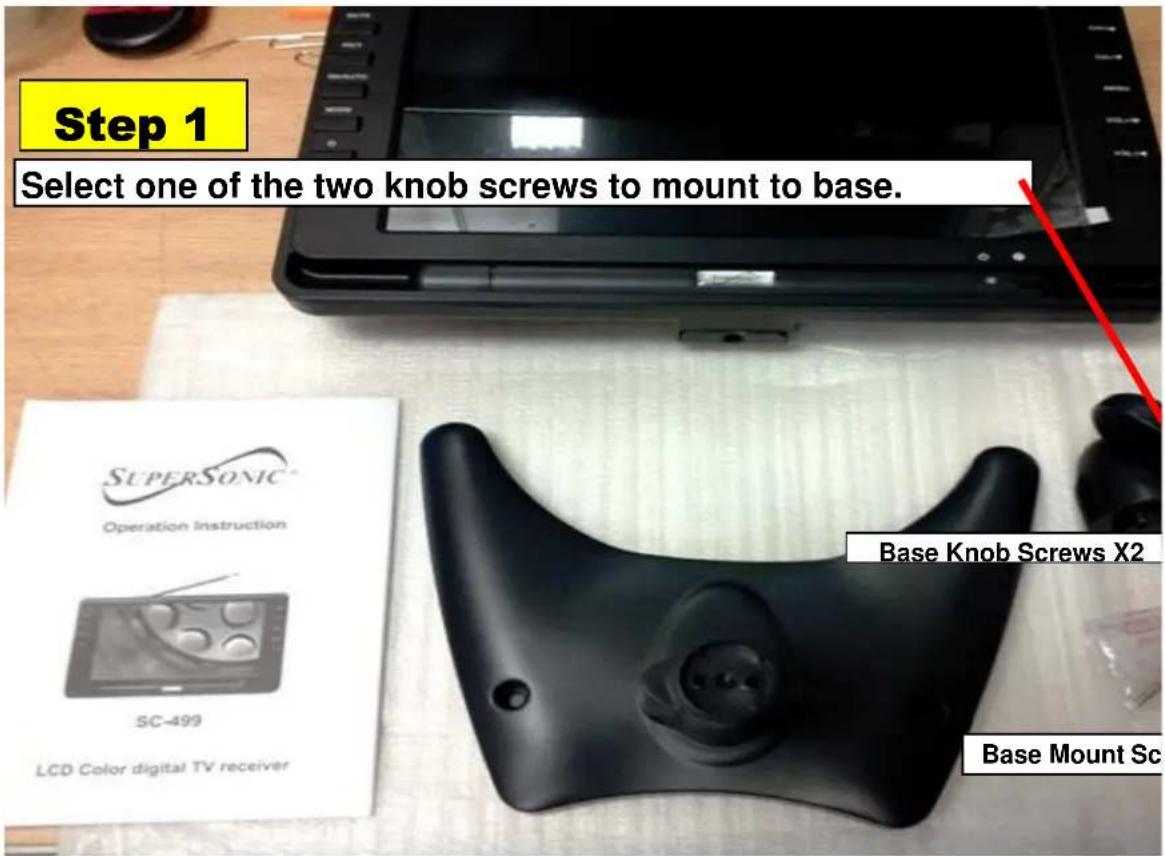
Step 1 Select one of the two knob screws to mount to base. Supersonic® Operation Instruction SC-499 LCD Color digital TV receiver Base Knob Screws X2 Base Mount Sc

Step 2 Turn Base Over to mount the Knob screw. Left Side Hole Use a r Phillip dr

Use a magnetic Phillips Screw driver to position screws on bottom b You will see two holes place first screw on the Left side hole.

Step 3

Make sure you don't let go of the magnetic Phillips Screw driver to put the first screw from the bottom base. Match hole into screw, then SCR in firmly.
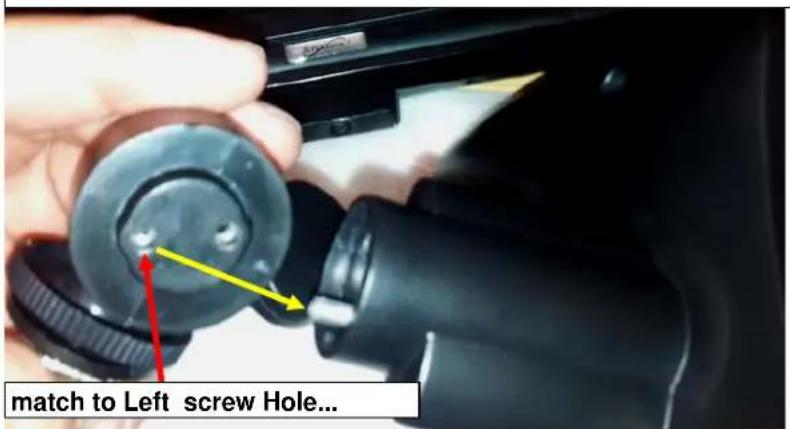
match to Left screw Hole...

Hold screw driver to position screw. Once you position screw with knob, start to screw in.

Step 4

Now that one side is firmly connected, select second knob screw and screw in firmly on the Right side hole.
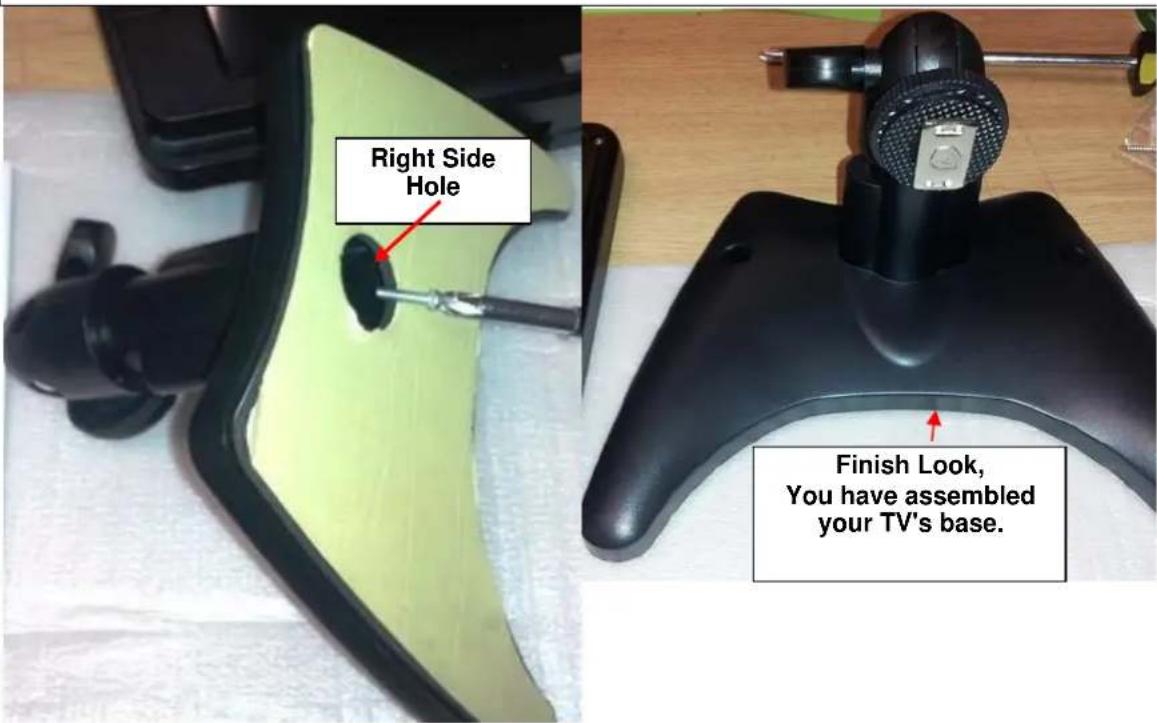
Right Side Hole Finish Look, You have assembled your TV's base.

Step 5

Mount SC-499TV with base.

TV Sliding base Adjust base Knob.

Slide in the silver Brace to adjust TV base hight.

Silver Slidin Brace.
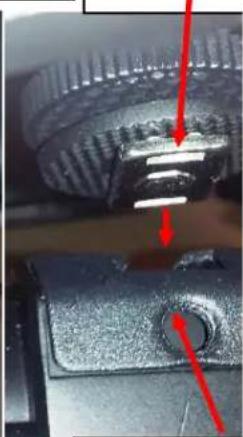
SuperSonic SC-499 - Step 5 - 2

natural_image Close-up of a mechanical component with red arrows pointing to features, no visible text or symbols

Backside of adjust Base s Brace.

Step 6

Twist knob Clockwise to lock in Base neck.

Final Step.

tep. 9" TTT LCD AT&T/NTIC TV Model-SC-459 POWER IN: DC1270mm 10A MADE IN: CHINA STN-SC-459 4011884 FC Turn clockwise to Lock in the Base Stand

TFT LDB COLOR ADJONIC MONITOR Base stand is now set..congratulations

crews X2

magnetic os Screw river

SuperSonic SC-499 - Final Step. - 4

ase.

position 'ew it

SuperSonic SC-499 - Final Step. - 5

natural_image Close-up of a mechanical component with yellow and black parts, partially covered by white material (no visible text or symbols)

SuperSonic SC-499 - Final Step. - 6

natural_image Close-up of a black shoe with a white plastic wrap, next to a green plastic bag (no visible text or symbols)

ng f TV, sliding

Manual assistant
Powered by Anthropic
Waiting for your message
Product information

Brand : SuperSonic

Model : SC-499

Category : Television
