
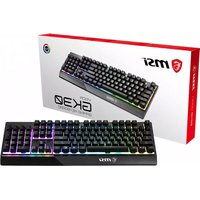
Vigor GK50 Ekute - Keyboard MSI - Free user manual and instructions
Find the device manual for free Vigor GK50 Ekute MSI in PDF.


Pick your language and provide your email: we'll send you a specifically translated version.
| Product Type | Gaming Keyboard |
| Brand | MSI |
| Model | Vigor GK50 Ekute |
| Switch Type | Mechanical |
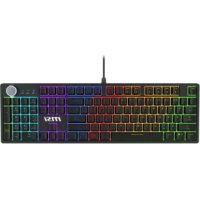
| Backlighting | RGB per-key |
| Connectivity | Wired USB 2.0 |
| Cable Length | 2.1 m |
| Dimensions (L x W x H) | 440 x 130 x 40 mm |
| Weight | 800 g |
| Key Rollover | Full N-key rollover |
| Anti-Ghosting | Yes |
| Wrist Rest | Detachable magnetic |
| Compatible Systems | Windows 10/11 |
| Software | MSI Center |
| Cleaning Instructions | Wipe with dry cloth, avoid liquids |
| Safety Warnings | Keep away from moisture, do not disassemble |
| Spare Parts Availability | Contact MSI support |
| Warranty | 2 years limited |
Frequently Asked Questions - Vigor GK50 Ekute MSI
How do I clean my MSI Vigor GK50 Ekute keyboard?
Use a soft dry cloth to wipe the surface. Do not use liquids or cleaners. For deep cleaning, keycaps can be removed and washed separately.
Can I customize the RGB lighting?
Yes, you can customize per-key RGB lighting using the MSI Center software. It offers multiple effects and color options.
What type of mechanical switches does it use?
The Vigor GK50 Ekute uses MSI Mechanical Switches (often Kailh Box White or similar) for a tactile and clicky feel.
Is the keyboard compatible with macOS?
It is primarily designed for Windows, but basic typing functions work on macOS. Some software features may not be available.
Does the keyboard have a wrist rest?
Yes, it includes a detachable magnetic wrist rest for added comfort during long gaming sessions.
What is the cable length?
The keyboard comes with a 2.1-meter braided USB cable for flexible placement.
How do I update the keyboard firmware?
Use the MSI Center software to check and install firmware updates. Connect the keyboard and open the device settings.
What is the warranty period?
MSI offers a 2-year limited warranty for the Vigor GK50 Ekute. Check the official website for terms.
Can I use the keyboard with a console?
It works with consoles that support USB keyboards, but RGB and software features may not be accessible.
How do I enable N-key rollover?
N-key rollover is enabled by default. It allows each keypress to be registered simultaneously without ghosting.
User questions about Vigor GK50 Ekute MSI
0 question about this device. Answer the ones you know or ask your own.
Ask a new question about this device
No questions yet. Be the first to ask one.
Download the instructions for your Keyboard in PDF format for free! Find your manual Vigor GK50 Ekute - MSI and take your electronic device back in hand. On this page are published all the documents necessary for the use of your device. Vigor GK50 Ekute by MSI.
USER MANUAL Vigor GK50 Ekute MSI
Manual assistant
Powered by Anthropic
Waiting for your message
Product information
Brand : MSI
Model : Vigor GK50 Ekute
Category : Keyboard