LV-7490 - Professional projector CANON - Free user manual and instructions
Find the device manual for free LV-7490 CANON in PDF.


| Product Type | Professional Projector |
| Brand | CANON |
| Model | LV-7490 |
| Dimensions (approx.) | 300 x 200 x 100 mm |
| Weight (approx.) | 4 kg |
| Power Supply | 100-240 V, 50/60 Hz |
| Power Consumption (max.) | 300 W |
| Native Resolution | XGA (1024 x 768) |
| Brightness (approx.) | 3000 ANSI lumens |
| Contrast Ratio (approx.) | 2000:1 |
| Lamp Life (Eco mode) | Up to 5000 hours |
| Video Inputs | 1x Computer1 (Analog/YPbPr/SCART), 1x Computer2 (Analog), 1x Composite Video, 1x S-Video |
| Main Features | RS-232C control, keystone correction, digital zoom, image modes (Dynamic, Standard, Real, Cinema, Blackboard, Colorboard), power management, PJ lock by PIN code, multilingual OSD display |
| Maintenance | Air filter cleaning, lamp replacement |
| Security | PIN code lock, deactivation of device keys or remote control |
| Spare Parts | Lamp, air filter (references not specified) |
| General Information | Technical manual available with detailed serial commands; compatible with firmware version 1.x |
Frequently Asked Questions - LV-7490 CANON
User questions about LV-7490 CANON
0 question about this device. Answer the ones you know or ask your own.
Ask a new question about this device
Download the instructions for your Professional projector in PDF format for free! Find your manual LV-7490 - CANON and take your electronic device back in hand. On this page are published all the documents necessary for the use of your device. LV-7490 by CANON.
USER MANUAL LV-7490 CANON
2.1 Transfer Specification 8
2.2 Connection 8
- Notes for communication 9
-
Name Definition 9
-
Functional Execution Command Table 10
5.1 Image Command Table 10
5.2 PC Adjust Control Command Table 10
5.3 Input Control Command Table 10
5.4 Screen Command Table 11
5.5 Lamp Command Table 11
5.6 Sound Command Table 11
5.7 Setting Command Table 12
5.8 Other Command Table 12
- Status Read Command Table 13
6.1 Image Status Read Command Table 13
6.2 PC Adjust Status Read Command Table 13
6.3 Video Status Read Command Table 13
6.4 Input Status Read Command Table 13
6.5 Screen Status Read Command Table 14
6.6 Lamp Status Read Command Table 14
6.7 Sound Status Read Command Table 14
6.8 Setting Status Read Command Table 15
6.9 Other Status Read Command 15
- Error Code Table 16
- Functional Execution Command 17
8.1 Format 17
8.2 Transfer Example 17
8.3 Operation Requirements 17
8.4 Image Command 18
8.4.1 CF_BRIGHT Command 18
8.4.2 CF_CONT Command 18
8.4.3 CF_COLOR Command 18
8.4.4 CF_TINT Command 18
8.4.5 CF_SHARP Command 19
8.4.6 CF_GAMMA Command 19
8.4.7 CF_WBAL - Command 20
8.4.8 CF_COLTEMP Command 20
8.4.9 CF_PROGV Command 20
8.4.10 CF_NZRED Command 21
8.4.11 CF_IMAGE Command 21
8.4.12 CF_COLBOARD Command 22
8.4.13 CF_IMAGEADJ Command 22
8.5 PC Adjust Control Command 23
8.5.1 CF_FSYNC Command 23
8.5.2 CF_TDOTS Command 23
8.5.3 CF_CLAMP Command 23
8.5.4 CF_H - POS Command 24
8.5.5 CF_V - POS Command 24
8.5.6 CF_DDOTS Command 24
8.5.7 CF_DLINE Command 25
8.5.8 CF_PCSTORE Command 25
8.5.9 CF_PCMODEFREE Command 25
8.6 Input Control Command 26
8.6.1 CF_INPUT Command 26
8.6.2 CF_SOURCECommand 26
8.6.3 CF_INPUT1 Command 27
8.6.4 CF_INPUT2 Command 27
8.6.5 CF_INPUT3 Command 27
8.6.6 CF_INPUT4 Command 27
8.6.7 CF_INPUT_%1_%2 Command 28
8.6.8 CF_SYSTEM Command 29
8.7 Screen Control Command 30
8.7.1 CFSCREEN Command 30
8.7.2 CF_DZCENT Command 30
8.7.3 CF_VSCALE Command 31
8.7.4 CF_VPOS Command 31
8.7.5 CF_HSCALE Command 32
8.7.6 CF_HPOS Command 32
8.7.7 CF_KEYSTONE Command 33
8.7.8 CF_KYSTNMODE Command 33
8.7.9 CF_CEIL Command 33
8.7.10 CF_REAR Command 33
8.8 Lamp Command 34
8.8.1 CF_LAMPMODE Command 34
8.8.2 CF_LAMPLIFECONTROL Command 34
8.9 Sound Command 35
8.9.1 CF_VOLUME Command 35
8.9.2 CF_MUTE Command 35
8.9.3 CF_MIC Command 35
8.9.4 CF_MICGAIN Command 35
8.9.5 CF_STANDBYMICOUT Command 36
8.10 Setting Command 37
8.10.1 CF_LANG Command 37
8.10.2 CF_MENUPOSITION Command 37
8.10.3 CF_INPUTSEARCH Command 38
8.10.4 CF_AUTOSETUPPCADJ Command 38
8.10.5 CF_AUTOSETUPKEYSTONE Command 38
8.10.6 CF_AUTOSETUP Command 38
8.10.7 CFBackingGND Command 39
8.10.8 CF_DISP Command 39
8.10.9 CF_LOGO Command 40
8.10.10 CF_TERMAL Command 40
8.10.11 CF_P-MANE Command 41
8.10.12 CF_P-MANETIME Command 41
8.10.13 CF_ON-STA Command 41
8.10.14 CF_STANDBYMODE Command 41
8.10.15 CF_PTIMEMODE Command 42
8.10.16 CF_PTIMER Command 42
8.10.17 CF_PTIME Command 42
8.10.18 CF_CCAPTIONDISP Command 42
8.10.19 CF_CCAPTIONCOLOR Command 43
8.10.20 CF_RCODE Command 43
8.10.21 CF_KEYDIS Command 43
8.10.22 CF_PJPINCODE Command 44
8.10.23 CF_FANMODE Command 44
8.10.24 CF_FANCONTROL Command 44
8.10.25 CF_DELAYCTRL Command 45
8.10.26 CF_FILTIMER Command 45
8.10.27 CF_FILH Command 45
8.10.28 CF_TTLPWRSAVE Command 45
8.10.29 CF_FDEFAULT Command 45
8.11 Other Command 46
8.11.1 CF_KEYENU Command 46
8.11.2 CF_MENU Command 46
8.11.3 CF_POWER Command 46
8.11.4 CF_FREZE Command 47
8.11.5 CF_VMUTE Command 47
9.Status Read Command. 48
9.1 Format 48
9.2 Transfer Example 48
9.3 Operation Condition 48
9.4 Image Status Read Command 49
9.4.1 CR_BRIGHT Command 49
9.4.2 CR_CONT Command 49
9.4.3 CR_COLOR Command 49
9.4.4 CR_TINT Command 49
CR 49
9.4.5 SHARP Command 49
9.4.6 CR_GAMMA Command 50
9.4.7 CR_WBAL - R Command 50
9.4.8 CR_WBAL-G Command 50
9.4.9 CR_WBAL-B Command 50
9.4.10 CR_COLTEMP Command 51
9.4.11 CR_NZRED Command 51
9.4.12 CR_PROGV Command 51
9.4.13 CR_IMAGE Command 51
9.4.14 CR_IMGGMD Command 52
9.4.15 CR_COLBOARD Command 52
9.5 PC Adjust Status Read Command 53
9.5.1 CR_FSYNC Command 53
9.5.2 CR_TDOTS Command 53
9.5.3 CR_CLAMP Command 53
9.5.4 CR_H - POS Command 53
9.5.5 CR_V - POS Command 53
9.5.6 CR_DDOTS Command 54
9.5.7 CR_DLINE Command 54
9.5.8 CR_PCSTORE Command 54
9.6 Video Status Read Command 55
9.6.1 CR_SERSYS Command 55
9.7 Input Status Read Command 56
9.7.1 CR_INPUT Command 56
9.7.2 CR_SOURCECommand 56
9.7.3 CR SRCINP1 Command 56
9.7.4 CR_SRCINP2 Command 56
9.7.5 CR_SRCINP3 Command 56
9.7.6 CR_SRCINP4 Command 57
9.7.7 CR_SYSTEM Command 57
9.7.8 CR_SYSLIST Command 58
9.7.9 CR_MODELIST Command 58
9.8 Screen Status Read Command 59
9.8.1 CRSCREEN Command 59
9.8.2 CR_VSCALE Command 59
9.8.3 CR_VPOS Command 59
9.8.4 CR_HSCALE Command 59
9.8.5 CR_HPOS Command 60
9.8.6 CR_KYSTNMODE Command 60
9.8.7 CR_CEIL Command 60
9.8.8 CR_REAR Command 60
9.9 Lamp Status Read Command 61
9.9.1 CR_LAMPREPL Command 61
9.9.2 CR_LAMPH Command 61
9.9.3 CR_LAMPCORRESPH Command 61
9.9.4 CR_LAMPMODE Command 61
9.9.5 CR_LAMPMS Command 62
9.9.6 CR_PROJH Command 62
9.9.7 CR_HMLAMP Command 62
9.9.8 CR_LAMPLIFECONTRL Command 62
9.10Sound Status Read Command 63
9.10.1 CR_VOLUME Command 63
9.10.2 CR_MUTE Command 63
9.10.3 CR_MIC Command 63
9.10.4 CR_MICGAIN Command 63
9.10.5 CR_STANDBYMICOUT Command 63
9.11 Setting Status Read Command 64
9.11.1 CR_LANG Command 64
9.11.2 CR_INPUTSEARCH Command 64
9.11.3 CR_AUTOSETUPPCADJ Command 64
9.11.4 CR_AUTOSETUPKEYSTONE Command 65
9.11.5 CR_BACKGND Command 65
9.11.6 CR_DISP Command 65
9.11.7 CR_LOGO Command 65
9.11.8 CR_TERMAL Command 65
9.11.9 CR_P-MANE Command 66
9.11.10 CR_P-MANETIME Command 66
9.11.11 CR_ON-STA Command 66
9.11.12 CR_STANDBYMODE Command 66
9.11.13 CR_PTIMEMODE Command 66
9.11.14 CR PTIMER Command 67
9.11.15 CR_PTIME Command 67
9.11.16 CR_CCAPTIONDISP Command 67
9.11.17 CR_CCAPTIONCOLOR Command 67
9.11.18 CR_RCODE Command 67
9.11.19 CR_SECURITY Command 68
9.11.20 CR_KEYDIS Command 68
9.11.21 CR_PJLOCKNOW Command 68
9.11.22 CR_PJLOCKMENU Command 68
9.11.23 CR_FANMODE Command 68
9.11.24 CR_FANCONTROL Command 69
9.11.25 CR_DELAYCTRL Command 69
9.11.26 CR_FILH Command 69
9.11.27 CR_FILREPL Command 69
9.11.28 CR_FILTIMER Command 69
9.11.29 CR_TTLPWRSAVEKWH Command 70
9.11.30 CR_TTLPWRSAVECO2 Command 70
9.12 Other Status Read Command 71
9.12.1 CR_STATUS Command 71
9.12.2 CR_SIGNAL Command 71
9.12.3 CR_VMUTE Command 71
9.12.4 CRFREEZE Command 71
9.12.5 CR_TEMPWARN Command 72
9.12.6 CR_TEMP Command 73
9.12.7 CR_TEMPFAIL Command 74
9.12.8 CR SerifALNO Command 74
1. Overview
1.1 This Functional Specification defines communication functions for LV-7490.
1.2 Compatible to Firmware Ver. 1.x of the projector.
1.3 Most commands can be used to control projector remotely from PC by RS-232C. Therefore, the commands are defined as Expand Serial Commands.
2. Serial Interface Specification
2.1 Transfer Specification
| Item | Specification |
| Synchronous System | Asynchronous |
| Transmission Speed | 9600 / 19200 |
| Data Length | 8 bit |
| Parity | N/A |
| Stop Bit | 1 |
| Flow Control | N/A |
Note1) Transmission Speed: initial setting value is 19200
Note2) Transmission Speed can be changed in service mode.
2.2 Connection
Dedicated serial cable must be used for a connection to a computer and a projector.
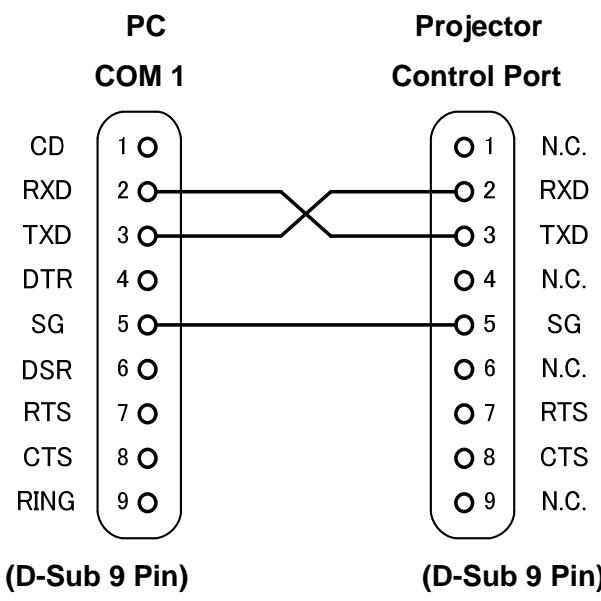
3. Notes for communication
- Expand Serial Command is defined as one command / one line that starts with "C" and ends with carriage return (0x0D)
-
There are two types of commands: Functional Execution Command and Status Read Command.
-
Example of Functional Execution Command:"CF_BRIGHT_032"[CR]
- Example of Status Read Command: "CR_RIGHT"[CR]
Note) _ means a space
- When it takes more than one second to receive one command, it is not executed.
When it takes more than one second to receive carriage return (0X0D) after the projector receives the first data "C", it clears the information of buffer.
- On command pipelining, wait for the interval of 100ms till sending next command after receiving a response.
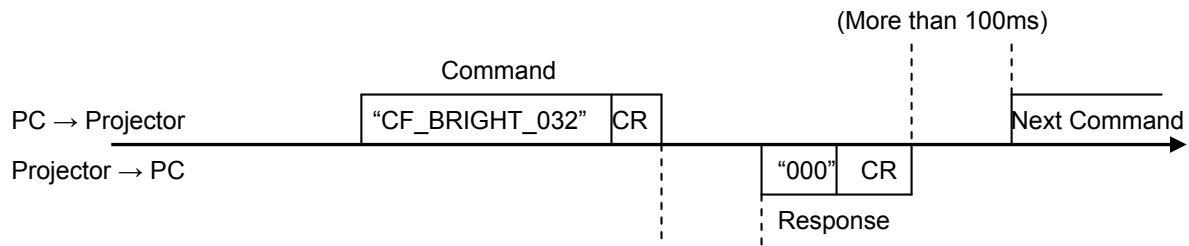
(A few ms - 5s)
When a computer sends next command before receiving a response, the projector may not operate properly, except when there is no response for more than 5 seconds.
- It takes about 5 seconds for internal initialization after plugging in AC power. During this time commands cannot be processed. Do not issue any command.
4. Name Definition
- Data from a controller to a projector is represented as COMMAND, and data from a projector to a controller for the incoming command is represented as RESPONSE.
- [CR]: Carriage Return Code
Command ends with cartridge return code.
Response also ends with carriage return code.
- : Space Code
A space Code is indicated by (_)
- %1:Parameter in Command
When there are several parameters, they are defined as %2, %3...
5.%%: Error code returned from a projector
Acceptable: "000".
Unacceptable: See [7. Error Code Table].
- %a : Parameter in Response Command
When there are several parameters, they are defined as %b, %c...
5. Functional Execution Command Table
5.1 Image Command Table
| Execute command | Item |
| CF_BRIGHT_%1[CR] | Set Brightness value |
| CF_CONT_%1[CR] | Set Contrast value |
| CF_COLOR_%1[CR] | Set Color value |
| CF_TINT_%1[CR] | Set Tint value |
| CF_SHARP_%1[CR] | Set Sharpness value |
| CF_GAMMA_%1[CR] | Set Gamma value |
| CF_WBAL-R_%1[CR] | Set White Balance Red value |
| CF_WBAL-G_%1[CR] | Set White Balance Green value |
| CF_WBAL-B_%1[CR] | Set White Balance Blue value |
| CF_COLTEMP_%1[CR] | Set Color Temp. value |
| CF_PROGV_%1[CR] | Set /Cancel Progressive Scan |
| CF_NZRED_%1[CR] | Set/Cancel Noise reduction |
| CF_IMAGE_%1[CR] | Set Image mode |
| CF_COLBOARD_%1[CR] | Set Colorboard mode |
| CF_IMAGEADJ_%1[CR] | Reset/Store for Image Adjustment |
5.2 PC Adjust Control Command Table
| Execute command | Item |
| CF_FSYNC_%1[CR] | Set Fine Sync value |
| CF_TDOTS_%1[CR] | Set Total Dots value |
| CF_CLAMP_%1[CR] | Set Clamp Value |
| CF_H-POS_%1[CR] | Set Horizontal Position value |
| CF_V-POS_%1[CR] | Set Vertical Position value |
| CF_DDOTS_%1[CR] | Set Display Dots value |
| CF_DLINE_%1[CR] | Set Display Line value |
| CF_PCSTORE_%1[CR] | Store current values of PC Adjust at Mode 1-10 |
| CF_PCMODEFREE_%1[CR] | Release registered values of Mode1-10 |
5.3 Input Control Command Table
| Execute command | Item |
| CF_INPUT_%1[CR] | Select Input |
| CF_SOURCE_%1[CR] | Select Input Source |
| CF_INPUT1_%1[CR] | Select computer-1 and set Input selected in %1 |
| CF_INPUT2_%1[CR] | Select computer-2 and set Input selected in %1 |
| CF_INPUT3_%1[CR] | Select Video and set Input selected in %1 |
| CF_INPUT4_%1[CR] | Select S-video and set Input selected in %1 |
| CF_INPUT_%1_%2[CR] | Select Input and Source |
| CF_SYSTEM_%1[CR] | Select System |
5.4 Screen Command Table
| Execute command | Item |
| CFSCREEN_%1[CR] | Select Aspect mode (screen size) |
| CF_DZCENT_%1[CR] | Cancel Digital Zoom mode |
| CF_VSCALE_%1[CR] | Set value of Vertical scale |
| CF_VPOS_%1[CR] | Set value of Vertical position |
| CF_HSCALE_%1[CR] | Set value of Horizontal scale |
| CF_HPOS_%1[CR] | Set value of Horizontal position |
| CF_KEYSTONE_%1[CR] | Set Keystone |
| CF_KYSTNMODE_%1[CR] | Set Keystone Store mode |
| CF_CEIL_%1[CR] | Set Ceiling function |
| CF_REAR_%1[CR] | Set Rear function |
5.5 Lamp Command Table
| Execute command | Item |
| CF_LAMPMODE_%1[CR] | Select Lamp mode |
| CF_LAMPLIFECONTROL_%1[CR] | Select Lamp life mode |
5.6 Sound Command Table
| Execute command | Item |
| CF_VOLUME_%1[CR] | Set Volume value |
| CF_MUTE_%1[CR] | Control ON/OFF of Sound Mute |
| CF_MIC_%1[CR] | Control ON/OFF of MIC |
| CF_MICGAIN_%1[CR] | Control value of MIC GAIN |
| CF_STANDBYMICOUT_%1[CR] | Control ON/OFF of STANDBY MIC OUT |
5.7 Setting Command Table
| Execute command | Item |
| CF_LANG_%1[CR] | Select language for OSD |
| CF_MENUPOSITION_%1[CR] | Move menu position. |
| CF_INPUTSEARCH_%1[CR] | Set up Auto input function |
| CF_AUTOSETUPPCADJ_%1[CR] | Set Auto PC in Auto Setup |
| CF_AUTOSETUPKEYSTONE_%1[CR] | Set Auto Keystone in Auto Setup |
| CF_AUTOSETUP_%1[CR] | Execute Auto Setup |
| CFBackGND_%1[CR] | Set screen mode for the case of no signal |
| CF_DISP_%1[CR] | Set Display function |
| CF_LOGO_%1_%2[CR] | Set Logo function |
| CF_TERMAL_%1[CR] | Set Terminal function |
| CF_P-MANE_%1[CR] | Set Power management mode function |
| CF_P-MANETIME_%1[CR] | Set Power management mode time |
| CF_ON-STA_%1[CR] | Set Direct power on Start function |
| CF_STANDBYMODE_%1[CR] | Set Standby Mode |
| CF_PTIMEMODE_%1[CR] | Select P-timer mode |
| CF_PTIMER_%1[CR] | Execute P-timer |
| CF_PTIME_%1[CR] | Set Countdown timer for P-timer |
| CF_CCAPTIONDISP_%1[CR] | Set channel of Closed caption |
| CF_CCAPTIONCOLOR_%1[CR] | Set color of Closed caption |
| CF_RCODE_%1[CR] | Select Remote Control Reception Code |
| CF_KEYDIS_%1[CR] | Disable RC/Projectile keys |
| CF_PJPINCODE_%1[CR] | Input PIN code to release PJ Lock |
| CF_FANMODE_%1[CR] | Select Fan mode |
| CF_FANCONTROL_%1[CR] | Select Fan control mode |
| CF_DELAYCTRL_%1[CR] | Set Video delay control |
| CF_FILTIMER_%1[CR] | Set time when Filter warning OSD is displayed |
| CF_FILH_%1[CR] | Reset Filter used time |
| CF_TTLPWRSAVE_%1[CR] | Reset the value of Total power savings |
| CF_FDEFAULT_%1[CR] | Set the value to Factory Default |
5.8 Other Command Table
| Execute command | Item |
| CF_KEYEMU_%1[CR] | Behave the same as corresponding key of projector top panel |
| CF_menu_%1[CR] | Switch ON/OFF of each Menu. |
| CF_POWER_%1[CR] | Switch ON/OFF of Power. |
| CFFREEZE_%1[CR] | Set Freeze function. |
| CF_VMUTE_%1[CR] | Set Blank function. |
6. Status Read Command Table
6.1 Image Status Read Command Table
| Status read command | Item |
| CR_BRIGHT[CR] | Get Brightness value |
| CR_CONT[CR] | Get Contrast value |
| CR_COLOR[CR] | Get Color value |
| CR_TINT[CR] | Get Tint value |
| CR_SHARP[CR] | Get Sharpness value |
| CR GAMMA[CR] | Get Gamma value |
| CR_WBAL-R[CR] | White Balance Red value |
| CR_WBAL-G[CR] | White Balance Green value |
| CR_WBAL-B[CR] | White Balance Blue value |
| CR_COLTEMP[CR] | Get setting value of Color temperature |
| CR_NZRED[CR] | Get setting status of Noise reduction |
| CR_PROGV[CR] | Get setting status of Progressive scan |
| CR_IMAGE[CR] | Get Selected Image status |
| CR_IMGGMD[CR] | Get setting value of Image Gamma |
| CR_COLBOARD[CR] | Get Selected Colorboard mode |
6.2 PC Adjust Status Read Command Table
| Status read command | Item |
| CR_FSYNC[CR] | Get setting value of Fine Sync |
| CR_TDOTS[CR] | Get setting value of Total Dots |
| CR_CLAMP[CR] | Get setting value of Clamp |
| CR_H-POS[CR] | Get setting value of Horizontal Position |
| CR_V-POS[CR] | Get setting value of Vertical Position |
| CR_DDOTS[CR] | Get setting value of Display Dots |
| CR_DLINE[CR] | Get setting value of Display Line |
| CR_PCSTORE[CR] | Get Free or Stored status for PC Adj. mode1-10 |
6.3 Video Status Read Command Table
| Status read command | Item |
| CR_SERSYS[CR] | Get selected current signal. When in Auto mode, it returns a result by Auto detect. |
6.4 Input Status Read Command Table
| Status read command | Item |
| CR_INPUT[CR] | Get selected Input No. |
| CR_SOURCE[CR] | Get selected source of currently selected Input |
| CR_SRCINP1[CR] | Get selected source of Computer 1 |
| CR_SRCINP2[CR] | Get selected source of Computer 2 |
| CR_SRCINP3[CR] | Get selected source of Video |
| CR_SRCINP4[CR] | Get selected source of S-video |
| CR_SYSTEM[CR] | Get selected system status in Input mode |
| CR_SYSLIST[CR] | Get selectable System table |
| CR_MODELIST[CR] | Get selectable Mode table |
6.5 Screen Status Read Command Table
| Status read command | Item |
| CRSCREEN[CR] | Get selected Aspect mode (screen size) |
| CR_VSCALE[CR] | Get setting status of Vertical Scale |
| CR_VPOS[CR] | Get setting status of Vertical Position |
| CR_HSCALE[CR] | Get setting status of Horizontal Scale |
| CR_HPOS[CR] | Get setting status of Horizontal Position |
| CR_KYSTNMODE[CR] | Get setting status of Keystone Store mode |
| CR_CEIL [CR] | Get setting status of Ceiling |
| CR_REAR[CR] | Get setting status of Rear |
6.6 Lamp Status Read Command Table
| Status read command | Item |
| CR_LAMPREPL[CR] | Get the information for Lamp replacement time |
| CR_LAMPH[CR] | Get lamp total running time |
| CR_LAMPCORRESPH[CR] | Get corresponding lamp use time |
| CR_LAMPMODE[CR] | Get Lamp Mode status |
| CR_LAMPSTS[CR] | Get lamp lighting status |
| CR_PROJH[CR] | Get projector total running time |
| CR_HMLAMP[CR] | Get lamp number |
| CR_LAMPLIFECONTROL[CR] | Get setting status of Lamp life mode |
6.7 Sound Status Read Command Table
| Status read command | Item |
| CR_volume[CR] | Get Volume value |
| CR_MUTE[CR] | Get Sound Mute setting status |
| CR_MIC[CR] | Get setting status of MIC |
| CR_MICGAIN[CR] | Get value of MIC GAIN |
| CR_STANDBYMICOUT[CR] | Get setting status of STANDBY MIC OUT |
6.8 Setting Status Read Command Table
| Status read command | Item |
| CRLANG[CR] | Get selected language |
| CR_INPUTSEARCH[CR] | Get setting status of Auto input |
| CR_AUTOSETUPPCADJ | Get setting status of Auto PC in Auto setup |
| CR_AUTOSETUPKEYSTONE | Get setting status of Keystone in Auto setup |
| CRBackGND[CR] | Get setting status screen mode for the case of no signal |
| CR_DISP[CR] | Get setting status of Display |
| CR_LOGO[CR] | Get setting status of Logo |
| CR_TERMAL[CR] | Get setting status of Terminal |
| CR_P-MANE[CR] | Get setting status of Power management mode |
| CR_P-MANETIME[CR] | Get setting time for Power management mode |
| CR_ON-STA[CR] | Get setting status of Direct power on |
| CR_STANDBYMODE[CR] | Get setting status of Standby Mode |
| CR_PTIMEMODE[CR] | Get selected mode of P-timer |
| CRPTIMER[CR] | Get operation status of P-timer |
| CRPTIME[CR] | Get setting status of Timer for P-timer |
| CR_CCAPTIONDISP[CR] | Get setting status of channel of Closed caption |
| CR_CCAPTIONCOLOR[CR] | Get setting status of color of Closed caption |
| CRRCODE[CR] | Get selected Remote Control Code |
| CRSECURITY[CR] | Get setting status of Security |
| CRKEYDIS[CR] | Get RC/KEY disability status |
| CRPJLOCKNOW[CR] | Get if PJ Lock is actually in operation |
| CRPJLOCKMENU[CR] | Get setting status of PJ Lock on Menu |
| CRFANMODE[CR] | Get selected Fan mode |
| CRFANCONTROL[CR] | Get selected Fan Control Mode |
| CRDELAYCTRL[CR] | Get setting status of Video delay control |
| CRFILH[CR] | Get Filter used time |
| CRFILREPL[CR] | Get the information for Filter replacement time |
| CRFILTIMER[CR] | Get time when Filter warning OSD is displayed |
| CR_TTLPWRSAVEKWH[CR] | Get current value (kWh) of Total power savings |
| CR_TTLPWRSAVECO2[CR] | Get current value (kg/CO2) of Total power savings |
6.9 Other Status Read Command
| Status read command | Item |
| CR_STATUS[CR] | Get setting status of Projector behavior |
| CR_SIGNAL[CR] | Get Signal Status if there is a signal or not |
| CR_VMUTE[CR] | Get setting status of Blank |
| CRFREEZE[CR] | Get setting status of Freeze |
| CR_TEMPWARN[CR] | Get if temperature is close to abnormal temperature |
| CR_TEMP[CR] | Get current temperature status |
| CR_TEMPFAIL[CR] | Get temperature when sensors detect abnormal temperature |
| CR_SERIALNO[CR] | Get value of SERIAL NO. |
- Error Code Table
| Error Code | Contents |
| ? | -When the received data cannot be decoded -Parameter determination error (digit number error, including invalid value, etc.) |
| 101 | The function is not available in the selected Mode |
| 102 | Selected value is out of range (Not reflected) |
| 103 | Command mismatched to Hardware (command for Optional function which is not installed) |
| 201 | When reached upper or lower limit of increasing or decreasing data |
| 301 | Command cannot be executed during capturing display. Resend the command after a while |
| 302 | Command cannot be executed during Auto PC operation. Resend the command after a while |
| 402 | Command cannot be executed during PIN code operation. Resend the command after a while. |
Note) These error codes are applied to Expand Command, not to Basic Command.
8. Functional Execution Command
8.1 Format
- PC issues commands in format as below:
Pattern1:“CF_COMMAND”[CR]
Pattern2:“CF_COMMAND”%1 [CR]
CF_ : Header
COMMAND : Character line
%1 : Parameter (Character line)
:: Space (To separate COMMAND and Parameter)
- The projector decodes the received command and when it is ready to receive the next command, it returns the response.
"000" [CR] : (0x06, 0xD) When receiving Functional Execution Command
"nnn" [CR]: Except "000", when it is unable to execute command by any specific reason.
See Error Code Table for details
- When the received data cannot be decoded, the projector returns "?" [CR]
8.2 Transfer Example
When setting projector's total dots to 1344 by Expand Serial Command
$$ \mathrm {P C} \rightarrow \mathrm {P J}: ^ {\prime \prime} \mathrm {C F} _ {-} \text {T D O T S} _ {-} 1 3 4 4 ^ {\prime \prime} [ \mathrm {C R} ] $$
$$ P C \leftarrow P J: ^ {\prime \prime} 0 0 0 ^ {\prime \prime} [ C R ] - - - - - - - - - - - - - - - - - - - - - - - - - - - - - - - - - - - - - - - - - - - - - - - - - - - - - - - - - - - - - - - - - - - - - - - - - - - - - - - - - - - - - - - - - - - - - - - - - - - - \text {A c c e p t a b l e} $$
8.3 Operation Requirements
1) Functional Execution Command is limited when the projector status is as below.
However, Status Read Command is effective even under these conditions.
| Projector Status | Available Functional Execution Command |
| In Standby | C00: POWER ON |
| Countdown in process | C00: POWER ON(Terminates Countdown)C01: POWER OFFC02: POWER OFF(Terminates Countdown) |
| Cooling down in process | N/A |
| Cooling down in process due to Abnormal Temperature | N/A |
| Abnormal Temperature | N/A |
| Power Failure(For 60 seconds after Power Failure occurred) | N/A |
| Power Save / Cooling down in process | N/A |
| Power Save in process | C00: POWER ONC01: POWER OFF |
Note:) When the projector receives the other command in this above status, it returns error code to show the status.
When the projector receives the following functional execution commands, OSD menu is closed except for pop-up menu
2) When Eco mode is selected in Standby mode of Setting menu and projector is in Standby, Functional Execution Commands are invalid.
8.4 Image Command
8.4.1 CF_BRIGHT Command
| Command | "CF_BRIGHT_%1"[CR] | |
| %1 | "000~063" ----- Directly select Brightness setting value "UP" ----- Current Brightness setting value + 1 "DN" ----- Current Brightness setting value - 1 | |
| Details | Set Brightness value of user control Projector does not save the value set with this command so that it resets when projector turning into Standby status or ALL is OFF. (The value is held in Suspend mode.) This command is available in normal Power ON status. | |
| Response | Acceptable | "000"[CR] |
| Unacceptable | "Error Code"[CR] | |
8.4.2 CF_CONT Command
| Command | “CF_CONT_%1”[CR] | |
| %1 | “000~063”--------Directly select Contrast setting value “UP”--------Current Contrast setting value + 1 “DN”--------Current Contrast setting value - 1 | |
| Details | Set Contrast value of user control Projector does not save the value set with this command so that it resets when projector turning into Standby status or ALL is OFF. (The value is held in Suspend mode.) This command is available in normal Power ON status. | |
| Response | Acceptable | “000”[CR] |
| Unacceptable | “Error Code”[CR] | |
8.4.3 CF_COLOR Command
| Command | “CF_COLOR_%1”[CR] | |
| %1 | “000~063”--------Directly select Color setting value “UP”--------Current Color setting value + 1 “DN”--------Current Color setting value - 1 | |
| Details | Set Color value of user control Projector does not save the value set with this command so that it resets when projector turning into Standby status or ALL is OFF. (The value is held in Suspend mode.) This command is available in normal Power ON status. | |
| Response | Acceptable | “000”[CR] |
| Unacceptable | “Error Code”[CR] | |
8.4.4 CF_TINT Command
| Command | “CF_TINT_%1”[CR] | |
| %1 | “000~063”--------Directly select Tint setting value “UP”--------Current Tint setting value + 1 “DN”--------Current Tint setting value - 1 | |
| Details | Set Tint value of user control Projector does not save the value set with this command so that it resets when projector turning into Standby status or ALL is OFF. (The value is held in Suspend mode.) This command is available in normal Power ON status. | |
| Response | Acceptable | “000”[CR] |
| Unacceptable | “Error Code”[CR] | |
8.4.5 CF_SHARP Command
| Command | “CF_SHARP_%1”[CR] | |
| %1 | “000~015”--------Directly select Sharpness setting value “UP”--------Current Sharpness setting value + 1 “DN”--------Current Sharpness setting value - 1 | |
| Details | Set Sharpness value of user control Projector does not save the value set with this command so that it resets when projector turning into Standby status or ALL is OFF. (The value is held in Suspend mode.) This command is available in normal Power ON status. | |
| Response | Acceptable | “000”[CR] |
| Unacceptable | “Error Code”[CR] | |
8.4.6 CF_GAMMA Command
| Command | “CF_GAMMA_%1”[CR] | |
| %1 | “000~015”--------Directly set Gamma setting value “UP”--------Current Gamma setting value + 1 “DN”--------Current Gamma setting value - 1 | |
| Details | Set Gamma value of user control Projector does not save the value set with this command so that it resets when projector turning into Standby status or ALL is OFF. (The value is held in Suspend mode.) This command is available in normal Power ON status. | |
| Response | Acceptable | “000”[CR] |
| Unacceptable | “Error Code”[CR] | |
8.4.7 CF_WBAL - Command
| Command | “CF_WBAL-%1_%2”[CR] | |
| %1 | “R”——— Red “G”——— Green “B”——— Blue | |
| %2 | “000~063” —— Directly select Color value specified by White Balance%1 “UP” ——— Current Color value set by White Balance%1 + 1 “DN” ——— Current Color value set by White Balance%1 - 1 | |
| Details | Set Color value set by White Balance%1 of user control Projection does not save the value set with this command so that it resets when projector turning into Standby status or ALL is OFF. (The value is held in Suspend mode.) This command is available in normal Power ON status. | |
| Response | Acceptable | “000”[CR] |
| Unacceptable | “Error Code”[CR] | |
8.4.8 CF_COLTEMP Command
| Command | “CF_COLTEMP_%1”[CR] | |
| %1 | “000”---- Xlow “001”---- Low “002”---- Mid “003”---- High | |
| Details | Set Color Temperature. (Available only in the normal Power ON status) The value set by this command will not be saved to the projector. Therefore, when turning into Standby-mode or ALL is OFF, the value returns to original setting. (The value is held in Suspend mode.) This command is available in normal Power ON status. | |
| Response | Acceptable | “000”[CR] |
| Unacceptable | “Error Code”[CR] | |
8.4.9 CF_PROGV Command
| Command | “CF_PROGV_%1”[CR] | |
| %1 | “FILM”-------- Select Progressive Mode FILM “L1”-------- Select Progressive Mode L1 “L2”-------- Select Progressive Mode L2 “OFF”-------- Cancel Progressive scan “UP”-------- The same operation as pressing Up key or Left key “DN”-------- The same operation as pressing Down key or Right key | |
| Details | Set / cancel Progressive scan Projector does not save the value set with this command so that it resets when projector turning into Standby status or ALL is OFF. (The value is held in Suspend mode.) This command is available in normal Power ON status. | |
| Response | Acceptable | “000”[CR] |
| Unacceptable | “Error Code”[CR] | |
8.4.10 CF_NZRED Command
| Command | “CF_NZRED_%1”[CR] | |
| %1 | “OFF”-------- Cancel Noise Reduction “L1”-------- Noise Reduction for moving image “L2”-------- Noise Reduction for still image “UP”-------- The same operation as pressing Up key or Left key “DN”-------- The same operation as pressing Down key or Right key | |
| Details | Noise Reduction based on frame correlation Select L1 or L2 depending on motion detection L2 is more effective in reducing noise than L1, however, L2 can have a blur in moving image Projector does not save the value set with this command so that it resets when projector turning into Standby status or ALL is OFF. (The value is held in Suspend mode.) This command is available in normal Power ON status. | |
| Response | Acceptable | “000”[CR] |
| Unacceptable | “Error Code”[CR] | |
8.4.11 CF_IMAGE Command
| Command | “CF_IMAGE_%1”[CR] | |
| %1 | “DYNAMIC”---- Presentation(Fixed value to enable projection with a sharp, powerful picture tone) “STAND”---- Standard (Image adjust value is set to factory default) “REAL”---- High contrast (Fixed value to display graphic image with natural tone) “CINEMA”---- Cinema (Fixed value to focus on tone reproduction for movie) “BLACKBOARD”- Blackboard (Fixed value to project image onto green-colored blackboard) “COLORBOARD”- Colorboard(Fixed value to project image onto colored board) “CUSTOM1”---- User1 (the value set and stored by a user) “CUSTOM2”---- User2 (the value set and stored by a user) “CUSTOM3”---- User3 (the value set and stored by a user) “CUSTOM4”---- User4 (the value set and stored by a user) | |
| Details | Select Image Mode Parameter “CUSTOM1” to “CUSTOM4” is the same as “User1” to “User4” displayed when selecting Image on OSD menu. The value set by this command is stored in EEPROM and its setting is effective even after ALL is OFF. This command is available in normal Power ON status. | |
| Response | Acceptable | “000”[CR] |
| Unacceptable | “Error Code”[CR] | |
8.4.12 CF_COLBOARD Command
| Command | “CF_COLBOARD_%1”[CR] | |
| %1 | “RED”--------Select Red “BLUE”--------Select Blue “YELLOW”--------Select Yellow “GREEN”--------Select Green | |
| Details | Select Color of Colorboard mode. Image mode is automatically switched to Colorboard mode by receiving this command. The value set by this command is stored in EEPROM and its setting is effective even after ALL is OFF. This command is available in normal Power ON status. | |
| Response | Acceptable | “000”[CR] |
| Unacceptable | “Error Code”[CR] | |
8.4.13 CF_IMAGEADJ Command
| Command | “CF_IMAGEADJ_%1”[CR] | |
| %1 | “RST”-------- Reset Image adjustment “STR1”---- Store current Image adjustment to User 1 “STR2”---- Store current Image adjustment to User 2 “STR3”---- Store current Image adjustment to User 3 “STR4”---- Store current Image adjustment to User 4 | |
| Details | Reset / store Image adjustment. Parameter “STR1” to “STR4” is the same as “User1” to “User4” displayed when adjusting Image on OSD menu and selecting “Store” The value stored to “User 1-4” is saved and its setting is effective even after ALL is OFF. This command is available in normal Power ON status. | |
| Response | Acceptable | “000”[CR] |
| Unacceptable | “Error Code”[CR] | |
8.5 PC Adjust Control Command
8.5.1 CF_FSYNC Command
| Command | “CF_FSYNC_%1”[CR] | |
| %1 | “0000~0031”--------Directly select Fine Sync setting value “UP”--------Current Fine Sync setting value + 1 “DN”--------Current Fine Sync setting value - 1 | |
| Details | Set Fine Sync value of PC signal Projector does not save the value set with this command so that it resets when projector turning into Standby status or ALL is OFF. This command is available in normal Power ON status. | |
| Response | Acceptable | “000”[CR] |
| Unacceptable | “Error Code”[CR] | |
8.5.2 CF_TDOTS Command
| Command | “CF_TDOTS_%1”[CR] | |
| %1 | “mmm~nnnn” --- Directly select Total Dots setting value “mmm” shows minimum value, it is current Display Dots Horizontal value + Position value. “nnnn” shows maximum value, which is not over 140MHz. “UP”———————————— Current Total Dots setting value + 1 “DN”———————————— Current Total Dots setting value - 1 | |
| Details | Set Total Dots of PC signal Projector does not save the value set with this command so that it resets when projector turning into Standby status or ALL is OFF. This command is available in normal Power ON status. | |
| Response | Acceptable | “000”[CR] |
| Unacceptable | “Error Code”[CR] | |
8.5.3 CF_CLAMP Command
| Command | “CF_CLAMP_%1”[CR] | |
| %1 | “mmm~nnnn”---- Directly select Clamp setting value “mmm” shows minimum value, fixed-value “0001”. “nnnn” shows maximum value: it depends on input signal. “UP”--------Current Clamp setting value + 1 “DN”--------Current Clamp setting value - 1 | |
| Details | Set Clamp value of PC signal Projector does not save the value set with this command so that it resets when projector turning into Standby status or ALL is OFF. This command is available in normal Power ON status. | |
| Response | Acceptable | “000”[CR] |
| Unacceptable | “Error Code”[CR] | |
8.5.4 CF_H - POS Command
| Command | “CF_H-POS_%1”[CR] | |
| %1 | “0000~nnnn” --- Directly select Horizontal Position setting value “nnnn” shows maximum value, it is current Total Dots value - Display Dots value “UP” .............................. Current Horizontal Position setting value + 1 “DN” .............................. Current Horizontal Position setting value - 1 | |
| Details | Set Horizontal Position value of PC signal. Projector does not save the value set with this command so that it resets when projector turning into Standby status or ALL is OFF. This command is available in normal Power ON status. | |
| Response | Acceptable | “000”[CR] |
| Unacceptable | “Error Code”[CR] | |
8.5.5 CF_V - POS Command
| Command | “CF_V-POS_%1”[CR] | |
| %1 | “0000~nnnn” --- Directly select Vertical Position setting value “nnnn” shows maximum value, it is current Total Line value - Display Line value “UP” ........................... Current Vertical Position setting value + 1 “DN” ........................... Current Vertical Position setting value - 1 | |
| Details | Set Vertical Position value of PC signal Projector does not save the value set with this command so that it resets when projector turning into Standby status or ALL is OFF. This command is available in normal Power ON status. | |
| Response | Acceptable | “000”[CR] |
| Unacceptable | “Error Code”[CR] | |
8.5.6 CF_DDOTS Command
| Command | “CF_DDOTS_%1”[CR] | |
| %1 | “0256”~”nnnn”--- Directly select Display Dots setting value “nnnn” shows maximum value, it is current Total Dots value - Horizontal Position value Even number is available and when odd number is set, it is rounded out. “UP”-------- Current Display Dots setting value + 2 “DN”-------- Current Display Dots setting value - 2 | |
| Details | Set Display Dots value of PC signal Projector does not save the value set with this command so that it resets when projector turning into Standby status or ALL is OFF. This command is available in normal Power ON status. | |
| Response | Acceptable | “000”[CR] |
| Unacceptable | “Error Code”[CR] | |
8.5.7 CF_DLINE Command
| Command | “CF_DLINE_%1”[CR] | |
| %1 | “0100”~“nnnn” --- Directly select Display Line setting value “nnnn” shows maximum value, it is current Total Line value – Vertical Position value “UP”————————————— Current Display Line setting value + 1 “DN”————————————— Current Display Line setting value – 1 | |
| Details | Set Display Line value of PC signal Projector does not save the value set with this command so that it resets when projector turning into Standby status or ALL is OFF. This command is available in normal Power ON status. | |
| Response | Acceptable | “000”[CR] |
| Unacceptable | “Error Code”[CR] | |
8.5.8 CF_PSTORE Command
| Command | “CF_PSTORE_%1”[CR] | |
| %1 | “MODE1”---- Store current PC Adjust status to Mode1 “MODE2”---- Store current PC Adjust status to Mode2 “MODE3”---- Store current PC Adjust status to Mode3 “MODE4”---- Store current PC Adjust status to Mode4 “MODE5”---- Store current PC Adjust status to Mode5 “MODE6”---- Store current PC Adjust status to Mode6 “MODE7”---- Store current PC Adjust status to Mode7 “MODE8”---- Store current PC Adjust status to Mode8 “MODE9”---- Store current PC Adjust status to Mode9 “MODE10”--- Store current PC Adjust status to Mode10 | |
| Details | Store current PC Adjust status (each parameter status such as Total dots) to Mode1~Mode10. This command operates the same way as storing to Mode1-Mode10 in PC Adjust MENU. This command is available in normal Power ON status. | |
| Response | Acceptable | “000”[CR] |
| Unacceptable | “Error Code”[CR] | |
8.5.9 CF_PCMODEFREE Command
| Command | “CF_PCMODEFREE_%1”[CR] | |
| %1 | “MODE1”---- Set Mode1 to Free status “MODE2”---- Set Mode2 to Free status “MODE3”---- Set Mode3 to Free status “MODE4”---- Set Mode4 to Free status “MODE5”---- Set Mode5 to Free status “MODE6”---- Set Mode6 to Free status “MODE7”---- Set Mode7 to Free status “MODE8”---- Set Mode8 to Free status “MODE9”---- Set Mode9 to Free status “MODE10”---- Set Mode10 to Free status | |
| Details | Delete the registered data in Mode1-Mode10 and turns it to Free status. This command operates the same as turning Mode1-Mode10 to Free in PC Adjust Menu. This command is available in normal Power ON status. | |
| Response | Acceptable | “000”[CR] |
| Unacceptable | “Error Code”[CR] | |
8.6 Input Control Command
8.6.1 CF_INPUT Command
| Command | “CF_INPUT_%1”[CR] | |
| %1 | “CONPUTER1”---- Select Computer1 Input “COMPUTER2”---- Select Computer2 Input “VIDEO”-------- Select Video Input “S-VIDEO”-------- Select S-video Input “UP”-------- The same operation as pressing Up key or Left key “DN”-------- The same operation as pressing Down key or Right key | |
| Details | Select Input The same operation as “INPUT” button of the projector and Remote Control. This command is available in normal Power ON status. Projector returns “101” by selecting Computer 2 while Monitor out is selected in Terminal menu. | |
| Response | Acceptable | “000”[CR] |
| Unacceptable | “Error Code”[CR] | |
8.6.2 CF_SOURCE Command
| Command | “CF_SOURCE_%1”[CR] | |
| %1 | Input is Computer 1 | “ANALOG”-------- Select Analog Input “YPBPR”-------- Select Component Input “SCART”-------- Select Scart Input “UP”-------- The same operation as pressing Up key or Left key “DN”-------- The same operation as pressing Down key or Right key |
| Input is Computer 2 | “ANALOG”-------- Select Analog Input “UP” “DN” Although no operation is executed, projector accepts parameter “UP”/“DN” | |
| Input is Video | “VIDEO”-------- Select Composite Video Input “UP” “DN” Although no operation is executed, projector accepts parameter “UP”/“DN” | |
| Input is S-video | “S-VIDEO”-------- Select S-video Input “UP” “DN” Although no operation is executed, projector accepts parameter “UP”/“DN” | |
| Details | Select Source of currently selected Input When Input specified by %1 is inappropriate for selected Input, the projector returns “101” and the command is not executed. This command is available in normal Power ON status. | |
| Response | Acceptable | “000”[CR] |
| Unacceptable | “Error Code”[CR] | |
8.6.3 CF_INPUT1 Command
| Command | “CF_INPUT1_%1_[CR] | |
| %1 | “ANALOG”-------- Select Analog RGB Input “YPBPR”-------- Select Component “S-VIDEO”-------- Select S-Video Input “SCART”-------- Select SCART | |
| Details | Select Computer 1 input and source specified by %1 at the same time. This command is available in normal Power ON status. | |
| Response | Acceptable | “000”[CR] |
| Unacceptable | “Error Code”[CR] | |
8.6.4 CF_INPUT2 Command
| Command | “CF_INPUT2_%1_[CR] | |
| %1 | “ANALOG”-------- Select Analog RGB Input | |
| Details | Select Computer 2 input and source specified by %1 at the same time. This command is available in normal Power ON status. Projector returns “101” by selecting Computer 2 while Monitor out is selected in Terminal menu. | |
| Response | Acceptable | “000”[CR] |
| Unacceptable | “Error Code”[CR] | |
8.6.5 CF_INPUT3 Command
| Command | “CF_INPUT3_%1_[CR] | |
| %1 | “VIDEO”--------Select Composite video Input | |
| Details | Select Video input. This command is available in normal Power ON status. | |
| Response | Acceptable | “000”[CR] |
| Unacceptable | “Error Code”[CR] | |
8.6.6 CF_INPUT4 Command
| Command | “CF_INPUT4_%1_[CR] | |
| %1 | “S-VIDEO”--------Select S-video Input | |
| Details | Select S-video input. This command is available in normal Power ON status. | |
| Response | Acceptable | “000”[CR] |
| Unacceptable | “Error Code”[CR] | |
8.6.7 CF_INPUT_%1_%2 Command
| Command | “CF_INPUT_%1_%2”[CR] | |
| %1 | “COMPUTER1” ---- Select Computer1 Input “COMPUTER2” ---- Select Computer2 Input “VIDEO” ---- Select Analog Input “S-VIDEO” ---- Select S-video Input | |
| %2 | When %1 is COMPUTER1 “ANALOG” ----Select Analog RGB Input “YPBPR” ----Select Component “S-VIDEO” ----Select S-Video Input “SCART” ----Select SCART When %1 is COMPUTER2 “ANALOG” ----Select Analog RGB Input When %1 is VIDEO “VIDEO” ----Select Video Input When %1 is S-VIDEO “S-VIDEO” ----Select S-video Input | |
| Details | Select Input specified by %1 and also Source specified by %2 at once This command is available in normal Power ON status. Projector returns “101” by selecting Computer 2 while Monitor out is selected in Terminal menu. | |
| Response | Acceptable | “000”[CR] |
| Unacceptable | “Error Code”[CR] | |
8.6.8 CF_SYSTEM Command
| Command | “CF_SYSTEM_%1”[CR] | |
| %1 | Input is Computer | “VGA1”-------- Select VGA1 : “XGA1”-------- Select XGA1 : “WXGA3”-------- Select WXGA3 “1080I”-------- Select 1080I “1035I”-------- Select 1035I “720P”-------- Select 720P “575P”-------- Select 575P “480P”-------- Select 480P “575I”-------- Select 575I “480I”-------- Select 480I “MODE1”~“MODE10”-------- Select Mode 1~Mode 10 |
| Input is Video | “AUTO”-------- Select System “Auto” “NTSC”-------- Select NTSC “NTSC443”-------- Select NTSC4.43 “PAL”-------- Select PAL “SECAM”-------- Select SECAM “PAL-M”-------- Select PAL-M “PAL-N”-------- Select PAL-N “1080I”-------- Select 1080i “1035I”-------- Select 1035i “720P”-------- Select 720p “575P”-------- Select 575p “480P”-------- Select 480p “575I”-------- Select 575i “480I”-------- Select 480i | |
| Details | Select System of currently selected Input When Input specified by %1 is inappropriate for selected Input, the projector returns “101”[CR] and the command is not executed This command is available in normal Power ON status. Note1) “NTSC” / “NTSC4.43” / “PAL” / “SECAM” / “PAL-M” / “PAL-N” is available only when Input is VIDEO / S-VIDEO Note2) “1080I” / “1035I” / “720P” / “575P” / “480P” / “575I” / “480I” is available only when Input is Y / Pb/Cb / Pr/Cr | |
| Response | Acceptable | “000”[CR] |
| Unacceptable | “Error Code”[CR] | |
8.7 Screen Control Command
8.7.1 CFSCREEN Command
| Command | “CFSCREEN %1”[CR] | |
| %1 | Input is Computer | “NORMAL”-------- Select Normal mode “FULL”-------- Select Full screen mode “WIDE”-------- Select 16:9 mode “ZOOM”-------- Select Zoom mode “TRUE”-------- Select True mode “CUSTOM”-------- Select Custom mode “DZOOM_UP”-------- Expand image size with Digital Zoom “DZOOM_DN”-------- Reduce image size with Digital Zoom “UP”-------- The same operation as pressing Up key or Left key “DN”-------- The same operation as pressing Down key or Right key |
| Input is Video | “NORMAL”-------- Select Normal mode “FULL”-------- Select Full screen mode “WIDE”-------- Select 16:9 mode “ZOOM”-------- Select Zoom mode “CUSTOM”-------- Select Custom mode “UP”-------- The same operation as pressing Up key or Left key “DN”-------- The same operation as pressing Down key or Right key | |
| AV / PC Common | “RST”-------- Reset screen adjustment | |
| Details | Select size on screen (in Aspect menu).When Input specified by %1 is inappropriate for selected Input, the projector returns “101” [CR] and the command is not executed. “DZOOM UP” and “DZOOM DN” start effecting from the first command. This command is available in normal Power ON status. Note) When Input is computer and AV sorts signals (480i / 575i...etc) are entered, the signal recognized as Video Input. | |
| Response | Acceptable | “000”[CR] |
| Unacceptable | “Error Code”[CR] | |
8.7.2 CF_DZCENT Command
| Command | “CF_DZCENT_%1”[CR] | |
| %1 | “CENT”---- Cancel Digital Zoom (CENT: “CENTER”) | |
| Details | Cancel Digital Zoom When image is expanded or shrunk, reset its value. This command is available in normal Power ON status and when Input is Computer. | |
| Response | Acceptable | “000”[CR] |
| Unacceptable | “Error Code”[CR] | |
8.7.3 CF_VSCALE Command
| Command | “CF_VSCALE_%1”[CR] | |
| %1 | “032”--------+32 “031”--------+31 : “002”--------+2 “001”--------+1 “000”--------+0 “-01”---------1 “-02”---------2 : “-31”---------31 “-32”---------32 “UP”--------Vertical Scale setting value + 1 “DN”--------Vertical Scale setting value - 1 | |
| Details | Set Vertical Scale This command is available in normal Power ON status. Note1) When Aspect setting is not in Custom mode, projector changes image mode into Custom by receiving this command. Note2) When there is no signal detected, projector returns 101 and the command does not execute. | |
| Response | Acceptable | “000”[CR] |
| Unacceptable | “Error Code”[CR] | |
8.7.4 CF_VPOS Command
| Command | “CF_VPOS_%1”[CR] | |
| %1 | “015”--------+15 “014”--------+14 : “002”--------+2 “001”--------+1 “000”--------+0 “-01”---------1 “-02”---------2 : “-14”---------14 “-15”---------15 “UP”--------Vertical Position setting value + 1 “DN”--------Vertical Position setting value - 1 | |
| Details | Set Vertical Position This command is available in normal Power ON status. Note1) When Aspect setting is not in Custom mode, projector changes image mode into Custom by receiving this command. Note2) When there is no signal detected, projector returns 101 and the command does not execute.. | |
| Response | Acceptable | “000”[CR] |
| Unacceptable | “Error Code”[CR] | |
8.7.5 CF_HSCALE Command
| Command | “CF_HSCALE_%1”[CR] | |
| %1 | “032”--------+32 “031”--------+31 : “002”--------+2 “001”--------+1 “000”--------+0 “-01”---------1 “-02”---------2 : “-31”---------31 “-32”---------32 “UP”--------Horizontal Scale setting value + 1 “DN”--------Horizontal Scale setting value - 1 | |
| Details | Set Horizontal Scale This command is available in normal Power ON status. Note1) When Aspect setting is not in Custom mode, projector changes image mode into Custom by receiving this command. Note2) When there is no signal detected, projector returns 101 and the command does not execute. | |
| Response | Acceptable | “000”[CR] |
| Unacceptable | “Error Code”[CR] | |
8.7.6 CF_HPOS Command
| Command | “CF_HPOS_%1”[CR] | |
| %1 | “015”--------+15 “014”--------+14 : “002”--------+2 “001”--------+1 “000”--------+0 “-01”---------1 “-02”---------2 : “-14”---------14 “-15”---------15 “UP”--------Horizontal Position setting value + 1 “DN”--------Horizontal Position setting value - 1 | |
| Details | Set Horizontal Position This command is available in normal Power ON status. Note1) When Aspect setting is not in Custom mode, projector changes image mode into Custom by receiving this command. Note2) When there is no signal detected, projector returns 101 and the command does not execute. | |
| Response | Acceptable | “000”[CR] |
| Unacceptable | “Error Code”[CR] | |
8.7.7 CF_KEYSTONE Command
| Command | “CF_KEYSTONE_%1”[CR] | |
| %1 | “UP”-------- Correct Keystone distortion to reduce upper part of image “FUP”-------- Correct Keystone distortion to reduce upper part by 2steps “DN”-------- Correct Keystone distortion to reduce lower part of image “FDN”-------- Correct Keystone distortion to reduce lower part by 2steps “RST”-------- Reset Keystone | |
| Details | Change Keystone distortion correction This command is available in normal Power ON status. | |
| Response | Acceptable | “000”[CR] |
| Unacceptable | “Error Code”[CR] “201”[CR] ----When reaching the Keystone correction limit or reaching 1 step to correction limit and “FDN”/“FUP” is received. (The command is not executed) | |
8.7.8 CF_KYSTNMODE Command
| Command | “CF_KYSTNMODE_%1”[CR] | |
| %1 | “STR”-------- Set Keystone store mode to Store “RST”-------- Set Keystone store mode to Reset | |
| Details | Set Keystone store mode This command is available in normal Power ON status. | |
| Response | Acceptable | “000”[CR] |
| Unacceptable | “Error Code”[CR] | |
8.7.9 CF_CEIL Command
| Command | “CF_CEIL_%1”[CR] | |
| %1 | “ON”--------Set Ceiling to ON “OFF”--------Set Ceiling to OFF | |
| Details | Set/Cancel Ceiling setting. The value set by this command is stored in EEPROM and its setting is effective even after ALL is OFF This command is available in normal Power ON status. | |
| Response | Acceptable | “000”[CR] |
| Unacceptable | “Error Code”[CR] | |
8.7.10 CF_REAR Command
| Command | “CF_REAR_%1”[CR] | |
| %1 | “ON”--------Set Rear to ON “OFF”--------Set Rear to OFF | |
| Details | Set/Cancel Rear setting. When Rear is ON, image is left/right reversed. The status set by this command is stored in EEPROM and its setting is effective after ALL is OFF This command is available in normal Power ON status. | |
| Response | Acceptable | “000”[CR] |
| Unacceptable | “Error Code”[CR] | |
8.8 Lamp Command
8.8.1 CF_LAMPMODE Command
| Command | “CF_LAMPMODE_%1”[CR] | |
| %1 | “AUTO”-------- Set lamp to Auto status “NORMAL”-------- Set lamp to Normal mode status “ECO1”-------- Set lamp to Eco1 mode status “ECO2”-------- Set lamp to Eco2 mode status “UP”-------- The same operation as pressing Up key or Left key “DN”-------- The same operation as pressing Down key or Right key | |
| Details | Select Lamp Mode The value set by this command is stored in EEPROM and its setting is effective even after ALL is OFF. This command is available in normal Power ON status. | |
| Response | Acceptable | “000”[CR] |
| Unacceptable | “Error Code”[CR] | |
8.8.2 CF_LAMPLIFECONTRL Command
| Command | “CF_LAMPLIFECONTRL_%1”[CR] | |
| %1 | “MODE1”-------- Set Lamp life control to Mode 1 “MODE2”-------- Set Lamp life control to Mode 2 | |
| Details | Select Lamp life control function The value set by this command is stored in EEPROM and its setting is effective even after ALL is OFF. This command is available in normal Power ON status. | |
| Response | Acceptable | “000”[CR] |
| Unacceptable | “Error Code”[CR] | |
8.9 Sound Command
8.9.1 CF_VOLUME Command
| Command | “CF_VOLUME_%1”[CR] | |
| %1 | “000-063”--------Directly select Volume setting value “UP”--------Current Volume setting value +1 “DN”--------Current Volume setting value -1 | |
| Details | Control Volume value The same operation of Volume Up/Down as projector and RC, and directly select Volume setting value. When setting Volume value, the Sound Mute ON status is canceled just like RC operation. The value set by this command is stored in Projector. This command is available in normal Power ON status. | |
| Response | Acceptable | “000”[CR] |
| Unacceptable | “Error Code”[CR] | |
8.9.2 CF_MUTE Command
| Command | “CF_MUTE_%1”[CR] | |
| %1 | “ON”--------Set Sound Mute to ON “OFF”--------Set Sound Mute to OFF | |
| Details | Control Sound Mute ON/OFF This command is available in normal Power ON status. | |
| Response | Acceptable | “000”[CR] |
| Unacceptable | “Error Code”[CR] | |
8.9.3 CF_MIC Command
| Command | “CF_MIC_%1” [CR] | |
| %1 | “ON”--------Set MIC to ON “OFF”--------Set MIC to OFF | |
| Details | Control MIC ON/OFF This command is available in normal Power ON status. | |
| Response | Acceptable | “000”[CR] |
| Unacceptable | “Error Code”[CR] | |
8.9.4 CF_MICGAIN Command
| Command | “CF_MICGAIN_%1”[CR] | |
| %1 | “000-063”--------Directly select MIC gain setting value “UP”--------Current MIC GAIN setting value +1 “DN”--------Current MIC GAIN setting value -1 | |
| Details | Control MIC GAIN value When setting MIC GAIN value just like operation by menu, the Sound Mute ON status is canceled. The value set by this command is stored in Projector. This command is available in normal Power ON status. | |
| Response | Acceptable | “000”[CR] |
| Unacceptable | “Error Code”[CR] | |
8.9.5 CF_STANDBYMICOUT Command
| Command | “CF_STANDBYMICOUT_%1”[CR] | |
| %1 | “ON”--------Set STANDBY MIC OUT to ON “OFF”--------Set STANDBY MIC OUT to OFF | |
| Details | Control STANDBY MIC OUT ON/OFF This command is available in normal Power ON status. | |
| Response | Acceptable | “000”[CR] |
| Unacceptable | “Error Code”[CR] | |
8.10 Setting Command
8.10.1 CF_LANG Command
| Command | “CF_LANG_%1”[CR] | |
| %1 | “ENG”-------- Select English “DEU”-------- Select German “FRA”-------- Select French “ITA”-------- Select Italian “ESP”-------- Select Spanish “POR”-------- Select Portuguese “NED”-------- Select Dutch “SVE”-------- Select Swedish “RUS”-------- Select Russian “CHI”-------- Select Chinese “KOR”-------- Select Korean “JPN”-------- Select Japanese “FIN”-------- Select Finnish “POL”-------- Select Polish “HUN”-------- Select Hungarian “ROM”-------- Select Romanian “THA”-------- Select Thai “TUR”-------- Select Turkish “KAZ”-------- Select Kazakh “VIE”-------- Select Vietnamese “CZE”-------- Select Czech | |
| Details | Set language for OSD The language set by this command is stored in EEPROM and its setting is effective after ALL is OFF. This command is available in normal Power ON status. | |
| Response | Acceptable | “000”[CR] |
| Unacceptable | “Error Code”[CR] | |
8.10.2 CF_MENUPOSITION Command
| Command | “CF_MENUPOSITION_%1”[CR] | |
| %1 | “SET” Move the menu display to next position | |
| Details | Change the menu positionThis command is available in normal Power ON status.The language set by this command is stored in EEPROM and its setting is effective after ALL is OFF.Position: center - bottom left-bottom right - top left - top right - center-...Menu display appears with the first command when menu display is not shown on the screen | |
| Response | Acceptable | “000”[CR] |
| Unacceptable | “Error Code”[CR] | |
8.10.3 CF_INPUTSEARCH Command
| Command | “CF_INPUTSEARCH_%1”[CR] | |
| %1 | “OFF”-------- Set Auto input operation to OFF “ON1”-------- Set Auto input operation to On1 “ON2”-------- Set Auto input operation to On2 | |
| Details | Set Auto input operation mode. The status set by this command is stored in EEPROM and its setting is effective after ALL is OFF This command is available in normal Power ON status. Note) It is unable to set Keystone, Auto PC and Auto input to OFF at once. e.g. If projector receives Auto input OFF command while Auto PC and Keystone are OFF, it returns error code “101”. | |
| Response | Acceptable | “000”[CR] |
| Unacceptable | “Error Code”[CR] | |
8.10.4 CF_AUTOSETUPPCADJ Command
| Command | “CF_AUTOSETUPPCADJ_%1”[CR] | |
| %1 | “ON”-------- Set Auto PC function to ON “OFF”-------- Set Auto PC function to OFF | |
| Details | Set/Cancel Auto PC function This command is available in normal Power ON status. Note) It is unable to set Keystone, Auto PC and Auto input to OFF at once. e.g. If projector receives Auto PC OFF command while Keystone and Auto input are OFF, it returns error code “101”. | |
| Response | Acceptable | “000”[CR] |
| Unacceptable | “Error Code”[CR] | |
8.10.5 CF_AUTOSETUPKEYSTONE Command
| Command | “CF_AUTOSETUPKEYSTONE_%1”[CR] | |
| %1 | “AUTO”-------- Set Auto Keystone function to Auto “MANUAL”-------- Set Auto Keystone function to Manual “OFF”-------- Set Auto Keystone function to OFF | |
| Details | Set Keystone function of Auto setup This command is available in normal Power ON status. Note) It is unable to set Keystone, Auto PC and Auto input to OFF at once. e.g. If projector receives Keystone OFF command while Auto PC and Auto input are OFF, it returns error code “101”. | |
| Response | Acceptable | “000”[CR] |
| Unacceptable | “Error Code”[CR] | |
8.10.6 CF_AUTOSETUP Command
| Command | “CF_AUTOSETUP_%1”[CR] | |
| %1 | “START”-------- Execute Auto Setup | |
| Details | Execute Auto Setup Note) CF commands does not execute while Auto setup is in process. If the command is sent during this, projector returns error code “302” | |
| Response | Acceptable | “000”[CR] |
| Unacceptable | “Error Code”[CR] | |
8.10.7 CF_BackGND Command
| Command | “CFBackGND %1” [CR] | |
| %1 | “BLUE”-------- Select Blue Back “USER”-------- Select User “BLACK”-------- Select Black Back “UP”-------- The same operation as pressing Up key or Left key “DN”-------- The same operation as pressing Down key or Right key | |
| Details | Set Screen status for no signal.(Available only in the normal Power ON status) The status set by this command is stored in EEPROM and the setting remains even after the power is turned to ALL OFF status. *When %1="USER" is received, error code “101” is returned, in the case of Capture non-practice. | |
| Response | Acceptable | “000”[CR] |
| Unacceptable | “Error Code”[CR] | |
8.10.8 CF_DISP Command
| Command | “CF_DISP_%1”[CR] | |
| %1 | “ON”-------- Select Display “OFF”-------- Cancel Display “CNTDWNOFF”-------- Count down OFF “UP”-------- The same operation as pressing Up key or Left key “DN”-------- The same operation as pressing Down key or Right key | |
| Details | Set / Cancel Display The value set by this command is stored in EEPROM and its setting is effective even after ALL is OFF. This command is available in normal Power ON status. | |
| Response | Acceptable | “000”[CR] |
| Unacceptable | “Error Code”[CR] | |
8.10.9 CF_LOGO Command
| Command | “CF_LOGO_%1_%2”[CR] | |
| %1 | “0000”-“9999”-------- Set LOGO PIN CODE directly | |
| %2 | “OFF”-------- Disable Logo function “DFLT”-------- Display Default Logo “USER”-------- Display Captured Logo “UP”-------- The same operation as pressing Up key or Left key “DN”-------- The same operation as pressing Down key or Right key | |
| Details | Set / Cancel Logo The value set by this command is stored in EEPROM and its setting is effective even after ALL is OFF This command is available in normal Power ON status. %1--- Set LOGO PIN CODE - When LOGO LOCK is in operation PIN CODE is correct-------- Command is valid (Acceptable) PIN CODE is incorrect-------- Command is invalid (Error Code “102”) PIN CODE is out of %1 range-------- Command is invalid (Error Code “? “) -When LOGO LOCK is not in operation PIN CODE is within %1 range-------- Command is valid PIN CODE is out of %1 range-------- Command is invalid (Error Code “? “) Note) Receiving correct LOGO PIN CODE while LOGO LOCK is in operation enables to change LOGO setting, but it does not release LOGO LOCK. (LOGO LOCK continues.) | |
| Projectile returns Error Code “101” by receiving USER in %2 when capture has not operated. | ||
| Response | Acceptable | “000”[CR] |
| Unacceptable | “Error Code”[CR] | |
8.10.10 CF_TERMAL Command
| Command | “CF_TERMAL_%1”[CR] | |
| %1 | “COMPUTER”--------Set Input mode “MONITOR”--------Set Monitor Out mode | |
| Details | Set Terminal setup. This command is available in normal Power ON status. Terminal means Computer 2 in this model. | |
| Response | Acceptable | “000”[CR] |
| Unacceptable | “Error Code”[CR] When Input is Computer 2, the projector returns “101” and the command is not executed. | |
8.10.11 CF_P-MANE Command
| Command | “CF_P-MANE_%1”[CR] | |
| %1 | “OFF”--------Set Power management mode to OFF “READY”--------Set Power management mode to Standby “SHUTDOWN”--------Set Power management mode to Exit mode “UP”--------The same operation as pressing Up key or Left key “DN”--------The same operation as pressing Down key or Right key | |
| Details | Set/Cancel Power management mode The status set by this command is stored in EEPROM and its setting is effective after ALL is OFF This command is available in normal Power ON status. | |
| Response | Acceptable | “000”[CR] |
| Unacceptable | “Error Code”[CR] | |
8.10.12 CF_P-MANETIME Command
| Command | “CF_P-MANETIME_%1”[CR] | |
| % 1 | “01” ~ “30” Directly select setting time by the minute “UP” Plus one minute (01 → 02 → … → 30 → 01) “DN” Minus one minute(30 → 29 → … → 01 → 30) | |
| Details | Set Power management mode time The status set by this command is stored in EEPROM and its setting is effective after ALL is OFF This command is available in normal Power ON status. | |
| Response | Acceptable | “000”[CR] |
| Unacceptable | “Error Code”[CR] | |
8.10.13 CF_ON-STA Command
| Command | “CF_ON-STA_%1”[CR] | |
| %1 | “ON”--------Set Direct power on active “OFF”--------Set Direct power on inactive “UP”--------The same operation as pressing Up key or Left key “DN”--------The same operation as pressing Down key or Right key | |
| Details | Set/Cancel Direct power on The status set by this command is stored in EEPROM and its setting is effective after ALL is OFF This command is available in normal Power ON status. | |
| Response | Acceptable | “000”[CR] |
| Unacceptable | “Error Code”[CR] | |
8.10.14CF_STANDBYMODE Command
| Command | “CF_STANDBYMODE_%1”[CR] | |
| %1 | “ECO”--------Less standby electricity “NORMAL”--------Normal standby electricity | |
| Details | Switch Standby Mode setting. This command is available in normal Power ON status. | |
| Response | Acceptable | “000”[CR] |
| Unacceptable | “Error Code”[CR] | |
8.10.15 CF_PTIMEMODE Command
| Command | “CF_PTIMEMODE_%1”[CR] | |
| %1 | “COUNTUP”--------Select Count up “COUNTDN”--------Select Countdown | |
| Details | Set operation mode of P-timer. The status set by this command is stored in EEPROM and its setting is effective after ALL is OFF This command is available in normal Power ON status. | |
| Response | Acceptable | “000”[CR] |
| Unacceptable | “Error Code”[CR] | |
8.10.16 CF_PTIMER Command
| Command | “CF_PTOMER_%1”[CR] | |
| %1 | “START”-------- Execute P-timer “STOP”-------- Pause P-timer “RESTART”-------- Restart P-timer “RST”-------- Reset P-timer “EXIT”-------- Terminate P-timer function | |
| Details | Control P-timer. This command is available in normal Power ON status. | |
| Response | Acceptable | “000”[CR] |
| Unacceptable | “Error Code”[CR] | |
8.10.17 CF_PTIME Command
| Command | “CF_PTIME_%1”[CR] | |
| %1 | “001” ~ “180” ----Directly specify the timer by minutes. | |
| Details | Set Countdown timer for P-timer function. The status set by this command is stored in EEPROM and its setting is effective after ALL is OFF This command is available in normal Power ON status. | |
| Response | Acceptable | “000”[CR] |
| Unacceptable | “Error Code”[CR] | |
8.10.18CF_CCAPTIONDISP Command
| Command | “CF_CCAPTIONDISP_%1”[CR] | |
| %1 | “OFF”-------- Select Off “CC1”-------- Select CC1 “CC2”-------- Select CC2 “CC3”-------- Select CC3 “CC4”-------- Select CC4 | |
| Details | Select channel of Closed caption. The status set with this command is stored in EEPROM and its setting is effective even after ALL is OFF. This command is available in normal Power ON status. Closed caption is available under conditions below; Entered signal is appropriate (Video, NTSC signal of S-video) and System is fixed to NTSC. | |
| Response | Acceptable | “000”[CR] |
| Unacceptable | “Error Code”[CR] | |
8.10.19CF_CCAPTIONCOLOR Command
| Command | “CF_CCAPTIONCOLOR_%1”[CR] | |
| %1 | “COLOR”-------- Select Color “WHITE”-------- Select White | |
| Details | Select color of Closed caption. The status set with this command is stored in EEPROM and its setting is effective even after ALL is OFF. This command is available in normal Power ON status. Closed caption is available under conditions below; Entered signal is appropriate (Video, NTSC signal of S-video) and System is fixed to NTSC. | |
| Response | Acceptable | “000”[CR] |
| Unacceptable | “Error Code”[CR] | |
8.10.20 CF_RCODE Command
| Command | “CF_RCODE_%1”[CR] | |
| %1 | "001"-------- Select Code1 "002"-------- Select Code2 "UP"-------- The same operation as pressing Up key or Left key "DN"-------- The same operation as pressing Down key or Right key | |
| Details | Select Code of Remote Control The status set by this command is stored in EEPROM and its setting is effective after ALL is OFF This command is available in normal Power ON status. | |
| Response | Acceptable | "000"[CR] |
| Unacceptable | "Error Code"[CR] | |
8.10.21 CF_KEYDIS Command
| Command | “CF_KEYDIS_%1”[CR] | |
| %1 | “NONE”-------- RC & Projector keys are valid (All are valid) “RC”-------- RC keys are invalid “KEY”-------- Projector keys are invalid | |
| Details | Disable RC/Projector keys This command is available in normal Power ON status. | |
| Response | Acceptable | “000”[CR] |
| Unacceptable | “Error Code”[CR] | |
8.10.22 CF_PJPINCODE Command
| Command | “CF_PJPINCODE_%1”[CR] | |
| %1 | “0000” – “9999” -----Set PJ PIN CODE directly | |
| Details | Set PJ PIN CODE to release PJ LOCK.PIN CODE cannot be changed by this command.-When PJ LOCK is in operationPIN CODE is correct ---- Command is valid (Acceptable)PIN CODE is incorrect ---- Command is invalid(Error Code"102")PIN CODE is out of %1 range ---- Command is invalid (Error Code “? “)-When PJ LOCK is not in operationPIN CODE is within %1 range ---- Command is valid (Acceptable)PIN CODE is out of %1 range ---- Command is invalid (Error Code “? “)This command is valid during a dialog “PJ PIN CODE” is displayed after Power On and Count down.Also when PJ LOCK setting is “On1”, it is necessary to transmit this commandevery time lamp turns on. | |
| Response | Acceptable | “000”[CR] |
| Unacceptable | “Error Code”[CR] | |
8.10.23 CF_FANMODE Command
| Command | “CF_FANMODE_%1”[CR] | |
| %1 | “L1”——— Set Fan Mode to L1 “L2”——— Set Fan Mode to L2 | |
| Details | Switch Fan Mode When L1 is selected, fan noise after POWER OFF is louder. When L2 is selected, fan noise after POWER OFF becomes quiet, however, fan rotates longer than L1. The status set by this command is stored in EEPROM and its setting is effective even after ALL is OFF. This command is available in normal Power ON status. | |
| Response | Acceptable | “000”[CR] |
| Unacceptable | “Error Code”[CR] | |
8.10.24 CF_FANCONTROL Command
| Command | “CF_FANCONTROL_%1”[CR] | |
| %1 | “OFF”--------Set Fan control to Off “ON1”--------Set Fan control to On1 “ON2”--------Set Fan control to On2 | |
| Details | Set Fan control setting. The status set by this command is stored in EEPROM and its setting is effective even after ALL is OFF. This command is available in normal Power ON status. | |
| Response | Acceptable | “000”[CR] |
| Unacceptable | “Error Code”[CR] | |
8.10.25 CF DELAYCTRL Command
| Command | “CF_DELAYCTRL_%1”[CR] | |
| %1 | “ON”--------Set Video delay control On “OFF”--------Set Video delay control Off | |
| Details | Set Video delay control. The status set by this command is stored in EEPROM and its setting is effective even after ALL is OFF. This command is available in normal Power ON status. | |
| Response | Acceptable | “000”[CR] |
| Unacceptable | “Error Code”[CR] | |
8.10.26 CF_FILTIMER Command
| Command | “CF_FILTIMER_%1”[CR] | |
| %1 | “1000”-------- Set 1000 hours “2000”-------- Set 2000 hours “3000”-------- Set 3000 hours “4000”-------- Set 4000 hours “5000”-------- Set 5000 hours “6000”-------- Set 6000 hours “OFF”-------- No warning display “UP”-------- The same operation as pressing Up key or Left key “DN”-------- The same operation as pressing Down key or Right key | |
| Details | Set timer of Filter replacement /clean-up warning display. | |
| Response | Acceptable | “000”[CR] |
| Unacceptable | “Error Code”[CR] | |
8.10.27CF_FILH Command
| Command | “CF_FILH_%1”[CR] | |
| %1 | “RST”--------Reset Filter used time | |
| Details | Reset filter used time | |
| Response | Acceptable | “000”[CR] |
| Unacceptable | “Error Code”[CR] | |
8.10.28CF_TTLPWRSAVE Command
| Command | “CF_TTLPWRSAVE_%1”[CR] | |
| %1 | “RST”--------Reset Total power savings | |
| Details | Reset the value of Total power savings | |
| Response | Acceptable | “000”[CR] |
| Unacceptable | “Error Code”[CR] | |
8.10.29CF_FDEFAULTCommand
| Command | “CF_FDEFAULT_%1”[CR] | |
| %1 | “RST” | |
| Details | Set the value to Factory Default This command is available in normal Power ON status. | |
| Response | Acceptable | “000”[CR] |
| Unacceptable | “Error Code”[CR] | |
8.11 Other Command
8.11.1 CF_KEYENU Command
| Command | “CF_KEYENU_%1”[CR] | |
| %1 | “RIGHT”-------- Shift Pointer on OSD Menu to right “LEFT”-------- Shift Pointer on OSD Menu to left “UP”-------- Shift Pointer on OSD Menu to right “DN”-------- Shift Pointer on OSD Menu to right “SELECT”-------- Behave the same as OK key “AUTOPC”-------- Execute Auto PC | |
| Details | This command behave the same as corresponding keys of Remote Control / Projector Auto PC keeps operating even though projector receives this command again while Auto PC is in process. | |
| Response | Acceptable | “000”[CR] |
| Unacceptable | “Error Code”[CR] | |
8.11.2 CF_MENU Command
| Command | “CF_MENU_%1”[CR] | |
| %1 | “ON” Display OSD Menu “OFF” Cancel OSD menu | |
| Details | Display / Cancel On Screen Display Menu This command is available in normal Power ON status. | |
| Response | Acceptable | “000”[CR] |
| Unacceptable | “Error Code”[CR] | |
8.11.3 CF_POWER Command
| Command | “CF_POWER_%1”[CR] | |
| %1 | “ON”--------Power ON projector “OFF”--------Power OFF Projector Note1) Countdown can be terminated by sending this command. Note2) Projector returns error code due to unable of command execution depends on its condition. Note3) Although projector returns “OK”, operation may not be proceeding properly. (e.g. After returning “000” for Power ON command, projector gets abnormal temperature.) Use Status read command to get projector states. | |
| Details | Power ON / OFF projector. | |
| Response | Acceptable | “000”[CR] |
| Unacceptable | “Error Code”[CR] | |
8.11.4 CF_FREZE Command
| Command | “CFFREEZE_%1”[CR] | |
| %1 | “ON”--------Set Freeze to ON “OFF”--------Set Freeze to OFF “UP”--------The same operation as pressing Up key or Left key “DN”--------The same operation as pressing Down key or Right key | |
| Details | Set/Cancel Freeze setting. Although projector returns “000”, receiving another Freeze command does not release Freeze operation. This command is available in normal Power ON status. | |
| Response | Acceptable | “000”[CR] |
| Unacceptable | “Error Code”[CR] | |
8.11.5 CF_VMUTE Command
| Command | “CF_VMUTE_%1”[CR] | |
| %1 | “ON”-------- Set Blank ON “OFF”-------- Set Blank OFF “UP”-------- The same operation as pressing Up key or Left key “DN”-------- The same operation as pressing Down key or Right key | |
| Details | Set/Cancel Blank setting. This command is available in normal Power ON status. | |
| Response | Acceptable | “000”[CR] |
| Unacceptable | “Error Code”[CR] | |
9. Status Read Command
9.1 Format
1) PC issues commands in format as below:
"CR Command" [CR]
Command : Character Line
2) When projector receives the appropriate command, it returns a character line as the required data
"000_"\%1 [CR]
%1: Required Data (Character Line. See [Basic Status Read Command Table])
3) When the received data cannot be decoded, the projector returns "?"[CR]
9.2 Transfer Example
Get total dots of projector by Expand Commands
PC PJ: "CR_TDOTS" [CR]
PC←PJ:“000_1344”[CR]
9.3 Operation Condition
1) Basically Status Read Commands should be always operated.
2) When Eco mode is selected in Standby mode of Setting menu and projector is in Standby, Status Read Commands are invalid.
9.4 Image Status Read Command
9.4.1 CR_BRIGHT Command
| Command | “CR_BRIGHT”[CR] | |
| Details | Get Brightness value of user control | |
| Response | Acceptable | “000_% a”[CR] |
| %a | “000”~“063” | |
| Unacceptable | “Error Code”[CR] | |
9.4.2 CR_CONT Command
| Command | “CR_CONT”[CR] | |
| Details | Get Contrast value of user control | |
| Response | Acceptable | “000_% a”[CR] |
| %a | “000”~“063” | |
| Unacceptable | “Error Code”[CR] | |
9.4.3 CR_COLOR Command
| Command | “CR_COLOR”[CR] | |
| Details | Get Color value of user control | |
| Response | Acceptable | “000_%a”[CR] |
| %a | “000”~“063” | |
| Unacceptable | “Error Code”[CR] | |
9.4.4 CR_TINT Command
| Command | “CR_TINT”[CR] | |
| Details | Get Tint value of user control | |
| Response | Acceptable | “000_%a”[CR] |
| %a | “000”~“063” | |
| Unacceptable | “Error Code”[CR] | |
9.4.5 CR_SHARP Command
| Command | “CR_SHARP”[CR] | |
| Details | Get Sharpness value of user control | |
| Response | Acceptable | “000_%a”[CR] |
| %a | “000”~“015” | |
| Unacceptable | “Error Code”[CR] | |
9.4.6 CR GAMMA Command
| Command | "CR GAMMA"[CR] | |
| Details | Get Gamma value of user control | |
| Response | Acceptable | "000_%a"[CR] |
| %a | "000"~"015" | |
| Unacceptable | "Error Code"[CR] | |
9.4.7 CR_WBAL - R Command
| Command | "CR_WBAL-R"[CR] | |
| Details | Get White Balance Red value of user control | |
| Response | Acceptable | "000_%a"[CR] |
| %a | "000"~"063" | |
| Unacceptable | "Error Code"[CR] | |
9.4.8 CR_WBAL - G Command
| Command | "CR_WBAL-G"[CR] | |
| Details | Get White Balance Green value of user control | |
| Response | Acceptable | "000_%a"[CR] |
| %a | "000"~"063" | |
| Unacceptable | "Error Code"[CR] | |
9.4.9 CR_WBAL - B Command
| Command | "CR_WBAL-B"[CR] | |
| Details | Get White Balance Blue value of user control | |
| Response | Acceptable | "000_%a"[CR] |
| %a | "000"~"063" | |
| Unacceptable | "Error Code"[CR] | |
9.4.10 CR_COLTEMP Command
| Command | "CR_COLTEMP"[CR] | |
| Details | Get Color Temp. setting value | |
| Response | Acceptable | "000_%a"[CR] |
| %a | "000"--------Xlow "001"--------Low "002"--------Mid "003"--------High "BLACK"--------Blackboard(Green) mode selected "COLOR"--------Colorboard selected "BLANK"--------White Balance has been changed | |
| Unacceptable | "Error Code"[CR] | |
9.4.11 CR_NZRED Command
| Command | “CR_NZRED”[CR] | |
| Details | Get setting status of Noise Reduction | |
| Response | Acceptable | “000_%1”[CR] |
| %1 | “L1”-------- Noise Reduction for moving image “L2”-------- Noise Reduction for still image “OFF”-------- Noise Reduction is OFF | |
| Unacceptable | “Error Code”[CR] | |
9.4.12 CR_PROGV Command
| Command | “CR_PROGV”[CR] | |
| Details | Get setting status of Progressive scan | |
| Response | Acceptable | “000 %a”[CR] |
| %a | “L1”-------- Progressive Mode L1 is selected “L2”-------- Progressive Mode L2 is selected “FILM”-------- Progressive Model FILM is selected “OFF”-------- Progressive scan is disabled | |
| Unacceptable | “Error Code”[CR] | |
9.4.13 CR_IMAGE Command
| Command | “CR_IMAGE”[CR] | |
| Details | Get image setting status Required data “CUSTOM1” to “CUSTOM4” is the same as “Image1” to “Image4” displayed when selecting IMAGE on OSD menu | |
| Response | Acceptable | “000_%a”[CR] |
| %a | “DYNAMIC”--------Presentation “STAND”--------Standard “REAL”--------High contrast “CINEMA”--------Cinema “BLACKBOARD”--------Blackboard “COLORBOARD”--------Colorboard “CUSTOM1”~“CUSTOM4”--------User1~4 | |
| Unacceptable | “Error Code”[CR] ---- When the command is invalid due to condition such as Input source | |
9.4.14 CR_IMGGMD Command
| Command | "CR_IMGGMD"[CR] | |
| Details | Get Image Gamma setting status | |
| Response | Acceptable | "000_%a"[CR] |
| %a | "DYN"--------Presentation "STD"--------Standard "REL"--------High contrast "CNM"--------Cinema "BKB"--------Blackboard "CLB"--------Colorboard | |
| Unacceptable | "Error Code"[CR] | |
9.4.15 CR_COLBOARD Command
| Command | “CR_COLBOARD_%1”[CR] | |
| Details | Get Colorboard setting status | |
| Response | Acceptable | “000_%a”[CR] |
| %a | “RED”--------Select Red “BLUE”--------Select Blue “YELLOW”--------Select Yellow “GREEN”--------Select Green | |
| Unacceptable | “Error Code”[CR] | |
9.5 PC Adjust Status Read Command
9.5.1 CR_FSYNC Command
| Command | "CR_FSYNC"[CR] | |
| Details | Get Fine Sync value | |
| Response | Acceptable | "000_%a"[CR] |
| %a | "0000"~"0031" | |
| Unacceptable | "Error Code"[CR] | |
9.5.2 CR_TDOTS Command
| Command | “CR_TDOTS”[CR] | |
| Details | Get Total Dots value | |
| Response | Acceptable | “000_%a”[CR] |
| %a | “nnnn”~“mmm”(nnnn = Display Dots + Horizontal Position)(mmm= Maximum value depends on input signal) | |
| Unacceptable | “Error Code”[CR] | |
9.5.3 CR_CLAMP Command
| Command | “CR_CLAMP”[CR] | |
| Details | Get Clamp value | |
| Response | Acceptable | “000_%a”[CR] |
| %a | “0001”~“nnnnn”(”nnnn” depends on input signal) | |
| Unacceptable | “Error Code”[CR] | |
9.5.4 CR_H - POS Command
| Command | “CR_H - POS”[CR] | |
| Details | Get Horizontal Position value | |
| Response | Acceptable | “000_%a”[CR] |
| %a | “0000”~“nnnnn” (nnnn = Total Dots - Display Dots) | |
| Unacceptable | “Error Code”[CR] | |
9.5.5 CR_V - POS Command
| Command | “CR_V - POS”[CR] | |
| Details | Get Vertical Position value | |
| Response | Acceptable | “000_%a”[CR] |
| %a | “0000”~“nnnnn” (nnnn = Total Line - Display Line) | |
| Unacceptable | “Error Code”[CR] | |
9.5.6 CR_DDOTS Command
| Command | “CR_DDOTS”[CR] | |
| Details | Get Display Dots value | |
| Response | Acceptable | “000_%a”[CR] |
| %a | “0256”~“nnnnn” (nnnn = Total Dots - Horizontal Position value) | |
| Unacceptable | “Error Code”[CR] | |
9.5.7 CR_DLINE Command
| Command | “CR_DLINE”[CR] | |
| Details | Get Display Line value | |
| Response | Acceptable | “000_%a”[CR] |
| %a | “0100”~“nnnn”(nnnn = Total Line - Vertical Position value) | |
| Unacceptable | “Error Code”[CR] | |
9.5.8 CR_PCSTORE Command
| Command | “CR_PCSTORE”[CR] | |
| Details | Get Free/Stored status of MODE1 - MODE5 for PC Adjust. Each data consists of 10 bytes. Each byte indicates the status of MODE1~MODE10 respectively. (F:Free S:Stored) | |
| Response | Acceptable | “000_%a”[CR] |
| %a | “FFFFFFFFF”--------All Free “SFFFFFFFFFFF”--------MODE1 is Stored, others are Free : “FFFFFFFFF”--------MODE5 is Stored, others are Free “SSSSSSSSSS”--------All Stored | |
| Unacceptable | “Error Code”[CR] | |
9.6 Video Status Read Command
9.6.1 CR_SERSYS Command
| Command | “CR_SERSYS”[CR] | |
| Details | Get currently selected signal Returns auto-detected signal in Auto mode Only available for Video input. (N/A when Input is computer) | |
| Response | Acceptable | “000_%a”[CR] |
| %a | “1080I60”-------- 1080i 60Hz “1080I50”-------- 1080i 50Hz “1035I”.-------- 1035i “720P”-------- 720p “575P”-------- 575p “480P”-------- 480p “575I”-------- 575i (includes Composite signal such as PAL) “480I”-------- 480i (includes Composite signal such as NTSC) “NO_SIGNAL”-------- There is no signal | |
| Unacceptable | “Error Code”[CR] | |
9.7 Input Status Read Command
9.7.1 CR_INPUT Command
| Command | “CR_INPUT”[CR] | |
| Details | Get selected INPUT No. | |
| Response | Acceptable | “000_%1”[CR] |
| Request data | “1”-“3” | |
| Unacceptable | “Error Code”[CR] | |
9.7.2 CR_SOURCE Command
| Command | “CR_SOURCE”[CR] | |
| Details | Get selected Source | |
| Response | Acceptable | "000_%1"[CR] |
| Request data | “ANALOG”--------- Analog (RGB) Input is selected “SCART”--------- SCART is selected “VIDEO”--------- Video Input is selected “S-VIDEO”--------- S-Video Input is selected “YPBPR”--------- Component Input is selected | |
| Unacceptable | “Error Code”[CR] | |
9.7.3 CR SRCINP1 Command
| Command | "CR_SRCINP1" [CR] | |
| Details | Get selected source of Input 1_CMP1 | |
| Response | Acceptable | "000_%1"[CR] |
| Request data | "ANALOG"--------- Analog RGB Input is selected "YPBPR"--------- YPBPR Input is selected "SCART"--------- Scart Input is selected | |
| Unacceptable | "Error Code"[CR] | |
9.7.4 CR SRCINP2 Command
| Command | "CR_SRCINP2" [CR] | |
| Details | Get selected source of Input 2_CMP2 | |
| Response | Acceptable | "000_%1"[CR] |
| Request data | "ANALOG"-------- Analog RGB Input is selected "OUT"-------- Monitor out is selected | |
| Unacceptable | "Error Code"[CR] | |
9.7.5 CR_SRCINP3 Command
| Command | "CR SRCINP3" [CR] | |
| Details | Get selected source of Input 3VIDEO | |
| Response | Acceptable | "000_%1"[CR] |
| Request data | "VIDEO"-------- Composite Video Input is selected | |
| Unacceptable | "Error Code"[CR] | |
9.7.6 CR_SRCINP4 Command
| Command | "CR_SRCINP4" [CR] | |
| Details | Get selected source of Input 4_S-video | |
| Response | Acceptable | "000_%1"[CR] |
| Request data | "S-VIDEO"-------- S-video Input is selected | |
| Unacceptable | "Error Code"[CR] | |
9.7.7 CR_SYSTEM Command
| Command | “CR_SYSTEM”[CR] | ||
| Details | Get selected System | ||
| Response | Acceptable | "000_%1"[CR] | |
| %1 | Input is PC Analog | ||
| Input is Y,Pb/Cb,Pr /Cr | |||
| Input is Video,S-Video | |||
| Unacceptable | ““Error Code”[CR] | ||
9.7.8 CR_SYSLIST Command
| Command | “CR_SYSLIST”[CR] | |
| Details | Get selectable System titles | |
| Response | Acceptable | “000_%1_%2_____%x” [CR] |
| %1 | - When Input is PC-Analog “XGA1”-------- XGA1is selectable “1080I”-------- 1080i is selectable Projector does not return Auto,Mode1-10 When there is no signal, it returns Error Code “101” -When Input is Y,Pb/Cb,Pr/Cr Returns all the System titles on Menu including Auto “AUTO”-------- Auto is selectable “1080I”-------- 1080i is selectable “1035I”-------- 1035i is selectable : “575I”-------- 575i is selectable “480I”-------- 480i is selectable Projector does not return Error Code “101” even if there is no signal. -When Input is Video, S-Video Returns all the System titles on Menu including Auto “AUTO”-------- Auto is selectable “PAL”-------- PAL is selectable “SECAM”-------- SECAM is selectable : “PAL-N”-------- SECAM is selectable Projector does not return Error Code “101” even if there is no signal. | |
| Unacceptable | ““Error Code”[CR] | |
9.7.9 CR_MODELIST Command
| Command | “CR_MODELIST”[CR] | |
| Details | Get selectable Mode titles | |
| Response | Acceptable | “000_%1_%2_____%x” [CR] |
| %1 | Returns Error code “101” when Input is other than PC-Analog | |
| %2 | Returns Error code “101” when Input is PC-Analog but no signal | |
| %X | When Input is PC-Analog and signal is found, returns selectable Mode among Mode1 – 10 | |
| “MODE1” | ||
| “MODE10” | ||
| Unacceptable | “Error Code”[CR] | |
9.8 Screen Status Read Command
9.8.1 CRSCREEN Command
| Command | “CRSCREEN”[CR] | ||
| Details | Get selected on-screen Aspect mode (screen size) | ||
| Response | Acceptable | “000 %a”[CR] | |
| %a | Input is PC | “NORMAL”-------- Normal mode is selected “FULL”-------- Full mode is selected “WIDE”-------- 16:9 mode is selected “ZOOM”-------- Zoom mode is selected “TRUE”-------- True mode is selected When the screen is set to D.Zoom, projector returns the previous status (NORMAL) “CUSTOM”-------- Custom mode is selected | |
| Input is Video | “NORMAL”-------- Normal mode is selected “FULL”-------- Full mode is selected “WIDE”-------- 16:9 mode is selected “ZOOM”-------- Zoom mode is selected “CUSTOM”-------- Custom mode is selected | ||
| Unacceptable | “Error Code”[CR] | ||
9.8.2 CR_VSCALE Command
| Command | “CR_VSCALE”[CR] | |
| Details | Get setting status of Vertical Scale Store Mode | |
| Response | Acceptable | “000_%1[CR] |
| %1 | “-32” ~ “032” | |
| Unacceptable | “Error Code”[CR] | |
9.8.3 CR_VPOS Command
| Command | “CR_VPOS”[CR] | |
| Details | Get setting status of Vertical Position Store Mode | |
| Response | Acceptable | “000_%1”[CR] |
| %1 | “-15” ~ “015” | |
| Unacceptable | “Error Code”[CR] | |
9.8.4 CR_HSCALE Command
| Command | “CR_HSCALE”[CR] | |
| Details | Get setting status of Horizontal Scale Store Mode | |
| Response | Acceptable | “000_%1”[CR] |
| %1 | “-32” ~ “032” | |
| Unacceptable | “Error Code”[CR] | |
9.8.5 CR_HPOS Command
| Command | “CR_HPOS”[CR] | |
| Details | Get setting status of Horizontal Position Store Mode | |
| Response | Acceptable | “000_%1”[CR] |
| %1 | “-15” ~ “015” | |
| Unacceptable | “Error Code”[CR] | |
9.8.6 CR_KYSTNMODE Command
| Command | “CR_KYSTNMODE”[CR] | |
| Details | Get setting status of Keystone Store Mode | |
| Response | Acceptable | “000_%a”[CR] |
| %a | “STR”--------Store mode is “Store” “RST”--------Store mode is “Reset” | |
| Unacceptable | “Error Code”[CR] | |
9.8.7 CR_CEIL Command
| Command | “CR_CEIL” [CR] | |
| Details | Get setting status of Ceiling | |
| Response | Acceptable | “000_%1”[CR] |
| %1 | “ON”——Ceiling is ON “OFF”——Ceiling is OFF | |
| Unacceptable | “Error Code” [CR] | |
9.8.8 CR_REAR Command
| Command | “CR_REAR” [CR] | |
| Details | Get setting status of Rear | |
| Response | Acceptable | “000_%1”[CR] |
| %1 | “ON”--------Rear is ON “OFF”--------Rear is OFF | |
| Unacceptable | “Error Code” [CR] | |
9.9 Lamp Status Read Command
9.9.1 CR_LAMPREPL Command
| Command | “CR_LAMPREPL”[CR] | |
| Details | Get information of Lamp Replacement time | |
| Response | Acceptable | “000_%1”[CR] |
| %1 | “1Y”-------- Over lamp replacement time “1N”-------- Within lamp replacement time “1” means the number of lamps. (1 lamp model→“1”) “Y”/“N” means if it has reached its replacement time or not. e.g. “1Y”-------- projector is 1 lamp model and Lamp is over its replacement time | |
| Unacceptable | “Error Code”[CR] | |
9.9.2 CR_LAMPH Command
| Command | “CR_LAMPH”[CR] | |
| Details | Get total running time of lamp by hour (h) *Actual running time, not corresponding value | |
| Response | Acceptable | “000_%1”[CR] |
| %1 | “00000”~“99999” | |
| Unacceptable | “Error Code”[CR] | |
9.9.3 CR_LAMPCORRESPH Command
| Command | “CR_LAMPCORRESPH”[CR] | |
| Details | Get total running time of lamp by hour (h) * Corresponding value, not actual running time | |
| Response | Acceptable | “000_%1”[CR] |
| %1 | “00000”~“99999” | |
| Unacceptable | “Error Code”[CR] | |
9.9.4 CR_LAMPMODE Command
| Command | “CR_LAMPMODE”[CR] | |
| Details | Get setting status of Lamp Mode | |
| Response | Acceptable | “000_%1”[CR] |
| %1 | “AUTO”-------- Lamp Mode is Auto “NORMAL”-------- Lamp Mode is Normal “ECO1”-------- Lamp Mode is Eco1 “ECO2”-------- Lamp Mode is Eco2 | |
| Unacceptable | “Error Code”[CR] | |
9.9.5 CR_LAMPMS Command
| Command | “CR_LAMPSTS”[CR] | |
| Details | Get Lighting status of lamp | |
| Response | Acceptable | “000_%1”[CR] |
| %1 | “n****” A number of * should be among 1-4. First character shows how many lamps are incorporated in projector. (1,2 or 4) Second character shows following status in order of lamp number. “I” Lamp is ON “O” Lamp is OFF “X” Lamp failure e.g. “1!” ···· 1 lamp model and Lamp is ON “2IO···· 2 lamps model and No.1 Lamp is ON and No.2Lamp is OFF “4IOXi” ···· 4 lamps model and No.1,No.4 lamps are ON. No.2 lamp is OFF and No.3 model is failed. | |
| Unacceptable | “Error Code”[CR] | |
9.9.6 CR_PROJH Command
| Command | “CR_PROJH”[CR] | |
| Details | Get total running time of Projector by hour (h) | |
| Response | Acceptable | “000_%1”[CR] |
| %1 | “0000000”~“0099999” | |
| Unacceptable | “Error Code”[CR] | |
9.9.7 CR_HMLAMP Command
| Command | “CR_HMLAMP”[CR] | |
| Details | Get lamp number. | |
| Response | Acceptable | “000_%1”[CR] |
| %1 | “001” | |
| Unacceptable | “Error Code” [CR] | |
9.9.8 CR_LAMPLIFECONTRL Command
| Command | “CR_LAMPLIFECONTRL” [CR] | |
| Details | Get setting status of Lamp life control | |
| Response | Acceptable | “000_%1”[CR] |
| %1 | “MODE1”-------- Lamp life control is Mode1 status “MODE2”-------- Lamp life control is Mode2 status | |
| Unacceptable | “Error Code” [CR] | |
9.10 Sound Status Read Command
9.10.1 CR_VOLUME Command
| Command | “CRVolumes”[CR] | |
| Details | Get Volume value of user control | |
| Response | Acceptable | “000 %a”[CR] |
| %a | “000”~“063” | |
| Unacceptable | “Error Code” [CR] | |
9.10.2 CR_MUTE Command
| Command | “CR_MUTE”[CR] | |
| Details | Get sound mute setting status | |
| Response | Acceptable | “000_%a”[CR] |
| %a | “ON”--------Sound Mute is ON “OFF”--------Sound Mute is OFF | |
| Unacceptable | “Error Code” [CR] | |
9.10.3 CR_MIC Command
| Command | “CR_MIC”[CR] | |
| Details | Get setting status of MIC | |
| Response | Acceptable | “000_%1”[CR] |
| %1 | “ON”---------MIC is ON “OFF”---------MIC is OFF | |
| Unacceptable | “Error Code” [CR] | |
9.10.4 CR_MICGAIN Command
| Command | “CR_MICGAIN”[CR] | |
| Details | Get MIC GAIN value of user control | |
| Response | Acceptable | “000_%a”[CR] |
| %a | “000” ~ “063” | |
| Unacceptable | “Error Code” [CR] | |
9.10.5 CR_STANDBYMICOUT Command
| Command | “CR_STANDBYMICOUT”[CR] | |
| Details | Get setting status of STANDBY MIC OUT | |
| Response | Acceptable | “000_%1”[CR] |
| %1 | “ON”--------STANDBY MIC OUT is ON “OFF”--------STANDBY MIC OUT is OFF | |
| Unacceptable | “Error Code” [CR] | |
9.11 Setting Status Read Command
9.11.1 CRLANG Command
| Command | “CR(Language”[CR] | |
| Details | Get selected language | |
| Response | Acceptable | “000 %a”[CR] |
| %a | “ENG”--------English is selected “DEU”--------German is selected “FRA”--------French is selected “ITA”--------Italian is selected “ESP”--------Spanish is selected “POR”--------Portuguese is selected “NED”--------Dutch is selected “SVE”--------Swedish is selected “JPN”--------Japanese is selected “CHI”--------Chinese is selected “KOR”--------Korean is selected “RUS”--------Russian is selected “FIN”--------Finnish is selected “POL”--------Polish is selected “HUN”--------Hungarian is selected “ROM”--------Romanian is selected “THA”--------Thai is selected “TUR”--------Turkish is selected “KAZ”--------Kazakh is selected. “VIE”--------Vietnamese is selected “CZE”--------Czech is selected | |
| Unacceptable | “Error Code”[CR] | |
9.11.2 CR_INPUTSEARCH Command
| Command | “CR_INPUTSEARCH”[CR] | |
| Details | Get setting status of Auto input | |
| Response | Acceptable | “000_%a”[CR] |
| %a | “OFF”--------Auto input is OFF “ON1”--------Auto input is On1 “ON2”--------Auto input is On2 | |
| Unacceptable | “Error Code”[CR] | |
9.11.3 CR_AUTOSETUPPCADJ Command
| Command | “CR_AUTOSETUPPCADJ” [CR] | |
| Details | Get Auto PC setting status in Auto setup | |
| Response | Acceptable | “000_%a”[CR] |
| %a | “ON”--------- Auto PC in Auto setup is ON “OFF”--------- Auto PC in Auto setup is OFF | |
| Unacceptable | “Error Code”[CR] | |
9.11.4 CR_AUTOSETUPKEYSTONE Command
| Command | “CR_AUTOSETUPKEYSTONE” [CR] | |
| Details | Get Keystone setting status in Auto setup | |
| Response | Acceptable | “000_%a”[CR] |
| %a | “AUTO”-------- Auto Keystone is Auto “MANUAL”-------- Auto Keystone is Manual “OFF”-------- Auto Keystone is OFF | |
| Unacceptable | “Error Code”[CR] | |
9.11.5 CR_BACKGND Command
| Command | “CR_BACKGND” [CR] | |
| Details | Get setting status of Screen for no signal | |
| Response | Acceptable | “000_%1” [CR] |
| %1 | “BLUE”-------- Blue Back is selected “USER”-------- User is selected “BLACK”-------- Black Back is selected | |
| Unacceptable | “Error Code” [CR] | |
9.11.6 CR_DISP Command
| Command | “CR_DISP”[CR] | |
| Details | Get setting status of Display | |
| Response | Acceptable | “000_%a”[CR] |
| %a | “ON”——— Display is ON “OFF”——— Display is OFF “CNTDWNOFF”——— Countdown OFF | |
| Unacceptable | “Error Code” [CR] | |
9.11.7 CR_LOGO Command
| Command | “CR_LOGO”[CR] | |
| Details | Get setting status of Logo | |
| Response | Acceptable | “000_%1”[CR] |
| %1 | “OFF”——————————— Logo function is OFF “DFLT”————————————— Default Logo is selected “USER”———————————— User Logo is selected | |
| Unacceptable | “Error Code” [CR] | |
9.11.8 CR_TERMAL Command
| Command | “CR_TERMAL” [CR] | |
| Details | Get setting status of Terminal | |
| Response | Acceptable | “000_%a”[CR] |
| %a | “COMPUTER”—Computer Input mode “MONITOR”—Monitor Out mode | |
| Unacceptable | “Error Code” [CR] | |
9.11.9 CR_P-MANE Command
| Command | “CR_P-MANE”[CR] | |
| Details | Get Power management mode setting status | |
| Response | Acceptable | “000_%a”[CR] |
| %a | “OFF”--------Power management mode is OFF “READY”--------Power management mode is Standby “SHUTDOWN”----Power management mode is set to Exit | |
| Unacceptable | “Error Code” [CR] | |
9.11.10 CR_P-MANETIME Command
| Command | “CR_P-MANETIME”[CR] | |
| Details | Get time to start Power management mode | |
| Response | Acceptable | “000_%a”[CR] |
| %a | “001”~“030”--------1 minute to 30 minutes | |
| Unacceptable | “Error Code” [CR] | |
9.11.11 CR_ON-STA Command
| Command | “CR_ON-STA”[CR] | |
| Details | Get Direct power on setting status | |
| Response | Acceptable | “000_%a”[CR] |
| %a | “ON”--------Direct power on is ON “OFF”--------Direct power on is OFF | |
| Unacceptable | “Error Code” [CR] | |
9.11.12CR_STANDBYMODE Command
| Command | “CR_STANDBYMODE” [CR] | |
| Details | Get Standby Mode setting status | |
| Response | Acceptable | “000_%a”[CR] |
| %a | “ECO”--------Eco Mode “NORMAL”--------Normal Mode | |
| Unacceptable | “Error Code” [CR] | |
9.11.13 CR_PTIMEMODE Command
| Command | “CR_PTIMEMODE”[CR] | |
| Details | Get operation mode of P-timer. | |
| Response | Acceptable | “000_%a”[CR] |
| %a | “COUNTUP”-------- Count up is selected “COUNTDN”-------- Count down is selected. | |
| Unacceptable | “Error code”[CR] | |
9.11.14 CR_PTIMER Command
| Command | “CR_PTIMER”[CR] | |
| Details | Get current status of P-timer | |
| Response | Acceptable | “000_%a”[CR] |
| %a | “ON”-------- P-timer is in execution “STOP”-------- P-timer is paused “OFF”-------- P-timer is inactive | |
| Unacceptable | “Error code”[CR] | |
9.11.15 CR_PTIME Command
| Command | “CR_PTIME”[CR] | |
| Details | Get setting status of Countdown timer. | |
| Response | Acceptable | “000_%a”[CR] |
| %a | “001”~“180”--------1~180 minutes | |
| Unacceptable | “Error code”[CR] | |
9.11.16 CR_CCAPTIONDISP Command
| Command | “CR_CCAPTIONDISP”[CR] | |
| Details | Get selected channel of Closed caption | |
| Response | Acceptable | “000_%a”[CR] |
| %a | “OFF”-------- Off “CC1”-------- CC1 is selected “CC2”-------- CC2 is selected “CC3”-------- CC3 is selected “CC4”-------- CC4 is selected | |
| Unacceptable | “Error Code”[CR] | |
9.11.17 CR_CCAPTIONCOLOR Command
| Command | “CR_CCAPTIONCOLOR_%1”[CR] | |
| Details | Get selected color of Closed caption | |
| Response | Acceptable | “000”[CR] |
| %a | “COLOR”--------Color is selected “WHITE”--------White is selected | |
| Unacceptable | “Error Code”[CR] | |
9.11.18CR_RCODE Command
| Command | “CR_RCODE”[CR] | |
| Details | Get selected Remote Control Code | |
| Response | Acceptable | “000_%a”[CR] |
| %a | “001”--------Code1 is selected “002”--------Code2 is selected | |
| Unacceptable | “Error Code” [CR] | |
9.11.19CR_SECURITY Command
| Command | “CR_security” [CR] | |
| Details | Get Security Mode setting status | |
| Response | Acceptable | “000_%1[CR] |
| %1 | “ON”--------- PJ Lock setting on Menu is ON-1 or ON-2 “OFF”---------PJ Lock setting on Menu is OFF | |
| Unacceptable | “Error Code” [CR] | |
9.11.20 CR_KEYDIS Command
| Command | “CR_KEYDIS”(CR) | |
| Details | Get disability status of RC/Projectile keys (valid or invalid) | |
| Response | Acceptable | “000_%a”[CR] |
| %a | “NONE”-------- RC / Projector keys are valid “RC”-------- RC keys are invalid “KEY”-------- Projector keys are invalid | |
| Unacceptable | “Error Code” [CR] | |
9.11.21 CR_PJLOCKNOW Command
| Command | “CR_PJLOCKNOW” [CR] | |
| Details | Get if PJ lock is actually in operation | |
| Response | Acceptable | “000_%1[CR] |
| %1 | “LOCK”--------- PJ Lock is in operation. PJ Lock status is ON-1 or ON-2 on Menu, and PJ PIN CODE is not entered so that projector is actually locked. “FREE”--------- PJ Lock is released. PJ Lock status is OFF, or, status is ON-1 or ON-2 on Menu but PJ PIN CODE is entered correctly so that PJ Lock is released. | |
| Unacceptable | “Error Code” [CR] | |
9.11.22 CR_PJLOCKMENU Command
| Command | “CR_PJLOCKMENU” [CR] | |
| Details | Get status of PJ Lock on Menu | |
| Response | Acceptable | “000_%1[CR] |
| %1 | “ON1”--------- PJ Lock status is On-1 “ON2”--------- PJ Lock status is On-2 “OFF”--------- PJ Lock status is OFF | |
| Unacceptable | “Error Code” [CR] | |
9.11.23CR_FANMODE Command
| Command | “CR_FANMODE”[CR] | |
| Details | Get selected Fan mode | |
| Response | Acceptable | “000_%a”[CR] |
| %a | “L1”--------Fan mode is L1 “L2”--------Fan mode is L2 | |
| Unacceptable | “Error Code” [CR] | |
9.11.24CR_FANCONTROL Command
| Command | “CR_FANCONTROL”[CR] | |
| Details | Get selected Fan control setting status | |
| Response | Acceptable | “000_%a”[CR] |
| %a | “OFF”--------Fan control is OFF “ON1”--------Fan control is ON1 “ON2”--------Fan control is ON2 | |
| Unacceptable | “Error Code” [CR] | |
9.11.25CR_DELAYCTRL Command
| Command | “CR_DELAYCTRL”[CR] | |
| Details | Get setting status of Video delay control | |
| Response | Acceptable | “000_%1”[CR] |
| %1 | “ON”--------Video delay control is active “OFF”--------Video delay control is inactive | |
| Unacceptable | “Error Code”[CR] | |
9.11.26 CR_FILH Command
| Command | “CR_FILH”[CR] | |
| Details | Get Filter used time | |
| Response | Acceptable | “000_%1”[CR] |
| %1 | “00000”~“99999”-------- 0 hour to 99999 hours | |
| Unacceptable | “Error Code”[CR] | |
9.11.27CR_FILREPL Command
| Command | “CR_FILREPL”[CR] | |
| Details | Get the information of Filter replacement time | |
| Response | Acceptable | “000_%1”[CR] |
| %1 | “1Y”-------- Over filter replacement time “1N”-------- Within filter replacement time | |
| Unacceptable | “Error Code”[CR] | |
9.11.28 CR_FILTIMER Command
| Command | “CR_FILTIMER” [CR] | |
| Details | Get setting time which filter warning OSD is displayed | |
| Response | Acceptable | “000_%1”[CR] |
| %1 | “1000”-------- 1000 hours “2000”-------- 2000 hours “3000”-------- 3000 hours “4000”-------- 4000 hours “5000”-------- 5000 hours “6000”-------- 6000 hours “OFF”-------- No OSD display | |
| Unacceptable | “Error Code”[CR] | |
9.11.29CR_TTLPWRSAVEKWH Command
| Command | “CR_TTLPWRSAVEKWH”[CR] | |
| Details | Get current value of Total power savings (kWh) | |
| Response | Acceptable | “000_%1”[CR] |
| %1 | “00000.00”~“99999.99” | |
| Unacceptable | “Error Code”[CR] | |
9.11.30CR_TTLPWRSAVECO2 Command
| Command | “CR_TTLPWRSAVECO2”[CR] | |
| Details | Get current value of Total power savings (CO2) | |
| Response | Acceptable | “000_%1”[CR] |
| %1 | “00000.00”~“99999.99” | |
| Unacceptable | “Error Code”[CR] | |
9.12 Other Status Read Command
9.12.1 CR_STATUS Command
| Command | “CR_STATUS”(CR) | |
| Details | Get status of Projector behavior. This command affects the same as “CR0” of Basic Serial command, but this has an error code. | |
| Response | Acceptable | “000_%1”[CR] |
| %1 | “00”= Power ON “80”= Stand by “40”= Count down “20”= Cooling down “10”= Power failure “28”= Cooling down due to abnormal temperature “88”= Stand by after Cooling down “24”= Power saving cooling down “04”= Power saving “21”= Cooling down due to Lamp failure “81”= Stand by after Cooling down due to Lamp failure | |
| Unacceptable | “Error Code”[CR] | |
9.12.2 CR_SIGNAL Command
| Command | “CR_SIGNAL”(CR) | |
| Details | Get Signal status if there is signal or not | |
| Response | Acceptable | “000_%a”[CR] |
| %a | “ON”--------Signal is found “OFF”--------There is no signal | |
| Unacceptable | “Error Code” [CR] | |
9.12.3 CR_VMUTE Command
| Command | “CR_VMUTE”[CR] | |
| Details | Get setting status of Blank | |
| Response | Acceptable | “000_%a”[CR] |
| %a | “ON”-------- Blank is ON,User Logo (My picture) is displayed “OFF”-------- Blank is OFF | |
| Unacceptable | “Error Code” [CR] | |
9.12.4 CRFREEZE Command
| Command | “CRFREEZE”[CR] | |
| Details | Get setting status of Freeze | |
| Response | Acceptable | “000_%a”[CR] |
| %a | “ON”-------- Freeze is ON “OFF”-------- Freeze is OFF | |
| Unacceptable | “Error Code” [CR] | |
9.12.5 CR_TEMPWARN Command
| Command | “CR_TEMPWARN”[CR] | |
| Details | Get the temperature inside a projector and its condition if it is abnormal temperature or close to abnormal temperatureIf there are several sensors installed, it is possible to get information from all the sensors at once. | |
| Response | Acceptable | “000_%a_%b_%c”[CR] |
| %a %b %c | %a-------- Sensor 1 status%b-------- Sensor 2 status%c-------- Sensor 3 status“W”---- Approach or reach abnormal temperature (dangerous temperature)“S”---- Far from abnormal temperature (safe temperature)“N”---- Sensor detects no abnormal temperature[Example]“S_W_S”[CR] means Sensor 1 detects safe temperature, Sensor 2 detects abnormal temperature and Sensor 3 detects safe temperatureNote) When the temperature difference between Sensor 1 and 3 reaches specific value, some of the models detect it as Abnormal temperature. In this case, the 3rd data shows if the temperature difference between Sensor 1 and 3 is dangerous state or not. The 3rd data means temperature abnormality due to Sensor 3When abnormal temperature is not detected by sensor, “N” (No connection with temperature abnormality) is returned. | |
| Unacceptable | “Error Code” [CR] | |
9.12.6 CR_TEMP Command
| Command | "CR_TEMP"[CR] | |
| Details | Get current temperature inside a projector.If there are several sensors installed, it is possible to get information from all the sensors at once. | |
| Response | Acceptable | "000_%1_%2_%3"[CR] |
| %1,%2,%3 | %1=Sensor 1 temperature (Outside temperature)%2=Sensor 2 temperature (Inside temperature1)%3=Sensor 3 temperature (Inside temperature2)%1,%2are consists of 6 bites fixedThere must be 1 space between %1 and %2, and, %2 and %3e.g._31.5F“_”means a space and“_”changes into“-”,when temperature gets below freezing.e.g.-05.5FThe last character shows if corresponding sensor is under abnormal temperature.“F”-----Abnormal temperature“W”-----Close to abnormal temperature(Temperature is as high to display Warning)“S”-----Not close to abnormal temperature (Temperature is low enough and safe.)“N”-----Applicable sensor does not detect abnormal temperature“E”-----Not able to return temperature dataWhen several sensors are incorporated, projector returns values continuously.e.g.“_31.5F_35.2S_38.0W"[CR]A data of sensor 1 comes first and a data of sensor 2 follows after 1 space.As described respectively in e.g., sensor 1 detects abnormal temp., sensor 2 detects 35.2 degrees which means safety, and sensor 3 is 38 degrees which is close to abnormal temp.In case projector cannot return its data due to some hard ware failure, the last character becomes “E” such as“_00.0E”.Some of the projectors get abnormal temperature because of heat of Lamp ballast in Standby mode or Powering ON.Therefore detection of abnormal temperature is suspended while Standby mode or adequate time after Power ON, and during that time projector returns“----N”as a temperature data. | |
| Unacceptable | "Error Code"[CR] | |
9.12.7 CR_TEMPFAIL Command
| Command | "CR_TEMPFAIL"[CR] | |
| Details | Get the temperature inside a projector when abnormal temperature occurs. If there are several sensors installed, it is possible to get information from all the sensors at once. | |
| Response | Acceptable | "000_%a_%b_%c"[CR] |
| %a %b %c | %a-------- Sensor 1 temp. (External temp.) %b-------- Sensor 2 temp. (Internal temp.1) %c-------- Sensor 3 temp. (Internal temp.2) [Example]"_31.5F"[CR]"_ indicates a space. When the temperature sinks to -, the first character is "-" like "-05.5F"[CR] The last character means the sensor's status if it reaches abnormal temperature Exceeding critical temp.-------- "F" Temp. is safe-------- "S" Sensor detects no critical temp.-------- "N" The example shows that sensor 1 indicates 31.5 degrees and the temperature is abnormal. When the temperature is safe, all data are represented as "☐000S". When the projector is reset, "☐000S" is set, and every time abnormal temperature occurs, it renews the data and returns it. In short, it only returns the renewed data of the latest abnormal temperature and the previous data is deleted. | |
| Unacceptable | "Error Code"[CR] | |
9.12.8 CR SerifALNO Command
| Command | “CR_SERIALNO” [CR] | |
| Details | Get value of the serial number. | |
| Response | Acceptable | “000_%1” [CR] |
| %1 | Eight digits of alphanumeric characters | |
| Unacceptable | “Error Code” [CR] | |