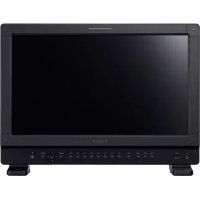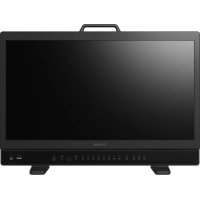
DPV2411 - Professional projector CANON - Free user manual and instructions
Find the device manual for free DPV2411 CANON in PDF.


| Technical Specifications | Resolution: 1920 x 1080 (Full HD), Brightness: 4000 lumens, Contrast: 2000:1, Technology: DLP |
|---|---|
| Connectivity | Ports: HDMI, VGA, USB, Audio Out |
| Usage | Ideal for professional presentations, movie projections, and video games. |
| Maintenance | Filters to be cleaned regularly, lamp to be replaced every 3000-5000 hours of use. |
| Safety | Do not expose to moisture, avoid shocks, use only with the supplied power supply. |
| General Information | Weight: 2.5 kg, Dimensions: 30 x 22 x 10 cm, Warranty: 2 years. |
Frequently Asked Questions - DPV2411 CANON
User questions about DPV2411 CANON
0 question about this device. Answer the ones you know or ask your own.
Ask a new question about this device
Download the instructions for your Professional projector in PDF format for free! Find your manual DPV2411 - CANON and take your electronic device back in hand. On this page are published all the documents necessary for the use of your device. DPV2411 by CANON.
USER MANUAL DPV2411 CANON
Function Settings 79
Picture Function Settings 92
Network/IMD Settings 96
System Settings 98
Signal Information 105
System Information 105
30-2, Shimomaruko 3-chome, Ohta-ku, Tokyo 146-8501, Japan
CANON EUROPA N.V.
Bovenkerwerweg 59, 1185 XB Amstelveen, The Netherlands

MENu Channel Settings] Picture Mode] Type]
- Sélectionnez [L/R].
MENuAdjustment] [Detail Settings] [Lt Import]
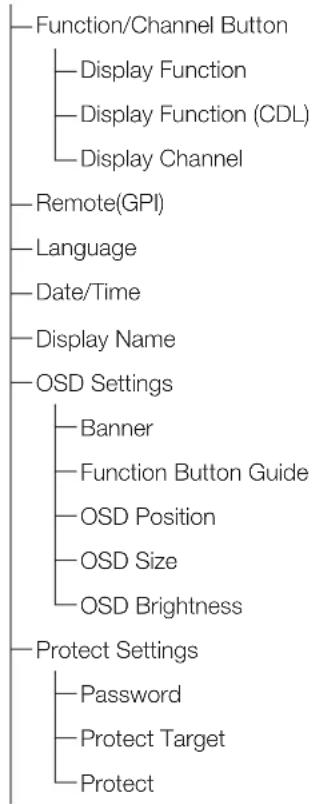
MENu System Settings] Dnction/Channel Button] [Display Function] ou [Display Function (CDL)]
| Bouton F Mode normal Mode CDL | ||
| F1 Picture Mode CDL/User LUT | ||
| F2 Brightness CDL SOP/SAT | ||
| F3 TC/ALM CDL/User LUT Bypass | ||
| F4 WF/M/VEC Single Input Dual View | ||
| F5 | Histogram/Frame Luminance | False Color |
| F6 | Pixel Value Check | Over Range |
| F7 | Zoom Preset | 2020 Outside of Gamut View |
| F8 | Boost Contrast | Compare View |

Référence
SYSTEM Settings] [ction/Channel Button] [Display Channel]
MENue System Settings] Remote(GPI)]
[LUT Import (User LUT)]
Channel Settings (64)
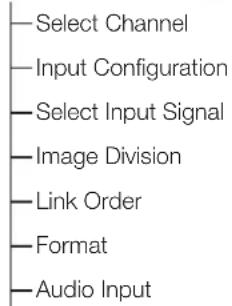
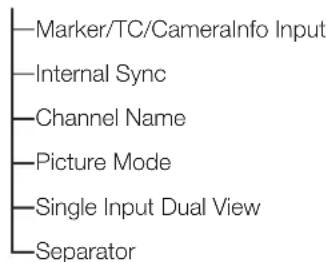
Display Settings (69)
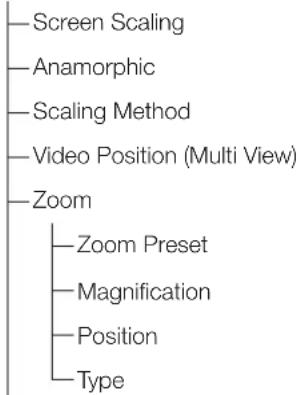
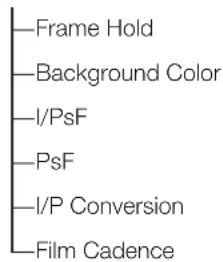
Audio Settings (73)
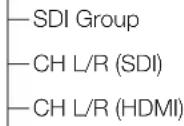
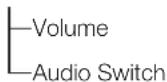
Marker Settings (74)
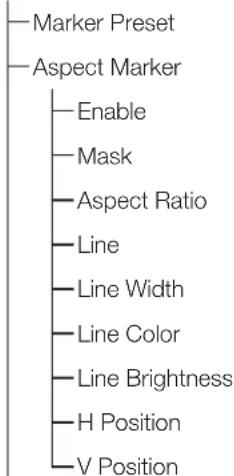
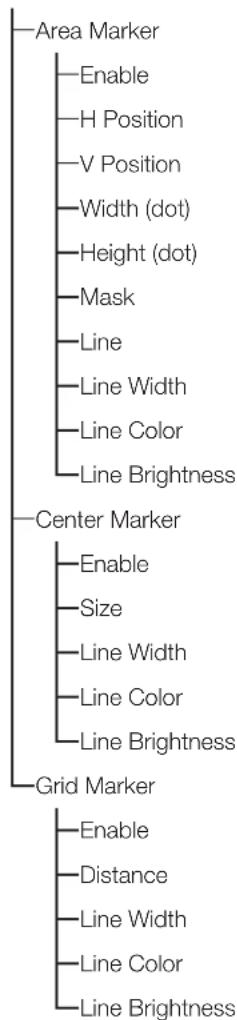
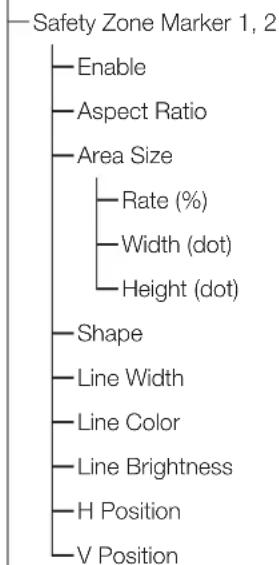
Function Settings (79)
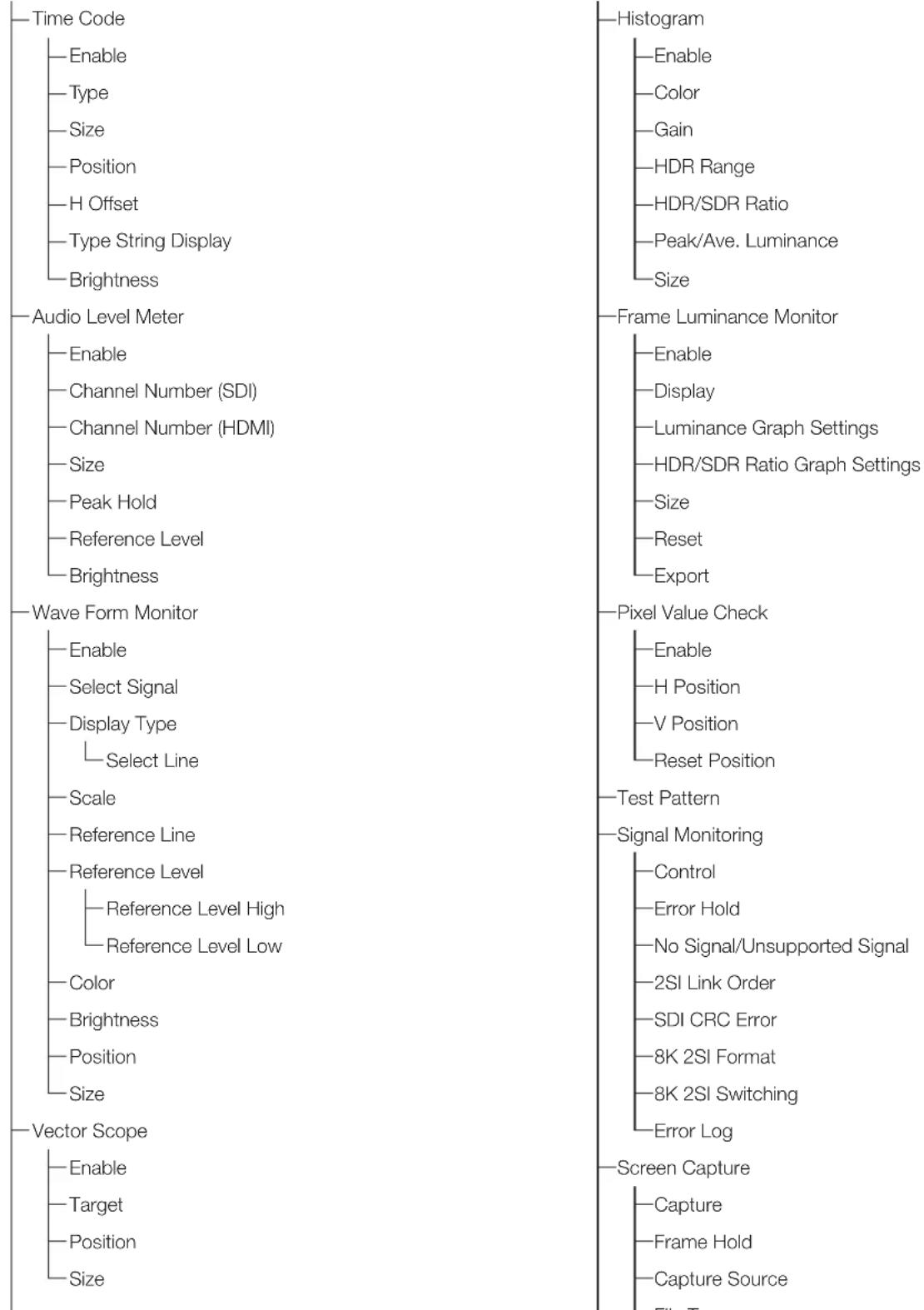
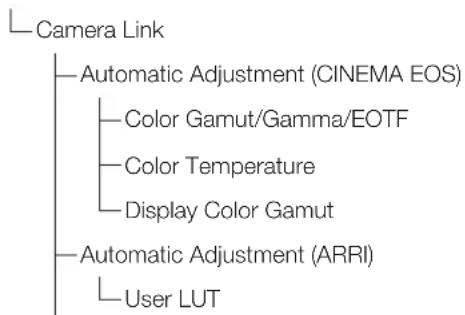
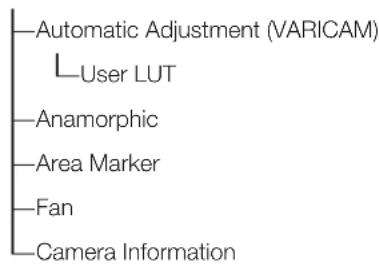
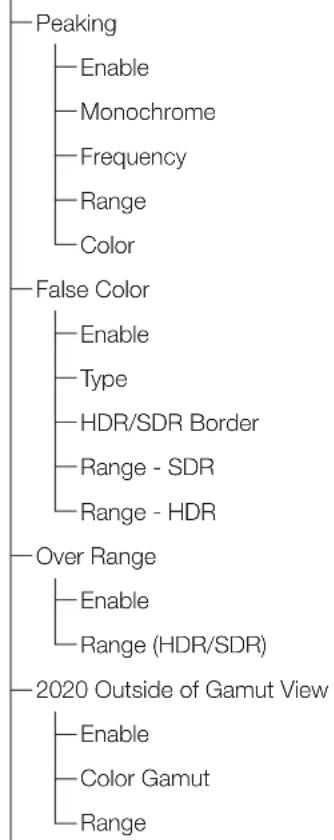
Picture Function Settings (92)
Network/IMD Settings (196)
System Settings (93)
Signal Information (105)
System Information (105)
Adjustment
Frame Luminance Monitor
Picture Function Settings
-Quand [Channel Settings]Picture Mode]Type][L]
- Quand [Peaking], [False Color], [Over Range] ou [2020 Outside of Gamut View] Enable]
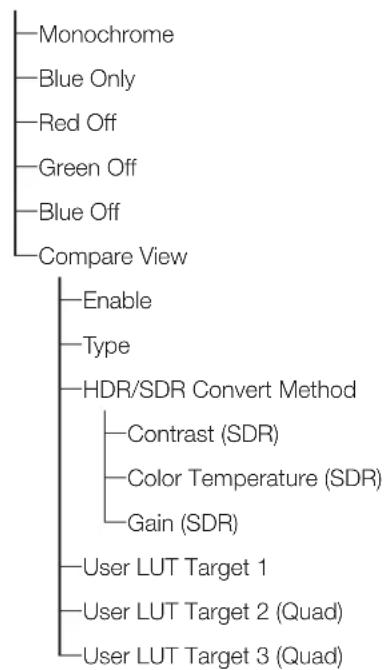
- Quand [Monochrome], [Blue Only], [Red Off], [Green Off] ou [Blue Off] On
- Pour les signaux SD-SDI
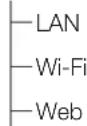
Network/IMD Settings
| Élément Options | |
| Function Settings TC/ALM | |
| Time Code | |
| Audio Level Meter | |
| WFM/VEC | |
| Wave Form Monitor | |
| WFM Select Signal | |
| Vector Scope | |
| Histogram/Frame Luminance | |
| Histogram | |
| Frame Luminance Monitor | |
| Pixel Value Check | |
| Signal Monitoring Log | |
| Capture | |
| Camera Information | |
| Picture Function Settings | Peaking |
| Peaking 1 | |
| Peaking 2 | |
| False Color | |
| False Color 1 | |
| False Color 2 | |
| Over Range | |
| 2020 Outside of Gamut View | |
| Monochrome | |
| Blue Only | |
| Red Off | |
| Green Off | |
| Blue Off | |
| Compare View | |
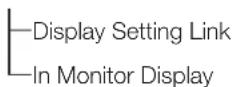
| System Settings Signal Information | |
| Hide OSD3 | |
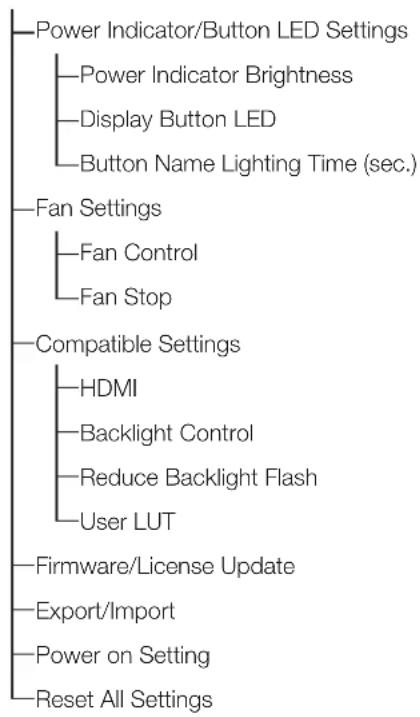
| Fan Stop | |
Copyright (c) 2000-2003 Intel Corporation All rights reserved.
Redistribution and use in source and binary forms, with or without modification, are permitted provided that the following conditions are met:
- Redistributions of source code must retain the above copyright notice, this list of conditions and the following disclaimer.
- Redistributions in binary form must reproduce the above copyright notice, this list of conditions and the following disclaimer in the documentation and/or other materials provided with the distribution.
* Neither name of Intel Corporation nor the names of its contributors may be used to endorse or promote products derived from this software without specific prior written permission.
THIS SOFTWARE IS PROVIDED BY THE COPYRIGHT HOLDERS AND COLNTRIBUTORS "AS IS" AND ANY EXPRESS OR IMPLIED WARRANTY, INCLUDING, BUT NOT LIMITED TO, THE IMPLIED WARRANTY OF MERCHANTABILITY AND FITNESS FOR A PARTICULAR PURPOSE ARE DISCLAIMED. IN NO EVENT SHALL INTEL OR COLNTRIBUTORS BE LIABLE FOR ANY DIRECT, INDIRECT, INCIDENTIAL, SPECIAL, EXEMPLARY, OR CONSEQUENTIAL DAMAGES (INCLUDING, BUT NOT LIMITED TO, PROCEDURE OF SUBSTITUTE GOODS OR SERVICES; LOSS OF USE, DATA, OR PROFITS; OR BUSINESS INTERRUsION) HOWEVER CAUSED AND ON ANY THEORY OF LIABILITY,
WHETHER IN CONTRACT, STRICT LIABILITY, OR TORT (INCLUDING NEGLIGENCE OR OTHERWISE) ARISING IN ANY WAY OUT OF THE USE OF THIS SOFTWARE, EVEN IF ADVISED OF THE POSSIBILITY OF SUCH DAMAGE.
libxml License
Copyright (C) 1998-2003 Daniel Veillard. All Rights Reserved.
Permission is hereby granted, free of charge, to any person obtaining a copy of this software and associated documentation files (the "Software"), to deal in the Software without restriction, including without limitation the rights to use, copy, modify, merge, publish, distribute, sublicense, and/or sell copies of the Software, and to permit persons to whom the Software is furnished to do so, subject to the following conditions:
The above copyright notice and this permission notice shall be included in all copies or substantial portions of the Software.
THE SOFTWARE IS PROVIDED "AS IS", WITHOUT WARRANTY OF ANY KIND, EXPRESS OR IMPLIED, INCLUDING BUT NOT LIMITED TO THE WARRANTY OF MERCHANTABILITY, FITNESS FOR A PARTICULAR PURPOSE AND NONINFRINGEMENT. IN NO EVENT SHALL THE DANIEL VEILLARD BE LIABLE FOR ANY CLAIM, DAMAGES OR OTHER LIABILITY, WHETHER IN AN ACTION OF CONTRACT, TORT OR OTHERWISE, ARISING FROM, OUT OF OR IN CONNECTION WITH THE SOFTWARE OR THE USE OR OTHER DEALINGS IN THE SOFTWARE.
Except as contained in this notice, the name of Daniel Veillard shall not be used in advertising or otherwise to promote the sale, use or other dealings in this Software without prior written authorization from him.
Newlib纪念馆) License
Copyright (c) 1990 The Regents of the University of California. All rights reserved.
Redistribution and use in source and binary forms are permitted provided that the above copyright notice and this paragraph are duplicated in all such forms and that any documentation, and other materials related to such distribution and use acknowledge that the software was developed by the University of California, Berkeley. The name of the University may not be used to endorse or promote products derived from this software without specific prior written permission.
THIS SOFTWARE IS PROVIDED "AS IS" AND WITHOUT ANY EXPRESS OR IMPLIED WARRANTY, INCLUDING, WITHOUT LIMITATION, THE IMPLIED WARRANTY OF MERCHANTABILITY AND FITNESS FOR A PARTICULAR PURPOSE.
Copyright (c) 1991, 2000 The Regents of the University of California. All rights reserved.
Redistribution and use in source and binary forms, with or without modification, are permitted provided that the following conditions are met:
- Redistributions of source code must retain the above copyright notice, this list of conditions and the following disclaimer.
- Redistributions in binary form must reproduce the above copyright notice, this list of conditions and the following disclaimer in the documentation and/or other materials provided with the distribution.
- All advertising materials mentioning features or use of this software must display the following acknowledgement: This product includes software developed by the University of California, Berkeley and its contributors.
- Neither the name of the University nor the names of its contributors may be used to endorse or promote products derived from this software without specific prior written permission.
THIS SOFTWARE IS PROVIDED BY THE REGENTS AND COLNTRIBUTORS "AS IS" AND ANY EXPRESS OR IMPLIED WARRANTY, INCLUDING, BUT NOT LIMITED TO, THE IMPLIED WARRANTY OF MERCHANTABILITY AND FITNESS FOR A PARTICULAR PURPOSE ARE DISCLAIMED. IN NO EVENT SHALL THE REGENTS OR COLNTRIBUTORS BE LIABLE FOR ANY DIRECT, INDIRECT, INCIDENTAL, SPECIAL, EXEMPLARY, OR CONSEQUENTIAL DAMAGES (INCLUDING, BUT NOT LIMITED TO, PROCEDUREMENT OF SUBSTITUTE GOODS OR SERVICES; LOSS OF USE, DATA, OR PROFITS; OR BUSINESS INTERRUPTION) HOWEVER CAUSED AND ON ANY THEORY OF LIABILITY, WHETHER IN CONTRACT, STRICT LIABILITY, OR TORT (INCLUDING NEGLIGENCE OR OTHERWISE) ASING IN ANY WAY OUT OF THE USE OF THIS SOFTWARE, EVEN IF ADVISED OF THE POSSIBILITY OF SUCH DAMAGE.
Copyright (C) 1993 by Sun Microsystems, Inc. All rights reserved.
Developed at SunPro, a Sun Microsystems, Inc. business.
Permission to use, copy, modify, and distribute this software is freely granted, provided that this notice is preserved.
openssl
Copyright (C) 1998-2017 The OpenSSL Project. All rights reserved.
Redistribution and use in source and binary forms, with or without modification, are permitted provided that the following conditions are met:
- Redistributions of source code must retain the above copyright notice, this list of conditions and the following disclaimer.
- Redistributions in binary form must reproduce the above copyright notice, this list of conditions and the following disclaimer in the documentation and/or other materials provided with the distribution.
- All advertising materials mentioning features or use of this software must display the following acknowledgment: "This product includes software developed by the OpensSL Project for use in the OpensSL Toolkit. (http:// www.openssl.org/)
- The names "OpenSSL Toolkit" and "OpenSSL Project" must not be used to endorse or promote products derived from this software without prior written permission. For written permission, please contact openssl-core@openssl.org.
- Products derived from this software may not be called "OpenSSL" nor may "OpenSSL" appear in their names without prior written permission of the OpenSSL Project.
- Redistributions of any form whatsoever must retain the following acknowledgment: "This product includes software developed by the OpenssL Project for use in the OpenssL Toolkit (http://www. opensll.org/)
THIS SOFTWARE IS PROVIDED BY THE OpenssL Project "AS IS" AND ANY EXPRESSED OR IMplied Warranties, INCLUDING, BUT NOT LIMITED TO, THE IMPLIED WARRANTY OF MERCHANTABILITY AND FITNESS FOR A PARTICULAR PURPOSE ARE DISCLAIMED. IN NO EVENT SHALL THE OpenssL Project OR ITS COBITORS BE LIABLE FOR ANY DIRECT, INDIRECT, INCIDENTAL, SPECIAL, EXEMPLARY, OR CONSEQUENTIAL DAMAGES (INCLUDING, BUT NOT LIMITED TO, PROCEDUREM OF SUBSTITUTE GOODS OR SERVICES; LOSS OF USE, DATA, OR PROFITS; OR BUSINESS INTERRUIPTION) HOWEVER CAUSED AND ON ANY THEORY OF LIABILITY, WHETHER IN CONTRACT, STRICT LIABILITY, OR TORT (INCLUDING NEGLIGENCE OR OTHERWISE) ARISING IN ANY WAY OUT OF THE USE OF THIS SOFTWARE, EVEN IF ADVISED OF THE POSSIBILITY OF SUCH DAMAGE.
Copyright (C) 1995-1998 Eric Young (eay@cryptsoft.com)
All rights reserved.
This package is an SSL implementation written by Eric Young (eay@cryptsoft.com).
The implementation was written so as to conform with Netscapes SSL.
This library is free for commercial and non-commercial use as long as the following conditions are aheared to. The following conditions apply to all code found in this distribution, be it the RC4, RSA, Ihash, DES, etc., code; not just the SSL code. The SSL documentation included with this distribution is covered by the same copyright terms except that the holder is Tim Hudson (tjh@cryptsoft.com).
Copyright remains Eric Young's, and as such any Copyright notices in the code are not to be removed. If this package is used in a product, Eric Young should be given attribution as the author of the parts of the library used. This can be in the form of a textual message at program startup or in documentation (online or textual) provided with the package.
Redistribution and use in source and binary forms, with or without modification, are permitted provided that the following conditions are met:
- Redistributions of source code must retain the copyright notice, this list of conditions and the following disclaimer.
- Redistributions in binary form must reproduce the above copyright notice, this list of conditions and the following disclaimer in the documentation and/or other materials provided with the distribution.
- All advertising materials mentioning features or use of this software must display the following acknowledgement:
"This product includes cryptographic software written by Eric Young (eay@cryptsoft.com)"
The word 'cryptographic' can be left out if the rouines from the library being used are not cryptographic related :-).
- If you include any Windows specific code (or a derivative thereof) from the apps directory (application code) you must include an acknowledgement:
"This product includes software written by Tim Hudson (tjh@cryptsoft.com)"
THIS SOFTWARE IS PROVIDED BY ERIC YOUNG "AS IS" AND ANY EXPRESS OR IMPLIED WARRANTY, INCLUDING, BUT NOT LIMITED TO, THE IMPLIED WARRANTYES OF MERCHANTABILITY AND FITNESS FOR A PARTICULAR PURPOSE ARE DISCLAIMED. IN NO EVENT SHALL THE AUTHOR OR COLLABORORS BE LIABLE FOR ANY DIRECT, INDIRECT, INCIDENTAL, SPECIAL, EXEMPLARY, OR CONSEQUENTIAL DAMAGES (INCLUDING, BUT NOT LIMITED TO, PROCEDURE OF SUBSTITUTE GOODS OR SERVICES; LOSS OF USE, DATA, OR PROFITS; OR BUSINESS INTERVENTION) HOWEVER CAUSED AND ON ANY THEORY OF LIABILITY, WHETHER IN CONTRACT, STRICT LIABILITY, OR TORT (INCLUDING NEGLIGENCE OR OTHERWISE) ASING IN ANY WAY OUT OF THE USE OF THIS SOFTWARE, EVEN IF ADVISED OF THE POSSIBILITY OF SUCH DAMAGE.
The licence and distribution terms for any publicly available version or derivative of this code cannot be changed. i.e. this code cannot simply be copied and put under another distribution licence [including the GNU Public Licence.]
wpa_supplicant, hostapd
Copyright (C) 2002-2016, Jouni Malinen j@w1.fi and contributors All Rights Reserved.
This software may be distributed, used, and modified under the terms of BSD license:
Redistribution and use in source and binary forms, with or without modification, are permitted provided that the following conditions are met:
- Redistributions of source code must retain the above copyright notice, this list of conditions and the following disclaimer.
- Redistributions in binary form must reproduce the above copyright notice, this list of conditions and the following disclaimer in the documentation and/or other materials provided with the distribution.
- Neither the name(s) of the above-listed copyright holder(s) nor the names of its contributors may be used to endorse or promote products derived from this software without specific prior written permission.
THIS SOFTWARE IS PROVIDED BY THE COPYRIGHT HOLDERS AND COLNTRutors "AS IS" AND ANY EXPRESS OR IMPLIED WARRANTY, INCLUDING, BUT NOT LIMITED TO, THE IMPLIED WARRANTY OF MERCHANTABILITY AND FITNESS FOR A PARTICULAR PURPOSE ARE DISCLAIMED. IN NO EVENT SHALL THE COPYRIGHT OWNER OR COLNTRutors BE LIABLE FOR ANY DIRECT, INDIRECT, INCIDENTAL, SPECIAL, EXEMPLARY, OR CONSEQUENTIAL DAMAGES (INCLUDING, BUT NOT LIMITED TO, PROCEDUREMENT OF SUBSTITUTE GOODSOR SERVICES;LOSS OF USE,DATA,OR PROFITS;OR BUSINESS INTERRUPTION) HOWEVER CAUSED AND ON ANY THEORY OF LIABILITY, WHETHER IN CONTRACT, STRICT LIABILITY, OR TORT (INCLUDING NEGLIGENCE OR OTHERWISE) ARISING IN ANY WAY OUT OF THE USE OF THIS SOFTWARE, EVEN IF ADVISED OF THE POSSIBILITY OF SUCH DAMAGE.
Copyright (c) 2004-2014 by Internet Systems Consortium, Inc. ("ISC")
Copyright (c) 1995-2003 by Internet Software Consortium
Permission to use, copy, modify, and distribute this software for any purpose with or without fee is hereby granted, provided that the above copyright notice and this permission notice appear in all copies.
THE SOFTWARE IS PROVIDED "AS IS" AND ISC DISCLAIMS ALL WARRANTYES WITH REGARD TO THIS SOFTWARE INCLUDING ALL IMPLIED WARRANTYES OF MERCHANTABILITY AND FITNESS. IN NO EVENT SHALL ISC BE LIABLE FOR ANY SPECIAL, DIRECT, INDIRECT, OR CONSEQUENTIAL DAMAGES OR ANY DAMAGES WHATsoever RESULTING FROM LOSS OF USE, DATA OR PROFITS, WHETHER IN AN ACTION OF CONTRACT, NEGLIGENCE OR OTHER TORTIOUS ACTION, ARISING OUT OF OR IN CONNECTION WITH THE USE OR PERFORMANCE OF THIS SOFTWARE.
Internet Systems Consortium, Inc.
950 Charter Street
Redwood City, CA 94063
https://www.isc.org/
Namble
2 Sample Interleave 64
3G-SDI RAW 64
200% (Screen Scaling) 69
2020 Constant Luminance 54
2020 Gamut Mapping 54
2020 Outside of Gamut View 93
A
ACESproxy 47
Adjustment 47
Adobe RGB 47
Anamorphic 69,87
Anchor Adjustment 23, 56
Area Marker 77
Area Marker (Camera Link) 87
Aspect Marker 74
Audio Input 65
Audio Level Meter 79
Audio Settings 73
Automatic Adjustment (CINEMA EOS/ARRIVARICAM) 86
B
Background Color 71
Backlight Control 47, 100
Banner 99
Bias R/G/B 48
Bicubic 70
Black (Test Pattern) 85
Blue Off 94
Blue Only 94
Boost Contrast 53
Brightness 47
Button Name Lighting Time 100
C
Calibration 26, 55
Camera Information 87
Camera Link 86
Canon Log, CanonLog 2, Canon Log 3 49
CDL Export/CDL Import 29
CDL/User LUT 52
CDL/User LUT Bypass 52
Center Marker 77
Channel Name 66
Channel Settings 64
Chroma 47
CINEMA EOS SYSTEM (Picture Mode) 47
Cinema Gamut to 709 48
Cinema Gamut to 2020 48
Cinema Gamut to DCI 48
Color Bars (Test Pattern) 85
Color Gamut 48
Color Range 51
Color Temperature 48
Compare View 94
Compatible Settings 100
Contrast 47
Copy Picture Mode 56
Custom (xy) (Color Temperature) 48
D
Date/Time 30,98
DCI-P3 47
DCI-P3+ to 709 48
DCI-P3+ to DCI 48
Detail Settings
Adjustment 53
CDL/User LUT 52
Display Button LED 100
Display Channel 98
Display Function/Display Function (CDL) 98
Display Name 99
Display Setting Link 97
Display Settings 69
Dual Input 64
Dual Link 3G-SDI 64
E
EBU 47
Export/Import 28,101
F
False Color 92
Fan (Camera Link) 87
Fan Settings 100
Film Cadence 71
Firmware/License Update 100
Firmware/License Ver. 105
Format 65
Frame Hold 71
Frame Luminance Monitor 83
Function Button Guide 99
Function/Channel Button 98
Function Settings 79
G
Gain R/G/B 48
Gamma/EOTF 49
Gamma LUT 49
Gamut LUT 48
Global Dimming 47
Gray (Test Pattern) 85
Green Off 94
Grid Marker 78
H
HDMI 11, 17, 100
HDMI Link 56
HDR Range 50
HDR/SDR View 55
Hide OSD 104
- Histogram 82
Hybrid Log-Gamma 49
Hybrid Log-Gamma System 55
1
Image Division 64
Image Priority 71
In Monitor Display 97
Input Configuration 64
Input Transform 51
Internal Sync 66
I/P Conversion 71
I/PsF 71
ITU-RBT.709 47
ITU-RBT.1886 49
ITU-R BT.2020 47
L
LAN 11
Language 98
LAN (Network/IMD Settings) 96
Link Order 65
Local Dimming 47
LTC 79
LUT Import 27,53
M
MAC Address 105
Marker Preset 74
Marker Settings 74
Marker/TC/CameraInfo Input 65
Menu OSD 20,42
Monochrome 94
Multi View (Dual/Quad) 64
N
Native Input Resolution (Screen Scaling) 69
Nearest Neighbor 70
Network/IMD Settings 96
0
Offset 52
OSD Brightness 99
OSD Position 99
OSD Settings 99
OSD Size 99
Output Transform 51
Output Transform Surround 51
Over Range 93
P
Password 96, 99
Peaking 92
Picture Function Settings 92
Picture Mode 47,66
Pixel Value Check 84
PLUGE (Test Pattern) 85
Power 52
Power Indicator Brightness 100
Power Indicator/Button LED Settings. 100
Power on Setting 101
Protect Settings 99
PsF 71
Q
Quad Input 64
R
Ramp (Test Pattern) 85
Red Off 94
ReduceBacklightFlash 100
Remote(GPI) 98
Reset 56
Reset All Settings 101
s
Safety Zone Marker 1, 2 75
Saturation 52
Scaling Method 70
Screen Capture 86
Screen Scaling 69
SDI 11, 16
Select Channel 64
Select Input Signal 64
Separator 67
Serial No. 105
Shape Trace 70
Sharpness 47
Signal Information 105
Signal Monitoring 85
Single Input 64
Single Input Dual View 67
Slope 52
SMPTE-C 47
Speed Priority 71
Square Division 64
Subnet Mask 96
System Information 105
System Settings 98
T
Test Pattern 85
Time Code 79
U
Usage Time 105
USB 10
User 1-7 47
User LUT 52,100
V
Vector Scope 81
Video Position (Multi View) 70
VITC 79
W
Wave Form Monitor 80
Web 39, 96
White (Test Pattern) 85
Wi-Fi 37,96
Y
YCbCr Color Matrix 54
Z
Zoom 70
GARANTIE LIMITÉE DE CANON SUR ÉQUIPEMENT DE MONITEUR PROFESSIONNEL POUR DES PRODUITS ACHETÉS AU CANADA
Canon Inc. 30-2, Shimomaruko 3-chome, Ohta-ku, Tokyo 146-8501, Japan
CANON Europa N.V. Bovenkerkerweg 59, 1185 XB Amstelveen, The Netherlands
www.canon-europa.com
BELGIQUE www.canon.be
Canon Belgium NV/SA
Berkenlaan 3, 1831 Diegem (Machelen)
(02) 7220411
2)7213274
CANADA
CANON CANADA INC.
http://www.canon.ca
109028, MockBa, CepebpaHnueckaHa6, 29, 3TaXk 8
Bn3Hec-ueHTp "Cepe6pbHbI IopOd"
7495)2585600
(495) 2585601
info@canonical.ru
OOO "KaHoh Py" B CaHKT-NeTepe6ypre
191186, CaHKT-TeTep6pr, BolbHcKn nepeyIok, 3A, IInTeP A, Bn3HeC-ueHTp "CeBepHa CToJIuca"
+7(812)4495500
(812)4495511
spb.info@canon.ru