
DS-3E2552-H - Network switch Hikvision - Free user manual and instructions
Find the device manual for free DS-3E2552-H Hikvision in PDF.


| Product Type | Network Switch |
| Model | DS-3E2552-H |
| Brand | Hikvision |
| Ports | 48 Gigabit Ethernet (10/100/1000) + 4 SFP+ (1/10 GbE) Uplink |
| Switching Capacity | 176 Gbps |
| Forwarding Rate | 130.95 Mpps |
| MAC Address Table | 16K entries |
| VLAN Support | 4K VLANs, 802.1Q |
| Layer 2 Features | STP, RSTP, MSTP, Link Aggregation (LACP), IGMP Snooping |
| Layer 3 Features | Static Routing, RIP, OSPF |
| Management | Web GUI, SNMP v1/v2c/v3, CLI (Telnet/SSH), RMON |
| Power Supply | AC 100-240V, 50/60Hz, internal |
| Power Consumption | ≤ 30W (typical) |
| Dimensions (W x D x H) | 440 x 200 x 44 mm (1U rackmount) |
| Weight | 3.5 kg |
| Operating Temperature | 0°C to 40°C |
| Storage Temperature | -40°C to 70°C |
| Humidity | 5% to 95% (non-condensing) |
| Cooling | 1 fan, smart speed control |
| Security | ACL, 802.1X Port Authentication, Port Security, DHCP Snooping |
| Standards | IEEE 802.3, 802.3u, 802.3ab, 802.3z, 802.3x, 802.1D, 802.1w, 802.1s, 802.1Q, 802.1X |
| Installation | Desktop or 19-inch rackmount (brackets included) |
| Cleaning | Use a soft dry cloth; do not use liquid cleaners or solvents |
| Spare Parts | Power supply unit and fan module are replaceable (contact support) |
| Reparability | No user-serviceable internal parts; repairs must be performed by authorized service |
Frequently Asked Questions - DS-3E2552-H Hikvision
User questions about DS-3E2552-H Hikvision
0 question about this device. Answer the ones you know or ask your own.
Ask a new question about this device
Download the instructions for your Network switch in PDF format for free! Find your manual DS-3E2552-H - Hikvision and take your electronic device back in hand. On this page are published all the documents necessary for the use of your device. DS-3E2552-H by Hikvision.
USER MANUAL DS-3E2552-H Hikvision
The installation tools are not provided with the switch. Prepare them yourself as required.

Installation accessories


Cage nutGrounding cable M6 screw M4 countersunk-head screw

natural_image
Collection of mechanical components and a curved cable, no visible text or symbols(Type A) (Type B)
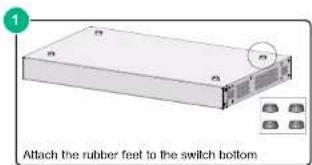
Mounting brackets Rubber feet Grounding screw
Cable tie
The applicable installation accessories vary by switch model. Some accessories are not provided with the switch. The packing list describes the accessories provided with the switch.
A Wear an ESD wrist strap, and make sure the wrist strap makes good skin contact and is reliably grounded.
Mounting the switch in a rack
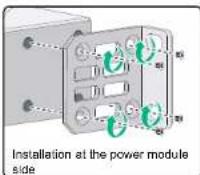
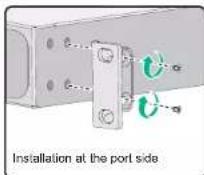
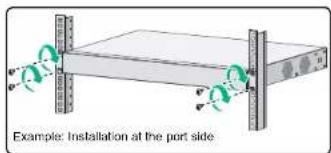
The applicable mounting brackets vary by switch model. Some switch models provide two installation positions on the two sides for mounting brackets: one at the port side and one at the power module side. Select an installation position for the mounting brackets as required.
Four screws are required to attach a Type A mounting bracket. Two screws are required to attach a Type B mounting bracket.
1 Attaching mounting brackets to the switch
Type A mounting bracket
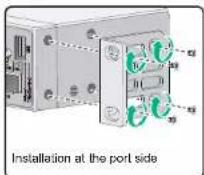
Type A mounting bracket
Type B mounting bracket
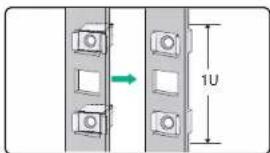
2 Attach cage nuts to the rack posts
Mount the switch in the rack
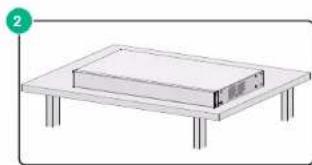
Mounting the switch on a workbench
natural_image
Simple line drawing of a rectangular electronic device on a flat table (no text or symbols)Grounding the switch
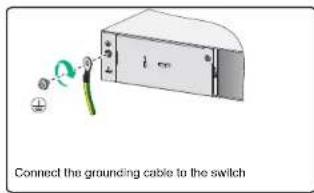
Correctly connecting the switch grounding cable is crucial to lightning protection and EMI protection. Use the grounding cable provided with the chassis to ground the switch.
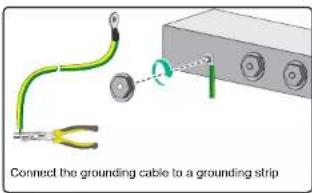
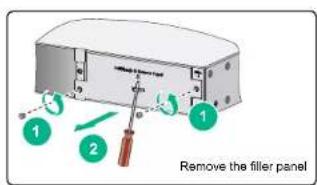
Installing and removing a power module
This section is applicable only to switch models that use removable power modules.
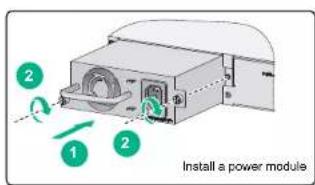
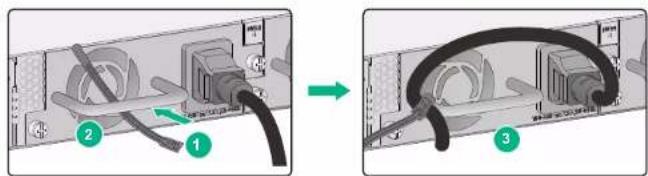
Connecting the power cord
Before connecting the power cord, connect the grounding cable and make sure the switch is reliably grounded. To avoid bodily injury, connect the power cord first to the switch and then to the power supply system.
1 Connecting the power cord for an AC power module.
Method 1
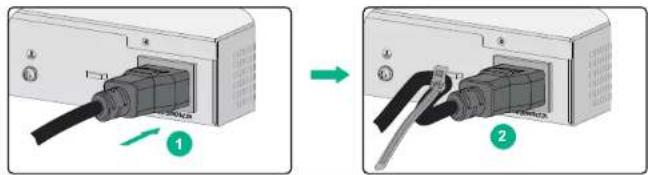
Method 2
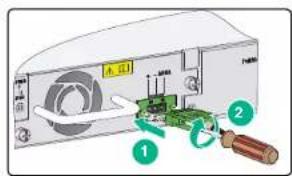
2 Connecting the power cord for a DC power module.
Brand : Hikvision
Model : DS-3E2552-H
Category : Network switch