LV-7292M - Professional projector CANON - Free user manual and instructions
Find the device manual for free LV-7292M CANON in PDF.


| Product type | Professional projector |
| Brand | Canon |
| Model | LV-7292M |
| Dimensions (W × D × H) | Approx. 320 × 250 × 110 mm |
| Weight | Approx. 3.5 kg |
| Power supply | 100 – 240 V AC, 50/60 Hz |
| Power consumption | Approx. 310 W (normal mode) |
| Display technology | 3-panel LCD |
| Native resolution | XGA (1024 × 768) |
| Brightness | Approx. 3000 ANSI lumens |
| Contrast ratio | 2000:1 |
| Keystone correction | Manual vertical and remote control |
| Digital zoom | Yes, adjustable via remote control |
| Video inputs | HDMI, VGA (Computer), S-Video, Composite |
| Audio output | Built-in speaker (mono) |
| Remote control | RS-232C (dedicated serial commands) |
| Main functions | Power on/off, image adjustments (Standard, Cinema, Presentation, etc.), video mute, screen display, presentation timer |
| Maintenance and cleaning | Regular air filter cleaning, lamp replacement |
| Safety | Auto shutdown in case of overheating, anti-theft security |
| Spare parts and repairability | Replacement lamp, air filter, dedicated serial cable |
| General information | Manual available in French, English, and other languages; compatibility with serial commands for professional integration |
Frequently Asked Questions - LV-7292M CANON
User questions about LV-7292M CANON
0 question about this device. Answer the ones you know or ask your own.
Ask a new question about this device
Download the instructions for your Professional projector in PDF format for free! Find your manual LV-7292M - CANON and take your electronic device back in hand. On this page are published all the documents necessary for the use of your device. LV-7292M by CANON.
USER MANUAL LV-7292M CANON
MULTIMEDIA PROJECTOR
LV-7292A/LV-7297A
LV-7298A/LV-7392A
LV-7393A/LV-8227A
LV-7292M/LV-7297M
LV-8227M/LV-7392S
LV-7292S/LV-7297S
BASIC SERIAL
COMMAND SPECIFICATIONS
Revision 1
Table of Contents
Overview 1
Serial Interface Specifications 2
2.1. Transfer Specifications 2
2.2. Connection 2
Notes for Communication 3
Functional Execution Command Table 4
Status Read Command Table 6
Functional Execution Command 7
6.1. Format 7
6.2. Command Pipelining 7
6.3. Transfer Example 7
6.4. Operation Requirements.. 8
6.5. POWER ON Command 9
6.6. POWER OFF Command (Quick Power OFF) 9
6.7. POWER OFF Command 9
6.8. HDMI Command (Except LV-7292S/LV-7297S/LV-7392S) 9
6.9. Computer Command 9
6.10. Video Command 10
6.11. VOLUME + Command (Except LV-7292S/ LV-7297S/ LV-7392S) 10
6.12. VOLUME - Command (Except LV-7292S/ LV-7297S/ LV-7392S) 10
6.13. AUDIO MUTE ON Command (Except LV-7292S/LV-7297S/LV-7392S).... 10
6.14. AUDIO MUTE OFF Command (Except LV-7292S/LV-7297S/LV-7392S).... 10
6.15. VIDEO MUTE ON Command 11
6.16. VIDEO MUTE OFF Command 11
6.17. Aspect Normal size Command 11
6.18. Aspect 16:9 size Command (LV-8227A/LV-8227M) 11
6.19. Screen Full size Command 11
6.20. Image Standard Command 11
6.21. Image High contrast Command 12
6.22. Image Cinema Command 12
6.23. User 1 Command. 12
6.24. User 2 Command. 12
6.25. User 3 Command. 12
6.26. User 4 Command. 12
6.27. Image Blackboard (Green) Command 12
6.28. Image Presentation Command 13
6.29. MENU ON Command 13
6.30. MENU OFF Command 13
6.31. DISPLAY CLEAR Command 13
6.32. BRIGHTNESS + Command. 13
6.33. BRIGHTNESS - Command 13
6.34. IMAGE (Toggle) Command 14
6.35. Direct power on Setting Command 14
6.36. Direct power on Cancel Command 14
6.37. Power management mode Standby Command 14
6.38. Power Management mode OFF Command 14
6.39. Power management mode Exit Command 14
6.40. D.ZOOM + Command 15
6.41. D.ZOOM-Command. 15
6.42. Computer S-Video Command 15
6.43. Image Colorboard Command 15
6.44. POINTER RIGHT Command 15
6.45. POINTER LEFT Command 16
6.46. POINTER UP Command 16
6.47. POINTER DOWN Command 16
6.48. OK Command 16
6.49. FREEZE ON Command 16
6.50. FREEZE OFF Command 17
6.51. Computer Analog RGB Command 17
6.52. Computer Scart Command 17
6.53. Computer Component Command 17
6.54. AUTO PC Command 17
6.55. PRESENTATION TIMER Command. 18
6.56. PRESENTATION TIMER (Exit) Command 18
6.57. KEYSTONE Command 18
6.58. KEYSTONE Command 18
Status Read Command 19
7.1. Format 19
7.2. Transfer Example 19
7.3. Operation Requirements 19
7.4. Status Read Command 19
7.5. Input Mode Read Command 22
7.6. Lamp Time Read Command 22
7.7. Setting Read Command 22
7.8. Temp Read Command 22
7.9. Lamp Mode Read Command 23
Overview
1.1. These specifications define projector control commands for LV-7292A/7297A/7392A/7393A/7398A/8227A/7292M/7297M/8227M/7292S/7297S/7392S
1.2. The projector control commands are used to remotely control a projector through RS-232C from a computer.
Serial Interface Specifications
2.1. Transfer Specifications
| Item | Specifications |
| Synchronous system | Asynchronous |
| Transmission Speed | 9600 / 19200 |
| Data Length | 8 bit |
| Parity | N/A |
| Stop Bit | 1 |
| Flow Control | N/A |
1) Transmission speed: initial setting value is 19200.
2) Transmission speed can be changed in service mode.
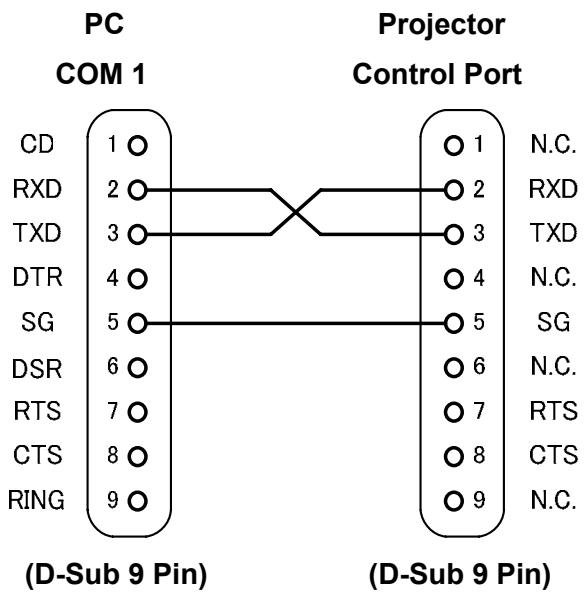
2.2. Connection
Dedicated serial cable must be used for connection to a computer and a projector.
Dedicated serial cable must be used for connection to a computer and a projector.
Notes for Communication
. . The projector control command is defined as one command/one line that starts with "C" and ends with carriage return (0xD).
. . There are two types of Commands: Functional Execution Commands and Status Read Commands.
Example of Functional Execution Command: "C05" [CR]
Example of Status Read Command: "CR0" [CR]
. . When it takes more than one second to receive one command, it does not operate.
The information of buffer is cleared when it takes more than one second to receive carriage return (0xD) after the projector receives the first data "C".
. . For Command pipelining, wait for the interval of 100ms after receiving a response.
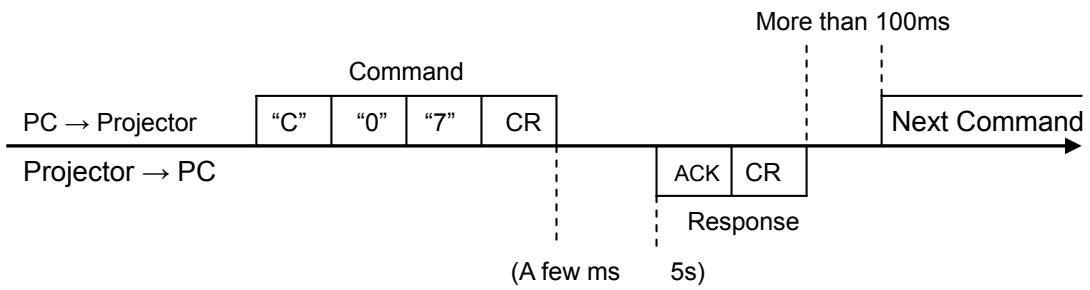
3.4.1. When a command is issued before receiving a response, the function is not executed properly.
3.4.2. Except for when there is no Response for more than 5 seconds.
. . It takes about 5 seconds for internal initialization after plugging in AC power. During this time, it cannot process commands. Do not issue any command.
. . The number of characters of response to Status Read Commands depends on commands. Please see [7. Status Read Commands].
. . Characters for commands must be Capital (A - Z).
Functional Execution Command Table
| Command | Item | Command | Item |
| C00 | POWER ON | C20 | BRIGHTNESS + |
| C01 | POWER OFF(Quick Power OFF) | C21 | BRIGHTNESS - |
| C02 | POWER OFF | C22 | —— |
| C03 | —— | C23 | —— |
| C04 | HDMI | C24 | —— |
| C05 | Computer | C25 | —— |
| C06 | —— | C26 | —— |
| C07 | Video | C27 | IMAGE (Toggle) |
| C08 | —— | C28 | Direct power on Enable |
| C09 | VOLUME + | C29 | Direct power on Disable |
| C0A | VOLUME - | C2A | Power management mode Standby |
| C0B | AUDIO MUTE ON | C2B | Power Management mode OFF |
| C0C | AUDIO MUTE OFF | C2C | —— |
| C0D | VIDEO MUTE ON | C2D | —— |
| C0E | VIDEO MUTE OFF | C2E | Power management mode Exit |
| C0F | Aspect Normal size | C2F | —— |
| C10 | Aspect 16 9 size | C30 | D.ZOOM + |
| C10 | Aspect Full size | ||
| C11 | Image Standard | C31 | D.ZOOM - |
| C12 | High Contrast | C32 | —— |
| C13 | Image Cinema | C33 | —— |
| C14 | User 1 | C34 | Computer S-video |
| C15 | User 2 | C35 | —— |
| C16 | User 3 | C36 | —— |
| C17 | User 4 | C37 | —— |
| C18 | Blackboard | C38 | —— |
| C19 | Presentation | C39 | Image Colorboard |
| C1A | —— | C3A | POINTER RIGHT |
| C1B | —— | C3B | POINTER LEFT |
| C1C | MENU ON | C3C | POINTER UP |
| C1D | MENU OFF | C3D | POINTER DOWN |
| C1E | DISPLAY CLEAR | C3E | —— |
| C1F | —— | C3F | OK |
-
- means no function.
Status Read Command Table
| Command | Item | Memo |
| CR0 | Status Read | |
| CR1 | Input Mode Read | |
| CR2 | —— | |
| CR3 | (Corresponding) Lamp Time Read | |
| CR4 | Setting Read | |
| CR5 | —— | |
| CR6 | Temp Read | |
| CR7 | Lamp Mode Read |
-
- means no function.
Functional Execution Command
6.1. Format
6.1.1 PC issues a command in format as below.
“C”COMMAND [CR]
Command: two characters (See Basic Functional Execution Command Table)
A projector changes received data to decode and returns a result after being ready to receive next command.
[ACK] CR (0x06 0xD)When received Functional Execution Commands.
6.1.2 “” CR When the received data cannot be decoded.
6.2. Command Pipelining
When some functions need the command pipelining, the performance is the same as that of the remote control;
6.2.1. System: issues any command every 100 ms.
6.2.2. When receiving the appropriate command, the function is executed for 120 ms from the moment.
6.2.3. When receiving the same command continuously within 120 ms, the function is executed for another 120 ms from the moment.
6.2.4. When there is no incoming command after 120 ms, the execution of pipelining is stopped.
6.2.5. When the projector receives other incoming commands within 120ms, the execution of pipelining is stopped.
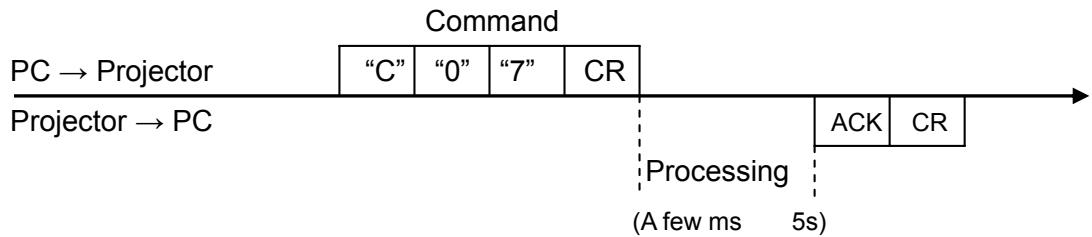
6.3. Transfer Example
Switch the projector to video mode with Basic Command.
6.4. Operation Requirements
1) When the projector's status is any of below, Functional Execution Commands are limited.
| Projector Status | Available Functional Execution Commands |
| In Standby | C00 POWER ON |
| Countdown in process | C00 POWER ON → Countdown is terminated C01 POWER OFF C02 POWER OFF → Countdown is terminated |
| Cooling Down in process | NONE (No Execution) |
| Cooling Down due to Abnormal Temperature | NONE (No Execution) |
| Abnormal Temperature Status | NONE (No Execution) |
| Abnormal Power Status | NONE (No Execution) |
| Power Save / Cooling Down in process | NONE (No Execution) |
| Power Save Status | C00 POWER ON C01 POWER OFF |
| Auto input: On1/On2 setting | Although transmit Input source commands, Auto input does not operate. |
Note) When the status is as above, even if the projector receives other commands, it returns [ACK] [CR].
2) When Eco mode is selected in Standby mode of Setting menu and projector is in Standby, Functional Execution Commands are invalid.
6.5. POWER ON Command
| Command | “C00” [CR] | |
| Detail | Power ON When already Power is ON, nothing is done. When sending this command during processing Countdown, Countdown is terminated. | |
| Response | Acceptable | [ACK] [CR] |
| Unacceptable | “ ”[CR] | |
6.6. POWER OFF Command (Quick Power OFF)
| Command | “C01” [CR] | |
| Detail | Power OFF (Standby) When Power is OFF with ON/STAND-BY button of the projector and remote control, “Power OFF?” is displayed. However, as soon as this command is sent, Quick Power OFF is executed. | |
| Response | Acceptable | [ACK] [CR] |
| Unacceptable | “ ”[CR] | |
6.7. POWER OFF Command
| Command | “C02” [CR] | |
| Detail | Power OFF (Standby).The command operates the same Power OFF function as ON/STAND-BY button of the projector and remote control.Once this command is sent, “Power OFF?” is displayed. If this command is sent again while it is displayed, Power OFF is executed.When sending this command during Countdown, Countdown is terminated. | |
| Response | Acceptable | [ACK] [CR] |
| Unacceptable | “ ”[CR] | |
6.8.HDMI Command (Except LV-7292S/LV-7297S/LV-7392S)
| Command | “C04” [CR] | |
| Detail | Select HDMI Input Although projector returns “OK”, Auto input is not executed with this command while Auto input is set to On1/On2. | |
| Response | Acceptable | [ACK] [CR] |
| Unacceptable | “ ”[CR] | |
6.9. Computer Command
| Command | “C05” [CR] | |
| Detail | Select Computer Input Although projector returns “OK”, Auto input is not executed with this command while Input search is set to On1 or On2, | |
| Response | Acceptable | [ACK] [CR] |
| Unacceptable | “ ”[CR] | |
6.10. Video Command
| Command | “C07” [CR] | |
| Detail | Select Video Input Although projector returns “OK”, Auto input is not executed with this command while Input search is set to On1 or On2, | |
| Response | Acceptable | [ACK] [CR] |
| Unacceptable | “ ”[CR] | |
6.11. VOLUME + Command (Except LV-7292S/ LV-7297S/ LV-7392S)
| Command | “C09” [CR] | |
| Detail | Volume Up. This command operates the same way as “VOLUME+” button of the projector and remote control2 | |
| Response | Acceptable | [ACK] [CR] |
| Unacceptable | “ ”[CR] | |
6.12. VOLUME - Command (Except LV-7292S/ LV-7297S/ LV-7392S)
| Command | “C0A” [CR] | |
| Detail | Volume Down This command operates the same way as “VOLUME-” button of the projector and remote control. | |
| Response | Acceptable | [ACK] [CR] |
| Unacceptable | “ ”[CR] | |
6.13. AUDIO MUTE ON Command (Except LV-7292S/ LV-7297S/ LV-7392S)
| Command | “C0B” [CR] | |
| Detail | Sound Mute ON. This command works the same way as “MUTE” button of the remote control for Mute ON, but does not work for Mute OFF. | |
| Response | Acceptable | [ACK] [CR] |
| Unacceptable | “ ”[CR] | |
6.14. AUDIO MUTE OFF Command (Except LV-7292S/ LV-7297S/ LV-7392S)
| Command | “C0C” [CR] | |
| Detail | Sound Mute OFF. This command works the same way as “MUTE” button of the remote control for Mute OFF, but does not work for Mute ON. | |
| Response | Acceptable | [ACK] [CR] |
| Unacceptable | “ ”[CR] | |
6.15. VIDEO MUTE ON Command
| Command | “C0D”[CR] | |
| Detail | Video Mute ON. This command works the same way as “BLANK” button of the remote control for Blank ON, but does not work for Blank OFF. | |
| Response | Acceptable | [ACK] [CR] |
| Unacceptable | “ ”[CR] | |
6.16.VIDEO MUTE OFF Command
| Command | “C0E” [CR] | |
| Detail | Video Mute OFF. This command works the same way as “BLANK” button of remote control for Blank OFF, but does not work for Blank ON. | |
| Response | Acceptable | [ACK] [CR] |
| Unacceptable | “ ”[CR] | |
6.17. Aspect Normal size Command
(LV-7292A/LV-7297A/ LV-7392A/ LV-7393A/ LV-7292M/ LV-7297M/ LV-8227M)
| Command | “C0F” [CR] | |
| Detail | Set Aspect mode to Normal. This command is invalid while D.Zoom is in operation. | |
| Response | Acceptable | [ACK] [CR] |
| Unacceptable | “ ”[CR] | |
6.18. Aspect 16:9 size Command (LV-8227A/LV-8227M)
| Command | “C10” [CR] | |
| Detail | Set Aspect mode to 16:9. This command is invalid while D.Zoom is in operation. | |
| Response | Acceptable | [ACK] [CR] |
| Unacceptable | “ ”[CR] | |
6.19. Screen Full size Command
| Command | “C10” [CR] | |
| Detail | Set Aspect mode to Full. This command is valid though D.Zoom is in operation. | |
| Response | Acceptable | [ACK] [CR] |
| Unacceptable | “ ”[CR] | |
6.20. Image Standard Command
| Command | “C11” [CR] | |
| Detail | Set image to Standard mode. | |
| Response | Acceptable | [ACK] [CR] |
| Unacceptable | “ ”[CR] | |
6.21. Image High contrast Command
| Command | “C12” [CR] | |
| Detail | Set image to High contrast mode. | |
| Response | Acceptable | [ACK] [CR] |
| Unacceptable | “ ”[CR] | |
6.22. Image Cinema Command
| Command | “C13” [CR] | |
| Detail | Set image to Cinema mode. | |
| Response | Acceptable | [ACK] [CR] |
| Unacceptable | “ ”[CR] | |
6.23. User 1 Command
| Command | “C14” [CR] | |
| Detail | Set image to User 1 mode. | |
| Response | Acceptable | [ACK] [CR] |
| Unacceptable | “ ”[CR] | |
6.24. User 2 Command
| Command | “C15” [CR] | |
| Detail | Set image to User 2 mode. | |
| Response | Acceptable | [ACK] [CR] |
| Unacceptable | “ ”[CR] | |
6.25. User 3 Command
| Command | “C16” [CR] | |
| Detail | Set image to User 3 mode. | |
| Response | Acceptable | [ACK] [CR] |
| Unacceptable | “ ”[CR] | |
6.26. User 4 Command
| Command | “C17” [CR] | |
| Detail | Set image to User 4 mode. | |
| Response | Acceptable | [ACK] [CR] |
| Unacceptable | “ ”[CR] | |
6.27. Image Blackboard (Green) Command
| Command | “C18” [CR] | |
| Detail | Set image to Blackboard (Green) mode. | |
| Response | Acceptable | [ACK] [CR] |
| Unacceptable | “ ”[CR] | |
6.28. Image Presentation Command
| Command | “C19” [CR] | |
| Detail | Set image to Presentation mode. | |
| Response | Acceptable | [ACK] [CR] |
| Unacceptable | “ ”[CR] | |
6.29. MENU ON Command
| Command | “C1C” [CR] | |
| Detail | Display On-Screen Display Menu. | |
| Response | Acceptable | [ACK] [CR] |
| Unacceptable | “ ”[CR] | |
6.30. MENU OFF Command
| Command | “C1D” [CR] | |
| Detail | Hide On-Screen Display Menu. | |
| Response | Acceptable | [ACK] [CR] |
| Unacceptable | “ ”[CR] | |
6.31. DISPLAY CLEAR Command
| Command | “C1E” [CR] | |
| Detail | Hide On-Screen Display. Hide On-Screen Display unconditionally. | |
| Response | Acceptable | [ACK] [CR] |
| Unacceptable | “ ”[CR] | |
6.32. BRIGHTNESS + Command
| Command | “C20” [CR] | |
| Detail | Brightness of User Control +1. | |
| Response | Acceptable | [ACK] [CR] |
| Unacceptable | “ ”[CR] | |
6.33. BRIGHTNESS - Command
| Command | “C21” [CR] | |
| Detail | Brightness of User Control -1. | |
| Response | Acceptable | [ACK] [CR] |
| Unacceptable | “ ”[CR] | |
6.34. IMAGE (Toggle) Command
| Command | “C27”[CR] | |
| Detail | Switch Image Setting status. This command works the same way as “IMAGE” button of the remote control. | |
| Response | Acceptable | [ACK] [CR] |
| Unacceptable | “ ”[CR] | |
6.35. Direct power on Setting Command
| Command | “C28” [CR] | |
| Detail | Enable Direct power on function. This status is stored in EEPROM and retained regardless of Power OFF/ON. | |
| Response | Acceptable | [ACK] [CR] |
| Unacceptable | “ ”[CR] | |
6.36. Direct power on Cancel Command
| Command | “C29” [CR] | |
| Detail | Cancel Direct power on function. This status is stored in EEPROM and retained regardless of Power OFF/ON. | |
| Response | Acceptable | [ACK] [CR] |
| Unacceptable | “ ”[CR] | |
6.37. Power management mode Standby Command
| Command | “C2A” [CR] | |
| Detail | Set Power Management mode to Standby mode. This status is stored in EEPROM and retained regardless of Power ON/OFF. | |
| Response | Acceptable | [ACK] [CR] |
| Unacceptable | “ ”[CR] | |
6.38. Power Management mode OFF Command
| Command | “C2B” [CR] | |
| Detail | Set Power Management mode to OFF mode. This status is stored in EEPROM and retained regardless of Power ON/OFF. | |
| Response | Acceptable | [ACK] [CR] |
| Unacceptable | “ ”[CR] | |
6.39. Power management mode Exit Command
| Command | “C2E” [CR] | |
| Detail | Set Power Management mode to Exit mode. This status is stored in EEPROM and retained regardless of Power OFF/ON. | |
| Response | Acceptable | [ACK] [CR] |
| Unacceptable | “ ”[CR] | |
6.40. D.ZOOM + Command
| Command | “C30” [CR] | |
| Detail | Enter Digital Zoom mode and expand image size. This command works the same way as “D.ZOOM +” button of the remote control. | |
| Response | Acceptable | [ACK] [CR] |
| Unacceptable | “ ”[CR] | |
6.41. D.ZOOM - Command
| Command | “C31” [CR] | |
| Detail | Enter Digital Zoom mode and reduce image size. This command works the same as “D.ZOOM -” button of the remote control. | |
| Response | Acceptable | [ACK] [CR] |
| Unacceptable | “ ”[CR] | |
6.42. Computer S-Video Command
| Command | “C34” [CR] | |
| Detail | Select S-Video of Computer input. Although projector returns “OK”, Auto input is not executed with this command while Auto input is set to On1 or On2, | |
| Response | Acceptable | [ACK] [CR] |
| Unacceptable | “ ”[CR] | |
6.43. Image Colorboard Command
| Command | “C39” [CR] | |
| Detail | Set image to Colorboard mode. | |
| Response | Acceptable | [ACK] [CR] |
| Unacceptable | “ ”[CR] | |
6.44. POINTER RIGHT Command
| Command | “C3A” [CR] | |
| Detail | Move the Pointer of On-Screen Display Menu to the right. This command works differently from the pointer “>” of the projector and remote control, and has no function of Volume + LV-7292S/7297S/7392S: Move the Pointer of On-Screen Display Menu to the right. This command is the same behavior as the point button “>” of the projector | |
| Response | Acceptable | [ACK] [CR] |
| Unacceptable | “ ”[CR] | |
6.45. POINTER LEFT Command
| Command | “C3B” [CR] | |
| Detail | Move the Pointer of On-Screen Display Menu to the left. This command works differently from the pointer “<” of the projector and remote control, and has no function of Volume + LV-7292S/7297S/7392S: Move the Pointer of On-Screen Display Menu to the left. This command is the same behavior as the point button “<” of the projector | |
| Response | Acceptable | [ACK] [CR] |
| Unacceptable | “ ”[CR] | |
6.46. POINTER UP Command
| Command | “C3C” [CR] | |
| Detail | Move up the Pointer of On-Screen Display Menu. This command works the same way as the pointer “▲” of the projector. | |
| Response | Acceptable | [ACK] [CR] |
| Unacceptable | “ ”[CR] | |
6.47. POINTER DOWN Command
| Command | “C3D” [CR] | |
| Detail | Move down the Pointer of On-Screen Display Menu. This command works the same way as the pointer “▼” of the projector. | |
| Response | Acceptable | [ACK] [CR] |
| Unacceptable | “ ”[CR] | |
6.48. OK Command
| Command | “C3F” [CR] | |
| Detail | This command works the same way as “OK” button of the projector and remote control. | |
| Response | Acceptable | [ACK] [CR] |
| Unacceptable | “ ”[CR] | |
6.49. FREEZE ON Command
| Command | “C43” [CR] | |
| Detail | Freeze on-screen image. This command works the same way as “FREEZE” button of the remote control for Freeze ON, but does not work for Freeze OFF. | |
| Response | Acceptable | [ACK] [CR] |
| Unacceptable | “ ”[CR] | |
6.50. FREEZE OFF Command
| Command | “C44” [CR] | |
| Detail | Cancel Freeze mode. This command works the same way as “FREEZE” button of the remote control for Freeze OFF, but does not work for Freeze ON. | |
| Response | Acceptable | [ACK] [CR] |
| Unacceptable | “ ”[CR] | |
6.51. Computer Analog RGB Command
| Command | “C50” [CR] | |
| Detail | Select Analog RGB input in Computer. Although projector returns “OK”, Auto input is not executed with this command while Input Auto input set to On1 or On2, | |
| Response | Acceptable | [ACK] [CR] |
| Unacceptable | “ ”[CR] | |
6.52. Computer Scart Command
| Command | “C51” [CR] | |
| Detail | Select Scart input in Computer. Although projector returns “OK”, Auto input is not executed with this command while Auto input is set to On1 or On2, | |
| Response | Acceptable | [ACK] [CR] |
| Unacceptable | “ ”[CR] | |
6.53. Computer Component Command
| Command | “C54” [CR] | |
| Detail | Select Component input in Computer. Although projector returns “OK”, Auto input is not executed with this command while Auto input is set to On1 or On2, | |
| Response | Acceptable | [ACK] [CR] |
| Unacceptable | “ ”[CR] | |
6.54. AUTO PC Command
| Command | “C89” [CR] | |
| Detail | Execute Auto PC function. This command operates the same as “Auto PC” of main menu. Projector suspends Auto PC operation when receiving this command another time. | |
| Response | Acceptable | [ACK] [CR] |
| Unacceptable | “ ”[CR] | |
6.55. PRESENTATION TIMER Command
| Command | “C8A” [CR] | |
| Detail | Execute P- timer. This command works the same way as “P-TIMER” button of the remote control. | |
| Response | Acceptable | [ACK] [CR] |
| Unacceptable | “ ”[CR] | |
6.56. PRESENTATION TIMER (Exit) Command
| Command | “C8B” [CR] | |
| Detail | Exit P- timer menu. This command works the same as holding on the “P-TIMER” button of the remote control | |
| Response | Acceptable | [ACK] [CR] |
| Unacceptable | “ ”[CR] | |
6.57. KESTONE ↑Command
| Command | “C8E” [CR] | |
| Detail | Correct keystone distortion by reducing upper part of image. | |
| Response | Acceptable | [ACK] [CR] |
| Unacceptable | “ ”[CR] | |
6.58. KESTONE ↓Command
| Command | “C8F” [CR] | |
| Detail | Correct keystone distortion by reducing down part of image. | |
| Response | Acceptable | [ACK] [CR] |
| Unacceptable | “ ”[CR] | |
Status Read Command
7.1. Format
7.1.1. PC issues commands in format as below;
"CR" Command [CR]
Command 1 character(See Basic Status Read Command Table)
7.1.2. When a projector receives the appropriate command, it returns a character line as the required data.
Required Data [CR]
Required Data A character line(See Basic Status Read Command Table)
7.1.3. When the received data cannot be decoded, the projector returns "?" [CR].
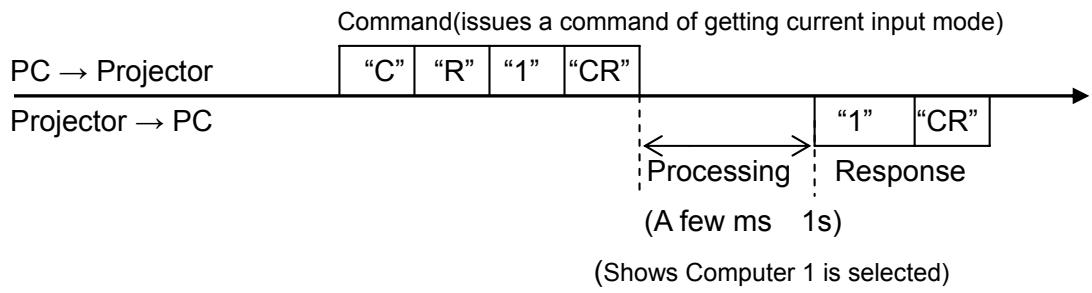
7.2.Transform Example
Get input mode for projector with basic commands
7.3. Operation Requirements
When Eco mode is selected in Standby mode of Setting menu and projector is in Standby, Status Read Commands are invalid.
7.4.Status Read Command
| Command | “CR0” [CR] | |
| Detail | Get the projector's operating status | |
| Response | Acceptable | “%1” [CR] |
| %1 | “00” = Power ON “80” = Standby “40” = Countdown in process “20” = Cooling Down in process “10” = Power Failure “28” = Cooling Down in process due to Temperature Anomaly “88” = Coming back after Temperature Anomaly “24” = Power Save/Cooling Down in process “04” = Power Save “21” = Cooling Down is in process after Power off due to lamp failure “81” = Standby after Cooling Down due to lamp failure | |
| Unacceptable | “?” [CR] | |
[Details of Response]
"00" [CR]
Status : Power ON
Normal image is on the screen.
"80" [CR]
Status: Standby
When the status is Standby, Status Read Commands are always acceptable, but Functional Execution Commands are not acceptable except POWER ON Command.
"40" [CR]
Status: Countdown in process
When "Display" in Setting Menu is ON and POWER ON is executed, it starts Countdown.
When "Display" in Setting Menu is OFF, processing Countdown is not executed and the status quickly moves to Power ON.
"20" [CR]
Status: Cooling Down in process
When the status is Power ON, and POWER OFF Command ("C01"[CR]) is executed, it moves to Cooling Down status.
This status automatically moves to Standby after lamp turns off and the fan spin finishes after about 90 seconds. The fan spin time depends on a model.
This function is used to cool down the lamps and other optical parts and is quite important for projector's reliability.
During this time, Functional Execution Commands are invalid.
"10" [CR]
Status: Power Failure
When the power supply voltage inside the projector reaches abnormal status, the projector is automatically turned off. The projector returns "10"[CR], which shows it moves to Power OFF status due to power failure. Fan also stops unlike Cooling Down status.
"28" [CR]
Status: Cooling Down in process due to Temperature Anomaly
When the inside temperature is out of the operating temperature, it automatically starts Cooling Down. Response for this status is "28"[CR].
Even if the temperature decreases during this process, Cooling Down is executed.
"88" [CR]
Status: Coming back after temperature anomaly
When the status moves to Standby after Cooling Down due to temperature anomaly, it returns "88" [CR].
This shows that the status turns to Standby because of abnormal temperature.
This status maintains until next operation is done. When Power On is executed, the information of temperature anomaly is canceled and normal operation is executed.
"24" [CR]
Status: Processing Power Save / Cooling Down
Power management function in Setting menu works and the status goes to Power Save / Cooling Down.
During this time, Functional Execution Commands are invalid (not executed).
This status moves to Power Save at set hours after the operation of Cooling Down.
![CANON LV-7292M - "24" [CR] - 1](/content/2019/11/99705/images/6a8416e42804c5c0f2e071870f40f44ebde66c7281d1d3a9a5f9d1a283dec5e0.jpg)
"04" [CR]
Status: Power Save
This shows that it moves to Power Save status by Power management function in Setting menu.
"21" [CR]
Status: Cooling Down in process after turned off due to lamp failure
When a projector is turned off because of lamp failure, it automatically starts Cooling Down operation, in which the projector returns "21" [CR].
"81" CR
Status: Standby after Cooling Down due to lamp failure
This value is returned when Cooling Down operation due to lamp failure has been completed and the status has been moved to Standby. The status is kept until the next operation starts.
7.5.Input Mode Read Command
| Command | “CR1” [CR] | |
| Detail | Get the selected Input No. | |
| Response | Acceptable | “%1” [CR] |
| %1 | "1" = Computer is selected "2" = HDMI is selected "3" = Video is selected LV-7292S/7297S/7292S: "1" = Computer is selected "2" = Video is selected | |
| Unacceptable | “?” [CR] | |
7.6.Lamp Time Read Command
| Command | “CR3” [CR] | |
| Detail | Get the total lamp running hours (Not actual lamp used hour, but Eco mode corresponding value). | |
| Response | Acceptable | “%1” [CR] |
| %1 | Shows the time period with 5 digits numbers. Example “00410”[CR] shows 410 hours | |
| Unacceptable | “?” [CR] | |
7.7.Setting Read Command
| Command | “CR4” [CR] | |
| Detail | Get screen setting status such as Ceiling / Rear. | |
| Response | Acceptable | “%1” [CR] |
| %1 | “11”[CR] = Normal Screen Setting “10”[CR] = Picture is top/bottom reversed. (Status: Rear Ceiling ON) “01”[CR] = Picture is left/right reversed. (Status: Rear ON) “00”[CR] = Picture is top/bottom and left/right reversed. (Status: Ceiling ON) | |
| Unacceptable | “?” [CR] | |
7.8.Temp Read Command
| Command | “CR6” [CR] | |
| Detail | Get the temperature data inside the projector. With some temperature sensors installed in the projector, it is possible to get all the temperature at once. | |
| Response | Acceptable | “%1_%2_%3” [CR] |
| %1 %2 %3 | %1 Temperature of sensor 1 %2 Temperature of sensor 2 %3 Temperature of sensor 3 Temperature data is shown as “00.0”. When the temperature goes down to -, the first character becomes “-” instead of a space, like “-05.5” [CR]. When no temperature data can be returned due to hardware problems, the first character becomes “E” like“E00.0” [CR]. When several temperature sensors are equipped, Responses are returned continuously. “_31.5 _35.2 _33.4”[CR] The first data is sensor 1, then one space, and the data of sensor 2 follows. | |
| Unacceptable | “ ”[CR] | |
7.9.Lamp Mode Read Command
| Command | “CR7” [CR] | |
| Detail | Get lamp mode status. For 1 lamp projector, get if it is lighting or not. | |
| Response | Acceptable | “%1” [CR] |
| %1 | “00” [CR]=Light is out. “01” [CR]=Light is on. | |
| Unacceptable | “ ”[CR] | |