
IDATA HDMI-KVM67 - Switch Techly - Free user manual and instructions
Find the device manual for free IDATA HDMI-KVM67 Techly in PDF.


| Type of Product | HDMI KVM Extender (Transmitter + Receiver Set) |
| Model | IDATA HDMI-KVM67 |
| Brand | Techly |
| Dimensions (L x W x H) | 150.0 x 107.0 x 28.4 mm |
| Weight (per unit) | 260 g (Transmitter), 260 g (Receiver) |
| Power Supply | DC 5V-12V, 2A (Two adapters included) |
| Power Consumption | TX < 4W, RX < 4W |
| Video Resolution | Up to 4K@60Hz (3840x2160@60Hz) |
| Transmission Distance | Up to 70m via CAT6/6A/7 cable |
| HDMI Compliance | HDMI 2.0 |
| HDCP Compliance | HDCP 2.2 |
| Audio Formats Supported | LPCM, DTS-HD, DTS-Audio, Dolby True HD 7.1CH, Dolby Digital 5.1CH |
| KVM Function | Yes (USB for keyboard/mouse at receiver, USB for computer at transmitter) |
| HDMI Loop-out (Transmitter) | Yes, one HDMI output |
| Audio Extraction (Receiver) | Yes, via S/PDIF port |
| HDR Support | Yes (YUV4:4:4) |
| EDID Passback | Yes |
| Protection Features | Lightning, surge, ESD protection (IEC61000-4-2) |
| Operating Temperature | -20 to 60°C |
| Storage Temperature | -30 to 70°C |
| Humidity (non-condensing) | 0 to 90% RH |
| Material | Aluminium alloy + crystal panel, grit blast finish |
| Color | Black |
| Mounting | Mounting brackets and screws included |
| Maintenance & Cleaning | Clean with a dry cloth only. Do not use solvents or abrasives. |
| Safety & Usage | For indoor dry use only. Keep away from water, high temperatures, and children. Do not open the device. |
| Spare Parts & Repairability | No user-serviceable parts. Contact authorized technician for service. |
| General Information | Compliant with WEEE and CE directives. |
Frequently Asked Questions - IDATA HDMI-KVM67 Techly
User questions about IDATA HDMI-KVM67 Techly
0 question about this device. Answer the ones you know or ask your own.
Ask a new question about this device
Download the instructions for your Switch in PDF format for free! Find your manual IDATA HDMI-KVM67 - Techly and take your electronic device back in hand. On this page are published all the documents necessary for the use of your device. IDATA HDMI-KVM67 by Techly.
USER MANUAL IDATA HDMI-KVM67 Techly
TECHly® The Modern IT brand
natural_image
Exterior view of a HDMI router device (no visible text or symbols on the device body)Technical features


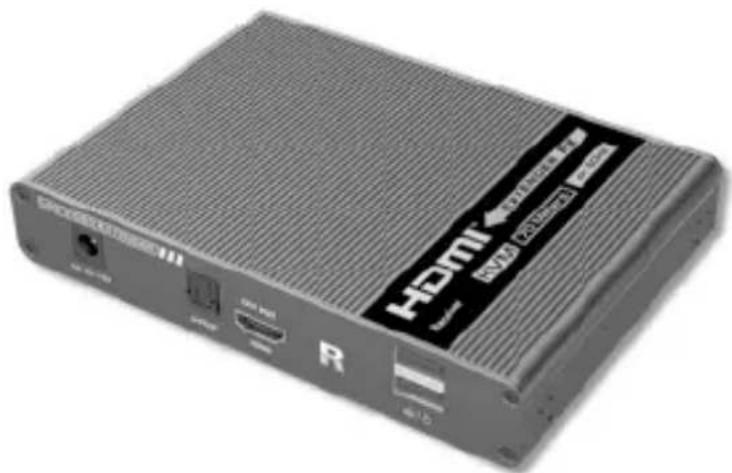
natural_image
Exterior view of a HDMI router device (no visible text or symbols on body)AIV SERIES

P/N: IDATA HDMI-KVM67
(transmitter + receiver)
8059018361629
Thank you for purchasing this product. For optimum performance and safety, please read these instructions carefully before connecting, operating or adjusting this product. Please keep this manual for future reference.
IMPORTANT SAFETY INSTRUCTION
INTENDED USE

We do not permit using the device in other ways like described in this user's manual. Use the product only in dry interior rooms. Not attending to these regulations and safety instruction might cause fatal accidents, injuries, and damages to persons and property. The manufacturer/supplier assumes no liability for damages caused by failure to comply with the intended use.

CAUTION
RISK OF ELECTRIC SHOCK DO NOT OPEN

To reduce risk of electric shock, this product should ONLY be opened by an authorized technician when service is required. Disconnect the product from mains and other equipment if a problem should occur. Do not expose the product to water or moisture.
- Your product is not a toy and is not meant for children, because it contains small parts which can be swallowed and can injure when used inappropriately!
- Please install the system and devices attached to it in a way that persons cannot be injured, or objects not be damaged for example by dropping or stumbling.
- Please remove the packing materials, because children may cut themselves on them while playing. Furthermore, there is a risk of swallowing and inhalation of incidentals and insulating material.
- Avoid places with high temperatures, or humidity, or places which might come into contact with water. Do not install the product close to openings of air conditioners, or at places with an excessive amount of dust or smoke. Keeps distance from flammable and explosive devices.
- Do not install the product at places subject to vibration, or oscillation
- Do not modify and alter the product and any accessories! Do not use any damaged parts.
- Keep enough space around all devices for a good ventilation and free motion and to avoid damages.
-
Do not mix up HDMI to RJ45 transmitter and RJ45 to HDMI receiver before installation.
-
Do not hot plug when it is working.
- Use DC5V-12V power supply only. Make sure specification matched if using 3rd party adapters.
- Static electricity will cause damage of the device, please do ESD protection when using the device.
INTRODUCTION
This HDMI Extender includes a transmitter unit and a receiver unit, allows HDMI signal to be transmitted up to 70 meters at 4K resolution using a CAT6/6A/7 network cable. It is perfect for outdoor advertising, video clips, monitor system, home entertainment, and conference, etc.
FEATURES
- Zero latency
- 4K@60Hz HDMI signal can be transmitted 70 meters through a CAT/6A/7 network cable.
- The receiver can extract the digital audio from the transmitter through the S/PDIF port.
• Supports audio formats (Dolby True HD 7.1CH, Dolby Digital 5,1CH).
• Supports HDR(YUV4:4:4), EDID passback.
• Transmitter support one HDMI loop-out.
• Support KVM function.
• Lighting protection, surge protection, ESD protection.
PACKAGE CONTENTS
• Transmitter unit x1pc
- Receiver unit x1pc
- DC5V 2A x2pcs
- USB Cable x1pc
- Mounting brackets x8pcs
- Screw x18pcs
- User manual x1pc
INSTALLATION REQUIREMENTS
- HDMI source device (compute graphics card, DVD, PS3,) HD monitoring equipment etc.
- HDMI display device like SDTV, HDTV, projector with HDMI port.
- UTP/STP CAT6/CAT6A/CAT7 cable. Follow standard IEEE-568B. It is recommended to select a network cable with less loss and crosstalk.
PANEL DESCRIPTION
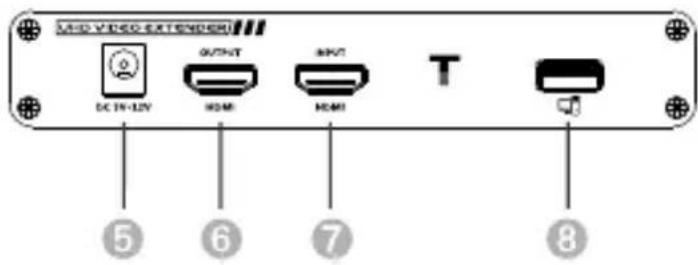
1. Transmitter (TX)
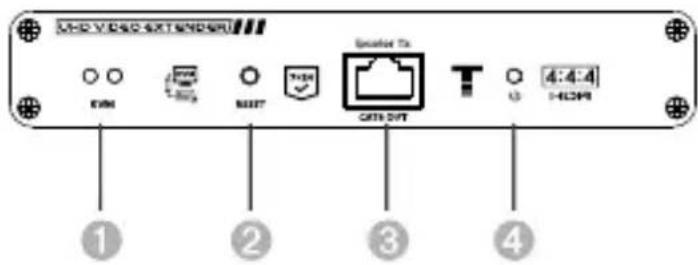
| 1 | USB light | a) The mouse and keyboard are connected, the indicator light is onb) There is signal connected, the indicator light flashes |
| 2 | Reset button Press to restart the device | |
| 3 | RJ45 signal output | Connect with network cable |
| 4 | Power/Signal indicator | When there is power and no HDMI signal, the indicator will flash, when there is HDMI signal, the indicator will light solid blue |
| 5 | DC5V-12V input | Connect with DC5V-12V power adapter |
| 6 | HDMI output Connect with HDMI display device | |
| 7 | HDMI input Connect with the source device | |
| 8 | USB-A port Connect with computer | |
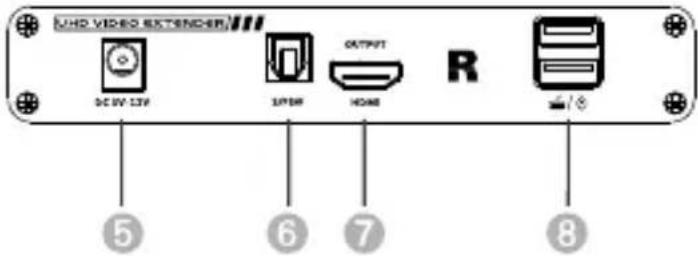
- Receiver (RX)
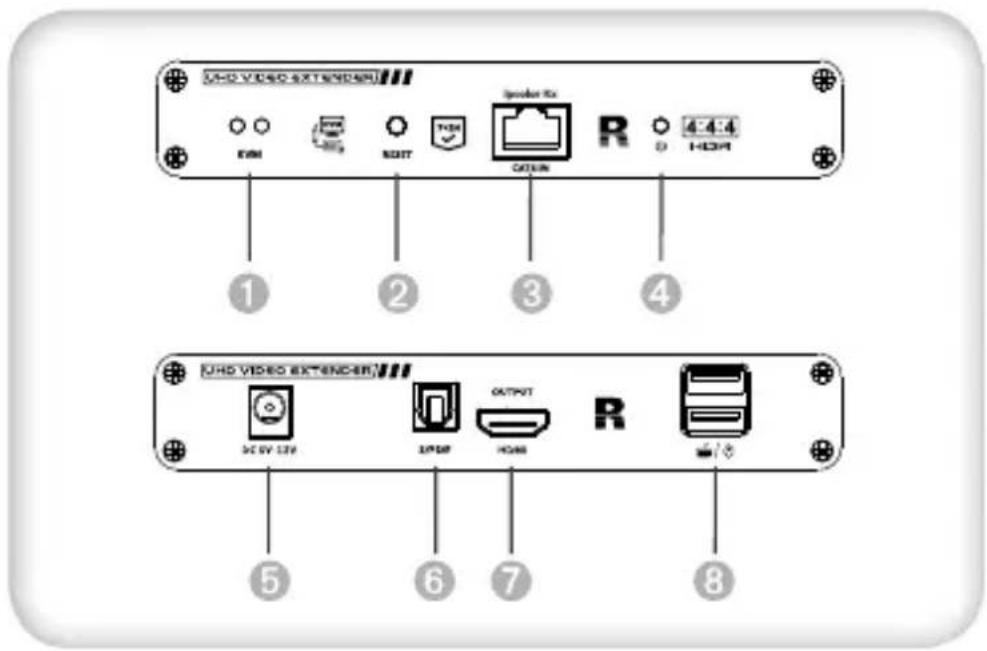
| 1 USB light | a) The mouse and keyboard are connected, the indicator light is onb) There is signal connected, the indicator light flashes | |
| 2 Reset button Press to restart the device | ||
| 3 | RJ45 signal output | Connect with network cable |
| 4 | Power/Signal indicator | When there is power and no HDMI signal, the indicator will flash, when there is HDMI signal, the indicator will light solid blue |
| 5 | DC5V-12V input | Connect with DC5V-12V power adapter |
| 6 S/PDIF out Output digital audio signal | ||
| 7 HDMI output Connect with HDMI display device | ||
| 8 USB-A port Connect with keyboard and mouse | ||
INSTALLATION PROCEDURE
1. Connection
One to one:
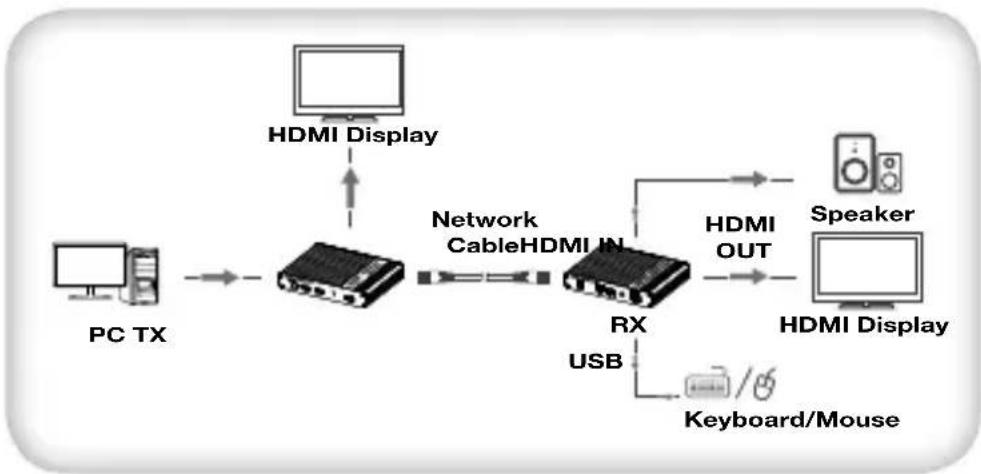
flowchart
graph LR
    PC_TX["PC TX"] --> A["PCI"]
    A --> B["HDMI Display"]
    B --> C["Network Cable"]
    C --> D["PCI"]
    D --> E["RX USB"]
    E --> F["HDMI OUT"]
    F --> G["Speaker"]
    G --> H["HDMI Display"]
    H --> I["Keyboard/Mouse"]
Follow the standard of EIA-568B, It is recommended to select a network cable with less loss and crosstalk.
1-Orange/white
2-Orange
3-Green/white
4-Blue
5-Blue/white
6-Green
7-Brown/white
8-Brown
2. Connection instruction
1) Connect the source device to the HDMI in port of the transmitter with an HDMI cable, and connect the HDMI out port of the receiver to the display device with another HDMI cable.
2) Connect the CAT out port of the transmitter and the CAT in port of the receiver via a network cable (CAT6/CAT6A/CAT7).
3) If using HDMI loop out, connect the display device to the HDMI OUT port of the transmitter.
4) Plug the power supply into the device to get started.
Note: It is recommended to use a length range within 2\~70m network cable. If the cable is too short, there may be no display output because the signal is too strong. If the cable is too long the output may be with poor quality.
FAQ
Q: There is no output on screen when all connections are correct
A: 1) Please make sure the HDMI cables supports 4K x 2K if the output signal from the source device is 4K x 2K resolution.
2) Please check and make sure the network cable insert to the RJ45 port well.
3) Restart the transmitter or receiver by pressing the reset button.
Q: Black screen happened on the display/monitor
A: 1) Check if the length of the cable is within the specified range.
2) Reset the transmitter to re-built the connection.
Q: The display shows unusual color or no sound
A: 1) Reset the transmitter or receiver to re-built the connection.
2) Check if the HDMI cables are connected well.
3) Reconnect the network cable.
SPECIFICATION
| Items Specification | |||
| Power Supply | Voltage/Current DC5V-12V | ||
| Power consumption | TX < 4W | RX < 4W | |
| HDMI compliance | HDMI 2.0 | ||
| HDCP compliance | HDCP 2.2 | ||
| HDMI Performance and Interface | HDMI resolution | 480i@60Hz, 480p@60Hz, 576i@50Hz, 576p@50Hz, 720p@50/60Hz, 1080i@50/60Hz, 1080p@50/60Hz, 3840x2160@24/25/30/50/60Hz, 4096x2160@24/25Hz, 1280x960, 1280x800, 1280x768, 1680x1050, 1360x768, 1366x768, 1600x900, 1024x768, 800x600 | |
| HDMI Performance And Interface | Supports audio formats | LPCM/DTS-HD/DTS-Audio/Dolby True HD 7.1CH/Dolby Digital 5,1CH | |
| Input and output TMDS signal | 0.7~1.2Vp-p(TMDS) | ||
| Input and output DDC signal | 5Vp-p (TTL) | ||
| Input cable length | ≤8m (AWG24) | ||
| Output cable length | ≤8m (AWG24) | ||
| Transmission Distance | CAT6/6A/7 ≤70m | ||
| Protection Level | Electrostatic protection of the whole machine | 1a Contact discharge level 31b Air discharge level 3Implementation of the standard: IEC61000-4-2 | |
| Operating Environment | Working temperature | -20~60°C | |
| Storage temperature | -30~70°C | ||
| Humidity (no condensation) | 0~90%RH | ||
| Body Properties | Dimension 150.0(L) x 107.0(W) x 28.4(H)mm | ||
| Material | Aluminium alloy material + crystal panel | ||
| Treatment process | Grit blast | ||
| Color Black | |||
| Weight TX: 260g | RX: 260g | ||
Maintenance: clean only with a dry cloth. Do not use cleaning solvents or abrasives.
Warranty: no guarantee or liability can be accepted for any changes and modifications of the product or damage caused due to incorrect use of this product.

In compliance with EU Directive WEEE this product is marked with this symbol. It means that used electrical and electronic products should not be mixed with general household waste.
There is a separate collections system for these products in compliance with WEEE directive, otherwise contaminative and hazardous substances can pollute the environment

With the CE sign, Techly® ensures that the product is conformed to the basic European standards and directives.
HDMI KVM EXTENDER SU CAVO DI RETE
Gentile Cliente
All rights reserved.
All trademarks and trade names are those
of their respective owners.
TECHLY ^® - Viale Europa 33
33077 Sacile (PN) - Italy
Brand : Techly
Model : IDATA HDMI-KVM67
Category : Switch