
IADAP USB31-HDMI - Adapter Techly - Free user manual and instructions
Find the device manual for free IADAP USB31-HDMI Techly in PDF.


| Product Type | USB 3.1 Type-C to HDMI Adapter |
| Brand | Techly |
| Model | IADAP USB31-HDMI |
| Input Interface | USB 3.1 Type-C Male |
| Output Interface | HDMI Female (HDMI 1.4) |
| Max Resolution | 3840x2600 @ 60Hz (mirror mode) / 4Kx2K @ 30Hz |
| Supported Resolutions | 4Kx2K @ 24/25/30Hz, 1080p @ 24/50/60Hz, 720p, 480p, 576i, 480i |
| Audio Support | HDMI audio (pass-through) |
| Color Depth | RGB 6/8/10/12 bpc, YCbCr 4:4:4/4:2:2 8/10/12 bpc |
| Data Rate | Up to 5.4 Gbps per lane (HBR2), supports HBR, RBR |
| Cable Length | 150 mm |
| Dimensions (Main Unit) | 41.5 × 37 × 14.5 mm |
| Weight | Approx. 25 g |
| Power Supply | USB bus power (no external power required) |
| Operating Temperature | 0°C to +45°C |
| Storage Temperature | -10°C to +80°C |
| Certifications | FCC, CE |
| Warranty | 1 Year Limited |
| Package Contents | Main unit, User manual |
| Material | Plastic (white) |
| Compliance | USB 3.1, DisplayPort Alt Mode 1.2 |
| Care & Cleaning | Wipe with a dry, soft cloth. Do not use liquids or abrasive cleaners. |
| Safety | Avoid exposure to moisture, extreme temperatures, and physical shock. |
| Spare Parts | Not available. The adapter is a sealed unit. |
| Repairability | Not designed for repair; replace if defective. |
Frequently Asked Questions - IADAP USB31-HDMI Techly
User questions about IADAP USB31-HDMI Techly
0 question about this device. Answer the ones you know or ask your own.
Ask a new question about this device
Download the instructions for your Adapter in PDF format for free! Find your manual IADAP USB31-HDMI - Techly and take your electronic device back in hand. On this page are published all the documents necessary for the use of your device. IADAP USB31-HDMI by Techly.
USER MANUAL IADAP USB31-HDMI Techly
USB 3.1 Type- C to HDMI Adapter (DP Alt mode)
User Manual
Contents
1.0 Introduction....1
2.0 Features....1
3.0 Specifications 2
4.0 Package Contents 2
5.0 Product Show....2
6.0 Operation 3
7.0 Connection Diagram....3
USB 3.1 Type- C to HDMI Adapter
DEAR CUSTOMER
Thank you for purchasing this product. For optimum performance and safety, please read these instructions carefully before connecting, operating or using this product. Please keep this manual for future reference.
1.0 INTRODUCTION
This USB3.1 Type-C to HDMI Adapter provides high throughput using the USB 3.1 bus and supports the high definition monitors with high resolution and high refresh rate. The USB3.1 Type-C Adapter allows you to connect your desktop PC or laptop's USB port to an extra monitor or TV.
2.0 FEATURES
- Standard USB3.1 Type-C
● Supports USB 3.1 input and HDMI output - Flexible USB Type-C Switching Support for USB 5G and DisplayPort 1.2 Alt mode
● Supports per lane data rates of 5.4 Gbps (HBR2), 2.7 Gbps (HBR) and 1.62 Gbps (RBR)
● Supports multiple color formats: RGB 6/8/10/12-bit per component (bpc) and YCbCr4:4:4, YCbCr4:2:2,8/10/12bpc
● Supports HDMI 1.4 and former versions
● Supports resolution up to 3840x2600 @60Hz (mirror mode) in DP1.1 (or 1.2) in SST mode.
● Supports resolutions as follows: 4Kx2K, @ 24Hz, 25Hz, 30Hz; 1080P, @24Hz, 50Hz, 60Hz; 720P, 480P, 576i, 480i, @50Hz and 60Hz
● Supports HDMI audio
● Supports bus-powered and self-powered operation
3.0 SPECIFICATIONS
| Signal Inputs/Output | |
| Input port | USB3.1 Type-C Male x1 |
| Output port | HDMI Female x1 (HDMI 1.4) |
| Warranty | |
| Limited Warranty | 1 Year |
| Environmental | |
| Operating Temperature | 0 °C to +45°C |
| Operating Humidity | 10% to 85 % RH (no condensation) |
| Storage Temperature | -10°C to +80°C |
| Storage Humidity | 5% to 90 % RH (no condensation) |
| Certifications | FCC,CE |
| Power Requirement | USB bus power |
| External Power Supply | NO |
| Accessories Adapter | |
| Size(L-W-H) | Main Unit :41.5×37×14.5mm Cable: 150mm |
| Remote control | NO |
| User Manual | English Version |
4.0 PACKAGE CONTENTS
Before attempting to use this unit, please check the packaging and make sure the following items are contained in the shipping carton:
- Main unit x1
- User Manual x1
5.0 PRODUCT SHOW
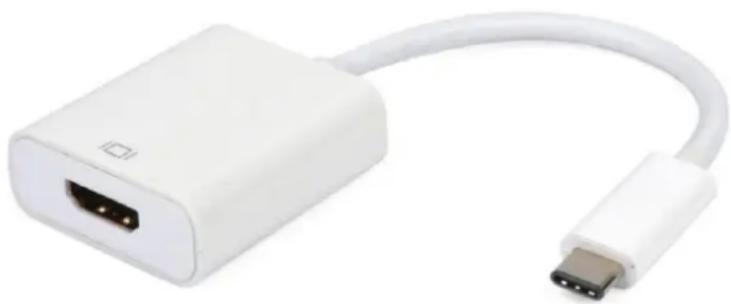
natural_image
White USB connector with port and cable, no visible text or symbols6.0 OPERATION
① Connect USB3.1 Type-C port of this product to computer
② Connect HDMI output of this product to HDTV using one HDMI M/M cable
Attention: Insert / Unplug cable gently.
7.0 CONNECTION DIAGRAM
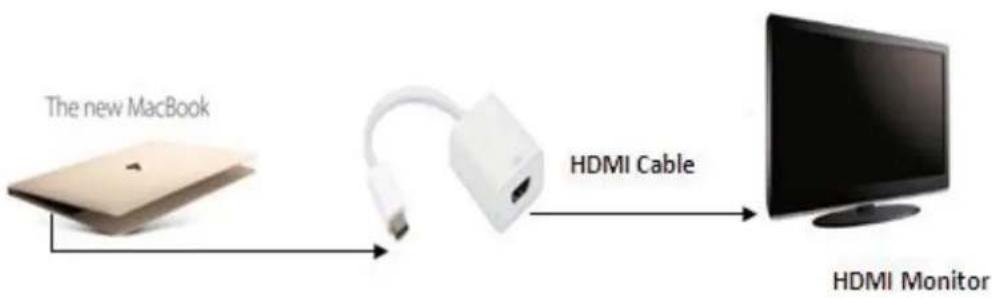
flowchart
graph LR
    A["The new MacBook"] --> B["HDMI Cable"]
    B --> C["HDMI Monitor"]
P/N13009
Brand : Techly
Model : IADAP USB31-HDMI
Category : Adapter