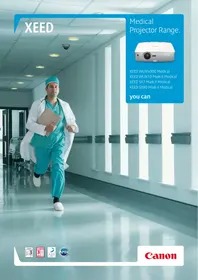
XEED WUX4000 MEDICAL - Professional projector CANON - Free user manual and instructions
Find the device manual for free XEED WUX4000 MEDICAL CANON in PDF.


| Product type | Professional installation projector |
| Brand | Canon |
| Model | XEED WUX4000 MEDICAL |
| Native resolution | WUXGA (1920 x 1200 pixels) |
| Display technology | Reflexive LCOS (Liquid Crystal on Silicon) |
| Brightness | 4000 lumens |
| Contrast ratio | 1000:1 (full on/off) |
| DICOM mode | Built-in DICOM simulation mode (21 gray levels) |
| Lens | Interchangeable (3 lens range), motorized zoom 1.5x |
| Lens shift | Motorized, vertical and horizontal |
| Keystone correction | Vertical: +20° to -11°, Horizontal: ±20° |
| Dimensions (W x H x D) | 380 mm x 170 mm x 430 mm |
| Weight (without lens) | 8.5 kg |
| Power consumption | Normal: 410 W, Silent: 365 W, Standby: 1.7 W (LAN off standby: 0.35 W) |
| Noise level | Normal: 39 dBA, Silent: 36 dBA |
| Input connectivity | DVI-D (HDCP), HDMI v1.3 with Deep Colour, Mini D-Sub 15-pin (component via adapter) |
| Control connectivity | RS-232 (Mini D-Sub 9-pin), RJ-45 (network) |
| Power supply | 100-240 V AC, 50/60 Hz |
| Main functions | DICOM simulation mode, on-site calibration (optional), display modes: Standard, Presentation, Dynamic, Vivid Photo, Photo/sRGB, Video, Cinema, Custom, DICOM SIM |
| Maintenance and cleaning | Clean the casing with a soft, dry cloth. Clean the air filter regularly. Refer to the manual for lamp replacement. |
| Security | Password lock function, Kensington cable security |
| Spare parts and repairability | Lamp, air filter, interchangeable lenses available. Repair by Canon authorized center. |
| General information | 3-year warranty. PACS compatible. Easy integration with medical image archiving and communication systems. |
Frequently Asked Questions - XEED WUX4000 MEDICAL CANON
User questions about XEED WUX4000 MEDICAL CANON
0 question about this device. Answer the ones you know or ask your own.
Ask a new question about this device
Download the instructions for your Professional projector in PDF format for free! Find your manual XEED WUX4000 MEDICAL - CANON and take your electronic device back in hand. On this page are published all the documents necessary for the use of your device. XEED WUX4000 MEDICAL by CANON.
USER MANUAL XEED WUX4000 MEDICAL CANON
Medical Projector Range.
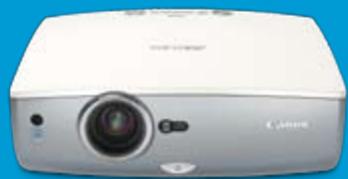
XEED WUX4000 Medical XEED WUX10 Mark II Medical XEED SX7 Mark II Medical XEED SX80 Mark II Medical
you can

Giving all the image accuracy you need.

Medical imaging demands extremely accurate reproduction of greyscales, if patient conditions are to be illustrated faithfully. Combining the benefits of Canon's LCOS panel technology with ultra-bright, high resolution imaging – up to native WUXGA resolution (1920 x 1200 pixels) – XEED offers seamless projection and optimal reproduction of medical images.
In hospitals, private medical centres and dentistry practices, Canon XEED projectors are a powerful addition to any PACS (Picture Archiving and Communication System), providing a reliable platform for radiological case discussions. Teaching hospitals and university medical schools will appreciate XEED's precise and accurate projection of X-ray and MRI images in any size of room.
Out-of-the-box DICOM simulation.
Optimising images to human visual perception, the DICOM 14 standard sets the benchmark in digital radiology. The XEED WUX4000 Medical, XEED WUX10 Mark II Medical, XEED SX7 Mark II Medical and XEED SX80 Mark II Medical all offer a DICOM simulation mode as standard.*
This DICOM SIM mode features 21 different levels of greyscale reproduction, based on varying combinations of luminance and contrast. The result is a flexible solution that can be used in various ambient lighting conditions. In addition, the range of DICOM presets available makes it far easier to accurately match twin screens when required.
Additional on-site calibration option.
On-site calibration giving full DICOM 14 compliance can be achieved using the AcuScreenPRO system, available separately from our partner Larivière GmbH. Environmental factors, such as the intensity and tone of ambient light, plus the projection screen type, are all taken into account to achieve the very best possible image quality.
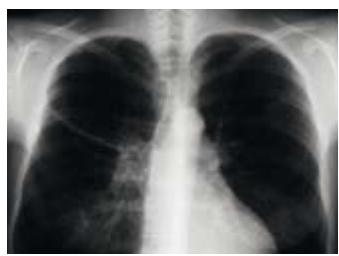
Without DICOM simulation mode
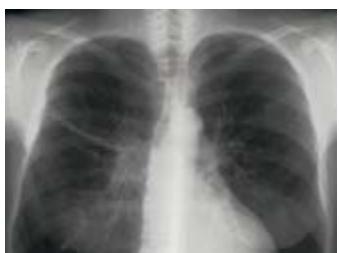
With DICOM simulation mode
![graph TD A["Canon XEED Projector WUX4000 Medical / WUX10 Mark II Medical / XEED SX7 Mark II Medical / XEED SX80 Mark II Medical"] --> B["RS232 control cable"] B --> C["AcuScreenPRO software"] C --> D["PC / Laptop with USB and RS232 interface"] D --> E["USB Connection"] E --> F["Measuring sensor"] F…](/content/2025/01/99690/images/88e423f91e8840689bae5a62facd16889b51d2cca7930bd5611cc81ebe29d0da.jpg)
The AcuScreenPRO system is comprised of easy-to-use, PC-based software and a measuring sensor. The supplied luminance sensor is used to evaluate exact display conditions, allowing precise corrections to be made according to the specific environment. By carrying out these corrections, the gradation between minimum luminance – where black areas appear grey due to external light – and maximum luminance can be distributed optimally.
Regular recalibration is recommended, to ensure ongoing DICOM 14 compliance, with the system downloading the new parameters to the projector after each calibration.
The XEED advantage:
The superior choice for medical professionals.
Leveraging Canon's 70 year heritage at the forefront of lens design, Canon XEED projectors deliver crisp, premium quality projection for demanding medical imaging applications, in a choice of both portable and installation models.
Employing Canon LCOS (Liquid Crystal on Silicon) panel technology, ultra-fine greyscales can be achieved in most lighting conditions. Projected images are displayed seamlessly, free from unwanted lattice and rainbow effects, that can so often plague conventional LCD and DLP models. The result is simply the best possible reproduction of radiological images.
A combination of exceptional contrast and high brightness is achieved via a unique optical system known as Canon AISYS (Aspectual Illumination System).
XEED WUX4000 Medical Installation Projector
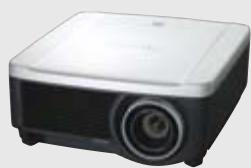



• Native WUXGA resolution with Canon LCOS technology
• 4000 lumens brightness and 1000:1 contrast ratio
• Full HD capability
• DICOM Simulation image mode
- Range of three interchangeable lenses and motorised lens shift
XEED WUX10 Mark II Medical Portable Projector
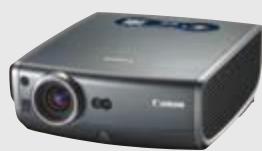
• Native WUXGA resolution with Canon LCOS technology
• 3200 lumens brightness and 1000:1 contrast ratio
• Full HD capability
• DICOM Simulation image mode



XEED SX7 Mark II Medical Portable Projector
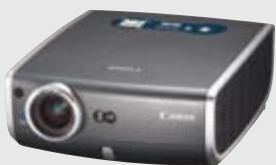


- Native SXGA+ resolution with Canon LCOS technology
• 4000 lumens brightness and 1000:1 contrast ratio - HD Ready
• DICOM Simulation image mode
XEED SX80 Mark II Medical Portable Projector
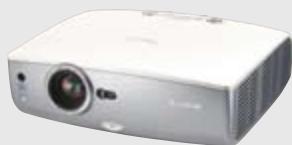
• Native SXGA+ resolution with Canon LCOS technology
• 3000 lumens brightness and 900:1 contrast ratio
• PC-less presentation via USB port
• DICOM Simulation image mode


| SPECIFICATIONS | XEED WUX4000 MEDICAL | XEED WUX10 MARK II MEDICAL | XEED SX7 MARK II MEDICAL | XEED SX80 MARK II MEDICAL |
| PRODUCT CLASS | Installation | Portable | Portable | Portable |
| LCD PANELTypeAspect RatioNative Resolution | LCOS reflective display, TFT Active Matrix16:101920 x 1200 (WUXGA), 2304000 pixels | LCOS reflective display, TFT Active Matrix16:101920 x 1200 (WUXGA), 2304000 pixels | LCOS reflective display, TFT Active Matrix4:31400 x 1050 (SXGA+), 1470000 pixels | LCOS reflective display, TFT Active Matrix4:31400 x 1050 (SXGA+), 1470000 pixels |
| OPTICSSzoom Magnification and ControlLens Shift | 1.5x MotorisedVertical and Horizontal, Motorised | 1.5x Motorised10:0 (fixed) | 1.7x Motorised9:1 (fixed) | 1.5x Motorised10:0 (fixed) |
| IMAGE AND AUDIOBrightnessContrast RatioKeystone Correction RangeDisplay Modes | 4000 lumens1000:1 (full on / full off)Vertical: +20° to -11°Horizontal: +/-20°Standard, Presentation, Dynamic, Vivid Photo, Photo/sRGB, Video, Cinema, Custom DICOM SIM | 3200 lumens1000:1 (full on / full off)Vertical: +/- 20° (Auto / Manual)Horizontal: NoneStandard, Presentation, Movie, sRGB, Photo, DICOM SIM | 4000 lumens1000:1 (full on / full off)Vertical: +/- 20° (Auto / Manual), Horizontal: +/- 20° (Manual)Standard, Presentation, Movie, Adobe RGB, sRGB, Photo, DICOM SIM | 3000 lumens900:1 (full on / full off)Vertical: +/- 20° (Auto / Manual)Horizontal: NoneStandard, Presentation, Movie, sRGB, Photo, DICOM SIM |
| PORTS AND CONNECTORSDigital RGB / Analogue RGBDigital Video and Audio InputAnalogue RGB Input 2Analogue RGB OutputS-Video InputComposite Video InputAudio InputsAudio OutputService Port / Projector ControlNetwork Port | DVI-D 24-pin (HDCP compatible)HDMI V1.3 with Deep ColourMini D-Sub 15-pin (Component via optional adaptor cable)---3.5mm stereo mini-jack x 23.5mm stereo mini-jack (variable level)Mini D-Sub 9-pinRJ-45 | DVI-I 29-pin (HDCP compatible)HDMI V1.3 with Deep ColourMini D-Sub 15-pin (Component via supplied adaptor cable)Mini D-Sub 15-pin (shared with Input 2)Mini-DIN 4-pinRCA x 13.5mm stereo mini-jack x 33.5mm stereo mini-jack (variable level)Mini D-Sub 9-pinRJ-45 | DVI-I 29-pin (HDCP compatible)-Mini D-Sub 15-pin (Component via supplied adaptor cable)Mini D-Sub 15-pinMini-DIN 4-pinRCA x 13.5mm stereo mini-jack x 33.5mm stereo mini-jack (variable level)Mini-DIN 8-pinVia optional RS-NA01 network adaptor | DVI-I 29-pin (HDCP compatible)HDMI V1.3 with Deep ColourMini D-Sub 15-pin (Component via supplied adaptor cable)Mini D-Sub 15-pinMini-DIN 4-pinRCA x 13.5mm stereo mini-jack x 33.5mm stereo mini-jack (variable level)Mini D-Sub 9-pinRJ-45 |
| RATINGSDimensions (W x H x D)WeightPower ConsumptionNoise LevelWarranty | 380mm x 170mm x 430mm8.5kg (without lens)Normal Mode: 410W / Quiet Mode: 365W / Standby: 1.7W / Standby (LAN off): 0.35WNormal Mode: 39dBA / Quiet Mode: 36dBA 3 years | 284mm x 114mm x 336mm5.0kgNormal Mode: 400W / Quiet Mode: 330W / Standby: 11WNormal Mode: 36dBA / Quiet Mode: 32dBA 3 years | 266mm x 114mm x 336mm4.8kgNormal Mode: 360W / Quiet Mode: 290W / Standby: 7WNormal Mode: 35dBA / Quiet Mode: 31dBA 3 years | 332mm x 121mm x 340mm5.0kgNormal Mode: 330W / Quiet Mode: 270W / Standby: 15WNormal Mode: 35dBA / Quiet Mode: 31dBA 3 years |
All data is based on Canon's standard testing methods. This Leaflet and the specifications of the product have been developed prior to the date of product launch. Specifications are subject to change without notice.
™and ®: All company and/or product names are trademarks and/or registered trademarks of their respective manufacturers in their markets and/or countries.
True Throw Distances
| WUX4000 MEDICAL WITH STANDARD LENS | |||||||
| Image size (inches) | 40 | 60 | 80 | 100 | 150 | 200 | 300 |
| Width (cm) | 86 | 129 | 172 | 215 | 323 | 431 | 646 |
| Height (cm) | 54 | 81 | 108 | 135 | 202 | 269 | 404 |
| Projection distance (zoom max) | 1.3m | 1.9m | 2.6m | 3.2m | 4.8m | 6.4m | 9.6m |
| Projection distance (zoom min) | 1.9m | 2.9m | 3.9m | 4.8m | 7.2m | 9.6m | — |
| WUX10 MARK II MEDICAL | |||||||
| Image size (inches) | 40 | 60 | 80 | 100 | 150 | 200 | 300 |
| Width (cm) | 86 | 129 | 172 | 215 | 323 | 431 | 646 |
| Height (cm) | 54 | 81 | 108 | 135 | 202 | 269 | 404 |
| Projection distance (zoom max) | 1.2m | 1.8m | 2.4m | 3.0m | 4.5m | 6.1m | 9.1m |
| Projection distance (zoom min) | 1.8m | 2.6m | 3.5m | 4.4m | 6.7m | 8.9m | — |
| SX7 MARK II MEDICAL | ||||||||
| Image size (inches) | 40 | 60 | 80 | 100 | 150 | 200 | 300 | |
| Width (cm) | 81 | 122 | 163 | 203 | 305 | 406 | 610 | |
| Height (cm) | 61 | 91 | 122 | 152 | 229 | 305 | 457 | |
| Projection distance (zoom max) | 1.2m | 1.8m | 2.4m | 3.0m | 4.5m | 5.9m | 8.9m | |
| Projection distance (zoom min) | 2.0m | 2.9m | 3.9m | 4.9m | 7.4m | — | — | |
| SX80 MARK II MEDICAL | |||||||
| Image size (inches) | 40 | 60 | 80 | 100 | 150 | 200 | 300 |
| Width (cm) | 81 | 122 | 163 | 203 | 305 | 406 | 610 |
| Height (cm) | 61 | 91 | 122 | 152 | 229 | 305 | 457 |
| Projection distance (zoom max) | 1.2m | 1.8m | 2.4m | 3.0m | 4.5m | 6.0m | 9.1m |
| Projection distance (zoom min) | 1.7m | 2.6m | 3.5m | 4.4m | 6.6m | 8.9m | — |
System Architecture – Integration of XEED with a typical PACS System
![graph TD A["Laptop / PC"] --> B["Sensor"] B --> C["Projector"] C --> D["DVI Cable"] D --> E["Work Station"] E --> F["PACS"] C --> G["RS 232"] G --> H["Projector"] H --> I["DVI Cable"] I --> J["Diagnostic monitor"] J --> K["DVI Splitter"] K --> L["DVI Splitter"] L --> M["Work Station"] M --> N["PACS"…](/content/2025/01/99690/images/9edafbb02fba67116ffd3a00c38bd375d79e8fc8ad2c3f0fe48f3de4ab9a3219.jpg)
Canon Inc
canon.com
Canon Europe
canon-europe.com
English Edition 0151W777
© Canon Europa N.V.,
2010
Canon Europe Ltd
3 The Square
Stockley Park
Uxbridge
Middlesex
UB11 1ET
United Kingdom
Brand : CANON
Model : XEED WUX4000 MEDICAL
Category : Professional projector