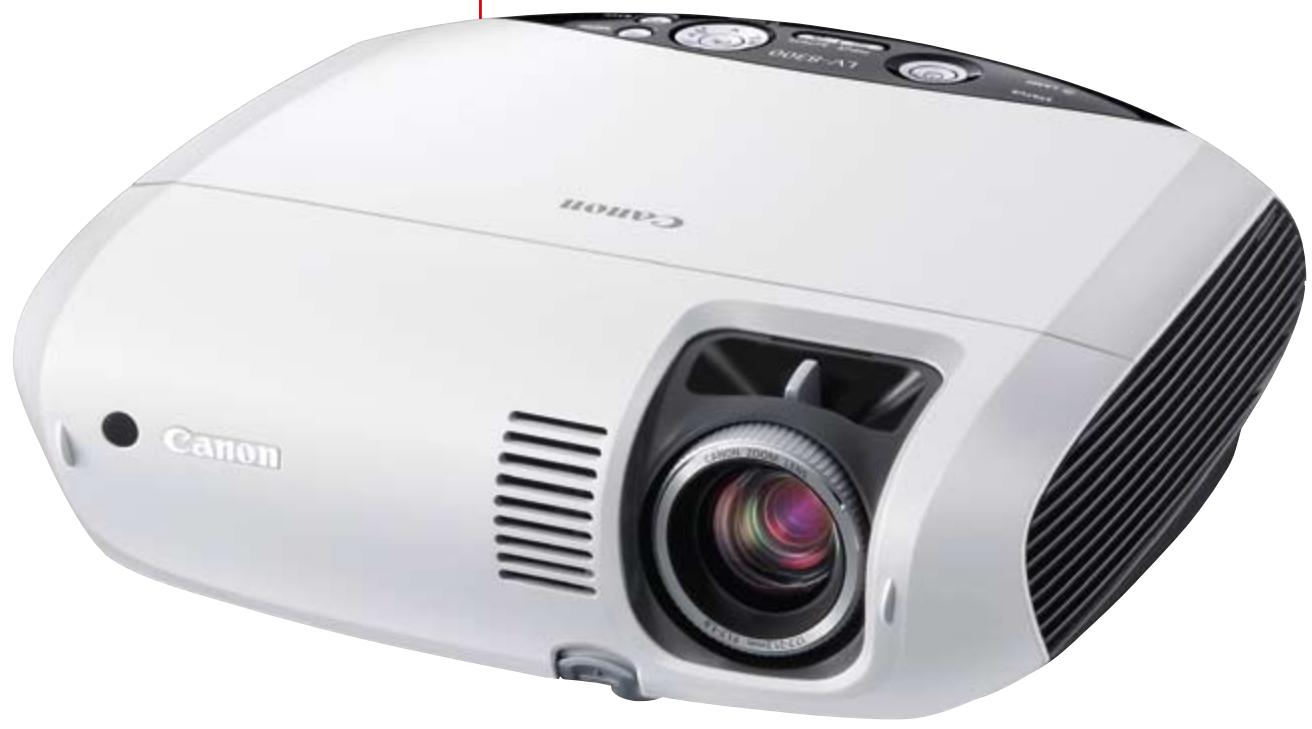
LV-8300 - Professional projector CANON - Free user manual and instructions
Find the device manual for free LV-8300 CANON in PDF.


| Product Type | Professional Projector |
| Brand | Canon |
| Model | LV-8300 |
| Display Technology | 3-panel LCD (Poly-silicon TFT Active Matrix) |
| Native Resolution | WXGA (1280 x 800) – 16:10 format |
| Brightness | 3000 lumens |
| Contrast Ratio | 500:1 |
| Lens | Manual zoom 1.2x, F1.7-1.9, f=17.7-21.2 mm |
| Lamp Life | 3000 h (normal mode), up to 4000 h (silent mode) |
| Lamp Type | 230 W NSHA |
| Noise Level | 35 dBA (normal), 29 dBA (silent) |
| Built-in Speaker | 7 W RMS (mono) |
| Keystone Correction | Vertical ±30° (auto and manual) |
| Connectivity | DVI-I HDCP, VGA (input/output), S-Video, Composite, RJ-45, RS-232C |
| Main Features | Auto Keystone, Screen Colour Correction (9 modes), Progressive Scan, startup 8 s, shutdown 30 s |
| Dimensions (W × H × D) | 317 × 111 × 336 mm |
| Weight | 3.3 kg |
| Power Supply | 100-240 V AC, 50/60 Hz |
| Power Consumption | 325 W (normal), 240 W (silent), 11 W (standby), 3 W (eco) |
| Operating Temperature | +5°C to +40°C |
| Storage Temperature | -10°C to +50°C |
| Included Accessories | Remote control, carrying case, 1.8 m VGA cable, DVI-VGA adapter, power cord |
| Maintenance | Lamp replacement from top without removing ceiling mount |
| Spare Parts | Replacement lamp LV-LP31, ceiling mount LV-CL15, DVI cable LV-CA29, component cable LV-CA32 |
Frequently Asked Questions - LV-8300 CANON
User questions about LV-8300 CANON
0 question about this device. Answer the ones you know or ask your own.
Ask a new question about this device
Download the instructions for your Professional projector in PDF format for free! Find your manual LV-8300 - CANON and take your electronic device back in hand. On this page are published all the documents necessary for the use of your device. LV-8300 by CANON.
USER MANUAL LV-8300 CANON
Professional projection,
exceptional value

Get the message across.
Created by imaging experts, Canon LV projectors are the ultimate presentation tool. The LV-7375, LV-7370 and LV-7275 models offer native XGA resolution, for sharp, high-impact images.
In addition, the LV-8300 offers WXGA resolution (1280 x 800 pixels) – a first for the LV range. WXGA has a wide aspect ratio of 16:10, designed to perfectly complement your wide-screen PC.
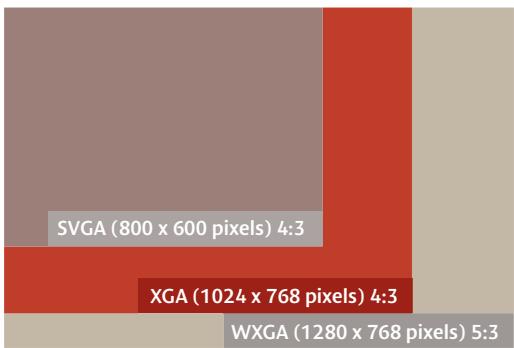
LV-8300 / LV-7375 / LV-7370 / LV-7275


Different environments need different projectors.
Each projector in the LV range is engineered to meet the imaging requirements of specific environments. Projectors with high brightness and advanced digital connectivity are perfect for the boardroom, while low noise, no-fuss projectors are suitable for the classroom. LV projectors offer a complete range of solutions to suit every need - and every budget.
LV-8300
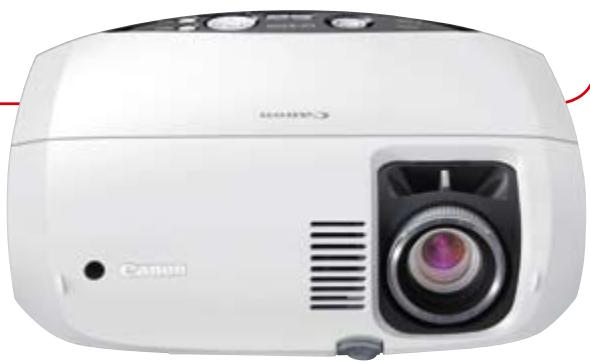
The LV-8300 offers a versatile mix of premium image quality in a compact, portable package. The native WXGA resolution and 16:10 aspect ratio ensure compatibility with today's wide-format computers.
LV-7375
Compact, affordable and capable of high performance, the LV-7375 offers exceptional 3500 lumens brightness and powerful 7W RMS audio output, making it ideal for business and public sector use.
LV-7370
The LV-7370 boasts improved functionality, with an integrated carrying handle, new lens cover and easy lamp replacement. 3000 lumens brightness and built-in 7W audio makes this projector a flexible business tool.
LV-7275
A portable, versatile, high-quality XGA projector, this model combines exceptional value and practical features that will benefit businesses, schools and mobile workers such as those working in sales.
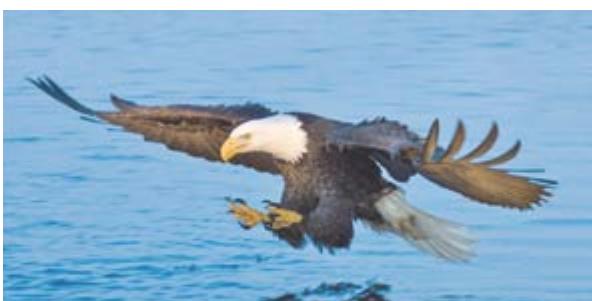
Original Image
CANON TECHNOLOGY FOR OUTSTANDING IMAGE QUALITY.
Outstanding image quality comes as standard across the LV range. Most models feature native XGA, while the LV-8300 has WXGA resolution for outstanding image quality. A Canon 1.2x wide-angle zoom lens produces flawless, large-size images in even the smallest rooms. Canon's superior lens technology uses twin aspherical elements to ensure clear, distortion-free projection.
HIGHLY RELIABLE AND SIMPLE TO MAINTAIN.
Each LV projector can be relied upon to provide powerful projection. Lamp changes are minimised, thanks to a long 3000 hour lamp life in Normal Mode. For even lower running costs, lamp life can be increased to a maximum of 4000 hours, with consistent use of Quiet Mode. In addition, lamp replacement is now quicker and easier than ever. The ingenious body design incorporates a top-mounted maintenance cover, enabling access to the lamp without the need to first uninstall the unit from its ceiling bracket. This makes routine maintenance much more straightforward.
COMPLETE CONVENIENCE FOR PRESENTERS.
With an 8 second start-up time, there's no waiting around for LV projectors to power up. A 30 second power-down time means that each projector can be quickly packed up and moved. An infra-red remote control is included, enabling convenient operation.
USER FRIENDLY DESIGN.
A soft carrying case and elegant built-in carrying handle are included with each projector, ensuring it is kept safe in transit.
If there is no conventional white projection screen available, Screen Colour Correction can help to recreate natural-looking images when projecting onto coloured surfaces. All four models are equipped with nine screen Colour Correction modes, including 'Greenboard' and new 'Whiteboard' options. While both of these settings are especially useful in teaching environments, the latter helps to eliminate 'hotspots' when projecting onto a whiteboard, ensuring natural colours and making images easier on the eye. Settings for coloured walls such as 'Light Yellow' and 'Sky Blue' are also included for maximum flexibility.
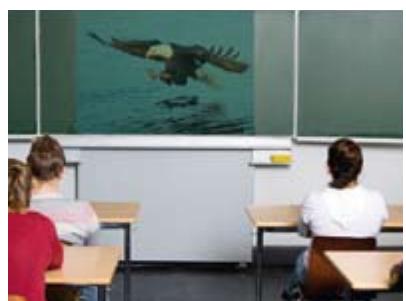
Screen Colour Correction Off
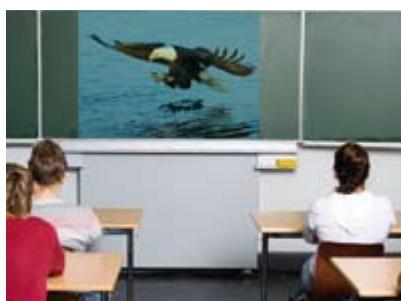
Screen Colour Correction On
High-quality images and wide-aspect compatibility in a stylish, compact package.
The LV-8300 has native WXGA resolution and is HD Ready, making it ideal for use with today's widescreen computers. With 1280 x 800 pixels of crisp image detail, the LV-8300 will certainly do justice to your wide-aspect presentations. A 500:1 contrast ratio and 3000 lumens ensure crisp, clear delivery, while automatic features make setup a breeze. The built-in 7W audio ensures that your message is heard – as well as seen – as clearly as possible.
- Native WXGA resolution with wide 16:10 aspect ratio
- 3000 lumens offers bright images - even in well-lit environments
- 500:1 contrast ratio for vivid colours
29dBA in Quiet Mode -
Canon wide-angle 1.2x zoom lens for large images from short throw distances
-
Auto Vertical Keystone Correction corrects image geometry
-
Screen Colour Compensation with nine options, including Greenboard and Whiteboard modes
Built-in audio with 7W output and line-out terminal -
HDCP-enabled DVI terminal for sharp reproduction of digital sources and RJ-45 network port for control and monitoring
- Ergonomic design with built-in carrying handle and easy lamp replacement
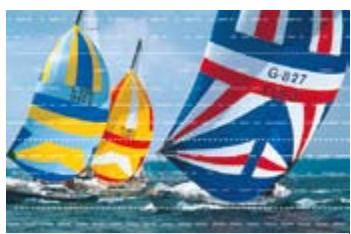
Without Progressive Scanning
With Progressive Scanning
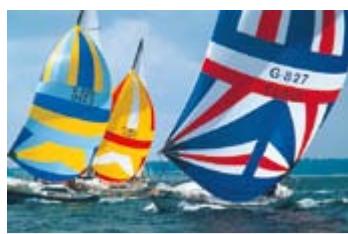
Progressive Scan, found throughout the LV range, significantly reduces screen flicker when projecting movies and multimedia presentations.

The LV-8300, LV-7375, LV-7370 and LV-7275 have a DVI port for connection to laptop and desktop computers, DVD players, and other digital sources. A digital-to-digital connection eliminates the flicker, ghosting and interference that can affect analogue signals and offers superb projection of High Definition images. The DVI connection is HDCP compliant, meaning that encrypted sources will be displayed correctly.
Meet the compact projector with a powerful punch.
The LV-7375's 3500 lumens make it the brightest projector in the ultra-portable LV range. Housed in a stylish, contemporary design, its native XGA resolution powers large screen projection and the built-in 7W audio ensures your presentation has maximum impact.
- Native XGA resolution for crisp image detail
- 3500 lumens for ultra-bright images even in well-lit environments
- 500:1 contrast ratio for vivid colours
- Just 29dBA in Quiet Mode
-
Canon wide-angle 1.2x zoom lens for large images from short throw distances
-
Auto Vertical Keystone Correction corrects image geometry
-
Screen Colour Compensation with nine options, including Greenboard and Whiteboard modes
Built-in audio with 7W output and line-out terminal -
HDCP-enabled DVI terminal for sharp reproduction of digital sources and RJ-45 network port for control and monitoring
- Ergonomic design with built-in carrying handle and easy lamp replacement

Vertical Keystone Correction OFF (projector placed below screen)

Vertical Keystone Correction ON

Vertical Keystone Correction, available across the LV range, allows accurate image projection even when the projector is not positioned square to the screen. The LV-8300, LV-7375, LV-7370 and LV-7275 incorporate Auto Vertical Keystone Correction for quick and easy set-up. In addition, Keystone Correction can also be adjusted manually, for precise alignment.
NETWORK CONNECTIVITY
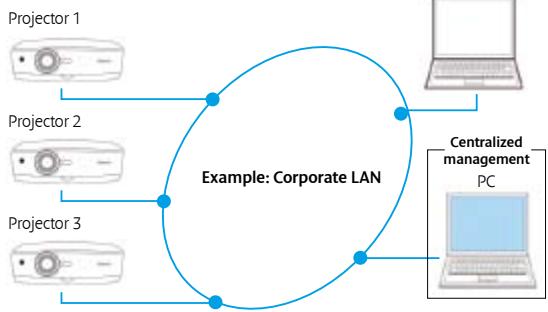
Canon ultra-portable LV projectors are now equipped with a built-in RJ-45 network port as standard. Connection to a network allows quick and convenient relaying of information between the projector and other network devices. For example, the projector can be remotely controlled from a touch panel system, while an email alert can be received when the lamp has reached the end of its life.
Powerful performance and effortless ease of use in demanding environments.
The LV-7370 combines the performance of a 3000 lumen output with versatile XGA resolution and enhanced functionality. Easy operation and setup comes from an ergonomic design and automatic features.
- Native XGA resolution for crisp image detail
- 3000 lumens - delivers bright images in larger rooms
- 500:1 contrast ratio
- Just 29dBA in Quiet Mode
-
Canon wide-angle 1.2x zoom lens for large images from short throw distances
-
Auto Vertical Keystone Correction corrects image geometry
-
Screen Colour Compensation with nine options, including Greenboard and Whiteboard modes
Built-in audio with 7W output and line-out terminal -
HDCP-enabled DVI terminal for sharp reproduction of digital sources and RJ-45 network port for control and monitoring
- Ergonomic design with built-in carrying handle and easy lamp replacement
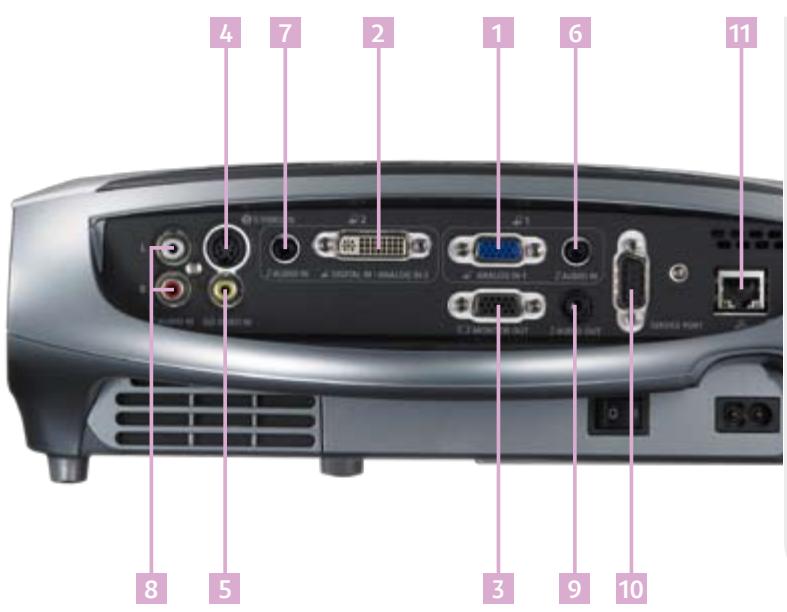
VIDEO INPUT AND OUTPUT
1 Mini D-sub 15-pin:
Analogue RGB input 1
(Component video via adaptor cable)
2 DVI-1 29-pin:
Digital RGB / Digital Video / Analogue RGB input 2
3 Mini D-sub 15-pin:
Analogue RGB output
4 Min-DIN 4-pin:
S-Video input
5 RCA x 1:
Composite Video input
AUDIO INPUT AND OUTPUT
6 3.5mm mini-jack:
Audio input for Analogue RGB sources
7 3.5mm mini-jack:
Audio input for Digital RGB / Analogue RGB sources
8 RCA x 2 (L/R):
Audio Input for Composite and S-Video sources
9 3.5mm mini-jack:
Stereo Audio output (variable level)
10 Mini D-sub 9-pin:
Service Port / Projector Control
11 RJ-45:
Network Port
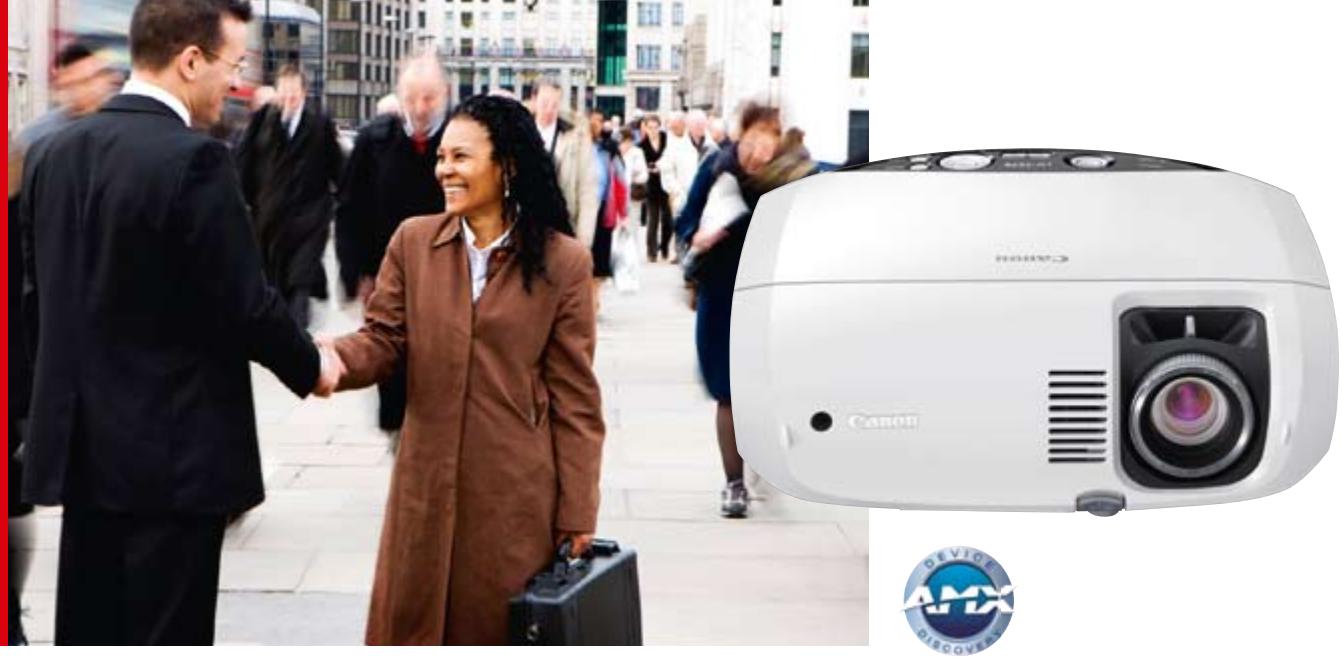
Excellent value projector with all the essentials.
Entry-level XGA projector that features a powerful 2600 lumens and 500:1 contrast ratio for high-quality images. User-friendly controls make it an ideal corporate, education and mobile solution.
- Native XGA resolution delivers crisp image detail
- 2600 lumens - sufficient brightness for general business use
- 500:1 contrast ratio for vivid colours
- Just 29dBA in Quiet Mode
-
Canon wide-angle 1.2x zoom lens for large images from short throw distances
-
Auto Vertical Keystone Correction corrects image geometry
-
Screen Colour Compensation with nine options, including Greenboard and Whiteboard modes
Built-in audio with 7W output and line-out terminal -
HDCP-enabled DVI terminal for sharp reproduction of digital sources and RJ-45 port for control and monitoring
- Ergonomic design with built-in carrying handle and easy lamp replacement
IN-BOX ACCESSORIES
Remote Control
Offers wireless control of most projector functions.
Soft Carry Case
A smart case with a strong shoulder strap, ensuring the projector is well protected whilst on the move.
VGA Computer Connection Cable, 1.8 metres
For connection of a standard laptop or desktop PC to the projector's RGB Input.
AC Mains Power Cable
For connecting the projector to the AC mains supply.
DVI to VGA adaptor
Connects standard 15-pin VGA cables to the DVI terminal.
OPTIONAL ACCESSORIES
(AVAILABLE SEPARATELY)
Replacement Lamp: LV-LP31
Replacement lamp for LV-8300, LV-7375,
LV-7370 and LV-7275.
Ceiling Mounting Bracket: LV-CL15
Enables ceiling mounting of the projector unit.
DVI Cable: LV-CA29
Allows a direct digital link between the video source and the DVI port.
Component Video Cable: LV-CA32
Used for connecting the projector to sources with
Component Video outputs, such as high-specification DVD players.
RS-232C Control Cable
Connects to the projector's service port for control from a PC or other device.
VGA Extension Cable, 10 metres: LV-CA02
Used when the computer is some distance away from the projector.
| Specifications | LV-8300 | LV-7375 | LV-7370 | LV-7275 |
| LCD PANEL Type | Transmissive LCD, Poly-silicon TFT Active Matrix | Transmissive LCD, Poly-silicon TFT Active Matrix | Transmissive LCD, Poly-silicon TFT Active Matrix | Transmissive LCD, Poly-silicon TFT Active Matrix |
| Size and Number | 0.59" diagonal with microlens, 3 panels | 0.63" diagonal with microlens, 3 panels | 0.63" diagonal with microlens, 3 panels | 0.63" diagonal, 3 panels |
| Aspect Ratio | 16:10 | 4:3 | 4:3 | 4:3 |
| Native Resolution | 1280 x 800 (WXGA), 1024000 pixels | 1024 x 768 (XGA), 786432 pixels | 1024 x 768 (XGA), 786432 pixels | 1024 x 768 (XGA), 786432 pixels |
| OPTICS | ||||
| Lamp Type | 230W NSHA | 230W NSHA | 230W NSHA (running at 210W max) | 230W NSHA (running at 210W max) |
| Lens F Number and Focal Length | F1.7 - F1.9; f=17.7 - 21.2mm | F1.7 - F2.0; f=19.8 - 23.7mm | F1.7 - F2.0; f=19.8 - 23.7mm | F1.7 - F2.0; f=19.8 - 23.7mm |
| Zoom Magnification and Control | 1.2x Manual | 1.2x Manual | 1.2x Manual | 1.2x Manual |
| Focus Control | Manual | Manual | Manual | Manual |
| Lens Shift | 8.5:1.5 (fixed) | 8.4:1.6 (fixed) | 8.4:1.6 (fixed) | 8.4:1.6 (fixed) |
| IMAGE AND AUDIO | ||||
| Brightness | 3000 lumens | 3500 lumens | 3000 lumens | 2600 lumens |
| Brightness Uniformity | 85% | 85% | 85% | 85% |
| Contrast Ratio | 500:1 (full on / full off) | 500:1 (full on / full off) | 500:1 (full on / full off) | 500:1 (full on / full off) |
| Projection Distance Coverage | 0.7m - 10.7m (2.9 - 3.5m for 100 inch image) | 0.8m - 11.3m (3.1m - 3.7m for 100 inch image) | 0.8m - 11.3m (3.1m - 3.7m for 100 inch image) | 0.8m - 11.3m (3.1m - 3.7m for 100 inch image) |
| Screen Size | 21" - 300" (45 x 28cm - 646 x 404cm) | 21" - 300" (43 x 32cm - 610 x 457cm) | 21" - 300" (43 x 32cm - 610 x 457cm) | 21" - 300" (43 x 32cm - 610 x 457cm) |
| Digital Zoom Magnification | 1x - 4x | 1x - 4x | 1x - 4x | 1x - 4x |
| Keystone Correction Range | Vertical: +/- 30° (Auto / Manual) | Vertical: +/- 30° (Auto / Manual) | Vertical: +/- 30° (Auto / Manual) | Vertical: +/- 30° (Auto / Manual) |
| Digital RGB Compatibility | SXGA+/ SXGA/WXGA/XGA/SVGA/VGA/MAC | SXGA+/ SXGA/WXGA/XGA/SVGA/VGA/MAC | SXGA+/ SXGA/WXGA/XGA/SVGA/VGA/MAC | SXGA+/ SXGA/WXGA/XGA/SVGA/VGA/MAC |
| Analogue RGB Compatibility | UXGA/ SXGA+/ SXGA/WXGA/XGA/SVGA/VGA | UXGA/ SXGA+/ SXGA/WXGA/XGA/SVGA/VGA | UXGA/ SXGA+/ SXGA/WXGA/XGA/SVGA/VGA | UXGA/ SXGA+/ SXGA/WXGA/XGA/SVGA/VGA |
| Digital Video Scan Systems | 1080i / 720p / 576p / 480p | 1080i / 720p / 576p / 480p | 1080i / 720p / 576p / 480p | 1080i / 720p / 576p / 480p |
| Component Video Scan Systems | 1080i / 720p / 576p / 576i / 480p / 480i | 1080i / 720p / 576p / 576i / 480p / 480i | 1080i / 720p / 576p / 576i / 480p / 480i | 1080i / 720p / 576p / 576i / 460p / 480i |
| Video / S-Video Colour Systems | PAL / PAL-M / PAL-N / PAL-60 / NTSC / NTSC4.43 / SECAM | PAL / PAL-M / PAL-N / PAL-60 / NTSC / NTSC4.43 / SECAM | PAL / PAL-M / PAL-N / PAL-60 / NTSC / NTSC4.43 / SECAM | PAL / PAL-M / PAL-N / PAL-60 / NTSC / NTSC4.43 / SECAM |
| Display Modes | Standard, Presentation, Cinema, Video, sRGB | Standard, Presentation, Cinema, Video, sRGB | Standard, Presentation, Cinema, Video, sRGB | Standard, Presentation, Cinema, Video, sRGB |
| Image Enhancement | Digital Gamma Correction | Digital Gamma Correction | Digital Gamma Correction | Digital Gamma Correction |
| Built-in Speaker | 7.0W RMS, Monaural | 7.0W RMS, Monaural | 7.0W RMS, Monaural | 7.0W RMS, Monaural |
| CONNECTORS | ||||
| Analogue RGB Input 1 | Mini D-Sub 15-pin | Mini D-Sub 15-pin | Mini D-Sub 15-pin | Mini D-Sub 15-pin |
| Digital RGB / Analogue RGB Input 2 | (DVI-I29-pin, HDCP compatible) | (DVI-I29-pin, HDCP compatible) | (DVI-I29-pin, HDCP compatible) | (DVI-I29-pin, HDCP compatible) |
| Analogue RGB Output | Mini D-Sub 15-pin | Mini D-Sub 15-pin | Mini D-Sub 15-pin | Mini D-Sub 15-pin |
| S-Video Input | Mini DIN 4-pin | Mini DIN 4-pin | Mini DIN 4-pin | Mini DIN 4-pin |
| Composite Video Input | RCAx1 | RCAx1 | RCAx1 | RCAx1 |
| Audio Input 1 | 3.5mm stereo mini-jack | 3.5mm stereo mini-jack | 3.5mm stereo mini-jack | 3.5mm stereo mini-jack |
| Audio Input 2 | 3.5mm stereo mini-jack | 3.5mm stereo mini-jack | 3.5mm stereo mini-jack | 3.5mm stereo mini-jack |
| Audio Input 3 | RCAx2 (L/R) | RCAx2 (L/R) | RCAx2 (L/R) | RCAx2 (L/R) |
| Audio Output | 3.5mm stereo mini-jack (variable level) | 3.5mm stereo mini-jack (variable level) | 3.5mm stereo mini-jack (variable level) | 3.5mm stereo mini-jack (variable level) |
| Service Port / Projector Control | Mini D-Sub 9-pin | Mini D-Sub 9-pin | Mini D-Sub 9-pin | Mini D-Sub 9-pin |
| Network Port | RJ-45 | RJ-45 | RJ-45 | RJ-45 |
| MECHANISMS | ||||
| Front Elevation Mechanism | Mechanical foot, 10° maximum image elevation | Mechanical foot, 10° maximum image elevation | Mechanical foot, 10° maximum image elevation | Mechanical foot, 10° maximum image elevation |
| Rear Adjustment Mechanism | One rotary foot for fine adjustment | One rotary foot for fine adjustment | One rotary foot for fine adjustment | One rotary foot for fine adjustment |
| RATINGS | ||||
| Dimensions (W×H×D) | 317mm x 111mm x 336mm | 317mm x 111mm x 336mm | 317mm x 111mm x 336mm | 317mm x 111mm x 336mm |
| Weight | 3.3kg | 3.3kg | 3.3kg | 3.3kg |
| Power Source | 100V - 240V AC, 50/60Hz | 100V - 240V AC, 50/60Hz | 100V - 240V AC, 50/60Hz | 100V - 240V AC, 50/60Hz |
| Power Consumption | Normal Mode: 325W / Quiet Mode: 240W / Standby: 11W / Power-Saving: 3W | Normal Mode: 325W / Quiet Mode: 240W / Standby: 11W / Power-Saving: 3W | Normal Mode: 295W / Quiet Mode: 240W / Standby: 11W / Power-Saving: 3W | Normal Mode: 295W / quiet Mode: 240W / Standby: 11W / Power-Saving: 3W |
| Noise Level | Normal Mode: 35dBA / Quiet Mode: 29dBA | Normal Mode: 35dBA / quiet Mode: 29dBA | Normal Mode: 35dBA / quiet Mode: 29dBA | Normal Mode: 35dBA / quiet Mode: 29dBA |
| Operating Environment | +5°C to +40°C | +5°C to +40°C | +5°C to +40°C | +5°C to +40°C |
| Storage Environment | -10°C to +50°C | -10°C to +50°C | -10°C to +50°C | -10°C to +50°C |
| Warranty | 3 years | 3 years | 3 years | 3 years |
Some images are simulated for clarity of reproduction. All data is based on Canon's standard testing methods
Specifications are subject to change without notice. ™ and @: All company and/or product names are trademarks and/or registered trademarks of their respective manufacturers in their markets and/or countries.
TRUE THROW DISTANCES FOR THE LV-8300 PROJECTOR
| Screen size | |||||||
| Inches (W x H) cm | 21 45 x 28 | 40 86 x 54 | 80 172 x 108 | 100 215 x 134 | 150 323 x 202 | 200 431 x 269 | 300 646 x 404 |
| Projection Distance | |||||||
| Zoom max | - | 1.1m | 2.3m | 2.9m | 4.4m | 5.9m | 8.8m |
| Zoom min | 0.7m | 1.4m | 2.8m | 3.5m | 5.3m | 7.1m | 10.7m |
| Height, H1 | 24cm | 46cm | 92cm | 114cm | 172cm | 229cm | 343cm |
| Height, H2 | 4cm | 8cm | 16cm | 20cm | 30cm | 40cm | 61cm |
10.7 m (Zoom min.)
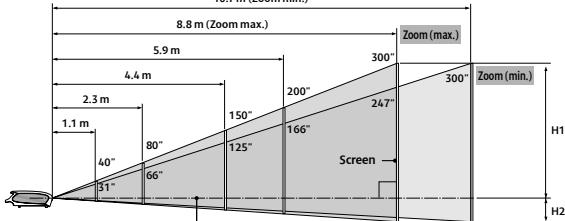
Optical axis when image is projected
at right angle to the screen
TRUE THROW DISTANCES FOR THE LV-7375, LV-7370 AND 7275 PROJECTORS
| Screen size | |||||||
| Inches (W x H) cm | 21 43 x 32 | 40 81 x 61 | 80 163 x 122 | 100 203 x 152 | 150 305 x 229 | 200 406 x 305 | 300 610 x 457 |
| Projection Distance | |||||||
| Zoom max | - | 1.2m | 2.5m | 3.1m | 4.7m | 6.2m | 9.4m |
| Zoom min | 0.8m | 1.5m | 3.0m | 3.7m | 5.6m | 7.5m | 11.3m |
| Height, H1 | 27cm | 51cm | 103cm | 128cm | 193cm | 257cm | 386cm |
| Height, H2 | 5cm | 10cm | 19cm | 24cm | 36cm | 48cm | 71cm |
11.3 m (Zoom min.)
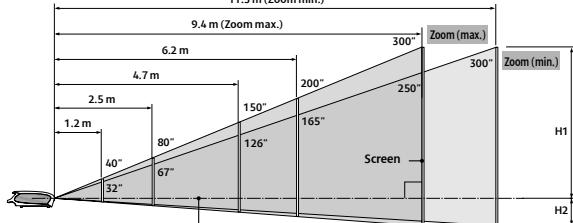
Optical axis when image is projected
at right angle to the screen.
you can
Canon
Canon Inc.
www.canon.com
Canon Europa N.V.
www.canon-europe.com
English Edition 0131W207
© Canon Europa N.V., 2009 (0109)
Canon (UK) Ltd
Woodhatch
Reigate
Surrey
RH28BF
T:08705143723
www.canon.co.uk
Canon Ireland
Arean Road, Sandyford
Industrial Estate
Dublin 18, Ireland
T:012052400
F:012958141
www.canon.ie

WWF
Canon
Europe Middle East & Africa
Europe, Middle East & Africa Conservation Partner
©1986 Panda symbol WWF
© WWF Registered Trademark