
DP46812 - Television SANYO - Free user manual and instructions
Find the device manual for free DP46812 SANYO in PDF.


| Product Type | LED Television |
| Screen Size | 46 inches (diagonal) |
| Resolution | 1920 x 1080 (Full HD) |
| Aspect Ratio | 16:9 |
| Refresh Rate | 60 Hz |
| Dimensions (with stand) | 106.5 x 66.5 x 25.0 cm |
| Weight (with stand) | 12.5 kg |
| Power Consumption (typical) | 85 W |
| Power Consumption (standby) | <0.5 W |
| Power Supply | AC 100-240V, 50/60 Hz |
| Tuner | ATSC (analog + digital) |
| Connectivity | 3x HDMI, 1x USB, 1x Composite, 1x Component, 1x RF, 1x Ethernet, 1x Optical Audio Out |
| Audio Output | 2 x 10 W speakers |
| Main Functions | Digital TV reception, multimedia playback via USB, sleep timer, parental lock, closed captioning, V-chip |
| Cleaning Instructions | Wipe screen and cabinet with a soft, dry cloth. Do not use abrasive cleaners. |
| Safety Precautions | Place on stable surface; ensure adequate ventilation; do not expose to moisture; unplug during storms. |
| Spare Parts & Repairability | Remote control (RC-46812), stand screws, power cord. Repairs should be performed by qualified service personnel. |
| General Information | Manufacturer: Sanyo; Model: DP46812; Year: 2012; Energy Star compliant; VESA mount compatible (400x400 mm) |
Frequently Asked Questions - DP46812 SANYO
User questions about DP46812 SANYO
0 question about this device. Answer the ones you know or ask your own.
Ask a new question about this device
Download the instructions for your Television in PDF format for free! Find your manual DP46812 - SANYO and take your electronic device back in hand. On this page are published all the documents necessary for the use of your device. DP46812 by SANYO.
USER MANUAL DP46812 SANYO
natural_image
Front view of a flat-screen computer monitor (no visible text or symbols)1080p HDTV LCD
Model No.: DP46812
Owner's Manual (English)
Part No.: 1JC0P1P0035 --
© 2012 Sanyo Manufacturing Corporation

Please read before operating your HDTV!
PROTECTING THE LCD SCREEN
CAUTION: The screen can be damaged if it is not maintained properly.
- Do not use hard objects such as hard cloth or paper to clean the screen.
- Do not use excessive pressure when cleaning the screen; excessive pressure can cause permanent discoloration or dark spots.
• NEVER spray liquids on the screen.
HANDLING PRECAUTIONS
• Handle by the cabinet only.
- Handling by two or more people is recommended.
- Never touch the screen when handling.
- Handling damage is not covered under warranty.
- Do not remove the protective film covering the front cabinet while handling the HDTV.
POSITIONING THE HDTV
• Always use a firm and flat surface when positioning your HDTV.
- Do not position the unit in a confined area.
- Allow adequate space for proper ventilation.
- Do not position the HDTV where it is easily reachable by small children and may present risk of injury.
- Once HDTV is positioned, remove the protective film covering front cabinet.
The American Academy of Pediatrics discourages media use by children younger than two years. For more information, visit www.aap.org.
ENERGY STAR is a set of power-saving guidelines issued by the U.S. Environmental Protection Agency (EPA). ENERGY STAR is a joint program of the U.S. Environmental Protection Agency and the U.S. Department of Energy helping us all save money and protect the environment through energy efficient products and practices.
Changes to default as-shipped television configuration and settings or enabling certain optional features and functionalities will change the energy consumption of the television, this may increase energy consumption beyond the limits required for ENERGY STAR qualification.
TRADEMARKS
Manufactured under license from Dolby Laboratories. "Dolby" is a trademark of Dolby Laboratories.
HDMI
HDMI, the HDMI Logo and High-Definition Multimedia Interface are trademarks or registered trademarks of HDMI Licensing LLC in the United States and other countries.

As an Energy Star® Partner, Sanyo Manufacturing Corporation has determined that this product meets the Energy Star® guidelines for energy efficiency.
AUDYSSEY
Manufactured under license from Audyssey Laboratories™. U.S. and foreign patents pending. Audyssey Dynamic Volume ^5 is a registered trademark of Audyssey Laboratories.
SPECIFICATIONS
Power Requirement:
Source: AC 120V, 60Hz
AC Power Consumption: 178 watts
Weight (w/stand) - 41 lbs.
Dimensions
| WIDTH | HEIGHT | DEPTH | |
| DP46812 | 43.9 | 29.4 | 10.6 |
| w/out stand | 43.9 | 28.6 | 4.4 |
NOTE: Dimensions are in inches

CONTAINS MERCURY LAMPS, DISPOSE OF PROPERLY

SANYO television customers should contact MRM Recycling at 888-769-0149 or visit their website at www.mrmrecycling.com regarding SANYO's waste management plan.
INITIAL CHANNEL SEARCH
is issued by the U.S. Environmental Protection of the U.S. Environmental Protection Agency all save money and protect the environment
station and settings or enabling certain optional energy consumption of the television, this may be required for ENERGY STAR qualification.
| CAUTION | RISK OF ELECTRIC SHOCK DO NOT OPEN! | THIS SYMBOL INDICATES THAT DANGEROUS VOLTAGE CONSTITUTING A RISK OF ELECTRIC SHOCK IS PRESENT AFTER THIS UNIT. |
| CAUTION TO REDUCE RISK OF ELECTRIC SHOCK, DO NOT REMOVE COVER OUT BACK. NO USB SERVICEABLE PARTS IN either PERE-mail FROM QUALIFIED SERVICE PERSONNEL | THIS SYMBOL INDICATES THAT THERE ARE IMPROVATING OPERATING AND NAME-BANKING INSTRUCTIONS IN THE LEAFYRE ACQUANTING THIS UNIT. | |
| WARNING: TO REDUCE THE RISK OF FIRE OR SHEALTH SHOCK, DO NOT EXPOSE THIS APPLIANCE TO RAIN OR MOISTURE | ||
IMPORTANT SAFETY INSTRUCTIONS
- Read these instructions.
- Keep these instructions.
- Need all warnings
- Follow an instructions.
- Do not take this
- DO NOT USE THIS APPARATUS NEAR WATER.
- Clean Poland with dry cloth
- Do not block any ventilation openings. Install in accordance with the manufacturer's instructions.
- Do not install near any heat sources such as radiators, heat registers, stoves, or other apparatus (including amplifiers) that produce heat.
- Do not defeat the safety purpose of the polarized or grounding-type plug. A polarized plug has two blades with one wider than the other. A grounding-type plug has two blades and a third grounding prong. The wide blade or the third prong are provided for your safety. If the provided plug does not fit fully into your outlet, consult an electrician for replacement of the obsolete outlet.
- Protect the power cord from being walked on or pinched particularly at plugs, convenience receptacles, and the point where they exit from the apparatus.
- Only use attachments/accessories specified by the manufacturer.
- Use only with the cart, stand, tripod, bracket, or table specified by the manufacturer, or sold with the apparatus. When a cart is used, use caution when moving the cart/apparatus combination to avoid injury from tip-over.
- Unplug this apparatus during lightning storms or when unused for long periods of time.
-
Refer all servicing to qualified service personnel. Servicing is required when the apparatus has been damaged in any way, such as power-supply cord or plug is damaged, liquid has been spilled or objects have fallen into the apparatus, the apparatus has been exposed to rain or moisture, does not operate normally, or has been dropped.
-
If an outside antenna is connected to the television equipment, be sure the antenna system is grounded so as to provide some protection against voltage surges and built up static charges. In the U.S. Selection 810-21 of the National Electrical Code provides information with respect to proper grounding of the mast and supporting structure, grounding of the lead-in wire to an antenna discharge unit, size of grounding conductors, location of antenna discharge unit, connection to grounding electrodes, and requirements for the grounding electrodes.
-
An outside antenna system should not be located in the vicinity of overhead power lines or other electrical light or power circuits, or where it can fall into such lines or circuits. When installing an outside antenna system, extreme care should be taken to keep from touching such power lines or circuits as contact with them might be fatal.
EXAMPLE OF ANTENNA GROUNDING ACCORDING TO NATIONAL ELECTRICAL CODE, ANSUNEPAL 70
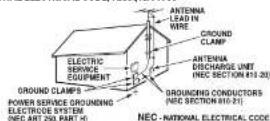
*Note to CATV system installer. This reminder is provided to call the CATV system installer's attention to Article 820-40 of the NEC that provides guidelines for proper grounding end, in particular, specifies that the cable ground shall be connected to the grounding system of the building, as close to the point of cable entry as practical."
17. Wall or Ceiling Mounting - The product should be mounted to a wall or ceiling only as recommended by the manufacturer.
18. Apparatus shall not be exposed to dripping or splashing, and no objects filled with liquids, such as vases, shall be placed on it.
19. When the MAINS plug is used as the disconnect device, the disconnect device shall remain readily operable.
FCC INFORMATION
This equipment has been tested and found to comply with the limits for a Class B digital device, pursuant to Part 15 of the FCC Rules. These limits are designed to provide reasonable protection against harmful interference in a residential installation. This equipment generates, uses and can radiate radio frequency energy and, if not installed and used in accordance with the instructions, may cause harmful interference to radio communications. However, there is no guarantee that interference will not occur in a particular installation. If this equipment does cause harmful interference to radio or television reception, which can be determined by turning the equipment off and on, the user is encouraged to try to correct the interference by one or more of the following measures:
- Reorient or relocate the receiving antenna.
- Increase the separation between the equipment and receiver.
- Connect the equipment into an outlet on a circuit different from that to which the receiver is connected.
- Consult the dealer or an experienced radio/TV technician for help.
CAUTION: FCC Regulations state that improper modifications or unauthorized changes to this unit may void the user's authority to operate the unit.
This device complies with Part 15 of the FCC Rules. Operation is subject to the following two conditions: (1) this device may not cause harmful interference, and (2) this device must accept any interference received, including interference that may cause undesired operation. Shielded cables must be used with this unit to ensure compliance with the Class B FCC limits.
This equipment is a Class II or double insulated electrical appliance. It has been designed in such a way that it does not require a safety connection to electrical earth.
GETTING STARTED
STAND ASSEMBLY
NOTE: Skip these steps if using a wall mounting kit (not included).
1 Place HDTV face down on a padded or cushioned flat surface to protect the screen and finish.
2 Carefully insert the stand base to the bottom of the HDTV and secure it by inserting four (4) screws as indicated in the diagram below.
NOTE: Stand base screws are located in the literature package.
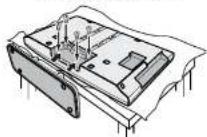
3 Position the HDTV on a firm and flat surface with adequate space for proper ventilation.
WALL MOUNTING (OPTIONAL)
Wall mounting of the HDTV must be performed by a skilled person.
If stand base disassembly is required:
- Place HDTV face down on a padded or cushioned flat surface to protect the screen and finish.
- Remove the four (4) screws securing the foot stand. CAUTION: Hold the stand firmly as you remove the last screw.
Use the four (4) screws included in the literature package (or removed from the foot stand) to secure the HDTV to a wall mounting kit.
IMPORTANT: Wall mount kit must comply with VESA standard 400 x 400. All four (4) screws must be threaded to the wall mount and HDTV's back cabinet
Mounting screws measurements: M6 (6mm) Diameter, Length—12mm (maximum)
BATTERY INSTALLATION
Install two (2) "AA" batteries in the remote control. (Not included)
PRECAUTIONS
- Replace both batteries at the same time. Do not use a new battery with an old used battery.
- There's a risk of explosion if a battery is replaced by an incorrect type.
- Keep away from moisture.
- Be sure to match the “+” and “-” signs on the batteries with marks inside the remote control.
- Please properly dispose of used up batteries.
WARNING: The batteries for battery packl shall not be exposed to excessive heat such as sunshine, fire or the like.
ANTENNA CONNECTION FOR
OFF-AIR SIGNALS OR CABLE
Hook up your antenna or your cable service to the HDTV's ANT terminal with the use of a 75 OHM coaxial cable.
NOTE: Keep your indoor antennas at least 3 ft. away from the television set and any other electronic equipment.
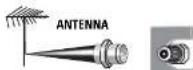
ANALOG / DIGITAL ANTENNA IN
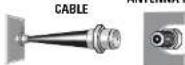
The tuner in this HDTV can receive: • Digital and Analog off air signals from an antenna
• Analog or ClearQAM cable channels from a direct Cable TV connection.
Before proceeding, please make sure to correctly hook up your antenna or cable connection and all AV equipment to your HDTV.
- PLUG IN AC POWER CORD
120V AC, 60Hz
2. TURN ON TV
3. TV SET LOCATION SELECTION:
Select "Home Mode" to set the HDTV's backlight to an Energy Star qualified level, or select "Store Mode" to set the backlight to a retail display level.
4. CHANNEL AND SIGNAL SEARCH:
Select "Signal Search" and press ENTER to perform a channel search from an Antenna or a direct Cable connection, and a signal search from devices hooked up to the HDTV's AV input jacks.
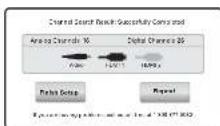
5. SIGNAL SEARCH RESULT SCREEN
The final setup screen displays analog and digital channels found, as well as AV inputs detected.
Select Finish Setup and press ENTER.
NOTE: If you wish to repeat the process, select Repeat.
AV INPUT SELECTION
Press the INPUT key to select the correct AV input for the video source you wish to watch.
NOTE: Unused AV inputs may be disabled with the Input Setting feature.
HDTV INPUT/OUTPUT REFERENCE

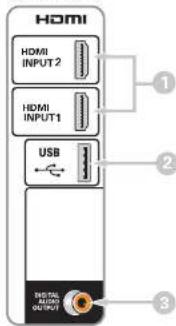
HDMI (INPUT1 or INPUT2)
Use HDMI INPUT1 & 2 to hookup HD digital devices such as a Blu-ray player, HD Cable Box, HD Satellite Receiver or Video-game System.
Connect your digital device's HDMI output to any of the two (2) HDMI inputs on your HDTV with the use of an HDMI cable.
2 USB
USB input jack is used to connect a USB mass storage device to watch digital images stored in JPEG format.

Digital Audio Output (Coaxial)
Hookup a multichannel receiver with the use of a phonotype digital audio cable.

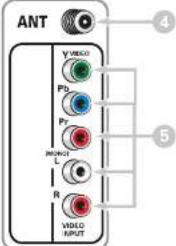
Analog / Digital Antenna Input
Hook up your indoor or outdoor digital antenna, or a direct Cable service (Analog or ClearQAM).

VIDEO INPUT (COMPONENT/COMPOSITE combo)
COMPOSITE Connection
A Composite connection is used to hookup your analog equipment such as a VCR or an older DVD player.
Match the YELLOW connector from your external device to the GREEN Y VIDEO jack on the HDTV.
NOTE: Use the WHITE and RED (L and R) jacks for AUDIO signal.
COMPONENT Connection
A Component connection will accept SDTV, EDTV and HDTV video signals. Use it for great image quality from digital devices such as a DVD player or Video Game system. Match your digital device's Component output jacks to the Component input jack set on your HDTV.
NOTE: Use the GREEN (Y), BLUE (Pb) and RED (Pr) jacks for the VIDEO signal and the WHITE and RED (L and R) jacks for the AUDIO signal.
HDTV SIDE PANEL
HDTV BACK PANEL

Sanyo Manufacturing Corp. 3333 Sanyo Road, Forrest City, AR 7233
Printed in Mexico, August 2013 US2R / 46-Z5WPP / GXFA
POWER. Turns your HDTV On or Off.
INPUT. Selects the video source to view. Holding down the key displays the Input List.
INFO. Displays the Channel Information banner.
PIX SHAPE. Cycles through the various aspect ratios. The different settings either stretch, zoom, or fill the image on your screen. Bars may appear on top and bottom of your screen (or on left and right sides) depending on the broadcasted signal or program.
AUDIO. Selects the desired Audio mode. Stereo, Mono, or SAP (when available.)
RESET. Pressing it twice restores your HDTV to its factory settings. All user customized settings will be cleared.
CAPTION. Cycles through the available Caption modes (when available.)
SLEEP. Displays the "Off" Timer. While Off Timer is on-screen, press the "0" key to Set the amount of time (in 30 minute increments) at which the HDTV will turn off.
NUMERIC KEYS. Choose a channel directly.
CH ▲▼, Scan through the channels in the memory database.
VOL + - . Increases or decreases the audio level.
RECALL. Switch between current channel and last selected channel or input.
“-” (DASH). Allows for the direct selection of digital subchannels. For example: to select channel 39.1 press the 3 and 9 keys, followed by the dash -, and 1 keys.
MUTE. Mute or restore the sound.
MENU - Displays or hides the on-screen menu.
CURSOR▲▼◀. Move the on-screen cursor in the desired direction.
ENTER. Set or select the highlighted option on the screen.
EXIT. Exits the on-screen menu.
Display the On Screen menu and use the CURSOR ◀▶ keys to select Channel. Press ENTER.
Channel Search
Auto - Searches the detected mode, Cable or Air.
Cable - Searches for analog and unscrambled (ClearQAM) digital cable channels.
Air (Antenna) - Searches for analog and digital off-air channels.
Digital Add-On - Searches digital channels adding newly found digital channels to the channel database.
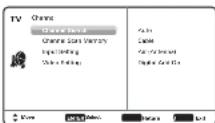
IMPORTANT FACT: This HDTV maintains only one database of digital channels. Therefore, when you search for cable channels, the database of antenna digital channels will be deleted. You will only be able to receive those ClearQAM channels your cable company provides.
Channel Scan Memory
Channel Scan Memory lists all Analog and Digital channels found. It also lists Analog channels that were not found, which can be added.
Use the CURSOR ▲▼ keys to move the channel select bar through all enabled and disabled channels.
NOTE: You can use the CH ▲▼ keys to change page.
Press ENTER to enable or disable the selected channel.
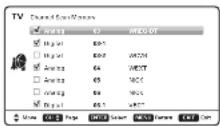
NOTE: For information on local digital channels, visit www.antennaweb.org
Input Setting
Input Setting feature allows the removal of unused inputs from the AV input loop.
Use the CURSOR ▲▼ keys to select an AV input. Press ENTER to disable (uncheck) or enable (check) the highlighted input.
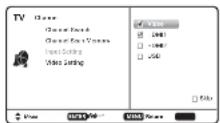
NOTE: At least one input must and will remain checked.
Unchecked box □means the input will be skipped
Video Setting
Use this feature to establish either a Component or Composite connection to the VIDEO INPUT jacks on your HDTV.
Use the CURSOR ▲▼ keys to select the type of connection you'll use in VIDEO INPUT.
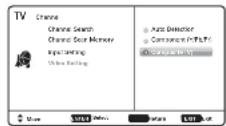
Press ENTER, a blue mark will appear next to the selected option indicating it as the active option.
SETUP
Display the On Screen menu and use the CURSOR ◀▶ keys to select Setup. Press ENTER.
Menu Language
Choose between English, Spanish and French for your On Screen menu's display language.
Press ENTER on the desired language.
Digital Caption
Captioning is textual information transmitted along with the picture and sound. Turning Captioning ON (by pressing the CAPTION key during normal TV viewing) causes the HDTV to open these captions (digital or analog) and superimpose them on the screen.
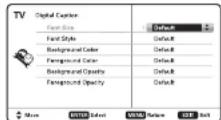
NOTE: Local broadcasters decide which caption signals to transmit.
Use the CURSOR ▲▼ and ◀▶ keys to modify Font, Background, and Foreground of digital caption text.
Energy Solution
• ECO (ENERGY SAVER)
ECO controls the LCD backlight brightness to reduce power consumption.
- Level 1: Energy Saver feature is off. - Level 2: Low power consumption
– Level 3: Lowest power consumption.
Press ENTER on the desired level.
• LIGHT SENSOR
This feature detects ambient room light brightness and uses that reading to control the panel brightness level and picture parameters to reduce the HDTV's power consumption.
NOTE: When room lighting is dark, the panel brightness and/or the picture setting parameters such as brightness and contrast are lowered. When room lighting is bright, parameters are affected opposite.
Use the CURSOR ▲▼ keys to select On or OFF and press ENTER.
- AUTO SHUT-OFF
When Auto Shut-off feature is set to ON, it will allow the HDTV to automatically turn off when no video and/or audio signals are being received.
NOTES: By factory default, this feature is set to ON. The HDTV will automatically turn off if no AV signals are received in a time span of 15 minutes.
Use the CURSOR ▲▼ keys to select On or OFF and press ENTER.
Mode (Home/Store)
Use the Mode (Home/Store) option if you would like to change the initial Energy Saving Mode chosen at HDTV's first power on.
Home Mode - For saving energy and power consumption reduction.
Store Mode - High brightness and contrast for display at retailer store.
NOTE: Only Home Mode qualifies for Energy Star.
Press ENTER on the desired mode.
Clock Timer
This feature allows you to set a Current Time for your HDTV and enable a Switch On Time for the HDTV to turn on at a specific time of day.
When On Timer Function is set to ON, the TV will automatically turn on at the previously set Switch on Time.
Use the CURSOR ▲▼ and ◀▶ keys to modify the Current Time and/or Switch On Time.
V-Chip (parental control)
Use this feature to automatically block programs with content you deem as inappropriate for viewing by your children.
NOTE: This feature is designed to comply with the United States of America's FCC V-Chip regulations. Therefore, it may not function with broadcasts that originate in other countries.
ADJUSTING THE V-CHIP RATINGS
Select ON and press ENTER. Select Adjust (Standard) and press ENTER.
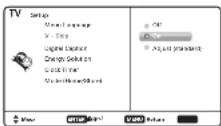
NOTE: Blocking a rating will automatically block all higher ratings. Unblocking a rating will automatically unblock all lower ratings.
For V-Chip (Movie) ratings select Movie and press ENTER, and then select the desired MPAA rating limit. Press the EXIT key to close the V-Chip menu.
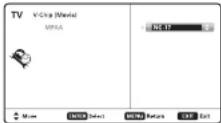
V-Chip (continued)
For V-Chip (TV) ratings select TV and press ENTER. Use the CURSOR ▲▼ keys to select a rating and press ENTER. Use the CURSOR ▲▼ keys to set the rating's status as Blockedor Viewable. Once ratings are set, press the EXIT key to close the V-Chip menu.
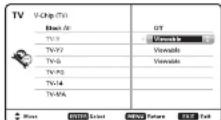
NOTE: Some TV ratings offer more detailed settings such as Dialogue, Language, Sexual, and Violence.
ADVANCED V-CHIP SYSTEM (RRT5)
RRT5 (V-Chip Regional Ratings 5) is an advanced V-Chip ratings system for over the air digital channels. When the HDTV detects compatible RRT5 data, it's downloaded & stored in memory, and the Setup V-Chip screen is then modified to show the Adjust (Advanced) option.
Use the CURSOR ▲▼ and ◀▶ keys to highlight the different options, and use the ENTER key to block or unblock the selected rating.
NOTE: When vertical scroll bars appear, press CURSOR ▲▼ to gain access to the additional ratings.
MORE INFORMATION
Additional information about MPAA (Motion Picture Association of America) and V-Chip rating can be found at: www.mpaa.org and www.v-chip.org, respectively.
AUDYSSEY
DYNAMIC VOLUME
1 Audyssey Dynamic Volume solves the problem of large variations in volume level between television programs, commercials, and between the soft and loud passages of movies. Audyssey Dynamic EQ * is integrated into Dynamic Volume so that as the playback volume is adjusted automatically, the perceived bass response, tonal balance, surround impression and dialog clarity remain the same.
PICTURE
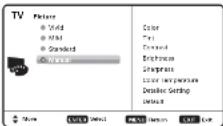
Display the On Screen menu and use the CURSOR ◀▶ keys to select Picture. Press ENTER.
You may choose between Vivid, Mild, and Standard, which have predetermined fixed picture parameter values, or choose the Manual option for customized personal settings.
NOTE: Each AV input can have its own picture mode (pre-determined or manual.) Current input's selected option is indicated by a blue marker.
MANUAL PICTURE SETTINGS
Manual parameters to adjust include: • Color • Tint
- Contrast - Brightness
- Sharpness - Color Temperature
The Detailed Setting option allows for the adjustment of several additional parameters such as:
- Signal Balancer - Noise Reduction
- White Balance - Edge Enhancer
- H-Size / V-Size - Dynamic Contrast
SOUND
Display the On Screen menu and use the CURSOR ◀ ▶ keys to select Sound. Press ENTER.
Choose sound setting option:
Auto - Sound settings are linked to the current Picture option and parameters are adjusted accordingly.
Dynamic, Mild, Standard
Predetermined sound parameters not linked with any Picture option.
MANUAL SOUND SETTINGS
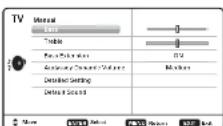
The Manual option provides different parameters that can be personally adjusted:
• Bass & Treble
- Bass Extension
■ Audyssey Dynamic Volume ^1
• Detailed Setting
- Equalizer: Personalize audio highs and lows.
ADJUSTING A PICTURE SETTING
Use the CURSOR ▲▼ keys to highlight the picture parameter you wish to adjust. Press the ENTER key to enter the value adjustment screen. Modify the selected parameter's value by pressing the CURSOR ◀▶ keys.
NOTE: CURSOR ▲▼ keys select the next/previous parameter without returning to the previous menu screen.

Once adjustments are complete, press the EXIT key to return to normal TV viewing.
ADJUSTING A SOUND SETTING
Use the CURSOR ▲▼ keys to highlight the sound parameter you wish to adjust. Press the ENTER key to enter the value adjustment screen. Modify the selected parameter's value by pressing the CURSOR ◀▶ keys.
NOTE: CURSOR ▲▼ keys select the next/previous parameter without returning to the previous menu screen.

Once adjustments are complete, press the EXIT key to return to normal TV viewing.
USB INPUT
PHOTO VIEWER
View pictures on your HDTV with the use of a USB mass storage device (not included.)
HDTV SIDE PANEL
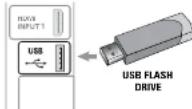
Insert the flash drive into the USB port, the TV will display the Photo Viewer screen, select Shuffle Play or Browse Photos and press ENTER to begin.
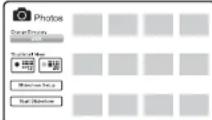
NOTE: A thumbnail hide icon will appear if a picture cannot be decoded or if no thumbnail data is available.
USING THE PHOTO VIEWER
Press ENTER on a thumbnail photo to enable the Rotate, Full View and Start Slideshow functions.
Once in Full View mode:
Use the CURSOR ◀▶ keys to change picture.
Press ENTER to show the full view options menu.
- Rotate - Pan - Zoom In / Out - Slideshow setup
- Start Slideshow - Browse Photo
SLIDE SHOW
In the Slideshow Setup menu you may turn the Shuffle and Quick Change options ON or OFF.
Press ENTER on Start Slideshow either from the Thumbnail View Screen or from the full view options menu to start the slideshow from the current picture.
ONE-YEAR LIMITED PARTS AND LABOR WARRANTY
THIS LIMITED PARTS AND LABOR WARRANTY IS VALID ONLY ON SANYO TELEVISIONS PURCHASED AND USED IN THE UNITED STATES OF AMERICA, CANADA, AND PUERTO RICO, EXCLUDING ALL OTHER U.S. TERRITORIES AND PROTECTORATES. THIS LIMITED WARRANTY APPLIES ONLY TO THE ORIGINAL RETAIL PURCHASER, AND DOES NOT APPLY TO PRODUCTS USED FOR INDUSTRIAL OR COMMERCIAL PURPOSES.
WARRANTY APPLICATION
FOR ONE YEAR from the date of original retail purchase Sanyo Manufacturing Corporation (SMC) warrants this TV to be free from manufacturing defects in materials and workmanship under normal use and conditions for parts and labor.
For the FIRST 90 DAYS from the date of original retail purchase, Sanyo Manufacturing Corporation will replace any defective TV via exchange at the retailer. To ensure proper warranty application, keep the original-dated-sales receipt for evidence of purchase. Return the defective TV to the retailer along with the receipt and the included accessories, such as the remote control. The defective TV will be exchanged for the same model, or a replacement model of equal value, if necessary. Replacement model will be contingent on availability and at the sole discretion of Sanyo Manufacturing Corporation. THE FOREGOING WARRANTY IS EXCLUSIVE AND IN LIEU OF ALL OTHER WARRANTIES OF MERCHANTABILITY OR FITNESS FOR A PARTICULAR PURPOSE.
OBLIGATIONS
For one year from the date of purchase, Sanyo Manufacturing Corporation warrants this product to be free from defects in material and workmanship under normal use and conditions. During the first 90 days under this warranty for any manufacturing defect or malfunction, Sanyo Manufacturing Corporation will provide a new TV via exchange at the retailer.
HOW TO MAKE A CLAIM UNDER THIS WARRANTY
Please call 1-800-877-5032. Please be prepared to give us the television's model number and serial number when you call. The model number and serial number are printed on a label attached to the back of the unit.
For customer assistance, call toll free 1-800-877-5032.
This warranty expresses specific contractual rights; retail purchasers may have additional statutory rights which vary from state to state.
(EFFECTIVE: March 1, 2007)
Your Sanyo HDTV is registered at the time of purchase,
please keep sales receipt for future reference.
For your protection in the event of theft or loss of this product, please fill in the information requested below and KEEP IN A SAFE PLACE FOR YOUR OWN PERSONAL RECORDS.
Model No. Serial No.
(Located on back of unit) (Located on back of unit)
Purchase date ____ Purchase Price
Where Purchased
- Model No.: DP46812
- Owner's Manual (English)
- PROTECTING THE LCD SCREEN
- HANDLING PRECAUTIONS
- POSITIONING THE HDTV
- TRADEMARKS
- HDMI
- AUDYSSEY
- SPECIFICATIONS
- CONTAINS MERCURY LAMPS, DISPOSE OF PROPERLY
- INITIAL CHANNEL SEARCH
- IMPORTANT SAFETY INSTRUCTIONS
- FCC INFORMATION
- GETTING STARTED
- STAND ASSEMBLY
- WALL MOUNTING (OPTIONAL)
- BATTERY INSTALLATION
- PRECAUTIONS
- ANTENNA CONNECTION FOR
- TURN ON TV
- TV SET LOCATION SELECTION:
- CHANNEL AND SIGNAL SEARCH:
- SIGNAL SEARCH RESULT SCREEN
- AV INPUT SELECTION
- HDTV INPUT/OUTPUT REFERENCE
- HDMI (INPUT1 or INPUT2)
- Digital Audio Output (Coaxial)
- Analog / Digital Antenna Input
- VIDEO INPUT (COMPONENT/COMPOSITE combo)
- COMPOSITE Connection
- COMPONENT Connection
- Channel Search
- Channel Scan Memory
- Input Setting
- Video Setting
- SETUP
- Menu Language
- Digital Caption
- Energy Solution
- • ECO (ENERGY SAVER)
- • LIGHT SENSOR
- - AUTO SHUT-OFF
- Mode (Home/Store)
- Clock Timer
- V-Chip (parental control)
- ADJUSTING THE V-CHIP RATINGS
- V-Chip (continued)
- ADVANCED V-CHIP SYSTEM (RRT5)
- MORE INFORMATION
- DYNAMIC VOLUME
- PICTURE
- MANUAL PICTURE SETTINGS
- SOUND
- Dynamic, Mild, Standard
- MANUAL SOUND SETTINGS
- ADJUSTING A PICTURE SETTING
- ADJUSTING A SOUND SETTING
- USB INPUT
- PHOTO VIEWER
- USING THE PHOTO VIEWER
- SLIDE SHOW
- ONE-YEAR LIMITED PARTS AND LABOR WARRANTY
- WARRANTY APPLICATION
- OBLIGATIONS
- HOW TO MAKE A CLAIM UNDER THIS WARRANTY
- For customer assistance, call toll free 1-800-877-5032.
Brand : SANYO
Model : DP46812
Category : Television