ST-VC1296 - Vacuum Cleaner Saturn - Free user manual and instructions
Find the device manual for free ST-VC1296 Saturn in PDF.


| Product Type | Bagless Canister Vacuum Cleaner |
| Brand | Saturn |
| Model | ST-VC1296 |
| Color | Red/Black |
| Dimensions (L x W x H) | 41.5 x 27.5 x 32 cm |
| Weight | 5.2 kg |
| Power Consumption | 1200 W |
| Voltage | 220-240 V |
| Frequency | 50/60 Hz |
| Dust Capacity | 1.8 L |
| Filtration | HEPA 10 + Washable sponge filter |
| Cord Length | 5 m |
| Noise Level | 78 dB(A) |
| Suction Power | 400 W (max. 25 kPa) |
| Accessories Included | Crevice tool, upholstery brush, combination brush, turbobrush |
| Bag Type | Bagless (cyclonic) |
| Filter Type | HEPA 10 |
| Warranty | 2 years |
| Manufacturer | Saturn, Germany |
| Recommended Use | Dry vacuuming of carpets and hard floors |
Frequently Asked Questions - ST-VC1296 Saturn
User questions about ST-VC1296 Saturn
0 question about this device. Answer the ones you know or ask your own.
Ask a new question about this device
Download the instructions for your Vacuum Cleaner in PDF format for free! Find your manual ST-VC1296 - Saturn and take your electronic device back in hand. On this page are published all the documents necessary for the use of your device. ST-VC1296 by Saturn.
USER MANUAL ST-VC1296 Saturn
natural_image
Exterior view of a green and silver vacuum cleaner with attached hose (no text or symbols visible)
VACUUM CLEANER
Dear Buyer!
We congratulate you on having bought the device under trade name "Saturn". We are sure that our devices will become faithful and reliable assistance in your housekeeping.
Avoid extreme temperature
changes. Rapid temperature
change (e.g. when the unit is
moved from freezing temperature
to a warm room) may cause
condensation inside the unit and a malfunction when it is switched
on.
In this case leave the unit at room temperature for at least 1.5 hours before switching it on.
If the unit has been in transit, leave it indoors for at least 1.5 hours before starting operation.
Description of the appliance
• Modern and elegant design.
- Multiple air-filter system guarantees a hygienic cleaning.
- Drivers accessories: floor brush, nozzle, etc.
- User-friendly wire rewinder pedal.
Know your vacuum cleaner

Important safety instructions:
Before connecting the device to the mains, check whether the supply voltage indicated on the device corresponds to the mains voltage. The device must be plugged into a grounded outlet.
If the supply cord is damaged, the manufacture or its service agent must replace it in order to avoid a hazard.
For household use only

Forbid

Do not use for absorbing detergent, kerosene, glass, needle, cigarette ash, water, match etc.

Forbid

The appliance should not be exposed to heat.

Forbid

Do not vacuum any moist or liquid substances, never immerse the appliance in water.

Forbid

Unplug the appliance from the mains supply socket after use and before every cleaning pull the mains cable, in order to disconnect the appliance from the mains.

Forbid
Do not put any object into openings. Do not use with any opening blocked. Keep the appliance free of dust, lint, hair etc.

Forbid

Do not use the vacuum cleaner without dust container or dust filter in place.

Forbid

Do not vacuum any flour, cement etc, in order to avoid the overloads.

Forbid

The appliance should only be cleaned with a dry or damp cloth, it should never immersed in water.
Do not use any solvents for cleaning.
Assembly vacuum cleaner:
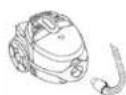
Connect the
hose with the
vacuum cleaner
Insert flexible
hose into the
air-intake:
Press the knob
until it clicks into
the position.
Remove the
flexible hose:
unplug the
appliance and
press the knob
at the end of the
hose. Remove it
from the
air-intake
opening.
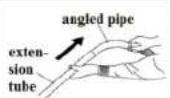
Fit the extension tube to be the angled pipe.
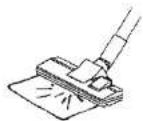
Fit the floor brush to the extension tube.

Operation:
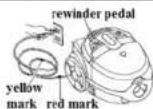
- A yellow mark on power cord shows the ideal
cable length. Do not expend the cable beyond the red mark.
•To rewind the power cord, press the rewinder pedal with one hand and guide the cord with the other hand.

| The suction power can be adjusted with the sliding control on the angled pipe. Put the extension tube into the fixing hook of the appliance when you have a break. Caution: Do not transfer the appliance when the fixing hook is used. |
Cleaning and maintenance
| Empty the dust container | |
| Crevice tool: | (1) After removing the flexible hose, press the cover lock button and open the dust container. |
| For cleaning corner edge and draws, etc. | |
| Where is difficult to reach, such as gaps and the keyboard, bookshelf and windows. | (2) Remove the dust filter from the container. |
| Convertible brush: | (3) Replace the dust filter in the container. |
| Turn the crevice tool 90°and attach it on the extension | |
| (4) Close the dust container. |
| container until it is locked in the position. |
| Change filter |
| Replace the motor filter:Open the dust container and remove the motor filter. Fix the new filter in the position | Replace the outlet filter: Detach the grille by pulling firmly away from the appliance, remove the outlet filter and replace |
| Clean the filter in water and allow them to dry completely before replace them. | Clean the cloth dust bag with water and a little detergent (if needed). Allow the bag to dry completely before replacing. |
Error detection:
| Before you contact our services center,please check the following points: | ||
| Problem | Possible reason | Active |
| Motor does not start | -Power card not firmly plugged into outlet -Outlet damaged -Cleaner not switch on | -Plug unit firmly -Check the outlet -Switch on the appliance |
| Suction power is weaker | -Unit clogged -Dust filter needs cleaning -Dust container not in position -Filter blocked | -Remove the blockage -Clean the dust filter -Close the dust container -Clean the filter |
| The wire cannot be winded completely. | The wire may diverge the wire wheel | Draw the wire a little then rewind |
| The wire cannot be draw out | The wire may wind disorder | Press the rewinder button and try again |
| Speed adjust does not work | Appliance is defective | Repair the appliance (only specialist) |
| Power card winds unwanted back | Rewind mechanisms is defective | Repair the appliance (Only specialist) |
| The dust container can not be closed | Dust filter is not in the position | Fix the dust filter and try again |
Specifications
| Power: | 1800 W |
| Rated Voltage: | 220-230 V |
| Rated Frequency: | 50 Hz |
| Rated Current: | 8,1 A |
Set
| Vacuum Cleaner Body | 1 |
| Crevice Nozzle | 1 |
| Floor Brush | 1 |
| Instruction Manual With Warranty Card | 1 |
| Packaging | 1 |

Environment friendly disposal

You can help protect the
environment!
Please remember to respect
the local regulations: hand in
the non-working electrical equipments to an appropriate waste disposal centre.
The manufacturer reserves the right to change the specification and design of goods.
RU
ПЫЛЕСОС
When purchasing the product, please require its checking before you; BE SURE
that the goods sold to you, are functional and complete and that the warranty coupon is filled in correctly.
This warranty coupon confirms the absence of any defects in the product you purchased and provides for free of charge repair of the product failed through the fault of the manufacturer throughout the period of warranty service and free of charge repair.
Failing the presentation of this coupon, in case of its improper filling in, infringement of factory seals (if any), and also in cases indicated in the warranty obligations, the claims are not accepted, and no warranty service and free of charge repair is made!
The warranty coupon is valid only in the original copy with the stamp of trading organization, signature of the seller, date of sale and signature of the buyer.
CZ
ZÁRUČNÍ LIST
Buyer's Signature confirming the acquaintance and consent with conditions of free of charge maintenance service of the product, and absence of the complaints on appearance and color of the product.


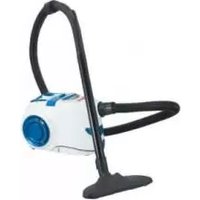
Brand : Saturn
Model : ST-VC1296
Category : Vacuum Cleaner