
NM-105 - Mp3 player Naxa - Free user manual and instructions
Find the device manual for free NM-105 Naxa in PDF.


| Product Type | MP3 Player |
| Model | NM-105 |
| Brand | Naxa |
| Display | 1.8-inch LCD screen |
| Storage | MicroSD card slot (up to 32 GB, not included) |
| Supported Audio Formats | MP3, WMA, WAV |
| Playback Functions | Music, FM radio, voice recording, folder navigation, repeat, shuffle, EQ presets |
| Battery | Built-in rechargeable lithium-ion battery (3.7V, 200 mAh) |
| Battery Life | Up to 10 hours of music playback |
| Charging Time | Approximately 2-3 hours via USB |
| Connectivity | USB 2.0 (for charging and data transfer), 3.5mm headphone jack |
| Dimensions | 3.5 x 2.0 x 0.5 inches |
| Weight | 1.2 oz (without accessories) |
| Color Options | Black, Silver |
| Included Accessories | USB cable, earphones, user manual |
| Cleaning | Wipe with a soft, dry cloth. Do not use liquids. |
| Safety | Do not expose to water or extreme temperatures. Keep away from children. |
| Repair and Spare Parts | Contact Naxa customer support. No user-serviceable parts. |
Frequently Asked Questions - NM-105 Naxa
User questions about NM-105 Naxa
0 question about this device. Answer the ones you know or ask your own.
Ask a new question about this device
Download the instructions for your Mp3 player in PDF format for free! Find your manual NM-105 - Naxa and take your electronic device back in hand. On this page are published all the documents necessary for the use of your device. NM-105 by Naxa.
USER MANUAL NM-105 Naxa
natural_image
Blue handheld electronic device with a screen displaying the 'nexa' logo (no additional text or symbols visible)Instruction Manual
The MP3 player is a new generation of digital portable device, supporting multiple music formats including MP1, MP2, MP3, WMA, WAV, etc. Its perfect sound quality, great reliability and exquisite appearance make it a masterpiece. Devoutly hope to bring you great enjoyment in this digital age.
Features :
- Multi-Codec Player
Supporting the latest updated features via firmware upgrade from the website
- Free U Disk Drive
You may manage your files directly through "Portable Disk" in "My Computer" on Windows 2000 Operating System or above without driver.
●"Private Space" Disk Mode
The flash memory can be divided into two parts by using the accessory tools and one is encrypted to hide the contents saved inaccessible by others. Keep your secret!
- Record/Replay
The player supports recording through built-in microphone and savesas WAV and ACT formats. Meanwhile it supports real digital A-B replay or comparison replay.
- 7 Preset EQ
Normal, Rock, Pop, Classic, Soft, Jazz and DBB
- Multiple Repeat Mode
Normal, Repeat One, Folder, Repeat Folder, Repeat All, Random, Intro.
- Power Off
You may set Sleep Timer or Off Time mode in your own convenience.
Declaration
Please read this manual carefully before using your new player.
Contents in this manual may change possibly for better service.
We have the right to make changes to this manual without notice.
If the actual operations of your player is not the same as the instruction in this manual, please visit our website for latest product information. This machine packs into the battery the each opening the confidential waiting for the first time 10 seconds, need the machine from measure to complete to grow to press to open the machine key the square can show, the inconvenient place begs your pardon.
Know well with player:

| 1 | Play | Play/Pause/Power on/off |
| 2 | Vol+ | Volume increase |
| 3 | Vol- | Volume decrease |
| 4 | Mode | To select/confirm your menu selection, enter submenu/last/next |
| 5 | Earphone | Earphone hole |
LCD Window

Battery
The player is uses 1 x AAA battery (Not Included)
Basic Operation
Entering Menu System
- Pressing Mode button may enter the menu system, including main menu (long press of mode key at Stop mode), submenu at Play mode (press to enter) and submenu at stop mode (press to enter).
Entering Different Modes
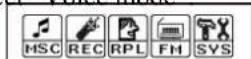
• You may enter different modes from the main menu.
Main menu: ( press Mode button)
Music mode:

Record mode:
Voice mode:

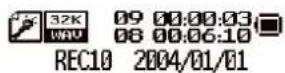

FM Radio Mode:

USB Mode when connecting to PC

System Setting :

You may press Play button to fast exit from any menu or option interfaces.
- Adjust volume
Decrease volume by hold on VOL- and increase volume by hold on VOL+.
- Turn ON/OFF
Turn ON/OFF by pressing Mode key for a long time.
Keys Operation
Music mode 📋nd Voice mode 🐵
| Operation | Action Stop | Status Play Status | Playing- Submenu Stop- | Submenu | |
| Play long p | press turn off | turn off turn off turn off | |||
| press play s | stop exit from menu | exit from menu | |||
| Mode long | press Enter | main menu | enter main menu | enter main menu | enter main menu |
| press enter | Stop-submenu | Enter Playing-submenu | confirm current option or enter next submenu | confirm current option or enter next submenu | |
| Vol+ | press volume increase | volume increase | X | X | |
| press on | volume increase continuously | volume increase continuously | X | X | |
| Vol- | press decrease volume | decrease volume | X | X | |
| press on | decrease volume continuously | decrease volume continuously | X | X | |
Record Mode

| Operation | Action Stop Status | Record | Status |
| Play | long press | turn off | stop recording |
| press | start recording | pause recording | |
| Mode | long press | enter main menu | X |
| press | enter Record submenu | X |
Play Music
Basic Operation
| 1. Connect the earphones | 2. Push the POWER switch to ON |
| 3. press Play button to turn on the player and enter Music mode. Press Play button again to play music. | 4.To select musicSwitch the MODE |
| 5.To adjust the volumeVOL+: to increase volume VOL-: to decrease volume |
EQUALIZER Mode
1.Playing music status | 2.PressModebutton to enter Play Submenu |
3.PushNextswitch to select Equalizer menu | 4. PressModebutton to enter EQUALIZER selectionMenu. |
| 5.PushMODEbutton to switch, and pressModebutton to confirm | Equalizer options:NOR(Natural)ROCK(Rock)POP(Pop)CLASS(Classic)SOFT(Soft)JAZZ(Jazz)DBB(DBB) |
Lyric Display
This player supports “*.LRC” lyric files, and lyrics may be displayed synchrosely while playing music.
How to use lyric files?
Save the lyric file with the same name as that of the corresponding music file.
e.g.: Music file name: Andy-Water.mp3
Lyric file name: Andy-Water.mp3.
How to know whether the lyrics exist?
If no lyric matches the current song, the icon on the left top in music mode will change to
1 the current song has matching lyric file, but don’t display. | Long pressModeto enter the Lyric interface.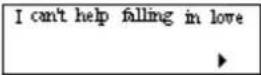 |
3. PressModeto return to Music play mode. | 4. Browse lyrics manually.PressVOLto browse lyrics. |
Record Voice
Make sure that the battery is not in the status of "low battery".
The player may save 99 recording files under each directory.
Start recording in Record Mode
Enter main menu.

Push Next switch to select recording mode.
Press Mode button to enter Record mode.

Press Play button to start recording.
Press Play button to pause recording .( the time icon flickers)
Press Play button to continue recording.
Long press Play button to stop recording.
NOTE:
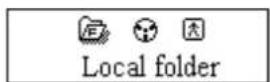
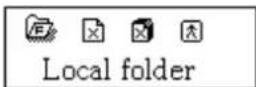
The recorded file is saved in the current folder set in "Recording Stop submenu/ /Local Folder".
If "Overflow" is displayed on the LCD, the player's memory is full. Please delete other files to make some space available.
If "over record" is displayed on the LCD, the current directory has already had 99 recording files. Please switch to another directory.
Select Recording Type
On the status of Stop Recording

Press Mode to enter Record Submenu.
Push Next to select REC Type option

Press Mode to enter this option
Push Next to select desired recording type

Press Mode to confirm the type selected
Press Play to start recording
Note: Voice control record means is the Player can automatically pause when no sound
Play Recorded Files
Enter main menu.

Push Model to select "Voice mode"
Press Mode to enter Voice mode interface.

Press Play to start playing.
Select recorded files:
Push Mode: to select the previous recorded file
Push Next Mode: to select the next recorded file
Control Volume:
VOL+: to increase volume
VOL-: to decrease volume
Using FM radio
- Entry main menu;
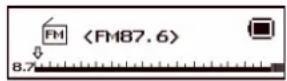
- Push Next scrolling "FM Mode"
- Push Mode to entry
System Setting
System parameters can be set here and every option varies according to firmware upgrading
Enter main menu, push Next button to select System setting icon, and then press Mode button to enter System
Setting submenu interface is as follows:
Param
| System Time |
| ( Record time ) | Set the time and date when recorded files are saved |
| ( B light ) | set the period of time (sec.) when Backlight stays on without any operation |
| ( Language ) | set different languages displayed |
| ( P er off ) | set a fixed time after which the player may turn power off automatically |
| (Replay mode ) | set working status on Replay Mode |
| ( Contrast ) | set contrast level of LCD window |
| (Back color) Set different back color. | |
| ( Online Mode ) | an option specially designed for “Private Space” function |
| ( Memory info. ) | show memory capacity and percentage that has been used |
| ( Firmware version ) | show firmware version |
| ( Firmware upgrade ) | special for firmware upgrading |
| ( Exit ) | exit from current interface |
Instruction
○ "System Time"
System Setting Interface

Press Mode to enter Record Time Interface

Press VOL+ to set time in sequence of "YY-MM-DD" (Press VOL- to set in opposite sequence)
Icon of year flickering:
Push Next / Last button to adjust numbers
Number of Year increasing:
Press Mode to confirm and exit the current interface.

○ "Back light" setting
At System Setting interface, push Next key to select "Back light" icon

Press Mode button to enter "Back light" setting interface:

Push Next/Last button to adjust time
Press Mode to confirm to exit.
○ Language
At System setting interface, push Next/Last button to select "Language" icon:

Press Mode button to enter "Language" setting interface:
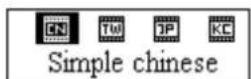
Push Next/Last button to select desired language.
The icon correspond language
| Simple Chinese | |
| Englis US | |
| Trad Chinese | |
| Japanese | |
| KO | Korean |
| French FR | |
| Italian IT | |
| Germa DE | |
| SP | Spanish |
| SW | Swedish |
| Portugal | |
| Danma |
Press Mode to confirm to exit.
○ Power Off
Operating steps refer to Language setting.
Off Time mode refers that after a fixed period of time (unit: second) when no operation on keys at
Stop mode, the player may turns off automatically to save power. If “0” is selected, power saving function is invalid.
Sleep Timer refers that you may set a fixed period of time (unit: minute) for the player to turn off
automatically when no keys operation no matter which mode it is at. This function is specially designed for listening to music before sleep. Note: Setting of Sleep Timer is valid only once and the set time will be cleared after power off.
The time needs to be set again next time.
○ Replay Mode
Operating steps refer to Equalizer Setting
Manual Replay means that at A-B Replay Mode the endpoint B can be set manually only.
Auto Replay means that at A-B Replay Mode the endpoint B can be set automatically. (Especially for English Reading files without music)
○ Contrast
Operating steps refers to Backlight setting.
○ Online Mode
Operating steps refers to Equalizer setting.
Some operating systems (under Windows 2K SP4) can not support two driver letters in one USB disk. Thus, if “Private Space” function is on, choose which disk you are going to use, i.e., “single ordinary disk” or “single encrypted disk”, in order for correct display of selected disk after connecting to PC.
○ Memory Info.
The number displayed represents total memory capacity and the percentage refers the capacity used.
- Firmware Version
Operating steps refers to Language setting..
- Firmware Upgrade
It is specially designed for Firmware Upgrade.
Tips: After pressing Mode button to select options, you may press Play button to exit from menu directly. The operation on Play button for direct exit is valid to all menus.
USB Disk
The player can use as USB disk with operating system of Windows98 (driver needed), Windows 2K and above (driver free), Mac OS 10.3 and above, Linux Redhat 8.0 and above.
The player also supports Suspend Mode.
How to connect to PC? Plug the player to enter the following Mode 1.
The player may display three modes after connecting to PC:
Standby State

Downloading state

Uploading Mode

Select Folders
Select Folders (At Stop Submenu)
Users can save files in different folders (folders should be set up on PC in advance), to manage and play files according to different types. The player supports identification of 99 subdirectories.
At Stop interface. (Current example is at Music Mode, and folders can be selected at both Record and Voice Mode as well.)
Press Mode to enter Stop Submenu.

Press Mode again to enter Select Folder interface.
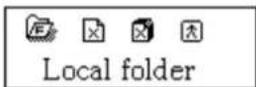
Press Next or Last to select folders.
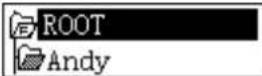
Press Mode to confirm the folders selected

Note: Independent folders can be set at corresponding modes as Music Mode, Record Mode and Voice Mode, i.e., three modes is not bound to correspond with the same folder.
Delete File (At Stop Submenu)
Files can be deleted at corresponding modes as Music Mode, Voice Mode.
At Stop Interface.

Press Mode to enter Stop Submenu.
Press Next/Last to select "Delete" or "Delete All".

Press Mode to enter Delete Interface.

Push Next to switch between "NO" and "YES".

Press Mode to confirm and deletion starts.

"Delete All" means to delete all the relevant files at current mode in current folder. (For example, at Music Mode executing "Delete All", all the music files in current files may be deleted, while recorded files without change.) When deleting files on PC, please take care to eject the player safely before pulling out USB cable, otherwise files may not be deleted.
Play Mode (Play Submenu)
When playing music and recorded files, different play modes can be selected. (such as Repeat, shuffle, etc.)
The first option in Play Submenu is Play Mode. The player will play files according to the mode selected.
○ REPEAT
|  | Normal | Play files in current folder in normal sequence |
|  | Repeat One | Play a single music file repeatedly |
|  | Folder | Play all music files in current folder in sequence |
|  | Repeat Folder | Play all music files in current folder repeatedly |
|  | Repeat All | Play all music files repeatedly |
○ SHUFFLE

O INTRO

Tempo Rate (Play Submenu)
When playing music(Only for MP3 formats) or recorded files, different tempo rate can be set (faster or slower) without changing the tone and sound.
When playing music files

Press Mode to enter Play Submenu

Push Next to select Tempo Rate
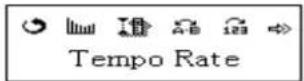
Press Mode to enter Tempo Rate
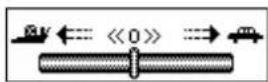
Push Next to quicken tempo rate and push Last to slow down tempo rate.
Press Mode button to confirm desired tempo rate to exit the current interface.
Note: Tempo Rate set is suitable to each music files till it is changed.
Replay Mode
Enter Play Submenu to enter.
○ A-B Replay
At Music Mode or Voice Mode

Press Mode to enter Play Submenu.

Push Next to select "Replay".

Press Mode to enter Replay.

"A" flickers in Replay Mode icon and start point is to be set.
Push Next to set "A".
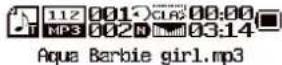
After "A" set, "B" flickers in icon and endpoint B needs to be set.
Push Next to set "B".

Replay icon is fixed and A-B segment replay begins. When replay times count up to times set in advance, the
player will quit from Replay Mode. At Replay Mode, pushing Last can set "A" again to select another segment.
(Setting of replay times refers to "Replay Times" in the next section.
At Replay Mode, Press VOL+/VOL- may set Tempo Rate directly.
○ Follow Read (This function does not exist at Voice Mode)
Replaying A-B segment, Push Next to enter Follow Read Mode.
Replay icon changes to Follow Read icon, a record sound of users is recorded. The recording time is as long as A-B segment.
After recording time, the icon changes to → and original sound is played. Push Next button to enter Comparison.
At this mode, pushing Last button may return to A-B Replay Mode.
Comparison (This function does not exist at Voice Mode)
Enter this mode, Replay icon changes to 📄 and the recorded sound of users is played.
After playing the recorded sound, the icon changes to 📄 and original sound is played
After playing the original sound, the recorded sound is played again. The whole procedure will not stop (without
limitation by Replay Times) until press Mode to exit.
At this mode pushing Last may return to Follow Read Mode.
At the three modes above, pressing Mode may exit from Replay Mode directly.
Replay Times (Play Submenu)
Operating steps refer to Backlight setting.
Replay times mean that after A-B segment has been replayed up to fixed times, it will exit from Replay Mode.
Replay Gap (Play Submenu)
Operating steps refer to Backlight setting.
Replay gap means the break period between different playing times (unit: second).
Trouble Shooting
| No Power Check whether the | battery have been inserted properly.Check whether the player is turned ON. |
| No sound is heard from headphone. | Check whether Volume is set “0” and connect the headphone plugs firmly.Check whether the headphone plug is dirty.Corrupted MP3 may make a static noise and the sound may cut off. Make sure that the music files are not corrupted. |
| Characters in LCM are corrupted | Check whether the right language has been selected. |
| Download of music files fails. | Check whether connected properly.Check whether driver is installed correctly. |
Specification
| LCM Window 128×32 LCM, EL backlight | ||
| Flash memory | 128M - 4GB | |
| Battery 1×AAA Battery | ||
| Record Sample rate 8KHz | ||
| Recording format | WAV (32K bps)、ACT (8K bps) | |
| Recording time | 35h (ACT, 128M Flash) | |
| MP3、WMA、WMV | Max output of headphone | (L) 10mW + (R) 10mW (32Ohm) |
| MP3 bit rate 8K bps – 320K | bps | |
| WMA、WMV bit rate | 5K bps – 384K bps | |
| Frequency response 20Hz to | 20KHz | |
| SNR 85dB | ||
| Distortion | ||
| Music format | MP1、MP2、MP3、WMA、WAV | |
| Working temperature | 23 to 104 F | |
| multi- language show | Simplified Chinese, English, Traditional Chinese, Japanese, Korean, French, Italian, German, Spanish, Swedish, Portugal, Danish, Dutch, Polish, Russian, Czech, Thai, Turkish, Greek. | |
| Operating System | Windows98/SE/ME/2K/XP、Mac OS 10、Linux 2.4.2, Windows 7 | |
Note: Product design and spec may change without notice.

Brand : Naxa
Model : NM-105
Category : Mp3 player