
Helios M2-550B - Computer power supply Gamdias - Free user manual and instructions
Find the device manual for free Helios M2-550B Gamdias in PDF.


| Product Type | Power Supply Unit (PSU) |
| Brand | Gamdias |
| Model | Helios M2-550B |
| Wattage | 550W |
| Form Factor | ATX |
| Dimensions (W x H x D) | 150mm x 86mm x 140mm |
| Weight | 1.5 kg |
| Input Voltage | 100-240V AC, 50-60Hz |
| Output Current (typical) | +12V: 45A, +5V: 20A, +3.3V: 20A |
| Cooling Fan | 120mm silent fan |
| Efficiency Rating | 80 PLUS Standard or higher |
| Modular Cables | Fixed cable design |
| Protections | OVP, UVP, OCP, SCP, OTP |
| Connectors | 1x 24-pin ATX, 1x 4+4-pin CPU, 2x 6+2-pin PCIe, 4x SATA, 2x Molex |
| Color | Black |
| Safety Certifications | UL, CE, RoHS |
| Maintenance and Cleaning | Wipe exterior with dry cloth; avoid liquids; clean fan grille every 6 months |
| Safety Warnings | Do not open case; risk of electric shock; use only with compatible systems |
| Spare Parts and Reparability | Non-user serviceable; contact authorized service center for repairs |
| General Information | Designed for desktop computers; includes mounting screws and power cord |
Frequently Asked Questions - Helios M2-550B Gamdias
User questions about Helios M2-550B Gamdias
0 question about this device. Answer the ones you know or ask your own.
Ask a new question about this device
Download the instructions for your Computer power supply in PDF format for free! Find your manual Helios M2-550B - Gamdias and take your electronic device back in hand. On this page are published all the documents necessary for the use of your device. Helios M2-550B by Gamdias.
USER MANUAL Helios M2-550B Gamdias
Output Specification
| Model Name | HEL/OS M2-550B | ||||
| AC Input | 100-240V-, 10A, 50-60Hz | ||||
| DC Output | +3.3V | +5V | +12V | -12V | +5Vsb |
| Max. Output Current | 20A | 20A | 45.8A | 8.3A | 3A |
| Max. Output Power | 105W | 550W | 3.6W | 15W | |
| Total Power | 550W | ||||
| Model Name | HEL/OS M2-650B | ||||
| AC input | 100-240V-, 10A, 50-50Hz | ||||
| DC Output | +3.3V | +5V | +12V | -12V | +5Vsb |
| Max. Output Current | 22A | 22A | 54.1A | 0.3A | 3A |
| Max. Output Power | 120W | 650W | 3.6W | 15W | |
| Total Power | 650W | ||||
| Model Name | HELIOS M2-750B | ||||
| AC Input | 100-340V~, 10A, 50-60Hz | ||||
| DC Output | +3.3V | +5V | +12V | -12V | +5Vsb |
| Max. Output Current | 22A | 22A | 62.5A | 9.3A | 3A |
| Max. Output Power | 120W | 750W | 3.6W | 15W | |
| Total Power | 750W | ||||
| Model Name | HEL/OS M2-850B | ||||
| AC Input | 100-240V~, 12-10A, 50-60Hz | ||||
| DC Output | +3.3V | +5V | +12V | -12V | +5Vab |
| Max. Output Current | 22A | 22A | 70.8A | 9.3A | 3A |
| Max. Output Power | 120W | 850W | 3.6W | 15W | |
| Total Power | 850W | ||||

Installing
02

natural_image
Technical diagram of a computer tower case showing internal components and ventilation ducts (no text or labels)
Warnings and Caution
Do not place the power supply in high humidity and /or temperature environment.
High voltages exist in the power supply. Do not open the power supply case unless you are an authorized service technician or electrician. Doing so will void the warranty.
Make sure all cables are plugged in properly.
Loose and improper connections would damage the power supply and your system.

Turn off
01
Turn off the PSU before installing by pushing I/O switch to "O" position.

natural_image
Illustration of a computer power box with a hand cursor pointing at it, showing no text or symbols.
Motherboard
03

natural_image
Diagram showing a computer power supply unit connected to an electronic connector with cable routing (no text or symbols present)
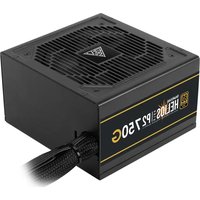


Brand : Gamdias
Model : Helios M2-550B
Category : Computer power supply