
SBT2 - Bluetooth Receiver Memphis Audio - Free user manual and instructions
Find the device manual for free SBT2 Memphis Audio in PDF.


| Product Type | Bluetooth Receiver |
| Brand | Memphis Audio |
| Model | SBT2 |
| Bluetooth Version | 5.0 |
| Bluetooth Profile | A2DP |
| Input Sources | Bluetooth, AUX (3.5mm), USB Flash Drive |
| Outputs | RCA (2.6V), 3.5mm AUX Pass-through |
| Power Supply | 12V DC (vehicle battery) |
| USB Charging | Yes (5V, up to 1A) |
| Water Resistance | IP67 (waterproof on submersion) |
| Construction | Marine Grade |
| Controls | Rotary Knob (volume/power), Rocker Switch (source/playback) |
| LED Indicator | RGB (Blue: Bluetooth, Green: AUX, Purple: USB) |
| Mounting | Fits Standard Rocker/Carling Switch Cutout (approx. 2.8" x 1.5") |
| Dimensions (Approx.) | 2.8" x 1.5" x 1.5" (71 x 38 x 38 mm) |
| Weight (Approx.) | 0.2 lbs (90 g) |
| Operating Temperature | -20°C to 60°C |
| Remote Turn-On | Yes (via power button) |
| Warranty | 1 Year (contact dealer) |
| FCC Compliance | Part 15 Class B |
Frequently Asked Questions - SBT2 Memphis Audio
User questions about SBT2 Memphis Audio
0 question about this device. Answer the ones you know or ask your own.
Ask a new question about this device
Download the instructions for your Bluetooth Receiver in PDF format for free! Find your manual SBT2 - Memphis Audio and take your electronic device back in hand. On this page are published all the documents necessary for the use of your device. SBT2 by Memphis Audio.
USER MANUAL SBT2 Memphis Audio
natural_image
Close-up of a black digital camera with water droplets and control buttons, connected by wires (no readable text or symbols)
ROTARY DIAL WITH RGB SOURCE INDICATOR
AUX INPUT

USB STREAM/CHARGE
Rocker Switch Bluetooth Controller With AUX Input Marine Grade Construction
BLUETOOTH
Ready to turn it up? Read this first!
Memphis Audio built a 50 year legacy in the audio industry by engineering the highest quality products to produce the best possible listening experience for our fans and loyal supporters. To fully appreciate our products we recommend taking the time to read and follow the instructions in this manual. As always, we recommend all the installations and services to be performed by an authorized Memphis Audio dealer.

For optimal performance, Memphis recommends using only Memphis Connection accessories. Outfitting your system with properly sized Memphis Connection wire and accessories will dramatically boost your listening experience and increase the durability of your Memphis Audio products.
Memphis Audio's SBT2 Bluetooth streaming accessories allow you to wirelessly connect to any Bluetooth device providing a complete Bluetooth solution wherever you need it. To keep this piece as bulletproof as possible, we sealed the unit making it waterproof in the event of submersion and resistant to the elements.

Combine with our Memphis Marine Grade Speakers and ultra-compact amplifiers for the perfect rugged go-anywhere audio solution!
Features
• Rotary knob for easy and intuitive volume control
- RGB LED knob indicates source selection
- Inputs include Bluetooth, AUX, USB flash drive play
• RCA output & 3.5mm AUX input
- USB charging compatibility
• Water and element resistant
- 2.6V output
- Designed to fit standard Rocker/Carling Switch locations
Pairing Instructions
Before starting, confirm your Bluetooth device is capable of streaming A2DP Bluetooth signals and that the Bluetooth is ENABLED on the device. Typically that function is available by entering the settings menu, then finding the 'Bluetooth' controls on your device.

Bluetooth functions are typically depicted by a Bluetooth symbol. Look for the Bluetooth symbol on your device when attempting to enable Bluetooth functionality.
Operation:
Long press and hold the power button ⏻ for 2 seconds. The unit will turn on and the buttons will illuminate blue. The BT LED will flash rapidly when the unit is powered on. When the SBT2 is successfully paired, the BT indicator will then be lit blue continuously and will no longer be flashing.
Make sure your phone is in 'Pairing' or 'Discoverable' mode. Within a few seconds you should see 'SBT2' appear on your device's Bluetooth menu. Selecting 'SBT2' will authorize your device to connect with the SBT2.
Once the SBT2 is connected, be certain the volume on your phone is set at a reasonably high level (at least 3/4 of max volume). Adjusting the volume of the system can be done on the SBT2 once your device is paired.
Press and hold the power button for 2 seconds to turn off the unit.
Control Functions:
The controls will allow you to perform the following functions: track up, track down, volume up, volume down, play/pause in Bluetooth/USB mode.
Changing Source:
After the power is on, short pressing the power button will change between the sources: Bluetooth > Aux > USB. The related indicator will illuminate showing which selection is active.
Identifying source modes: BLUE LED indicates Bluetooth source.
GREEN LED indicates Aux source.
PURPLE LED indicates USB source.
Button Functions
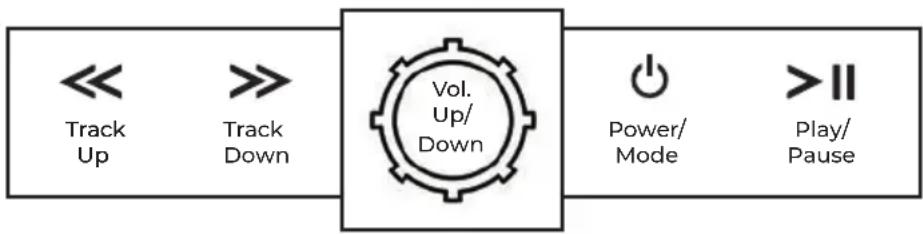
flowchart
graph LR
    A["<< Track Up"] --> B[">> Track Down"]
    B --> C["Vol. Up/Down"]
    C --> D["Power/ Mode"] --> E[">> II Play/Pause"]
Bluetooth, Aux, and USB Charging Inputs
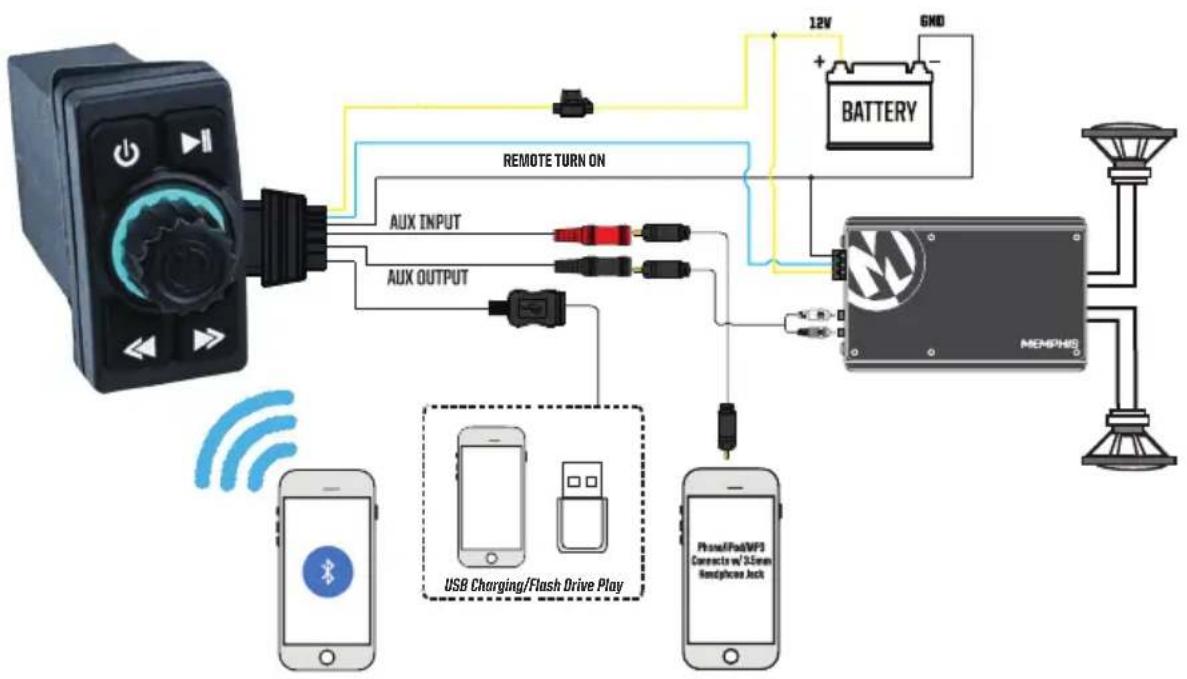
flowchart
graph TD
    A["MEMPHG Device"] -->|12V + 6ND| B["BATTERY"]
    B --> C["Remote Turn On"]
    C --> D["AUX INPUT"]
    C --> E["AUX OUTPUT"]
    D --> F["AUX INPUT"]
    E --> G["AUX OUTPUT"]
    F --> H["USB Charging/Flash Drive Play"]
    G --> I["Phone/Fob/WF3 Connects w/ 3.5mm Headphones Jack"]
    H --> J["Smartphone"]
    I --> K["Smartphone"]
Warranty
Should your SBT2 require service, please consult with the dealer from which it was purchased, or contact Memphis Audio customer service: 800-489-2300, or send an email to techsupport@memphiscaraudio.com. Do not attempt to return your accessory directly to us without first calling for a Return Authorization number. Units received without an accompanying Return Authorization number will be returned unopened. Additionally, you must include a copy of your purchase receipt from an authorized dealer for consideration of in-warranty service; otherwise, repair charges will apply. Units received without a receipt will be held for 30 days allowing us time to contact you and obtain a copy of the receipt.
Legal Disclaimer
FCC Statement
This equipment has been tested and found to comply with the limits for a Class B digital device, pursuant to part 15 of the FCC Rules. These limits are designed to provide reasonable protection against harmful interference in a residential installation. This equipment generates, uses and can radiate radio frequency energy and, if not installed and used in accordance with the instructions, may cause harmful interference to radio communications. However, there is no guarantee that interference will not occur in a particular installation. If this equipment does cause harmful interference to radio or television reception, which can be determined by turning the equipment off and on, the user is encouraged to try to correct the interference by one or more of the following measures:
-Reorient or relocate the receiving antenna.
-Increase the separation between the equipment and receiver.
-Connect the equipment into an outlet on a circuit different from that to which the receiver is connected.
-Consult the dealer or an experienced radio/TV technician for help.
FCC Radiation Exposure Statement
This device complies with FCC radiation exposure limits set forth for an uncontrolled environment. This equipment must be installed and operated in accordance with provided instructions and the antenna(s) used for this transmitter must be installed to provide a separation distance of at least 20cm from all persons.
This device complies with Part 15 of the FCC Rules. Operation is subject to the following two conditions:
(1) this device may not cause harmful interference, and
(2) this device must accept any interference received, including interference that may cause undesired operation.
Caution!
Any changes or modifications not expressly approved by the party responsible for compliance could void the user's authority to operate the equipment.

natural_image
Abstract geometric logo with orange and black letter M inside a circle (no text or symbols)Brand : Memphis Audio
Model : SBT2
Category : Bluetooth Receiver