MXAZEQ5BT - Audio Equalizer Memphis Audio - Free user manual and instructions
Find the device manual for free MXAZEQ5BT Memphis Audio in PDF.


User questions about MXAZEQ5BT Memphis Audio
0 question about this device. Answer the ones you know or ask your own.
Ask a new question about this device
Download the instructions for your Audio Equalizer in PDF format for free! Find your manual MXAZEQ5BT - Memphis Audio and take your electronic device back in hand. On this page are published all the documents necessary for the use of your device. MXAZEQ5BT by Memphis Audio.
USER MANUAL MXAZEQ5BT Memphis Audio
text_image
UNITED STATES, IN THE USA MEMPHYS, IN, UNITED STATES, SINCE 1985 DESIGNED AND DEVELOPED IN THE USA MEMPHYS, IN, UNITED STATES, SINCE 1985 DESIGNED AND DEVELOPED IN THE USA MEMPHYS. THE UNITED STATES'S NAME OF NO-------------IN THE USA MEMPHYS. IN THE USA800.489.2300
www.memphisaudio.com
122 Gayoso Ave.
Memphis,TN, USA

@MEMPHISAUDIO

@MEMPHISCARAUDIOUSA

MEMPHIS
AUDIO SINCE 1965

natural_image
Four identical white electrical connectors with wires inserted into a circuit board background (no text or symbols visible)
natural_image
Pure electrical circuit lines without any symbolsL R L R DOAT OUT TOWER OUT L R L R SUB OUT MATH IN
USB CHARGE AUX EN AUX OUT REM IN / ELSE RIGHT / RED GND / BLACK

MEMPHIS
ENGLISH TO BEINY WITHS & CLEMENTS
MXAZEQSBT
[Non-Text]
text_image
MEMPHIS MEN MEN MEN MAX MAX MAX MAX MAX MAX MAX MAX MAX MAX MAX MAX MAX MAX MAX MAX MAX MAX MAX MAX MAX MAX MAX MAX MAX MAX MAX MAX MAX MAX MAX MAX MAX MAX MAX MAX MAX MAX MAX MAX MAX MAX MAX MAX MAX MAX MAX MAX MAX MAX Max Max Max Max Max Max Max Max Max Max Max Max Max Max Max Max Max Max Max Max Max Max Max Max Max Max Max Max Max Max Max Max Max Max Max Max Max Max Max Max Max Max Max Max Max Max Max Max Max Max MinMXAZE05BT
Dual Zone 5-Band Marine EQ
with Bluetooth

MEMPHIS
AUDIO SINCE 1965
MXAZEQ5BT
Dual Zone 5-Band Marine EQ
with Bluetooth & Sub Level
Ready to Turn It Up? Read This First!
Memphis Audio built a 50+ year legacy in the audio industry engineering the highest quality products to produce the best possible listening experience for our fans and loyal supporters. To fully appreciate our products we recommend taking the time to read and follow the instructions in this manual. As always, we recommend all installations and service be performed by an authorized Memphis Audio dealer.
TIP
For optimal performance, Memphis recommends using only Memphis Connection accessories. Outfitting your system with properly sized Memphis Connection wire and accessories will dramatically boost your listening experience and increase the durability of your Memphis Audio products.
The MXA2EQ5BT 5-Band marine grade EQ with Bluetooth allows you to dial in your system for peak performance and control cabin, tower and sub levels from a single unit. The universal 1/2 din design will fit easily in multiple applications and serve as the command center for your systems audio. This unit is a perfect solution for marine audio applications.
Features
Main Volume Control With Three Independent Zone Output Controls
Connect up to 3 external amplifiers with separate level output controls from the front panel with a master volume control for the entire system.
Front Panel Source Selector MAIN/AUX and BLUETOOTH
The front panel source selector control knob allows you to switch between 3 different input sources TH, AUX and RCA INPUTS)
5-Band Dual Equalization - Bass, Mid-Bass, Mid and High (BOAT and TOWER)
Each center frequency receives 18dB of boost or cut to adjust
• Bass (75Hz) • Mid Bass (250Hz) • Mids (2kHz) • Mid/High (6kHz) • High (14.5kHz)
USB Charging Port
2 Amp output to charge your connected Bluetooth device.
High Voltage Line Driver
6V of pre-amp signal voltage to deliver clean output signal for your amplifiers. Up to 6V in BLUETOOTH mode and up to 10V in AUX/MAIN mode.
MOSFET PWM Power Supply
The Pulse Width Modulated power supply is used to provide steady voltage from the vehicles or boats charging system which can vary under normal operating conditions
Marine Grade Conformal Coated PCB
Conformal coated circuit board resists damage and corrosion from the elements and water.
Specifications
Frequency Response: 10Hz - 50kHz
Frequency EQ Center: 75Hz, 250Hz, 2kHz, 6kHz, 14.5kHz
Total Harmonic Distortion THD: 0.02%
Signal to Noise Ratio: >101dB
Inputs: Switchable, 3-source MAIN, AUX, Bluetooth
Equalization Boost/Cut: -/+18dB
Channel Separation: 85dB
Maximum Output Voltage: MAIN, AUX - 10Vrms @ 0.1%THD | Bluetooth - 6Vrms @0.1%THD
Power Supply: 11-15V DC negative ground
Fuse: 2 Amp (AGC type included)
Dimensions: Chassis 7"W x 1.0"H x 4" D (178mm x 25.4mm x 102mm)
Installation Instructions
Memphis Audio recommends all installations to be performed by an authorized Memphis Audio dealer. If you chose to proceed with your own installation, please read the following instructions.
- Turn OFF all stereo and other electrical devices prior to beginning the installation
- Disconnect the negative { - } battery lead from your systems battery.
- Locate all fuel lines, brake lines, oil lines and electrical cables when mapping out your installation.
- Check the mounting depth to make sure there is sufficient room to mount the EQ
- When connecting ground points, make certain that all paint is carefully scrapped away from the grounding location and that the contact is made with bare metal.
- Use a utility knife to trim away fabric from hole locations prior to drilling or cutting. Drilling directly into fabric can tear and damage fabric beyond the desired installation location.
- When running power cables through sheet metal, be certain to use grommets to insulate the lines from the metal edges of the sheet metal.
- If possible, use tubing through the grommets for extra protection.
Mounting The Equalizer
text_image
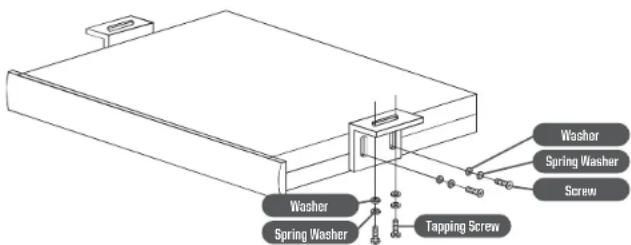
Washer Spring Washer Tapping Screw Washer Spring Washer ScrewThere are two basic mounting options for your MXAZEQ5BT. One is to under-mount the unit beneath the dash panel using the supplied brackets as shown.
The second option is to flush mount the unit by cutting a hole through a suitable panel for an built-in look. If you chose the in-dash mounting method, be careful to cut the correct size hole for the best appearance. Also take care not to let your EQ or the cables interfere with other components in the mounting location.
Controls Rear Panel Connections

text_image
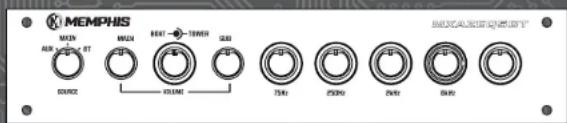
MEMPHIS MAIN OFF ON ON ON ON ON ON ON ON ON ON ON ON ON ON ON ON ON ON ON ON ON ON ON ON ON ON ON ON ON ON ON ON ON ON ON ON ON ON ON ON ON ON ON ON ON ON ON ON ON ON INCHN INCHN INCHN INCHN INCHN INCHN INCHN INCHN INCHN INCHN INCHN INCHN INCHN INCHN INCHN INCHN INCHN INCHN INCHN INCHN INCHN INCHN INCHN INCHN INCHN INCHNH INCHNH INCHNH INCHNH INCHNH INCHNH INCHNH INCHNH INCHNH INCHNH INCHNH INCHNH INCHNH INCHNH INCHNH INCHNH INCHNH INCHNH INCHNH INCHNH INCHNH INCHNH- Source Input Control Knob - This control will change the input source from MAIN, AUX and Bluetooth
- Main Volume Control Knob - This control adjusts the output for BOAT, TOWER and SUB.
- Boat Output Control Knob - This control adjusts the output of the BOAT zone.
- Tower Output Control Knob - This control adjusts the output of the TOWER zone.
- Sub Output Control Knob - This control adjusts the output of the SUB zone.
- Boat Equalizer Control Knobs - These controls will adjust the output at 75Hz, 250Hz, 2KHz, 6KHz, 14.5Hz from the BOAT output.
- Tower Equalizer Control Knob - These controls will adjust the output at 75Hz, 250Hz, 2KHz, 6KHz, 14.5Hz from the TOWER output.
text_image
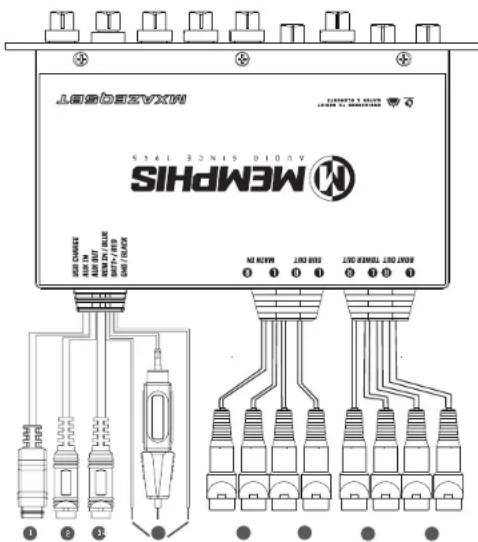
MAXI 2015 SIEMPHIS MENPHIS MAXI 2015 MAXI 2016 MAXI 2017 MAXI 2018 MAXI 2019 MAXI 2020 MAXI 2021 MAXI 2022 MAXI 2023 MAXI 2024 MAXI 2025 MAXI 2026 MAXI 2027 MAXI 2028 MAXI 2029 MAXI 2030 MAXI 2031 MAXI 2032 MAXI 2033 MAXI 2034 MAXI 2035 MAXI 2036 MAXI 2037 MAXI 2038 MAXI 2039 MAXI 2040 MAXI 2041 MAXI 2042 MAXI 2043 MAXI 2044 MAXI 2045 MAXI 2046 MAXI 2047 MAXI 2048 MAXI 2049 MAXI 2050 MAXI 2051 MAXI 2052 MAXI 2053 MAXI 2054 MAXI 2055 MAXI 2056 MAXI 2057 MAXI 2058 MAXI 2059 MAXI 2060 MAXI 2061 MAXI 2062 MAXI 2063 MAXI 2064 MAXI 2065 MAXI 2066 MAXI 2067 MAXI 2068 MAXI 2069 MAXI 2070 MAXI 2071 MAXI 2072 MAXI 2073 MAXI 2074 MAXI 2075 MAXI 2076 MAXI 2077 MAXI 2078 MAXI 2079 MAXI 2080 MAXI 2081 MAXI 2082 MAXI 2083 MAXI 2084 MAXI 2085 MAXI 2086 MAXI 2087 MAXI 2088 MAXI 2089 MAXI 2090 MAXI 2091 MAXI 2092 MAXI 2093 MAXI 2094 MAXI 2095 MAXI 2096 MAXI 2097 MAXI 2098 MAXI 2099 MAXI 2100- USB Charging - Connect your Bluetooth device to charge the battery
- AUX Input - Connect this 3.5mm input to any second input source (DVD, etc.) This is selected from the input source control knob.
- AUX Output - Connect this 3.5mm output to a second EQ, external amp or soundbar. This is a variable output controlled from the master volume control knob with no EQ adjustments.
- POWER CONNECTIONS
RED - 12V DC (Constant) - Connect this lead to a 12 volt (+) positive constant source
BLACK - Ground - Connect this lead to a solid ground point
BLUE- Remote Turn On Input - Connect this lead to the remote output of your head unit's remote turn-on output. If there is no remote output lead or no head unit, connect this lead to a 12V DC switched power source. This lead turns the EQ on and off.
- MAIN RCA Input - Connect this to your head unit's pre-amp output. This is selected from the input source control knob.
- Sub RCA Output - Connect this to your mono amplifier's RCA input connections.
- Tower RCA Output - Connect this to your tower amplifier's RCA input connections. This is controlled from the tower output control knob. Tower EQ controls (outer control knob) will adjust the tone controls from this output.
- Boat RCA Output - Connect this to your boat amplifier's RCA input connections. This is controlled from the boat output control knob. Boat equalizer control (inner EQ knobs) will adjust the tone controls from this output.

text_image
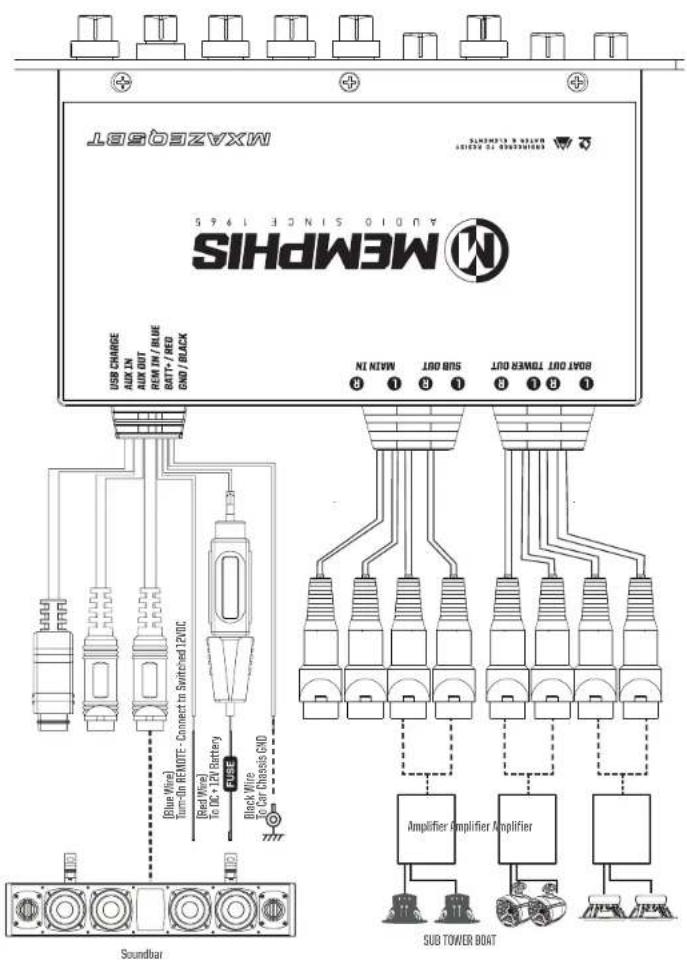
Wiring Configurations Using Main Input Wiring Configuration Usi MAXG5BT SIEMPHIS 24010 SINCE T495 USB CHARGE AUX IN AUX OUT REM IN / BLUE BATT/ / RED GND / BLACK 8 1 3 1 3 1 SIB OUT BOAT OUT TOWER OUT MAIN IN Blue Wire Turn-On REMOTE- Connect to Switched I2VDC Red Wire 12V Battery Black Wire Car Diagnostic GND Source Unit Amplifier amplifier Amplifier SUB TOWER BOAT SoundbarSet SOURCE INPUT Control Knob To MAIN Set SOURCE INPUT Control Knob To AUX

text_image
MAX3058BT M63058BT SI45 AVODI 1SINE 1&45 M6305HS USB CHANGE AUX IN AUX OUT REM IN / BLUE BATT+ / RED GND / BLACK USB CHANGE AUX IN AUX OUT REM IN / BLUE BATT+ / RED GND / BLACK SINIC 1 SINO 1 SINO 1 SINO 1 SINO 1 SINO 1 SINO 1 SINO 1 SINO 1 SINO 1 SINO 1 SINO 1 SINO 1 SINO 1 SINO 1 SINO 1 SINO 1 SINO 1 SINO 1 SINO 1 SINO 1 SINO 1 SINO 1 SINO 1 SINO 1 SINO 1 SSO AM21.10 8 1 8 1 8 1 8 1 8 1 8 1 8 1 8 1 8 1 8 1 8 1 8 1 8 1 8 1 8 1 8 1 8 1 8 1 8 1 8 1 8 1 8 1 8 1 8 1 8 1 8 2 Blue Wire Turn-On REMUTE- Connect to Switched I2VDC Red Wire to DC+ I2V Battery Black Wire to Car Chassis GND Soundbar Amplifier Amplifier Amplifier SUB TOWER BOATWiring Configuration Using Bluetooth Only
text_image
MXAZG6BT AUDIO SINCE 1945 MEMPHS SIHDPMS USB CHARGE AUX IN AUX OUT REM IN / BLUE BATT/- RED GND/ BLACK NIN MIN NIN OUT SOUT OUT BOOT OUT TURNER OUT [Blue Wire] Turn-on REMOTE- Connect to Switched 12VDC [Bed Wire] To DC + 12V Battery Block Wire To Car Chassis GND Soundbar Amplifier Amplifier Amplifier SUB TOWER BOATSet SOURCE INPUT Control Knob To BT [Bluetooth]
Bluetooth Pairing and Operation
- Turn the source selector knob to BT [Bluetooth]
- Open your devices Bluetooth settings. Search for MXAZEQ5BT and pair your device. Once paired you can stream audio to the MXAZEQ5BT.
- You can either use the Bluetooth device or the MXAZEQ5BT to change tracks and control the master volume of your system.
- There is no visual or audio conformation from the MXAZEQ5BT to indicate your device is paired. You must confirm this from your Bluetooth device.
- There is no need to un-pair your device to listen to a different input source. Use the front panel source selector knob to change MAIN or AUX input.
Equalization Adjustment
Adjust the EQ to match your listening style. You can adjust different aspects of your sound until you reach the perfect blend to suit your listening style.
Equalizer Band Ranges
Each knob is essentially a tone control dedicated to a specific part of the audio spectrum from 20Hz to 20kHz. They can help your speakers match the environment in which they are being utilized. There are 5 knobs for BOAT and 5 knob for TOWER that allow you to adjust the EQ setting for each zone separately. Start with all nine knobs in the 12 o'clock position. Listen to a variety of types of music. Rotate each of the knobs individually. When rotating the knob you will notice the effect of the knobs on different parts of the audio spectrum. Use the knobs to dial in your sound to the perfect level.
75Hz: Use this control sparingly. It can produce low bass punch that may force the speakers to reproduce sounds beyond their capability
250Hz: This controls frequencies above sub bass and below the midrange
2kHz: This range is responsible for musical instruments, vocal and midrange percussion.
6kHz: Controls the frequencies above midrange and below high range
14.5kHz: Controls the upper high range frequencies.

text_image
MEMPHS MAX MIN BAC CMR DSB DSB DSB DSB MaxTroubleshooting
| PROBLEM | SOLUTION |
| No Sound | 1. Check Power and Remote Turn-on for the proper voltage2. Check the ground connections3. Check if the source knob is at the correct selection |
| Hiss | 1. Turn down the amplifier gains2. Adjust the source unit output3. Check for kinked or faulty RCA interconnect cables |
| Distorting Speakers | 1. Adjust the equalization levels2. Lower the volume of the source unit3. See your dealer |
| Amplifier Popping Noise or Turn-on and Turn-off Thump | 1. Equalizer battery + must be connected to a constant 12VDC source2. Check wiring for proper hook up of power and remote leads |
Warranty
This products has a one year warranty from the date of purchase for defects in material or workmanship. The warranty is void if the product has been physically damaged by improper usage or abuse. If repairs are attempted outside of a Memphis Audio facility, the warranty is void.
This warranty is limited to the original retail purchaser and does not cover any expenses incurred in the removal or re-installation of the product. This warranty does NOT apply to product exterior and cosmetics. Memphis Audio disclaims any liability for incidental or consequential damages caused by product defects. Memphis Audio liability will not exceed the purchase price of the product and the warranty period specified.
Warranty shipments to Memphis Audio are the responsibility of the purchaser. Pack the product carefully in the original carton if possible Memphis Audio will not be responsible for damages incurred in shipment or due to improper packaging materials used by the purchaser.
If determined to be within warranty your product will be repaired or replaced at the discretion of Memphis Audio.
What is NOT covered under warranty
• Damage due to improper installation
- Damage caused by exposure to moisture, excessive heat, chemical cleaners and/or UV radiation
- Damage through negligence, misuse, accident or abuse. (Repeated returns for the same damage may be abuse)
- Product damaged in accident and/or due to criminal activity
• Service performed by anyone other than Memphis Audio
- Subsequent damage to other components
- Any cost or expense related to the removal or re-installation of product
- Products with tampered, missing, altered or defaced serial numbers/labels
- Freight damage
• The cost of shipping product to Memphis Audio
- Return shipping on non-defective items
- Any product not purchased from an authorized Memphis Audio dealer
Some states do not allow the exclusion or limitation of incidental or consequential damages. The above limitations or exclusions may not apply to you. This warranty gives you specific rights, you may have other rights which vary from state to state.
If warranty service is required, a return authorization number is required to return the product to Memphis Audio.