Sonora - Tablet Primux - Free user manual and instructions
Find the device manual for free Sonora Primux in PDF.


| Product Type | Tablet |
| Brand | Primux |
| Model | Sonora |
| Dimensions | Approximately 240 x 160 x 8 mm |
| Weight | Approximately 450 g |
| Power Supply | AC adapter 5V/2A |
| Operating System | Android (version may vary) |
| Processor | Quad-core (estimated) |
| RAM | 2 GB (estimated) |
| Storage | 32 GB (estimated) |
| Display | 10.1 inch IPS, 1280x800 resolution |
| Connectivity | Wi-Fi 802.11 b/g/n, Bluetooth |
| Camera | Front and rear cameras (megapixels not specified) |
| Battery | Lithium-ion, 5000 mAh (estimated) |
| Accessories Included | USB cable, charger |
| Maintenance | Clean with a soft, dry cloth |
| Safety | Avoid extreme temperatures, do not disassemble |
| Repairability | Spare parts available through authorized service centers |
Frequently Asked Questions - Sonora Primux
User questions about Sonora Primux
0 question about this device. Answer the ones you know or ask your own.
Ask a new question about this device
Download the instructions for your Tablet in PDF format for free! Find your manual Sonora - Primux and take your electronic device back in hand. On this page are published all the documents necessary for the use of your device. Sonora by Primux.
USER MANUAL Sonora Primux
Standby:
Press to decrease the volume level. Press to increase the volume level.
2. HOME
back to home interface.
3. Headphone
Audio output connection for headphones
4.USB OTG
Connect to a USB device or a computer to transfer data (e.g. music, videos, photos, files).
5. TF card slot
Load external microSD memory cards here.
6.USB HOST
Connect to a USB device
7. HDMI
Connect to a TV or other displays.
8. DC IN 9V
Charge and power the tablet with the included power Adapter.
9. POWER
Press to turn the unit on, or to turn the screen on and off. Press and hold to access the Power Off menu
Getting Started Turning the Tablet on or off
To turn the tablet on:
Press and hold the Power key until the LCD screen turns on. Wait until the Home screen appears; the tablet is now ready for use.
To turn the tablet off:
- Press and hold the Power key until the Device Options menu appears.
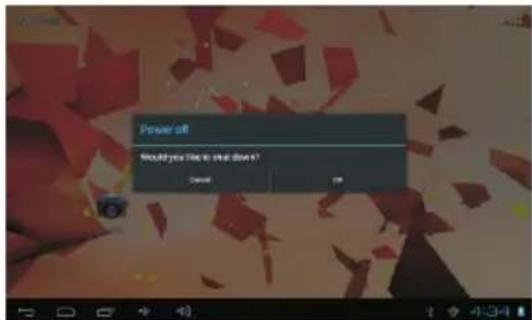
- Touch ok the screen to turn off the tablet.
Turning the Screen On or off (Standby)
When the tablet is on, you can turn off the screen to conserve battery power. Simply press the Power key once to turn the screen off. Press the Power key again to turn the screen back on.

To conserve battery power, the screen be set to turn off automatically when the set is not in use (between 15 second 30 minutes).
This Screen timeout option can be found in the Display menu.
Getting Started Unlocking the Screen
When the screen turns off, you will have to unlock the screen, when you turn it back on. To unlock the screen, drag the lock icon across the screen towards the unlock icon.

About Applications
To open an application, touch the application icon on the home screen or in the Launcher where you can tap the icon right up on the home screen to get in..
Launcher screen:

The screen shown above is for illustrative purposes only. Reserves the right to modify and improve the final list of applications available on the tablet.
About Applications Preinstalled Applications
Some applications have been installed on your tablet for your convenience. These applications include:

Browse the web.

Perform simple mathematical operations.

Take pictures or videos with the frontfacing camera.

Check your e-mail.

Play music

Access the Settings menu to adjust the tablet's options.
Preinstalled Applications Installing Applications
You can also download an install additional applications from the device's applications marketplace, the web browser, or other sources.
Connect to a Wi-Fi network
The Notification bar displays icons that indicate your tablet's Wi-Fi status.

Notification that an open Wi-Fi network is in range.

Connected to a Wi-Fi network (waves indicate connection strength).
[no icon] There are no Wi-Fi networks in range, or the Wi-Fi radio is off.
- Turn on the Wi-Fi radio if it is not already on. To turn on Wi-Fi:
a.Go to the Home screen: Press the Home key. b.Open the Settings menu: tap the icon right up on the home screen to get into the launcher, then touch Settings icon.
c.Open the Wireless & networks menu: Slide the icon to ON status.
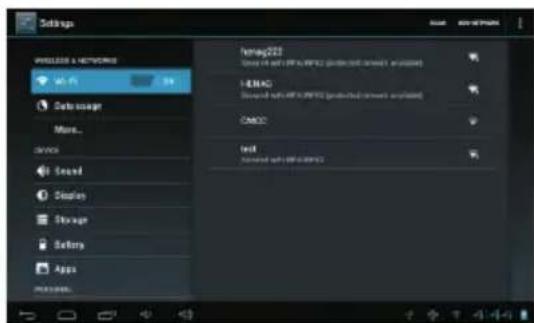
When Wi-Fi is on, the tablet will look for and display a list of available Wi-Fi networks.

If a network that you have connected to iously is found, the tablet will connect to it. u don't see your network in the list, you force the tablet to re-scan. To scan for works, tap the Menu key, and then touch n.
- Select an available Wi-Fi network to connect to: In the same Wi-Fi settings menu above, touch a network in the list. If the network is open, the tablet will prompt you to confirm connection to the network. Touch Connect to confirm. If the network is secured (as indicated by a Lock icon), the tablet will prompt you to enter a password or other credentials. Touch the Wireless password box to show the on-screen keyboard and then use it to enter the password. Touch Connect to confirm.

When you have successfully connected to a Wi-Fi network, the Notifications bar at the the low of the screen will show a Wi-Fi signal indicator.

To learn about how to add a Wi-Fi network when it is not in range or when the router is set to obscure the network name (SSID); or to configure advanced Wi-Fi options, please refer to the manual.
Optional Connections Connecting to a Computer
Connect the tablet to a computer to transfer files.
-
Connect your tablet to the computer. With the included USB cable: Plug the small end of the cable into the USB 2.0 high speed connector of the tablet. Plug the large end of the cable into an available USB 2.0 high speed port on the computer.
-
When your tablet is connected, slide up the USB icon right down on the screen and then touch icon USB connected.

- Mount the storage.
Touch button Turn on USB storage to mount the tablet's built-in storage. When it is mounted, you can copy files to or from your tablet.

To connect the tablet to the TV:
- Plug the small end of the HDMI cable into the mini HDMI connector on the tablet.
- Plug the large end of the HDMI cable into the HDMI port on the TV.
- Turn on the TV, and set its display mode to the HDMI port that the tablet is connected to.
If you need help setting the display mode of the TV, please refer to the documentation provided by the TV manufacturer. If there is no sound from the tablet on your TV, you may need to set the HDMI switch sound settings.
Specifications
| Processor | Boxchip A10 (Cortex A8 + Mali400) |
| RAM | 1G DDR3 |
| Storage | 8 GB(option) flash built-in; microS D card slot (max.32GB supported) |
| Display | 9.7" TFT LCD(1024x768), Capactive touch screen |
| Wi-Fi Networking | IEEE 802.11 b/g/n |
| Video Output | Mini HDMI, type C(1080p and 720p supported) |
| enohpdaeh mm5 | |
| PC Interface | USB 2.0 high speed |
| Additional Features | Built-in microphone Front facing camera(0.3MP), rear camera(2MP) 2x1W speaker |
| Operating System | AndroidTM 4.0 |
| Power | Rechargeable Li-poly battery power Adapter(DC 9V,2A) |
Please, visit www.primux.es website for more information
tuptuO oiduA



1080P FULL HD


PRiMUX® TECH
- Standby:
- HOME
- Headphone
- 4.USB OTG
- TF card slot
- 6.USB HOST
- HDMI
- DC IN 9V
- POWER
- Getting Started Turning the Tablet on or off
- Turning the Screen On or off (Standby)
- Getting Started Unlocking the Screen
- About Applications
- About Applications Preinstalled Applications
- Preinstalled Applications Installing Applications
- Connect to a Wi-Fi network
- Optional Connections Connecting to a Computer
- PRiMUX® TECH
Brand : Primux
Model : Sonora
Category : Tablet