
PresenterPOD - Camera Vaddio - Free user manual and instructions
Find the device manual for free PresenterPOD Vaddio in PDF.


| Product Type | Camera Control System |
| Model | PresenterPOD |
| Part Numbers | 999-1111-000 (North America), 999-1111-001 (International) |
| Box Contents | PresenterPOD Interface, Power Supply, Button Overlay Labels |
| Power Supply | Included AC adapter |
| Dimensions (Interface) | Approximately 6.5 x 4.5 x 1.5 inches |
| Weight (Interface) | Approximately 1.0 lb |
| Primary Function | Automated camera tracking for presenters |
| Compatible Cameras | Vaddio AutoPresenter and other PTZ cameras |
| Control Interface | Button panel with customizable overlay labels |
| Tracking Technology | IR or ultrasonic (specifics in full manual) |
| Mounting | Desktop or under-table |
| Operating Temperature | 32°F to 104°F (0°C to 40°C) |
| Storage Temperature | -4°F to 140°F (-20°C to 60°C) |
| Humidity | 20% to 80% non-condensing |
| Safety Certifications | CE, FCC, UL listed |
| Cleaning Instructions | Wipe with dry soft cloth; avoid liquids |
| Repairability | Contact Vaddio support for service; no user-serviceable parts |
| Warranty | Standard Vaddio warranty (check support.vaddio.com) |
| Manual Availability | Full manual at support.vaddio.com |
Frequently Asked Questions - PresenterPOD Vaddio
User questions about PresenterPOD Vaddio
0 question about this device. Answer the ones you know or ask your own.
Ask a new question about this device
Download the instructions for your Camera in PDF format for free! Find your manual PresenterPOD - Vaddio and take your electronic device back in hand. On this page are published all the documents necessary for the use of your device. PresenterPOD by Vaddio.
USER MANUAL PresenterPOD Vaddio
PresenterPOD™ System
PRODUCT INFO:
PresenterPOD System
999-1111-000 North America
999-1111-001 International
What's in the box?
• PresenterPOD Interface
- PresenterPOD
- Power Supply
- Button Overlay Labels
Vaddio, and PresenterPOD are trademarks of Vaddio.
All other trademarks are property of their respective owners. Reproduction in whole or in part without written permission is prohibited. Specifications and pricing are subject to change without notice or obligation.
For additional product information, tech specs, warranty, repair, and return policies, please visit us online at support.vaddio.com.
©2014 Vaddio - All Rights Reserved.
Quick-Start No. 342-0891 Rev. A
12.15.14
PresenterPOD

PresenterPOD Interface
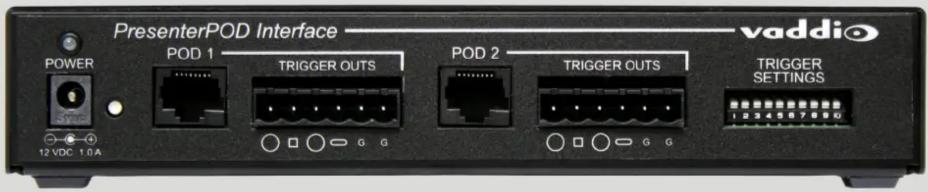
Visit us online at support.vaddio.com
Click on manuals, and select the full
PresenterPOD System Manual.
vaddio
THE ART OF EASY
PresenterPOD System
Visit us online at support.vaddio.com
Click on manuals, and select the full PresenterPOD System Manual.

AutoPresenter

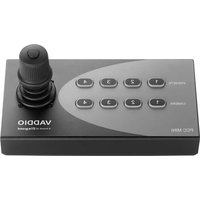
Brand : Vaddio
Model : PresenterPOD
Category : Camera