
AutoVIEW IR - Camera Vaddio - Free user manual and instructions
Find the device manual for free AutoVIEW IR Vaddio in PDF.


| Product Type | PTZ Camera with IR |
| Brand | Vaddio |
| Model | AutoVIEW IR |
| Image Sensor | 1/2.8-inch CMOS |
| Resolution | 1080p Full HD |
| Optical Zoom | 12x |
| IR Range | Up to 30 meters |
| Pan/Tilt Range | Pan: 340°, Tilt: +90° to -20° |
| Video Output | HDMI, 3G-SDI, IP (H.264/H.265) |
| Audio Input | 3.5mm line-in |
| Control Interface | RS-232, IR remote, IP |
| Power Supply | PoE+ (IEEE 802.3at) or 12V DC |
| Power Consumption | 15W max |
| Dimensions (WxHxD) | 160 x 170 x 180 mm |
| Weight | 1.5 kg |
| Mounting | Tabletop, wall, ceiling |
| Operating Temperature | 0°C to 40°C |
| Storage Temperature | -20°C to 60°C |
| Maintenance | Clean lens with soft cloth; avoid solvents |
| Safety | Use only supplied accessories; keep away from water |
| Spare Parts | Remote control, power adapter, mounting bracket |
| Repairability | Refer to authorized service center |
Frequently Asked Questions - AutoVIEW IR Vaddio
User questions about AutoVIEW IR Vaddio
0 question about this device. Answer the ones you know or ask your own.
Ask a new question about this device
Download the instructions for your Camera in PDF format for free! Find your manual AutoVIEW IR - Vaddio and take your electronic device back in hand. On this page are published all the documents necessary for the use of your device. AutoVIEW IR by Vaddio.
USER MANUAL AutoVIEW IR Vaddio
AutoVIEW™ IR Sensor Kit
PRODUCT INFO:
AutoVIEW IR Sensor Kit
999-1701-000 North America
999-1701-001 International
What's in the box?
• AutoVIEW IR Sensor
• AutoVIEW Control Interface
• Power Supply
Vaddio, ControlVIEW, AutoPresenter, Quick-Connect, AutoVIEW, ProductionVIEW, Hot-Shot and PowerRite are trademarks of Vaddio.
All other trademarks are properly of their respective owners. Reproduction in whole or in part without written permission is prohibited. Specifications and pricing are subject to change without notice or obligation.
For additional product information, tech specs, warranty, repair, and return policies, please visit us online at support.vaddio.com.
©2014 Vaddio - All Rights Reserved.
Quick-Start No. 342-0912 Rev. A 10.29.14
AutoVIEW IR Sensor

natural_image
Circular metallic ring with a black center, surrounded by speckled texture (no text or symbols)Visit us online at support.vaddio.com
Click on manuals, and select the full AutoVIEW IR Sensor Kit Manual.
vaddio
THE ART OF EASY
AutoVIEW IR Sensor Kit
Visit us online at support.vaddio.com
Click on manuals, and select the full AutoVIEW IR Sensor Kit Manual.

flowchart
graph TD
    A["PowerVIEW HD-22"] --> B["Control & HD Video"]
    C["PowerVIEW HD-22"] --> B
    D["PowerVIEW HD-22"] --> B
    E["AutoView IR Sensor"] --> F["Closure"]
    G["AutoPresenter"] --> H["Power"]
    H --> I["PowerVIEW IR Sensor"]

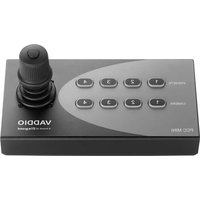
Brand : Vaddio
Model : AutoVIEW IR
Category : Camera