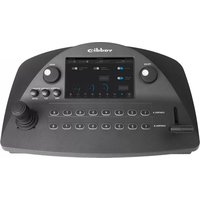
ProductionVIEW Precision Camera Control - Controller Vaddio - Free user manual and instructions
Find the device manual for free ProductionVIEW Precision Camera Control Vaddio in PDF.
Pick your language and provide your email: we'll send you a specifically translated version.
| Product Type | Camera Control Controller |
| Brand | Vaddio |
| Model | ProductionVIEW Precision Camera Control |
| Dimensions (W x D x H) | 19 x 6.5 x 1.75 inches (rackmount 1U) |
| Weight | 5.5 lbs (2.5 kg) |
| Power Supply | PoE (Power over Ethernet) or 12V DC, 2A |
| Power Consumption | 15W max |
| Connectivity | Ethernet (RJ45), RS-232, USB (for firmware update) |
| Supported Protocols | VISCA, Pelco-D, Pelco-P |
| Control Interface | Joystick, buttons, touchscreen (optional) |
| Camera Control | Pan, Tilt, Zoom, Focus, Iris, Presets |
| Number of Cameras Supported | Up to 7 cameras via daisy-chain |
| Display | 3.5-inch color TFT LCD (optional) |
| Operating Temperature | 32°F to 104°F (0°C to 40°C) |
| Storage Temperature | -4°F to 140°F (-20°C to 60°C) |
| Humidity | 10% to 90% non-condensing |
| Mounting | Desk or rackmount (1U rack kit included) |
| Safety Compliance | CE, FCC Class A, RoHS |
| Cleaning Instructions | Wipe with a dry, soft cloth. Do not use liquids or sprays. |
| Maintenance | Check cable connections periodically. Update firmware as needed. |
| Spare Parts & Repairability | Contact Vaddio support for replacement parts. Device is not user-serviceable. |
Frequently Asked Questions - ProductionVIEW Precision Camera Control Vaddio
How do I connect the Vaddio ProductionVIEW controller to my PTZ camera?
Connect the controller and camera via Ethernet using a standard CAT5/6 cable. The controller supports PoE, so power is supplied through the same cable if the camera is PoE-compatible. Alternatively, use RS-232 for serial control.
Can I control multiple cameras with one controller?
Yes, the ProductionVIEW controller can control up to 7 cameras when daisy-chained via RS-485 or VISCA protocol. Ensure each camera has a unique address.
What camera protocols are supported?
The controller supports VISCA, Pelco-D, and Pelco-P protocols. Check your camera's manual to select the appropriate protocol.
How do I set up presets?
Position the camera using the joystick and buttons, then press and hold a preset button (e.g., 1-9) until the display confirms. To recall a preset, simply tap the button.
Does the controller require a separate power supply?
It can be powered via PoE (Power over Ethernet) from a compatible switch or injector. Alternatively, use a 12V DC adapter (2A) connected to the DC input.
How do I update the firmware?
Download the latest firmware from the Vaddio website. Connect the controller to a PC via USB and follow the update instructions in the user manual. Do not disconnect power during the update.
What is the range of the joystick control?
The joystick provides precise speed control with variable sensitivity. Pan and tilt ranges depend on the camera; the controller can manage full 360° pan and 180° tilt if supported by the camera.
Can I use this controller with non-Vaddio cameras?
Yes, as long as the camera supports one of the standard protocols (VISCA, Pelco-D, or Pelco-P). Check the camera's specifications for compatibility.
How do I clean the controller?
Turn off the device and unplug it. Wipe the exterior with a dry, soft cloth. Do not use any liquids, sprays, or abrasive cleaners.
What should I do if the controller is not responding?
Check all cable connections. Ensure power is supplied (PoE or DC). Try a factory reset by holding the reset button for 5 seconds. If the issue persists, contact Vaddio technical support.
User questions about ProductionVIEW Precision Camera Control Vaddio
0 question about this device. Answer the ones you know or ask your own.
Ask a new question about this device
No questions yet. Be the first to ask one.
Download the instructions for your Controller in PDF format for free! Find your manual ProductionVIEW Precision Camera Control - Vaddio and take your electronic device back in hand. On this page are published all the documents necessary for the use of your device. ProductionVIEW Precision Camera Control by Vaddio.