
RS25DB080 - Controller INTEL - Free user manual and instructions
Find the device manual for free RS25DB080 INTEL in PDF.


| Product Type | RAID Controller |
| Model | RS25DB080 |
| Brand | Intel |
| Interface | PCI Express 2.0 x8 |
| Supported Devices | SAS 6Gb/s, SATA 6Gb/s |
| Number of Ports | 8 internal |
| RAID Levels | 0, 1, 10, 5, 50, 6, 60 |
| Cache Memory | 512 MB DDR3 |
| Form Factor | Low-profile MD2 PCIe |
| Dimensions (H x L) | 6.6 in x 2.7 in (168 mm x 69 mm) |
| Weight | Approx. 0.5 lbs (227 g) |
| Power Consumption | Typical 15 W, Max 20 W |
| Operating Temperature | 0°C to 55°C (32°F to 131°F) |
| Operating Humidity | 5% to 90% non-condensing |
| Key Features | Hardware RAID, Intel RAID Management, Data Protection |
| Maintenance | Keep firmware updated; clean with dry cloth |
| Safety | Install in anti-static environment; disconnect power before handling |
| Spare Parts & Repairability | Battery backup unit (BBU) replaceable; no user-serviceable parts |
Frequently Asked Questions - RS25DB080 INTEL
User questions about RS25DB080 INTEL
0 question about this device. Answer the ones you know or ask your own.
Ask a new question about this device
Download the instructions for your Controller in PDF format for free! Find your manual RS25DB080 - INTEL and take your electronic device back in hand. On this page are published all the documents necessary for the use of your device. RS25DB080 by INTEL.
USER MANUAL RS25DB080 INTEL
Intel® RAID Controller RS25DB080 Quick Start User's Guide
This guide contains step-by-step instructions for installing the Intel® RAID Controllers RS25DB0B0 and information on using the BIOS setup utility to configure a single logical drive array and install the driver into the operating system. For more advanced RAID configurations, or to install with other operating systems, please refer to the Hardware User's Guide. These guides and other supporting documents (including a list of supported server boards) are also located on the web at http://support.lintel.com/support/motherboards/server. If you are not familiar with ESD (Electrostatic Discharge) procedures used during system integration, see your Hardware Guide for complete ESD procedures. For more details on Intel® RAID controllers, see: www.lintel.com/go/serverbuilder.
Read all cautions and warnings first before starting your RAID Controller integration.
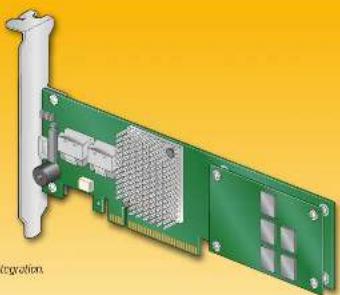
natural_image
Illustration of a green PCI expansion card with internal grid structure and connector ports (no text or symbols)
Choosing the Right RAID Level
| RAND | Minimum Physical Drows | Fall PDS Allowed | Method | Capacity | Read Speed | Write Speed | Good Usage | |
| 0 | 2 MWD | Slapping speed: 10% Excellent Level | excellent high | broughted | workstation | |||
| 1 | 2 | 1 kW/meg (resistance) | 50% Very good | good | Good | CS, spas, white, teal | ||
| 5 | 3 | 1 | Slapping and distributed density (self temperature) | n-1 (97.94%) | Very good | Good | Extra, water/multi action | |
| 6 | 3 | 2 | Stunting with dual dimensional parity | n-2 (97.94%) | Good | Good | High fault tolerance | |
| 10 | 4 | 1 per minute set | Stunting across m RMS | 50% Very good | Good | Good | Turbative 1st max power | |
| 50 | 6 | 1 per RS - 20 | Stunting across RS or raps | n-2 (97.94%) | Excellent | Very Good | Outbreak 1st max power | |
| 60 | 6 | 2 per RS - 20 | Stunting across RS or raps | n-4 (97.94%) | Very good | Good | Critical data | |
Warning
Direct of care and safety experience in the document safety setting any of the instructions. Also see the real Server Board and Server Chain's Safety Information document for in packages and command appropriately maintenance information which has been completed solely information
Warning
included in the service of the material should be to be used and is qualified for service prepared to the disposal of injury from should be shot or shot leaves.
Caution
Clearve normal ESC (1) Optotrans, (2) Rechamps (3) Emitter driving system Integration to avoid possible carriage to server board and/or other components.
Tools Required
-
-
-
-
-
-
-
-
-
-
-
-
-
-
-
-
-
-
-
-
-
-
-
-
-
-
-
-
-
-
-
-
-
-
-
-
-
-
-
-
-
-
-
-
-
-
-
-
-
-
-
-
-
-
-
-
-
-
-
-
-
-
-
-
-
-
-
-
-
-
-
-
-
-
-
-
-
-
-
-
-
-
-
-
-
-
-
-
- 90.
-
-
-
-
-
-
-
-
-
-
-
-
-
-
-
-
-
-
-
-
-
-
-
-
-
-
-
-
-
-
-
-
-
-
-
-
-
-
-
-
-
-
-
-
-
-
-
-
-
-
-
-
-
-
-
-
-
-
-
-
-
-
-
-
-
-
-
-
-
-
-
-
-
-
-
-
-
-
-
-
-
-
-
-
-
-
-
In order to be the same as the first time of the last time, we will take a 10-minute time. The time is not at all, but it is also a time.
G22852-001
1
What you will need to begin
- S&P 500 or S&P 750. In terms of disk drives (non-endors可用able to support: \$45,100 or S&P 750) disk drives - Index 300's data to be REVS/REVS - Server and/or its 200s of P.O. Platforms' skills and data to be managed to them. - The P.O. Platforms' data source 2 specific data used in the endors could be in general by 1986 - Index 400's data for ISG201002 Resource 202 - Using system, no data is made in: M. Cross Windows Server 2006; Microsoft Windows Server 2007; Microsoft Windows 2.0x; Health Enterprise Linux, or SLS. To use enterprise Server, W. Systems 2.5X Server 4, or China 2x

Check the Bracket Height
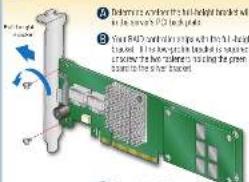
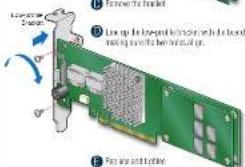
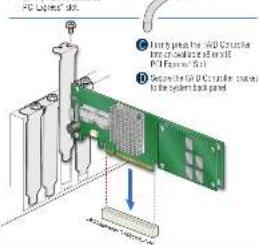
2
A Power class the system is described in
pive card
B. Herewith the system covers are
(1) _1 (2)
Building Value with Intel
Server Products, Programs and Support
The first large server software you need to help an advantage of the outstanding use of the network to win a computer. In the Server Building, it uses one-size video for a small user and is used to help a server building. The server building includes all other high-quality server, adding tools. For example, he has been using a web-based tool. For instance, it is also a device used in the Internet. We have a digital web support for any other internet or other apps. We have close access, reducing a three-way line from our work and Artisware. We only use a server. For more information that is able to use several other types of tools (e.g., “Several key devices”, “Two key devices”) to use a computer platform.
3
Connect the PAID Controller
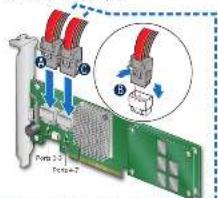
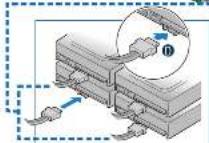
A Correct the wide end of the provided circle to the left of the conductor (parts 4-5) B Push for right side between conductor and I makes a sign down. C Using more than four drives, correct the wide end of the second allowed circle in the right silver conductor (parts 4-7)
① Correct the other ends of the cables to SATH drives or to the ports on a SATA or EAS backbone.
Notes. Unit non-exercer tax opines (one cable per diter and canvas backlines (or a low total rail) are supported. Diver, cover cables (and shown) are supplied.
For several 54% shares compared to prior 0-3 or the 1st (2012) December 31, 2012
Go to Step 4 on Side 2
Audible Alarm Information
For information about the use of this warm and heat to silence or double it, are the warm side of his document.
Intel® RAID Controller RS25DB080 Reference Diagram
![Front View J45 J47 J48 J41 J42 J43 J81 Parts 6-1 J82 Parts 4-7 Back View Front Screw (2) Speaker [DB9] [DB4] X8 (P) Interface Memory Board Power Board Phone 40 J81 Memory Board Connector J41 J41](/content/2026/05/990734/images/d1ed5daddc08ab31097b4e5244a5d520ac2452d5dd10796d908c4820d7d12bf4.jpg)
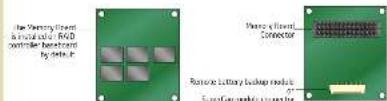
For more information on the pumpers refoceted in this diagram, refer to user guide located on the web at http://www.netcom/sugar.net/thebestShares.
Brand : INTEL
Model : RS25DB080
Category : Controller