
RS2WG160 - Controller INTEL - Free user manual and instructions
Find the device manual for free RS2WG160 INTEL in PDF.


| Product Type | RAID Controller |
| Brand | Intel |
| Model | RS2WG160 |
| Host Interface | PCI Express 3.0 x8 |
| Supported Drives | SAS 12Gb/s, SATA 6Gb/s |
| Number of Ports | 16 internal, 4 external |
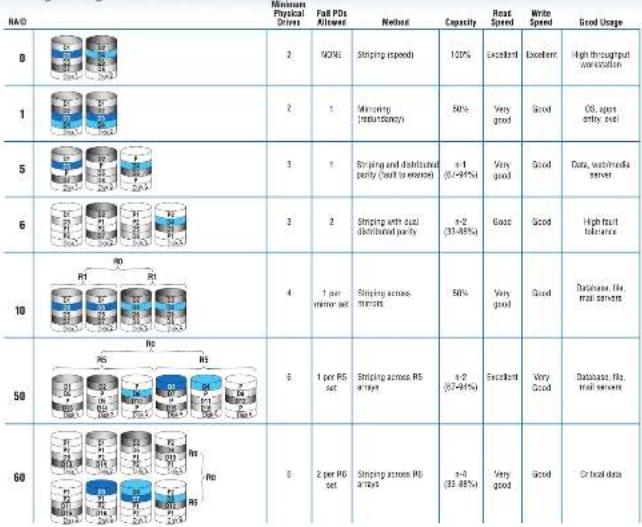
| RAID Levels | 0, 1, 10, 5, 50, 6, 60 |
| Cache Memory | 1 GB DDR3 |
| Form Factor | Low-profile MD2 |
| Dimensions (L x W x H) | 6.6 in x 2.7 in x 0.7 in (168 mm x 69 mm x 18 mm) |
| Weight | Approximately 0.5 lb (230 g) |
| Power Consumption | 20 W typical |
| Operating Temperature | 0°C to 55°C (32°F to 131°F) |
| Storage Temperature | -40°C to 70°C (-40°F to 158°F) |
| Certifications | CE, FCC, UL, BSMI |
| Maintenance | Keep firmware updated; clean contacts periodically |
| Safety | Install in grounded chassis; handle with ESD precautions |
| Spare Parts / Repairability | Battery backup unit and cache module replaceable |
| Operating Systems Supported | Windows Server, Linux, VMware ESXi |
| Warranty | 3 years limited |
Frequently Asked Questions - RS2WG160 INTEL
User questions about RS2WG160 INTEL
0 question about this device. Answer the ones you know or ask your own.
Ask a new question about this device
Download the instructions for your Controller in PDF format for free! Find your manual RS2WG160 - INTEL and take your electronic device back in hand. On this page are published all the documents necessary for the use of your device. RS2WG160 by INTEL.
USER MANUAL RS2WG160 INTEL
Intel® RAID Controller RS2WG160 Quick Start User's Guide
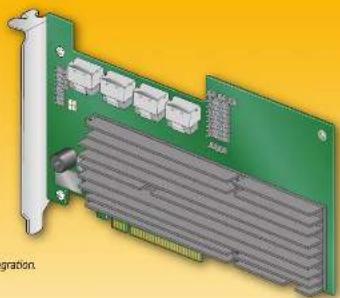
This guide contains step-by-step instructions for installing the Intel® RAID Controller RS2WG160 and information on using the BIOS setup utility to configure a single logical drive array and install the driver into the operating system. For more advanced RAID configurations, or to install with other operating systems, please refer to the Hardware User's Guide. These guides and other supporting documents (including a list of supported server boards) are also located on the web alt: http://www.intel.com/support/motherboards/server. If you are not familiar with ESD (Electrostatic Discharge) procedures used during system integration, see your Hardware Guide for complete ESD procedures. For more details on Intel® RAID controllers, see: www.intel.com/gp/serverbuilder.
Read all cautions and warnings first before starting your RAID Controller integration.
natural_image
3D CAD rendering of a green circuit board with multiple gray components and a yellow background (no text or symbols)
Warning
Warning of caution and safety statements in this document before performing any of the instructions. Also see the 'liver® Server Board and Server Class's Safety Information' journal at: http://www.iota.com/support/ncm/bio/ServiceNow-010725. The for comp the safety information.
Warning
###
Caution
Observe normal ESO (Electrical Discharge) procedures during system integration to avoid possible damage to server board and/or other components.
Tools Required

note: a registered transaction of real Corporate or its subsidiaries in the United States and other countries. Other names and rights are also listed as the company officers. Copyright 9/2015, by Corporation. All rights reserved.
E92188-001
[Barcode]
What you will need to begin
- SLS2.0 or SLS4.1 rare disk drives (backward compatible to support)
- Never be able to use X16-P31 Egy1857 50% this came for a designed tool.
1986.5 Equitrations, patents and other financial services
• LCA BAC Co. (2017)
• Consumer price volatility data, Microsoft Sales 2007
Microsoft Windows Survey 2008, Microsoft Windows Corp., Delphi Technologies
Link, or S.R. * Link Liking & Save

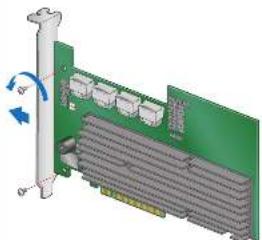
Check the Bracket Height
This RAC controls requires a full capacity. Pass
make sure your server's PCI Express artifacts this card
2 Your FA D revolver ship with the In Design broker.
3.5641856
natural_image
3D diagram of a green circuit board with multiple connectors and a pull-up cable, showing no text or symbols.
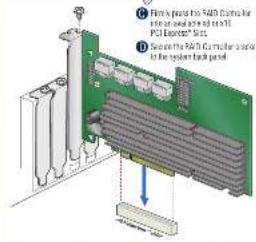
Install the RAID Controller
Power down the system and disconnect is
power band.
③ Hang the system covered any
the 1025 to 4386
PCI Express' list.
C. Fully press the SAID Controller
10.24.2017年1月2日
PCI Express® Sirt.
D Secret the R&D Commissioner
to the system back panel
Audible Alarm Information
For information about the article given and
the purpose of use is to be a file in document.
Choosing the Right RAID Level
 |

Connect the RAID Controller
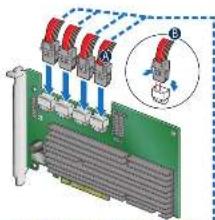
For internal stress contained the wide end of the provided cable to the left-slip connector (Parts 5-21).
3. Put the case into the sler connected until it makes a slight stick
Note. This controller is shipped together with multiple mini-SAS to mini-SAS cables. Both non-expander banks and/or cable per drive and expander bankers (one or two total carriers) are supported. For direct drive connection, a third party mini-SAS-to-single drive we SANS or SATA drive cable is required
natural_image
Diagram of a circuit board with red connectors and blue/red wires, showing connections without any text or symbols.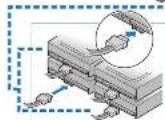
Banc et al. 2014 SATA (the following in port 0-3
in the R&P 500 Corporate Banking
Go to Step 4 on Side 2
Building Value with Intel\*
Server Products, Programs and Support
Get the high-value server solution you
used by being a percentage of the outstanding
alam-ol tuerat bahan 1 ore
+ Exports e credit of serve to filing blocks
+ Solutions and looks to create a Business
• Motion or 240° technical support
(4.3) Country Code: 068-625-6265
Three-year limited warranty and fees
Warranty Rep. asement
For more information on links to add-on value
saver offering, and the 10P SaveBuilder
wirks: www.wirks.com
Intel® SensorBuilder is your one-step
shop of normal or abnormal fields
S. 10. (3) (2)
- Protact recombinant, or using
product trade and technical process
2017年
* 2415 x005, 2.
• 2018
rld® Crlra Laurina Derler
• Suggest valuation and much more
Intel RAID Controller RS2WG160 Reference Diagram
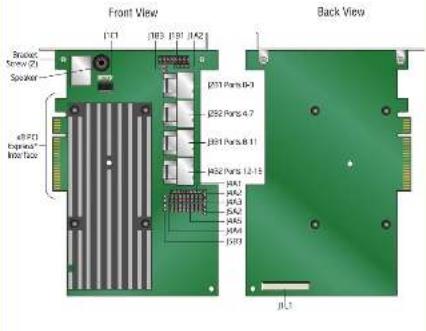
For more information on the jumpers referenced in this diagram, refer to user guide located on the web at
http://www.fib.com/sportin.com/184538.com
Brand : INTEL
Model : RS2WG160
Category : Controller