060-201 - Drill Meec Tools - Free user manual and instructions
Find the device manual for free 060-201 Meec Tools in PDF.


| Product Type | Electric Drill |
| Brand | Meec Tools |
| Model | 060-201 |
| Power Source | Corded Electric |
| Voltage | 230-240 V ~ 50 Hz |
| Power Input | 600 W |
| Chuck Type | Keyless |
| Chuck Capacity | 1.5-10 mm |
| Speed Settings | Variable speed with trigger |
| Speed Range | 0-2800 rpm |
| Rotation Direction | Forward/Reverse |
| Drilling Capacity (Steel) | 10 mm |
| Drilling Capacity (Wood) | 25 mm |
| Net Weight | 1.5 kg |
| Protection Class | Class II (Double insulated) |
| Cable Length | 2 m |
| Accessories Included | Depth stop, auxiliary handle, chuck key (if applicable) |
| Maintenance | Clean housing with dry cloth; check carbon brushes annually |
| Safety Features | Lock-on button, safety trigger guard |
| Spare Parts | Carbon brushes, chuck, power cord (order from Meec Tools) |
| Repairability | User-replaceable carbon brushes; else service center |
| Warranty | 2 years |
Frequently Asked Questions - 060-201 Meec Tools
The lock-on button can be pressed to keep the drill running continuously.
User questions about 060-201 Meec Tools
0 question about this device. Answer the ones you know or ask your own.
Ask a new question about this device
Download the instructions for your Drill in PDF format for free! Find your manual 060-201 - Meec Tools and take your electronic device back in hand. On this page are published all the documents necessary for the use of your device. 060-201 by Meec Tools.
USER MANUAL 060-201 Meec Tools
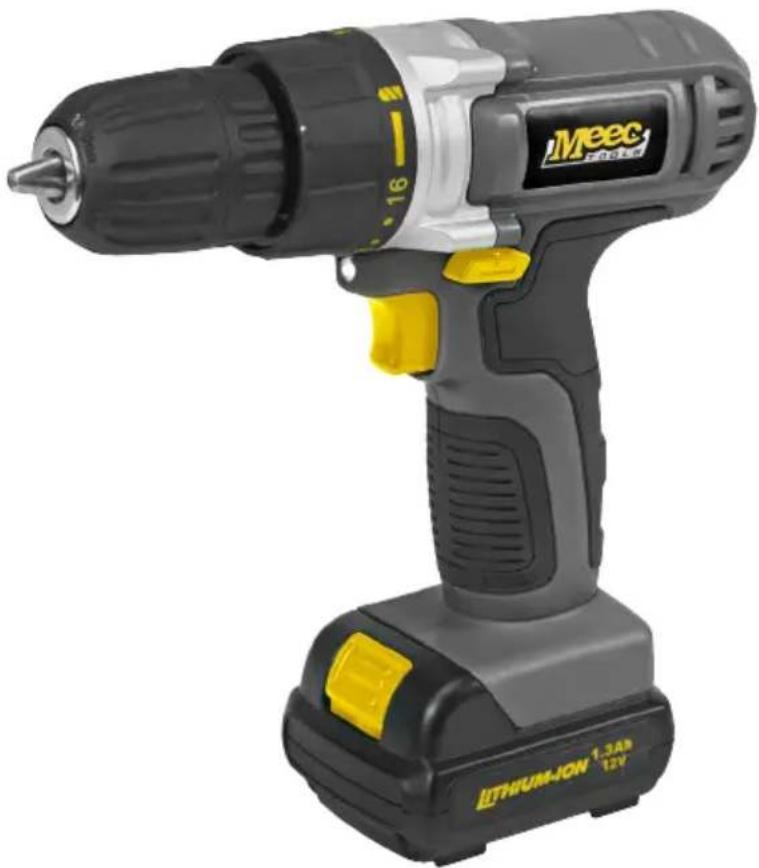
natural_image
Exterior view of a Meec LiDAR electric drill with yellow buttons and black body (no text or symbols on the device itself)SE Bruksanvisning för borrskruvdragare
NO Bruksanvisning for borskrutrekker
PL Instrukcja obsługi wiertarko-wkrętarki
EN User instructions for drill/screwdriver
SE - Bruksanvisning i original
EN - Operating instructions (Translation of the original instructions)
Date of production: 2015-06-01
© Jula AB
SVENSKA....5
SÄKERHETSANVISNINGAR....5
TEKNISKA DATA....10
BESKRIVNING 11
HANDHAVANDE 12
Rotationsomkopplare/låsknapp 13
SAFETY INSTRUCTIONS 41
TECHNICAL DATA 46
DESCRIPTION 47
USE 48
Intended use 48
Charge the battery 48
Changing drills/bits 49
Rotation switch/lock button....49
Torque setting. 49
Screw/Drill 50
MAINTENANCE ....51
SÄKERHETSANVISNINGAR
Vibration (borrläge) 2.10m/s², k=1.5m/s²
Vibration (dragare) 0.76m/s², k=1.5m/s²
natural_image
Electric motor with attached cable and plug, labeled '8' (no text or symbols on the device itself)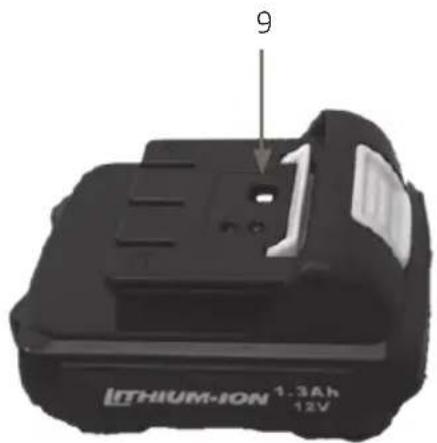
HANDHAVANDE
AVSEDD ANVÄNDNING
MOMENTINSTÄLLNING
OBS!
natural_image
Close-up of a black and silver drill bit with a directional arrow indicator (no text or symbols)natural_image
Simple line drawing of a trash bin with diagonal lines crossing it, no text or symbols present.Värna om miljön!
natural_image
Electric guitar with attached cable and plug, labeled with number 8 (no text or symbols on the device itself)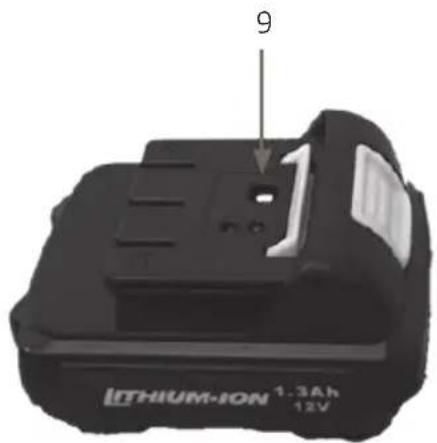
BRUK
BRUKSOMRÅDE
natural_image
Close-up of a black and silver drill bit with numbered dial (no text or symbols visible)natural_image
Electric guitar with attached cable and plug, labeled with number 8 (no text or symbols on the device itself)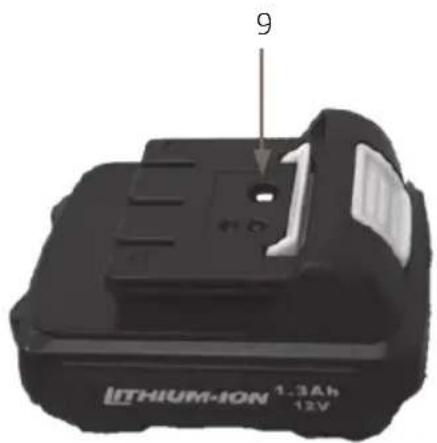
OBSŁUGA
natural_image
Close-up of a black and white electric drill put tool with visible buttons and control panel (no text or symbols on the device itself)natural_image
Close-up of a black and silver drill bit with a numbered dial (no text or symbols visible)natural_image
Pure electrical circuit lines without any symbolsDBAJ O ŚRODOWISKO!
Read the User Instructions carefully before use!
Save these instructions for future reference.
WARNING! Read all warnings, safety instructions and other directives. Failure to follow all the instructions and safety instructions can result in the risk of electric shock, fire and/or serious personal injury.
- This power tool is intended for drilling as well as for tightening and undoing screws.
- Use the power tool only for its intended purpose.
- The term power tool in the warnings below refers to your mains-powered (corded) or battery-powered (cordless) power tool.
Work area
- Keep the work area clean and well lit. Dark and cluttered work areas increase the risk of accidents and injuries.
- Do not use power tools in explosive environments, such as in the vicinity of flammable liquids, gases or dust. Power tools produce sparks that can ignite dust and fumes.
- Keep children and onlookers at a safe distance when using power tools. You can easily lose control of the equipment if you are distracted.
Electrical safety
- The mains plug on the power tool must match the mains outlet. Never modify the plug in any way. Never use an adapter with earthed power tools.
- Unmodified plugs and matching outlets reduce the risk of electric shock.
- Avoid body contact with earthed surfaces such as pipes, radiators, cookers and refrigerators.
- There is an increased risk of electric shock if your body is earthed.
- Do not expose power tools to rain or moisture. There is a greater risk of electric shock if water gets into a power tool.
- Be careful with the power cord. Never use the power cord to carry or pull the power tool, or to pull out the plug from the mains socket. Keep the power cord away from heat, oil, sharp edges and moving parts.
- Damaged or tangled power cords increase the risk of electric shock.
- If using the tool outdoors, only use an extension cord approved for outdoor
use. Cords intended for outdoor use reduce the risk of electric shock.
- If it is absolutely necessary to use power tools in damp conditions, use a mains connection protected by a residual current device. Using an RCD reduces the risk of electric shock.
Personal safety
- Stay alert. Pay attention to what you are doing, and use your common sense when working with power tools.
- Never use power tools if you are tired or under the influence of drugs, alcohol or medication.
- A moment of inattention when using a power tool can result in serious personal injury.
- Use personal safety equipment. Always wear safety glasses. Depending on the type of power tool and how it is used, safety equipment such as dust masks, non-slip safety shoes, safety helmets and ear protection reduce the risk of personal injury.
Avoid accidental starting.
- Check that the power switch is in the OFF position before plugging in the power cord and/or the battery, or lifting/carrying the tool.
- Carrying a power tool with your finger on the switch, or connecting a tool to the mains supply when the switch is in the ON position, increases the risk of accidents and injuries.
- Remove Allen keys/spanners etc. before starting the power tool. Allen keys, or the like, left in a rotating part of a power tool can cause personal injury.
- Do not overreach. Always maintain a firm footing and good balance.
- This will ensure you have better control over the tool in unexpected situations.
- Wear suitable clothing. Do not wear loose-fitting clothing or jewellery.
- Keep your hair, clothing and gloves away from moving parts.
- Loose-fitting clothing, jewellery and long hair can get caught in moving parts.
- If dust extraction and dust collection equipment is available, this should be connected and used correctly. The use of such devices can reduce the risk of dust-related problems.
Wear ear protection.
• Using and looking after power tools
- Do not force the power tool. Use the correct power tool for the planned work.
- The tool does the job better and safer when used at the rate for which it was designed.
- Do not use the tool if it cannot be switched on and off with the power switch. Power tools that cannot be controlled with the power switch are dangerous and must be repaired.
- Unplug the power cord and/or remove the battery before making any adjustments, changing accessories or putting the power tool away.
• These safety precautions reduce the risk of accidentally starting the power tool.
- Store power tools out of the reach of children when not in use. Never allow children, or anyone who is unfamiliar with the power tool and these instructions, to use the tool.
- Power tools are dangerous if used by inexperienced persons.
- Keep the power tool properly maintained. Check that moving parts are properly adjusted and do not jam, and that no parts are incorrectly fitted or damaged. Check for other factors that could affect functionality. If the power tool is damaged, it must be repaired before being used again. Many accidents are caused by poorly maintained power tools.
- Keep cutting tools sharp and clean. Properly maintained cutting tools with sharp cutting edges are less likely to jam and are easier to control.
- Use the power tool, accessories and bits etc., in accordance with these instructions, taking into account the actual working conditions and the work that is to be done.
- It can be dangerous to use power tools for purposes other than those they are intended to be used for.
Battery-powered tool use and care
- The battery must only be charged with the charger specified by the manufacturer. A charger intended for one type of battery can pose a fire risk if used with another type of battery.
- Only use power tools with the specified batteries. The use of other batteries can cause accidents or a fire.
- When the battery is not being used it must be kept away from other metal objects such as paper clips, coins, keys, nails, screws and other metal objects that can short circuit the terminals.
- Short circuiting the battery terminals can cause burns or a fire.
- Failure to handle the battery carefully can cause acid to leak from the battery. Avoid contact with battery acid.
- Rinse well with plenty of water if you come into contact with battery acid. Seek medical attention if you get battery acid in your eyes. Acid leaking from the battery can cause irritation or burns.
Service
- The power tool must only be serviced by qualified service personnel using identical spare parts. This will ensure that the power tool remains safe to use.
- Only use NiCd batteries.
Special safety instructions for drilling
- Wear ear protection. Exposure to loud noise can cause hearing impairment.
- Use the support handle, if the tool is supplied with one. Otherwise, you could lose control of the tool and become injured.
- Hold the tool by the insulated grip when working in areas where the bit can come into contact with concealed cables. Contact with a live cable will cause the metal parts on the tool to also become live and give the user an electric shock.
Special safety instructions for screw driving
- Hold the power tool by the insulated grip when working in areas where bits or attachments may come into contact with concealed cables. Contact with a live cable will cause the metal parts on the tool to also become live and give the user an electric shock.
Special safety instructions for the battery and charger
- Under extreme conditions, acid can leak from the battery. Avoid contact with battery acid. Rinse well with plenty of water if you come into contact with battery acid. Seek medical attention if you get battery acid in your eyes.
- Check that the mains voltage corresponds to the rated voltage on the type plate.
- Do not charge the battery in the rain or in damp or wet areas.
- The ambient temperature must not exceed 40 °C . Do not expose the unit to direct sunlight.
- Batteries that are defective or damaged, or that cannot be charged, must be disposed of in accordance with the applicable regulations. A damaged power cord must be replaced by an authorised service centre, or qualified person, to ensure safe use.
• Repairs must only be carried out by qualified personnel.
- Only use batteries recommended by the manufacturer.
- Keep the surface of the charger free from dust and dirt.
- Insert the battery in the charger with the battery terminals facing in the right direction.
• Always remove the battery before doing any work on the tool.
- Cover the battery terminals when the battery is not in the tool, in order to avoid a short-circuit.
- Do not discard batteries with household waste, into a fire or into water.
- Do not knock or open the battery.
- Never allow the battery to become completely discharged. Charge the battery regularly if it is not being used for a long time.
Remaining risks
- Even if the tool is used in accordance with the instructions it is impossible to rule out all risk factors. The following are potential risks that may be incurred as a result of the type and design of the tool.
– Damage to lungs (if effective face mask is not worn).
– Damage to ears (if effective ear protection is not worn).
- Vibration injuries (if the tool is used for long periods, or is not handled and maintained correctly).
WARNING! The tool produces an electromagnetic field when in use. This field can in some circumstances affect active or passive medical implants. If you have a medical implant you should consult your doctor and/or the manufacturer of the medical implant before using the tool to reduce the risk of serious or fatal personal injury.
- Declared total vibration values are measured in accordance with a standard test method, and can be used for comparisons between tools.
- The value may also be used for a preliminary assessment of exposure.
WARNING:
- Vibration levels can deviate from the declared value, depending on how the tool is used.
- Suitable precautions for users must be based on the actual conditions, taking into account all parts of the operating cycle, such as the time when the tool is switched off and the idling time, in addition to the time when the power switch is pressed.

Read the User Instructions carefully before use!
TECHNICAL DATA
| Voltage 12 VDC |
| Max. drill diameter 10 mm |
| Speed 0–550 rpm |
| Sound power level LWA 92.1 dB, K=3 dB |
| Sound pressure level LpA 81.1 dB, K=3 dB |
| Vibration (drill mode) 2.10m/s ^2 , k=1.5m/s ^2 |
| Vibration (driver) 0.76m/s ^2 , k=1.5m/s ^2 |
| Charging time: 3–5 hours |
| Battery capacity 1300 mAh |
DESCRIPTION
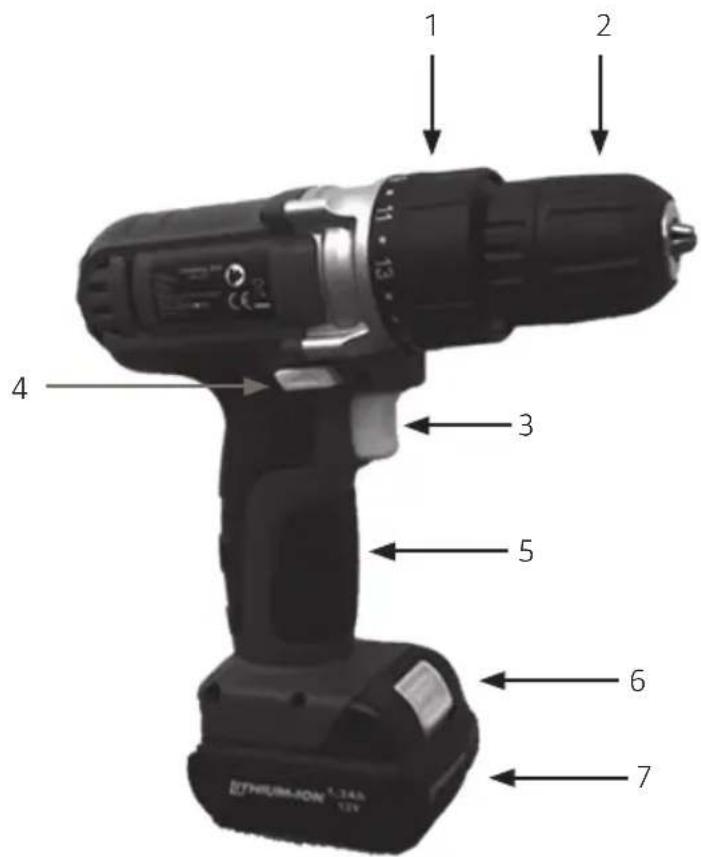
- Torque setting ring
- Quick chuck
- Power switch with speed control
- Rotation switch/lock button
- Handle
6 Battery release button
7 Battery - Mains adapter
- Indicator lamp on the battery
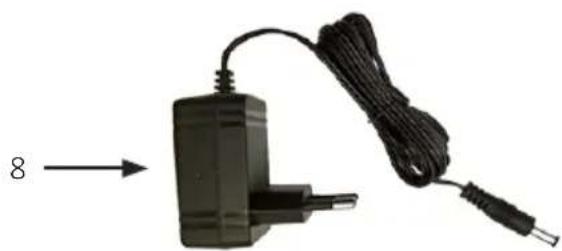
natural_image
Electric guitar charger with attached cable and plug, labeled with number 8 (no text or symbols on device body)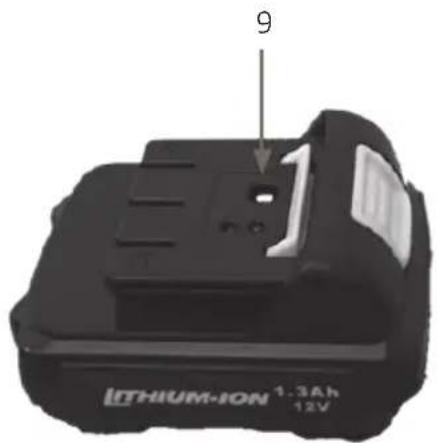
USE
INTENDED USE
- This drill/screwdriver is intended for drilling and screwing/unscrewing screws in wood and metal.
- To ensure safe use it is very important to read, and follow, all the user instructions before using the drill/screwdriver for the first time.
- The tool, accessories and battery charger must only be used in the intended manner and in accordance with the directions in these instructions.
- This drill/screwdriver is only intended for private home use, not for commercial use. The drill/screwdriver must not be modified or used for any other purposes than the ones described in these instructions.
CHARGE THE BATTERY
NOTE:
- Charge the battery fully before using it for the first time. In order for the battery to attain full capacity, it must be charged and discharged several times.
- Do not charge the battery for short periods. Only charge the battery when it is fully discharged.
-
The adapter, charger and battery become hot when charging. This is quite normal.
-
Remove the battery by pressing the battery's release button and pulling it out.
- Connect the charger to the battery.
- Connect the charger to a mains outlet.
— The status lamp lights up during charging. It normally takes 3–5 hours to fully charge the battery.
— When the red status lamp goes out and the green status lamp comes on, the battery is fully charged.
- Unplug the charger from the wall socket after recharging and disconnect the charger from the drill/screwdriver.
- Slide the battery into the underside of the handle until it clicks into place.
CHANGING DRILLS/BITS
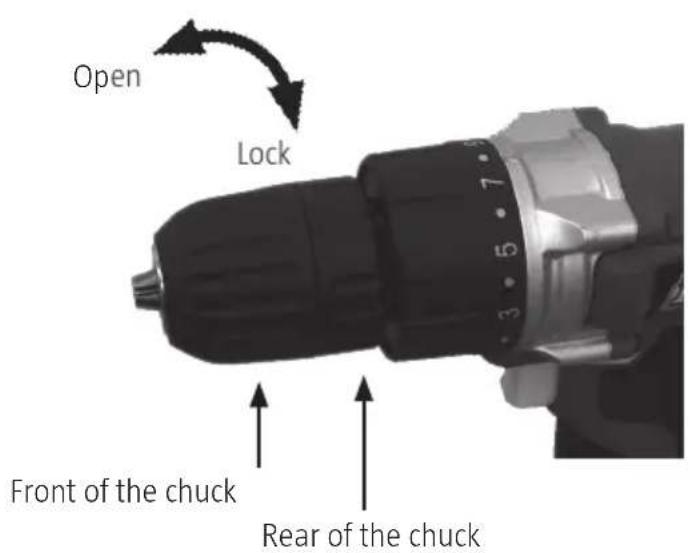
- Open the quick chuck by rotating the front of the chuck. Hold the rear part of the chuck while turning the front part.
- Insert the bit/drill into the chuck until you feel resistance.
- Select an appropriate screw bit for the screw in question.
- Use the bit holder (sold separately) for screw bits.
- Hold the rear part of the chuck while turning the front part to lock in position. Check that the bit is properly secured.
ROTATION SWITCH/LOCK BUTTON
NOTE: Do not touch the rotation switch/lock button when the tool is moving.
- Press the button with the arrow forward for clockwise/screwing.
- Press the button with the arrow backward for anti-clockwise/unscrewing.
- Set the button in the middle position to lock the machine and prevent accidental starting.
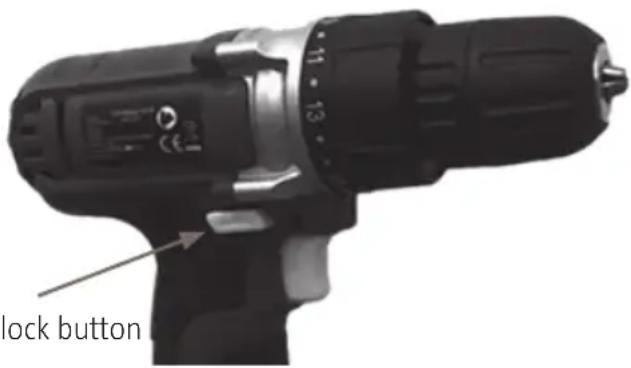
Rotation switch/lock button
TORQUE SETTING
NOTE:
- Use an appropriate torque setting when screw driving. This reduces the risk of the workpiece and/or the screw being damaged.
- Always start with the lowest torque setting and increase if necessary.
-
When drilling, use the torque setting that is marked with a drill symbol.
-
Rotate the torque setting ring to the required torque setting. The arrow indicates the set value.
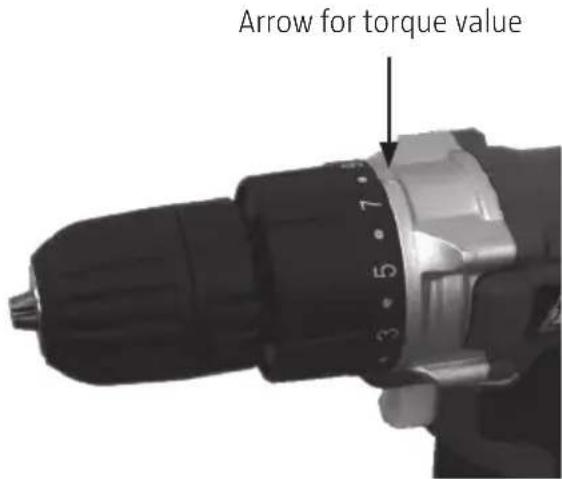
SCREW/DRILL
NOTE:
- Extended operation at a low speed increases the risk of the motor overheating.
Avoid overheating by regularly leaving the tool turned off for 15 minutes, allowing the motor to cool. -
When drilling in hard material, make a mark using an awl to prevent the drill slipping.
• Always hold the tool firmly with both hands. -
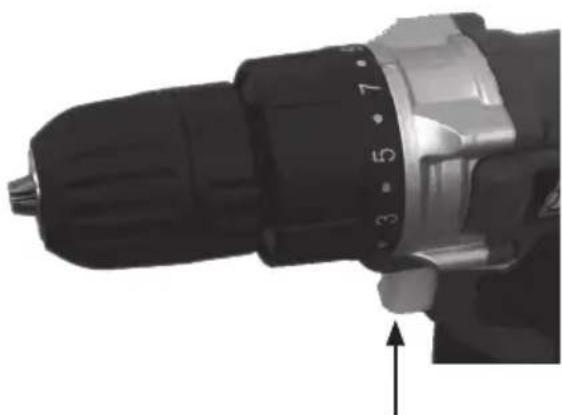
Start the tool by pressing the power switch.
-
Press the power switch harder to increase the speed.
— Press the power switch less hard to decrease the speed. -
Switch off the tool by releasing the power switch.
natural_image
Close-up of a black and silver drill bit with numbered dial (no text or symbols visible)Power switch with speed control
MAINTENANCE
NOTE: Always remove the battery before doing any work on the tool.
- Clean the tool with a damp cloth.
- Do not use petrol, solvents or detergents that can damage the plastic parts.
- Keep the tool's air vents clean.
Jula reserves the right to make changes. In the event of problems, please contact our service department. www.jula.com
natural_image
Symbol of a trash bin crossed with no text or labels, representing waste sorting or disposal (no text present)Care for the environment!
Must not be discarded with household waste!
This product contains electrical or electronic components that should be recycled.
Leave the product for recycling at the designated station e.g. the clocal authority's recycling station.
CE
EC DECLARATION OF CONFORMITY EG FÖRSÄKRAN OM ÖVERENSSTÄMMELSE EF SAMSVARSERKLÆRING DEKLARACJA ZGODNOŚCI WE

Jula AB, Box 363, SE-532 24 SKARA, SWEDEN
RoHS Directive 2011/65/EU
This product was CE marked in year -11
- SVENSKA....5
- SÄKERHETSANVISNINGAR....5
- TEKNISKA DATA....10
- BESKRIVNING 11
- HANDHAVANDE 12
- Rotationsomkopplare/låsknapp 13
- SÄKERHETSANVISNINGAR
- HANDHAVANDE
- AVSEDD ANVÄNDNING
- MOMENTINSTÄLLNING
- OBS!
- Värna om miljön!
- BRUK
- BRUKSOMRÅDE
- OBSŁUGA
- DBAJ O ŚRODOWISKO!
- Read the User Instructions carefully before use!
- Work area
- Electrical safety
- Personal safety
- Avoid accidental starting.
- Wear ear protection.
- Battery-powered tool use and care
- Service
- Special safety instructions for drilling
- Special safety instructions for screw driving
- Special safety instructions for the battery and charger
- Remaining risks
- WARNING:
- DESCRIPTION
- USE
- INTENDED USE
- CHARGE THE BATTERY
- NOTE:
- CHANGING DRILLS/BITS
- ROTATION SWITCH/LOCK BUTTON
- TORQUE SETTING
- SCREW/DRILL
- MAINTENANCE
- NOTE: Always remove the battery before doing any work on the tool.
- Care for the environment!
- CE
- EC DECLARATION OF CONFORMITY EG FÖRSÄKRAN OM ÖVERENSSTÄMMELSE EF SAMSVARSERKLÆRING DEKLARACJA ZGODNOŚCI WE
Brand : Meec Tools
Model : 060-201
Category : Drill