GTD708 - Tablet Growing - Free user manual and instructions
Find the device manual for free GTD708 Growing in PDF.


| Product Type | Tablet |
| Brand | Growing |
| Model | GTD708 |
| Dimensions (approx.) | 240 x 170 x 8 mm |
| Weight (approx.) | 450 g |
| Display Size | 10.1 inches |
| Power Supply | Rechargeable Li-ion battery, 5V/2A charger |
| Main Functions | Wi-Fi 802.11 b/g/n, Bluetooth 4.0, front and rear cameras, touchscreen, microSD slot, headphone jack |
| Operating System | Android 10 (estimated) |
| Storage Capacity | 32 GB internal, expandable via microSD |
| RAM | 2 GB |
| Processor | Quad-core 1.3 GHz |
| Battery Capacity | 4000 mAh |
| Maintenance & Cleaning | Use a soft, dry cloth to wipe the screen. Avoid solvents and abrasive cleaners. Keep device away from moisture and extreme temperatures. |
| Safety Precautions | Do not disassemble the device. Use only the provided charger. Avoid exposure to water or heat sources. Do not puncture the battery. |
| Spare Parts & Repairability | Battery and screen may be replaceable by a qualified technician. Contact Growing service center for genuine parts. |
| General Information | Growing GTD708 tablet, designed for multimedia and basic productivity. Comes with user manual in PDF format available for download. |
Frequently Asked Questions - GTD708 Growing
User questions about GTD708 Growing
0 question about this device. Answer the ones you know or ask your own.
Ask a new question about this device
Download the instructions for your Tablet in PDF format for free! Find your manual GTD708 - Growing and take your electronic device back in hand. On this page are published all the documents necessary for the use of your device. GTD708 by Growing.
USER MANUAL GTD708 Growing
Índice
- Introdução ....3
natural_image
Close-up of a white surface with a blue circular button and camera icon (no text or symbols)natural_image
Close-up of a white car's side panel with a red circular button and blurred background (no text or symbols)All logos & trade marks are properties of the respective companies
Índice
- Introducción....3
natural_image
Close-up of a white surface with a blue circular button and camera icon (no text or symbols)natural_image
Close-up of a white car's side panel with a red circular button and partial view of the window (no visible text or symbols)Index
- Introduction....3
1.1 Content details of your GROWING Tablet....3
1.2 Specifications of the Tablet GROWING+....3
- Basic Operations....4
2.1 Unlock Screen....4
2.2 Work Environment 4
- Applications ....6
3.1 List....6
3.2 Widgets....6
3.3 Establish and control the desktop icons....7
3.4 Deleting the shortcut to an application desktop....8
3.5 Change the image of the desktop 8
-
Connecting to the computer ....9
-
Management applications ....9
5.2 Install....9
5.2 Uninstall+....11
- Video....11
- Music....12
- Recording Function....13
- Definitions....14
9.1 Wireless Networks and Other 14
9.2 Device....14
9.3 Personnel 14
9.4 Accounts....15
9.5 System....15
- Camera....15
10.1 Capture Photography....15
10.2 Video Capture 16
- Setup Wireless Networks....17
- Setup 3G Network ....18
- List of compatible 3G handsets....19
- Warranty....20
- CE certificate 22
1. Introduction
1.1 Content details of your GROWING Tablet.
Each unit will have the following items:
- 1 x Tablet PC GROWING
- 1 x transformer
- 1 x USB cable
- 1 x USB OTG
- 1 x User Manual
1.2 Specifications of the Tablet GROWING:
| CPU | Allwinner A20 Dual Core up to 1.2Ghz |
| Operating system | Android 4.2 |
| Screen Size | 7.0 Inches |
| Resolution | 800x480 |
| Flash Memory | 8GB |
| RAM | 1GB |
| Support micro SD | 2GB to 32GB |
| Multimedia | Video, Audio, Images, Ebooks, etc.. |
| WiFi | Realtek 8188ETV |
| 3G | Supports USB 3G |
| Battery | 2100mAh |
| Sensors | Accelerometer |
| Inputs / Outputs | 1x mini HDMI; 1xMicro; 1x Audio Jack; 1xHost; 1xMini USB, 1x Micro SD 1xDC |
2. Basic Operations
2.1 Unlock Screen
After connecting your Tablet GROWING, the system will enter the lock menu as shown in the following image.

Click the unlock icon and move it to unlock the screen.
2.2 Work Environment
After unlocking the screen, the menu will appear as shown in the following image

In Android 4.2.2 has up to 5 areas of work, to navigate between them will have to drag
your finger to the right or left side.
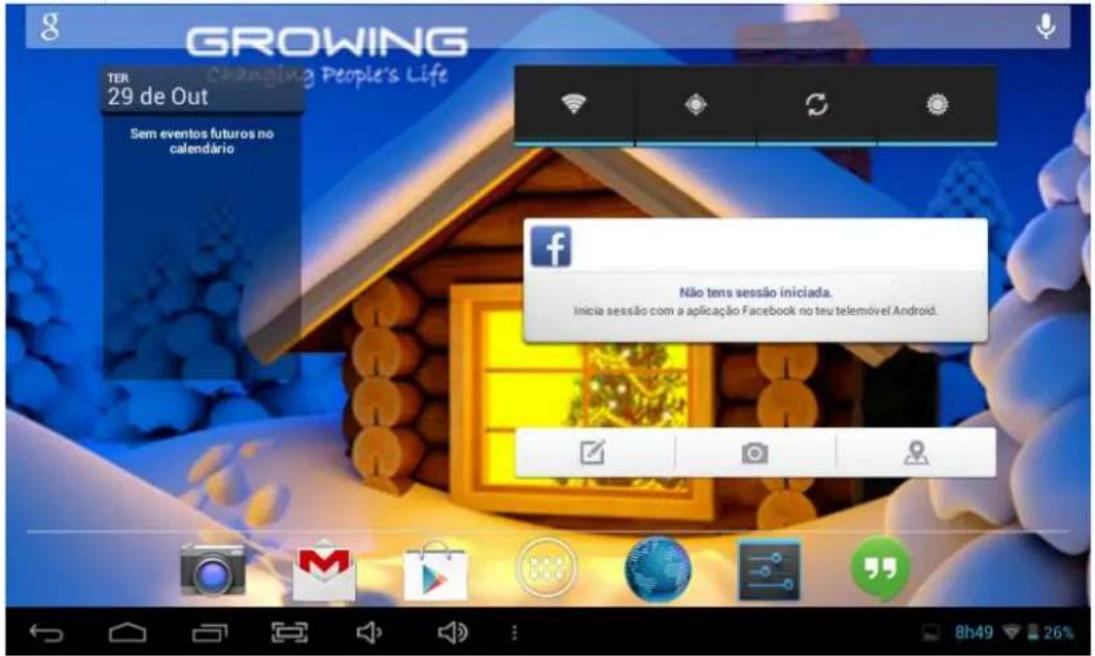
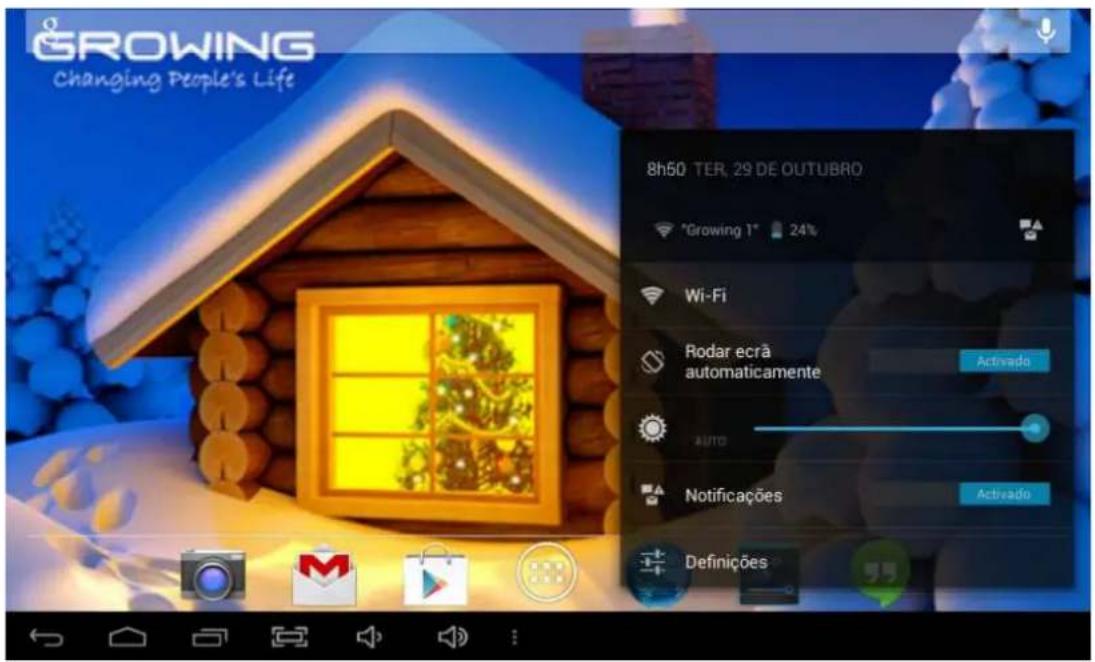
In the notification bar you can drag fingertip below and more information will appear as shown in the following image.
| Image Feature | |
| Click this icon to return to the previous menu. | |
 | Click this icon to return to the workplace. |
 | List of recent applications. |
 | Take picture to the screen. |
 | Volume control. |
 | Notification bar (battery icon / Wi-Fi etc..). |
3. Applications
3.1 List
From the main menu (desktop) click the icon to enter the application menu as shown in the following image.

When you complete the first application screen will automatically create a second access to just drag your finger to the left and the other applications will be in the next screen.
3.2 Widgets
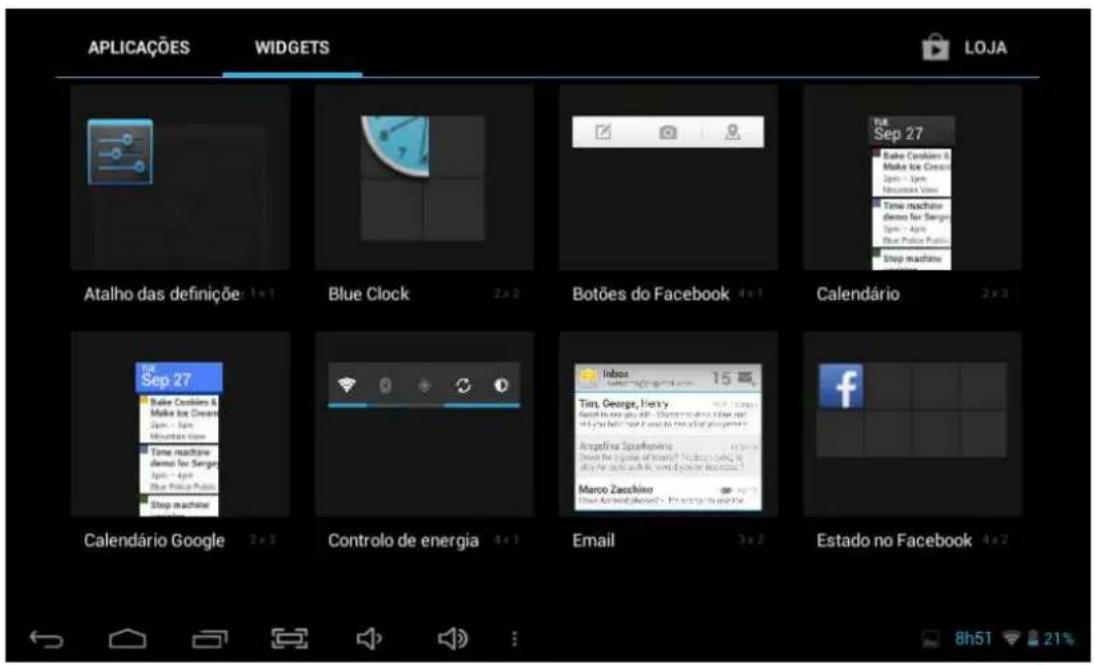
In the application menu, click APLICAÇÕES WIDGETS the left to
enter the menu of widgets. Press on the widget and move to the main menu.
Note: The widgets only work in the areas of work
3.3 Establish and control the desktop icons
In the application menu or widgets, press on the icon you want to create a shortcut on the desktop. Press on the application / widget where you want to move.
Note: Some widgets require internet connection to function properly.
3.4 Deleting the shortcut to an application desktop
Press the icon you want to delete and move it up where you have an X. Keep up the icon turns red when you drop the red icon will be deleted.

3.5 Change the image of the desktop
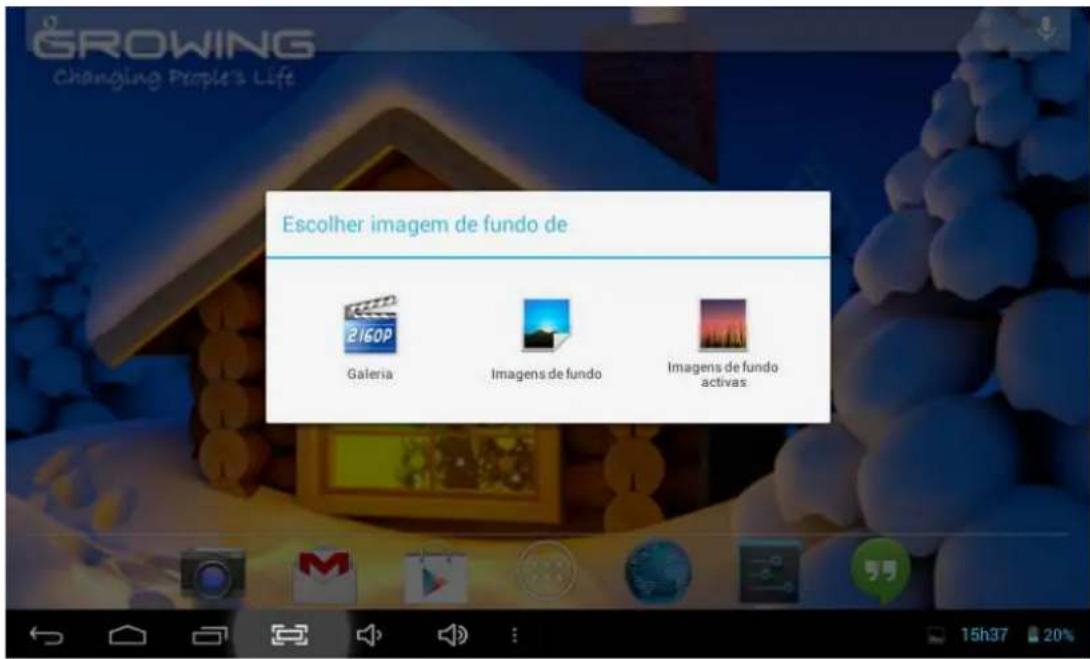
On the desktop press in a place that is not busy and a window will appear to select the picture. Choose images gallery system or to use a photo saved as image to the desktop.
4. Connecting to the computer
When connected to the computer can be used as USB disk. Click the icon 📋 to connect the USB storage:

5. Management applications
5.2 Install
Opens the File Manager choose the file you want to install APK corresponding location where it was saved.
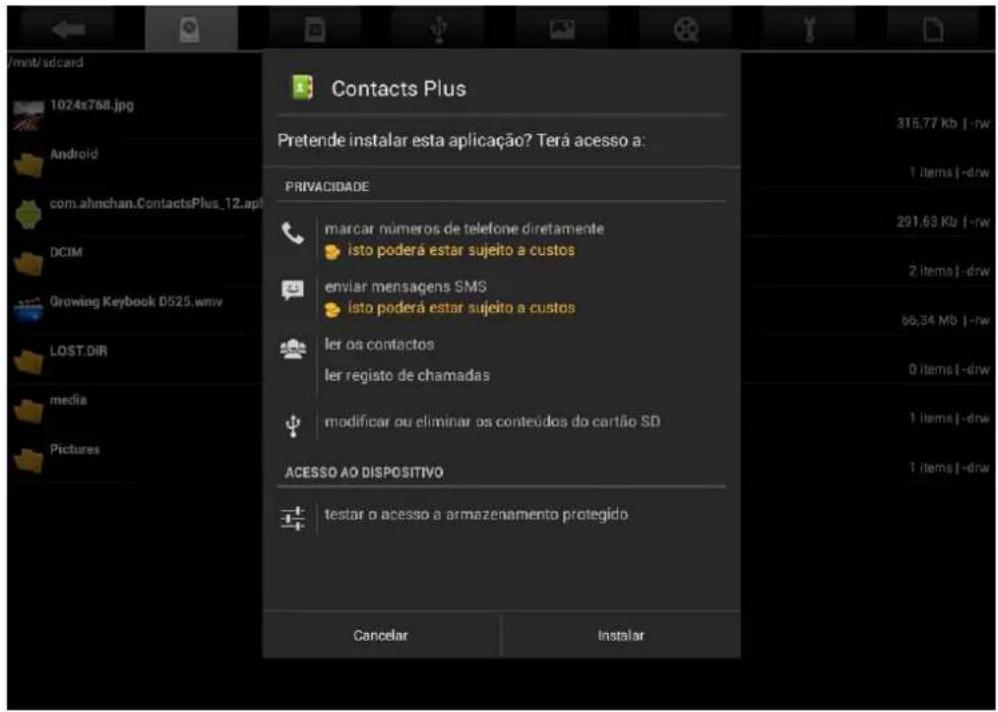
To install applications through Google Play (Market) will have to open the application and associate a Gmail account to your Tablet GROWING.

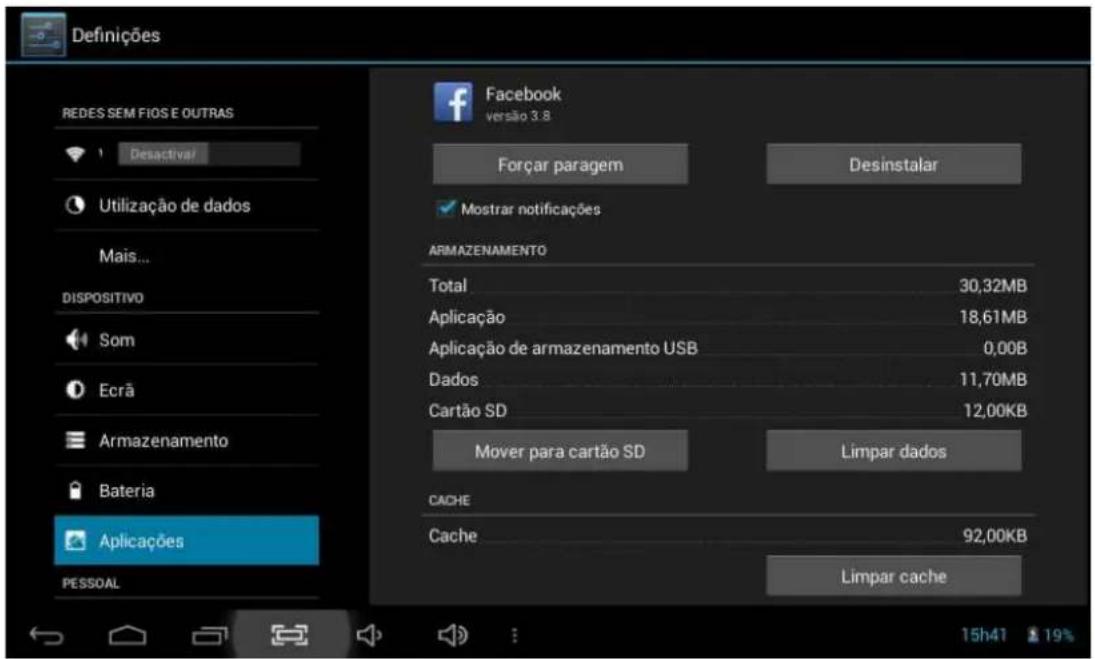
At settings select Applications and select the application and then uninstall. Select "Ok" and the application is uninstalled.
In the application menu select video player and select a video to be played.
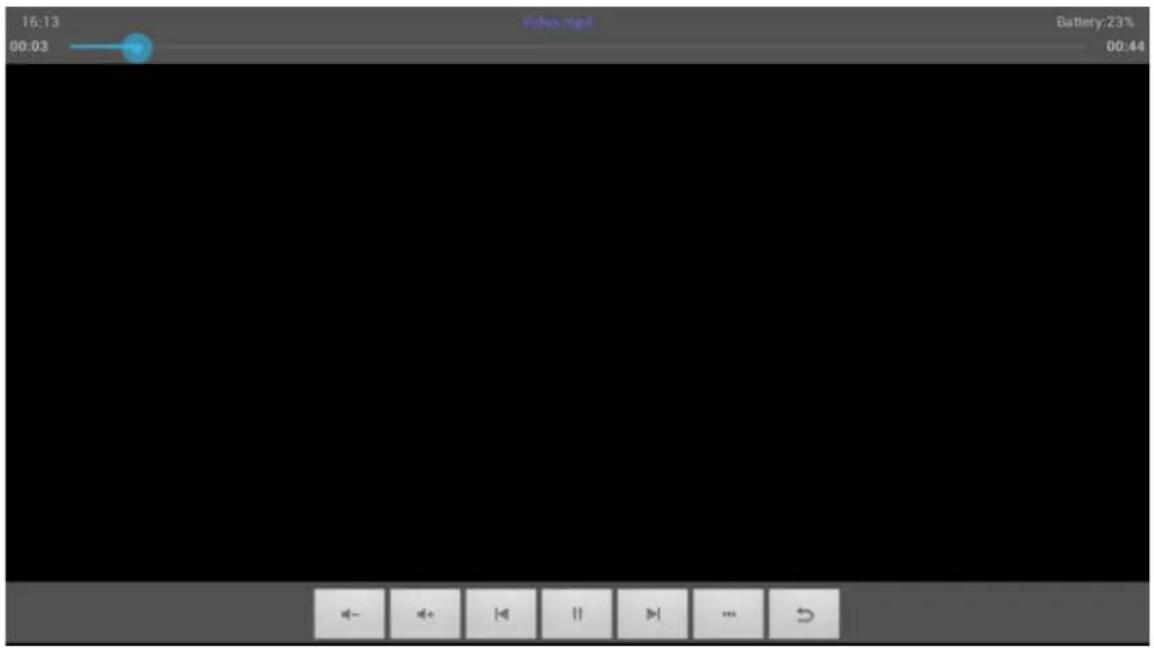
Click the buttons on the video player:
| Image Function | |
 | Add to favorites |
 | Previous video. |
 | Next video. |
 | Pause / Play |
 | Volume -. |
 | Volume +. |
 | Back to back. |
7. Music
In the application menu click music.
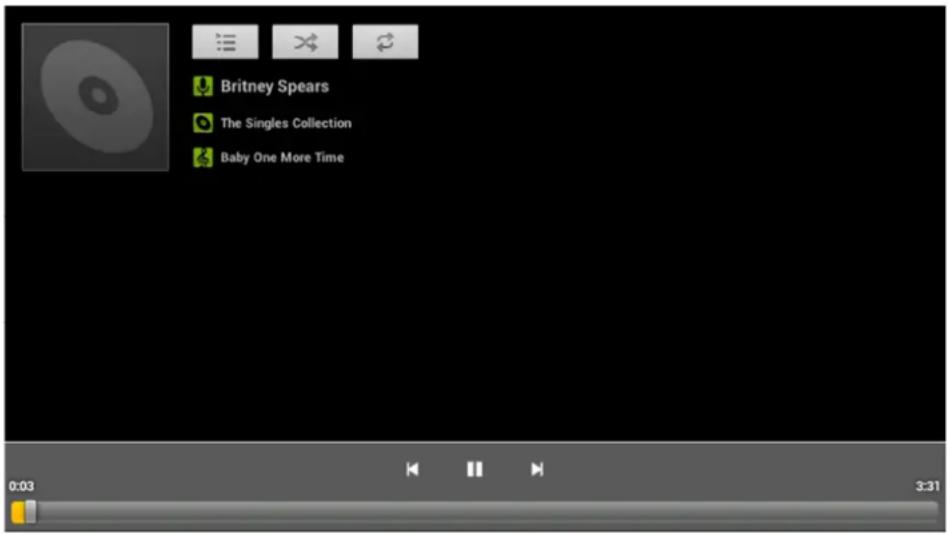
Slide the progress bar to adjust the reproduction process.
Click the buttons on the music player.
| Image Function | |
 | Artist |
 | Music |
 | Random Music |
 | Play last song |
 | Pause |
 | Album |
 | Playlist |
 | Repeat music (s) |
 | Play next |
 | Reproduce |
When no music files in the playlist the system will automatically load music files through the card. (The Tablet GROWING supports playback formats: mp3, wav, midi, wma).
8. Recording Function
Click the recording icon to enter the recording interface, click to begin recording, click to stop recording.
Play recording: Please select a music application to play the recording.
9. Definitions
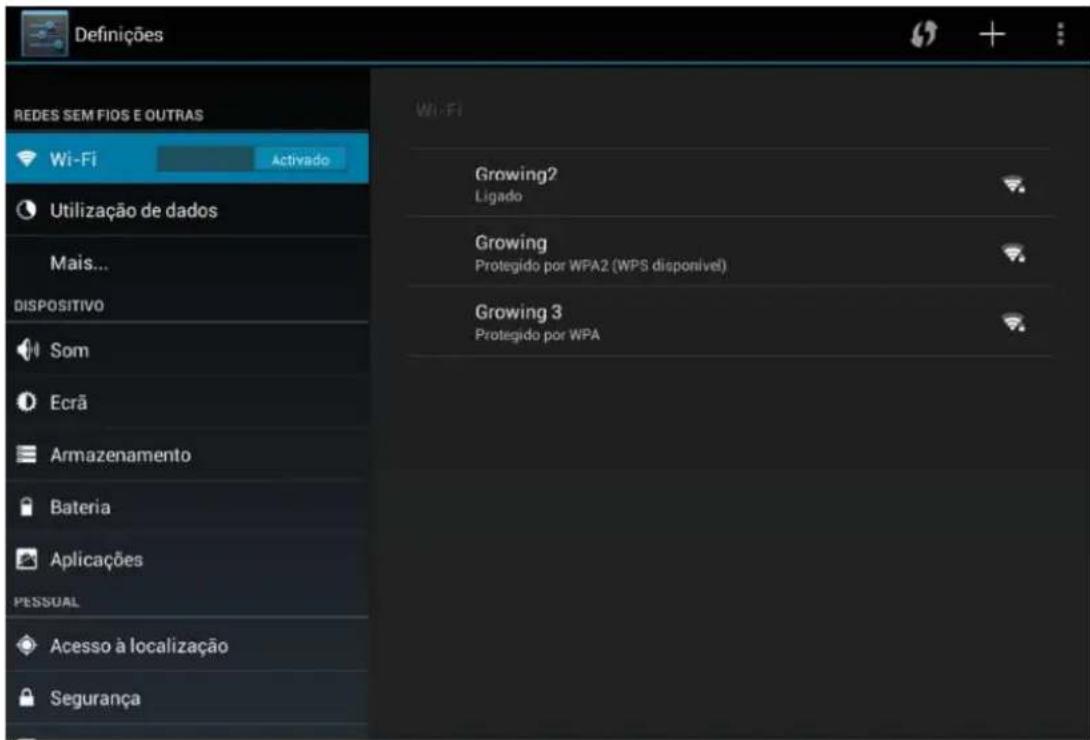
9.1 Wireless Networks and Other
You can turn on / off Wi-Fi, select the flight mode, set cable internet, create a VPN, Hotspot Portable create and configure mobile networks.
9.2 Device
You can set the volume of the ringtone and notifications, ringing sound, the sound of the lock screen.
You can set brightness, hanging screen, background image, font size,
You can see the storage in use, installing micro sd card and install USB storage, view downloaded applications and uninstall and move to the micro SD, see the memory usage and see the battery usage.
9.3 Personnel
You can enable location services Google having Wi-fi or 3G turned on.
May submit a lock code and user information
You can choose the system language, and keyboard input method.
You can back up your data applications and make factory restore your tablet.
9.4 Accounts
You can add / remove email account, company, Google and Facebook.
9.5 System
You can set date, time zone, and view system information.
10. Camera
Click the icon to open the camera, take the picture or do video capture.
10.1 Capture Photography

natural_image
Close-up of a white surface with a blue circular button and camera icon (no text or symbols)Click the buttons on the camera.
| Image Feature | |
| Choose the type of chamber between video and photo | |
| Camera settings | |
| Take picture | |
10.2 Video Capture

natural_image
Close-up of a white car's side panel with a red circular button and blurred background (no text or symbols)| Image Feature | |
 | Choose the type of chamber between video and photo |
 | Definitions of the camcorder. |
 | Starts recording video. |
11. Setup Wireless Networks
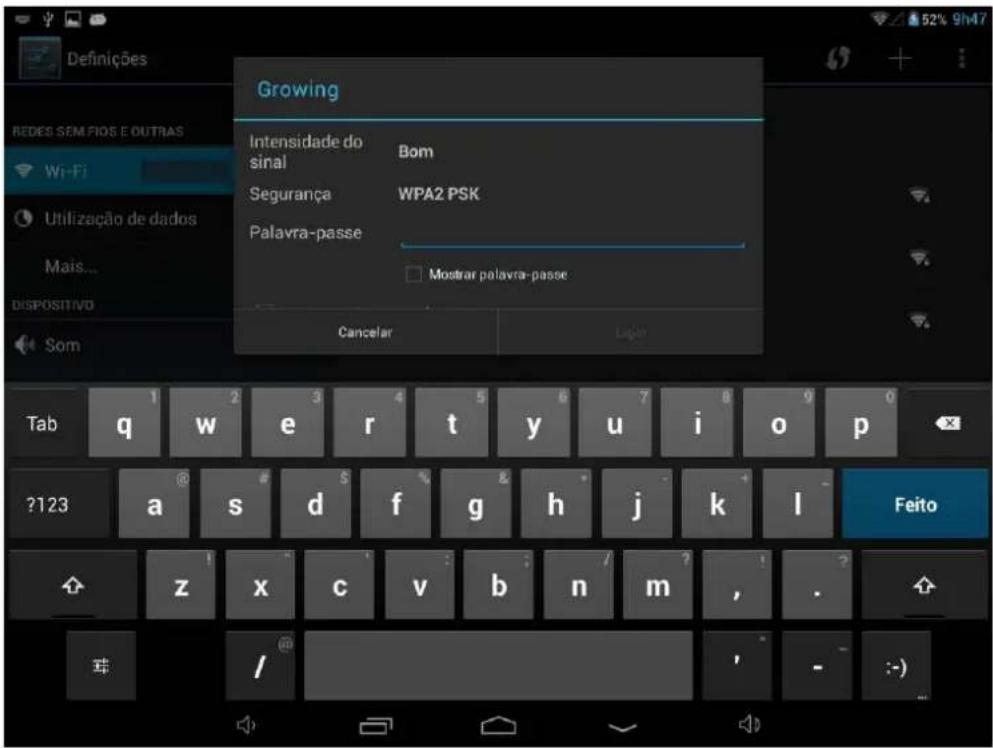
- Turn on Wi-Fi, Wi-Fi settings press The machine will search for networks automatically.
- Choose Wi-Fi network you want to connect.
- Press Connect. Some networks may ask keyword.
- In the settings screen Wi-Fi, pressing the menu button and pressing, advanced, you can see more options of Wi-Fi
- Turn off Wi-Fi if connected.
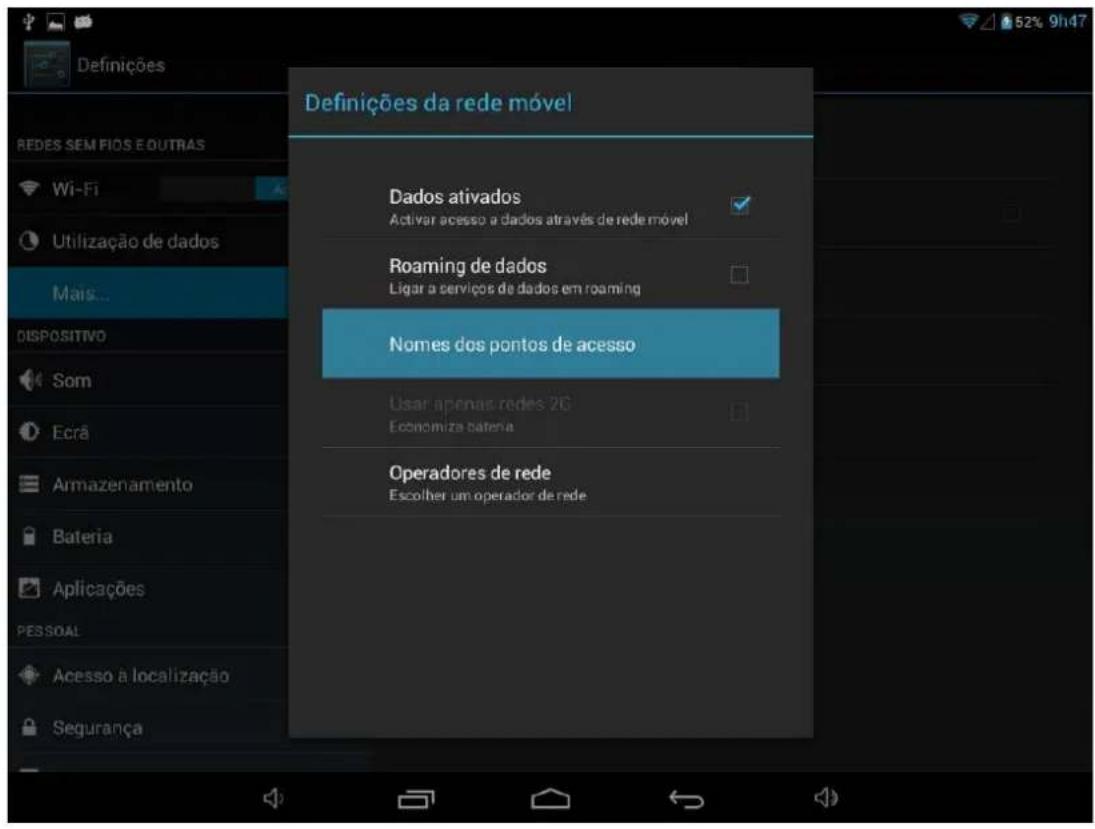
- Access the settings, select Other Wireless Networks and select mobile networks, make sure that the option of active data is enabled. Go back.
- Insert the USB converter in the USB Tablet with 3G.
- Enter the point name (APN's) right to obtain 3G. (Contact your carrier).
Note: Some models of USB 3G may be incompatible with our Tablet first check the attached list of compatible devices on the next page.
13. List of compatible 3G handsets
| Model Model | |
| Huawei E153 ZTE MF628- | |
| Huawei E156G ZTE MF636- | |
| Huawei E160E ZTE MF110- | |
| Huawei K3520 ZTE MF626- | |
| Huawei E170 ZTE MF633- | |
| Huawei E173 ZTE-MF637u | |
| Huawei E176G + ZTE-MF633BP | |
| Huawei E1782 ZTE MF170- | |
| Huawei E180 ZTE MF190- | |
| Huawei E220 | ZTE-TA356 |
| Huawei E226 | ZTE-AC2736 |
| Huawei E230 | ZTE-AC2736 |
| Huawei E261 | ZTE-AC2746 |
| Huawei E270 | ZTE-AC2766 |
| Huawei E272 | ZTE-AC560 |
| Huawei E353 | ZTE-AC580 |
| Huawei E1552 | ZTE-AC581 |
| Huawei E1786 | ZTE-AC590 |
| Huawei ET127 | |
| Huawei EC122 | |
| Huawei EC150 | |
| Huawei EC156 | |
| Huawei EC1270 | |
| Huawei EC167 | |
| Huawei EC189 |
14. Warranty
This product has Growing warranty against factory defects.
The product is a sophisticated electronic device. The Growing strongly recommends that you consult the user manual and the instructions supplied with the product and for the same. In turn, should take into account that the product may contain high precision displays, camera lenses and other similar parts that may be subject to scratching or other damage if not handled with extreme care. This Warranty does not cover in any case these situations.
Under warranty is explicit time specific guarantee, which acquire the product.

bar
Warranty | Garantía | Garantie | Garantía | Region | 2 Years | 2 Anos | 2 Ans | 2 Años | | :--- | :--- | :--- | :--- | :--- | | Europe | 2 Years | 2 Anos | 2 Ans | 2 Años | | Brazil | 6 Months | 6 Meses | 6 Mois | 6 Meses | | Africa | 6 Months | 6 Meses | 6 Mois | 6 Meses |Frame Warranty
Policy Defects in LCD tablet
Despite the highest possible standards, the intricate manufacturing of screens "thin-film transistor" (TFT) liquid crystal display (LCD) may still produce slight visual imperfections. These visual imperfections do not impair the performance of your tablet. However, the Growing will provide warranty service for the TFT LCD screen of your tablet when there are at least:
More than 5 bright spots or dark spots 8 (excluding 8).
These warranty conditions for TFT LCD screens are offered by TFT LCD manufacturers. The Growing will however, by his will, repair or replace the product.
Please note: A bright dot is a pixel or sub-pixel that is always on white. A dark dot is a pixel or sub-pixel that is always off black.
This Warranty does not cover user manuals, software, configuration, content, data or links to third party included or downloaded on the tablet, included during installment, assembly, shipping or at any other time in the delivery chain or otherwise acquired by user.
The Growing does not guarantee that the software fits your needs, to work in combination with any hardware or software from a vendor independent, or that the operation of any software will be free from suffering interruptions or errors or that any defects present in the software can be subject to correction or rectification.
This warranty does not cover:
Normal wear (including, without limitation, wear lenses of cameras, batteries or displays).
The defects caused by poor handling (including, without limitation, defects caused by sharp elements, folding, compression or falls, etc.).
Defects or damage caused by misuse of the tablet, including the use contrary to the instructions provided by Growing (eg, the manual instructions for use of the tablet).
Other acts beyond the reasonable control of Growing.
Warranty Policy Battery
The battery has 6 months Warranty.
This warranty does not cover defects caused by the fact that the battery be subjected to short-circuiting or the fact that the seals of the battery latch, tablet or cells were broken or show evidence of manipulation, either because the battery has been used in equipment for which was not specified.
Other important notices
We remind you that should make backup copies or keep written records of all important content and data stored in your Product, because there is the possibility of loss of data and content during repair or replacement.
All parts of the Product or other equipment will be replaced by Growing, from that time, ownership of Growing. If the Product is not covered by the terms and conditions of this Limited Warranty, Growing and service companies authorized by the same reserve the right to charge a fee for hand labor. To repair or replace the Product, Growing can use new products or parts equivalent to new or reconditioned.
For assistance Growing hotdog various channels:
- Contact your local vendor.
- On the site www.mygrowing.com support we have in the tool for technical support "Helpdesk".
- Directly to the Growing via phone (+351 808 20 29 30) or email to 808202930@growing.pt.
For assistance contact in Brazil for Sao Paulo phone 08007776222, other regions (11) 4979-6961 or email sac@growing.com.br
- On the site www.growing.com.br support we have in the tool for technical support "Helpdesk".
15. CE certificate

Certificate of Conformity EC
Council Directive 2004/108/EC
Electromagnetic Compatibility
Fabricante/Importador: The Growing Company S,A,
The certificate of conformity is based on an evaluation of a sample of the above-mentioned product.
Technical report and documentation are at the applicant's disposal.
This is to certify that the tested sample is in conformity with all provisions of Annex I of Council Directive 2004/108/EC, referred to as the EMC Directive.
This certificate does not imply assessment of production and does not permit the use of ATC's logo.
The applicant of the certificate is authorized to use this certificate in connection with the EC declaration of conformity accordind to Annex IV of the Directive.
Fabricante/Importador

THE GROWING COMPANY, S.A.
A Administração
23-08-2013


All logos & trade marks are properties of the respective companies.
- Índice
- Index
- Introduction
- Content details of your GROWING Tablet.
- Specifications of the Tablet GROWING:
- Basic Operations
- Unlock Screen
- Work Environment
- Applications
- List
- Widgets
- Establish and control the desktop icons
- Deleting the shortcut to an application desktop
- Change the image of the desktop
- Connecting to the computer
- Management applications
- Install
- Music
- Recording Function
- Definitions
- Wireless Networks and Other
- Device
- Personnel
- Accounts
- System
- Camera
- Capture Photography
- Video Capture
- Setup Wireless Networks
- List of compatible 3G handsets
- Warranty
- CE certificate
Brand : Growing
Model : GTD708
Category : Tablet