
AGS-1016 - Network switch Luxul - Free user manual and instructions
Find the device manual for free AGS-1016 Luxul in PDF.


| Product Type | Network switch |
| Model | AGS-1016 |
| Brand | Luxul |
| Ports | 16 x RJ-45 10/100/1000 Mbps |
| Mounting | Desktop or 19-inch rack (1U) |
| Dimensions (approx.) | 440 x 170 x 44 mm (17.3 x 6.7 x 1.7 inches) |
| Weight (approx.) | 2.5 kg (5.5 lbs) |
| Power Supply | Internal, 100-240 VAC, 50/60 Hz |
| Power Consumption (approx.) | 15 W (max) |
| LED Indicators | Power (front), Link/Activity per port (front and back) |
| LED Color Selection | Blue or green via rear switch |
| Cabling | Cat5e UTP recommended, Cat6 for 1000 Mbps |
| Duplex Mode | Half/Full for 10/100 Mbps, Full for 1000 Mbps |
| Auto MDI/MDIX | Yes |
| Auto-Negotiation | Yes |
| Packet Forwarding Rate (approx.) | 23.8 Mpps (64-byte packets) |
| Switching Capacity | 32 Gbps |
| MAC Address Table Size | 8K |
| Jumbo Frame Support | Yes (up to 9K bytes) |
| Included Accessories | Rack mount kit, rubber feet, power cord |
| Compliance | FCC, CE, RoHS |
Frequently Asked Questions - AGS-1016 Luxul
User questions about AGS-1016 Luxul
0 question about this device. Answer the ones you know or ask your own.
Ask a new question about this device
Download the instructions for your Network switch in PDF format for free! Find your manual AGS-1016 - Luxul and take your electronic device back in hand. On this page are published all the documents necessary for the use of your device. AGS-1016 by Luxul.
USER MANUAL AGS-1016 Luxul
natural_image
Exterior view of a black LUXUL device with a digital display and control panel (no visible text or symbols on the device body)16-Port Gigabit Switch
AGS-1016
Includes:
16-Port Gigabit Switch
Rack Mount Kit
Rubber Feet
Power Cord
SETUP AND CONFIGURATION
1 Physical Installation
The AGS-1016 can be rack-mounted or used as a desktop switch. Install the AGS-1016 in a stable/safe place to avoid any possible damage. Avoid placement in direct sunlight. Do not place heavy articles on the AGS-1016 and verify the ground connection of the outlet is functioning properly.
Desktop/Shelf Installation
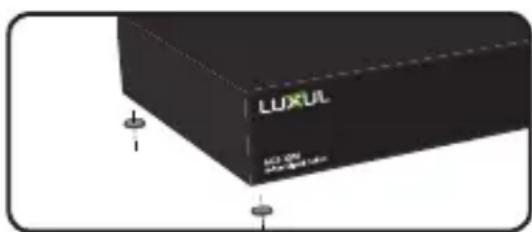
For desktop/shelf installation, attach the four rubber feet to the corner indentations on the bottom of the AGS-1016, then place the switch horizontally on a solid, level platform.
Rack Installation
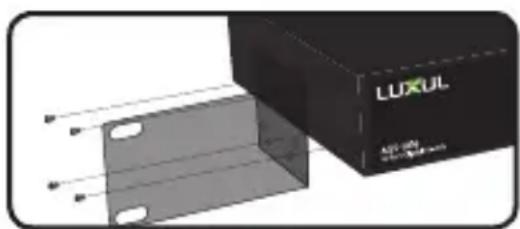
Use the included L brackets for convenient installation in a 19-inch server or audio/video rack. Use four screws to attach the L-shaped brackets on both sides of the AGS-1016 as shown below, then install the switch horizontally in the rack. Use your desired hardware to affix the switch brackets to the rack.
natural_image
Exterior view of a black LUXUL device with mounting holes (no text or symbols on body)Attach Feet for Desktop Installation
natural_image
Exterior view of a black LUXUL device with mounting holes and a transparent panel (no text or symbols visible)Install Brackets for Rack-Mounting

Connecting Ethernet and Power
Ethernet and Power Connections
Use any RJ-45 to connect the AGS-1016 to an Ethernet-enabled device, including servers, routers or other switches. No crossover cable is necessary.
The AGS-1016 supports 10/100/1000 Mbps Ethernet; 10/100 Mbps half/full-duplex mode and 1000 Mbps full-duplex mode.
Use the included power cable to connect the AGS-1016 to a surge protected outlet. The AC input socket and a power switch are on the rear panel. The built-in power supply supports 100\~240VAC at 50/60Hz.

CAUTION: Use only the correct power cord for your environment. Any voltage other than standard 100/240 will result in damage to the AGS-1016.

Connecting Devices
Use an Ethernet cable to connect the AGS-1016 to a device as shown below. Luxul recommends at least Cat-5e unshielded twisted pair (CAT5e UTP) cabling. To ensure best performance and stable data transmission at 1000 Mbps, use Category-6 unshielded twisted pair (CAT6 UTP).
The AGS-1016 automatically adjusts to the speed and duplex of the connected device.

natural_image
Illustration of a black network switch connected to a desktop computer via a cable (no text or symbols on the device itself)Connecting the AGS-1016 to a Device
When a device is properly connected and powered, the Link/Activity LED for the device port lights up. Refer to the Hardware Operation section for indicator definitions and troubleshooting.

Connecting to a Router or Other Switch
Use an Ethernet cable to connect the AGS-1016 to a router or other switch as shown below. The AGS-1016 automatically adjusts to the speed and duplex of the connected switch or router, so uplink cables are not necessary.
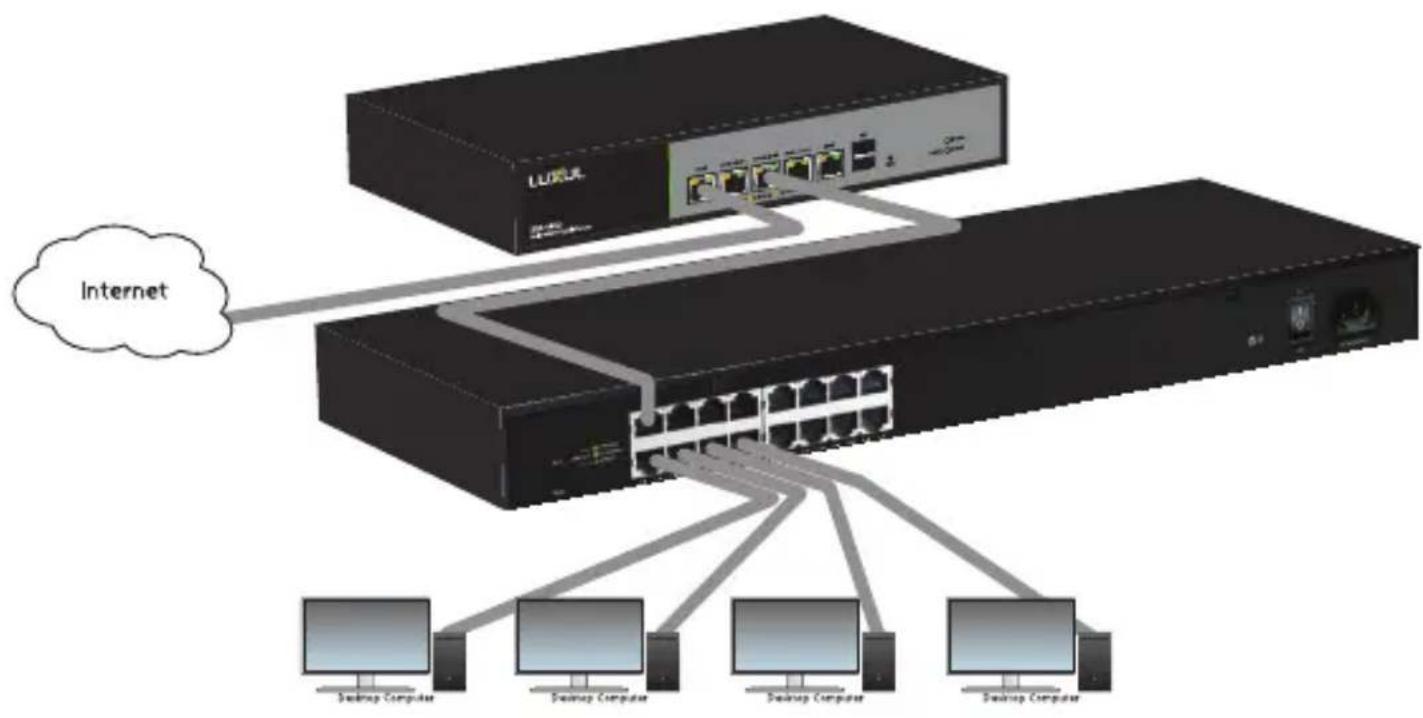
When a router or switch is properly connected, the Link/Activity LED for each port lights up. Refer to the Hardware Operation section for indicator definitions and troubleshooting.

Hardware Operation
The front panel of the AGS-1016 switch features one Power LED as well as a Link/Activity LED for each port. The back panel of the switch includes (16) 10/100/1000 Mbps RJ-45 ports, a power connector, and a switch to select blue or green front-panel LEDs. Each Ethernet port has one LED to indicate Link/Activity as well as connection speed.

natural_image
Dark rectangular object with a grid of small green dots, no visible text or symbols.The following table describes the LED functionality for both front and back indicators:
| Front | ||
| Indicator | StateDescription | |
| Power | On The AGS-1016 is switched on. | |
| Off AGS-1016 is switched off or not connected to AC power. Check power connections and power switch at on the rear of the unit. | ||
| Link/Act | On Device connected to the port. | |
| Flashing Port is receiving or transmitting data. | ||
| Off No device connected to the port or the device is off. | ||
| Back | ||
| Indicator | StateDescription | |
| Speed/Link/Act | Green Gigabit device connected to the port. | |
| Amber 10/100Mbps device connected to the port. | ||
| Flashing Port is receiving or transmitting data. | ||
| Off No device connected to the port or device is off. | ||
SELECTING FRONT-PANEL LED COLOR
Use the switch on the rear panel of the AGS-1016 to select either blue or green for the Power and System LEDs on the front panel to best match the equipment in the rack where the Switch is sharing space.

AGS-1016 Selector Switch
Sales
P: 801-822-5450
E: sales@luxul.com
Technical Support
P: 801-822-5450 Option 3
E: support@luxul.com
Copyright and Trademark Notices
No part of this document may be modified or adapted in any way, for any purposes without permission in writing from Luxul. The material in this document is subject to change without notice. Luxul reserves the right to make changes to any product to improve reliability, function, or design. No license is granted, either expressly or by implication or otherwise under any Luxul intellectual property rights. An implied license only exists for equipment, circuits and subsystems contained in this or any Luxul product.
© Copyright 2017 Luxul. All rights reserved. The name Luxul, the Luxul logo, the Luxul logo mark and Simply Connected are all trademarks and or registered trademarks of Luxul Wireless, Inc. All other trademarks and registered trademarks are property of their respective holders.
LUX-QIG-AGS-1016-v4 06271701
A brand of legrand®

natural_image
Abstract network diagram with interconnected nodes and lines on a dark background (no text or symbols)
- 16-Port Gigabit Switch
- Includes:
- SETUP AND CONFIGURATION
- Physical Installation
- Desktop/Shelf Installation
- Rack Installation
- Connecting Ethernet and Power
- Ethernet and Power Connections
- Connecting Devices
- Connecting to a Router or Other Switch
- Hardware Operation
- SELECTING FRONT-PANEL LED COLOR
- Sales
- Technical Support
Brand : Luxul
Model : AGS-1016
Category : Network switch