
SW-100-04P - Network switch Luxul - Free user manual and instructions
Find the device manual for free SW-100-04P Luxul in PDF.


| Product Type | Network Switch |
| Brand | Luxul |
| Model | SW-100-04P |
| Ports | 4 PoE+ (802.3at) Gigabit Ethernet |
| PoE Budget | 60 W |
| Switching Capacity | 8 Gbps |
| Dimensions (W x D x H) | 5.5 x 3.5 x 1.0 inches |
| Weight | 0.5 lbs |
| Power Supply | External AC adapter (48V DC) |
| Operating Temperature | 0°C to 40°C |
| Mounting | Desktop or wall-mountable |
| LED Indicators | Power, PoE, Link/Act per port |
| Management | Unmanaged (plug-and-play) |
| Auto MDI/MDIX | Yes |
| Jumbo Frame Support | Up to 9K |
| Fanless | Yes (silent operation) |
| Certifications | FCC, CE, RoHS |
| Warranty | 2 years limited |
Frequently Asked Questions - SW-100-04P Luxul
User questions about SW-100-04P Luxul
0 question about this device. Answer the ones you know or ask your own.
Ask a new question about this device
Download the instructions for your Network switch in PDF format for free! Find your manual SW-100-04P - Luxul and take your electronic device back in hand. On this page are published all the documents necessary for the use of your device. SW-100-04P by Luxul.
USER MANUAL SW-100-04P Luxul
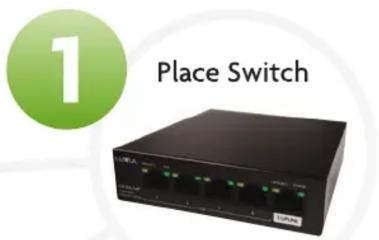
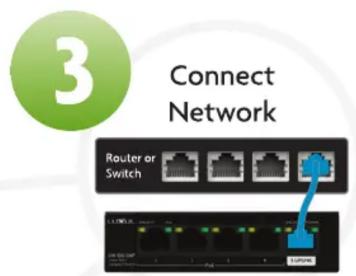
Setting up your switch:
- Place your new switch in the desired location
- Attach and plug in power supply
- Uplink to your network
- Attach devices via Ethernet cable



What if...
I need to restart my switch?
To restart your switch, unplug it for 5 seconds.

What do the LEDs on the switch indicate?
| Indicator | State | Description |
| POWER (upper-right corner of port 5) | Solid on | Switch is properly connected to power supply |
| Off | Switch is disconnected from or not properly connected to power supply | |
| LINK/ACT (upper-left corners of ports 1-5) | Solid on | Port is connected properly |
| Blinking | Data is being transmitted or received over port | |
| Off | Port is disconnected or not properly connected to a device | |
| PoE (upper-right corners of ports 1-4) | Solid on | Port is powering connected PoE device |
| Off | Port is disconnected from or not supplying power to connected device | |
| Blink once | Power requirement of the device exceeds maximum power output of the port | |
| Blinking | Total power requirement exceeds maximum power output of the switch/power supply of the connected device is faulty |
Copyright and Trademark Notices
No part of this document may be modified or adapted in any way, for any purposes without permission in writing from Luxul. The material in this document is subject to change without notice. Luxul reserves the right to make changes to any product to improve reliability, function, or design. No license is granted, either expressly or by implication or otherwise under any Luxul intellectual property rights. An implied license only exists for equipment, circuits and subsystems contained in this or any Luxul product.
© Copyright 2020 Legrand AV Inc. All rights reserved. The name Luxul, the Luxul logo, the Luxul logo mark and Simply Connected are all trademarks and or registered trademarks of Legrand AV Inc. All other trademarks and registered trademarks are property of their respective holders.
Technical Support
P: 801-822-5450
E: support@luxul.com
For support chat go to: luxul.com
Sales
P: 801-822-5450
E: sales@luxul.com

Brand : Luxul
Model : SW-100-04P
Category : Network switch