BTH106B - Headphones Xmusic - Free user manual and instructions
Find the device manual for free BTH106B Xmusic in PDF.


| Product Type | Over-ear wireless headphones |
| Model | BTH106B |
| Brand | Xmusic |
| Dimensions | 18 x 15 x 6 cm (folded) |
| Weight | 200 g |
| Power Source | Built-in rechargeable lithium-ion battery, 3.7V, 300 mAh |
| Charging Time | About 2 hours via USB-C |
| Battery Life | Up to 20 hours (at 50% volume) |
| Connectivity | Bluetooth 5.0, range up to 10 m |
| Driver Size | 40 mm |
| Frequency Response | 20 Hz - 20 kHz |
| Impedance | 32 ohms |
| Controls | Volume +/-, play/pause, track skip, power, built-in microphone |
| Features | Foldable design, adjustable headband, memory foam ear cushions |
| Care and Cleaning | Wipe with a soft, dry cloth; do not use liquids |
| Safety | Avoid prolonged listening at high volume to prevent hearing damage |
| Spare Parts | Replacement ear cushions available from Xmusic |
| General Information | Compatible with most Bluetooth-enabled devices; supports hands-free calls |
Frequently Asked Questions - BTH106B Xmusic
User questions about BTH106B Xmusic
0 question about this device. Answer the ones you know or ask your own.
Ask a new question about this device
Download the instructions for your Headphones in PDF format for free! Find your manual BTH106B - Xmusic and take your electronic device back in hand. On this page are published all the documents necessary for the use of your device. BTH106B by Xmusic.
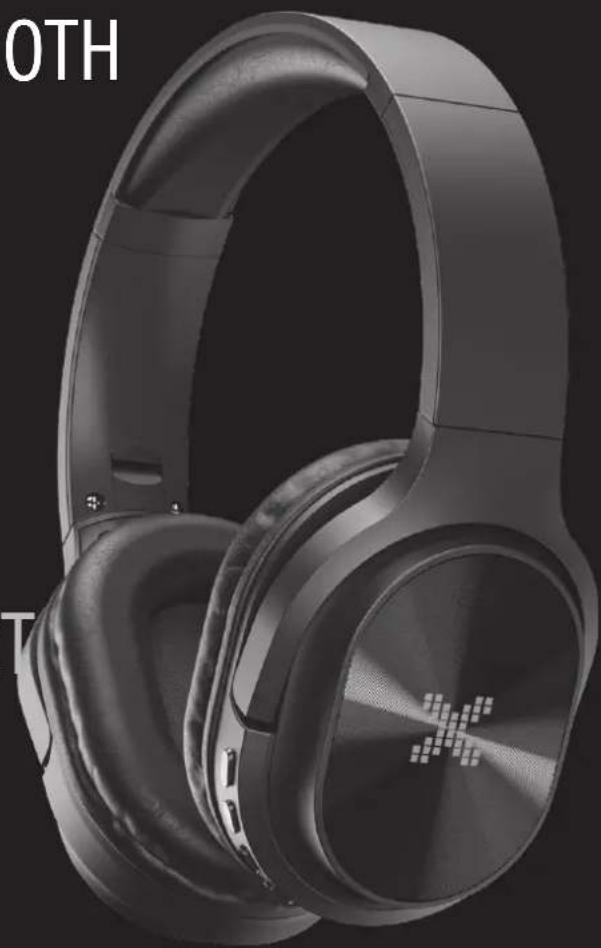
USER MANUAL BTH106B Xmusic
Operating Manual & Warranty Terms
*x - indicates the colour of the device
natural_image
Black and white photo of a modern multi-band headphones with visible brand logo (no text or symbols on the headset itself)WARUNKI BEZPIECZEŃSTWA I ZAGROŻENIA
natural_image
Close-up of black audio headphones with numbered labels and a USB cable (no text or symbols on the headphones themselves)PROBLEMY I ROZWIAZANIA
SAFETY CONDITIONS AND HAZARDS
Before using the device please read the entire user manual carefully.
- The range of operation of wireless Bluetooth technology is about 10m, however, it may vary depending on the environment (walls, metal objects, devices).
- The product should be used in wireless mode. It emits radio waves.
- Use the device according to its intended purpose described in the user manual. Do not interfere with or change the design of the device as this may be dangerous.
- This device emits electromagnetic energy. Avoid contact with other electronic devices, as this may affect their correct operation.
- Do not use the device near people with a pacemaker or other electronic implants.
- Do not use the device in hospitals as it may interfere with the operation of medical devices.
- Do not immerse the device in water or other liquids. Do not expose the device to moisture.
- Do not expose the device to excessively high or low temperatures: below 0^ C or above 40^ C.
- Do not use the device in dusty rooms and do not store it near or on hot surfaces.
- To avoid damage to your hearing, never operate the device at a high
volume level for a prolonged period of time. Make sure that the device with a fixed high volume will no be used by children, whose hearing is particularly vulnerable to damage.
- Using the device in vicinity of other Wi-Fi devices should be avoided. Electromagnetic interference may occur causing interference, inability to connect, or loss of sound.
- One shall not use the device in wireless mode onboard of aircraft, or follow the instructions of the crew regarding the use of the product in this mode.
- The device does not guarantee it will establish connection to all Bluetooth devices. All devices must comply with the Bluetooth standard, and their technical specifications should allow you to connect to other devices.
- Do not expose the device to severe shocks.
- If you experience discomfort while using the device, please immediately stop using it.
- Take special care when using headset while performing any activity as they impair your ability to hear.
- The product should be stored out of the reach of children.
- Do not use the device if any of its components is damaged.
-
Any repairs should be ordered from the manufacturer, an authorized service center or a person with appropriate qualifications.
-
Avoid exposing the product to rain, moisture or other liquids.
- Do not use the device during bathing, showering or training water sports such as swimming, surfing, etc.
INTRODUCTION
Thank you for the trust you have placed in us when you purchased your XMUSIC device.
We are convinced that this high quality device will provide you with a lot of joy and satisfaction during its use.
PLEASE CAREFULLY READ AND FOLLOW THE OPERATING MANUAL!
This device is intended for domestic or other non-commercial use.
The manufacturer will not be held liable for damages resulting from improper or non-compliant use.
TECHNICAL DATA
| Model BTH106 | |
| Maximum Bluetooth range up to 10m | |
| Operating time up to 10h | |
| Charging time up to 3h | |
| Battery Capacity 400mAh | |
| Impedance 32Ω | |
| Speaker diameter | 45mm |
| Frequency response | 20Hz-20kHz |
| Signal-to-noise ratio | ≥95dB |
| SPL dynamic | 90±3dB |
| Connectors | 3.5mm Jack, microSD, USB-C |
| Microphone | Tak |
| FM Radio Tak | |
| Bluetooth 5.0 | |
| Frequency range 2402-2480MHz | |
| Maximum transmission power 1.24dBm | |
| Charging 5V | --- 1A |
OPIS URZĄDZENIA
natural_image
Close-up of a black headband headset with numbered labels pointing to specific parts (no text or symbols beyond numbers)⑨
natural_image
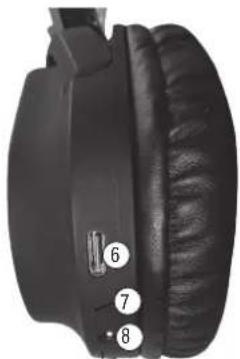
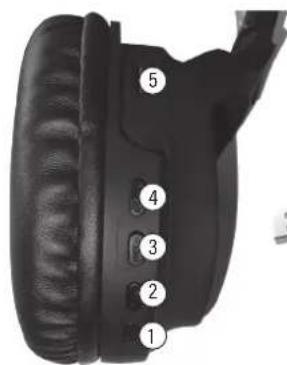
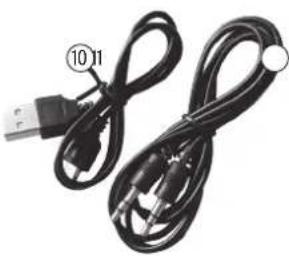
Coiled black cable with USB port and connector (no text or symbols visible)- ON/OFF Button
- MFB (Multi-Function Button)
- Volume - / Previous track
- Volume + / Next track
- MicroSD card slot
- USB-C port
-
Microphone
-
3.5mm Audio Jack Input
- LED
- USB-C cable
- Audio cable
17
PERATION OF THE DEVICE
SWITCHING ON & OFF
To turn on the headphones, hold the ON/OFF button for about 2 seconds until you hear "Power on." To turn off the BTH106 headphones, hold the ON/OFF button for about 3 seconds until you hear "Power off."
HEADPHONE MODES
There are 4 modes of operation of the headphones. You can switch between them by briefly pressing the MFB button.
1. Bluetooth mode
The Bluetooth mode will automatically turn on, if there's no memory card installed in the headset. The message "Bluetooth device is ready to pair" will notify you once the headphones enter this mode.
To connect to the headphones, turn on the Bluetooth feature on your phone. Select BTH106 from the list of available devices, and pair it with your phone. The next time you turn on your headphones, they will automatically pair with your phone. To interrupt this process, disconnect the device by selecting BTH106 again in the list of available Bluetooth devices.
In the Bluetooth mode:
- A short press of the ON/OFF button will pause or resume the song being played.
- Holding the Volume – button will decrease the playback volume. A short press of this button will play the previous song.
- Holding the Volume + button will increase the playback volume. A short press of this button will play the next track.
In Bluetooth mode, you can also handle phone calls. You will hear a beep of the incoming call.
- To answer the call, press the MFB button.
- To reject the call, press and hold down the MFB button for about 3 seconds.
- Double pressing the MFB button is used to call back, the headphones will make a call to the last number.
2. FM Radio mode
Switching to FM radio mode will be signalled by the „Radio mode on" message.
In the FM radio mode:
- After holding down the MFB button for 2 seconds, the headphones will start searching for available radio stations.
- Once the search is complete, you can switch between the found radio stations by briefly pressing the Volume + or Volume - button.
- Holding the Volume – button will decrease the playback volume.
- Holding the Volume + button will increase the playback volume.
The range of radio stations depends on the region and the signal quality may vary depending on your location.
3. Memory card playback mode
Insert a memory card into the dedicated slot located on one earpiece. Insert the card with the inside facing the outside of the piece and press until you hear the characteristic click. To take out the memory card, press it again to make it pop out slightly, then you can pull it out.
If the memory card is inserted in the headphones, they will automatically enter playback mode from the memory card when turned on. The message „Music play mode on“ will notify you when the headphones enter this mode.
The headphones will play the sound files from the memory card.
In the memory card playback mode:
- A short press of the ON/OFF button will pause or resume the song being played.
- Holding the Volume – button will decrease the playback volume. A short press of this button will play the previous song.
- Holding the Volume + button will increase the playback volume. A short press of this button will play the next track.
CAUTION! MAXIMUM SUPPORTED CARD SIZE IS 32GB. FILE FORMATS SUPPORTED BY THE HEADPHONES ARE MP3 AND WAV.
19
4. Wired headset mode
To use this mode, turn off the headphones and connect the audio cable included in the set, one end in the headphones, the other to the audio playback device.
CHARGING
To charge the device, connect the USB-C cable included in the set. During charging, the red LED will illuminate, and will only turn off after charging about 80% of the battery. After the LED switches off, the device continues to charge. Once the battery reaches 100% charge, charging will be paused. Thanks to this, there is no risk of overcharging the battery. It is recommended that the charging current does not exceed 1A. The full charge time is about 2-3 hours.
CAUTION! BATTERY DETERIORATION DURING OPERATION OF THE DEVICE IS A NATURAL PHENOMENON. TO KEEP THE BATTERY IN GOOD CONDITION AND EXTEND ITS LIFE, PLEASE FOLLOW THESE GUIDELINES:
- Do not start the device if the battery is discharged.
- Charge the battery according to the voltage and charging current data on the rating plate.
- Before a longer storage period, charge the battery to 50% and recharge it every 3-4 months. If it is not possible to determine a specific charge level in the product, discharge the device, then charge it for half the time required to fully charge it. Leaving a discharged battery for a prolonged period of time may result in its damage or loss of its properties.
- When using the device regularly, avoid full discharge of the battery and always charge it to the full.
- Once the battery is charged, disconnect the charger plug from the charging socket on the device.
- Do not leave the device unattended while charging.
- Using chargers and cables other than those recommended in the device manual with may lead to damage to the product and even an explosion of the battery.
- Charge in a dry, well-ventilated place that is not exposed to direct sunlight.
DECLARATION
ART-DOM Sp. z o.o. hereby declares that Bluetooth headphones comply with the relevant requirements of EU harmonisation legislation: Directive 2014/53/EU and other EU harmonisation legislation. The full text of the EU declaration of conformity is available at the following address: https://www.artdom.net.pl/deklaracja/BTH106x/
TROUBLESHOOTING
| PROBLEM POSSIBLE CAUSE SOLUTION | ||
| The head-phones do not work. | Battery low. Charge the head phones. | headphones before using them. |
| Audio cable connected to head-phones. | Disconnect the audio cable and try to switch the headphones on again. | |
| Headphones won't charge. | Faulty charging cable. Carefully check that the cable is not damaged.Check if the headphones will charge using a different USB-C cable. | |
| Faulty power supply. Check that the headphones will charge using a different power supply, with the parameters given in the CHARGING section. | ||
| Poorly connected charging cable. Make sure that the charging cable is connected correctly. | ||
| The Bluetooth function does not work. | Excessive distance between the devices you want to connect. | Reduce the distance between the devices you want to connect. |
| Another device is already paired with the headphones. | Cancel pairing with the headphones on another device and try to reconnect your device. | |
| The Bluetooth function of your device is disabled. | Turn on Bluetooth on the device you want to connect to the headphones. | |
| You have selected a different operating mode for the head-phones. | Change the operating mode of the headphones to Bluetooth mode. | |
| No radio stations found. | No Signal. Make sure that there is a good enough radio signal in your area and that there is no interference. | |
21
| The device does not play music from the memory card. | Invalid memory card size or has unsupported audio file format. | Make sure that the card does not exceed the recommended size of 32GB, and that there are files with supported audio formats (MP3, WAV) on the card. |
| The head-phones play quietly. | Setting too low. Turn up the volume on your headphones or connected device. | |
ECO-FRIENDLY AND ENVIRONMENTALLY FRIENDLY DISPOSAL
This device is marked in accordance with the Directive of the European Parliament and of the Council of 2012/19/EU of 4 July 2012 on waste electrical and electronic equipment (WEEE), with the symbol of a crossed-out waste bin:

Do not dispose of devices marked with this symbol, together with household waste.
For disposal return the device to your local waste treatment and disposal facility or contact your local authorities.
YOU CAN HELP PROTECT THE ENVIRONMENT!
Proper handling of waste electrical and electronic equipment contributes to avoiding harmful consequences for human health and the environment resulting from the presence of hazardous components and improper storage and processing of such equipment.
WARRANTY CONDITIONS FOR BLUETOOTH HEADSET
- ART-DOM Sp. z o.o. with its registered office in Łódź (92-402) at ul. Zakładowa 90/92 National Court Register Number 0000354059 (Guarantor) guarantees that the purchased device is free from physical defects. The warranty covers only defects resulting from the causes inherent in the item sold (manufacturing defects).
- A disclosed defect will be removed at the Guarantor's expense within 14 days from the date of reporting the damage to the authorized service or point of sale.
-
In exceptional cases, e.g. the need to import spare parts from their manufacturer, the repair period may be extended up to 30 days.
-
The warranty period for the user is 24 months from the date of delivery of the goods.
- The goods are intended for use only in the conditions of an individual household.
- The present warranty does not cover:
a. damage caused by using the device in a manner inconsistent with the user manual,
b. mechanical, chemical or thermal damage,
c. repairs and modifications made by companies or persons that were not authorized to do so by the manufacturer,
d. parts that are inherently easy to wear or consumables such as: batteries, bulbs, fuses, filters, knobs, shelves, accessories,
e. installation, maintenance, inspection, cleaning, unlocking, removal of contaminants and instruction.
- The Guarantor will select the mode of defect removal at its own discretion. Removal of a confirmed defect of the device will take place through warranty repair or replacement of the device. The Guarantor may perform repairs when the buyer requests replacement or the Guarantor may perform replacements when the buyer requests repair, if bringing the goods (device) into conformity in accordance with the granted warranty in the manner selected by the buyer is impossible or would require excessive costs at the part of Guarantor. In particularly justified cases, if both repair and replacement are impossible or would require excessive costs for the Guarantor, the Guarantor may refuse to bring the goods into compliance with the granted warranty and propose another way to settle the warranty claim.
- The exchange of goods is made at the point of sale at which the goods were purchased (replacement or refund) or an authorized service point, if it offers such service (replacement). The returned device must be complete, without mechanical damage. Failure to comply with these conditions may result in failure to accept the warranty claim.
- In the event of non-compliance of the goods with the sales contract, the buyer is entitled by law to legal protection measures on the part and at the expense of the seller, and the warranty does not affect these remedies.
- The present warranty is valid in Poland.
- The condition for the warranty repair or replacement of the device is the presentation of proof of purchase and the use of the goods in accordance with the information contained in the operating manual.
CAUTION!
Damage or removal of the rating plate from the device may result in warranty being deemed void.

- WARUNKI BEZPIECZEŃSTWA I ZAGROŻENIA
- PROBLEMY I ROZWIAZANIA
- SAFETY CONDITIONS AND HAZARDS
- INTRODUCTION
- PLEASE CAREFULLY READ AND FOLLOW THE OPERATING MANUAL!
- OPIS URZĄDZENIA
- PERATION OF THE DEVICE
- SWITCHING ON & OFF
- HEADPHONE MODES
- Bluetooth mode
- In the Bluetooth mode:
- FM Radio mode
- Memory card playback mode
- Wired headset mode
- CHARGING
- CAUTION! BATTERY DETERIORATION DURING OPERATION OF THE DEVICE IS A NATURAL PHENOMENON. TO KEEP THE BATTERY IN GOOD CONDITION AND EXTEND ITS LIFE, PLEASE FOLLOW THESE GUIDELINES:
- DECLARATION
- TROUBLESHOOTING
- ECO-FRIENDLY AND ENVIRONMENTALLY FRIENDLY DISPOSAL
- YOU CAN HELP PROTECT THE ENVIRONMENT!
- WARRANTY CONDITIONS FOR BLUETOOTH HEADSET
- CAUTION!
Brand : Xmusic
Model : BTH106B
Category : Headphones