
Halo Light - Tripod On Air - Free user manual and instructions
Find the device manual for free Halo Light On Air in PDF.


| Product Type | Ring Light with Tripod |
| Brand | On Air |
| Model | Halo Light |
| Category | Tripod |
| Light Source | LED Ring Light |
| Color Temperature | 3000K - 6000K (Adjustable) |
| Brightness Levels | 10 Levels (Dimmable) |
| Power Source | USB Powered (5V, 2A via USB-A) |
| Maximum Height | 160 cm (63 inches) |
| Minimum Height | 60 cm (24 inches) |
| Ring Diameter | 10 inches (25 cm) |
| Net Weight | 0.8 kg (1.76 lbs) |
| Maximum Load | 0.5 kg (1.1 lbs) |
| Compatible Devices | Smartphones up to 6.7 inch, Compact Cameras |
| Phone Holder Width | Adjustable, 6-9 cm |
| Cable Length | 1.5 meters (4.9 feet) |
| Material | Aluminum Alloy + ABS Plastic |
| Main Functions | Video Lighting, Vlog, Selfie, Makeup, Video Conferencing, Live Streaming |
| Control Method | Remote Control (included) + Wireless Bluetooth Shutter |
| Care Instructions | Wipe with a soft dry cloth. Avoid liquids. Disconnect when not in use. |
| Safety | Do not disassemble. Keep away from water and high temperatures. |
| Spare Parts | USB cable, remote control, phone holder. Contact seller for replacements. |
| Repairability | Not user-serviceable. Contact support for repairs. |
| General Info | Designed for content creators. Free PDF manual available online. |
Frequently Asked Questions - Halo Light On Air
User questions about Halo Light On Air
0 question about this device. Answer the ones you know or ask your own.
Ask a new question about this device
Download the instructions for your Tripod in PDF format for free! Find your manual Halo Light - On Air and take your electronic device back in hand. On this page are published all the documents necessary for the use of your device. Halo Light by On Air.
USER MANUAL Halo Light On Air
INTRODUCTION & FEATURES
Create a selfie-ready setting in seconds with the On Air HaloLight 8-inch LED Ring Light. This compact filler light provides multiple brightness settings and 3 LED variations to deliver a flawless glow, powered by any USB power source and designed with an easy to use in-line remote.
The included desktop tripod stand enables quick setup on any flat surface, keeps smartphones of all sizes stable, and folds compact for easy storage or toting in a laptop bag or backpack.
PACKAGE CONTENTS:
1 x 8-inch LED Round Tube Light
1 x Desktop Tripod Stand
1 x Ball Joint Head
1 x Expanding Smartphone Holster
User Manual
PRODUCT OVERVIEW & FUNCTIONS
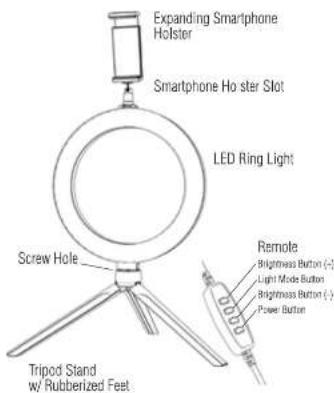
• 3 LED Modes (Warm Light, Cool White, and Daylight) with 10 Brightness Levels
- Powered by any USB Power Source (including PCs, Wall Adapters, Power Banks, etc.)
• Universal-Fit Spring-Loaded Smartphone Holster & Easy Tripod Adjustments with Foot Grips
- Quick Setup & Compact Desktop Size for Travel/Storage
PRODUCT SPECIFICATIONS
Ring Light Diameter: 8 in.
Tripod Folded Length: 7.5 in. (19 cm)
Tripod Expanded Height: 3.1 in. (9 cm)
LED Bulb total: 72
Color Temperature: 2700-6500K
Luminous Flux: 1600-2000LM
Wattage: 10W
Power Supply: 5V(2A)
Unit assembled weight: around289g/10.19oz/0.64lbs
USING YOUR HALOLIGHT LED RING LIGHT
STEP 1: CONNECT THE RING LIGHT TO THE TRIPOD.
- Locate the screw hole located toward the base of the LED ring light (see diagram for reference).
- Place the ring light directly on the tripod stand and twist clockwise to fasten.
- Stop tightening when the ring light feels secure and unmoving.
STEP 2: CONNECT THE SMARTPHONE HOLSTER TO THE RING LIGHT.
- Loosen the nut on the ball joint head by turning it to the right, insert the square base at the bottom of the ball joint into the slot at the top of ring light.
- Tighten the nut on the ball joint head by turning it to the left until is securely tight.
- Screw the expandable smartphone holster to the top of ball joint head by turning it counter-clockwise, you may install it horizontally or vertically, as desired.
- Loosen the ridged knob on the back of the ball joint head by turning it counter-clockwise, adjust the expandable smartphone hoister angle as desired and tighten by turning it clockwise until tight.
STEP 3: POSITION THE TRIPOD.
- Release the tripod legs by pulling them apart from the folded position.
- Place the unit on a flat surface such as a table or desk. Gently adjust as needed to obtain the ideal angle.
- The legs feature rubber grips to help keep the tripod in place. If you notice the stand begin to slip or appear less stable, attempt to reposition in a manner that gains better traction.
STEP 4: INSERT YOUR SMARTPHONE.
- Expand the phone holder clip.
- Place your phone inside the phone holder clip.
- Gently release the clip and it will automatically close around your smartphone, securing it in place.
- Plug the USB power cord into a power source, such as a power bank, computer, or AC wall adapter.
- Use the attached inline remote to adjust your brightness and LED mode.
-
The Mode button allows you to switch between 3 LED settings: white only (cool white), yellow only (warm light), and white/yellow mixed (daylight).
-
Press the dimmer button (labeled "-" to decrease the brightness of the LED bulbs.
- Press the brightness increase button (labeled “+”) to increase the brightness of the LED bulbs.
CARE & IMPORTANT SAFEGUARDS
- To clean, wipe down with a soft dry or damp cloth. Do not use with cleaning agents or other chemical solutions.
- This unit is not waterproof. Do not expose to water, moisture, extreme temperatures, or high levels of humidity.
- This product contains LED bulbs. Keep away from flammable objects and excessive heat.
- Never attempt to disassemble or modify your On Air LED Ring Light in any way. Doing so violates any warranty in place and may cause permanent damage to the unit.
- Contact the Customer Support team at tzumi.com/support for assistance.

life just got better.
Learx Inc. Dated by Larrin Inc. NY, NY 10676. © Copyright 2021 Larrin Inc. All Rights Reserved. Made in China. Other trademarks and state names are those of their respective owners. Subject to change without prior notice.
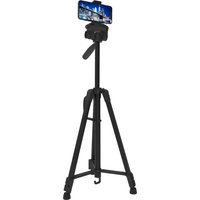
Brand : On Air
Model : Halo Light
Category : Tripod