Halo Live Pro - Tripod On Air - Free user manual and instructions
Find the device manual for free Halo Live Pro On Air in PDF.


Pick your language and provide your email: we'll send you a specifically translated version.
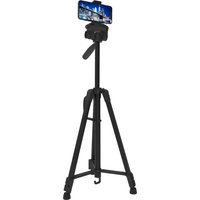
| Product Type | Tripod |
| Brand | On Air |
| Model | Halo Live Pro |
| Compatibility | Smartphones, compact cameras, and live streaming devices |
| Maximum Load Capacity | 5 kg |
| Material | Aluminum alloy |
| Maximum Height | 170 cm |
| Minimum Height | 60 cm |
| Folded Length | 65 cm |
| Head Type | Fluid head with 360° pan and tilt |
| Quick Release Plate | Yes, standard 1/4 inch screw |
| Leg Locks | Flip locks |
| Adjustable Leg Angle | Three-step adjustable |
| Bubble Level | Built-in |
| Weight | 1.8 kg |
| Color | Black |
| Usage | Indoor and outdoor |
| Maintenance | Wipe with dry cloth and clean leg locks regularly |
| Safety | Ensure legs are fully locked before use |
| Included Accessories | Carrying bag, quick release plate, rubber feet |
Frequently Asked Questions - Halo Live Pro On Air
How do I set up the Halo Live Pro tripod?
To set up the tripod, unfold the legs fully until they lock in place. Adjust the leg angle if needed using the flip locks. Extend the center column to your desired height and tighten the knob securely.
What devices can be mounted on this tripod?
The Halo Live Pro is compatible with smartphones, compact cameras, and live streaming devices. All you need is a standard 1/4 inch mount point or a compatible phone holder.
How do I attach a camera to the quick release plate?
First, secure the quick release plate to your camera's bottom using the 1/4 inch screw. Then slide the plate into the tripod head until it clicks. Make sure the locking pin is engaged to prevent accidental slips.
Can I adjust the height of the tripod?
Yes, the tripod has a minimum height of 60 cm and a maximum height of 170 cm. You can adjust the leg sections individually and raise the center column for extra reach.
How do I use the pan and tilt fluid head?
Loosen the pan knob to rotate the camera horizontally 360 degrees. Tighten the tilt knob to control vertical movement. The fluid mechanism ensures smooth and precise positioning during recording.
What is the maximum weight the tripod can hold?
The Halo Live Pro can support up to 5 kg of equipment. Always stay within this limit to maintain stability and prevent damage to the tripod or your gear.
How do I keep the tripod clean and in good condition?
Wipe the legs and head with a dry, soft cloth after each use. For stubborn dirt, use a slightly damp cloth and dry immediately. Clean the flip locks regularly to ensure smooth operation and avoid sand or dust buildup.
Is the tripod stable on uneven ground?
Yes, the tripod features adjustable rubber feet and a three-step leg angle system. You can angle each leg independently to find a stable position on slopes or stairs.
Can I use the tripod for vlogging or live streaming?
Absolutely. The Halo Live Pro is designed for live streaming content creators. Its fluid head and sturdy build allow smooth camera movements, ideal for talking heads, product demos, or outdoor vlogs.
How do I fold the tripod for transport?
Lower the center column completely, then release the leg locks and fold the legs together. The folded length is about 65 cm. Use the included carrying bag to protect the tripod during travel.
User questions about Halo Live Pro On Air
0 question about this device. Answer the ones you know or ask your own.
Ask a new question about this device
No questions yet. Be the first to ask one.
Download the instructions for your Tripod in PDF format for free! Find your manual Halo Live Pro - On Air and take your electronic device back in hand. On this page are published all the documents necessary for the use of your device. Halo Live Pro by On Air.
USER MANUAL Halo Live Pro On Air
Manual assistant
Powered by Anthropic
Waiting for your message
Product information
Brand : On Air
Model : Halo Live Pro
Category : Tripod