Selfie Tripod - Tripod On Air - Free user manual and instructions
Find the device manual for free Selfie Tripod On Air in PDF.


| Product Type | Selfie Tripod |
| Brand | On Air |
| Model | Selfie Tripod |
| Material | Aluminum alloy and plastic |
| Maximum Height | 140 cm (55 inches) |
| Folded Length | 30 cm (12 inches) |
| Weight | 200 g (0.44 lbs) |
| Phone Holder Width | Adjustable from 5.5 to 9 cm (2.2 to 3.5 inches) |
| Bluetooth Remote | Included |
| Remote Battery | CR1632 coin cell |
| Connection | Bluetooth 4.0 |
| Compatibility | iOS and Android smartphones |
| Functions | Remote shutter, 360° rotation, tilt adjustment |
| Cleaning | Wipe with a soft, damp cloth; do not use harsh chemicals |
| Safety | Do not exceed maximum load of 500g; keep away from water |
| Spare Parts | Replacement remote (CR1632 battery) |
| General Information | Suitable for travel and vlogging |
Frequently Asked Questions - Selfie Tripod On Air
User questions about Selfie Tripod On Air
0 question about this device. Answer the ones you know or ask your own.
Ask a new question about this device
Download the instructions for your Tripod in PDF format for free! Find your manual Selfie Tripod - On Air and take your electronic device back in hand. On this page are published all the documents necessary for the use of your device. Selfie Tripod by On Air.
USER MANUAL Selfie Tripod On Air
INTRODUCTION & FEATURES
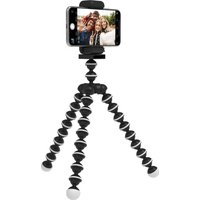
No matter where your content lives, the Live View Tripod Stand makes the perfect photography and broadcasting companion. A durable and lightweight ABS design utilizes 3 flexible, rubber-lined legs that can bend and rotate in any direction while your smartphone rests safely holstered on top, controlled by an included Bluetooth shutter remote that can be used up to 33 feet away. Designed for content creators, vloggers, and photographers looking to create content on the go or capture that perfect angle – even on rough, uneven surfaces. Use it as a selfie stick, wrap it around objects, and have a stable smartphone setup wherever inspiration finds you.
PACKAGE CONTENTS:
1 x Octopus Tripod Stand
1 x Bluetooth Shutter Remote
1 x CR2032 Battery (In Unit)
User Manual
PRODUCT OVERVIEW & FUNCTIONS

• Flexible Legs Bend to Unlimited Shooting Angles
- Rubberized Feet Provide a Secure No-Slip Grip on Any Surface
• Lightweight & Folds Easily for Convenient Storage
- Record and Capture Images from 33 F1. Away with Bluetooth Shutter Remote.
USING YOUR OCTOPUS TRIPOD STAND
NOTE: This product will pair to any devices that utilize Bluetooth connection (version 4.2 or newer).
STEP 1: CONNECT ALL PARTS.
- Take the smartphone holster and screw it onto the mount base. (You may wish to remove the base in order to replace it with a camera or other base type/accessory.)
- If you need to remove the holster base from the tripod for any reason, simply either press down on the flip lock tab to release it or disconnect the base by unscrewing it in a counterclockwise direction.
STEP 2: TURN THE REMOTE ON.
- Each unit comes with a CR2032 battery pre-installed in the battery compartment.
- If you need to replace with a fresh battery, remove the battery compartment cover by pressing gently downward on the back of the remote with your thumb and sliding outwards. Remove the old battery and replace with a fresh CR2032. Slide the battery compartment cover back in place until you feel a "click".
- The positive pole (+) should be facing upward when inserted correctly.
- Turn the remote on by sliding the power switch to the "ON" position.
STEP 3: PAIR TO A BLUETOOTH-ENABLED DEVICE.
- When you have turned the remote on, it will automatically enter pairing mode. The LED indicator will begin to flash blue repeatedly.
- Once in pairing mode, open the Settings menu on your smart device (smartphone, tablet, etc.). Keep the device and the remote within 3 feet of each other.
- Enable Bluetooth pairing and wait for your device to locate the shutter remote.
- When this happens, "OnAir Remote" will appear on the device list; select this option. Follow the prompt to pair the remote.
• The LED will turn off after a successful connection.
STEP 4: OPEN YOUR CAMERA APP.
- You may either use your device's built-in camera app or install a separate camera/recording app with this unit.
- Open the camera app and click the appropriate button on the shutter remote to take a photo.
STEP 5: POSITION THE TRIPOD AND INSERT YOUR SMARTPHONE.
- When you have decided on a shooting location, bend the legs in any angle as needed to obtain an optimal position. (You may also wish to flatten all legs and push them together to create an improvised selfie stick).
- Try to distribute weight evenly to balance all 3 legs equally. To test, simply apply minimal pressure to the holster from above. If the unit falls over, it won't be able to handle the weight of your smartphone and should be adjusted.
- With your selected camera app opened, carefully insert your smartphone into the holster.
- Tighten the holster around your smartphone by turning the knob clockwise. Do not over-tighten; doing so could damage your device.
STEP 6: START TAKING PHOTOS!
- Make any final angle adjustments by tilting the positioning knob located at the base.
- Depending on the style of smartphone you're using (iOS or Android), press the corresponding button.
- Each time you press the button, your device will take a photo remotely.
- For recording and additional functions, refer to the instructions provided with your selected app.
SPECIFICATIONS
Tripod Extended Height (max.): 9.5 in (24 cm)
Tripod Width: 2.1 in (5.4 cm)
Tripod Weight: 0.3 lbs (5.3 oz)
Remote Bluetooth Technology: V4.2
Transmission Frequency: Approx. 2.4 GHz - 2.5 GHz
BT Range: 10 m (35 ft) Battery Type: CP2022
Battery Type: On2002 Est. Battery Life: 6 months
Remote Dimensions: 2 x 1.2 x 0.4 in (5 x 3 x 1 cm)
Remote Weight: 0.3 oz (8 g)
Phone Holder Dimensions: 2.9 x 1.46 x 1 in
(7.4 × 3.7 × 2.5 cm)
SAFEGUARDS:
- Never attempt to disassemble or modify your On Air Live View Flexible Octopus Tripod Stand in any way. Doing so violates any warranty in place and may cause permanent damage to the unit.
- If your tzumi tripod malfunctions, do not attempt to repair the unit yourself. Doing so will violate the tzumi Warranty and may cause permanent damage. Instead, contact the Customer Support team at tzumi.com/support for assistance.
tzumi® Distributed by tzumi inc. NY, NY, 10016.
©Copyright 2020 tzumi. All Rights Reserved. Made In China. All pictures shown are for illustration purpose only. Actual product may vary due to product enhancement. Other trademarks and trade names on this package are those of their respective owners.
Brand : On Air
Model : Selfie Tripod
Category : Tripod