Halo Stick Pro - Tripod On Air - Free user manual and instructions
Find the device manual for free Halo Stick Pro On Air in PDF.


Pick your language and provide your email: we'll send you a specifically translated version.
| Type de produit | Tripod |
| Brand | On Air |
| Model | Halo Stick Pro |
| Dimensions (folded) | 24 cm (height) x 5 cm (width) |
| Dimensions (extended) | 130 cm (max height) |
| Weight | 0.45 kg |
| Material | Aluminum alloy legs, ABS plastic head |
| Maximum load | 1.2 kg |
| Head type | Ball head with 3-way pan/tilt |
| Leg locks | Twist locks |
| Number of leg sections | 5 |
| Mounting screw | 1/4 inch standard |
| Bluetooth remote | Included, range up to 10 m |
| Remote battery | CR2032 (included) |
| Smartphone clamp | Adjustable width 55-85 mm |
| Spirit level | Built-in bubble level on head |
| Quick release plate | Yes, compatible with Arca-Swiss |
| Carrying case | Pouch included |
| Maintenance | Wipe with dry cloth; avoid water contact |
| Safety instructions | Do not exceed max load; keep away from children |
Frequently Asked Questions - Halo Stick Pro On Air
How to set up the Halo Stick Pro tripod?
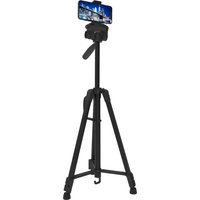
Unfold the legs and twist the locks to secure. Extend the center column if needed. Attach your device using the quick release plate or smartphone clamp.
How to connect the Bluetooth remote?
Remove the battery tab from the remote. Turn on your device's Bluetooth, search for 'Halo Stick Pro', and pair. The remote works up to 10 meters.
What is the maximum height of the tripod?
The maximum height with center column extended is 130 cm (51 inches). Folded length is 24 cm.
What is the weight capacity of the tripod?
The tripod can hold up to 1.2 kg (2.6 lbs), suitable for most smartphones, action cameras, and compact DSLRs.
What devices are compatible with the tripod?
It works with smartphones up to 85 mm width, action cameras with adapter, and cameras with a 1/4 inch tripod mount.
How to clean and maintain the tripod?
Wipe the legs and head with a dry, soft cloth. Avoid using water or chemicals. Store in the included pouch when not in use.
How to replace the remote battery?
Slide open the battery compartment on the back of the remote. Replace the CR2032 battery with the positive side up. Close the compartment firmly.
The tripod wobbles – what to do?
Ensure all leg locks are tightened fully. Extend the legs on a stable surface. If using the center column, retract it partially for more stability.
Does the tripod have a warranty?
Yes, the On Air Halo Stick Pro comes with a 1-year limited warranty from the date of purchase. Retain your receipt for claims.
How to store the tripod?
Fold the legs, collapse the center column, and zip it into the carrying pouch. Store in a dry, cool place away from direct sunlight.
User questions about Halo Stick Pro On Air
0 question about this device. Answer the ones you know or ask your own.
Ask a new question about this device
No questions yet. Be the first to ask one.
Download the instructions for your Tripod in PDF format for free! Find your manual Halo Stick Pro - On Air and take your electronic device back in hand. On this page are published all the documents necessary for the use of your device. Halo Stick Pro by On Air.
USER MANUAL Halo Stick Pro On Air


Manual assistant
Powered by Anthropic
Waiting for your message
Product information
Brand : On Air
Model : Halo Stick Pro
Category : Tripod