BCM-650 - Scale AWS - Free user manual and instructions
Find the device manual for free BCM-650 AWS in PDF.


| Product Type | Digital Pocket Scale |
| Brand | AWS (American Weigh Scales) |
| Model | BCM-650 |
| Maximum Capacity | 650 g |
| Readability | 0.1 g |
| Minimum Weight | 0.2 g |
| Units of Measure | g, oz, ozt, dwt, ct, gn |
| Power Source | 2 x AAA alkaline batteries |
| Scale Dimensions | 4.0 x 0.9 in (101.6 x 22.9 mm) |
| Platform Dimensions | 0.3 x 2.5 in (7.6 x 63.5 mm) |
| Key Functions | ON/OFF, Mode (unit change & calibration), Tare (zeroing) |
| Tare Feature | Subtractive taring for net weight determination |
| Calibration | User calibration with 500 g weight (M2 class) |
| Overload Protection | Integrated, but avoid exceeding max capacity |
| Low Battery Indicator | Display shows "Lo" when batteries are low |
| Error Codes | OUTZ (zero drift), O-Ld (overload), Lo (low battery) |
| Included Accessories | Cover/Expansion Tray, 2 x AAA batteries |
| Operating Environment | Flat, level surface; avoid drafts, vibrations, and extreme temperatures |
| Cleaning | Wipe with a dry cloth; avoid moisture and dust accumulation |
| Warranty | Limited warranty (details in manual) |
| Country of Origin | China |
Frequently Asked Questions - BCM-650 AWS
User questions about BCM-650 AWS
0 question about this device. Answer the ones you know or ask your own.
Ask a new question about this device
Download the instructions for your Scale in PDF format for free! Find your manual BCM-650 - AWS and take your electronic device back in hand. On this page are published all the documents necessary for the use of your device. BCM-650 by AWS.
USER MANUAL BCM-650 AWS
BCM-Series User Manual

natural_image
Black digital wristwatch with a blue LCD display showing approximately 1.00°F (no text or symbols visible)BCM-100 (100g x 0.01g)
BCM-650 (650g x 0.1g)
Thank you for purchasing the American Weigh BCM-Series digital pocket scale. Please read all operating instructions carefully before use. Scales are precision measuring devices and should always be handled with proper care. To ensure years of reliable service, keep these simple tips in mind:
- Do not exceed the scale’s maximum capacity. This scale has integrated overload protection, but any overload protection has its limits!
- Avoid exposure to extreme heat or cold. Scales perform best at normal room temperature. If temperatures have changed dramatically, recalibration may be necessary.
- Allow your scale to warm up for 30-60 seconds before performing calibration (if available).
- Store your scale in a clean, dry location. Dust, dirt, and moisture can accumulate on the weighing sensors and electronics causing inaccuracy or malfunction.
- Avoid using your scale in close proximity to strong radio wave emitting devices such as cordless phones.
• Always weigh on a flat and level surface, free from vibrations and drafts. The corner of a room is usually the most stable.
• Gently apply all items to be weighed. Do not drop items onto the weighing platform. - Avoid dropping your scale. The warranty does not cover damage due to rough treatment or overload.
- Check the batteries first if you are having any trouble with your scale. This simple step can remedy most scale issues.
- Calibration should be checked and adjusted occasionally as part of routine scale maintenance.
I. Part List
- Scale
- Cover/Expansion Tray
- AAA Batteries (x2)
II. Key Description
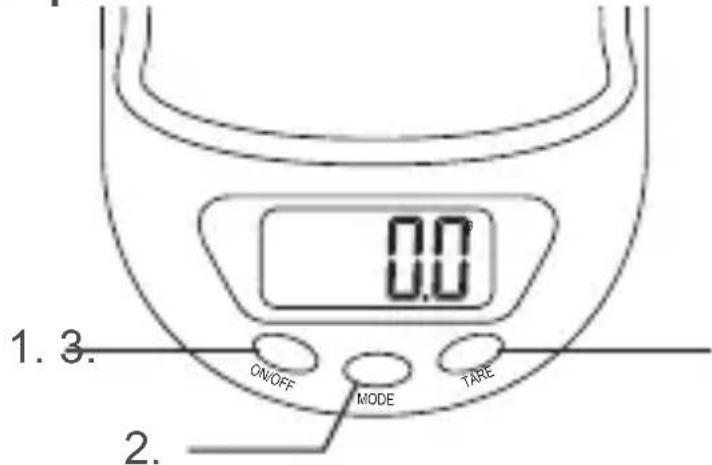
- ON/OFF - Turns the scale on or off.
- Mode Key - Tap to change the displayed unit of measure. Hold to enter calibration (see VII).
- Tare Key - Re-zeros the scale. Used to remove the weight of a tray or container.
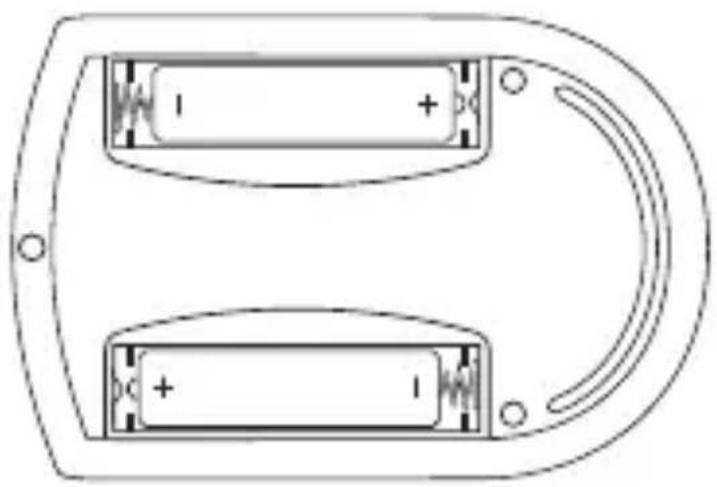
III. Battery Installation
natural_image
Diagram of a battery pack with two cells and a curved arrow, no text or symbols presentProper Battery Installation
Low batteries can cause inaccuracies in digital scales. If you are experiencing issues with your scale, first try new batteries. Most times, this will solve the problem.
- Before using the scale for the first time, check the battery compartment and remove any plastic insulation strips or packaging that may be in place to prevent battery drainage during shipping/storage.
- If you are replacing the batteries, make sure the positive and negative contacts are properly aligned.
IV. Operation
- Place the scale on a flat, level surface and press the ON/OFF key to turn the scale on.
- Once the start-up process completes and the scale goes to zero you are ready to weigh.
- Place the quantity to be weighed onto the weighing platform.
- Wait a couple seconds for the display to stabilize before taking a weight reading.
- To turn the scale OFF, press the ON/OFF key again.
V. Changing the Unit of Measure
- Press the MODE key to change the scales displayed unit of measure.
- If the scale is turned off then back on, it will default to the last unit used.
- BCM-100 & BCM-650 Units: g (gram)▶ oz (ounce) ▶ ozt (troy ounce) ▶ dwt (pennyweight) ▶ ct (carat) ▶ gn (grain)
VI. Using the Tare Feature
You can use this scale's tare feature to subtract the weight of an empty container or vessel for net weight determination. NOTE: The weight of the container will subtract from the available capacity (subtractive taring).
- Place the empty container or vessel on the weighing platform.
- Press the TARE key once. The display will then reset to zero. If the container is removed, its weight will be displayed as a negative number.
- You may now fill the container with the quantity to be weighed. The display will show the net weight of the contents.
- To return to normal weight display (gross weight), remove any items from the weighing platform and press the TARE key again to re-zero the scale.
VII. Calibration
Initial calibration is performed at the factory. However, the calibration can drift slightly due to stresses from shipping. Also, due to changes in local acceleration of gravity around the world, adjustment is recommended when moving the scale from one location to another. To check calibration:
- Place the required calibration weight on the scale and note the displayed value.
- If the displayed value is not within acceptable tolerance (see chart on next page), adjustment is required.
| Model Acceptable Tolerance (±) | Calibration Weight | Recommended Accuracy Class | |
| BCM-100 0. | 02g 100g OIML | M2 | |
| BCM-650 0. | 2g 500g OIML | M2 | |
VIII. Adjustment
- Press and hold the MODE key until the display shows "CAL"
- Make sure nothing is on the scale platform then press the MODE key again.
- The display will flash "CAL" followed by the required calibration weight (see chart above).
- Place the required calibration weight on the platform. The display will flash "PASS" then return to normal weighing mode. Adjustment is complete!
IX. Troubleshooting
• Problem: Scale will not turn on
• Solution: Check the batteries and battery contacts.
• Problem: Displayed weight fluctuates randomly
- Solution: Make sure your workspace is stable and free of any air currents or vibration. In some cases, nearby radio wave emitting devices can cause fluctuations.
• Problem: Displayed weight is inaccurate
- Solution: Perform a calibration adjustment. If you are still having trouble, contact our warranty department.
X. Error Codes
- OUTZ - Zero point has drifted out of the acceptable range. Try to perform a calibration adjustment. If the problem persists, the load cell may be permanently damaged due to overloading.
- O-Ld - Overload. The maximum capacity has been exceeded. Remove the extra weight to avoid permanently damaging the load cell.
- Lo - Batteries are low. Replace the batteries.
XI. Specifications
| BCM-100 BCM-650 | ||
| Max. Capacity | g 650g | |
| Readability | 0.1g | |
| Min. Weight | g 0.2g | |
| Power | “AAA” Alkaline | |
| Dimensions | 4.0 x 0.9 in. | |
| Platform Dimensions | .3 x 2.5 in. | |
| Warranty | ar Limited Warranty | |
XII. Capacity/Readability Charts
| BCM-100 BCM-650 | |
| 100g x 0.01g3.527oz x 0.001oz3.215ozt x 0.001ozt64.30dwt x 0.01dwt500ct x 0.05ct1543.2gn x 0.2gn | 650g x 0.1g22.92oz x 0.01oz20.89ozt x 0.01ozt417.95dwt x 0.1dwt3250ct x 0.5ct10031gn x 2gn |
American Weigh Scales, Inc.
Norcross, GA 30092
Made In China to our exact specifications and quality control.
Brand : AWS
Model : BCM-650
Category : Scale