330ECO - Scale AWS - Free user manual and instructions
Find the device manual for free 330ECO AWS in PDF.


| Type de produit | Digital Scale |
| Modèle | 330ECO |
| Marque | AWS |
| Capacité maximale | 330 kg (728 lb) |
| Précision | 0.1 kg (0.2 lb) |
| Unités de mesure | kg, lb, oz |
| Dimensions de la plateforme | 400 x 400 mm (15.7 x 15.7 in) |
| Hauteur | 120 mm (4.7 in) |
| Poids net | 3.5 kg (7.7 lb) |
| Alimentation | 4 piles AAA (incluses) ou adaptateur secteur (optionnel) |
| Autonomie des piles | Environ 100 heures d'utilisation continue |
| Affichage | Écran LCD rétroéclairé, chiffres de 25 mm (1 in) de haut |
| Fonctions principales | Pesée simple, tare, mise en zéro, conversion d'unité, détection de stabilité, arrêt automatique |
| Matériau de la plateforme | Acier inoxydable |
| Matériau du boîtier | Plastique ABS |
| Entretien et nettoyage | Essuyer avec un chiffon humide et un détergent doux. Ne pas immerger. |
| Sécurité | Ne pas dépasser la capacité maximale. Éviter les surcharges. Utiliser sur une surface plane et stable. |
| Pièces détachées et réparabilité | Les piles sont remplaçables par l'utilisateur. Pour d'autres réparations, contacter le service après-vente. |
| Informations générales | Conforme aux normes CE et FCC. Température de fonctionnement : 0°C à 40°C. |
Frequently Asked Questions - 330ECO AWS
User questions about 330ECO AWS
0 question about this device. Answer the ones you know or ask your own.
Ask a new question about this device
Download the instructions for your Scale in PDF format for free! Find your manual 330ECO - AWS and take your electronic device back in hand. On this page are published all the documents necessary for the use of your device. 330ECO by AWS.
USER MANUAL 330ECO AWS
natural_image
Wooden digital kitchen scale with a digital display showing 1.07 (no text or symbols on the device itself)330ECO (330lb x 0.2lb)
Thank you for purchasing the American Weigh 330ECO bathroom scale. Please read all operating instructions carefully before use. Scales are precision measuring devices and should always be handled with proper care. To ensure years of reliable service, keep these simple tips in mind:
Weighing Tips
- Do not weigh on carpet. Hard floors provide the best weighing surface. Slanted or uneven surfaces should also be avoided.
- For best results, weigh yourself after waking up in the morning. This will give you a more accurate picture of your weight trend. Your weight can fluctuate by several pounds throughout the day.
- For repeatable results, stand as still as possible when weighing, with your weight centered on the platform.
- Keep the area under and around the scale clear. Inaccuracy can arise from items lodged under the platform.
Care Tips
- Clean the scale with a slightly damp cloth. Do not use harsh solvents.
- To avoid leakage, remove the batteries when storing the scale for extended periods of time.
- Avoid dropping your scale. The warranty does not cover damage due to rough treatment.
- Check the batteries first if you are having any trouble with your scale. This simple step can remedy most scale issues.
- Store your scale in a clean, dry location. Dust, dirt, and moisture can accumulate on the weighing sensors and electronics causing inaccuracy of malfunction.
I. Part List
- Scale
- CR2032 Batteries (x2)
II. Key Description
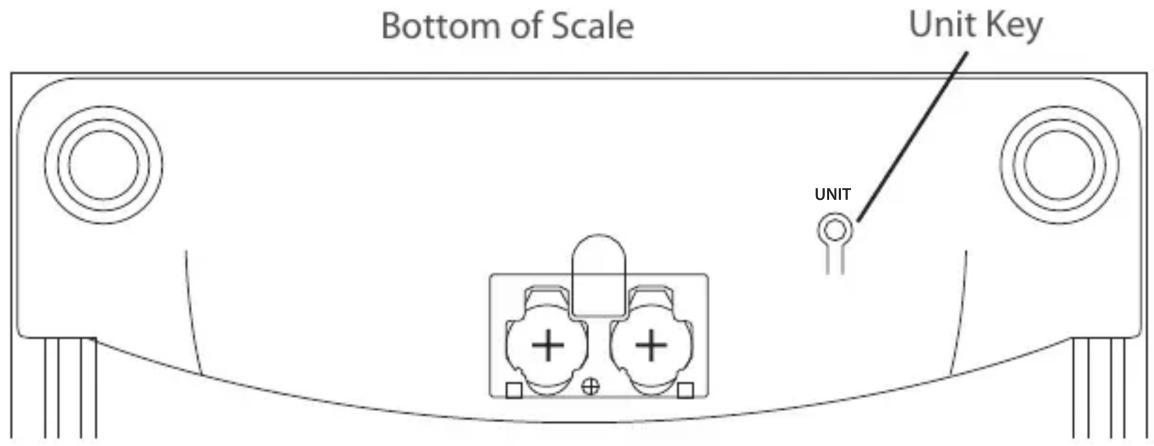
III. Battery Installation
- Before using the scale for the first time, check the battery compartment and remove any plastic insulation strips or packaging that may be in place to prevent battery drainage during shipping/storage.
- If you are replacing the batteries, make sure the positive and negative contacts are properly aligned.

natural_image
Pure electrical connector diagram without any text, numbers, or symbolsInstall Both Batteries Positive Side Facing Out
IV. Scale Operation
- Place the scale on a flat, level surface. Do not weigh on carpet as it may affect the accuracy.
- Step onto the platform. Once the weight has stabilized, it will be locked on the display for a few seconds.
- The scale will turn off automatically after 10 seconds of non-use.
NOTES: Do not leave items on the scale when not in use. This scale has an Auto-On feature that allows you to step on the scale immediately without having to tap the scale first to zero it. When moving the scale from one place to another, allow the scale to turn on then off once before weighing. This will allow the zero-point to be re-established. Otherwise, the weight result may be inaccurate (because it includes the weight of the platform).
V. Changing the Unit of Measure
- Press the UNIT key on the bottom of the scale to change the scale's displayed unit of measure.
- If the scale is turned off then back on, it will default to the last unit used.
• 330ECO Units: kg (Kilogram) lb (Pound) st:lb (UK Stone:Pound)
VI. Specifications
| 330ECO | |
| Max. Capacity | b / 150kg / 23st:8lb |
| Readability | 0.1kg / 1lb |
| Power | 032 (included) |
| Dimensions | x 11.8 x 1.3” |
| Display Dimensions | 7 x 3.2” |
| Warranty | r Limited Warranty |
American Weigh Scales, Inc.
Norcross, GA 30092, U.S.A
Made in China to our exact specifications and quality control.
Brand : AWS
Model : 330ECO
Category : Scale