ICD202A - Wi-Fi repeater Black Box - Free user manual and instructions
Find the device manual for free ICD202A Black Box in PDF.


| Product Type | Wi-Fi Repeater |
| Brand | Black Box |
| Model | ICD202A |
| Dimensions (approx.) | 100 x 60 x 30 mm (3.9 x 2.4 x 1.2 in) |
| Weight | 150 g (5.3 oz) |
| Power Supply | 5V DC via micro USB (adapter included) |
| Wi-Fi Standards | IEEE 802.11 b/g/n/ac |
| Frequency Bands | 2.4 GHz and 5 GHz |
| Maximum Data Rate | Up to 1200 Mbps (combined) |
| Operating Range | Up to 300 m (open area) |
| Number of Ethernet Ports | 1 x 10/100 Mbps LAN |
| Antenna Type | Internal dual-band antennas |
| Encryption | WPA/WPA2 |
| Setup Method | WPS button or web interface |
| Compatibility | Any standard Wi-Fi router |
| Care and Cleaning | Wipe with a dry, soft cloth; do not use liquids |
| Safety Precautions | Keep away from water; do not disassemble; use only supplied adapter |
| Spare Parts Availability | Not applicable; contact support for repair options |
| Repairability | No user-serviceable parts; refer to qualified service |
| Operating Temperature | 0°C to 40°C (32°F to 104°F) |
| Package Contents | Wi-Fi repeater, USB cable, power adapter, quick start guide |
Frequently Asked Questions - ICD202A Black Box
User questions about ICD202A Black Box
0 question about this device. Answer the ones you know or ask your own.
Ask a new question about this device
Download the instructions for your Wi-Fi repeater in PDF format for free! Find your manual ICD202A - Black Box and take your electronic device back in hand. On this page are published all the documents necessary for the use of your device. ICD202A by Black Box.
USER MANUAL ICD202A Black Box
Industrial Opto-Isolated RS-422/485 Repeater
Double the range of RS-422/485 data communications in heavy industrial areas.
Rugged IP30-rated metal case for panel mounting.
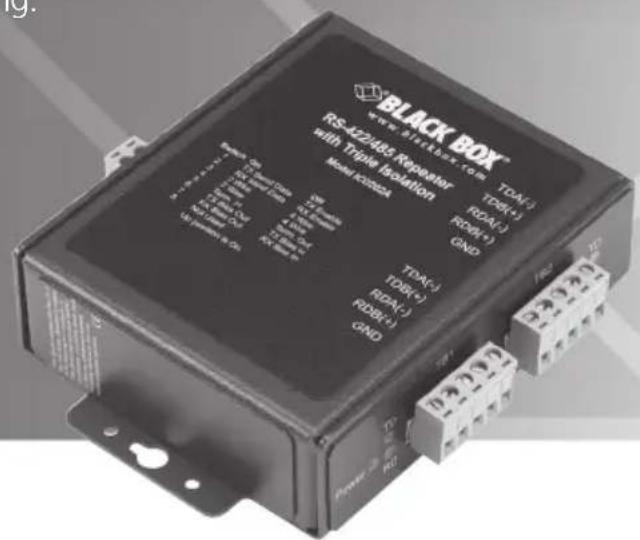
ICD202A
Quick Start Guide
1. What's Included:
• ICD202A Industrial Opto-Isolated RS-422/485 Repeater
• This Quick Start Guide
User-Supplied Components
• 10- to 48-VDC power supply; this repeater draws a maximum of 2.3 watts.
- RS-422/485 cables. Recommended characteristics: (1) or (2) shielded or unshielded twisted pairs.
2. Certifications
- FCC Class A
• CE
IEC 61850-3 - IEEE 1613
- RoHS
A detailed declaration of conformity is available at www.blackbox.com.
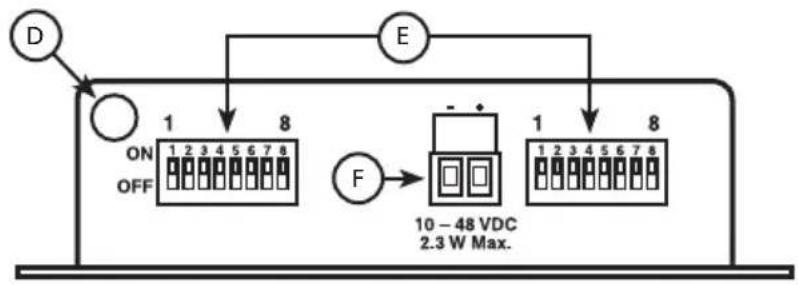
3. Front and Back Panels, DB9 Pin-out
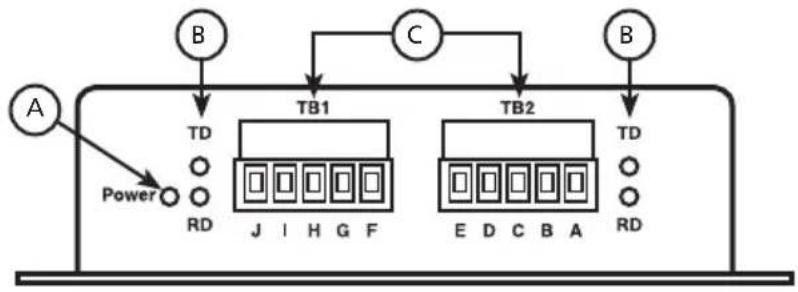
flowchart
graph TD
    A["A"] --> Power["Power"]
    B["B"] --> TB1["TB1"]
    C["C"] --> TB1
    TB1 --> TB2["TB2"]
    TB2 --> TD1["TD"]
    TB2 --> TD2["TD"]
    Power --> RD["RD"]
    TB1 --> J["J"]
    TB2 --> E["E"]
    TB2 --> D["D"]
    TB2 --> C_B["A"]
    style Power fill:#f9f,stroke:#333
    style TB1 fill:#ccf,stroke:#333
    style TB2 fill:#ccf,stroke:#333
Figure 1. Front panel
flowchart
graph TD
    D["Power Supply"] -->|ON/OFF| A["10-48 VDC"]
    A --> B["8"]
    B --> C["E"]
    C --> D["Power Supply"]
    D -->|F| D
    style A fill:#f9f,stroke:#333
    style B fill:#ccf,stroke:#333
    style C fill:#cfc,stroke:#333
    style D fill:#fcc,stroke:#333
Figure 2. Back panel.
Table 1: Front and Back Panels
| A Power LED Red, “on” when power is applied; see Section 9 | ||
| B Data LEDs Green LEDs flash when data is on port; see Section 9 | ||
| C | 422/485 Terminal Block | Five-position, removable; see Sections 7 and 8 |
| D | Grounding Lug | Chassis ground to earth ground; see Section 5 |
| E DIP | Switches Used to configure the repeater; see Section 4 | |
| F | Power Terminal Block | Two-position, removable; see Section 6 |
4. Configuration DIP Switch
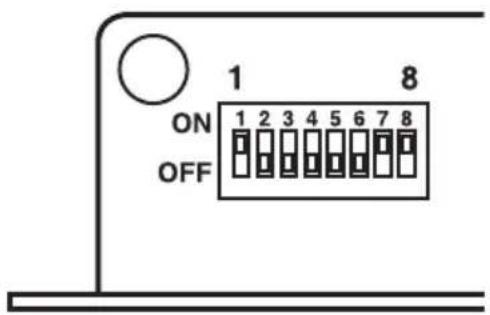
Figure 3. Switch position 8 is not used. Illustration shows factory default settings.
Table 2: Communications Mode Switch
| 1 2 3 4 | |
| RS-4852-WireHalf Duplex | On On On On |
| RS-4854-WireFull Duplex | On Off Off Off |
| RS-422Full Duplex Off Off Off Off | |
| Table 3: Built-in Termination Resistor | Switch |
| 5 | |
| Use the 120-ohm built-in termination On | |
| Use external or no termination Off |
| Table 4: Built-in Transmit Bias Resistor | Switch |
| 6 | |
| Use the external or no bias resistor On | |
| Use the 1.2K ohm transmit bias resistor Off |
| Table 5: Built-in Receive Bias Resistor | Switch |
| 7 | |
| Use the external or no bias resistor On | |
| Use the 1.2K ohm receive bias resistor | Off |
For an explanation of RS-485 termination and biasing requirements, refer to Black Box's white paper, "The Elements of an RS-422 and 485 System," which can be downloaded at www.blackbox.com > Resources > White Papers.
5. Ground Connection
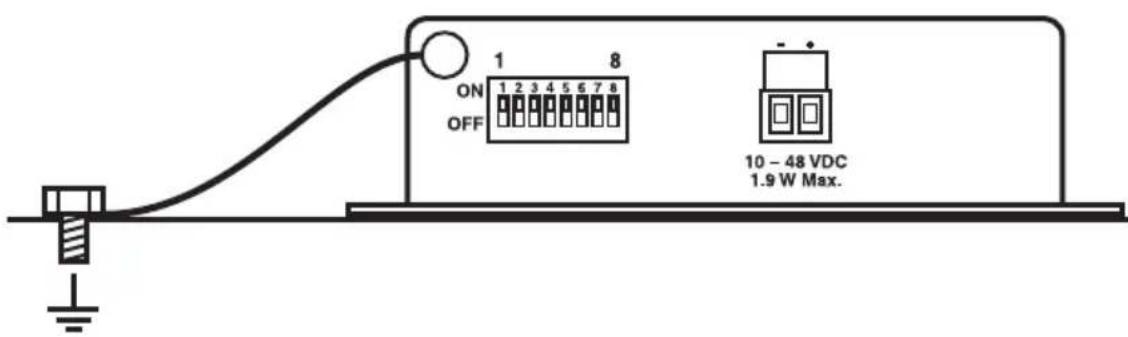
Figure 4. Black Box recommends that you ground the chassis as shown here. Connect a grounding wire from the ground lug to a good grounding source.
6. Power Connection
- Connect the power: Requirements are 10 to 48 VDC, 2.3 watts maximum.
- The terminal block will accept 28 to 12 AWG wire.
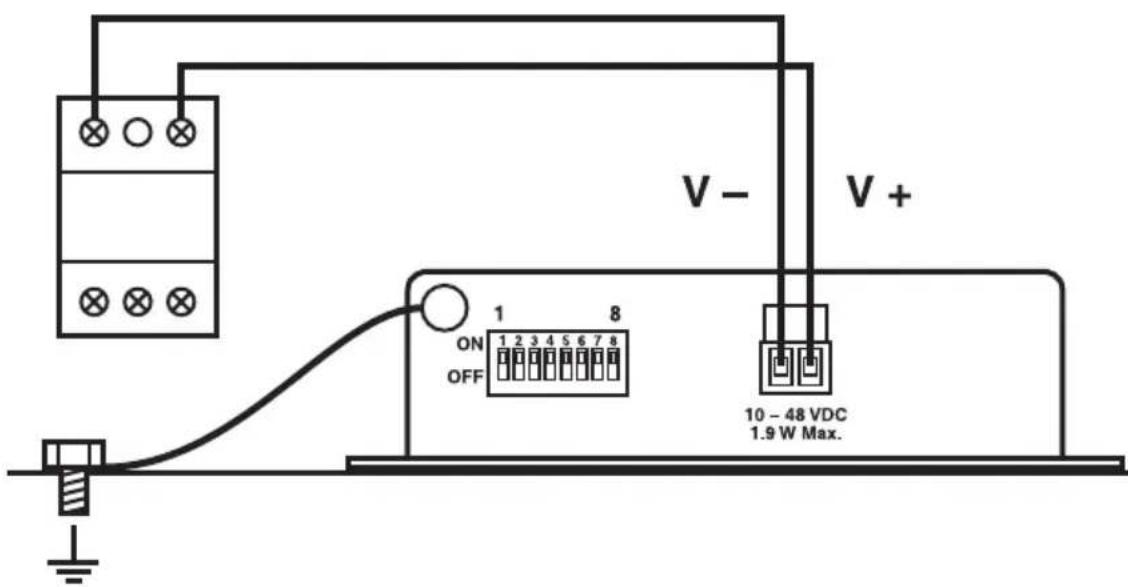
Figure 5. Power connection.
7. RS-422/485 Terminal Blocks
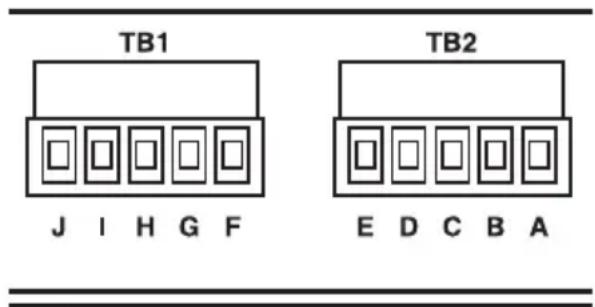
Figure 6. See cable recommendations in Section 1.
Table 6: Terminal Connections
| Terminal RS-422 RS-485 | |
| A and F -- TDA(-) | |
| B and G -- TDB(+) | |
| C and H Data A(-) RDA(-) | |
| D and I Data B(+) RDB(+) | |
| E and J Ground Ground |
8. Wiring Examples
RS-485 2-Wire
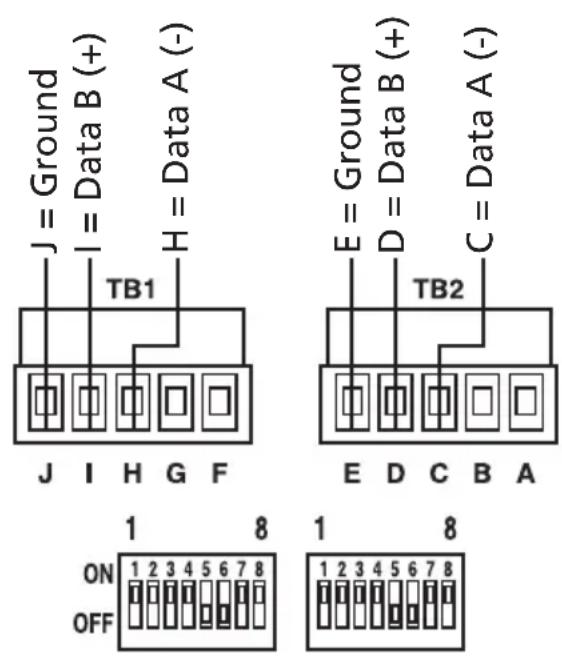
Figure 7. Terminal block wiring examples.
Table 7: RS-422/485 4-wire DIP Switch configuration
| 1 2 | 3 4 5 6 | 7 | ||||
| On | On | On | X | X | X |
Positions 5, 6, and 7 are used for termination and biasing. See Section 4. Position 8 is not used.
RS-422/RS-485 4-wire
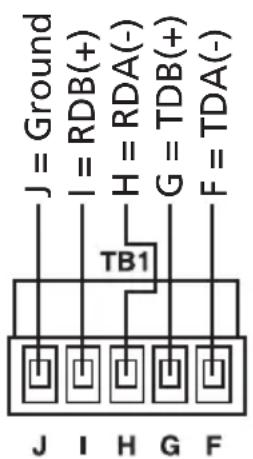
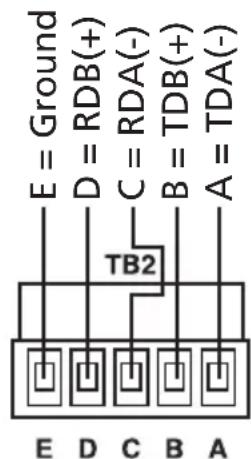
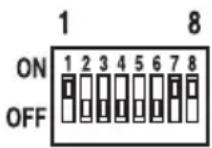
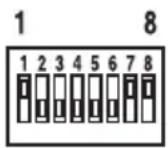
Table 8: RS-422/485 4-wire DIP Switch configuration
| 1 2 | 3 4 5 6 | 7 | ||||
| X Off Off | Off X | XX | ||||
Position 1 is ON for RS-485 and OFF for RS-422.
Positions 5, 6, and 7 are used for termination and biasing.
Position 8 is not used.
9. Operation
During normal operation, the Power LED should be illuminated.
When data is sent or received on either port, the corresponding Data LED should flash.
Black Box Tech Support: FREE! Live. 24/7.
Tech support the way it should be.

natural_image
Close-up portrait of a smiling man with a headset, hand near face (no text or symbols visible)Great tech support is just 30 seconds away at 724-746-5500 or blackbox.com.

BLACK BOX®
NETWORK SERVICES
About Black Box
Black Box Network Services is your source for an extensive range of networking and infrastructure products. You'll find everything from cabinets and racks and power and surge protection products to media converters and Ethernet switches all supported by free, live 24/7 Tech support available in 30 seconds or less.
© Copyright 2012. Black Box Corporation. All rights reserved.
ICD202A_QSG, rev. 2
- Double the range of RS-422/485 data communications in heavy industrial areas.
- ICD202A
- Quick Start Guide
- What's Included:
- User-Supplied Components
- Certifications
- Front and Back Panels, DB9 Pin-out
- Configuration DIP Switch
- Ground Connection
- Power Connection
- RS-422/485 Terminal Blocks
- Wiring Examples
- Operation
- About Black Box
Brand : Black Box
Model : ICD202A
Category : Wi-Fi repeater